
GC3001
Control Box
Product User Manual
01 Product Introduction
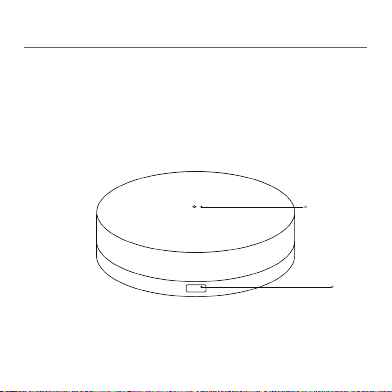
The GC3001 Control Box is a 433MHz wireless remote control
copier that supports integration with Smart Life. It is primarily
designed for curtain devices that are compatible with 433MHz
remote control. Non-smart curtains can be integrated with Smart
Life by connecting to the GC3001, enabling mobile and remote
control. This provides users with a convenient smart experience
1
Indicator
light
Power
port
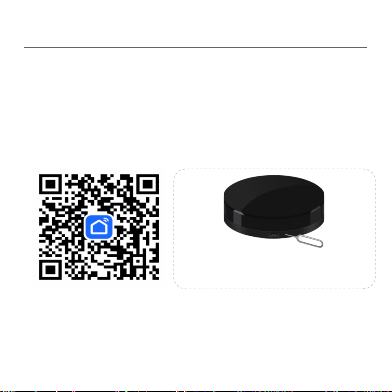
Scan the QR code for Smart Life or search for "Smart Life" in the app store, download
and install the app.If it is your first time to download and use, please register an
account and log in.
Press and hold the device button for 3 seconds,and the white light on the device will
flash,indicating that it has entered the network configuration state.
Open the Smart Life APP, click the"+" on the top right corner of the homepage, and
enter the device addition page to start searching for devices.
Click on the discovered device, fill in the Wifi information, and follow the instructions to
02 Connect to Smart Life APP
proceed.
2
Guidelines for distribution network
Press and hold for 3 seconds to reset the device to factory
settings. The indicator light will flash, indicating that the de
·During the connection process, please ensure that your phone is connected to 2.4G
Wi-Fi and keep it as close as possible to this product;
·If the addition fails, please press and hold the device button for 3 seconds until the
indicator light flashes, and then reconnect;
·The device must be installed in the same space as the curtain motor to avoid affecting
signal transmission。
vice is in the network configuration state
03 Add/delete curtain motor
Addition of curtain motor
:
1、The added curtain motor must be properly aligned with the
transmitter
and have its upper and lower limit switches properly set。
2
、
Enter the Smart Life APP homepage, click on the added
smart
controller, and enter the smart controller page。
3、Click "Add Device" at the bottom of the page to enter the "Select Device
Type" interface。
4、Select the type of curtain you are about to add, enter the "Device Code
Addition" interface, and follow the instructions to add the code。
Delete curtain motor
:
1
、
Enter the Smart Life APP homepage, click on the added
smart
co
ntroller
, and enter the smart controller page。
2、Long press the added curtain motor device, and the page enters a
selectable state。
3、Select the curtain motor you want to delete and click "Delete"。
4、After successful deletion, the curtain motor device will disappear from th
e homepage of the smart controller。
5、You can also access the control page of the device you wish to delete, cl
ick on "More Settings", and then proceed to the settings page. From there, c
lick on "Delete Device" at the bottom to complete the deletion process。
3
04 Product Parameters
Product Name:Control Box
TYPE:GC3001
Adapter Output:DC5V/1A
Maximum Power Supply:5W
Working Temperature:-10
℃
~+55
℃
Working
Humidity:10%~90%(no condensation)
Wireless Technology:433.92MHz, Bluetooth and Wi-Fi
4

FCC Caution.
This device complies with part 15 of the FCC Rules. Operation is subject to the following two
conditions:
(1) This device may not cause harmful interference, and
(2) this device must accept any interference received, including interference that may cause
undesired operation.
Any Changes or modifications not expressly approved by the party responsible for compliance
could void the user's authority to operate the equipment.
Note: This equipment has been tested and found to comply with the limits for a Class B digital
device, pursuant to part 15 of the FCC Rules. These limits are designed to provide reasonable
protection against harmful interference in a residential installation. This equipment generates
uses and can radiate radio frequency energy and, if not installed and used in accordance with the
instructions, may cause harmful interference to radio communications. However, there is no
guarantee that interference will not occur in a particular installation. If this equipment does
cause harmful interference to radio or television reception, which can be determined by turning
the equipment off and on, the user is encouraged to try to correct the interference by one or
more of the following measures:
-Reorient or relocate the receiving antenna.
-Increase the separation between the equipment and receiver.
-Connect the equipment into an outlet on a circuit different from that to which the receiver is
connected.
-Consult the dealer or an experienced radio/TV technician for help.
FCC Radiation Exposure Statement:
This equipment complies with FCC radiation exposure limits set forth for an uncontrolled
environment. This equipment should be installed and operated with minimum distance 20 cm
between the radiator & your body.