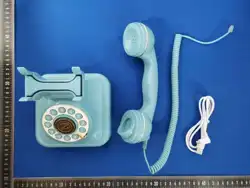

LCS BTPHONE Operation Guide
一、introduce
1. Charging: USB charging
2. Battery charging current: 500mA
3. Hands-free amplifier: 3W
4. Buttons: 0, 1, 2, 3, 4, 5, 6, 7, 8, 9, *, #, hands-free, call back, power on/off
5. Working mode: music mode (idle mode), hands-free phone mode (press the
hands-free button to enter), handle phone mode (pick up the phone handle to
enter)
6. Key prompt tone:
(1) Chinese voice
(2) English voice
(3) DTMF key tones
7. Replay prompt tone: fixed DTMF key tone prompt tone
8. Bluetooth volume switch: In idle mode, single press * key (star key) for volume +,
single press # key (pound key) for volume -
9. Switch between Chinese and English: Long press * key to switch
10. Switch between key tone and voice: Double-click the # key to switch
11. Incoming call ringtone selection: long press the " # " key to select the ringtone in
the on-hook state
二、operate:
1.Bluetooth connection: After the device is turned on, it enters the automatic
reconnection state. If the reconnection attempt fails after 3 times, it enters the waiting
state. If no device connects within 2 minutes, it will enter the low-power mode. You can
wake up the device by pressing any key or picking up the phone.
2.Playing audio on the phone: When the device is idle, you can use the hands-free
speaker to play audio. When a call comes in, the hands-free mode is activated, or the
handset is lifted, audio playback is paused and can be resumed manually using the
software on the host device. Volume can be adjusted using the host device or the * or #
keys.
3.Hands-free call: Press the hands-free button to enter the hands-free phone mode,
enter the dialing state, press the corresponding button to dial, the call is connected, and
you can make a hands-free call. During the call, press the hands-free button again to end
the current call; if you lift the phone handle during the call, you can enter the handle phone
mode. If you put down the handle at this time, the handle hangs up and the call ends.
*During a hands-free call, press the end call button on the host to end the call. The
phone will beep twice to exit the hands-free call mode and return to idle mode.
4.Handle call: Lift the phone handle to enter the handle phone mode, dial the number
correctly, and when the call is connected, you can enter the call state. During the call,
hang up the handle to end the call. If you press the hands-free button during the call to
enter the hands-free call mode, you can still continue the call by putting the handle back to
the phone base. Press the hands-free button again to end the call.
5.Call Back: After pressing the hands-free button or picking up the phone handle to enter
the call mode, press the Call Back button to enter the last record in the call history.
6.Electrical performance of the whole machine
LCS Phone 3.7V lithium battery power supply

Hands-free 280mA (playing dial tone at maximum volume)
Not connected standby 5-8mA
Connected standby 5-7mA
15mA maximum volume
Deep standby 3.7mA
Play music 150-200mA maximum volume
100mA maximum volume during hands-free call
12-15mA for on-hook calls
This device complies with Part 15 of the FCC Rules. Operation is subject to the following
two conditions:
(1) This device may not cause harmful interference, and (2) this device must accept any
interference received, including interference that may cause undesired operation.
NOTE 1: This equipment has been tested and found to comply with the limits for a Class B
digital device, pursuant to part 15 of the FCC Rules. These limits are designed to provide
reasonable protection against harmful interference in a residential installation. This
equipment generates, uses and can radiate radio frequency energy and, if not installed
and used in accordance with the instructions, may cause harmful interference to radio
communications. However, there is no guarantee that interference will not occur in a
particular installation. If this equipment does cause harmful interference to radio or
television reception, which can be determined by turning the equipment off and on, the
user is encouraged to try to correct the interference by one or more of the following
measures:
-Reorient or relocate the receiving antenna.
-Increase the separation between the equipment and receiver.
-Connect the equipment into an outlet on a circuit different from that to which the receiver
is connected.
-Consult the dealer or an experienced radio/TV technician for help.
NOTE 2: Any changes or modifications to this unit not expressly approved by the party
responsible for compliance could void the user's authority to operate the equipment.
The device has been evaluated to meet general RF exposure requirement. The device
can be used in portable exposure condition without restriction.