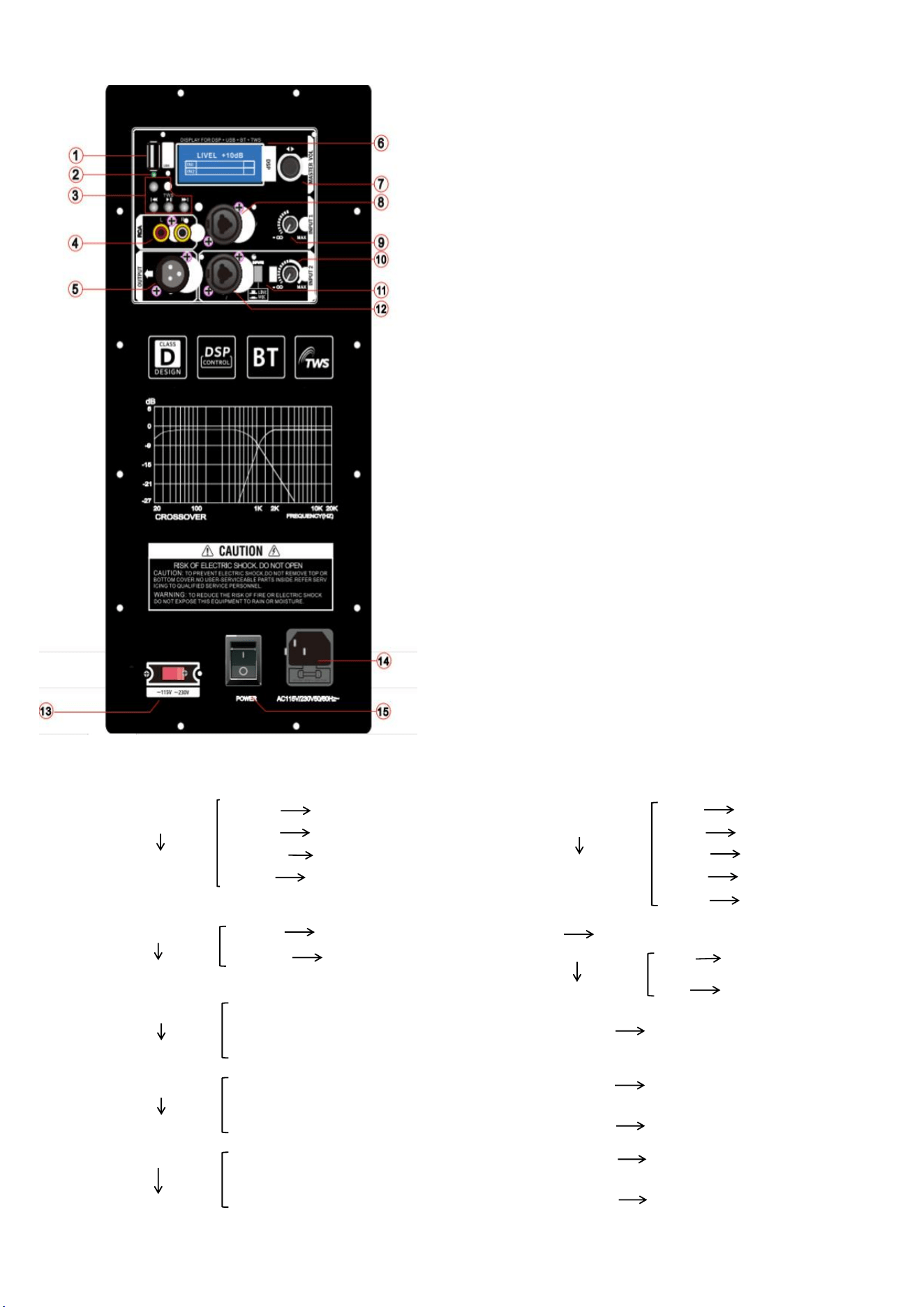
①USB Port
②USB/Bluetooth Status Indicator
Bluetooth pairing: Green LED flashes quickly
Bluetooth connected: Green LED stays on
USB playback: Green LED flashes slowly
③Bluetooth/USB Playback Control
MODE: Switch mode
|◀◀: Previous track
▶▶|: Next track
▶❚❚: Short press – Play/Pause; Long press – Bluetooth TWS pairing
(Requires two identical units: one connected to Bluetooth audio source, the
other in Bluetooth mode; long press to initiate TWS pairing)
④TWS Pairing (Refer to long press function above)
⑤RCA Input (Unbalanced)
⑥XLR Output (Balanced)
⑦Display Screen
⑧Volume / DSP Mode Selector
Menu adjustment details: See Section A-7
Multi-function input: Supports XLR male / 6.35mm (1/4") TRS input
⑨USB/Bluetooth/Input 8 Signal – Volume Control
⑩Input 10 – Volume Control
⑪Input / OK Input Switch
⑫Multi-function Input: Supports XLR male / 6.35mm (1/4") TRS input
⑬AC Voltage Selector: 115V / 230V Switch
⑭Power Switch
⑮AC Power Inlet
A-7: Rotate to adjust volume; short press to enter menu options.
1
MODE
Mode Selection
MUSIC Music Mode
6
SUB
Low Cut (High-Pass Filter)
OFF HPF Off
FLAT Live Mode 80Hz Cut below 80Hz
SPEECH Vocal Mode 100Hz Cut below 100Hz
CLUB Bass Boost Mode 120Hz Cut below 120Hz
150Hz Cut below 150Hz
2
LOCATION
Mode Status
NORMAL Normal Mode
7
DELAY Delay
MONITOR Monitor Mode
8
LCD DIM
LCD Dimmer
OFF Off (Display stays bright)
ON On (Display dims when idle)
3
TREBLE
High EQ
+12dB
0dB
9
BRIGHT Display Brightness
-12dB
4
MID
Mid EQ
+12dB
10
CONTRAST Display Contrast
0dB
-12dB
11
RESET Reset
5
BASS
Low EQ
+12dB
12
INFO Version Information
0dB
-12dB
13
EXIT Save Settings and Exit