XECH warrants that the product will b e free from any manufac-
turing defects & takes responsibility in case the device fails to
func�on for a period of one year from the date of the original
invoice.
The warranty period validity is also subject to the following
condi�ons:
• The product must be registered on www.xech.com within
15 days from the date of purchase.
• The product is not given to some external repair personnel.
• It is only valid in the Indian Subcon�nent.
• If the device is not immersed in water. It also does not cover
natural wear & tear or rough usage.
• If the instruc�on manual is not followed & the device is not
used in an improper manner.
• If the device is not used for its stated func�onality.
• If the device is not used by children below 3 years or
someone incapable or using the device.
Purchasing Date:
Invoice No:
Dealer Informa�on:
Product Warranty:
Warranty
• Handle with Care. Fragile contents.
• Do not use XECH Tellivibe MAX in extreme temperatures.
• Unbox the product carefully.
• Take the device out and check if the product isn’t damaged
in transport.
• Please read the instruc�ons carefully before using XECH
Tellivibe MAX.
• Please charge the device for 3 - 4 Hours before using it for
the first �me.
PRODUCT CAUTION
BLUETOOTH PAIRING YOUR DEVICE WITH XECH TELLIVIBLE
MAX
Turn on XECH Tellivibe MAX. Once the speaker is on you will
hear the indica�on tone sta�ng which mode is on. The default
mode set when the device is turned on is Bluetooth Mode.
BLUE LED Indicator indicates that the speaker is now ON and in
pairing mode.
Turn your smartphone’s Bluetooth on and search for nearby
Bluetooth devices. Once you find XECH Tellivibe MAX, you can
tap and connect.
FM OR RADIO MODE
Press the MODE bu�on to turn on the Radio FM Mode. Press
the PLAY/PAUSE bu�on to scan for the FM channels. Once the
scanning is complete press the PREVIOUS or NEXT bu�on to
toggle between the channels. For be�er signal recep�on, you
can adjust the antenna length and posi�on accordingly.
User Manual
TELLIVIBE MAX
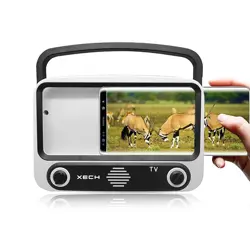
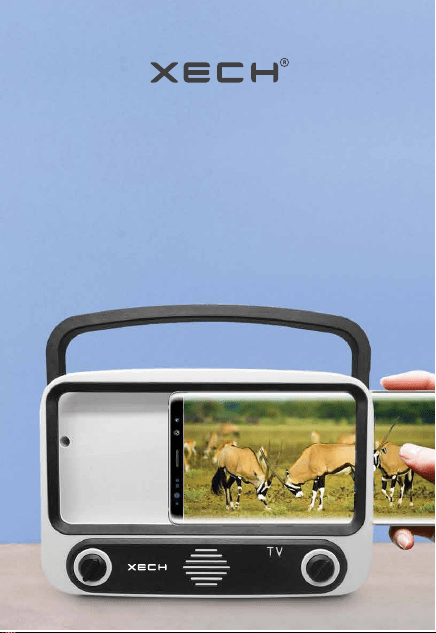
Turn Your Smartphone in to a 90s Retro TV with Speaker
XECH Tellivibe MAX combines the aesthe�cs of a 90s Retro TV
with the latest in Bluetooth Audio Technology so that you can
watch your favorite videos, movies or web series while you
experience nostalgia! All you have to do is just pair your
smartphone with XECH Tellivibe and insert it in the speaker
and you’re set.
AUDIOSYNTH TECHNOLOGY
High Fidelity speakers provide clear sound quality with a
balance of bass and treble. This is made possible using
Tellivibe MAX’s AudioSynth Technology.
LATEST BLUETOOTH 5.2V
XECH Tellivibe MAX comes with the latest Bluetooth 5.2v in
Wireless Technology that provides seamless connec�vity even
at 10m range. When you place your smartphone into XECH
Tellivibe MAX, it creates a subwoofer effect to create the
perfect synergy of audio.
EXTRA LONG PLAY TIME
When we designed XECH Tellivibe MAX, we wanted to make
sure that you enjoy your viewing experience to the MAX!
That’s why we’ve incorporated a dense rechargeable ba�ery
that can last for hours!
MAX PORTABILITY
XECH Tellivibe MAX comes with a handle that allows you to
carry it and enjoy your videos just about anywhere! It’s more
than just a 90s BOOMBOX, it’s like a 90s Retro TV.
FEATURES
3 CHANNEL SPEAKERS
With XECH Tellivibe MAX you can enjoy your music from just
about any source.
• Radio
• USB Pen Drive
• TF Card (Up to 32 GB)
ACCOMODATES PHONES UP TO 6.5 INCH SCREENS
XECH Tellivibe MAX can easily accommodate most
smartphones in the market which have a screen size of up to
6.5 inches (diagonal). It works best when you remove the
smartphone cover.
Bluetooth: 5.2v
Bluetooth Profile: A2DP, AVRCP HFP
Impedance: 4 ohm
Play Time: 6 Hours
Ba�ery Capacity: 1200mAH
Signal to Noise: ≥95dB
Driver Size: 40mm
Output Power: 5 Wa�s
Charging Time: 4 Hours
Audio Formats Supported: MP3, WMA
Max Supported Memory Size: 32GB
SPECIFICATIONS
BUTTONS
MODE BUTTON – To change the different modes including
input modes of XECH Tellivibe MAX.
PREVIOUS BUTTON – Short press to play previous song/ track
or go to the previous FM/Radio channel. Long press to
decrease the volume.
NEXT BUTTON – Short press to play next song/ track or go to
the next FM/Radio channel. Long press to increase the
volume.
PLAY BUTTON – Short Press to PLAY or PAUSE the speaker. You
can also press it to answer or end a call.
CHARGING XECH TELLIVIBE MAX
To charge XECH Tellivibe MAX, please use the micro USB
charging cable and connect it to the micro USB charging port.
Tellivibe MAX supports DC 5V power voltage.
A RED LED indicator will glow, indica�ng that the device is
ge�ng charged.
The RED LED Light will turn off once the device is completely
charged.
OPERATION GUIDE
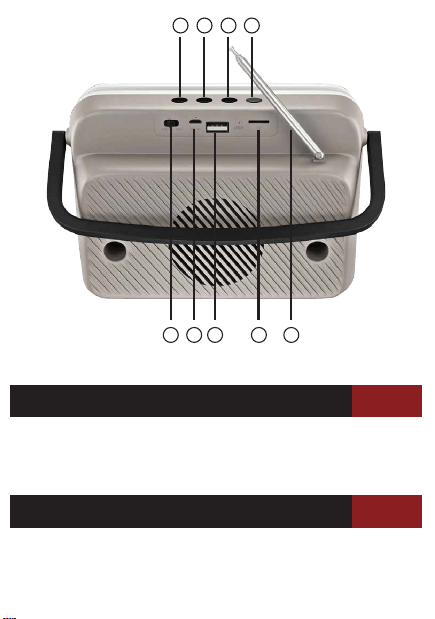
1. Previous
2. Play/ Pause / Answer Calls
3. Next
4. Mode
BUTTON GUIDE
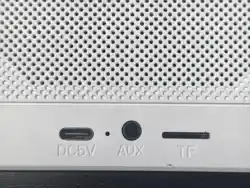
A. Power Switch
B. USB Charging Port
C. USB Pen/ Flash Drive
D. TF Card Slot
E. Antenna
PRODUCT GUIDE
A B
C
1 2 3 4
D E
Front
Back

XECH warrants that the product will b e free from any manufac-
turing defects & takes responsibility in case the device fails to
func�on for a period of one year from the date of the original
invoice.
The warranty period validity is also subject to the following
condi�ons:
• The product must be registered on www.xech.com within
15 days from the date of purchase.
• The product is not given to some external repair personnel.
• It is only valid in the Indian Subcon�nent.
• If the device is not immersed in water. It also does not cover
natural wear & tear or rough usage.
• If the instruc�on manual is not followed & the device is not
used in an improper manner.
• If the device is not used for its stated func�onality.
• If the device is not used by children below 3 years or
someone incapable or using the device.
Purchasing Date:
Invoice No:
Dealer Informa�on:
Product Warranty:
Warranty
• Handle with Care. Fragile contents.
• Do not use XECH Tellivibe MAX in extreme temperatures.
• Unbox the product carefully.
• Take the device out and check if the product isn’t damaged
in transport.
• Please read the instruc�ons carefully before using XECH
Tellivibe MAX.
• Please charge the device for 3 - 4 Hours before using it for
the first �me.
PRODUCT CAUTION
BLUETOOTH PAIRING YOUR DEVICE WITH XECH TELLIVIBLE
MAX
Turn on XECH Tellivibe MAX. Once the speaker is on you will
hear the indica�on tone sta�ng which mode is on. The default
mode set when the device is turned on is Bluetooth Mode.
BLUE LED Indicator indicates that the speaker is now ON and in
pairing mode.
Turn your smartphone’s Bluetooth on and search for nearby
Bluetooth devices. Once you find XECH Tellivibe MAX, you can
tap and connect.
FM OR RADIO MODE
Press the MODE bu�on to turn on the Radio FM Mode. Press
the PLAY/PAUSE bu�on to scan for the FM channels. Once the
scanning is complete press the PREVIOUS or NEXT bu�on to
toggle between the channels. For be�er signal recep�on, you
can adjust the antenna length and posi�on accordingly.
User Manual
TELLIVIBE MAX
Turn Your Smartphone in to a 90s Retro TV with Speaker
XECH Tellivibe MAX combines the aesthe�cs of a 90s Retro TV
with the latest in Bluetooth Audio Technology so that you can
watch your favorite videos, movies or web series while you
experience nostalgia! All you have to do is just pair your
smartphone with XECH Tellivibe and insert it in the speaker
and you’re set.
AUDIOSYNTH TECHNOLOGY
High Fidelity speakers provide clear sound quality with a
balance of bass and treble. This is made possible using
Tellivibe MAX’s AudioSynth Technology.
LATEST BLUETOOTH 5.2V
XECH Tellivibe MAX comes with the latest Bluetooth 5.2v in
Wireless Technology that provides seamless connec�vity even
at 10m range. When you place your smartphone into XECH
Tellivibe MAX, it creates a subwoofer effect to create the
perfect synergy of audio.
EXTRA LONG PLAY TIME
When we designed XECH Tellivibe MAX, we wanted to make
sure that you enjoy your viewing experience to the MAX!
That’s why we’ve incorporated a dense rechargeable ba�ery
that can last for hours!
MAX PORTABILITY
XECH Tellivibe MAX comes with a handle that allows you to
carry it and enjoy your videos just about anywhere! It’s more
than just a 90s BOOMBOX, it’s like a 90s Retro TV.
FEATURES
3 CHANNEL SPEAKERS
With XECH Tellivibe MAX you can enjoy your music from just
about any source.
• Radio
• USB Pen Drive
• TF Card (Up to 32 GB)
ACCOMODATES PHONES UP TO 6.5 INCH SCREENS
XECH Tellivibe MAX can easily accommodate most
smartphones in the market which have a screen size of up to
6.5 inches (diagonal). It works best when you remove the
smartphone cover.
Bluetooth: 5.2v
Bluetooth Profile: A2DP, AVRCP HFP
Impedance: 4 ohm
Play Time: 6 Hours
Ba�ery Capacity: 1200mAH
Signal to Noise: ≥95dB
Driver Size: 40mm
Output Power: 5 Wa�s
Charging Time: 4 Hours
Audio Formats Supported: MP3, WMA
Max Supported Memory Size: 32GB
SPECIFICATIONS
BUTTONS
MODE BUTTON – To change the different modes including
input modes of XECH Tellivibe MAX.
PREVIOUS BUTTON – Short press to play previous song/ track
or go to the previous FM/Radio channel. Long press to
decrease the volume.
NEXT BUTTON – Short press to play next song/ track or go to
the next FM/Radio channel. Long press to increase the
volume.
PLAY BUTTON – Short Press to PLAY or PAUSE the speaker. You
can also press it to answer or end a call.
CHARGING XECH TELLIVIBE MAX
To charge XECH Tellivibe MAX, please use the micro USB
charging cable and connect it to the micro USB charging port.
Tellivibe MAX supports DC 5V power voltage.
A RED LED indicator will glow, indica�ng that the device is
ge�ng charged.
The RED LED Light will turn off once the device is completely
charged.
OPERATION GUIDE
1. Previous
2. Play/ Pause / Answer Calls
3. Next
4. Mode
BUTTON GUIDE
A. Power Switch
B. USB Charging Port
C. USB Pen/ Flash Drive
D. TF Card Slot
E. Antenna
PRODUCT GUIDE
A B
C
1 2 3 4
D E
Front
Back

XECH warrants that the product will b e free from any manufac-
turing defects & takes responsibility in case the device fails to
func�on for a period of one year from the date of the original
invoice.
The warranty period validity is also subject to the following
condi�ons:
• The product must be registered on www.xech.com within
15 days from the date of purchase.
• The product is not given to some external repair personnel.
• It is only valid in the Indian Subcon�nent.
• If the device is not immersed in water. It also does not cover
natural wear & tear or rough usage.
• If the instruc�on manual is not followed & the device is not
used in an improper manner.
• If the device is not used for its stated func�onality.
• If the device is not used by children below 3 years or
someone incapable or using the device.
Purchasing Date:
Invoice No:
Dealer Informa�on:
Product Warranty:
Warranty
• Handle with Care. Fragile contents.
• Do not use XECH Tellivibe MAX in extreme temperatures.
• Unbox the product carefully.
• Take the device out and check if the product isn’t damaged
in transport.
• Please read the instruc�ons carefully before using XECH
Tellivibe MAX.
• Please charge the device for 3 - 4 Hours before using it for
the first �me.
PRODUCT CAUTION
BLUETOOTH PAIRING YOUR DEVICE WITH XECH TELLIVIBLE
MAX
Turn on XECH Tellivibe MAX. Once the speaker is on you will
hear the indica�on tone sta�ng which mode is on. The default
mode set when the device is turned on is Bluetooth Mode.
BLUE LED Indicator indicates that the speaker is now ON and in
pairing mode.
Turn your smartphone’s Bluetooth on and search for nearby
Bluetooth devices. Once you find XECH Tellivibe MAX, you can
tap and connect.
FM OR RADIO MODE
Press the MODE bu�on to turn on the Radio FM Mode. Press
the PLAY/PAUSE bu�on to scan for the FM channels. Once the
scanning is complete press the PREVIOUS or NEXT bu�on to
toggle between the channels. For be�er signal recep�on, you
can adjust the antenna length and posi�on accordingly.
User Manual
TELLIVIBE MAX
Turn Your Smartphone in to a 90s Retro TV with Speaker
XECH Tellivibe MAX combines the aesthe�cs of a 90s Retro TV
with the latest in Bluetooth Audio Technology so that you can
watch your favorite videos, movies or web series while you
experience nostalgia! All you have to do is just pair your
smartphone with XECH Tellivibe and insert it in the speaker
and you’re set.
AUDIOSYNTH TECHNOLOGY
High Fidelity speakers provide clear sound quality with a
balance of bass and treble. This is made possible using
Tellivibe MAX’s AudioSynth Technology.
LATEST BLUETOOTH 5.2V
XECH Tellivibe MAX comes with the latest Bluetooth 5.2v in
Wireless Technology that provides seamless connec�vity even
at 10m range. When you place your smartphone into XECH
Tellivibe MAX, it creates a subwoofer effect to create the
perfect synergy of audio.
EXTRA LONG PLAY TIME
When we designed XECH Tellivibe MAX, we wanted to make
sure that you enjoy your viewing experience to the MAX!
That’s why we’ve incorporated a dense rechargeable ba�ery
that can last for hours!
MAX PORTABILITY
XECH Tellivibe MAX comes with a handle that allows you to
carry it and enjoy your videos just about anywhere! It’s more
than just a 90s BOOMBOX, it’s like a 90s Retro TV.
FEATURES
3 CHANNEL SPEAKERS
With XECH Tellivibe MAX you can enjoy your music from just
about any source.
• Radio
• USB Pen Drive
• TF Card (Up to 32 GB)
ACCOMODATES PHONES UP TO 6.5 INCH SCREENS
XECH Tellivibe MAX can easily accommodate most
smartphones in the market which have a screen size of up to
6.5 inches (diagonal). It works best when you remove the
smartphone cover.
Bluetooth: 5.2v
Bluetooth Profile: A2DP, AVRCP HFP
Impedance: 4 ohm
Play Time: 6 Hours
Ba�ery Capacity: 1200mAH
Signal to Noise: ≥95dB
Driver Size: 40mm
Output Power: 5 Wa�s
Charging Time: 4 Hours
Audio Formats Supported: MP3, WMA
Max Supported Memory Size: 32GB
SPECIFICATIONS
BUTTONS
MODE BUTTON – To change the different modes including
input modes of XECH Tellivibe MAX.
PREVIOUS BUTTON – Short press to play previous song/ track
or go to the previous FM/Radio channel. Long press to
decrease the volume.
NEXT BUTTON – Short press to play next song/ track or go to
the next FM/Radio channel. Long press to increase the
volume.
PLAY BUTTON – Short Press to PLAY or PAUSE the speaker. You
can also press it to answer or end a call.
CHARGING XECH TELLIVIBE MAX
To charge XECH Tellivibe MAX, please use the micro USB
charging cable and connect it to the micro USB charging port.
Tellivibe MAX supports DC 5V power voltage.
A RED LED indicator will glow, indica�ng that the device is
ge�ng charged.
The RED LED Light will turn off once the device is completely
charged.
OPERATION GUIDE
1. Previous
2. Play/ Pause / Answer Calls
3. Next
4. Mode
BUTTON GUIDE
A. Power Switch
B. USB Charging Port
C. USB Pen/ Flash Drive
D. TF Card Slot
E. Antenna
PRODUCT GUIDE
A B
C
1 2 3 4
D E
Front
Back
XECH warrants that the product will b e free from any manufac-
turing defects & takes responsibility in case the device fails to
func�on for a period of one year from the date of the original
invoice.
The warranty period validity is also subject to the following
condi�ons:
• The product must be registered on www.xech.com within
15 days from the date of purchase.
• The product is not given to some external repair personnel.
• It is only valid in the Indian Subcon�nent.
• If the device is not immersed in water. It also does not cover
natural wear & tear or rough usage.
• If the instruc�on manual is not followed & the device is not
used in an improper manner.
• If the device is not used for its stated func�onality.
• If the device is not used by children below 3 years or
someone incapable or using the device.
Purchasing Date:
Invoice No:
Dealer Informa�on:
Product Warranty:
Warranty
• Handle with Care. Fragile contents.
• Do not use XECH Tellivibe MAX in extreme temperatures.
• Unbox the product carefully.
• Take the device out and check if the product isn’t damaged
in transport.
• Please read the instruc�ons carefully before using XECH
Tellivibe MAX.
• Please charge the device for 3 - 4 Hours before using it for
the first �me.
PRODUCT CAUTION
BLUETOOTH PAIRING YOUR DEVICE WITH XECH TELLIVIBLE
MAX
Turn on XECH Tellivibe MAX. Once the speaker is on you will
hear the indica�on tone sta�ng which mode is on. The default
mode set when the device is turned on is Bluetooth Mode.
BLUE LED Indicator indicates that the speaker is now ON and in
pairing mode.
Turn your smartphone’s Bluetooth on and search for nearby
Bluetooth devices. Once you find XECH Tellivibe MAX, you can
tap and connect.
FM OR RADIO MODE
Press the MODE bu�on to turn on the Radio FM Mode. Press
the PLAY/PAUSE bu�on to scan for the FM channels. Once the
scanning is complete press the PREVIOUS or NEXT bu�on to
toggle between the channels. For be�er signal recep�on, you
can adjust the antenna length and posi�on accordingly.
User Manual
TELLIVIBE MAX
Turn Your Smartphone in to a 90s Retro TV with Speaker
XECH Tellivibe MAX combines the aesthe�cs of a 90s Retro TV
with the latest in Bluetooth Audio Technology so that you can
watch your favorite videos, movies or web series while you
experience nostalgia! All you have to do is just pair your
smartphone with XECH Tellivibe and insert it in the speaker
and you’re set.
AUDIOSYNTH TECHNOLOGY
High Fidelity speakers provide clear sound quality with a
balance of bass and treble. This is made possible using
Tellivibe MAX’s AudioSynth Technology.
LATEST BLUETOOTH 5.2V
XECH Tellivibe MAX comes with the latest Bluetooth 5.2v in
Wireless Technology that provides seamless connec�vity even
at 10m range. When you place your smartphone into XECH
Tellivibe MAX, it creates a subwoofer effect to create the
perfect synergy of audio.
EXTRA LONG PLAY TIME
When we designed XECH Tellivibe MAX, we wanted to make
sure that you enjoy your viewing experience to the MAX!
That’s why we’ve incorporated a dense rechargeable ba�ery
that can last for hours!
MAX PORTABILITY
XECH Tellivibe MAX comes with a handle that allows you to
carry it and enjoy your videos just about anywhere! It’s more
than just a 90s BOOMBOX, it’s like a 90s Retro TV.
FEATURES
3 CHANNEL SPEAKERS
With XECH Tellivibe MAX you can enjoy your music from just
about any source.
• Radio
• USB Pen Drive
• TF Card (Up to 32 GB)
ACCOMODATES PHONES UP TO 6.5 INCH SCREENS
XECH Tellivibe MAX can easily accommodate most
smartphones in the market which have a screen size of up to
6.5 inches (diagonal). It works best when you remove the
smartphone cover.
Bluetooth: 5.2v
Bluetooth Profile: A2DP, AVRCP HFP
Impedance: 4 ohm
Play Time: 6 Hours
Ba�ery Capacity: 1200mAH
Signal to Noise: ≥95dB
Driver Size: 40mm
Output Power: 5 Wa�s
Charging Time: 4 Hours
Audio Formats Supported: MP3, WMA
Max Supported Memory Size: 32GB
SPECIFICATIONS
BUTTONS
MODE BUTTON – To change the different modes including
input modes of XECH Tellivibe MAX.
PREVIOUS BUTTON – Short press to play previous song/ track
or go to the previous FM/Radio channel. Long press to
decrease the volume.
NEXT BUTTON – Short press to play next song/ track or go to
the next FM/Radio channel. Long press to increase the
volume.
PLAY BUTTON – Short Press to PLAY or PAUSE the speaker. You
can also press it to answer or end a call.
CHARGING XECH TELLIVIBE MAX
To charge XECH Tellivibe MAX, please use the micro USB
charging cable and connect it to the micro USB charging port.
Tellivibe MAX supports DC 5V power voltage.
A RED LED indicator will glow, indica�ng that the device is
ge�ng charged.
The RED LED Light will turn off once the device is completely
charged.
OPERATION GUIDE
1. Previous
2. Play/ Pause / Answer Calls
3. Next
4. Mode
BUTTON GUIDE
A. Power Switch
B. USB Charging Port
C. USB Pen/ Flash Drive
D. TF Card Slot
E. Antenna
PRODUCT GUIDE
A B
C
1 2 3 4
D E
Front
Back

XECH warrants that the product will b e free from any manufac-
turing defects & takes responsibility in case the device fails to
func�on for a period of one year from the date of the original
invoice.
The warranty period validity is also subject to the following
condi�ons:
• The product must be registered on www.xech.com within
15 days from the date of purchase.
• The product is not given to some external repair personnel.
• It is only valid in the Indian Subcon�nent.
• If the device is not immersed in water. It also does not cover
natural wear & tear or rough usage.
• If the instruc�on manual is not followed & the device is not
used in an improper manner.
• If the device is not used for its stated func�onality.
• If the device is not used by children below 3 years or
someone incapable or using the device.
Purchasing Date:
Invoice No:
Dealer Informa�on:
Product Warranty:
Warranty
• Handle with Care. Fragile contents.
• Do not use XECH Tellivibe MAX in extreme temperatures.
• Unbox the product carefully.
• Take the device out and check if the product isn’t damaged
in transport.
• Please read the instruc�ons carefully before using XECH
Tellivibe MAX.
• Please charge the device for 3 - 4 Hours before using it for
the first �me.
PRODUCT CAUTION
BLUETOOTH PAIRING YOUR DEVICE WITH XECH TELLIVIBLE
MAX
Turn on XECH Tellivibe MAX. Once the speaker is on you will
hear the indica�on tone sta�ng which mode is on. The default
mode set when the device is turned on is Bluetooth Mode.
BLUE LED Indicator indicates that the speaker is now ON and in
pairing mode.
Turn your smartphone’s Bluetooth on and search for nearby
Bluetooth devices. Once you find XECH Tellivibe MAX, you can
tap and connect.
FM OR RADIO MODE
Press the MODE bu�on to turn on the Radio FM Mode. Press
the PLAY/PAUSE bu�on to scan for the FM channels. Once the
scanning is complete press the PREVIOUS or NEXT bu�on to
toggle between the channels. For be�er signal recep�on, you
can adjust the antenna length and posi�on accordingly.
User Manual
TELLIVIBE MAX
Turn Your Smartphone in to a 90s Retro TV with Speaker
XECH Tellivibe MAX combines the aesthe�cs of a 90s Retro TV
with the latest in Bluetooth Audio Technology so that you can
watch your favorite videos, movies or web series while you
experience nostalgia! All you have to do is just pair your
smartphone with XECH Tellivibe and insert it in the speaker
and you’re set.
AUDIOSYNTH TECHNOLOGY
High Fidelity speakers provide clear sound quality with a
balance of bass and treble. This is made possible using
Tellivibe MAX’s AudioSynth Technology.
LATEST BLUETOOTH 5.2V
XECH Tellivibe MAX comes with the latest Bluetooth 5.2v in
Wireless Technology that provides seamless connec�vity even
at 10m range. When you place your smartphone into XECH
Tellivibe MAX, it creates a subwoofer effect to create the
perfect synergy of audio.
EXTRA LONG PLAY TIME
When we designed XECH Tellivibe MAX, we wanted to make
sure that you enjoy your viewing experience to the MAX!
That’s why we’ve incorporated a dense rechargeable ba�ery
that can last for hours!
MAX PORTABILITY
XECH Tellivibe MAX comes with a handle that allows you to
carry it and enjoy your videos just about anywhere! It’s more
than just a 90s BOOMBOX, it’s like a 90s Retro TV.
FEATURES
3 CHANNEL SPEAKERS
With XECH Tellivibe MAX you can enjoy your music from just
about any source.
• Radio
• USB Pen Drive
• TF Card (Up to 32 GB)
ACCOMODATES PHONES UP TO 6.5 INCH SCREENS
XECH Tellivibe MAX can easily accommodate most
smartphones in the market which have a screen size of up to
6.5 inches (diagonal). It works best when you remove the
smartphone cover.
Bluetooth: 5.2v
Bluetooth Profile: A2DP, AVRCP HFP
Impedance: 4 ohm
Play Time: 6 Hours
Ba�ery Capacity: 1200mAH
Signal to Noise: ≥95dB
Driver Size: 40mm
Output Power: 5 Wa�s
Charging Time: 4 Hours
Audio Formats Supported: MP3, WMA
Max Supported Memory Size: 32GB
SPECIFICATIONS
BUTTONS
MODE BUTTON – To change the different modes including
input modes of XECH Tellivibe MAX.
PREVIOUS BUTTON – Short press to play previous song/ track
or go to the previous FM/Radio channel. Long press to
decrease the volume.
NEXT BUTTON – Short press to play next song/ track or go to
the next FM/Radio channel. Long press to increase the
volume.
PLAY BUTTON – Short Press to PLAY or PAUSE the speaker. You
can also press it to answer or end a call.
CHARGING XECH TELLIVIBE MAX
To charge XECH Tellivibe MAX, please use the micro USB
charging cable and connect it to the micro USB charging port.
Tellivibe MAX supports DC 5V power voltage.
A RED LED indicator will glow, indica�ng that the device is
ge�ng charged.
The RED LED Light will turn off once the device is completely
charged.
OPERATION GUIDE
1. Previous
2. Play/ Pause / Answer Calls
3. Next
4. Mode
BUTTON GUIDE
A. Power Switch
B. USB Charging Port
C. USB Pen/ Flash Drive
D. TF Card Slot
E. Antenna
PRODUCT GUIDE
A B
C
1 2 3 4
D E
Front
Back

XECH warrants that the product will b e free from any manufac-
turing defects & takes responsibility in case the device fails to
func�on for a period of one year from the date of the original
invoice.
The warranty period validity is also subject to the following
condi�ons:
• The product must be registered on www.xech.com within
15 days from the date of purchase.
• The product is not given to some external repair personnel.
• It is only valid in the Indian Subcon�nent.
• If the device is not immersed in water. It also does not cover
natural wear & tear or rough usage.
• If the instruc�on manual is not followed & the device is not
used in an improper manner.
• If the device is not used for its stated func�onality.
• If the device is not used by children below 3 years or
someone incapable or using the device.
Purchasing Date:
Invoice No:
Dealer Informa�on:
Product Warranty:
Warranty
• Handle with Care. Fragile contents.
• Do not use XECH Tellivibe MAX in extreme temperatures.
• Unbox the product carefully.
• Take the device out and check if the product isn’t damaged
in transport.
• Please read the instruc�ons carefully before using XECH
Tellivibe MAX.
• Please charge the device for 3 - 4 Hours before using it for
the first �me.
PRODUCT CAUTION
BLUETOOTH PAIRING YOUR DEVICE WITH XECH TELLIVIBLE
MAX
Turn on XECH Tellivibe MAX. Once the speaker is on you will
hear the indica�on tone sta�ng which mode is on. The default
mode set when the device is turned on is Bluetooth Mode.
BLUE LED Indicator indicates that the speaker is now ON and in
pairing mode.
Turn your smartphone’s Bluetooth on and search for nearby
Bluetooth devices. Once you find XECH Tellivibe MAX, you can
tap and connect.
FM OR RADIO MODE
Press the MODE bu�on to turn on the Radio FM Mode. Press
the PLAY/PAUSE bu�on to scan for the FM channels. Once the
scanning is complete press the PREVIOUS or NEXT bu�on to
toggle between the channels. For be�er signal recep�on, you
can adjust the antenna length and posi�on accordingly.
User Manual
TELLIVIBE MAX
Turn Your Smartphone in to a 90s Retro TV with Speaker
XECH Tellivibe MAX combines the aesthe�cs of a 90s Retro TV
with the latest in Bluetooth Audio Technology so that you can
watch your favorite videos, movies or web series while you
experience nostalgia! All you have to do is just pair your
smartphone with XECH Tellivibe and insert it in the speaker
and you’re set.
AUDIOSYNTH TECHNOLOGY
High Fidelity speakers provide clear sound quality with a
balance of bass and treble. This is made possible using
Tellivibe MAX’s AudioSynth Technology.
LATEST BLUETOOTH 5.2V
XECH Tellivibe MAX comes with the latest Bluetooth 5.2v in
Wireless Technology that provides seamless connec�vity even
at 10m range. When you place your smartphone into XECH
Tellivibe MAX, it creates a subwoofer effect to create the
perfect synergy of audio.
EXTRA LONG PLAY TIME
When we designed XECH Tellivibe MAX, we wanted to make
sure that you enjoy your viewing experience to the MAX!
That’s why we’ve incorporated a dense rechargeable ba�ery
that can last for hours!
MAX PORTABILITY
XECH Tellivibe MAX comes with a handle that allows you to
carry it and enjoy your videos just about anywhere! It’s more
than just a 90s BOOMBOX, it’s like a 90s Retro TV.
FEATURES
3 CHANNEL SPEAKERS
With XECH Tellivibe MAX you can enjoy your music from just
about any source.
• Radio
• USB Pen Drive
• TF Card (Up to 32 GB)
ACCOMODATES PHONES UP TO 6.5 INCH SCREENS
XECH Tellivibe MAX can easily accommodate most
smartphones in the market which have a screen size of up to
6.5 inches (diagonal). It works best when you remove the
smartphone cover.
Bluetooth: 5.2v
Bluetooth Profile: A2DP, AVRCP HFP
Impedance: 4 ohm
Play Time: 6 Hours
Ba�ery Capacity: 1200mAH
Signal to Noise: ≥95dB
Driver Size: 40mm
Output Power: 5 Wa�s
Charging Time: 4 Hours
Audio Formats Supported: MP3, WMA
Max Supported Memory Size: 32GB
SPECIFICATIONS
BUTTONS
MODE BUTTON – To change the different modes including
input modes of XECH Tellivibe MAX.
PREVIOUS BUTTON – Short press to play previous song/ track
or go to the previous FM/Radio channel. Long press to
decrease the volume.
NEXT BUTTON – Short press to play next song/ track or go to
the next FM/Radio channel. Long press to increase the
volume.
PLAY BUTTON – Short Press to PLAY or PAUSE the speaker. You
can also press it to answer or end a call.
CHARGING XECH TELLIVIBE MAX
To charge XECH Tellivibe MAX, please use the micro USB
charging cable and connect it to the micro USB charging port.
Tellivibe MAX supports DC 5V power voltage.
A RED LED indicator will glow, indica�ng that the device is
ge�ng charged.
The RED LED Light will turn off once the device is completely
charged.
OPERATION GUIDE
1. Previous
2. Play/ Pause / Answer Calls
3. Next
4. Mode
BUTTON GUIDE
A. Power Switch
B. USB Charging Port
C. USB Pen/ Flash Drive
D. TF Card Slot
E. Antenna
PRODUCT GUIDE
A B
C
1 2 3 4
D E
Front
Back

XECH warrants that the product will b e free from any manufac-
turing defects & takes responsibility in case the device fails to
func�on for a period of one year from the date of the original
invoice.
The warranty period validity is also subject to the following
condi�ons:
• The product must be registered on www.xech.com within
15 days from the date of purchase.
• The product is not given to some external repair personnel.
• It is only valid in the Indian Subcon�nent.
• If the device is not immersed in water. It also does not cover
natural wear & tear or rough usage.
• If the instruc�on manual is not followed & the device is not
used in an improper manner.
• If the device is not used for its stated func�onality.
• If the device is not used by children below 3 years or
someone incapable or using the device.
Purchasing Date:
Invoice No:
Dealer Informa�on:
Product Warranty:
Warranty
• Handle with Care. Fragile contents.
• Do not use XECH Tellivibe MAX in extreme temperatures.
• Unbox the product carefully.
• Take the device out and check if the product isn’t damaged
in transport.
• Please read the instruc�ons carefully before using XECH
Tellivibe MAX.
• Please charge the device for 3 - 4 Hours before using it for
the first �me.
PRODUCT CAUTION
BLUETOOTH PAIRING YOUR DEVICE WITH XECH TELLIVIBLE
MAX
Turn on XECH Tellivibe MAX. Once the speaker is on you will
hear the indica�on tone sta�ng which mode is on. The default
mode set when the device is turned on is Bluetooth Mode.
BLUE LED Indicator indicates that the speaker is now ON and in
pairing mode.
Turn your smartphone’s Bluetooth on and search for nearby
Bluetooth devices. Once you find XECH Tellivibe MAX, you can
tap and connect.
FM OR RADIO MODE
Press the MODE bu�on to turn on the Radio FM Mode. Press
the PLAY/PAUSE bu�on to scan for the FM channels. Once the
scanning is complete press the PREVIOUS or NEXT bu�on to
toggle between the channels. For be�er signal recep�on, you
can adjust the antenna length and posi�on accordingly.
User Manual
TELLIVIBE MAX
Turn Your Smartphone in to a 90s Retro TV with Speaker
XECH Tellivibe MAX combines the aesthe�cs of a 90s Retro TV
with the latest in Bluetooth Audio Technology so that you can
watch your favorite videos, movies or web series while you
experience nostalgia! All you have to do is just pair your
smartphone with XECH Tellivibe and insert it in the speaker
and you’re set.
AUDIOSYNTH TECHNOLOGY
High Fidelity speakers provide clear sound quality with a
balance of bass and treble. This is made possible using
Tellivibe MAX’s AudioSynth Technology.
LATEST BLUETOOTH 5.2V
XECH Tellivibe MAX comes with the latest Bluetooth 5.2v in
Wireless Technology that provides seamless connec�vity even
at 10m range. When you place your smartphone into XECH
Tellivibe MAX, it creates a subwoofer effect to create the
perfect synergy of audio.
EXTRA LONG PLAY TIME
When we designed XECH Tellivibe MAX, we wanted to make
sure that you enjoy your viewing experience to the MAX!
That’s why we’ve incorporated a dense rechargeable ba�ery
that can last for hours!
MAX PORTABILITY
XECH Tellivibe MAX comes with a handle that allows you to
carry it and enjoy your videos just about anywhere! It’s more
than just a 90s BOOMBOX, it’s like a 90s Retro TV.
FEATURES
3 CHANNEL SPEAKERS
With XECH Tellivibe MAX you can enjoy your music from just
about any source.
• Radio
• USB Pen Drive
• TF Card (Up to 32 GB)
ACCOMODATES PHONES UP TO 6.5 INCH SCREENS
XECH Tellivibe MAX can easily accommodate most
smartphones in the market which have a screen size of up to
6.5 inches (diagonal). It works best when you remove the
smartphone cover.
Bluetooth: 5.2v
Bluetooth Profile: A2DP, AVRCP HFP
Impedance: 4 ohm
Play Time: 6 Hours
Ba�ery Capacity: 1200mAH
Signal to Noise: ≥95dB
Driver Size: 40mm
Output Power: 5 Wa�s
Charging Time: 4 Hours
Audio Formats Supported: MP3, WMA
Max Supported Memory Size: 32GB
SPECIFICATIONS
BUTTONS
MODE BUTTON – To change the different modes including
input modes of XECH Tellivibe MAX.
PREVIOUS BUTTON – Short press to play previous song/ track
or go to the previous FM/Radio channel. Long press to
decrease the volume.
NEXT BUTTON – Short press to play next song/ track or go to
the next FM/Radio channel. Long press to increase the
volume.
PLAY BUTTON – Short Press to PLAY or PAUSE the speaker. You
can also press it to answer or end a call.
CHARGING XECH TELLIVIBE MAX
To charge XECH Tellivibe MAX, please use the micro USB
charging cable and connect it to the micro USB charging port.
Tellivibe MAX supports DC 5V power voltage.
A RED LED indicator will glow, indica�ng that the device is
ge�ng charged.
The RED LED Light will turn off once the device is completely
charged.
OPERATION GUIDE
1. Previous
2. Play/ Pause / Answer Calls
3. Next
4. Mode
BUTTON GUIDE
A. Power Switch
B. USB Charging Port
C. USB Pen/ Flash Drive
D. TF Card Slot
E. Antenna
PRODUCT GUIDE
A B
C
1 2 3 4
D E
Front
Back

XECH warrants that the product will b e free from any manufac-
turing defects & takes responsibility in case the device fails to
func�on for a period of one year from the date of the original
invoice.
The warranty period validity is also subject to the following
condi�ons:
• The product must be registered on www.xech.com within
15 days from the date of purchase.
• The product is not given to some external repair personnel.
• It is only valid in the Indian Subcon�nent.
• If the device is not immersed in water. It also does not cover
natural wear & tear or rough usage.
• If the instruc�on manual is not followed & the device is not
used in an improper manner.
• If the device is not used for its stated func�onality.
• If the device is not used by children below 3 years or
someone incapable or using the device.
Purchasing Date:
Invoice No:
Dealer Informa�on:
Product Warranty:
Warranty
• Handle with Care. Fragile contents.
• Do not use XECH Tellivibe MAX in extreme temperatures.
• Unbox the product carefully.
• Take the device out and check if the product isn’t damaged
in transport.
• Please read the instruc�ons carefully before using XECH
Tellivibe MAX.
• Please charge the device for 3 - 4 Hours before using it for
the first �me.
PRODUCT CAUTION
BLUETOOTH PAIRING YOUR DEVICE WITH XECH TELLIVIBLE
MAX
Turn on XECH Tellivibe MAX. Once the speaker is on you will
hear the indica�on tone sta�ng which mode is on. The default
mode set when the device is turned on is Bluetooth Mode.
BLUE LED Indicator indicates that the speaker is now ON and in
pairing mode.
Turn your smartphone’s Bluetooth on and search for nearby
Bluetooth devices. Once you find XECH Tellivibe MAX, you can
tap and connect.
FM OR RADIO MODE
Press the MODE bu�on to turn on the Radio FM Mode. Press
the PLAY/PAUSE bu�on to scan for the FM channels. Once the
scanning is complete press the PREVIOUS or NEXT bu�on to
toggle between the channels. For be�er signal recep�on, you
can adjust the antenna length and posi�on accordingly.
User Manual
TELLIVIBE MAX
Turn Your Smartphone in to a 90s Retro TV with Speaker
XECH Tellivibe MAX combines the aesthe�cs of a 90s Retro TV
with the latest in Bluetooth Audio Technology so that you can
watch your favorite videos, movies or web series while you
experience nostalgia! All you have to do is just pair your
smartphone with XECH Tellivibe and insert it in the speaker
and you’re set.
AUDIOSYNTH TECHNOLOGY
High Fidelity speakers provide clear sound quality with a
balance of bass and treble. This is made possible using
Tellivibe MAX’s AudioSynth Technology.
LATEST BLUETOOTH 5.2V
XECH Tellivibe MAX comes with the latest Bluetooth 5.2v in
Wireless Technology that provides seamless connec�vity even
at 10m range. When you place your smartphone into XECH
Tellivibe MAX, it creates a subwoofer effect to create the
perfect synergy of audio.
EXTRA LONG PLAY TIME
When we designed XECH Tellivibe MAX, we wanted to make
sure that you enjoy your viewing experience to the MAX!
That’s why we’ve incorporated a dense rechargeable ba�ery
that can last for hours!
MAX PORTABILITY
XECH Tellivibe MAX comes with a handle that allows you to
carry it and enjoy your videos just about anywhere! It’s more
than just a 90s BOOMBOX, it’s like a 90s Retro TV.
FEATURES
3 CHANNEL SPEAKERS
With XECH Tellivibe MAX you can enjoy your music from just
about any source.
• Radio
• USB Pen Drive
• TF Card (Up to 32 GB)
ACCOMODATES PHONES UP TO 6.5 INCH SCREENS
XECH Tellivibe MAX can easily accommodate most
smartphones in the market which have a screen size of up to
6.5 inches (diagonal). It works best when you remove the
smartphone cover.
Bluetooth: 5.2v
Bluetooth Profile: A2DP, AVRCP HFP
Impedance: 4 ohm
Play Time: 6 Hours
Ba�ery Capacity: 1200mAH
Signal to Noise: ≥95dB
Driver Size: 40mm
Output Power: 5 Wa�s
Charging Time: 4 Hours
Audio Formats Supported: MP3, WMA
Max Supported Memory Size: 32GB
SPECIFICATIONS
BUTTONS
MODE BUTTON – To change the different modes including
input modes of XECH Tellivibe MAX.
PREVIOUS BUTTON – Short press to play previous song/ track
or go to the previous FM/Radio channel. Long press to
decrease the volume.
NEXT BUTTON – Short press to play next song/ track or go to
the next FM/Radio channel. Long press to increase the
volume.
PLAY BUTTON – Short Press to PLAY or PAUSE the speaker. You
can also press it to answer or end a call.
CHARGING XECH TELLIVIBE MAX
To charge XECH Tellivibe MAX, please use the micro USB
charging cable and connect it to the micro USB charging port.
Tellivibe MAX supports DC 5V power voltage.
A RED LED indicator will glow, indica�ng that the device is
ge�ng charged.
The RED LED Light will turn off once the device is completely
charged.
OPERATION GUIDE
1. Previous
2. Play/ Pause / Answer Calls
3. Next
4. Mode
BUTTON GUIDE
A. Power Switch
B. USB Charging Port
C. USB Pen/ Flash Drive
D. TF Card Slot
E. Antenna
PRODUCT GUIDE
A B
C
1 2 3 4
D E
Front
Back