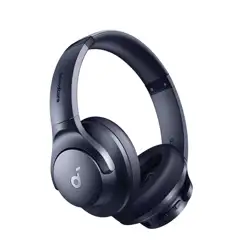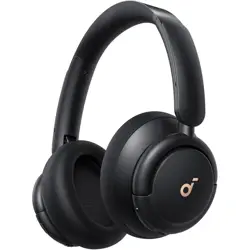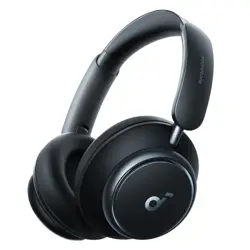
soundcore Space Q45
USER MANUAL
EN 1
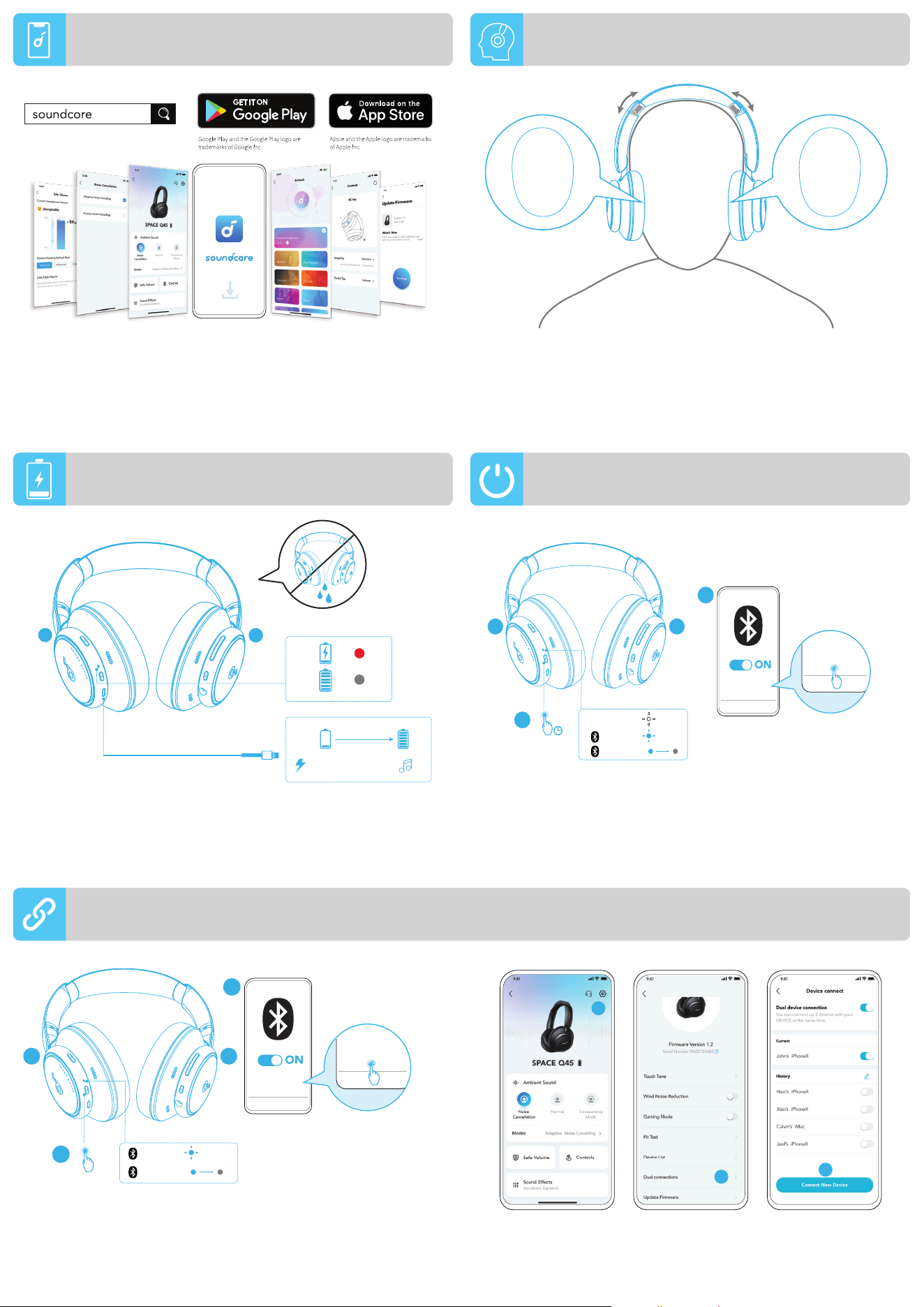
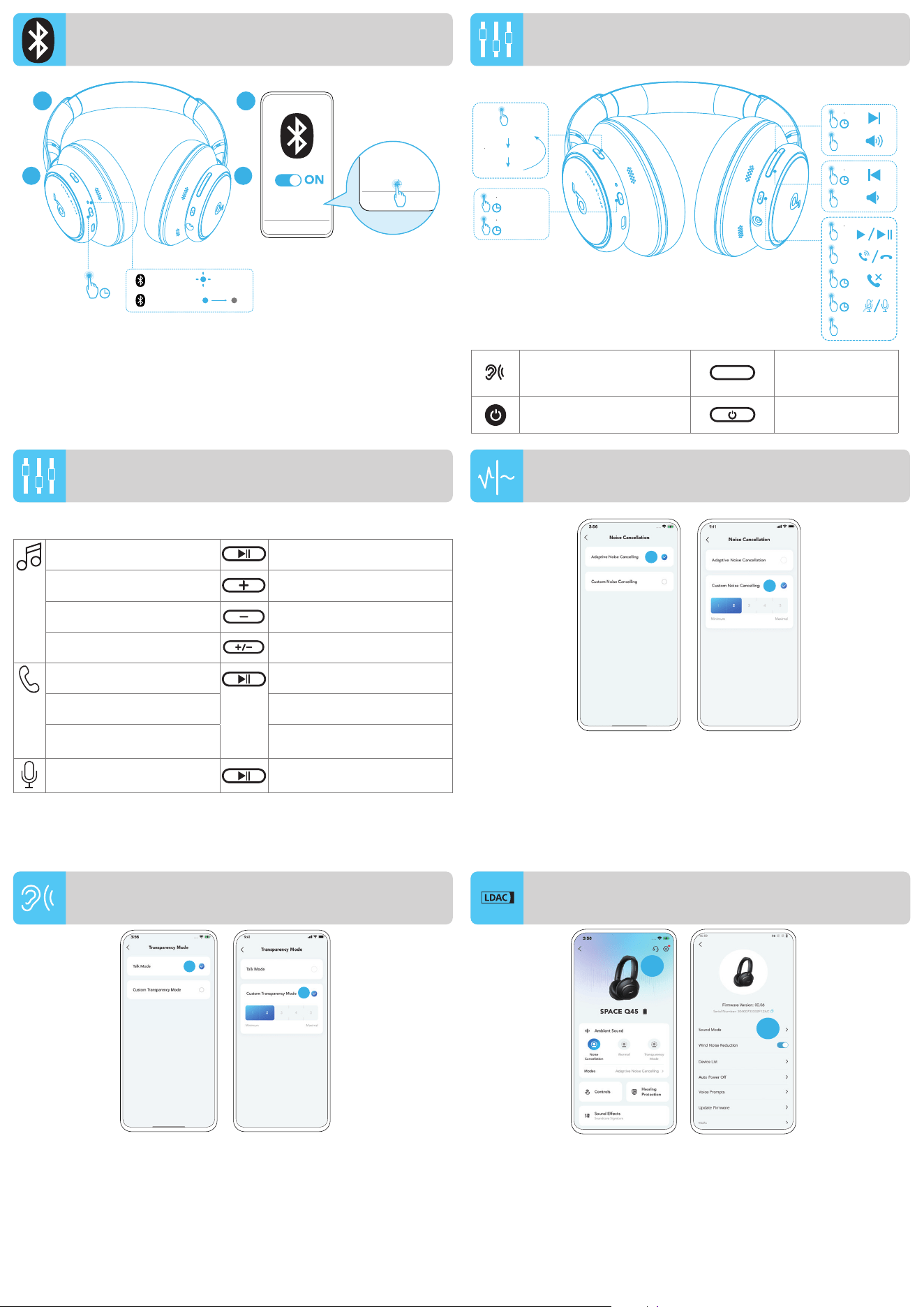
Download the soundcore app to customize ambient sound,
adjust EQ settings, update firmware, and explore more.
If your headphones cannot connect with the soundcore app,
update it to the latest version in your mobile app store.
Wear the headphones with the "L" logo on your left ear and
"R" logo on your right ear. Adjust the length of the headband
for a comfortable fit.
Fully dry off the USB port before charging.
Do not turn on your headphones while charging.
Use a certified USB-C charging cable and charger to prevent
any damage.
The headphones can connect with two devices at the same
time. When already connected to one device, press the power
button twice to pair with another device.
Press and hold the power button for 2 seconds to turn on.
The headphones will automatically enter Bluetooth pairing
mode when connecting for the first time.
Select "soundcore Space Q45" on your device's Bluetooth
list to connect.
R
L
5min=4hr
2hr
L
R
soundcore
Space Q45
soundcore
Space Q45
ce
ce
ce
ce
ce
ce
ce
2
Pairing
ON
Connected
3s
2s
L R
×3
1
Pairing
Connected
3s
soundcore
Space Q45
soundcore
Space Q45
ce
ce
ce
ce
ce
ce
ce
L R
1
2
×2
APP WEARING
CHARGING
POWERING ON & PAIRING
In the soundcore app, go to settings and select Dual
Connections > Connect New Device.
1
2
3
MULTIPOINT CONNECTION
EN 2
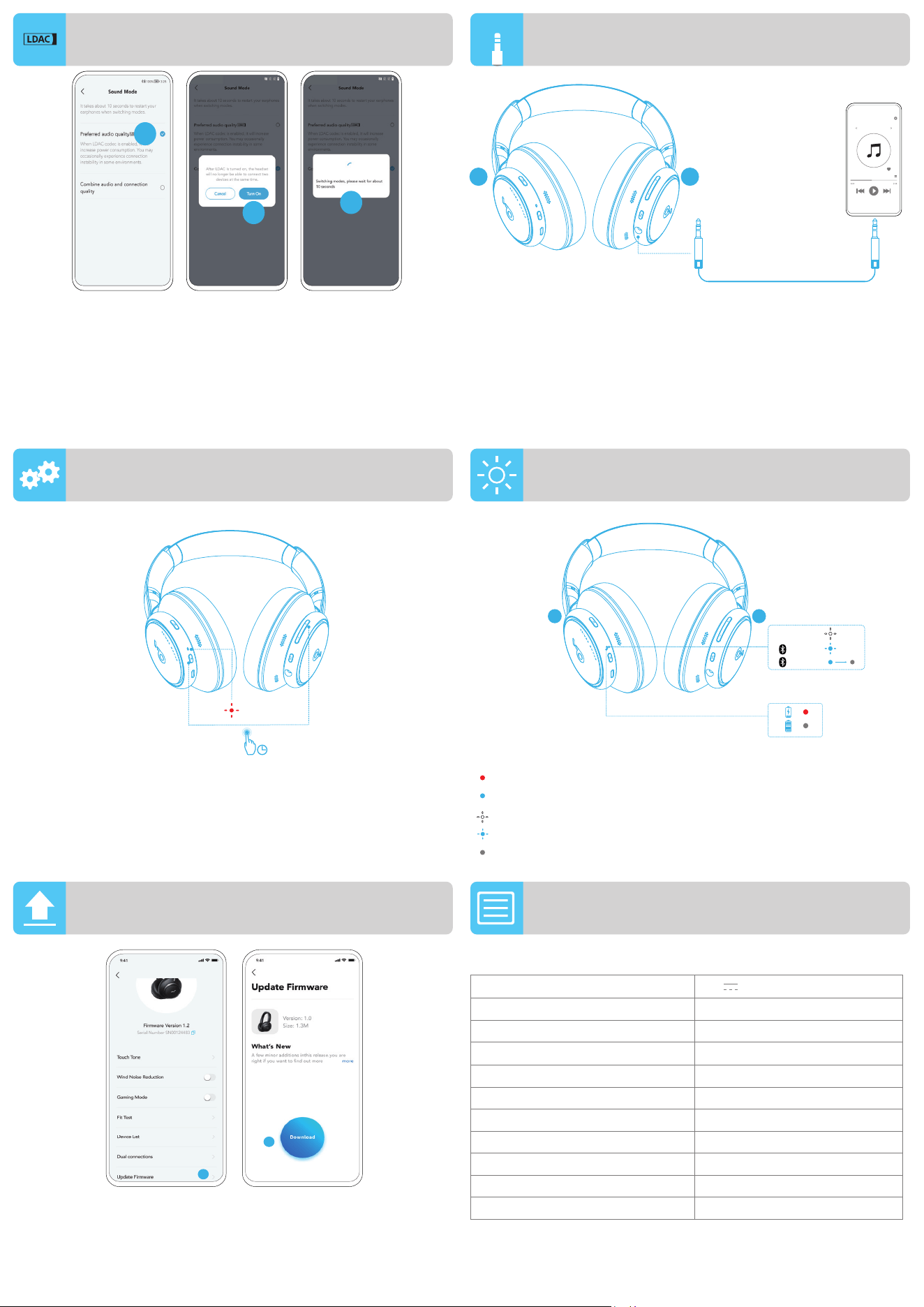
To manually enter Bluetooth pairing mode when the headphones
are off, press and hold the power button for 5 seconds until the
LED flashes blue.
BUTTON CONTROLS
BUTTON CONTROLS
Switch ambient
sound modes (ANC /
Transparency / Normal)
Press once
Power on / off
Press and hold for
2 seconds
Play / Pause Press once
Next track Press and hold for 2 seconds
Previous track Press and hold for 2 seconds
Volume up / down Press once
Answer / End a call Press once
Reject a call Press and hold for 2 seconds
Mute / Restore the
microphone
Press and hold for 2 seconds
Activate voice assistant
software
Press twice
To reduce ambient noise, switch to noise cancellation (default) via
NC button and customize in the soundcore app.
• Adaptive Noise Cancelling: Adjust the level of noise cancellation
automatically for various scenarios.
• Custom Noise Cancelling: Set the level of noise cancellation manually.
To stay aware of your surroundings while listening to music, switch
to transparency via NC button and customize in the soundcore app.
• Talk Mode: Voices stand out more clearly from other ambient sounds.
• Custom Transparency Mode: Set the level of transparency manually.
Pairing
Connected
3s
soundcore
Space Q45
soundcore
Space Q45
ce
ce
ce
ce
ce
ce
ce
1 2
5s
L R
×1
×1
2s
×1
2s
2s
2s
2s
2s
×1
×2
×1
Voice
Assistant
ANC (Default)
Normal
ON
OFF
Transparency
1
2
1
2
MANUAL PAIRING
NOISE CANCELLATION
TRANSPARENCY
NC
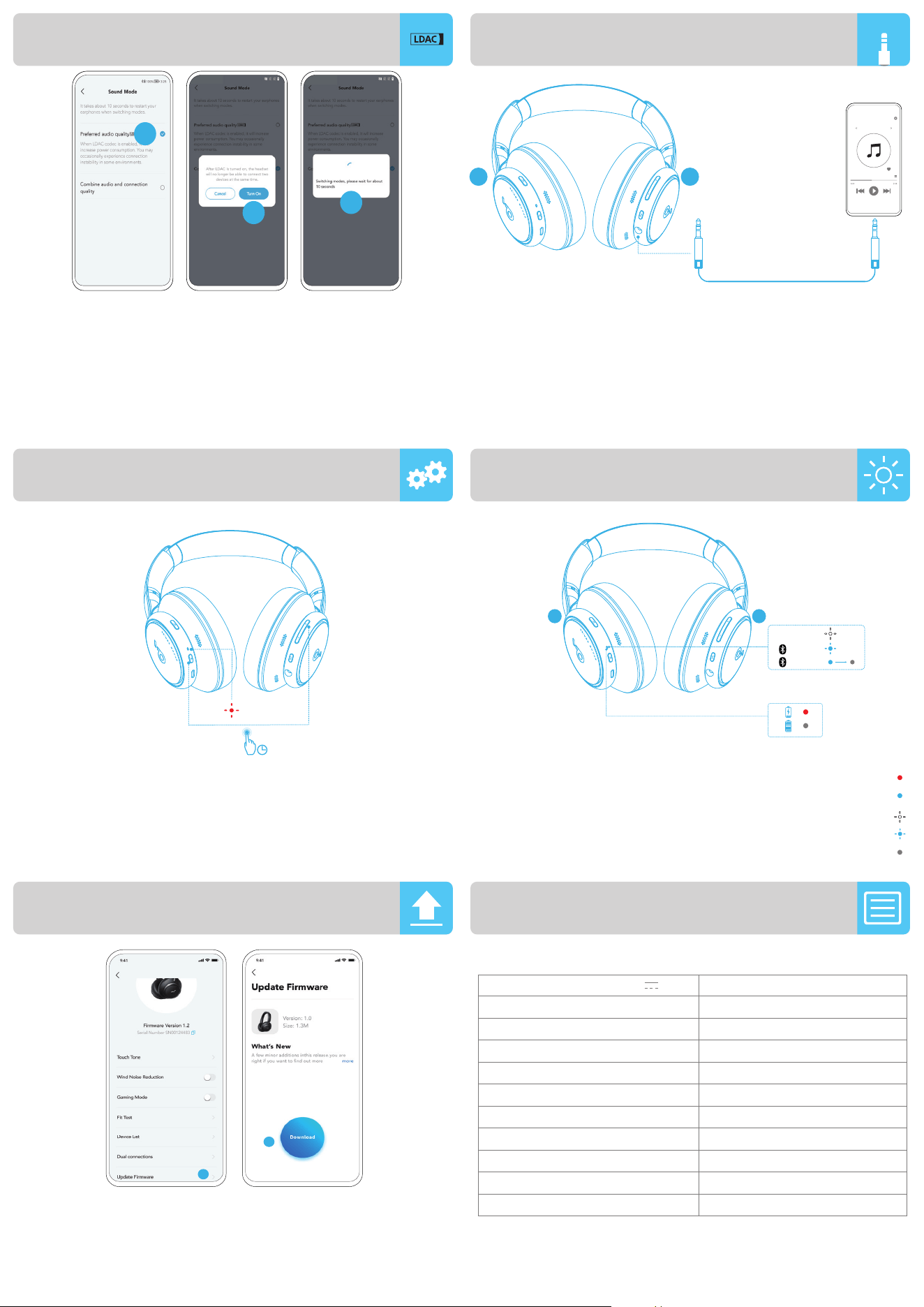
• Use devices powered by Android 8.0 or later to experience LDAC
quality sound.
• LDAC provides higher quality sound, increases power
consumption, and reduces playtime.
• Enable LDAC in a low-interference environment to ensure a stable
Bluetooth connection.
1. Go to settings in the soundcore app. 2. Click on "Sound Mode".
2
1
LDAC
EN 3
LED LIGHT GUIDE
FIRMWARE UPDATE
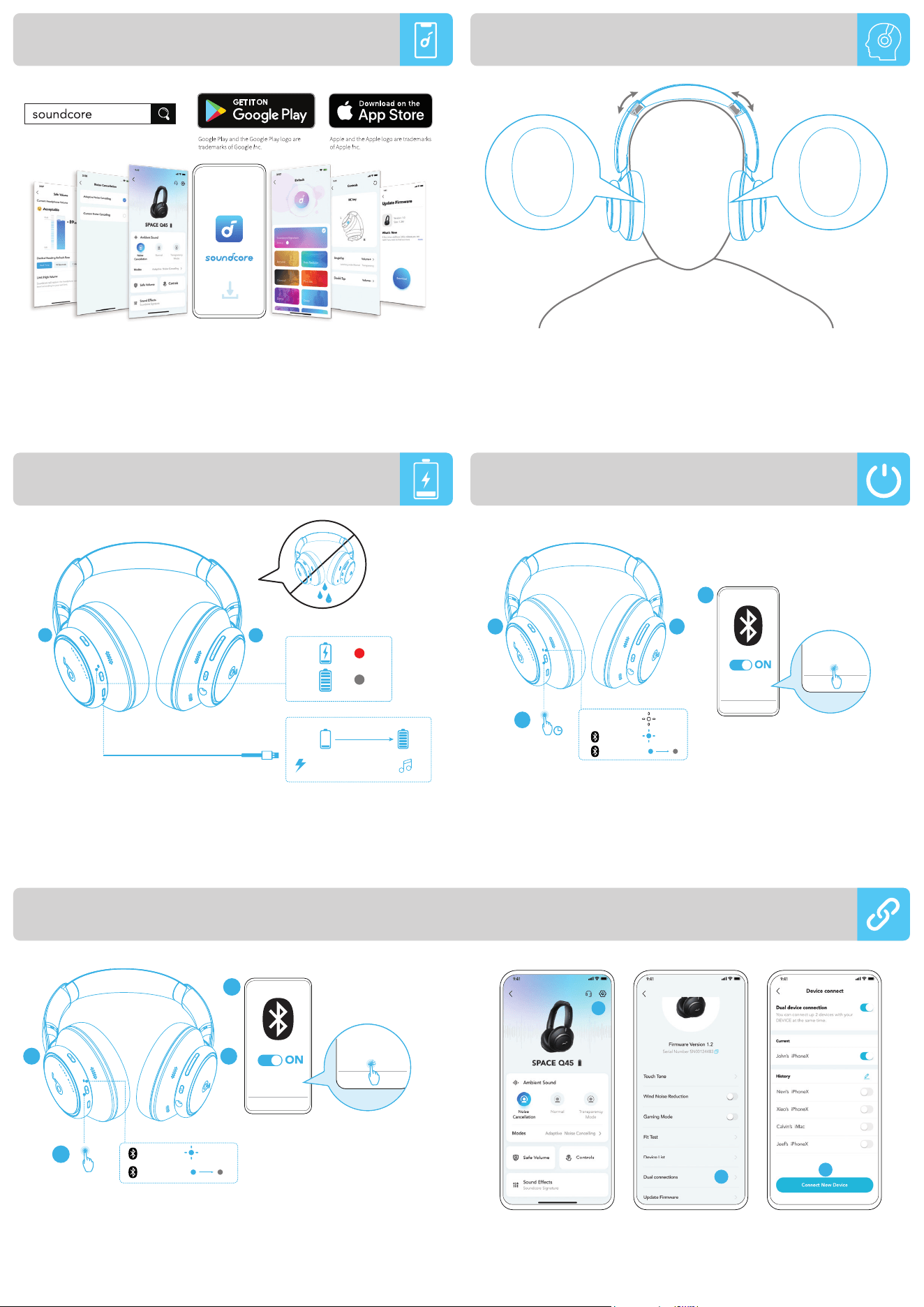
You might need to reset your headphones if you experience
connectivity or function issues.
Delete the pairing history from your Bluetooth device first.
Press the power and volume up buttons simultaneously for 5
seconds until the LED flashes red three times.
You will be informed once the new version of firmware is
detected when you connect the headphones with the app.
Ensure the headphones are powered on and connected to a
device until the firmware update is complete. During the update,
avoid any usage and ensure stable access to the internet.
Steady red
Steady blue
Flashing white
Flashing blue
Light off
5s
×3
L R
Pairing
ON
Connected
3s
×3
WIRED LISTENING
Play audio on an external device by plugging in a 3.5mm
AUX cable. Wired listening will turn off Bluetooth mode
automatically.
3.5mm
L R
3. Select "Preferred audio quality" to switch to LDAC codec.
4. You will be notified that the headphones do not support LDAC
when connected to two devices. Select "Turn on" to continue.
5. It takes about 10 seconds to switch audio codecs. You may
be requested to update the headphones' firmware if available.
3
5
4
2
1
LDAC
AUX
RESET
Specifications are subject to change without notice.
Input 5 V
0.7 A
Rated output power 2.2 mW
Battery capacity 750 mAh
Charging
time
2
hours
Playtime (with ANC off) Up to 65 hours
Playtime (with ANC on) Up to 50 hours
Driver size 40 mm
Frequency response 20 Hz - 40 kHz
Impedance ѷ
Bluetooth version 5.3
Bluetooth range 15 m / 49 ft
SPECS
AR 73
ΕϭλϟϝΩΎόϣΕΩΩϋ·ρΑοϭρϳΣϣϟΕϭλϟιϳλΧΗϟsoundcoreϕϳΑρΗϝϳίϧΗΑϡϗ
ΩϳίϣϟϑΎηϛΗγϭΕΑΎΛϟΞϣΎϧέΑϟΙϳΩΣΗϭEQ)
ϰϟ·ϪΛ
˷
ΩΣϓˬsoundcoreϕϳΑρΗΑϝΎλΗϻϥϣϙΑΔλΎΧϟαέϟΕΎϋΎϣγϥϛϣΗΗϡϟΫ·
ΔϟϭϣΣϣϟΓίϬΟϷΕΎϘϳΑρΗέΟΗϣϲϓΩϭΟϭϣέΩλ·ΙΩΣ
ϙϧΫϰϠϋRέΎόηϟϭϯέγϳϟϙϧΫϰϠϋLέΎόηϟϝϣΣΗϲΗϟαέϟΕΎϋΎϣγ
˶
ΩΗέ
ϳέϣαΎϘϣϰϠϋϝλΣΗϰΗΣαέϟϕϭρϝϭρρΑοϰϧϣϳϟ
ϥΣηϟϝΑϗϝϣΎϛ
˳
ϝϛηΑUSBΫϔϧϣϑϳϔΟΗΑϡϗ
ϥΣηϟ˯ΎϧΛϙΑΔλΎΧϟαέϟΕΎϋΎϣγϝ
˷
ϐηΗϻ
ϑϠΗϱϊϧϣϟϥϳΩϣΗόϣUSB-CϲγϲΑα·ϭϳϥΣΎηϭϝΑΎϛϡΩΧΗγ
ΔϠλΗϣϥϭϛΗΎϣΩϧϋϪγϔϧΕϗϭϟϲϓBluetoothϱίΎϬΟΑαέϟΔϋΎϣγϝϳλϭΗϥϛϣϳ
έΧίΎϬΟΑϥέΗϗϼϟΔϗΎρϟέίϰϠϋϥϳΗέϣρϐοˬΩΣϭίΎϬΟΑϝόϔϟΎΑ
ϝΧΩΗγαέϟΔϋΎϣγϝϳϐηΗϟΔϗΎρϟέίϰϠϋϥϳΗϳϧΎΛΓΩϣϟέέϣΗγϻϊϣρϐο
ΓέϣϝϭϷϝΎλΗϻΩϧϋBluetoothέΑϋϥέΗϗϻϊοϭϲϓΎ
˱
ϳΎϘϠΗαέϟΕΎϋΎϣγ
ϝΎλΗϼϟϙίΎϬΟΑBluetoothΔϣΎϗϲϓsoundcore Space Q45Ω
ΩΣ
R
L
5min=4hr
2hr
L
R
soundcore
Space Q45
soundcore
Space Q45
ce
ce
ce
ce
ce
ce
ce
2
Pairing
ON
Connected
3s
2s
L R
×3
1
Pairing
Connected
3s
soundcore
Space Q45
soundcore
Space Q45
ce
ce
ce
ce
ce
ce
ce
L R
1
2
×2
APP ˯ΩΗέϻ
ϥΣηϟ
ϥέΗϗϻϭϝϳϐηΗϟ
ίΎϬΟϝϳλϭΗ < ΝϭΩίϣϝΎλΗΩΩΣϭΕΩΩϋϹϰϟ·ϝϘΗϧˬsoundcoreϕϳΑρΗϲϓ
.ΩϳΩΟ
1
2
3
ρΎϘϧϟΩΩόΗϣϝΎλΗϻ
AR 74
ϑΎϘϳ·ΩϳϗαέϟΔϋΎϣγϥϭϛΗΎϣΩϧϋBluetoothέΑϋϥέΗϗϻϊοϭϰϟ·Ύ
˱
ϳϭΩϳϝϭΧΩϠϟ
ϥϭϠϟΎΑLEDέη΅ϣνϣϭϳϰΗΣ
˳
ϥϭΛ5ΓΩϣϟΔϗΎρϟέίϰϠϋέέϣΗγϻϊϣρϐοˬϝϳϐηΗϟ
ϕέίϷ
έέίϷΎΑϡϛΣΗϟ
έέίϷΎΑϡϛΣΗϟ
ΓΩΣϭΓέϣρϐοϟ
˯Ύϐϟ·ρϳΣϣϟΕϭλϟωΎοϭϝϳΩΑΗ
ΔϳϓΎϔηANCρηϧϟ˯Ύοϭοϟ
ϱΩΎϋΕϭλϟ
ΓΩϣϟέέϣΗγΎΑρϐο
ϥϳΗϳϧΎΛ
ϝϳϐηΗϑΎϘϳ·ϝϳϐηΗ
ΓΩΣϭΓέϣρϐοϟ ϑΎϘϳ·ϝϳϐηΗ
ϥϳΗϳϧΎΛΓΩϣϟέέϣΗγΎΑρϐο ϲϟΎΗϟϲΗϭλϟϊρϘϣϟ
ϥϳΗϳϧΎΛΓΩϣϟέέϣΗγΎΑρϐο ϕΑΎγϟέΎγϣϟ
ΓΩΣϭΓέϣρϐοϟ ϪοϔΧΕϭλϟϯϭΗγϣϊϓέ
ΓΩΣϭΓέϣρϐοϟ Ύϫ΅ΎϬϧ·ΔϣϟΎϛϣϰϠϋΩέϟ
ϥϳΗϳϧΎΛΓΩϣϟέέϣΗγΎΑρϐο ΔϠϣΎϛϣνϓέ
ϥϳΗϳϧΎΛΓΩϣϟέέϣΗγΎΑρϐο ϥϭϓϭέϛϳϣϟΓΩΎόΗγΕϭλϟϡΗϛ
ϥϳΗέϣρϐο ΔϳΗϭλϟΓΩϋΎγϣϟΞϣΎϧέΑρϳηϧΗ
NCέίέΑϋϲοέΗϓϻΩΩϋϹ˯Ύοϭοϟ˯Ύϐϟ·ϰϟ·ϝ
˷
ΩΑˬΔρϳΣϣϟ˯ΎοϭοϟϝϳϠϘΗϟ
.soundcoreϕϳΑρΗϲϓϪλϳλΧΗϭ
ΕΎϫϭϳέΎϧϳγϠϟΎ
˱
όΑΗΎ
˱
ϳΎϘϠΗ˯Ύοϭοϟ˯Ύϐϟ·ϯϭΗγϣρΑοϲϔϳϛΗϟ˯ΎοϭοϟΏΟΣϡΎυϧ
ΔϔϠΗΧϣϟ
Ύ
˱
ϳϭΩϳ˯Ύοϭοϟ˯Ύϐϟ·ϯϭΗγϣρΑοιλΧϣϟ˯Ύοϭοϟ˯Ύϐϟ·
ΔϳϓΎϔηϊοϭϰϟ·ϝϳΩΑΗϟϙϧϛϣϳˬϰϘϳγϭϣϟϰϟ·ωΎϣΗγϻ˯ΎϧΛϙϟϭΣέϭΩϳΎϣΑΔϳέΩϰϠϋ˯ΎϘΑϠϟ
.soundcoreϕϳΑρΗϲϓϪλϳλΧΗϭNCέίέΑϋΕϭλϟ
ϯέΧϷΔρϳΣϣϟΕϭλϷϥϣΎ
˱
ΣϭοϭέΛϛϝϛηΑΔϳέηΑϟΕϭλϷίέΑΗΙϳΩΣϟϊοϭ
Ύ
˱
ϳϭΩϳΕϭλϟΔϳϓΎϔηϯϭΗγϣρΑοιλΧϣϟΕϭλϟΔϳϓΎϔηϊοϭ
Pairing
Connected
3s
soundcore
Space Q45
soundcore
Space Q45
ce
ce
ce
ce
ce
ce
ce
1 2
5s
L R
×1
×1
2s
×1
2s
2s
2s
2s
2s
×1
×2
×1
Voice
Assistant
ANC (Default)
Normal
ON
OFF
Transparency
1
2
1
2
ϱϭΩϳϟϥέΗϗϻ
˯Ύοϭοϟ˯Ύϐϟ·
ΕϭλϟΔϳϓΎϔη
NC
ΓΩϭΟΑΕϭλΔΑέΟΗΑωΎΗϣΗγϼϟΙΩΣϭAndroid 8.0ϡΎυϧΑϝϣόΗϲΗϟΓίϬΟϷϡΩΧΗγ
.LDAC
ϝϳϐηΗϟΕϗϭϝϠϘϳϭΔϗΎρϟϙϼϬΗγΩ
˷
ηέϳϭΓΩϭΟϰϠϋΎ
˱
ΗϭλLDACέϓϭϳ
έϘΗγϣBluetoothϝΎλΗϥΎϣοϟϝΧΩΗϟΔοϔΧϧϣΔϳΑϲϓLDACϊοϭϥ
˷
ϛϣ
.soundcoreϕϳΑρΗϲϓΕΩΩϋϹϰϟ·ϝϘΗϧ1
ΕϭλϟϊοϭϕϭϓέϘϧ2
2
1
LDACϊοϭ
AR 75
LEDΡΎΑλϣϝϳϟΩ
ΕΑΎΛϟΞϣΎϧέΑϟΙϳΩΣΗ
ϭϝΎλΗϻιϭλΧΑΕϼϛηϣϱϙΗϬΟϭΫ·αέϟΕΎϋΎϣγρΑοΓΩΎϋ·ϰϟ·ΝΎΗΣΗΩϗ
ϝϳϐηΗϟϑΎυϭ
ΔϗΎρϟϱέίϰϠϋρϐο
˱
ϻϭϙΑιΎΧϟBluetoothίΎϬΟϥϣϥέϗϹϝΟγϑΫΣ
έϣΣϷϥϭϠϟΎΑLEDέη΅ϣνϣϭϳϰΗΣ
˳
ϥϭΛ5ΓΩϣϟΩΣϭ
˳
ϥϲϓΕϭλϟϯϭΗγϣϊϓέϭ
ΕέϣΙϼΛ
αέϟΕΎϋΎϣγϝϳλϭΗΩϧϋΕΑΎΛϟΞϣΎϧέΑϟϥϣΩϳΩΟϟέΩλϹϑΎηΗϛΩέΟϣΑϙέΎρΧ·ϡΗϳγ
ΞϣΎϧέΑϟΙϳΩΣΗϝϣΗϛϳϰΗΣίΎϬΟΑΎϬϠϳλϭΗϭαέϟΕΎϋΎϣγϝϳϐηΗϥϣΩϛ΄ΗϕϳΑρΗϟΎΑ
ΕϧέΗϧϹϰϟ·έϘΗγϣϟϝϭλϭϟϥϣΩϛ΄ΗϭϡΩΧΗγϱΏ
˷
ϧΟΗˬΙϳΩΣΗϟ˯ΎϧΛΕΑΎΛϟ
ΕΑΎΛέϣΣ
ΕΑΎΛϕέί
νϣϭνϳΑ
ϕέίνϳϣϭ
Γ΄ϔρϣΓ˯ΎοϹ
5s
×3
L R
Pairing
ON
Connected
3s
×3
ϲϛϠγϟωΎϣΗγϻ
ϡϣ3.5αΎϘϣAUXϝΑΎϛϝϳλϭΗΑϲΟέΎΧίΎϬΟϰϠϋΔϳΗϭλϟΕΎϔϠϣϟϝϳϐηΗϙϧϛϣϳ
Ύ
˱
ϳΎϘϠΗBluetoothϊοϭϝϳϐηΗϑΎϘϳ·ϰϟ·ϲϛϠγϟωΎϣΗγϻϱΩ΅ϳγ
3.5mm
L R
.LDACΩϳϭϛΗϰϟ·ϝϳΩΑΗϠϟ3UHIHUUHGDXGLRTXDOLW\ΩΩΣ3
ΩΩΣϥϳίΎϬΟΑΎϬϠϳλϭΗΩϧϋLDACϊοϭϡϋΩΗϻαέϟΕΎϋΎϣγϥ΄Αϙϣϼϋ·ϡΗϳγ4
ΔόΑΎΗϣϠϟϝϳϐηΗ
ΕΑΎΛϟΞϣΎϧέΑϟΙϳΩΣΗϙϧϣΏϠρ
˵
ϳΩϗ
˳
ϥϭΛ10ϲϟϭΣΔϳΗϭλϟΩϭϛϷϝϳΩΑΗϕέϐΗγϳ5
Ύ
˱
ΣΎΗϣϥΎϛΫ·αέϟΕΎϋΎϣγϟ
3
5
4
2
1
LDACϊοϭ
AUX
ρΑοϟΓΩΎϋ·
έΎόη·ϥϭΩέϳϳϐΗϠϟΔοέϋΕΎϔλϭϣϟ
έϳΑϣ0.7 Εϟϭϓ5
ϝΧΩϟ
2.2 mW
Δϔϧλ
˵
ϣϟΝέΧϹΓϭϗ
750 mAh
ΔϳέΎρΑϟΔόγ
ΓΩΣϭΔϋΎγ
2
ϥΣηϟΓΩϣ
ΕΎϋΎγ65ϰϟ·ϝλϳΎϣ ANCϝϳϐηΗϑΎϘϳ·ϊϣϝϳϐηΗΕϗϭ
ΕΎϋΎγ50ϰϟ·ϝλϳΎϣ ANCϝϳϐηΗϊϣϝϳϐηΗΕϗϭ
ϡϣ40 ϙέΣ
˵
ϣϟϡΟΣ
ίΗέϫϭϠϳϛ40ίΗέϫ20 ΩΩέΗϟΔΑΎΟΗγ
ϡϭ16 ΔϣϭΎϘϣϟ
5.3
BluetoothέΩλ·
ϡΩϗ49έΗϣ15 BluetoothϕΎρϧ
ΕΎϔλϭϣϟ