QUICKSTART GUIDE v1.0 (ENGLISH)
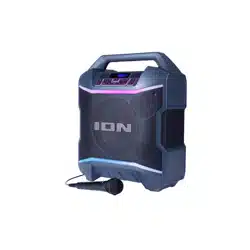
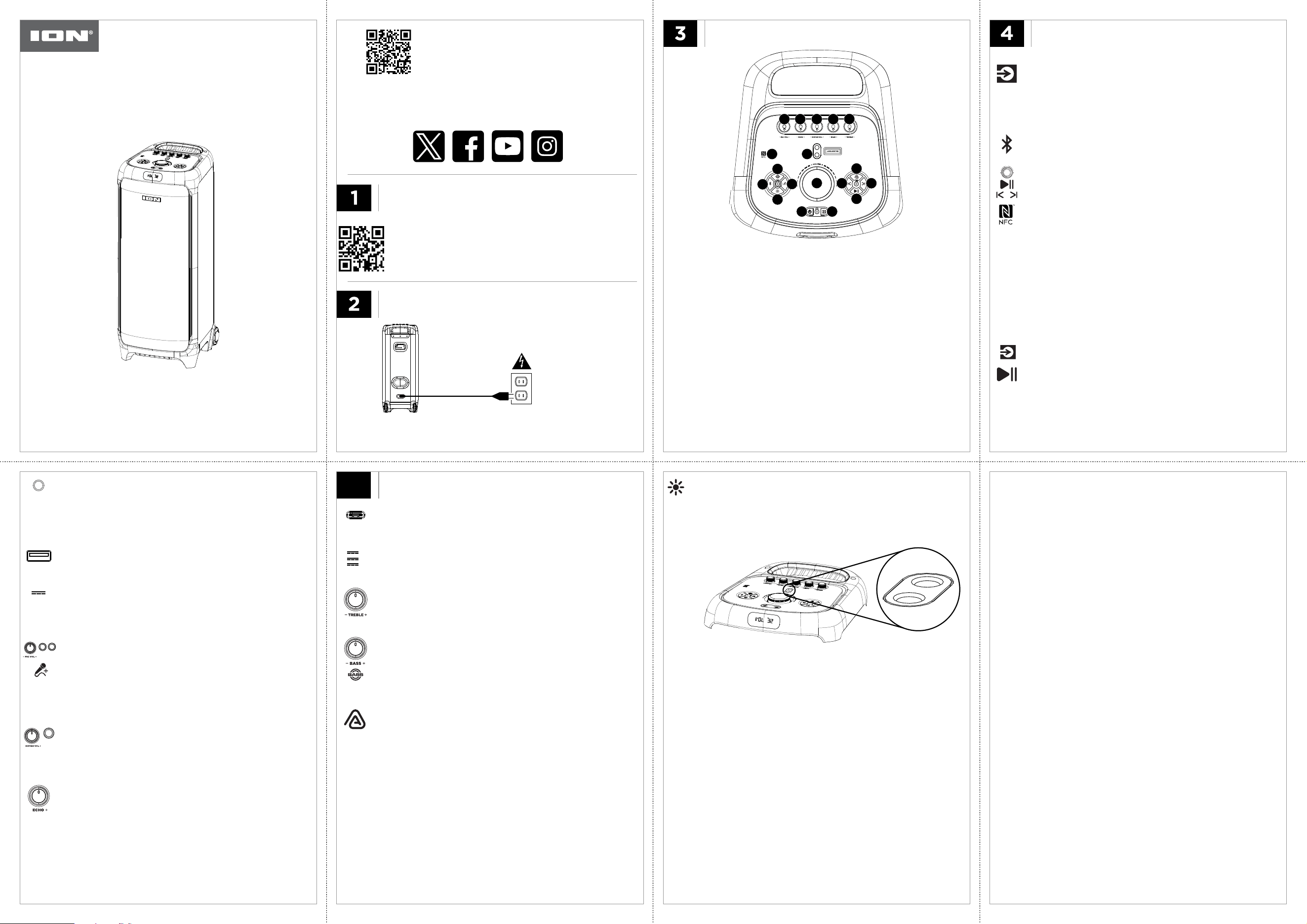
BLOCK ROCKER TITAN
GUITARMIC 2MIC 1
AUDIO IN DC
OUTPUT
AUX
GUITAR
FM RADIO
1. Press SOURCE button to select radio mode.
2. Plug in the included AUX cable for improved FM
station reception.
3. Press and hold PLAY/PAUSE button to seek stations
and automatically save preset stations.
4. Press PLAY/PAUSE to cycle through saved presets.
5. Press and hold
|< and >|
to search up and down for
radio stations.
6. Press |< and >| to select the previous/next radio
station.
MIC INPUTS
1. Plug in sound source to AUX input using the included 1/8”
cable.
2.Turn sound source volume up.
AUX INPUT
• Connect 1/4” (6.35 mm) dynamic mics to these inputs.
• Adjust MIC VOL knob to control volume.
• Press the MIC PRIORITY button to have the level of the
music reduced when using the microphone.
GUITAR INPUT
1. Connect a guitar to this 1/4” (6.35 mm) TS input.
2.Adjust GUITAR VOL knob to control volume.
USB-A PLAYBACK
1. Insert a USB drive into the USB-A port on the back panel
to enter USB mode.
2. Press PLAY/PAUSE button to play or pause a track.
• Turn the VOLUME knob to adjust volume.
• Press the |< and >| buttons to navigate tracks.
ECHO
• Turn the ECHO knob to adjust the eect level.
DC
OUTPUT
USB-C
OUTPUT:
3A5V
2.77A
9V
2.0A
12V
V
O
L
U
M
E
DOWNLOAD THE FULL USER GUIDE TO LEARN MORE
IONAUDIO.COM
AUDIO IN
MIC 1
MIC 2
AUX
USB-A
OUTPUT:
1A
5V
CUSTOMIZE YOUR SOUND EXPERIENCE
CREATE YOUR SOUND EXPERIENCE
IONAUDIO.COM/SUPPORT
For articles, videos, web and chat support
IONAUDIO.COM/WARRANTY
For complete warranty information
GETTING STARTED
Package Contents:
Block Rocker Titan Power • Cable (4.82 ft / 147 cm) • Aux Cable (3.6 ft. /
110 cm) • Quickstart Guide
PLUG IN AND THEN POWER ON
Model: iPA197
• Make sure all items listed in the Package Contents are
included in the box.
• Read the included Important Safety Instructions.
• Scan QR code to download the complete User Guide.
• Register your product on ionaudio.com.
Input Voltage: 100-240V~,
50/60Hz, 300W
Press and hold the POWER button to power on/o.
Press and hold POWER for 3 seconds to turn Voice Prompts on or o.
BLUETOOTH
1. Press SOURCE button to select Bluetooth mode or
press the BLUETOOTH button to directly enter pairing
mode.
2. Choose “Block Rocker Titan” in your Bluetooth settings
menu.
3. Press Play in music player App of choice on device.
4. Turn VOLUME knob to adjust volume.
5. Press PLAY/PAUSE to start and stop audio.
6. Press |< and >| buttons to navigate tracks.
Note: Use a compatible NFC-enabled device to quickly
pair your phone. iOS does not support NFC-triggered
Bluetooth pairing with Block Rocker Titan.
Press the BLUETOOTH button to disconnect Bluetooth
and re-enter pairing mode. Press the BLUETOOTH
button again to reconnect to the last connected
Bluetooth device.
• Press SOURCE button to cycle through the available
sources (Bluetooth, FM, AUX, USB). Press and hold
SOURCE button for 5 seconds to perform a factory
reset.
SOURCE
LIGHT MODES
• Press and release LIGHTS button to cycle through the light
modes and turn the front panel lights o.
• Press and hold LIGHTS button to turn the top panel laser light
show on/o.
AURACAST
TM
1. Power on the primary speaker and pair to your Bluetooth
device, or switch to USB, AUX, or FM mode.
2. Press the AURACAST button on the primary speaker.
3. Power on the secondary speaker(s).
4. Press |< and >| to select the primary speaker. Make sure the
secondary speakers are not connected to Bluetooth and
press the AURACAST button to start the linking process.
Once the speakers are linked, the Auracast icon on the
display will stop flashing and be lit solid.
5. To exit Auracast mode on the primary speaker, press and
hold the AURACAST button on that speaker.
6. To exit Auracast mode on secondary speakers, press and
hold their AURACAST button or press their SOURCE or
BLUETOOTH button, or connect a USB flash drive.
USB-C CHARGING
• Connect your smartphone, tablet, or other devices to the
USB-C port using the included USB-C® to USB-C® cable (not
included) to charge (up to 24W).
TREBLE
• Turn the TREBLE knob to adjust the high frequencies.
BASS
1. Turn the BASS knob to adjust the low frequencies.
2.Press the BASS BOOST button for a separate tuning that is
bassier than the standard tuning.
Laser light emitter
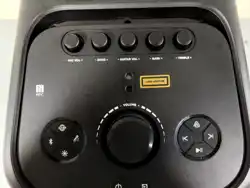
1. Mic Vol +/-: Turn to adjust the mic’s input level.
2. Echo +/-: Turn to adjust the mic echo level.
3. Guitar Vol +/-: Turn to adjust the guitar’s input level.
4. Bass +/-:
Turn to adjust the low frequencies.
5. Treble +/-:
Turn to adjust the high frequencies.
6. NFC: Quickly pair your
NFC-enabled device here.
7. Laser Aperture: The laser light is emitted from here. Do not stare
into the laser light lense.
8. Volume +/-: Turn to adjust the overall speaker volume.
9. Bass Boost: Press to
give a bassier tuning.
10. Bluetooth:
Press to directly enter pairing mode or press to
disconnect from a connected Bluetooth device.
11. Mic Priority:
Press to have the level of the music reduced when
using the microphone.
12. Lights:
Press and release to cycle through light modes and turn the
front panel lights o. Press and hold to turn the top panel laser light
show on/o.
13. Auracast
TM
: Press to start connecting to additional speakers.
14. Track Navigation/Search: Press and release to navigate tracks or
radio station. Press and hold to search through radio stations.
15. Play/Pause: Press to start/stop audio, seek stations, or cycle through
saved presets
16. Source: Press
to cycle through available sources.
17. Power: Press and hold to power on/o.
7
1 2 3
4
5
6
9
8
10
11
12
13
1414
15
1617
OPERATION
5
Important Safety Instructions
1. Read and keep these instructions. Heed all warnings and follow all
Instructions.
2. Warning (if applicable): Please refer to any important information
(e.g., electrical, safety, etc.) printed on the exterior bottom
enclosure or rear panel before installing or operating the product.
3. Clean only with dry cloth.
4. Water and Moisture (if applicable): Do not use this apparatus near
water. The apparatus shall not be exposed to dripping or splashing
and that no objects filled with liquids, such as vases, shall be
placed on the apparatus. Electrical equipment should NEVER be
kept or stored in damp environments.
5. (If applicable) Do not block any ventilation openings. Install in
accordance with the manufacturer’s instructions. Do not install this
equipment in a confined or “boxed-in” space such as a bookcase or
similar unit, and maintain good ventilation conditions. The
ventilation should not be impeded by covering the ventilation
openings with items such as newspaper, tablecloths, curtains, etc.
6. Do not install near any heat sources such as radiators, heat
registers, stoves, or other apparatus (including amplifiers) that
produce heat. Do not place exposed flame sources such as lighted
candles on the apparatus.
7. (If applicable) This product should be connected to a power
supply only of the type described in these operating instructions,
or as marked on the unit.
8. (If applicable) Be careful not to damage the power cord. When
moving or not using the appliance, secure the power cord (e.g.,
wrap it with a cable tie). Before using it again, make sure the
power cord has not been damaged. If the power cord has been
damaged at all, bring the unit and cord to a qualified service
technician for repair or replacement as specified by the
manufacturer.
9. Unplug this apparatus during lightning storms or when unused for
long periods of time.
10. Only use attachment/accessories specified by the manufacturer.
11. (If applicable) Use only the cart, stand, tripod, bracket or
table specified by the manufacturer, or sold with the
apparatus. When a cart is used, use caution when moving
the cart/apparatus combination to avoid injury from tip-
over.
12. Internal/External Voltage Selectors (if applicable): Internal or external
voltage selector switches, if any, should only be reset and re-
equipped with a proper plug for alternative voltage by a qualified
service technician. Do not attempt to alter this yourself.
13. (If applicable) Do not defeat the safety purpose of the polarized or
grounding-type plug.
14. Protective earthing terminal (if applicable): The apparatus
should be connected to a mains socket outlet with a protective
earthing connection.
15. For Class II apparatus only: This symbol means the equipment
is a Class II or double-insulated electrical appliance. It has been
designed in such a way that it does not require a safety
connection to electrical earth. When servicing use only identical
replacement parts installed by an instructed person or with the
use of ready-made leads or cords.
16. Warning (if applicable): Provide an earthing connection before the
mains plug is connected to the mains. When disconnecting the
earthing connection, be sure to disconnect it after pulling the mains
plug out from the mains.
17. (If applicable) Where the mains plug or an appliance coupler is used
as the disconnect device, the disconnect device shall remain readily
operable.
18. Warning (if applicable): To prevent possible hearing damage,
do not listen at high volume levels for long periods.
19. This apparatus is for professional use only. Intended operational
climate: moderate.
Safety Notices
CAUTION: TO REDUCE THE RISK OF ELECTRIC SHOCK, DO NOT REMOVE
ANY COVER. NO USER-SERVICEABLE PARTS INSIDE. REFER SERVICING
TO QUALIFIED SERVICE PERSONNEL ONLY.
DANGEROUS VOLTAGE: The lightning flash with arrowhead
symbol within the equilateral triangle is intended to alert the
user to the presence of un-insulated “dangerous voltage” within
the product’s enclosure that may be of sufficient magnitude to
constitute a risk of electric shock.
INSTRUCTIONS: The exclamation point within the equilateral
triangle is intended to alert the user to the presence of
important operating and maintenance (servicing) instructions in
the literature accompanying this appliance.
CAUTION (for U.S.A. & CANADIAN models only): TO PREVENT
ELECTRIC SHOCK DO NOT USE THIS (POLARIZED) PLUG WITH AN
EXTENSION CORD, RECEPTACLE OR OTHER OUTLET UNLESS THE
BLADES CAN BE FULLY INSERTED TO PREVENT BLADE EXPOSURE.
Warning: Contains flashing and strobe light effects. Not recommended for
individuals with photosensitive epilepsy or light sensitivity.
CAUTION
Risk of electric shock.
Do not open.
ESD/EFT Warning: This unit may contain a microcomputer
for signal processing and control functions. In very rare
situations, severe interference, noise from an external source,
or static electricity may cause it to lock up. In the unlikely
event that this should happen, turn off the unit, wait at least
five seconds, and then turn it back on again. The pins of
connectors identified with this ESD warning symbol should
not be touched.
Do not force discharge, recharge (non-rechargeable batteries are not to
be recharged), disassemble, heat above manufacturer’s specified
temperature rating, or incinerate. Doing so may result in injury due to
venting, leakage, or explosion resulting in chemical burns.
IONAUDIO.COM
World Headquarters U.K. Office Germany Office
inMusic Brands, Inc.
200 Scenic View Drive
Cumberland, RI 02864
USA
inMusic Europe Ltd
Abbey House 5F5
282 Farnborough Road
Farnborough
GU14 7NA
United Kingdom
inMusic GmbH
Hans-Günther-Sohl-Str. 4a
47807 Krefeld
GERMANY
ION Audio is a trademark of inMusic Brands, Inc., registered in the U.S. and other
countries.
NEMA
®
is the registered trademark and service mark of the National Electrical
Manufacturers Association.
All other product names, company names, trademarks, or trade names are those of
their respective owners.
Model: iPA197
LASER SAFETY WARNING:
1. Assemble strictly per the official instructions. Do NOT disassemble
the laser module or remove covers. No user-serviceable parts inside.
2. This product contains a Class 3R laser. LASER RADIATION —
AVOID DIRECT EYE EXPOSURE.
3. Never point the laser beam at eyes (including animals) or reflective
surfaces.
4. Before any maintenance, disconnect AC power and wait 10 seconds
for discharge.
5. If abnormal laser emission occurs, switch off immediately and contact
authorized service. Do NOT attempt to repair laser components.
6. WARNING: DOUBLE POLE FUSING
Touching dangerous live parts on the power board may result in
electric shock.
This symbol indicates that the fuse may be in the neutral,
and that the mains shall be disconnected to deenergize
the phase conductors.
During maintenance, it is necessary to disconnect from mains
(such as unplugging the power plug) and confirm that there is
no dangerous voltage on the power supply board.
7. Wavelength:
630-670nm (Red),
515-532nm (Green)
8. Beam divergence:
Parallel: 175 mrad (max)
Perpendicular: 436 mrad
(max)
9. Pulse duration: 500 ms
10. Red laser: Max. output
power < 5 mW
Green laser: Max. output
power < 5 mW
11. Laser Aperture Location
The laser beam is
emitted from the laser
aperture shown, right:
This product is classified as a Class 3R laser product in accordance with
IEC 60825-1:2014. Only authorized service personnel may perform
maintenance, repair, or replacement of the laser module.
(a) Warnings and Precautions During Service [6.2 b)(i)]
During servicing, accessible laser radiation may exceed the Class 3R
Accessible Emission Limit (AEL). Do not stare into the beam, and do
not aim it at eyes or reflective surfaces. Disconnect the AC power
supply and wait 5 seconds to allow the system to discharge before
opening any protective housing. If abnormal laser emission occurs,
power off the product immediately and contact the authorized service
center; do not attempt to service the product yourself. Use only
approved replacement parts.
(b) Maintenance Schedule [6.2 b)(ii)]
To maintain continued compliance with IEC 60825-1, the following
maintenance shall be performed at the intervals specified:
- Inspection of all warning labels and the laser aperture: every 12 months
- Comprehensive safety inspection (verification of power, wavelength,
and divergence): every 36 months, or after any service or component
replacement
- Replacement of the laser module: in accordance with the service
manual (service life for laser module: 99,999 operating hours)
If any label is damaged, illegible, or missing, it must be replaced before
the product is put back into service.
(c) Operations That May Result in Increased Laser Exposure [6.2 b)(iii)]
The following operations, if not performed in accordance with this manual,
may cause accessible laser radiation to exceed the Class 3R AEL and must
be avoided:
- Removing or displacing any protective housing while the product is
energized;
- Bypassing, defeating, or tampering with any safety interlock;
- Replacing the laser module or any optical component with non-
approved (non-original) parts, or adjusting alignment/focusing beyond
the specified range;
- Using controls, making adjustments, or performing procedures not
described in this manual.
CAUTION — Use of controls, adjustments, or procedures other than those
specified in this manual may result in hazardous radiation exposure.
NOTICE CONCERNING FCC REGULATIONS: You are cautioned that
changes or modifications not expressly approved by the part responsible
for compliance could void the user’s authority to operate the equipment.
This equipment has been tested and found to comply with the limits for a
Class B digital device, pursuant to Part 15 of the FCC rules. These limits are
designed to provide reasonable protection against harmful interference in
a residential installation.
This equipment generates uses and can radiate radio frequency energy
and, if not installed and used in accordance with the instructions, may
cause harmful interference to radio communications. However, there is no
guarantee that interference will not occur in a particular installation. If this
equipment does cause harmful interference to radio or television
reception, which can be determined by turning the equipment off and on,
the user is encouraged to try to correct the interference by one or more of
the following measures: (a) reorient or relocate the receiving antenna; (b)
move this unit; (c) increase the separation between the equipment and
receiver; (d) connect the equipment into an outlet on a circuit different
from that to which the receiver is connected; (e) be sure that all cables are
properly shielded, using a choke or ferrite where appropriate; or (f)
consult the dealer or an experienced radio/television technician for help.
This equipment should be installed and operated with a minimum distance
of 20 cm between the radiator and your body.
Radiation Exposure Statement: This equipment complies with ISED
radiation exposure limits set forth for an uncontrolled environment. This
equipment should be installed and operated with greater than 20 cm
between the radiator & your body.
For wireless products supporting the 5.15–5.35 GHz frequency band (if
applicable): Usage of the 5.15–5.35 GHz band are restricted to indoor
operation only. This applies to the following countries: AT, BE, BG, CZ, DK,
EE, FR, DE, IS, IE, IT, EL, ES, CY, LV, LI, LT, LU, HU, MT, NL, NO, PL, PT, RO,
SI, SK, TR, FI, SE, CH, UK, HR.
For 240-volt use in U.K., use NEMA
®
-style 240-volt plug. For other
countries use proper plug for local outlet.