
DIGITAL SIGNAGE
USER MANUAL
Please read this manual carefully before operating
your set and retain it for future reference.
www.geephon.com
1
CAUTION
RISK OF ELECTRIC SHOCK
DO NOT OPEN
CAUTION: TO AVOID THE RISK OF ELECTRIC SHOCK.
DO NOT REMOVE COVER (OR BACK).
NO USER - SERVICEABLE PARTS INSIDE.
REFER SERVICING TO QUALIFIED SERVICE PERSONNEL.
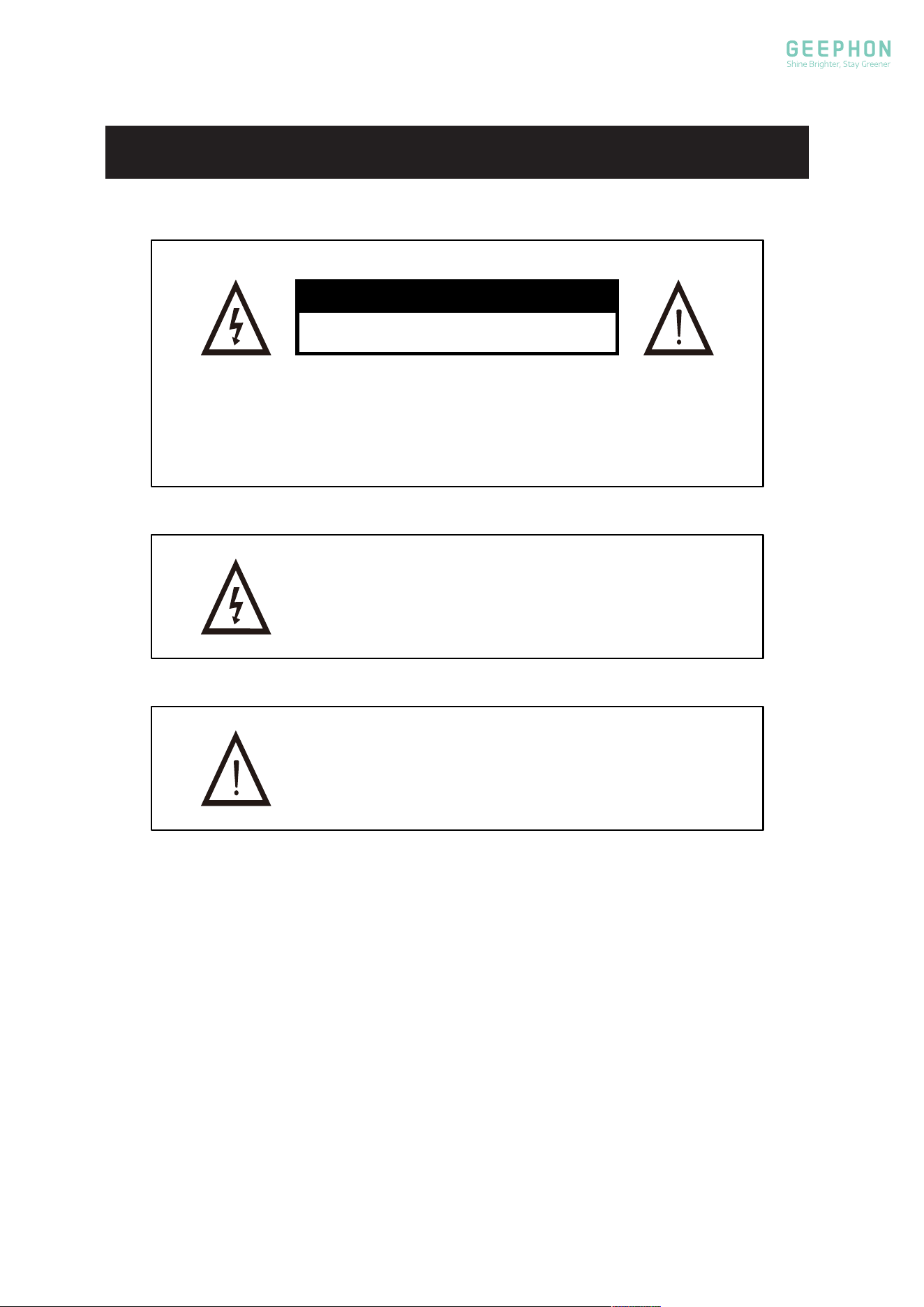
This symbol is intended to alert the user to avoid the risk
of electric shock, do not disassemble this equipment by anyone
except a qualied service personnel.
This symbol is intended to alert the user to the presence
of important operation and maintenance instructions in
the literature accompanying the equipment.
WARNING

2
§ 15.19 Label requirements. (Suit for Verification (VOC) and Certification (ID))
This device complies with part 15 of the FCC Rules. Operation is subject to the following
two conditions: (1) This device may not cause harmful interference, and (2) this device
must accept any interference received, including interference that may cause undesired
operation.
§ 15.21 Information to user.(Suit for Verification (VOC) and Certification (ID) and
Declaration of Conformity(DOC))
Any Changes or modifications not expressly approved by the party responsible for
compliance could void the user's authority to operate the equipment.
§ 15.105 Information to the user. (Suit for Class A and Class B digital device(unintentional
radiator or intentional radiator))
Note: This equipment has been tested and found to comply with the limits for a Class B
digital device, pursuant to part 15 of the FCC Rules. These limits are designed to provide
reasonable protection against harmful interference in a residential installation. This
equipment generates uses and can radiate radio frequency energy and, if not installed
and used in accordance with the instructions, may cause harmful interference to radio
communications. However, there is no guarantee that interference will not occur in a
particular installation. If this equipment does cause harmful interference to radio or
television reception, which can be determined by turning the equipment off and on, the
user is encouraged to try to correct the interference by one or more of the following
measures:
-Reorient or relocate the receiving antenna.
-Increase the separation between the equipment and receiver.
-Connect the equipment into an outlet on a circuit different from that to which the
receiver is connected.
-Consult the dealer or an experienced radio/TV technician for help.
*RF warning for Mobile device:(Suit for FCC Part 15.247 of ID)
This equipment complies with FCC radiation exposure limits set forth for an uncontrolled
environment. This equipment should be installed and operated with minimum distance
20cm between the radiator & your body.
FCC Caution.

Precautions for Safe Installation
- Before installation, it is essential to read the "Preparatory Matters before Installation" thoroughly
and adhere to all operational instructions within this guide.
- Employ liing equipment appropriate for the product's weight for hoisting. Prior to hoisting,
ascertain the dimensions, weight, hoisting height, etc. of the equipment. Overloading is strictly
prohibited.
- Before hoisting, it is essential to inspect the work site, liing and hoisting machinery, slings,
safety devices, control mechanisms, brakes, hooks and so on.
- Obvious and visible safety warning signs must be set up in the hoisting operation area.
- Before the hoisting operation, the weight and center of gravity of the object to be hoisted must
be clearly known, and the center of gravity should be accurately located when hoisting.
- Trial hoisting and trial lowering must be carried out before the formal hoisting to ensure that the
hoisting and landing processes are smooth and stable.
- There should be sufficient lighting equipment for night operations.
- Hoisting operations are prohibited in bad weather conditions such as heavy fog, strong winds,
and heavy rain.
- Tools and debris on the equipment should be removed before hoisting to avoid hurting people if
they fall.
- When hoisting, the installation personnel should stand in a position where they can avoid. When
the equipment has been hoisted and moved to the docking position of the fixed base, the
installation personnel can then approach to support the equipment for alignment.
3

Precautions for Use
The specification of the AC power cord must be matched with the corresponding wire diameter
according to the maximum current value used by the equipment to prevent the wire from heating
up due to substandard wire specifications.
When the equipment is exposed to intense sunlight, its surface will become very hot. Please do
not touch it at this time.
Under intense sunlight, the remote control may not work, which is a normal phenomenon. In case
of such a situation, it is necessary to shield the remote control and place it close to the receiving
head of the equipment, or wait until the sunlight is no longer intense before operating it.
When disconnecting the AC power supply, please ensure that the equipment is not exposed to
intense sunlight for a long time. When storing the equipment, cover it with a cloth or box. This can
prevent problems such as screen blackening, creasing and yellowing, and help extend the service
life of electronic components.
4

1. Read Instructions
All the safety and operating instructions should be read before the appliance is operated.
2. Retain Instructions
The safety and operating instructions should be retained for future reference.
3. Heed Warnings
All warnings on the appliance and in the operating instructions should be adhered to.
4. Follow Instructions
All operating instructions should be followed.
5. Battery
Batteries shall not be exposed to excessive heat such as sunshine, fire or so on.
6. Earthing Connection
The apparatus shall be connected to a MAlNS socket outlet with a protective earthing
connection.
7. Water and Moisture
The appliance should not be used near water.
8. Ventilation
The appliance should be well situated so that its location or position does not interfere
with its proper ventilation.
9. Heat
This appliance should be placed away from heat sources such as radiators, heat registers
and stoves.
10. Power Sources
The appliance should only be connected to a power supply as described in the operating
instructions or as marked on the appliance.
11. Grounding or Polarization
Precautions should be taken.
12. Power Cord Protection
Power supply cord should be located so that it is not likely to be walked on or pinched by
items placed upon it.
Safety Instruction
5

13. Cleaning
The appliance should be cleaned only as recommended by the manufacturer.
14. Non-use Periods
The power cord of the appliance should be unplugged from the outlet when le unused
for a long period of time.
15. Objects and Liquids
Care should be taken to prevent objects from falling and liquids from spilling into the
enclosure through openings.
16. Conditions Requiring Service
The appliance should be serviced by qualified service personnel when the supply cord or
plug has been damaged, objects have fallen on, or liquid has been spilled into the
appliance. This caution also applies when the appliance has been exposed to rain, does
not appear to operate normally, or exhibits a marked change in performance.
17. Caution
There is a button cell inside. Keep it away from children and the elderly to prevent
accidental ingestion. If ingestion occurs, seek medical attention immediately.
18. Keep the key properly
There are high voltage and dangerous live parts inside. It's better to maintain and repair
with a professional.
Safety Instruction
6

• Not liable for any damage caused by fires, natural disaster ( such as thunderstorms earthquake,
etc.), acts by the third parties, accidents, owner's misuse or use in otherimproper conditions.
• Not liable for incidental damages (such as profit loss or interruption in business
modification, erasure of record data, etc.) caused by use or inability to use of product.
• Not liable for any damage caused by neglect of the instructions described in the owner's manual.
• Not liable for any damage caused by misuse or malfunction through simultaneous use of this
product and the connected equipment.
Preparatory Matters before Installation
7
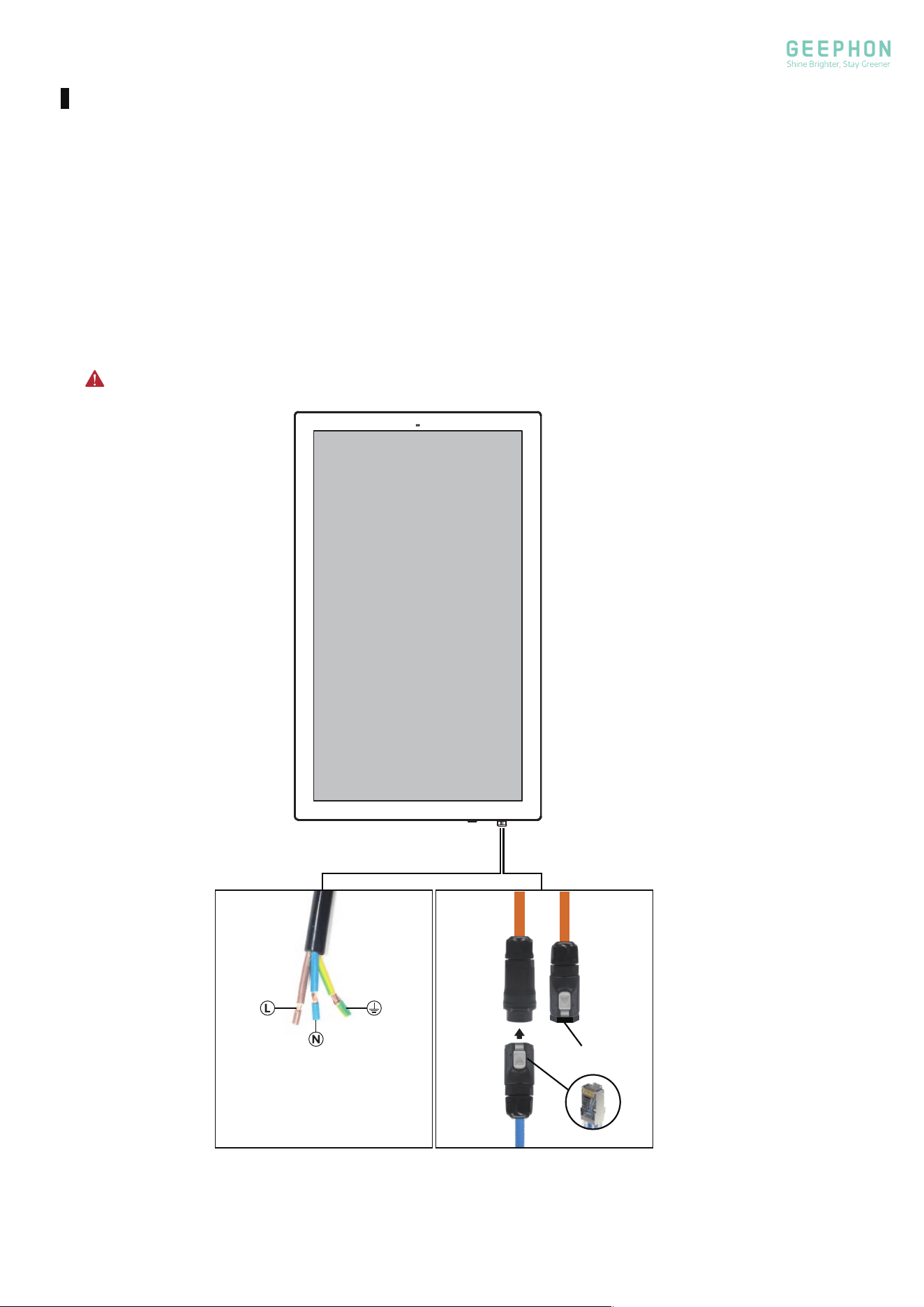
Note: The ethernet out connector must remain closed (tightly covered).
Ethernet
Connecter
In Out
Cover
Making Connections
Power connection:
Connect the power cord of the display to the corresponding external power terminal.
This DIGITAL SIGNAGE can be connected to 100-240V- 50/60Hz.
Network connection:
Insert the network cable terminal(RJ45) into the ethernet connector, and tighten it, and then
insert it into the ethernet in connector.
8
Power supply Connecter
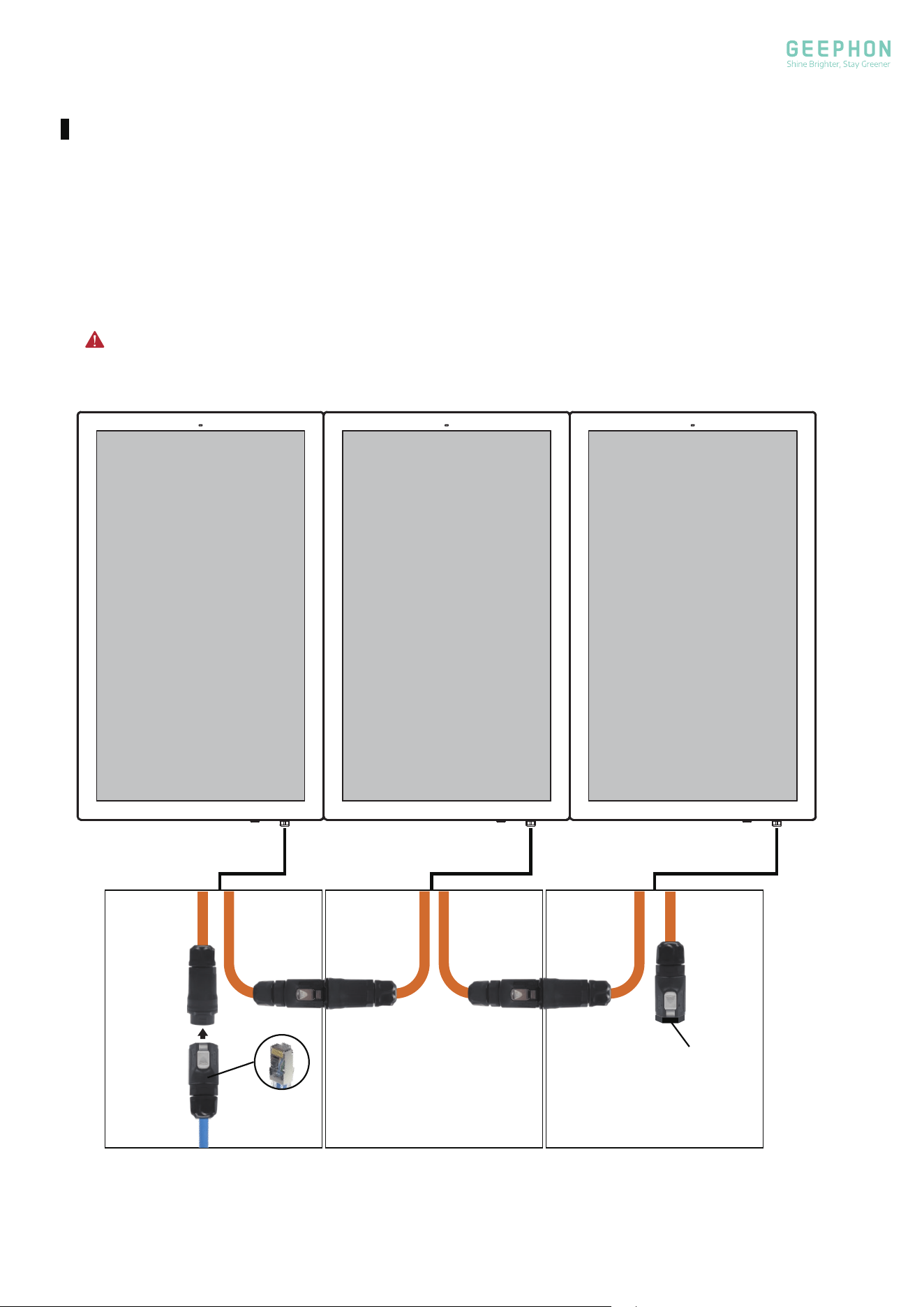
Insert the network cable terminal into the ethernet connector, and tighten it, and then insert it into
the ethernet in connector of the 1st display. Connect the ethernet out of the 1st display to the
ethernet in of the 2nd display, Connect the ethernet out of the 2nd display to the ethernet in of the
3rd display.
Note: The ethernet out connector of the 3rd display must remain closed (tightly covered).
InIn Out InOut
Making Connections
Network interconnection for three displays:
Cover
9
10
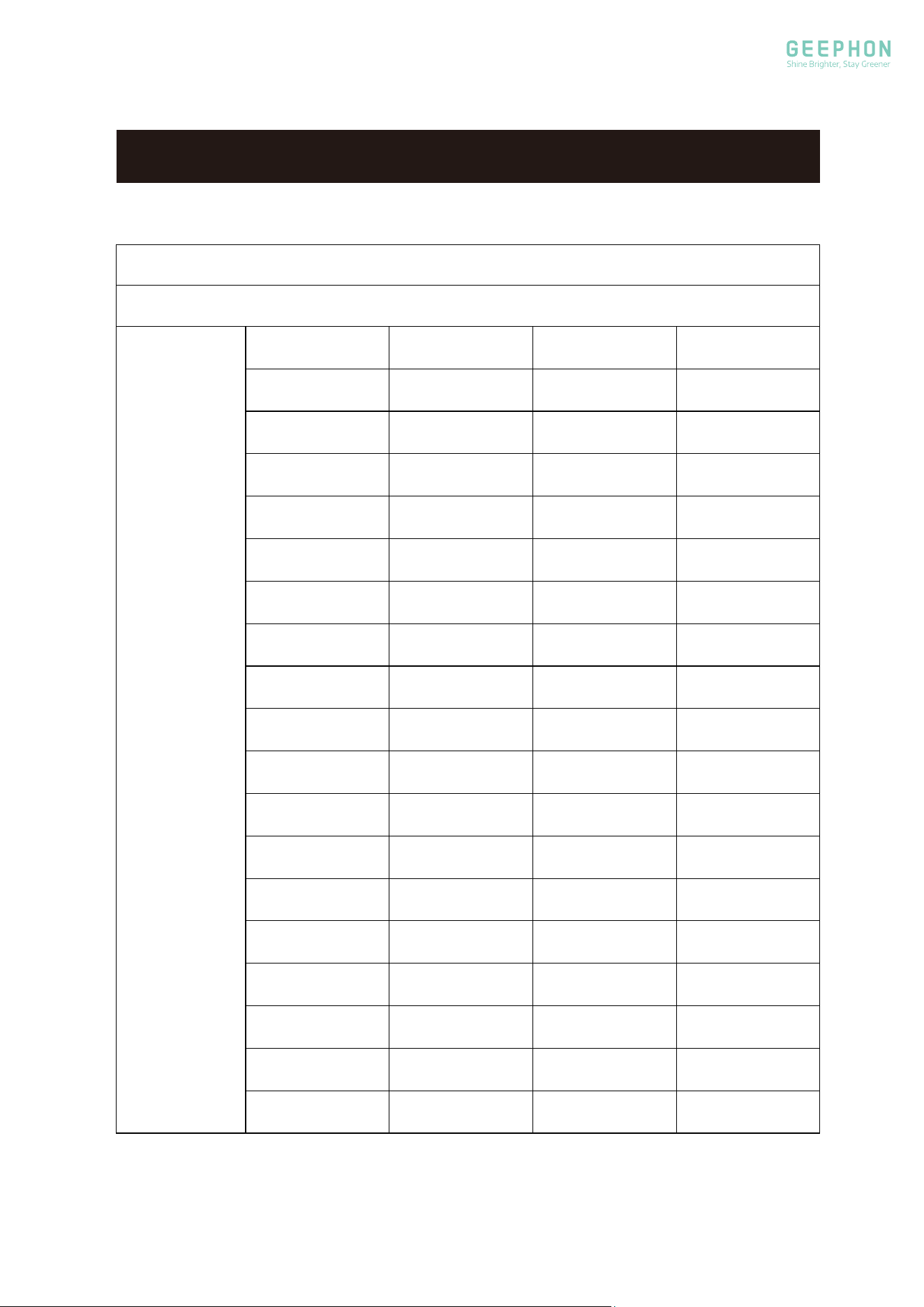
SPECIFICATIONS
Resolution
Horizontal
Frequency(kHz)
Vertical
Frequency(Hz)
Standard
640 x 480 31.5 60 VGA
640 x 480 37.861 72.809 VESA
640 x 480 37.5 75 VESA
720 x 400 31.5
70
VGA-T
800 x 600 37.9 60 VESA Guidelines
800 x 600 48.077 72.19 VESA
800 x 600 46.9 75 VESA
832 x 624 49.7 75
Mac
1024 x 768 48.4 60 VESA Guidelines
1024 x 768 60
75
VESA
1125 x 870 68.68
75
MAC
1280 x 800
47.8
59.8 --------
1280 x 960
60.0
60 VESA
1280 x 1024
63.595
60 VESA
1440 x 900
55.9
59.9 VESA
1680 x 1050
65.3
60
-------
1920 x 1080
67.5
60 VESA
3840 x 2160 67.5
30
INPUT
FORMAT
INPUT SPEC
11
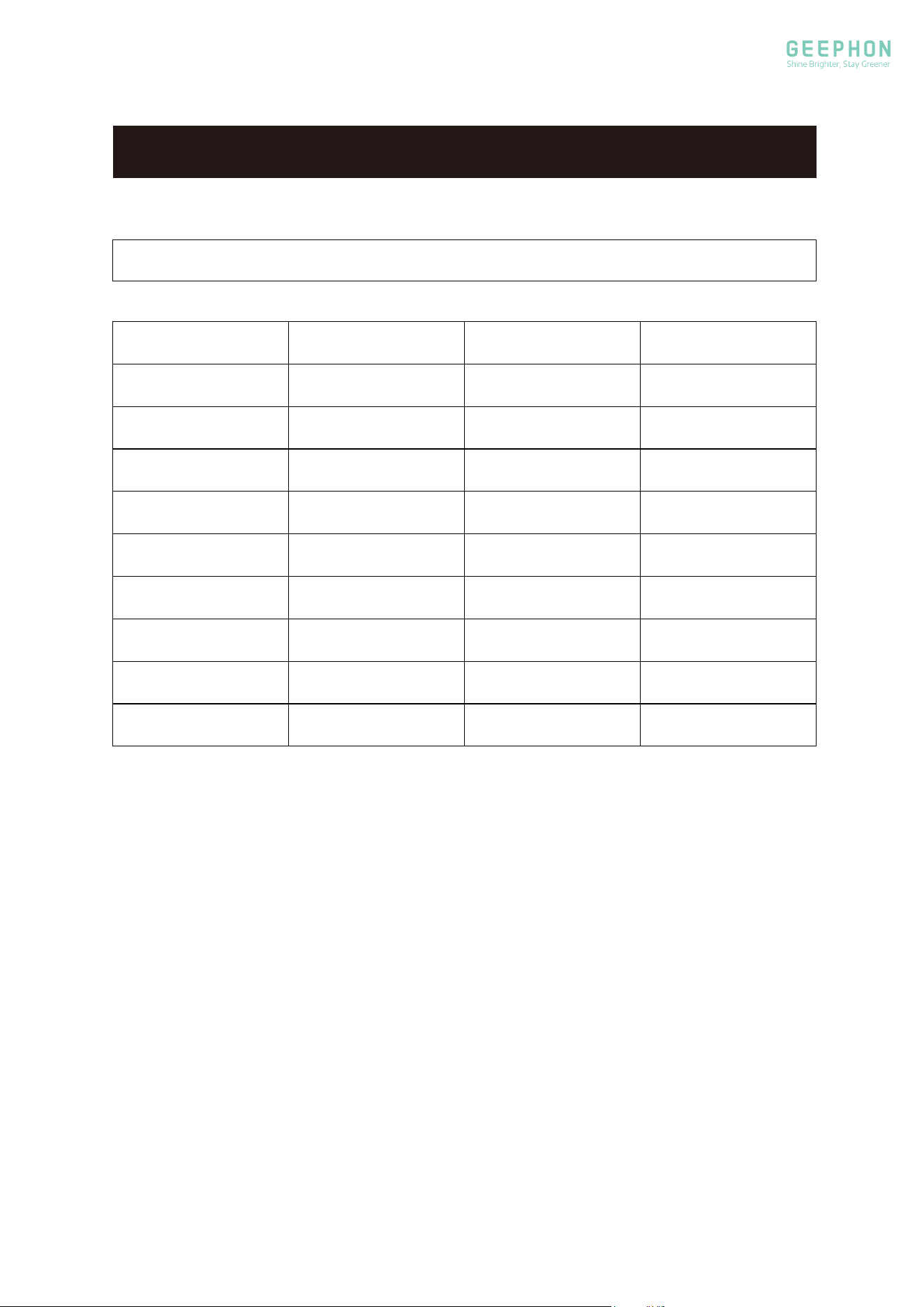
SPECIFICATIONS
Mode Resolution
Horizontal
Frequency(kHz)
Vertical
Frequency(Hz)
480i 720 x 480i 15.73 59.94/60
576i 720 x 576i 15.63 50
480p 720 x 480p 31.47 59.94/60
576p
720 x 480p 31.26
50
720p 1280 x 720p
37.50
44.96
50
59.94/60
1080i 1920 x 1080i
28.13
33.75
50
59.94/60
1080p 1920 x 1080p
56.25
67.5
50
59.94/60
2160p 3840 x 2160 56.25
25
2160p 3840 x 2160 67.5 30
INPUT SPEC

www.geephon.com
Copyright © 2024-2026 GEEPHON.All Rights Reserved