INSTRUCTION MANUAL
REFLECT 60

Lou Lentine
CEO
Echelon Fitness
Multimedia, LLC

Hello,
I am Lou Lentine, CEO of Echelon, and I would like to welcome you to the
Echelon community. You’ve made a great decision for yourself and your
family. The Echelon Experience is an innovative combination of fitness
products integrated with our state-of-the-art Echelon Fit
®
app. This brand-
new, fitness lifestyle connects your family, friends, the Echelon community,
and Echelon instructors together to help you with your fitness goals. With
thousands of live and on-demand classes, no matter your schedule or
experience, there is always a new and exciting class for you to join.
We embrace your decision to join our Echelon family in the pursuit of living
a healthier lifestyle. We are committed to continue engineering cutting
edge, world-class fitness products to improve quality of life through workout
experiences that make an active lifestyle more accessible and sustainable.
Thank you again for choosing Echelon and I look forward to seeing you
in the next live class!
Best personal regards,
Lou Lentine
CEO, Echelon Fitness Multimedia, LLC

4
15.21
Changes or modifications to this unit not expressly approved by the party
responsible for compliance could void the user’s authority to operate the
equipment.
15.105(B)
This equipment has been tested and found to comply with the limits for a
Class B digital device, pursuant to part 15 of the FCC rules. These limits are
designed to provide reasonable protection against harmful interference in
a residential installation. This equipment generates, uses and can radiate
radio frequency energy and, if not installed and used in accordance with
the instructions, may cause harmful interference to radio communications.
However, there is no guarantee that interference will not occur in a particular
installation. If this equipment does cause harmful interference to radio or
television reception, which can be determined by turning the equipment off
and on, the user is encouraged to try to correct the interference by one or
more of the following measures:
• Reorient or relocate the receiving antenna.
• Increase the separation between the equipment and receiver.
• Connect the equipment into an outlet on a circuit different from
that to which the receiver is connected.
• Consult the dealer or an experienced radio/TV technician for help.
FCC RF RADIATION EXPOSURE STATEMENT:
1. This Transmitter must not be co-located or operating in conjunction
with any other antenna or transmitter.
2. This equipment complies with RF radiation exposure limits set forth for
an uncontrolled environment. This equipment should be installed and
operated with a minimum distance of 20 cm between the radiator and
your body.
THIS DEVICE COMPLIES WITH PART 15 OF
THE FCC RULES. OPERATION IS SUBJECT
TO THE FOLLOWING TWO CONDITIONS:
1. This device may not cause harmful interference and
2. This device must accept any interference received, including
interference that may cause undesired operation.
FEDERAL COMMUNICATIONS COMMISSION (FCC) STATEMENT

5
THIS CLASS B DIGITAL APPARATUS COMPLIES WITH
CANADIAN ICES-003.
CANADIAN NOTICE
This device contains licence-exempt transmitter(s)/receiver(s) that comply with
Innovation, Science and Economic Development Canada’s licence-exempt
RSS(s). Operation is subject to the following two conditions:
1. This device may not cause interference.
2. This device must accept any interference, including interference
that may cause undesired operation of the device.
This equipment complies with FCC’s and IC’s RF radiation exposure
limits set forth for an uncontrolled environment. The antenna(s) used for
this transmitter must be installed and operated to provide a separation
distance of at least 20 cm from all persons and must not be collocated or
operating in conjunction with any other antenna or transmitter. Installers
must ensure that 20cm separation distance will be maintained between
the device and users.
CET APPAREIL NUMÉRIQUE DE CLASSE B EST
CONFORME À LA NORME NMB-003.
AVIS CANADIEN
L’émetteur/récepteur exempt de licence contenu dans le présent appareil est
conforme aux CNR d’Innovation, Sciences et Développement économique
Canada applicables aux appareils radio exempts de licence. L’exploitation est
autorisée aux deux conditions suivantes :
1. L’appareil ne doit pas produire de brouillage.
2. L’appareil doit accepter tout brouillage radioélectrique subi, même si le
brouillage est susceptible d’en compromettre le fonctionnement.
Cet appareil est conforme aux limites d’exposition au rayonnement RF
stipulées par la FCC et l’IC pour une utilisation dans un environnement non
contrôlé. Les antennes utilisées pour cet émetteur doivent être installées
et doivent fonctionner à au moins 20 cm de distance des utilisateurs et ne
doivent pas être placées près d’autres antennes ou émetteurs ou fonctionner
avec ceux-ci. Les installateurs doivent s’assurer qu’une distance de 20 cm
sépare l’appareil des utilisateurs.
INNOVATION, SCIENCE AND ECONOMIC DEVELOPMENT CANADA (ISED)
INNOVATION, SCIENCE ET DÉVELOPPEMENT ÉCONOMIQUE CANADA (ISED)

6
CONTENTS
PARTS LIST .��.��.��.��.��.��.��.��.��.��.��.��.��.��.��.��.��.��.��.��.��.��.��.��.��.��.��.��.��.��.��.��.��.��.��.��.��.��.��.��.��.��.��.��.��.��.��.��.��.��.��.��.��.��.��.��.��.��.��.��.��.��.��.�7
IMPORTANT SAFETY INSTRUCTIONS��.��.��.��.��.��.��.��.��.��.��.��.��.��.��.��.��.��.��.��.��.��.��.��.��.��.��.��.��.��.��.��.��.��.��.��.��.��.��.��.��.��.�8
INSTALLATION �.��.��.��.��.��.��.��.��.��.��.��.��.��.��.��.��.��.��.��.��.��.��.��.��.��.��.��.��.��.��.��.��.��.��.��.��.��.��.��.��.��.��.��.��.��.��.��.��.��.��.��.��.��.��.��.��.��.��.��. 12
ECHELON MEMBERSHIP ACTIVATION �.��.��.��.��.��.��.��.��.��.��.��.��.��.��.��.��.��.��.��.��.��.��.��.��.��.��.��.��.��.��.��.��.��.��.��.��.��.��.��.��.��. 19
PRODUCT USE �.��.��.��.��.��.��.��.��.��.��.��.��.��.��.��.��.��.��.��.��.��.��.��.��.��.��.��.��.��.��.��.��.��.��.��.��.��.��.��.��.��.��.��.��.��.��.��.��.��.��.��.��.��.��.��.��.��.��.��. 20
CARE & MAINTENANCE��.��.��.��.��.��.��.��.��.��.��.��.��.��.��.��.��.��.��.��.��.��.��.��.��.��.��.��.��.��.��.��.��.��.��.��.��.��.��.��.��.��.��.��.��.��.��.��.��.��.��.��.��. 22
CUSTOMER SERVICE��.��.��.��.��.��.��.��.��.��.��.��.��.��.��.��.��.��.��.��.��.��.��.��.��.��.��.��.��.��.��.��.��.��.��.��.��.��.��.��.��.��.��.��.��.��.��.��.��.��.��.��.��.��.��. 23
ParTs LIsT
|
7
1
2
4
5
6
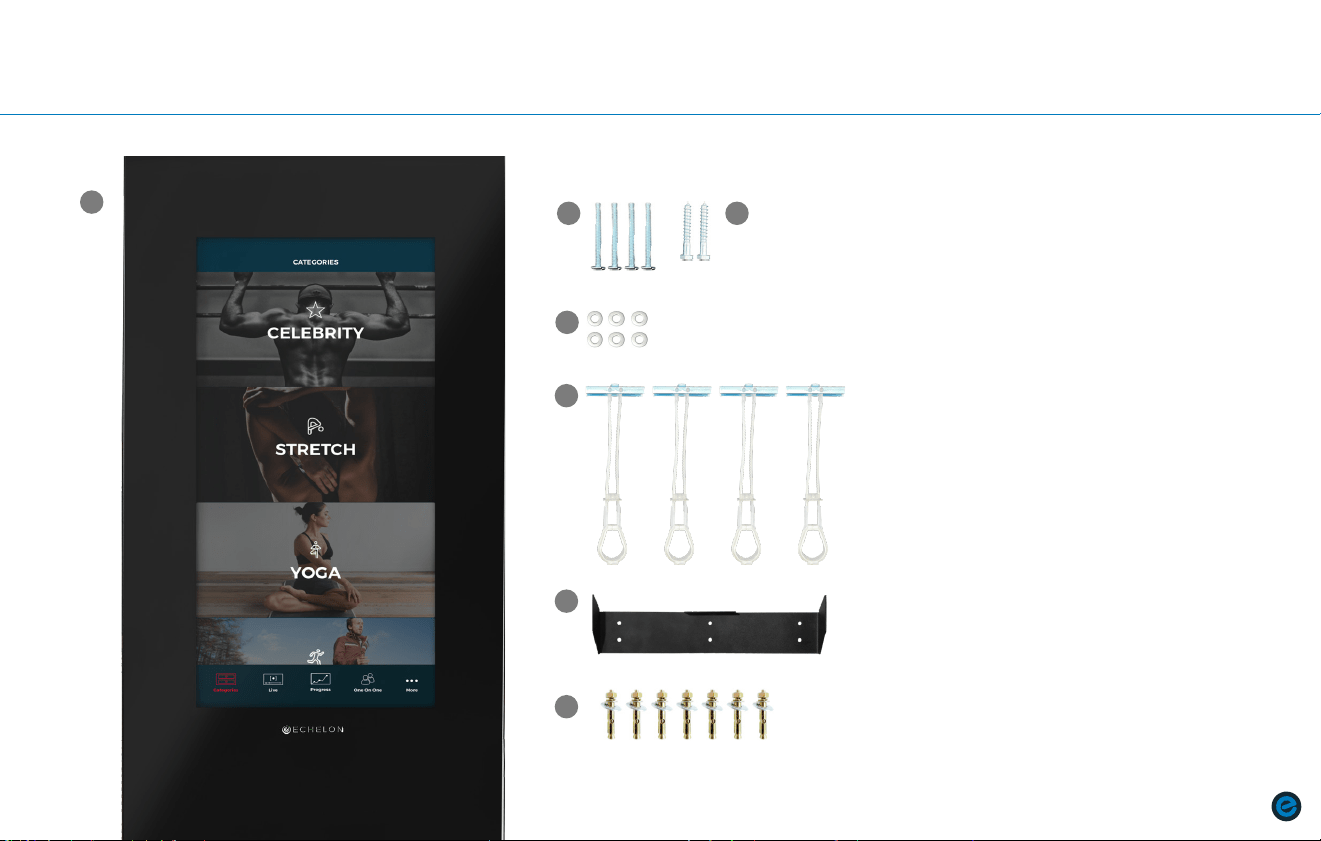
INCLUDES
1. Echelon
®
Reflect Fitness Mirror
2. Bolt (4)
3. Lag screw (2)
4. Washer (6)
5. Zip toggle anchor (4)
6. Wall mount
7. Sleeve anchor (6 for UK only)
3
7
(6 for UK only)
PARTS LIST

8
|
IMPOrTanT saFETY InsTruCTIOns
IMPORTANT SAFETY INSTRUCTIONS
WHILE CLEANING YOUR ECHELON
®
REFLECT 60,
PLEASE USE A SOFT RAG WITH MILD DETERGENT OR
WATER TO WIPE DOWN THE MACHINE. DO NOT USE
CORROSIVE CHEMICAL LIQUIDS WHICH MAY DAMAGE
THE COVER.
When using an electrical appliance, basic precautions should always
be followed, including the following:
Read all instructions before using the Echelon
®
Reflect 60.
FOR HOUSEHOLD USE ONLY.
SAVE THESE INSTRUCTIONS.
DANGER – TO REDUCE THE RISK OF ELECTRIC SHOCK:
Always unplug this appliance from the electrical outlet immediately after using
and before cleaning.
WARNING – TO REDUCE THE RISK OF BURNS, FIRE,
ELECTRIC SHOCK, OR INJURY TO PERSONS:
1. An appliance should never be left unattended when plugged in. Unplug
from outlet when not in use, and before putting on or taking off parts.
2. Do not operate under blanket or pillow. Excessive heating can occur and
cause fire, electric shock, or injury to persons.
3. This appliance is not intended for use by persons with reduced physical,
sensory or mental capabilities, or lack of experience and knowledge,
unless they have been given supervision or instruction concerning use
of the appliance by a person responsible for their safety. Keep children
under the age of 13 away from this machine.
4. Use this appliance only for its intended use as described in this manual.
Do not use attachments not recommended by the manufacturer.
5. Never operate this appliance if it has a damaged cord or plug, if it is not
working properly, if it has been dropped or damaged, or dropped into
water. Return the appliance to a service center for examination and repair.
6. Do not carry this appliance by supply cord or use cord as a handle.
7. Keep the cord away from heated surfaces.
8. Never operate the appliance with the air openings blocked. Keep the air
openings free of lint, hair, and the like.
9. Never drop or insert any object into any opening.
10. Do not use outdoors.
11. Do not operate where aerosol (spray) products are being used or where oxygen
is being administered.
12. To disconnect, turn all controls to the o position, then remove plug from outlet.
BEFORE starting any fitness or strength program, consult with your
physician or health official. This will ensure that you engage in the proper
strength or fitness program for your age and physical condition.
Before using the Echelon
®
Reflect 60, answer these questions:
• Have you been sick recently?
• Have you had prolonged dizziness recently?
• Have you been out of breath for no reason recently?
• Have you had chest pain recently?
• Do you currently have any injuries preventing you from exercise?
• Are you pregnant?
• Do you have any conditions or reasons you should NOT exercise?
• Are you over 35 years old and physically inactive?
• Have you been told by a doctor that you should NOT exercise?
IMPOrTanT saFETY InsTruCTIOns
|
9
IMPORTANT SAFETY INSTRUCTIONS
If you answer “yes” to any of the above questions, you should seek further
advice from your doctor prior to using the Echelon
®
Reflect 60.
Read the user manual fully and follow all instructions. This ensures
your safety.
ALWAYS use the Echelon
®
Reflect 60 in a well lit and ventilated area.
• ALWAYS check the mirror before use.
• NEVER use the mirror if it is not properly/completely assembled or is
damaged in any way.
• NEVER use Echelon
®
Reflect 60 when sick or fatigued.
• ALWAYS wear proper attire and footwear that fully covers your feet. Long
hair should be tied back or tucked away. Ensure that shoelaces are tucked
into your shoes.
• ALWAYS warm up/stretch before starting exercise.
• NEVER overexert yourself or work to exhaustion. If you feel faint, dizzy,
short of breath, or if you have chest or other pains, STOP IMMEDIATELY!
Consult your physician before using the Echelon
®
Reflect 60 again.
• ALWAYS ensure that you have a water bottle filled with at least 12 oz.
of water and a towel close by to absorb sweat from your body and the
handlebars.
• NEVER use accessory attachments that have not been recommended by
the manufacturer. Using such attachments may cause injury or damage to
the mirror and will affect the warranty of the mirror.
• ALWAYS ensure that the Echelon
®
Reflect 60 is wiped down after each use
to keep it sanitary.
• Cleaning and user maintenance shall not be made by children without
supervision.
If any problems arise affecting the performance of the Echelon
®
Reflect 60,
contact the manufacturer immediately. Always ensure that parts which undergo
wear are checked regularly.
This safety information and user manual do not replace the need to be alert and
to use common sense when using the Echelon
®
Reflect 60!
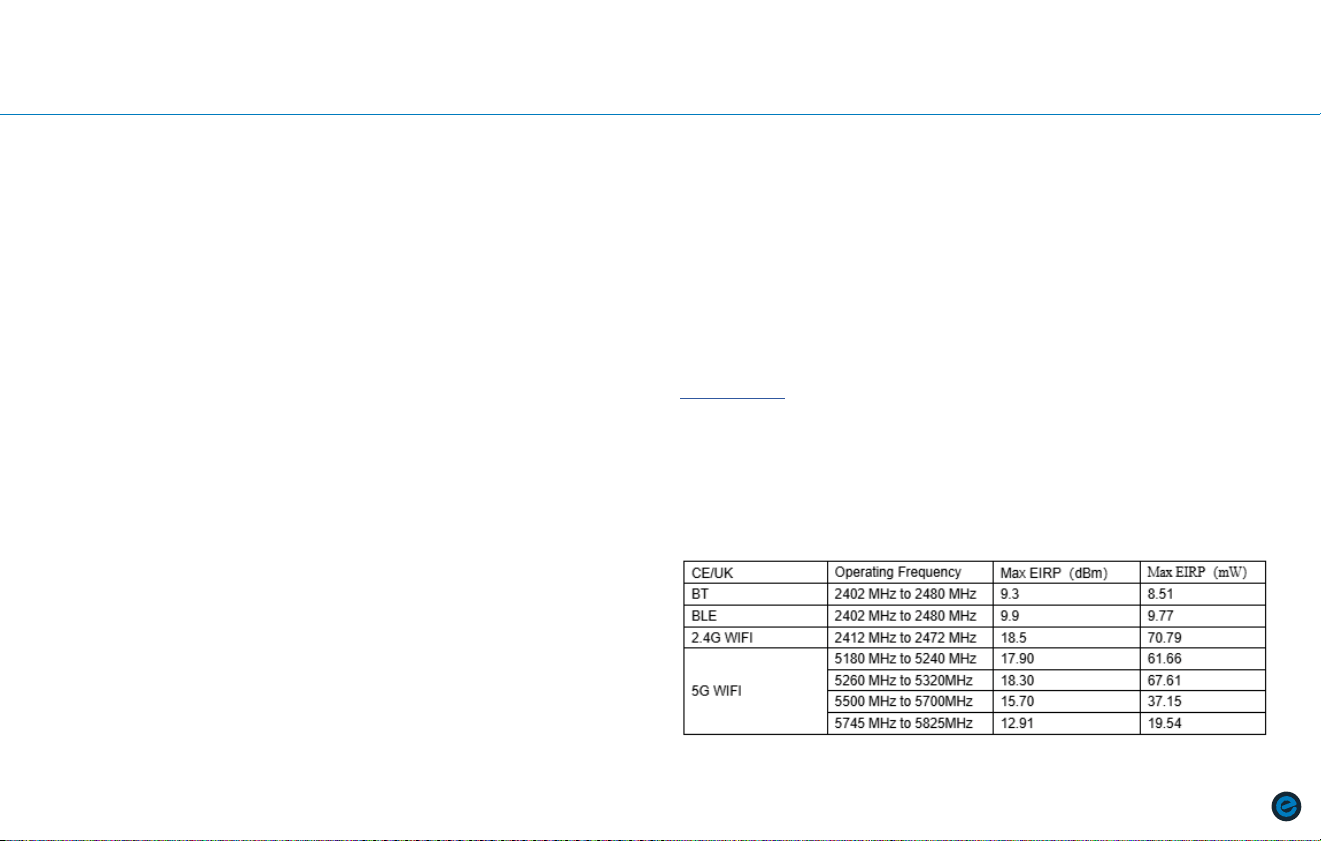
FREQUENCY:
POWER:
DOC Document

10
|
IMPOrTanT saFETY InsTruCTIOns
GROUNDING INSTRUCTIONS
This product must be grounded. If it should malfunction or breakdown,
grounding provides a path of least resistance for electric current to reduce the
risk of electric shock. This product is equipped with a cord having an equipment-
grounding conductor and a grounding plug. The plug must be plugged into an
appropriate outlet that is properly installed and grounded in accordance with all
local codes and ordinances.
Two common types of outlets presently in Homes are: GFCI (Ground Fault Circuit
Interrupter) and AFCI (Arc Fault Circuit Interrupter). Should hazardous wiring
occur, either outlets are programmed to trip. Due to this, treadmills and other
equipment have poor interactions with the GFCI or AFCI outlets.
Oftentimes, GFCI outlets are installed in either bathrooms or kitchens. These can
be identified with either a red or white reset switch that is located on the front of
the outlet. Should an excessive amount of power go through the group port, the
GFCI outlet will flip their breaker. Due to treadmills and other equipment using
the ground prong to help disperse static electricity, it is not ideal to use a GFCI
outlet to power your machine. It is recommended that equipment be plugged
into a different type of outlet that will prevent the machine from continually
shutting down. Please note that GFCI outlets can be connected to other outlets
(even if they’re not that specific type of outlet) and it is recommended moving
the equipment to a space that is not electrically tied together. Do not plug your
equipment into surge protectors or other types of units, it is recommended that
the equipment is plugged into a dedicated circuit.
Electrical arcs are detected by AFCI outlets and are designed to disrupt and
cancel the flow of electricity. Due to this, treadmills and other equipment would
likely have issues of shutting down if plugged into AFCI outlets. Newer building
codes now require AFCI outlets, however, if you’re having persistent issues, here
are some recommended solutions: consult an electrician or switch to a different
type of outlet.
IMPORTANT SAFETY INSTRUCTIONS (cont’d.)
IMPOrTanT saFETY InsTruCTIOns
|
11
DANGER – Improper connection of the equipment-grounding conductor can
result in a risk of electric shock. Check with a qualified electrician or serviceman
if you are in doubt as to whether the product is properly grounded. Do not
modify the plug provided with the product. If it will not fit the outlet, have a
proper outlet installed by a qualified electrician.
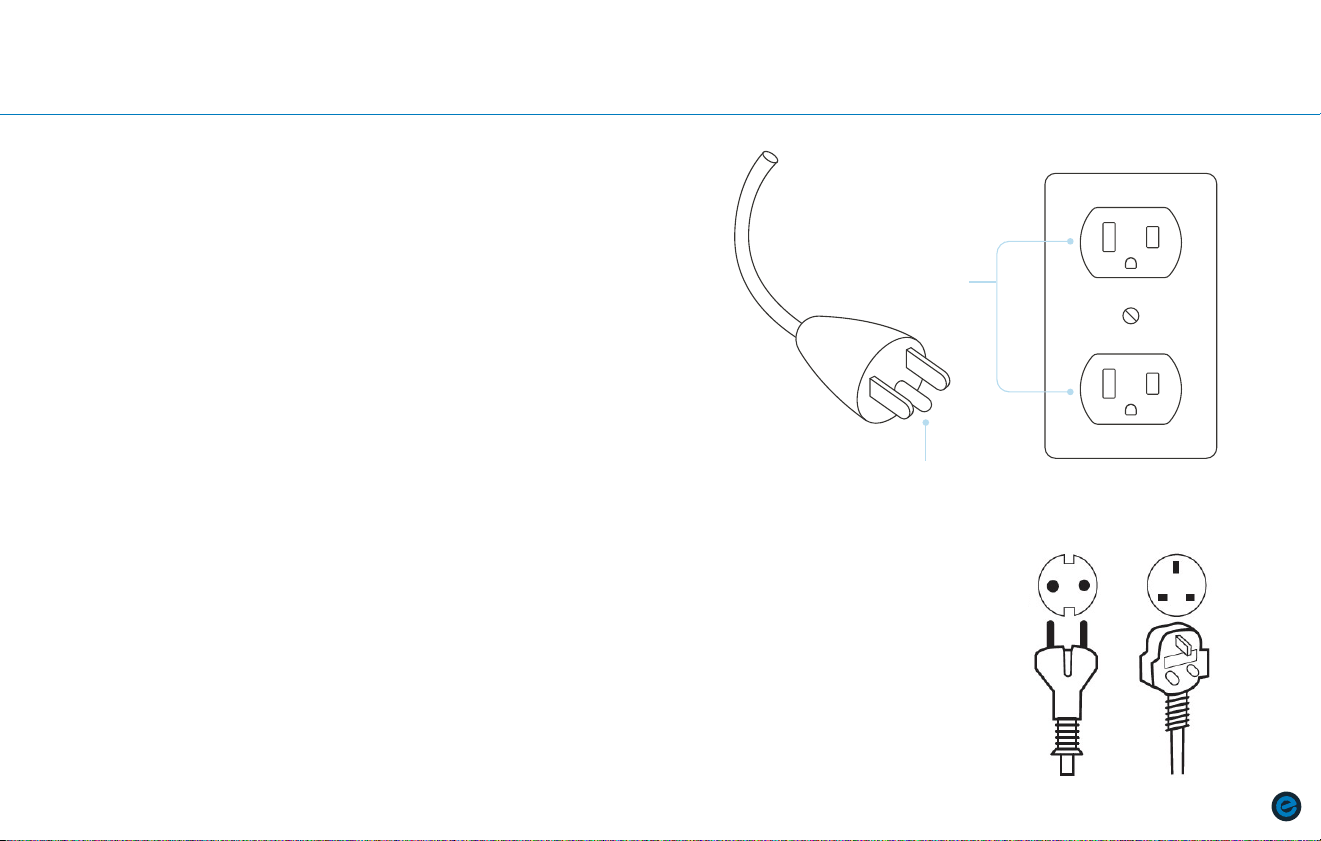
For use in the USA, products are designed to operate on a nominal 120-V
circuit and have a grounding plug that looks like the plug illustrated in sketch
A. For use in the EU and UK, products are designed to operate on a nominal
220-V circuit and have a grounding plug that looks like the plug illustrated in
sketch B. Make sure that the product is connected to an outlet having the same
configuration as the plug. No adapter should be used with this product.
Grounded Outlet
Grounding Pin
SKETCH A
SKETCH B
Standard EURO/UK
Voltage
220 - 240 VAC
Standard EURO/UK
Frequency
50 HZ
IMPORTANT SAFETY INSTRUCTIONS (cont’d.)
12
|
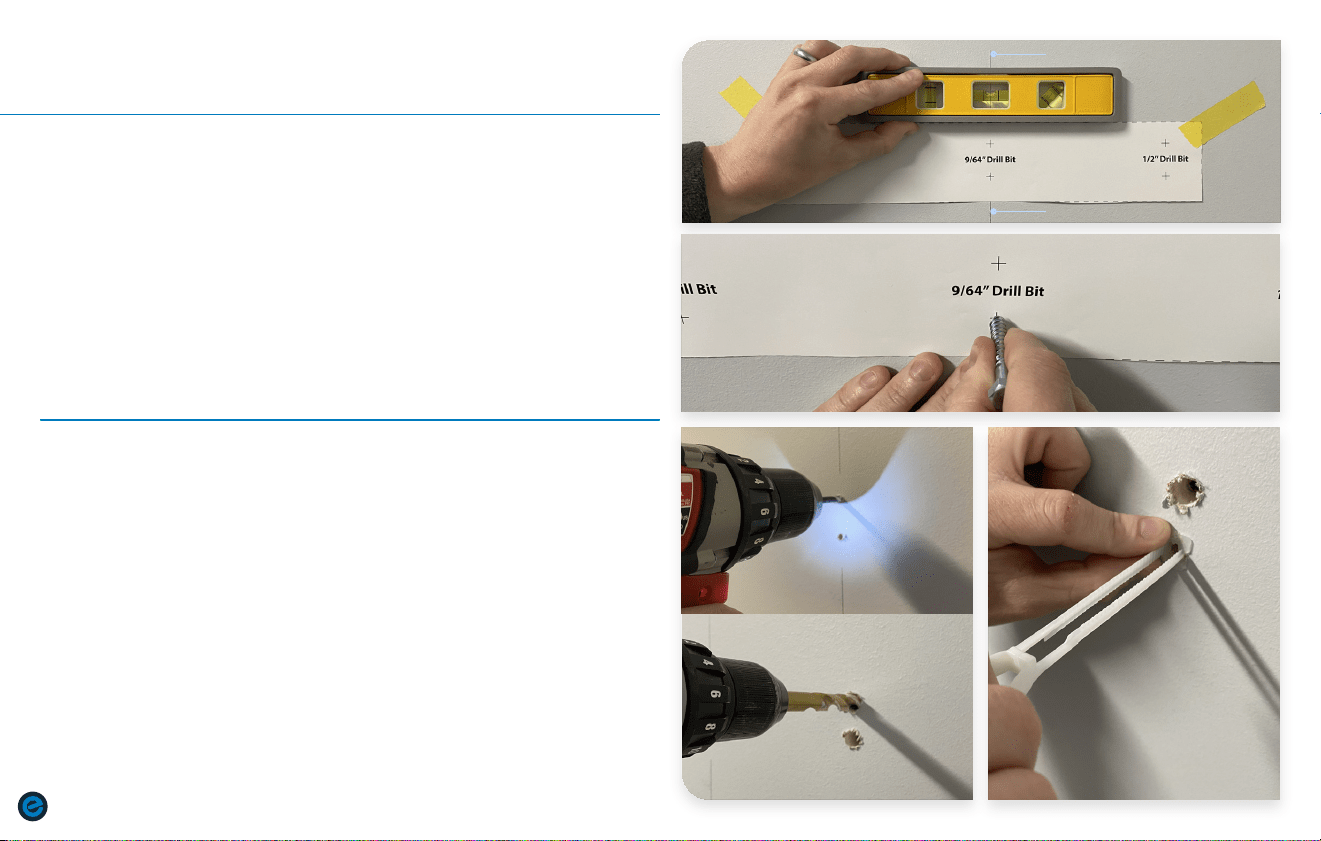
InsTaLLIng THE MOunT
Drywall
a. The Echelon
®
Reflect is required to be mounted directly
to a wall stud or suitable floor stand. Note: Standard
installation height is 69” to the top of the wall mount.
b. Locate stud within the wall you intend to hang your Reflect
and mark with a pencil. Level and tape wall mount template
with middle two cross marks centered over stud mark.
c. Mark all six holes by pressing the tip of a lag screw through
the center of each cross mark.
* Ensure that you press hard enough to leave a hole in the drywall
behind the template.
a. Using a 9/64” drill bit, drill two pilot holes for the lag screws.
Using a 1/2” drill bit, drill four holes for the zip toggles.
b. Insert zip toggles into 1/2” holes and push the zip toggle plate
until it is flush against the wall.
* Ensure eyelet of zip toggle is oriented as shown above.
1
2
STEP
STEP
1-c
1-b
INSTALLING THE MOUNT
2-a
2-b
STUD MARK
STUD MARK
9/64"
1/2"
InsTaLLIng THE MOunT
|
13
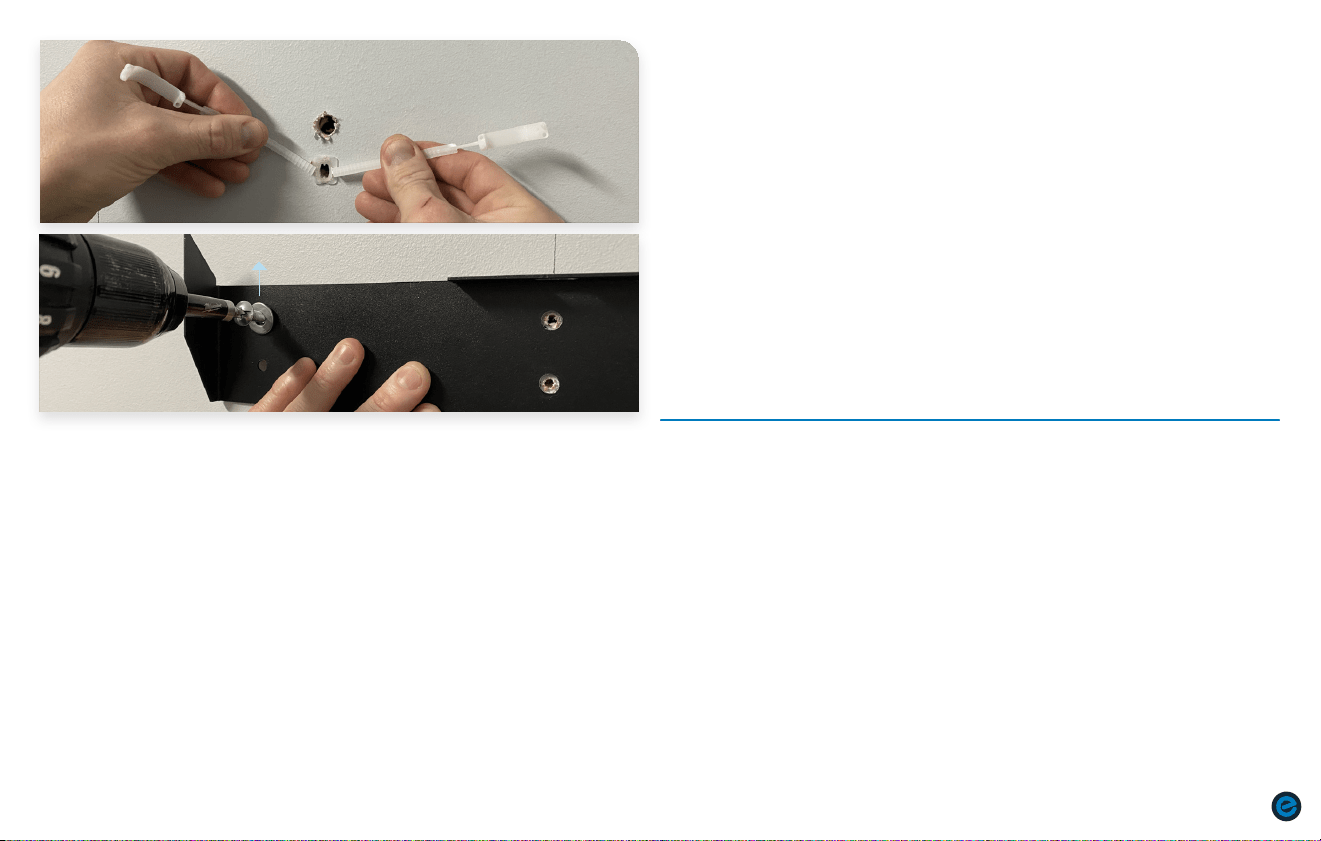
a. Snap off excess plastic from the zip toggle.
**Before starting the next step, make sure wall mount is facing upright as shown
by the arrow in next step.
b. Hand screw in bolts into the zip toggles. Use drill to tighten down.
* If installing onto an insulated wall, ensure anchor sits flush inside inner wall
before tightening down.
3
STEP
3-a
3-b
14
|
InsTaLLIng THE MOunT
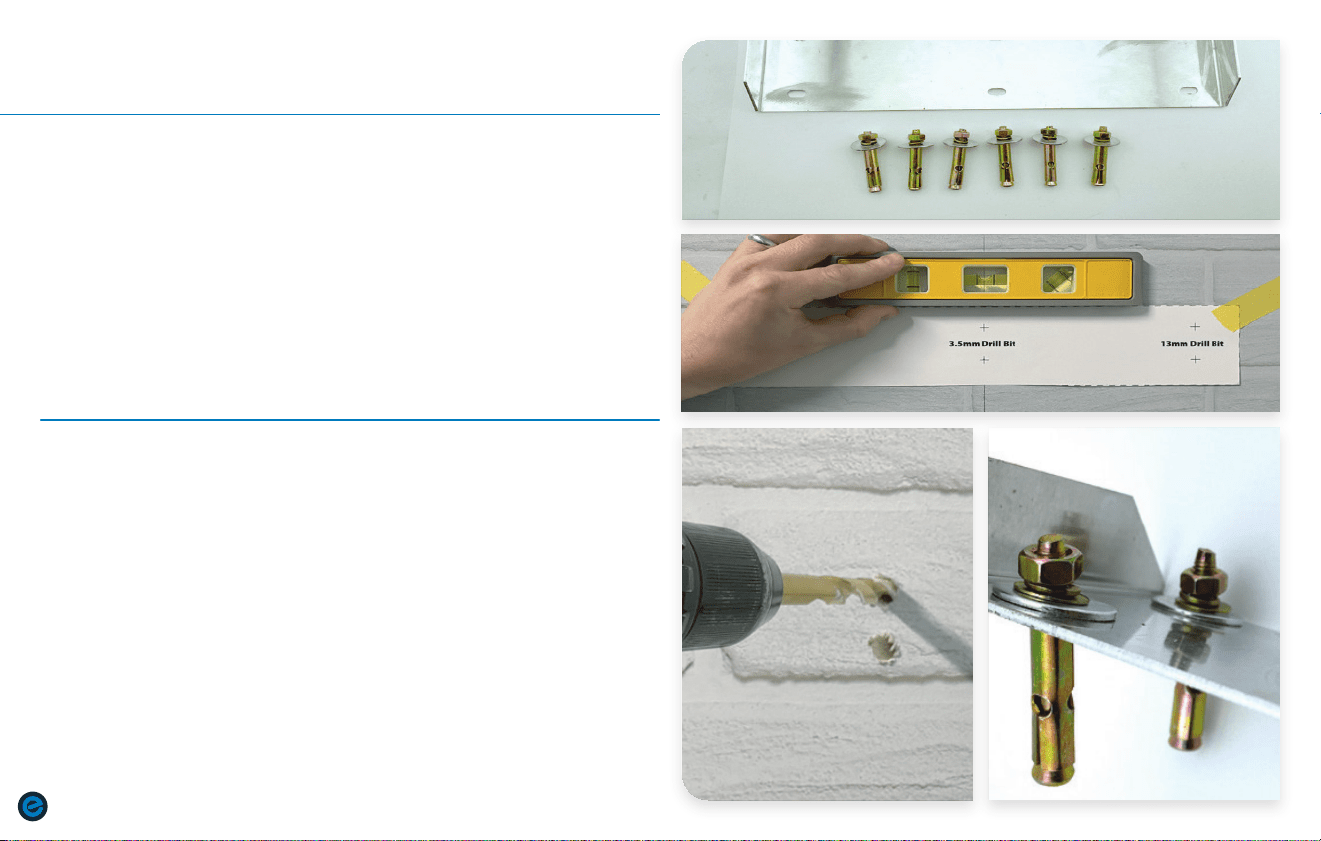
Brickwall or Concrete
a. Locate mounting bracket and Sleeve Anchor hardware within
the box.
b. Level and tape wall mount template. Mark all six holes by
pressing the tip of a pencil through the center of each cross
mark.
*Ensure that you press hard enough to leave a mark behind
the template.
a. Using appropriate tools, drill a hole the same diameter
as the sleeve anchor diameter,and at least 15mm deeper
than the sleeve anchor depth. An 8mm drill bit would allow
for tightest fit but may require force to insert the sleeve
anchor. Increase bit size up to 9mm as needed.
b. Insert the sleeve anchor through the wall bracket into the hole in
the base material until the washer and nut are tight against the
wall bracket. A hammer may be required.
1
2
STEP
STEP
2-a 2-b
INSTALLING THE MOUNT
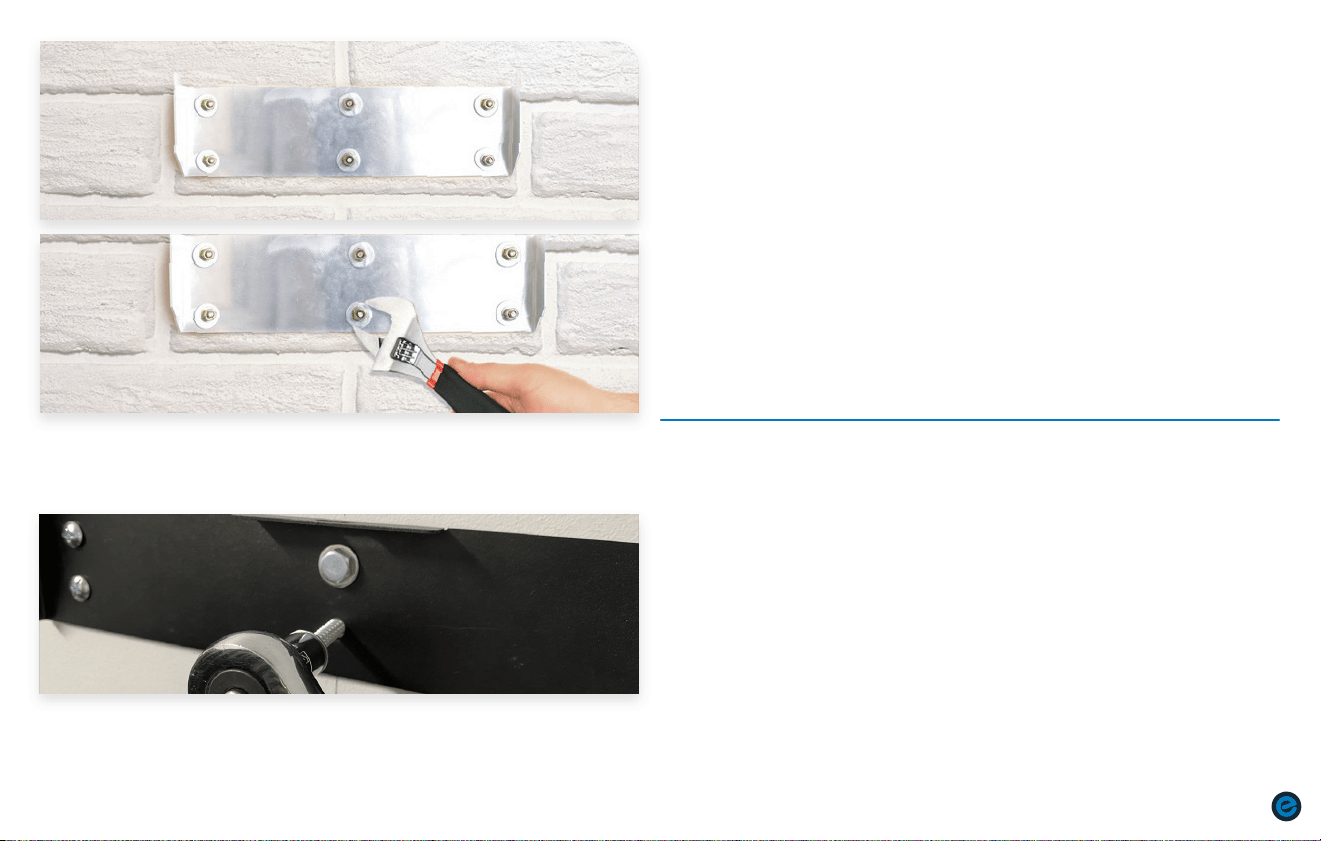
4-b
4-a
InsTaLLIng THE MOunT
|
15
a. Turn the nut until finger tight.
b. Use a wrench to set the anchor by turning the nut three to four full
turns.
3
STEP
3-a
3-b
4-a
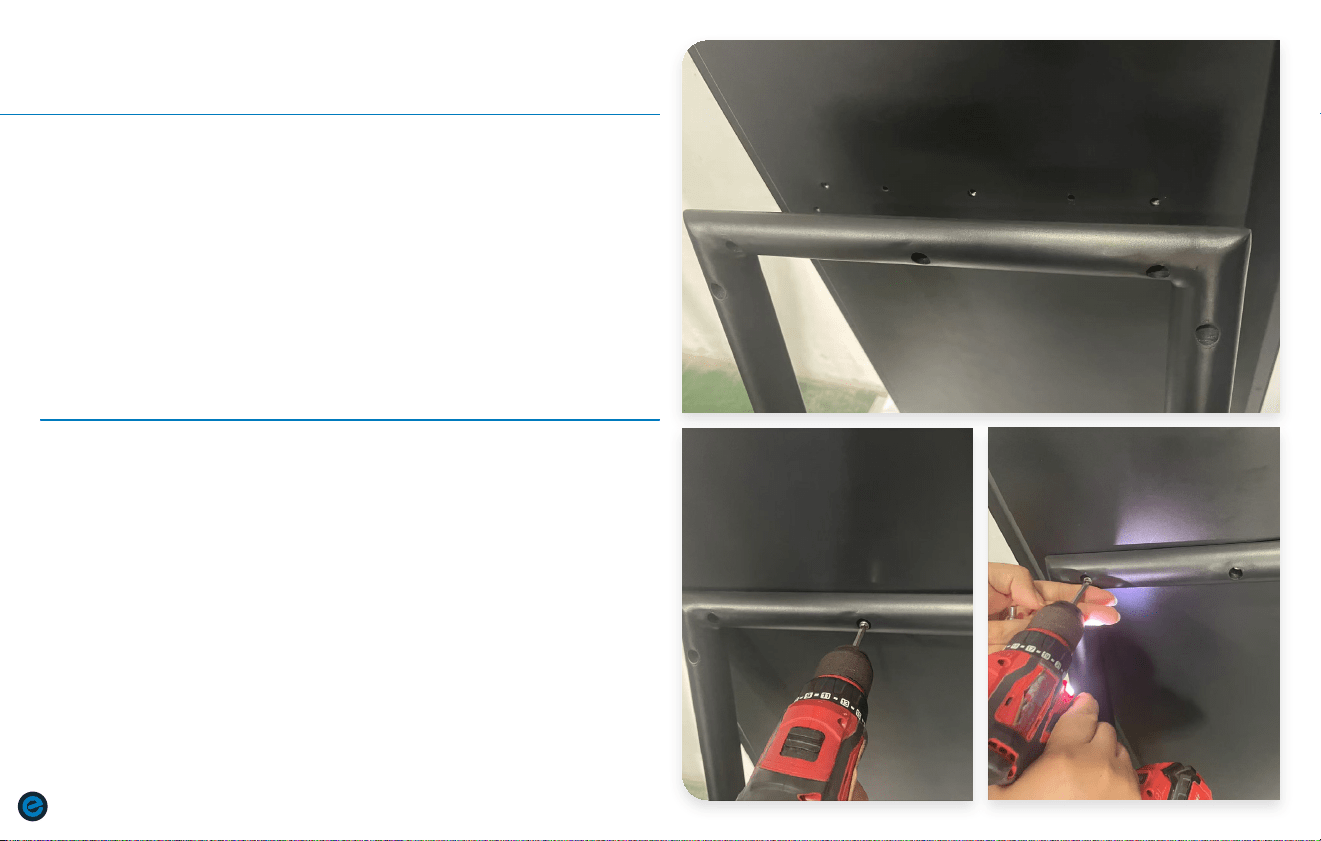
a. Drive in the two lag screws into the pre-drilled pilot holes.
4
STEP
16
|
InsTaLLIng THE sTanD
Reflect Stand
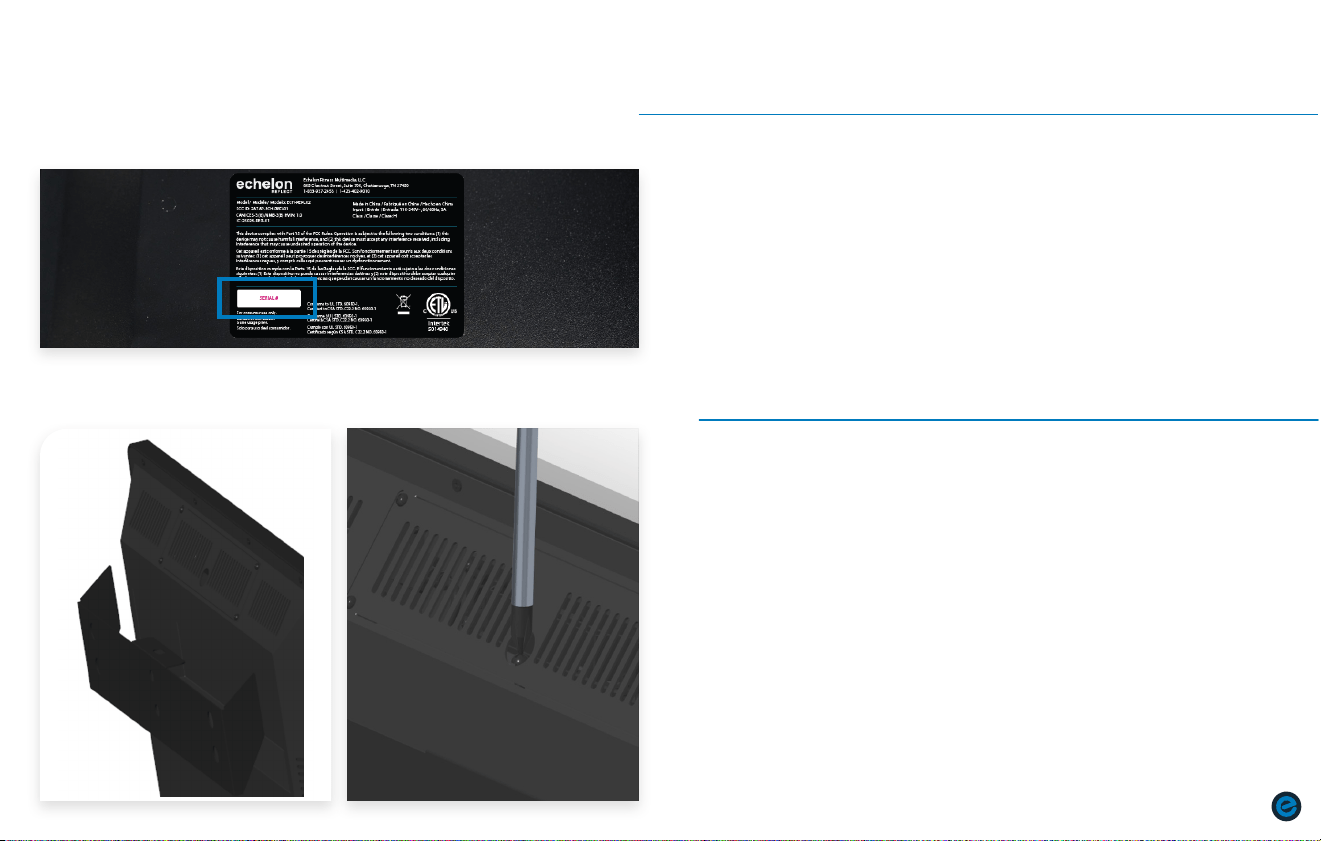
a. Locate 5x Phillips Head Screws and Reflect Stand.
b. Align holes on Reflect Stand with screw holes on back of
Reflect mirror casing.
a. Using appropriate tools, attach Reflect Stand beginning
with middle screw and working outward.
b. Do not fully tighten screws until all screws have been
installed.
1
2
STEP
STEP
2-a 2-b
INSTALLING THE STAND
HangIng THE MOunT
|
17
1-a
4-b
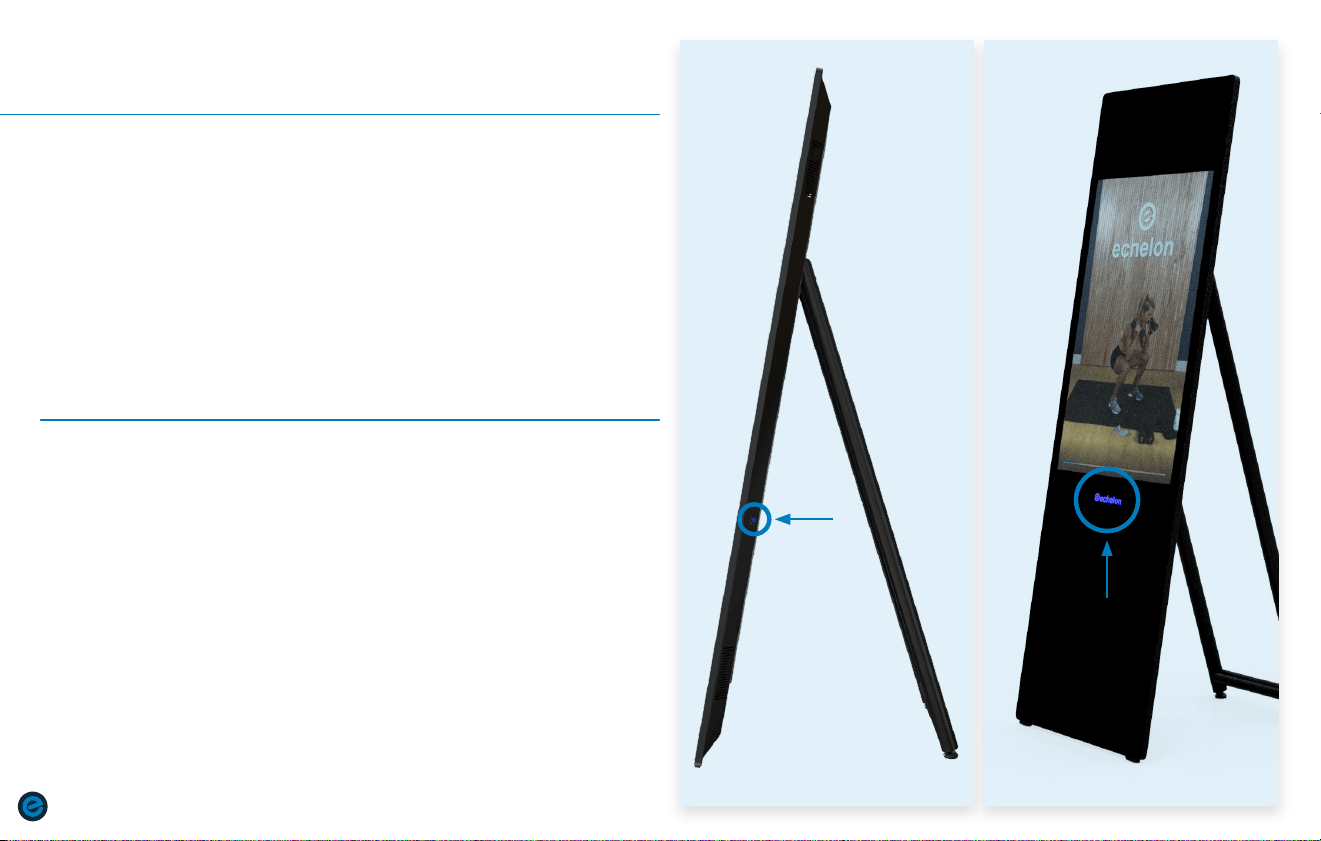
a. Place the Reflect onto the wall mount as shown above.
b. Using a Philips screwdriver, drive in the screw located above
wall mount to secure.
1
STEP
HANGING THE MOUNT
a. BEFORE HANGING REFLECT ON THE WALL MOUNT, be sure to write
down your product’s serial number for registering your product
on the Echelon Fit
TM
App. The serial number can be located on the
label on the back of the Reflect.
2
STEP
18
|
POWErIng On/OFF
1-a 2-a
1
2
STEP
STEP
POWERING ON/OFF
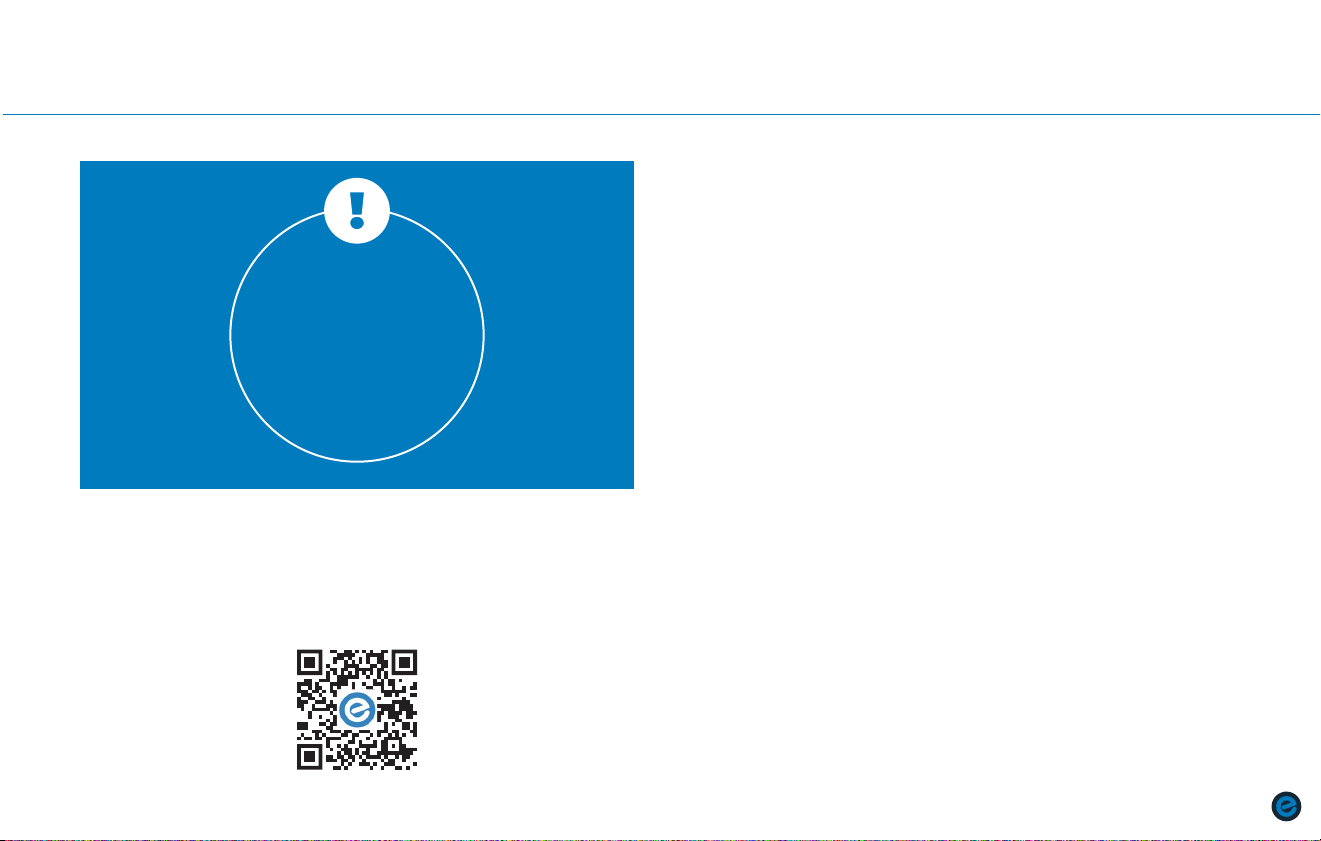
a. To turn off the Reflect, press and hold the echelon® logo for six
seconds. (fig. 2-a)
a. To turn on the Reflect, flip the switch on the back of the unit to the
right then press the power button on the right side of the mirror. The
power button will turn blue when PRESSED. (fig. 1-a)
ECHELOn MEMBErsHIP aCTIvaTIOn
|
19
ECHELON MEMBERSHIP ACTIVATION
1. CHOOSE “SIGN UP NOW”
2. SELECT PURCHASE LOCATION
Select purchase location and follow the on-screen instructions.
3. CHOOSE YOUR PLAN
Monthly / 1-Year and 2-Year
4. SET UP PAYMENT METHOD
5. ENTER PERSONAL ACCOUNT INFO
6. VIEW YOUR ACCOUNT
Edit your billing info, add family members, manage subscriptions,
and (if on your mobile device) download the app and sign in.
ACCOUNT ACTIVATION
If this product was purchased on the echelonfit.com website, you should have
received an activation email. Click the link in the activation email and follow the
on-screen instructions. Enter your information to verify payment information. You
will not be charged until the next month.
ACCOUNT CREATION
All account info and plans are managed at member.echelonfit.com and use
the same login. After creating your account login on member.echelonfit.com,
write down your login info. This will be the same login for the App.
Activate Echelon Premier Membership to connect to classes.
To learn more about the membership, visit echelonfit.com/membership.
a. Scan QR code below or visit member.echelonfit.com.
b. Follow prompts to complete membership enrollment.
Membership
Activation
Required
to Unlock the
Reflect Touch
Experience
20
|
PrODuCT usE
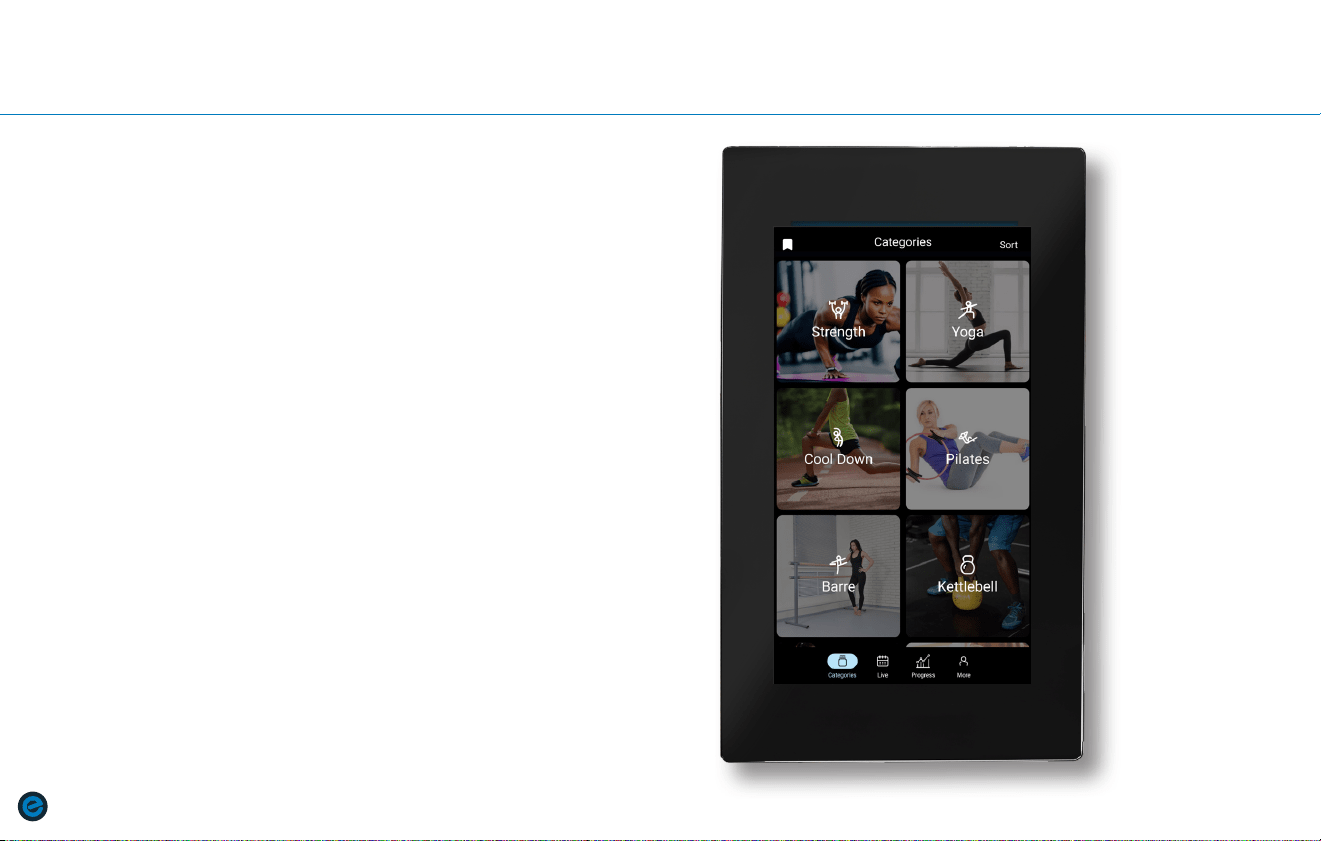
FAVORITES:
Press Flag icon on top left of screen to see classes that have been added to
the Favorites list.
SORT:
Press Sort on top right of screen to filter classes alphabetically or by
popularity.
CATEGORIES:
Press to view class categories. Select category to view all classes in that
category.
LIVE:
Press to view Live class schedule. Upcoming Live classes will show a
countdown until the class begins.
PROGRESS:
Press to view Weekly / Monthly goals, Weekly Stats, Badges earned, and My
Workouts.
MORE:
Press to see Settings menu, Sign Out, Switch User, and Check for Updates.
PRODUCT USE
PrODuCT usE
|
21
PRODUCT USE
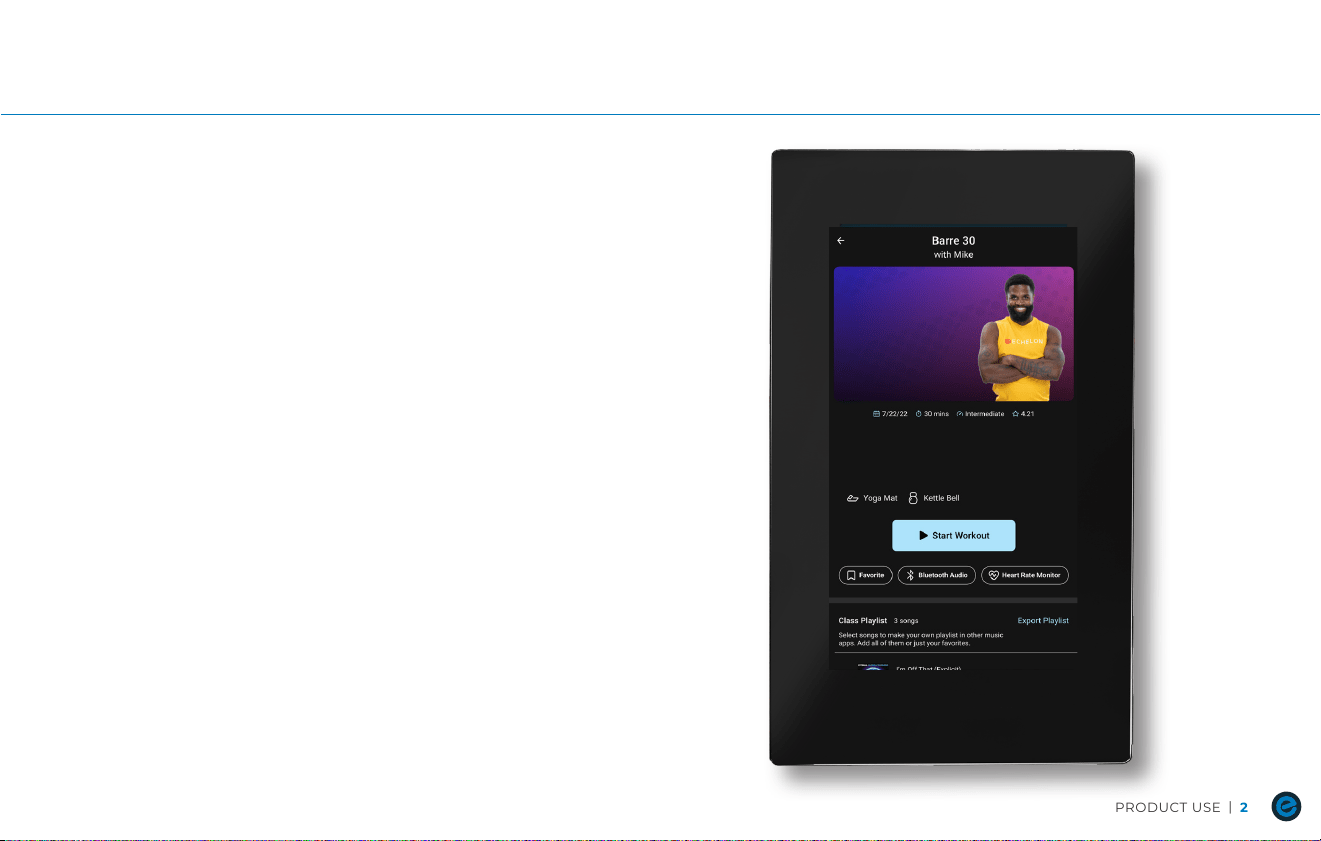
CONNECTING TO WIFI:
• WiFi menu will automatically pop up upon initial start up.
• Select network and enter password if secured.
• Connection attempt will time out after 20 seconds. If attempt times out,
check wifi router to be sure the signal is strong then repeat step 2.
CONNECTING HEARTRATE MONITOR:
• Choose class and press to select.
• Once in the class, be sure your heart rate monitor is in pairing mode then
press the Heart icon.
• When successfully paired, the Heart icon will change from white to red.
CONNECTING BLUETOOTH AUDIO DEVICE
• Choose class and press to select.
• Once in the class, press the headphone icon to open Bluetooth
device menu.
• Ensure Bluetooth Audio Device is in pairing mode.
• Select desired Bluetooth device in Bluetooth device menu.

22
|
CarE & MaInTEnanCE
CARE & MAINTENANCE
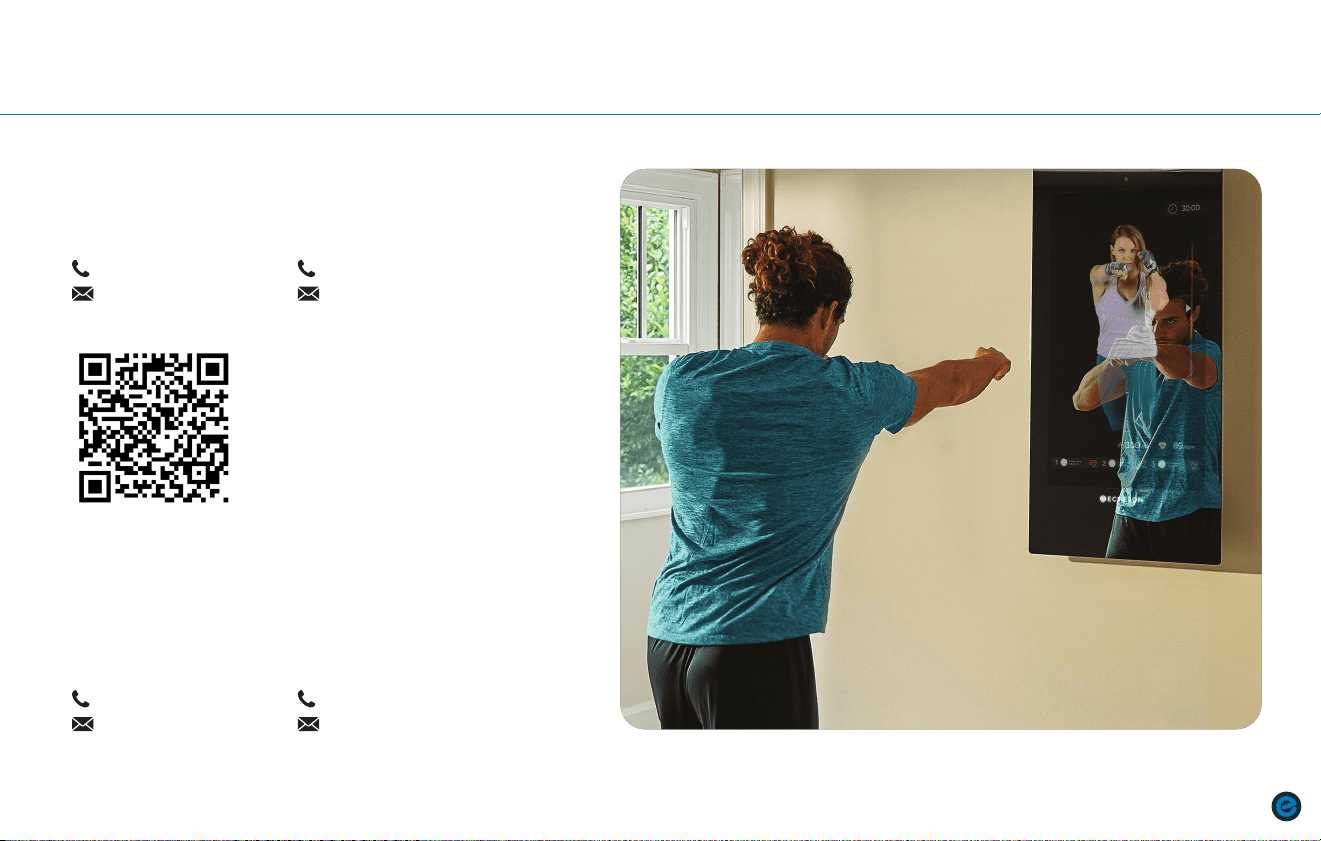
CARE AND MAINTENANCE:
Daily
• Clean the REFLECT mirror surface with a soft cloth dampened by non-acidic
(NO ammonia, chlorine, or alcohol) cleaner. Do NOT spray cleaning solution
directly on mirror as electrical components could be damaged.
• Inspect plug for damage. If plug is damaged, discontinue use immediately
and contact customer service..
Weekly
• Update firmware and app on REFLECT if updates are available. Failure
to update firmware and app will result in poor performance of REFLECT
and app.
• Ensure that your WiFi router is operating normally and that streaming speeds
are within normal range.
CusTOMEr sErvICE
|
23
CARE & MAINTENANCE CUSTOMER SERVICE
Questions or Concerns
Our customers are our priority! If you require assistance or
have concerns, please contact our customer service team.
Submit a Request:
Warranty Information
Your Echelon
®
Reflect Mirror comes with a minimum 1-year parts and labor
warranty. Should the need arise, all you need is a proof of purchase and
our customer service team will be happy to assist. Additional warranty
options and extensions are available by speaking with our renewal team.
Commercial:
(906) 208-8862
Residential:
(855) 4-GETFIT
Commercial:
(833) 586-1216
Residential:
(938) 336-2624
READ INSTRUCTIONS
BEFORE OPERATING
MADE IN
CHINA
PATENT
PENDING
REV: 04102026
MODEL: ECH-REFL-06
ECHELON FITNESS MULTIMEDIA, LLC
605 CHESTNUT STREET, SUITE 700
CHATTANOOGA, TN 37450
ECHELONFIT.COM