Read instructions carefully and thoroughly before first
use.
Instruction Manual
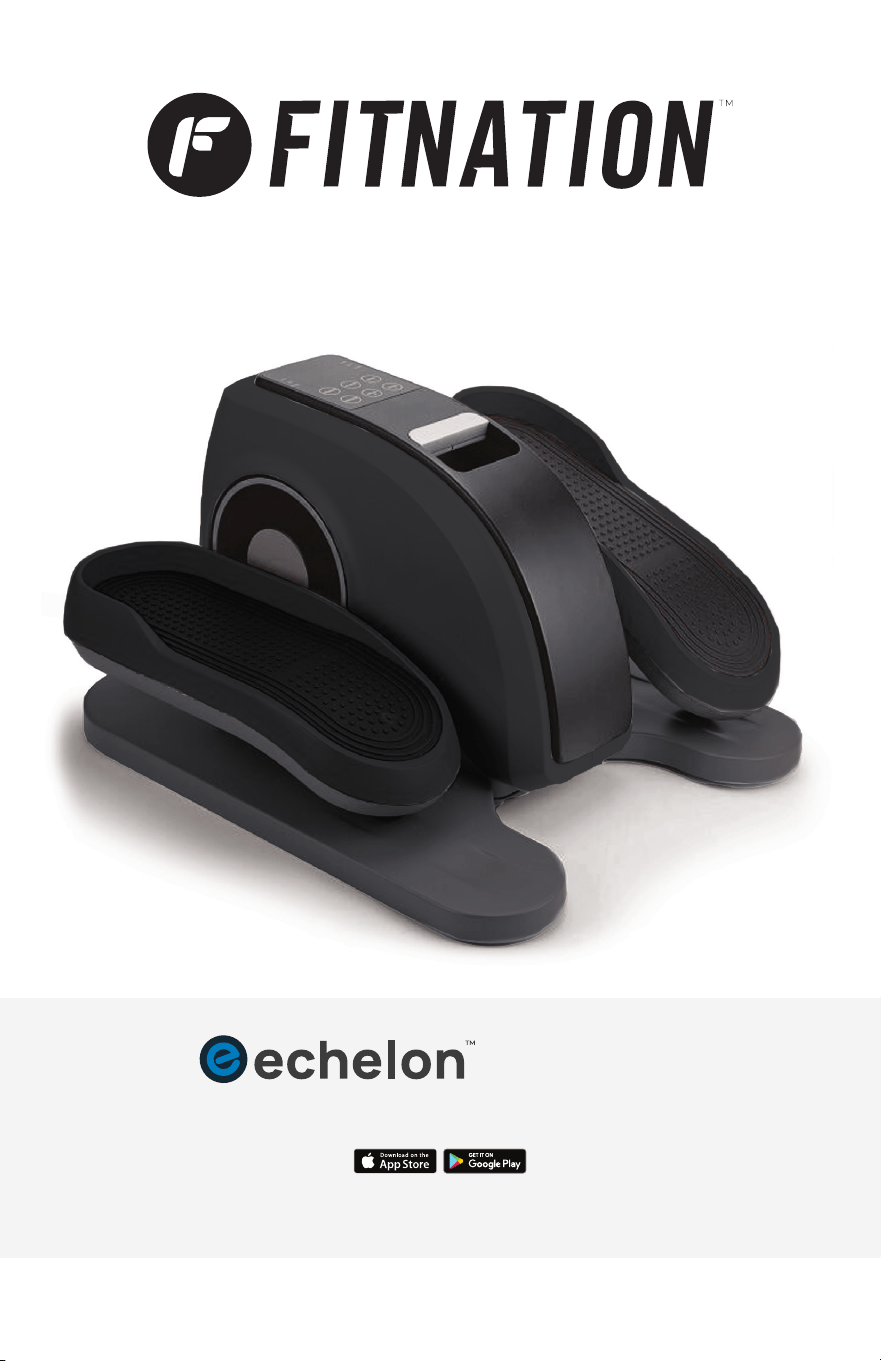
PEDAL PRO PLUS
FITNESS APP FOR SMARTPHONES AND TABLETS
Apple and the Apple
®
logo are trademarks of Apple
®
Inc. Registered in the U.S. and other countries.
App Store is a service mark of Apple
®
Inc. Registered in the U.S. and other countries Google
®
Play
and the Google
®
Play logo are trademarks of Google
®
Inc.
Fit
®
App

2
FEDERAL COMMUNICATIONS
COMMISSION (FCC) STATEMENT
This equipment has been tested and found to comply with the limits for a
Class B digital device, pursuant to Part 15 of the FCC Rules. These limits are
designed to provide reasonable protection against harmful interference in
a residential installation. This equipment generates, uses and can radiate
radio frequency energy and, if not installed and used in accordance with
the instructions, may cause harmful interference to radio communications.
However, there is no guarantee that interference will not occur in a particular
installation. If this equipment does cause harmful interference to radio or
television reception, which can be determined by turning the equipment off
and on, the user is encouraged to try to correct the interference by one or
more of the following measures:
• Reorient or relocate the receiving antenna.
• Increase the separation between the equipment and receiver.
• Connect the equipment into an outlet on a circuit different from that to
which the receiver is connected.
• Consult the dealer or an experienced radio/TV technician for help.
This device complies with Part 15 of the FCC Rules. Operation is subject to the
following two conditions:
1. This device may not cause harmful interference, and
2. This device must accept any interference received, including interference
that may cause undesired operation.
Please note that changes or modifications of this product is not expressly
approved by the party responsible for compliance could void the user's
authority to operate the equipment.
Echelon Fitness Multimedia, LLC
605 Chestnut Street, Suite 700, Chattanooga, TN 37450
833-937-2453
IMPORTER INFORMATION
3
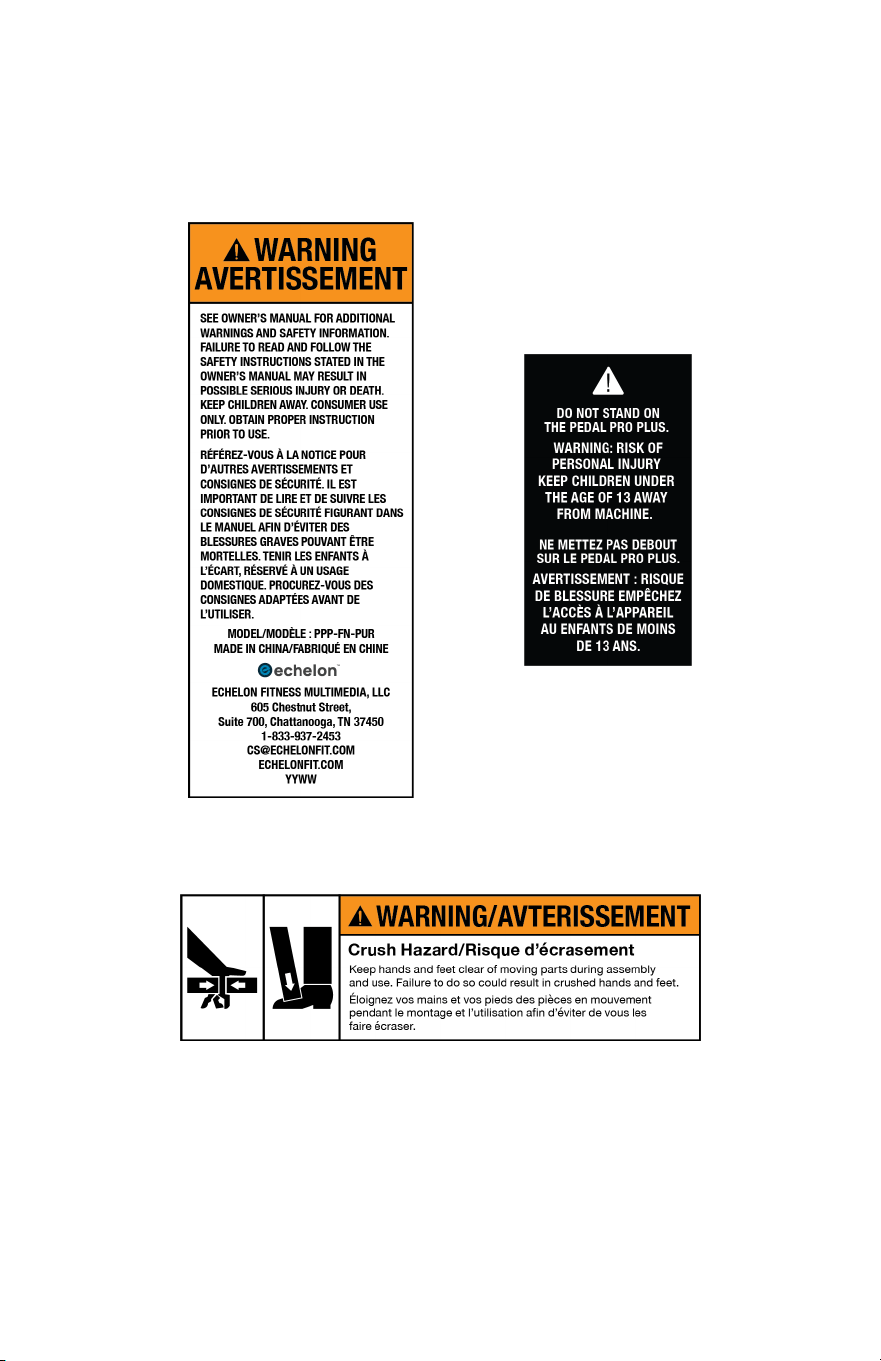
WARNING LABELS
Crush Warning Label
Standing Warning Label
Warning Label

4
IMPORTANT SAFETY
INSTRUCTIONS
When using an electrical appliance, basic precautions should always be followed,
including the following:
Read all instructions before using the Pedal Pro Plus.
DANGER ―
To reduce the risk of electric shock:
1. Always unplug this appliance from the electrical outlet immediately after
using and before cleaning.
WARNING ―
To reduce the risk of burns, fire, electric shock, or injury to persons:
1. An appliance should never be left unattended when plugged in. Unplug
from outlet when not in use, and before putting on or taking off parts.
2. Do not operate under blanket or pillow. Excessive heating can occur and
cause fire, electric shock, or injury to persons.
3. Close supervision is necessary when this appliance is used by, on, or near
children, invalids, or disabled persons. This appliance is not intended for
use by persons with reduced physical, sensory or mental capabilities,
or lack of experience and knowledge, unless they have been given
supervision or instructions concerning use of the appliance by a person
responsible for their safety. Keep children under the age of 13 away from
this machine.
4. Use this appliance only for its intended use as described in this manual. Do
not use attachments not recommended by the manufacturer.
5. Never operate this appliance if it has a damaged cord or plug, if it is not
working properly, if it has been dropped or damaged, or dropped into the
water. Return the appliance to a service center for examination and repair.
6. Do not carry this appliance by supply cord or use cord as a handle.
7. Keep the cord away from heated surfaces.
8. Never operate the appliance with the air openings blocked. Keep the air
openings free of lint, hair, and the like.
9. Never drop or insert any object into any opening.
10. Do not use outdoors.
11. Do not operate where aerosol (spray) products are being used or where
oxygen is being administered.
12. To disconnect, turn all controls to the off position, then remove plug from
outlet.
13. Remove power supply when not in use, and store out of reach of children.
SAVE THESE INSTRUCTIONS

5
PLEASE READ ALL INSTRUCTIONS BEFORE USING THIS APPLIANCE, AND
RETAIN THESE INSTRUCTIONS FOR REFERENCE. SHOULD THE APPLIANCE
BE PASSED ON TO THIRD PARTIES, SO MUST THIS INSTRUCTION MANUAL.
1. This product is not intended for medical use. It is intended solely
for Leg Exercise.
2. Consult your physician before using this product if:
a. You are pregnant.
b. You have been fitted with a pacemaker, an implant, or other medical aid.
c. You suffer from diabetes.
d. You have a circulatory disorder.
e. You have any concerns about your health.
3. Older or infirm persons should consult their doctor before using the
product, even if they have no specific preexisting conditions.
4. Cease use immediately if you feel discomfort or pain.
5. Do not use this product immediately prior to going to bed. The appliance
has a stimulating effect, and can delay sleep.
6. To avoid a short circuit, connect the device correctly and keep it away from
metal (pins), rubbish and water.
7. Do not place the adapter on the ground to avoid being stepped on or
other potential damage.
8. To avoid overheating always stop the unit by removing the power cord or
turning off the unit with the console pad, or remote when the unit is not
in use. A thermal limiter is placed inside the power adapter to prevent
overheating of the unit.
9. Use the device on a level surface. If the device is not stable, it can tip over
and cause injury. 9) Remove the adapter from the power outlet when not
in use.
10. If you suspect a problem, turn off the device immediately.
11. Store the device in its packaging for prolonged storage, or in a secure, dry
and cool place. 12) Do not place any other objects on the device.
12. To avoid the risk of electric shock, do not use the device on wet skin.
13. Keep the product away from moisture. Do not use if the appliance or parts
of it are wet or damp.
14. Children should not play with the appliance. Cleaning and user
maintenance must not be performed by children unless they are over 13
years old and supervised. Children younger than 13 years of age are to be
kept away from the machine and the power cable.
15. To avoid injury and irreparable damage, always sit while using the device.
In order to avoid serious injury, never stand on the unit or use it with
excessive force.
16. Do not attempt to disassemble or repair the appliance. Repairs may only
be carried out by a suitable qualified technician.
IMPORTANT SAFETY
INSTRUCTIONS (cont'd)

6
To reduce the risk of electric shock, this appliance has a polarized plug (one
blade is wider than the other). This plug will fit in a polarized outlet only one
way. If the plug does not fit fully in the outlet, reverse the plug. If it still does not
fit, contact a qualified electrician to install the proper outlet. Do not change the
plug in any way.
Please note that changes or modifications of this product is not expressly
approved by the party responsible for compliance could void the user's authority
to operate the equipment.
17. Requires AAA batteries (included). Do not mix old and new batteries. Do
not mix alkaline, standard (carbon-zinc), or rechargeable (NiCd, Ni-MH, etc.)
batteries.
IMPORTANT SAFETY
INSTRUCTIONS (cont'd)
ATTENTION: For sensitive floor surfaces (wood or tile floors) we recommend
placing a film mat or carpet under the unit. This could prevent damage to
and discoloration of your flooring.
START UP & USE
The Pedal Pro Plus is designed for individuals to use their feet to improve
blood circulation while seated at home or work through a combination of
manpower and a motorized passive workout.
1. Plug the power adapter into the power outlet and connect the cable to
the unit. As soon as the device is connected to power, it will beep once
and the display will light up.
2. Once the device is connected, turn it so that the display faces forward. Press
the power button on the console or controller to access the settings. Select
a mode according to your requirements using the remote control
or the buttons on the device. Your settings will be shown on the display.
To start, press the Start/Stop button on remote control or on the device.
(See pg. 4–5).
3. To switch off appliance correctly, you must first stop the device by holding
down the power button on the device or tapping the power button on the
remote control. Then press and hold the power button on the device to shut
off the device completely.
4. Disconnect the appliance from the power outlet after use.
7
Sit on a chair and place your feet on the pedals.
DO NOT STAND ON UNIT.
NOTE: Never put your full body weight on the appliance, as this could
damage the device.
Requires 2 AAA batteries (included). Do not mix alkaline, standard
(carbon-zinc), or rechargeable (NiCd, Ni-MH, etc) batteries.
1. Open battery compartment door on the back of the remote control.
2. Note the inside of the compartment that shows the correct battery
installation polarity.
3. Install 2 AAA batteries according to the correct polarity.
4. Replace the battery compartment door.
CORRECT POSITIONS FOR USE
REMOTE CONTROL BATTERY INSTALLATION
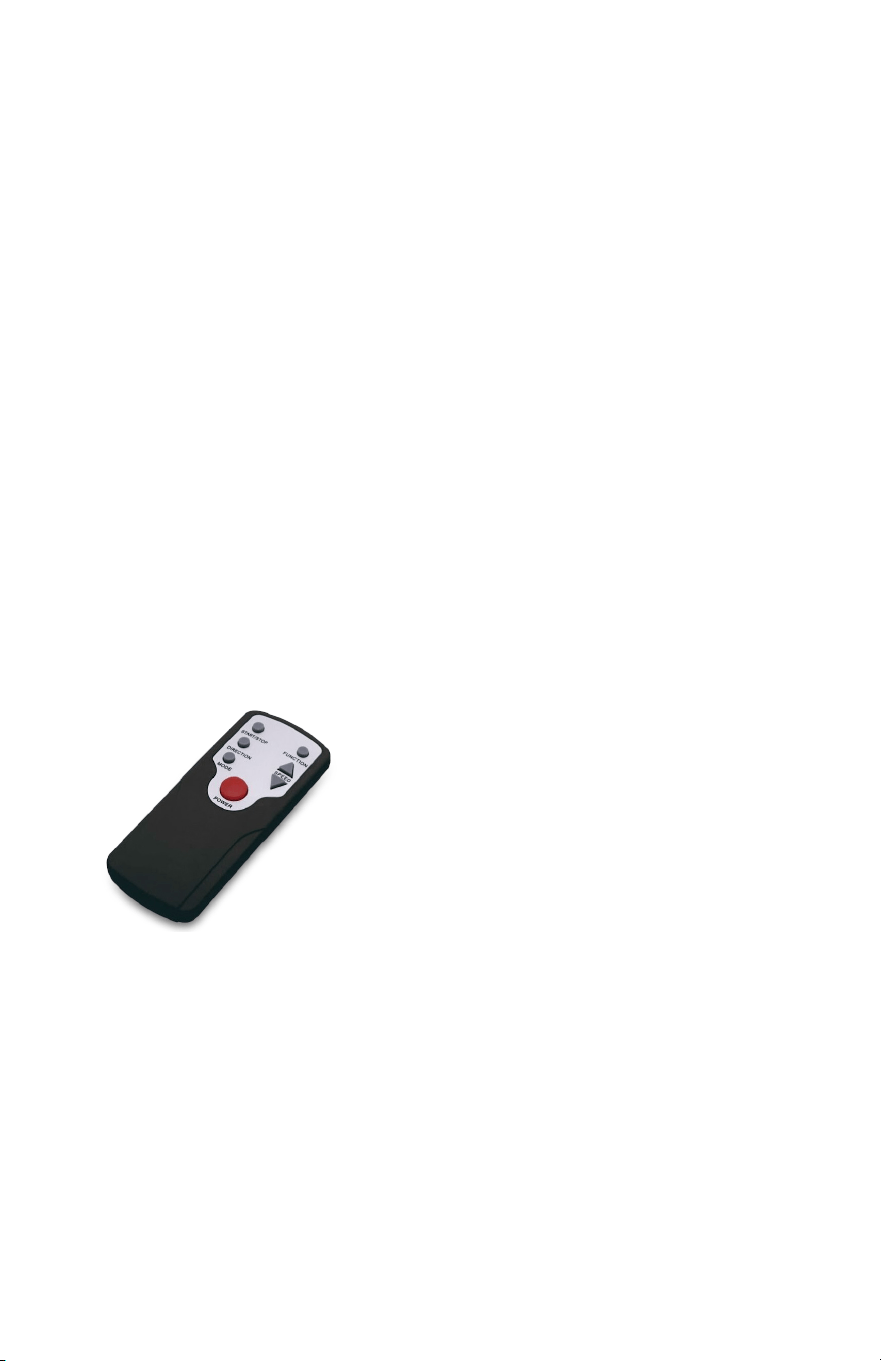
REMOTE CONTROL BUTTONS
This remote has a range of 3 feet and must be pointed directly at the display
on the machine.
START UP & USE (cont'd)
Power: Press this button to turn the unit
ON or OFF.
Start/Stop: Press this button to start with
your chosen settings. When the device is in
operation, press this button to stop it.
Speed + : Increase the speed. The speed can be
manually set from 1 to 10. Press this button to
increase the speed while the device is running.
Speed - : Reduce the speed. The speed can be manually set from 1 to 10.
Press this button to reduce the speed while the device is running.
NOTE: Cannot be controlled once pre-programed workout is started.
Function: Press this button to show SCAN, TIME, DISTANCE, SPEED, STEP and
CALORIES during your workout.
Direction: Press this button to change the direction of pedal movement.
Mode: Press this button to choose different programs. Auto programs P1, P2,
P3 and manual speed adjust program.
8
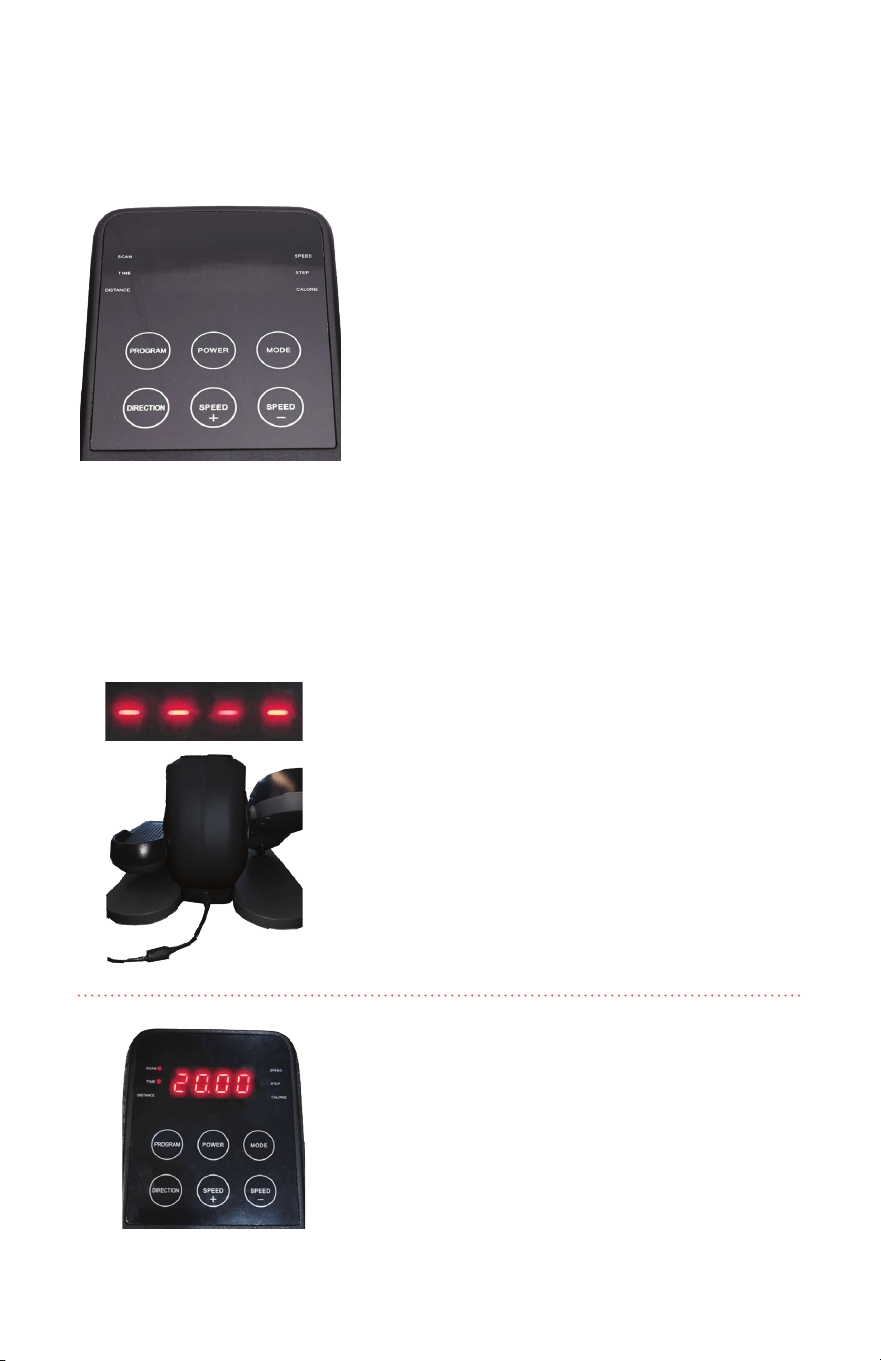
Power: Press this button to turn the unit
ON or OFF.
Speed + : Increase the speed. The speed can be
manually set from 1 to 10. Press this button to
increase the speed while the device is running.
Speed - : Reduce the speed. The speed can be
manually set from 1 to 10. Press this button to
reduce the speed while the device is running.
NOTE: Cannot be controlled once
pre-programed workout is started.
DISPLAY BUTTONS AND INSTRUCTIONS
Program: Press this button to show SCAN ("SCAN" mode cycles through all the
metrics on display to give the total rundown of your workout as you go), TIME,
DISTANCE, SPEED, STEP and CALORIES in circles.
Direction: Press this button to change direction of pedal movement.
Mode: Press this button to choose different programs. Auto programs
P1, P2, P3 and manual speed adjust program.
START UP & USE (cont'd)
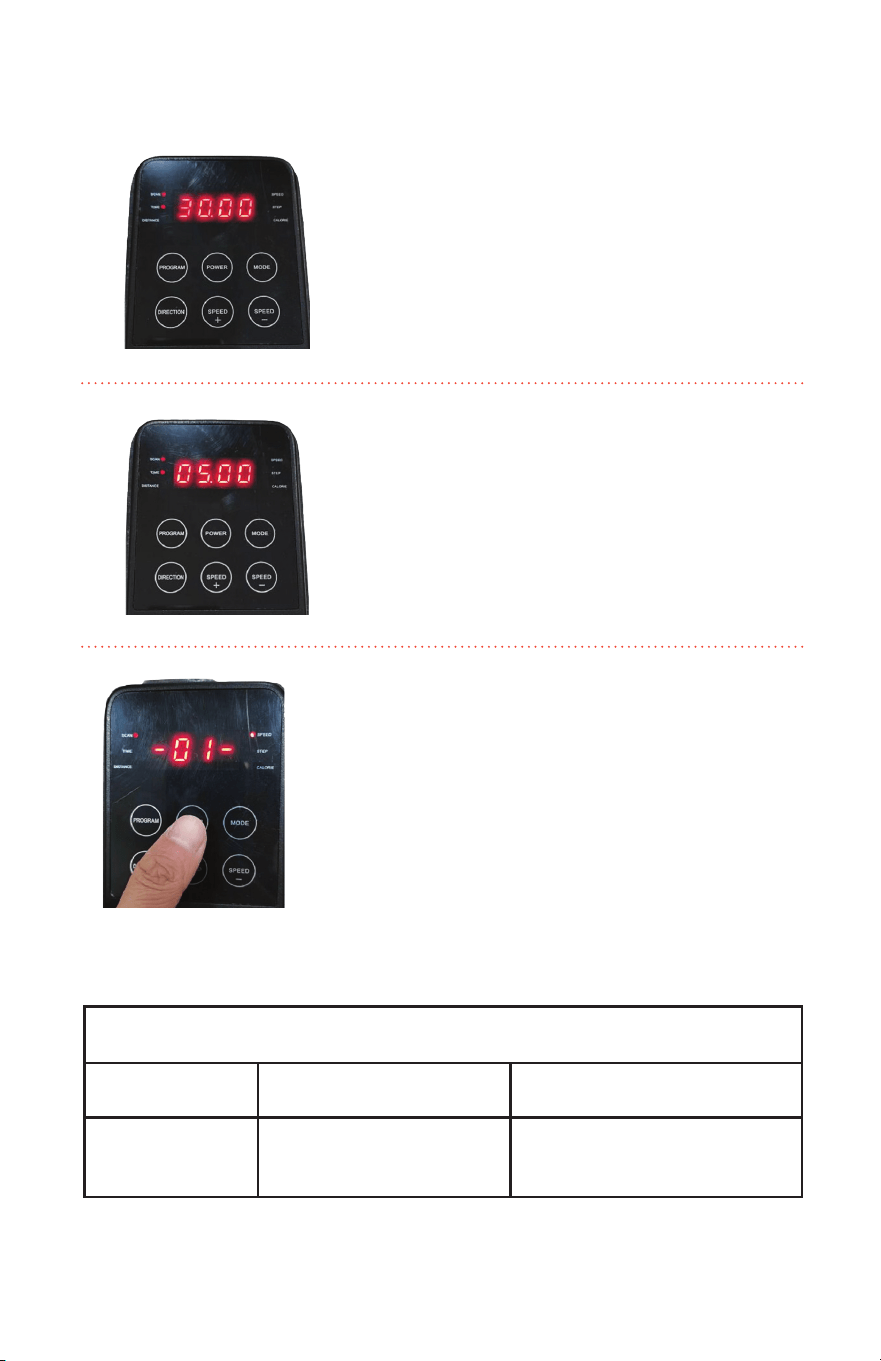
2. Press the "POWER" button to display
the default start time of 20 minutes.
1. Connect the power adapter plug into the
back of the unit, and insert the main plug
into the wall outlet.
9
4. After the workout time is set, press the
"POWER" button on the machine to start the
workout. By default, the machines modes are
manually controlled by the user. The machine
will start at the first speed level and can be
adjusted 1 to 10 levels with the Speed+ and
Speed- buttons.
START UP & USE (cont'd.)
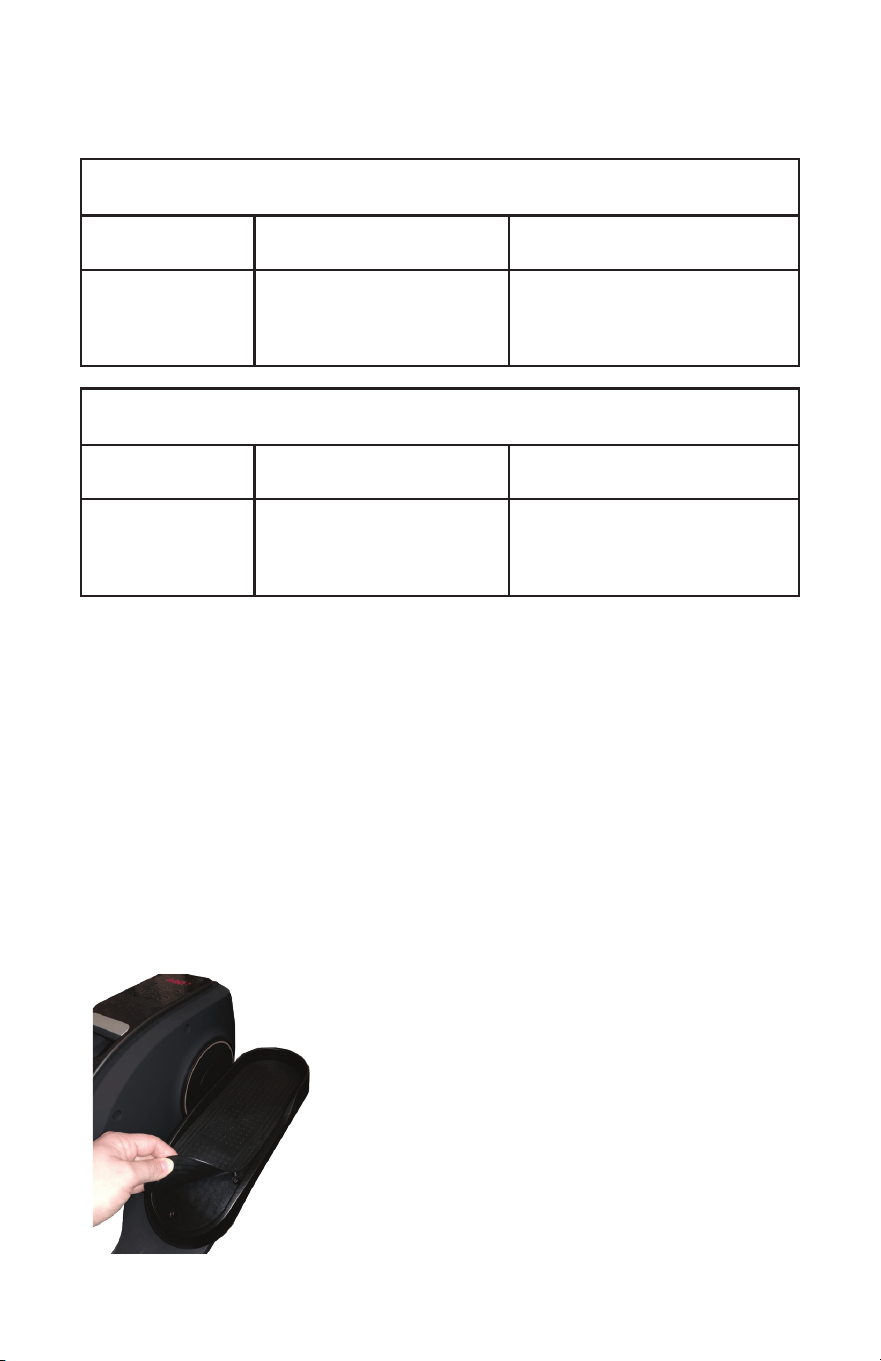
3. Press the Speed+ or Speed- button to
adjust the time of the workout. The device
workouts can range anywhere from
5 minutes to 30 minutes.
5. You can press the "MODE" button to choose
different programs. Auto programs P1, P2, P3,
and manual speed adjust program.
TABLE: AUTO PROGRAM OVERVIEW OF P1, P2, P3:
AUTOMATIC PROGRAM P1
SET TIME: DIRECTION: SPEED RANGE:
20 Minutes Forward and Backward
(Changes per 60 seconds)
1-2-3-4-5-4-3-2-1-circulation
(Changes per 60 seconds)
10
AUTOMATIC PROGRAM P2
SET TIME: DIRECTION: SPEED RANGE:
20 Minutes Forward and Backward
(Changes per 90 seconds)
2-3-4-5-6-7-8-4-6-4-8-
circulation
(Changes per 60 seconds)
AUTOMATIC PROGRAM P3
SET TIME: DIRECTION: SPEED RANGE:
20 Minutes Forward and Backward
(Changes per 90 seconds)
5-6-7-8-9-10-8-6-8-10-8
circulation
(Changes per 60 seconds)
START UP & USE (cont'd.)
ALWAYS DISCONNECT THE PLUG FROM THE
DEVICE BEFORE CLEANING!
Inspect the power cord for damage. If damaged,
call customer service (833-937-2453) for immediate
replacement before use.
Power off the elliptical and remove power cord.
Clean any high-use areas, like the pedals and
console, with a non-acidic cleaner (NO ammonia,
chlorine, or alcohol) on a soft cloth. Do not spray
cleaning solution directly on or into the elliptical as
this could ruin any electrical components.
SWITCHING OFF THE DEVICE
You must first stop the device by pressing the Speed - button on the device
or on remote control to reduce speed. Then press and hold the power button
on the device or the stop and power button on remote control to switch off
the device completely.
USER MAINTENANCE
INSTRUCTIONS
11
When storing, place the elliptical in a dry, non-humid area out of direct sunlight
and away from pets and children. Remove the cord and place it in a location out
of reach of children.
It may be necessary from time to time to lubricate or wipe down moving
parts or high-use areas on your elliptical. As-needed, thoroughly clean the wheel
path with a dry rag. This will prevent the build-up of dust and dirt inside of the
wheel bearing.
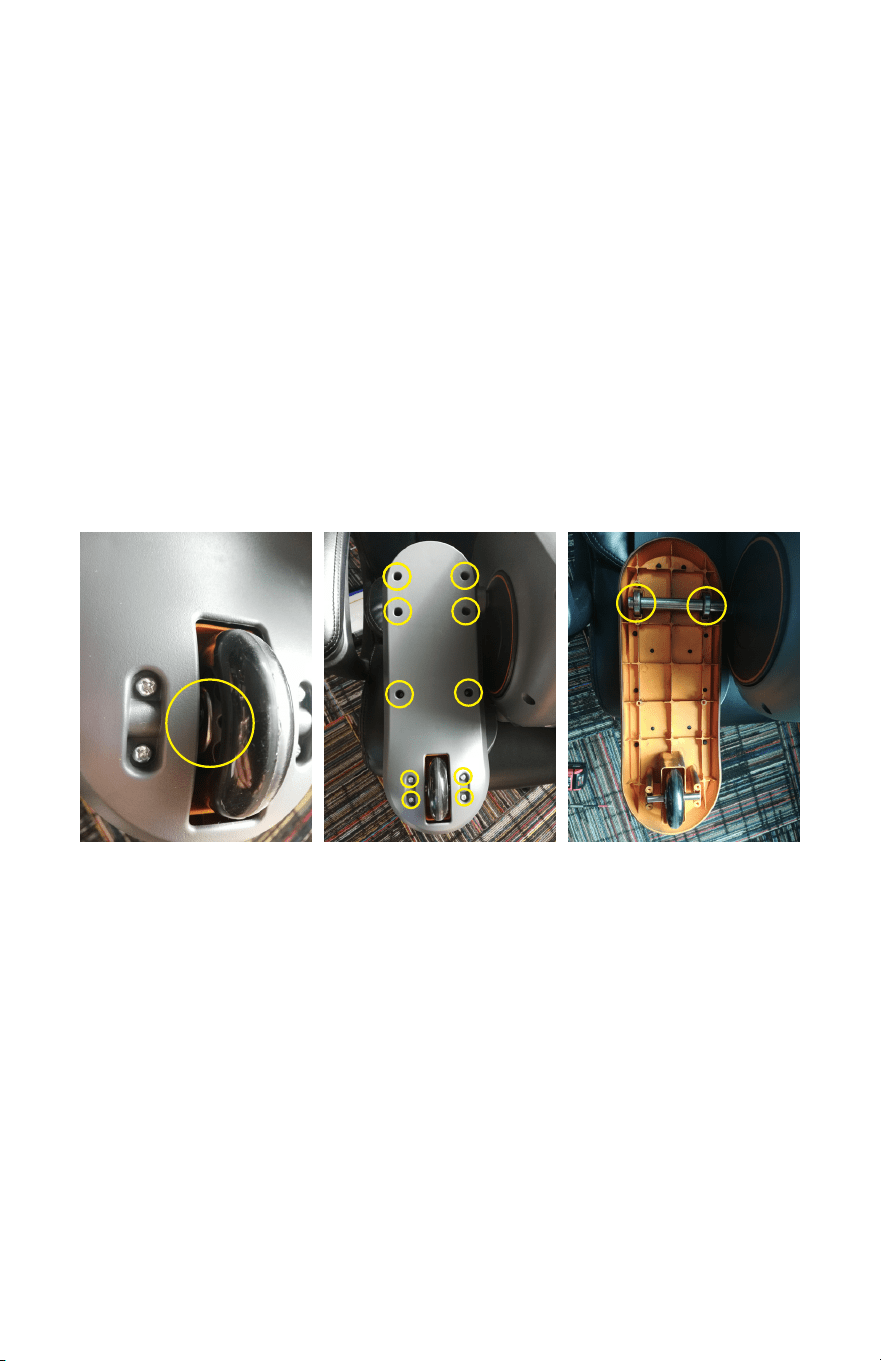
If squeaking from the pedal area occurs, use a 100% silicone lubricant and cover
the following areas:
Fig. A Fig. B Fig. C
• If the noise is emanating from the wheel area, lightly lubricate the center area
of the wheel (as pictured in Fig. A).
• If the noise is emanating from further up on the foot pedal, remove the back
panel of the foot pedal by flipping it over and removing the 10 Phillips head
screws (Fig. B). Lubricate the top two roller bearings thoroughly (clean excess
lube) and reassemble the pedal cover (Fig. C).
USER MAINTENANCE
INSTRUCTIONS (cont'd)

MODEL: PPP-FN
PATENT
PENDING
Read Instructions
Before Opening
Made in
CHINA
Adapter Input: 100–240V, 50/60Hz
Adapter Output: DC24V 3000mA
For indoor use only
REV: 030422
ECHELON
®
1-YEAR LIMITED WARRANTY
For questions, assistance, or replacement parts, do not return to your retailer.
Contact Echelon customer service below.
For refunds on items not purchased from Echelon directly, please contact your retailer.
Echelon warrants this product to be free of manufacturing defects. Should any such defect
develop or become evident within one year from the date of purchase, Echelon will replace
the entire product or, at its option, repair or replace the defective part(s) without charge.
Contact Echelon customer service at 833-937-2453 or at cs@echelonfit.com to determine
whether it is necessary to return the unit. To return, securely pack the entire unit. Be sure
carton clearly identifies sender by name and address. Attach a letter or card describing
defect and original sales receipt.
Mail prepaid to Echelon Fitness Returns 2001 Riverside Drive, Building 2,
Chattanooga, TN 37406
This warranty is void if damage or malfunction is due to abuse or failure to operate product
in accordance with instructions and on recommended electrical current. This warranty gives
you specific legal rights and you may also have other rights which vary from state to state.
If you have any questions, or would like to learn more about Echelon, please contact us at
833-937-2453 or at cs@echelonfit.com.
Register your product online at echelonfit.com/pages/register-warranty/
CUSTOMER SERVICE
/ Le service a la clientele / Servicio al Consumidor
833-937-2453 (+1.423.402.9010)
cs@echelonfit.com
DO NOT DISPOSE OF BATTERIES IN FIRE. ALWAYS DISPOSE OF BATTERIES
PER LOCAL & FEDERAL GUIDELINES.
© 2022 ECHELON FITNESS MULTIMEDIA, LLC. All specifications are subject
to change without notice. All rights reserved.
Echelon Fitness Multimedia, LLC 605
Chestnut St. Suite 700 Chattanooga, TN 37450
ECHELONFIT.COM