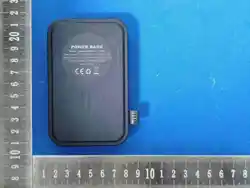

Magnetic Wireless Power Bank V1.2
USER MANUAL
Specifications
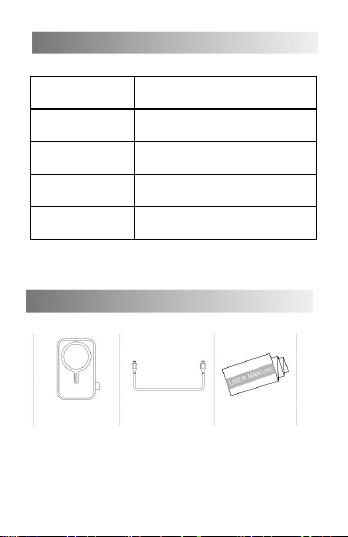
Package Contents
Power Bank x1 Charging Cable x1 User Manual x1
Battery Capacity
5000mAh 18.5Wh
Type-C Input
12V⎓ 1.5A, 9V⎓ 2A, 5V⎓ 3A
Type-C Output
12V⎓ 1.67A, 9V⎓ 2.22A, 5V⎓ 3A
Wireless Output
15W / 10W / 7.5W / 5W
Dimensions
104 x 66 x 16 mm
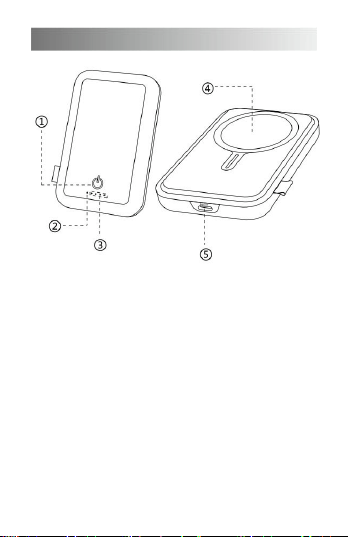
Product Features
1. Power Button
2. Wireless Charging Indicator
3. 4-Level Power Indicators
4. Wireless Charger & Magnetic Adsorption Ring
5. Type-C Input & Output
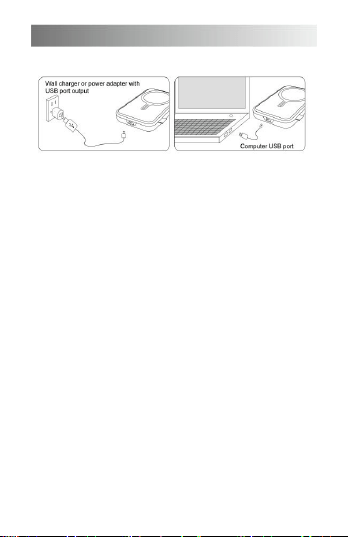
Operating Instructions
1. Charging the Power Bank
1). Connect the Type-C cable (included) between power bank
and the wall charger or power adapter (not included), It will start
charging automatically. It's recommend to use the PD18W wall
charger or power adapter to match the fast charging.
2). Fully charge the power bank before using the power bank for
the first time. Recharge the power bank once every three
months when not in use or seldom used.
3). During charging the power bank, the power Indicators will
flash. Each LED light indicates about 25% of the available
battery capacity. When fully charged, all power Indicators will be
on and then go out.
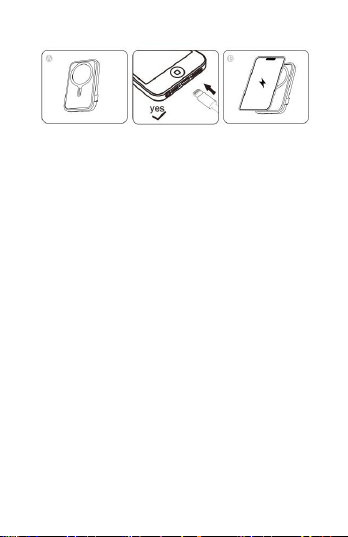
2. Charging the device
1). Wired charging
Press the power button, the power indicators are on. Connect
the charging cable between Type-C port of the power bank and
your device to start charging.
During charging the device, the power indicators are on.
2). Wireless charging
Place the device in the center of the wireless charging area. If
your device supports MagSafe technology, The power bank will
automatically hold it thanks to strong magnets.
Press the power button, the wireless charging indicator is on,
which means wireless charging is in progress.
P.S., Make sure your device is fit for Qi standard receiving
equipment.

Troubleshooting
1. Press the power button, if the first power indicator is flashing,
It means the battery is running out soon, please recharge.
2. This power bank can automatically identify equipment that
need to charge, If no device is being charged, the power bank
will be turned off after 30 seconds.
3. For wireless charging, your device must be equipped with a
Qi wireless receiver. The device can automatically identify a
Qi-compatible device placed on it.
4. If wired charging is not working properly, please try a different
charging cable, since the connector may become loose due to
wearing.
5. During charging, the device may become warm due to high
currents and resistance, especially during wireless charging. To
reduce temperature, avoid running intensive applications or
using GPS on your mobile device when charging.

Cautions
1. The power bank will generate heat when charging. Always
charge in a well-ventilated and open-air area.
2. Do not charge under pillows, blankets, clothing or on
flammable surfaces. Keep the power bank away from heat
sources, direct sunlight, combustible gas, humidity, water or
other liquids.
3. Do not disassemble, open, microwave, incinerate, paint or
insert foreign objects into the power bank.
4. Do not subject the power bank to mechanical shock such as
crushing, bending, puncturing or shredding. Avoid dropping or
placing heavy objects on the power bank.
5. Do not short-circuit the power bank or store it in a receptacle
where it may be short-circuited by other metallic or conductive
objects.
6. Do not operate the power bank if it has been wet or damaged,
to prevent against electric shock,explosion and/or injury.
7. Keep the power bank dry to avoid short circuits or other
damage to electronical components.
8. Keep the power bank away from high heat and flammable
liquids and gasses. Avoid using in environment temperature
above 45℃ or below 0℃.

FCC Warning
This device complies with Part 15 of the FCC Rules. Operation is subject to the following two conditions:
(1) This device may not cause harmful interference, and (2) this device must accept any interference received, including
interference that may cause undesired operation.
NOTE 1: This equipment has been tested and found to comply with the limits for a Class B digital device, pursuant to part 15 of
the FCC Rules. These limits are designed to provide reasonable protection against harmful interference in a residential
installation. This equipment generates, uses and can radiate radio frequency energy and, if not installed and used in accordance
with the instructions, may cause harmful interference to radio communications. However, there is no guarantee that
interference will not occur in a particular installation. If this equipment does cause harmful interference to radio or television
reception, which can be determined by turning the equipment off and on, the user is encouraged to try to correct the
interference by one or more of the following measures:
- Reorient or relocate the receiving antenna.
- Increase the separation between the equipment and receiver.
-Connect the equipment into an outlet on a circuit different from that to which the receiver is connected.
-Consult the dealer or an experienced radio/TV technician for help.
NOTE 2: Any changes or modifications to this unit not expressly approved by the party responsible for compliance could void the
user's authority to operate the equipment.
The device has been evaluated to meet general RF exposure requirement. The device can be used in portable exposure
condition without restriction.