P7
P 7
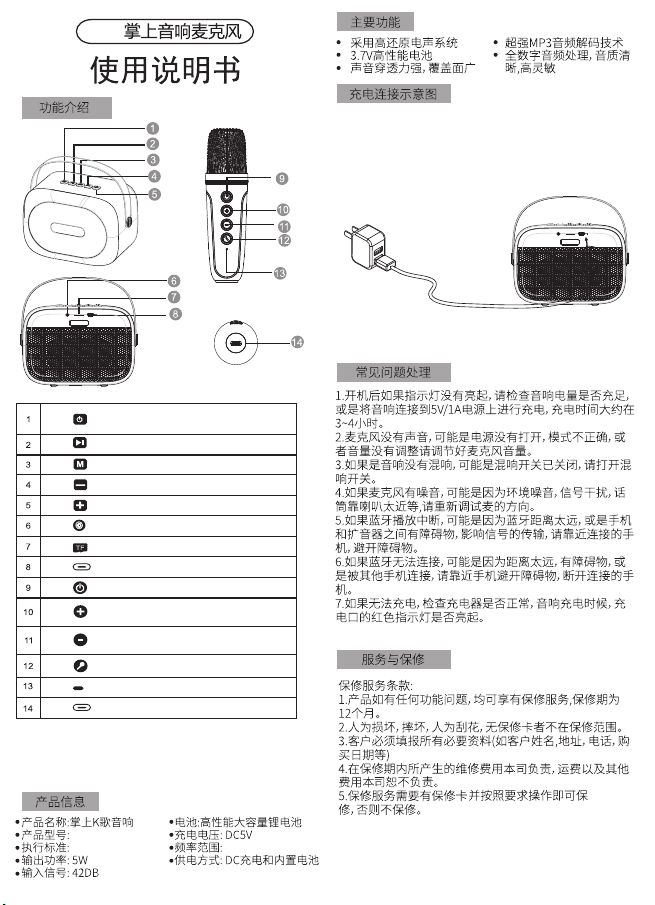
长按: 一曲
短按:音量减
双击:混响音响 减
下
长按:消原音开/关
单击:模式切换( TF卡、 蓝牙)
单击:暂停/播放
长按:开/关机
单击:切换灯光
双击关闭/开启 灯光
长按:
:音量减
上一曲
单击
长按:
:音量加
下一曲
单击
AUX接口
Type-c充 电接口
TF卡接口
长按:开/关机
单击:麦克风关/开
长按: 一曲
短按:音量加
双击:混响音量 加
上
长按:魔音切换
单击:消原音开/关
蓝灯指示灯,红 灯充电 指示灯.
麦克风充电 端口
将充电线USB头插入标准的USB电源适配器(5V1A),
充电线Type-C头插入音箱的充电接口中,USB左侧的红色
指示灯亮表示产品开始充电,红色指示灯熄灭表示电池已
充满,可断开充电器和音箱的连接。
Insert the USB cable into the standard USB power adapter
(5V1A), and the Type-C plug of the charging cable into the
charging interface of the speaker. If the red indicator light
on the left side of the USB lighting indicates,the product starts to
charge, and the red indicator light off indicates the charge is full,
you can break the connection between the charger and the
speaker
GB 4943.1-2022
106Hz-20kHz
1. If the indicator light does not light up, please check whether the
power of the speaker is sufficient. Connect the speaker to a 5V/1A
power supply to charge. The charging time is about 3 to 4 hours.
2. If there is no sound from the microphone, may be the
microphone is not turned on, the mode is incorrect, or the mic
volume has been closed. Please adjust the microphone v olume.
3. If there is no reverb in the speaker, the reverb may be closed.
Please turn on the reverb volume on the microphone.
4. If there is noise from the microphone, it may be due to
environmental noise, signal interference, or the microphone is
too close to the speaker, etc. Please re-adjust the direction of the
microphone.
5. If Bluetooth playback is interrupted, maybe Bluetooth
transmission distance is too far, or there are obstacles between
the mobile phone and the speaker that affect signal transmission.
Please move speaker more closer to the connected mobile phone
and avoid obstacles.
6. If Bluetooth cannot be connected, maybe the distance is too far,
there are obstacles between speaker and phone, or this s peaker
connected by other mobile phones. Please move the spea ker
closer to the mobile phone, avoid obstacles and discon nect
the other connected mobile phone.
7. If it cannot be charged, check whether the charger is normal
and whether the red indicator lights up when the speaker i s charging
1.Warranty service is available for any functional issues with the
product,with a warranty period of 12 months.
2.Warranty does no t cover damages caused by human factors,
such as accidental damage,dropping,intention al scratching,or
ack of a warranty card.
3 Customers must provide all necessary information(such as
customer name,address, phone number,purchase da te,etc.)
4 The company is responsible for repair costs incurred during the
warranty period,but is not responsible for shippin g and other
expenses
5 Warranty service requires a warranty card and compliance
with the specified requirements. Without these,warranty ser vice
will not be provided
Battery: High performance high capacity lithium battery
Charging Voltage: DC5V
Frequency range: 106Hz-20kHz
Power supply method: DC charging and built-in battery
Adopt high reduction electro-acoustic system
3.7V high performance battery
Strong sound penetration, wide coverage
Super MP3 audio decoding technology
Fully digital audio processing, clear sound quality, responsive
Product name: Pocket karaoke speaker
Product model: P7
Implementation standard: GB 4943.1-2022
Output power: 5W
Input signal: 42DB
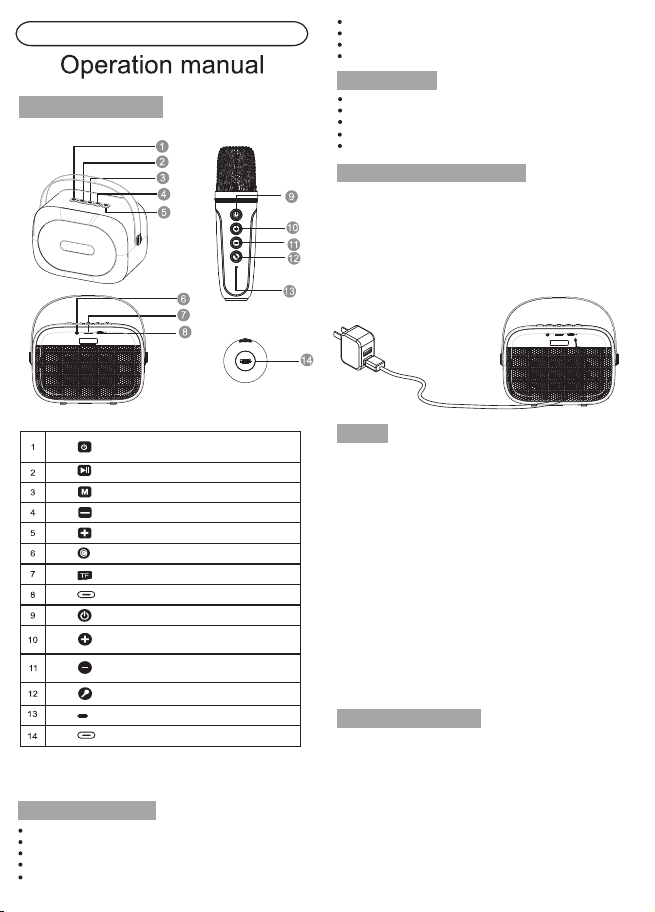
P7 Pocket Karaoke Speaker
Long press: previous song
Short press: volume down
Double click: Reverb volume down
Long press: original sound on/off
Single click: switch mode(TF card, Bluetooth)
Single click: pause/play
Long press: power on/off
Single click: switch lights
Double click: turn off/on lights
Long press: previous song
Single click: volume down
Long press: next song
Single click: volume up
AUX port
TYPE-C charging port
TF card port
Long press: power on/off
Single click: microphone off/on
Long press: next song
Short press: volume up
Double click: Reverb volume up
Long press: magic sound switch
Single click: original sound on/off
Blue indicator, red charging indicator
Microphone charging port
Service and warranty
FAQ
Charging connection diagram
Main functions
Function introduction
Product information
P7
P 7
长按: 一曲
短按:音量减
双击:混响音响 减
下
长按:消原音开/关
单击:模式切换( TF卡、 蓝牙)
单击:暂停/播放
长按:开/关机
单击:切换灯光
双击关闭/开启 灯光
长按:
:音量减
上一曲
单击
长按:
:音量加
下一曲
单击
AUX接口
Type-c充 电接口
TF卡接口
长按:开/关机
单击:麦克风关/开
长按: 一曲
短按:音量加
双击:混响音量 加
上
长按:魔音切换
单击:消原音开/关
蓝灯指示灯,红 灯充电 指示灯.
麦克风充电 端口
将充电线USB头插入标准的USB电源适配器(5V1A),
充电线Type-C头插入音箱的充电接口中,USB左侧的红色
指示灯亮表示产品开始充电,红色指示灯熄灭表示电池已
充满,可断开充电器和音箱的连接。
Insert the USB cable into the standard USB power adapter
(5V1A), and the Type-C plug of the charging cable into the
charging interface of the speaker. If the red indicator light
on the left side of the USB lighting indicates,the product starts to
charge, and the red indicator light off indicates the charge is full,
you can break the connection between the charger and the
speaker
GB 4943.1-2022
106Hz-20kHz
1. If the indicator light does not light up, please check whether the
power of the speaker is sufficient. Connect the speaker to a 5V/1A
power supply to charge. The charging time is about 3 to 4 hours.
2. If there is no sound from the microphone, may be the
microphone is not turned on, the mode is incorrect, or the mic
volume has been closed. Please adjust the microphone v olume.
3. If there is no reverb in the speaker, the reverb may be closed.
Please turn on the reverb volume on the microphone.
4. If there is noise from the microphone, it may be due to
environmental noise, signal interference, or the microphone is
too close to the speaker, etc. Please re-adjust the direction of the
microphone.
5. If Bluetooth playback is interrupted, maybe Bluetooth
transmission distance is too far, or there are obstacles between
the mobile phone and the speaker that affect signal transmission.
Please move speaker more closer to the connected mobile phone
and avoid obstacles.
6. If Bluetooth cannot be connected, maybe the distance is too far,
there are obstacles between speaker and phone, or this s peaker
connected by other mobile phones. Please move the spea ker
closer to the mobile phone, avoid obstacles and discon nect
the other connected mobile phone.
7. If it cannot be charged, check whether the charger is normal
and whether the red indicator lights up when the speaker i s charging
1.Warranty service is available for any functional issues with the
product,with a warranty period of 12 months.
2.Warranty does no t cover damages caused by human factors,
such as accidental damage,dropping,intention al scratching,or
ack of a warranty card.
3 Customers must provide all necessary information(such as
customer name,address, phone number,purchase da te,etc.)
4 The company is responsible for repair costs incurred during the
warranty period,but is not responsible for shippin g and other
expenses
5 Warranty service requires a warranty card and compliance
with the specified requirements. Without these,warranty ser vice
will not be provided
Battery: High performance high capacity lithium battery
Charging Voltage: DC5V
Frequency range: 106Hz-20kHz
Power supply method: DC charging and built-in battery
Adopt high reduction electro-acoustic system
3.7V high performance battery
Strong sound penetration, wide coverage
Super MP3 audio decoding technology
Fully digital audio processing, clear sound quality, responsive
Product name: Pocket karaoke speaker
Product model: P7
Implementation standard: GB 4943.1-2022
Output power: 5W
Input signal: 42DB
P7 Pocket Karaoke Speaker
Long press: previous song
Short press: volume down
Double click: Reverb volume down
Long press: original sound on/off
Single click: switch mode(TF card, Bluetooth)
Single click: pause/play
Long press: power on/off
Single click: switch lights
Double click: turn off/on lights
Long press: previous song
Single click: volume down
Long press: next song
Single click: volume up
AUX port
TYPE-C charging port
TF card port
Long press: power on/off
Single click: microphone off/on
Long press: next song
Short press: volume up
Double click: Reverb volume up
Long press: magic sound switch
Single click: original sound on/off
Blue indicator, red charging indicator
Microphone charging port
Service and warranty
FAQ
Charging connection diagram
Main functions
Function introduction
Product information