User Manual
Indicator Lights
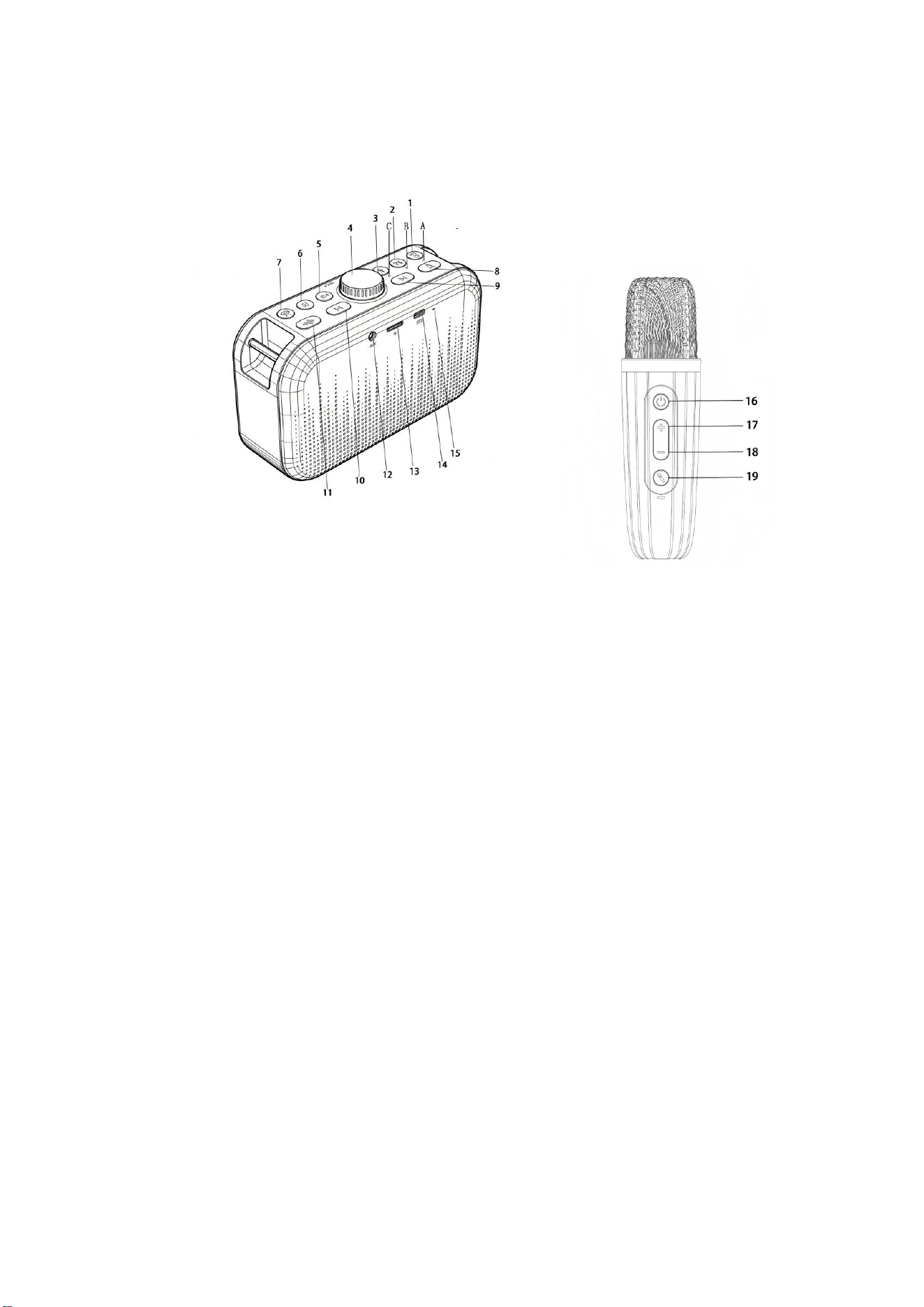
Indicator A (Bluetooth Mode Indicator):
After powering on, the blue light flashes when Bluetooth is unconnected; it stays
steady blue after successful pairing, and flashes slowly blue during music playback.
Indicator B (TF Card Mode Indicator):
It lights up solid green under TF card mode, and remains green while playing
recorded audio files.
Indicator C (Recording Mode Indicator):
Solid green light is on during recording, and turns off once recording finishes.
Button & Interface Instructions
1. Power / Play Button
Long press to power the speaker on or off; short press to play or pause audio.
2. Mode Button (M Button)
Short press to switch among Bluetooth Mode, TF Card Mode (supports TF card up to
32GB) and AUX Mode. When a dual-head 3.5mm audio cable is plugged into audio
output devices such as computers, the unit will automatically switch to AUX Mode with
a prompt tone, allowing it to work as an external speaker.
Note: Corresponding modes cannot be selected if no TF card or AUX audio cable is
inserted.

Long press the M button to turn the vocal cancel function on or off.
3. Record Button
Short press once to start recording via the microphone; short press again to save the
recording. After saving, long press this button to play back saved recordings. If
multiple recordings are stored, use track skip buttons to switch between previous and
next recordings.
• The recording function only works with a TF card inserted (all recordings are
saved to the TF card). This button will not respond without a TF card.
• Music playback and recording cannot run simultaneously under TF Card Mode.
Music will pause automatically during recording and resume when recording ends.
• Playing recordings under Bluetooth Mode will terminate the Bluetooth connection.
Press the M button to switch back to Bluetooth Mode and reconnect your device.
4. Volume Knob
Turn counterclockwise to lower volume; turn clockwise to raise volume.
5. Sound Effect Key
Short press to play celebratory horn sound.
6. Sound Effect Key
Short press to play applause and cheer sound.
7. Sound Effect Key
Short press to play tense and funny sound effect.
8. Light Key
Short press to cycle different light effects; long press to turn lights on or off.
The lighting effects activate automatically every time the speaker powers on,
regardless of the light status before last shutdown.
9. Previous Track Key
Short press to play the previous track.
10. Next Track Key
Short press to play the next track.
11. Built-in Music Key
Short press to play preloaded instrumental tracks; short press repeatedly to switch to
the next track in loop (3 built-in instrumental tracks in total).
• This function deactivates and the button does not work once Bluetooth is
connected successfully.
• This button only supports play and track switching, without pause or stop
functions.
• While playing built-in instrumental music, short press the Power/Play button to
pause or resume playback; short press Previous/Next Track keys to switch tracks.
12. AUX Audio Input Jack
Automatically switches to AUX IN mode when a 3.5mm audio cable is plugged in.

13. TF Card Slot
Automatically switches to TF Card Mode when a TF card stored with MP3 audio files
is inserted.
14. Speaker Type-C 5V Charging Port
15. Speaker Charging Indicator
Glows red while charging; the red light goes out once fully charged.
16. Microphone Power Button
Long press for 3 seconds to turn the microphone on or off. The blue indicator below
stays lit when the mic is on and turns off when the mic is off. Short press to mute or
unmute the microphone.
17. Mic Volume + Key
Short press to increase microphone volume; a "beep" alert sounds when maximum
volume is reached. Double press to boost microphone reverb.
18. Mic Volume - Key
Short press to decrease microphone volume; a "beep" alert sounds when minimum
volume is reached. Double press to reduce microphone reverb.
19. Microphone Voice Changer Key
Short press to cycle through built-in mic sound effects (4 voice-changing effects
available). Long press to enable or disable vocal cancel function.

FCC Warning:
Note: This equipment has been tested and found to comply with the limits for a Class B digital
device, pursuant to part 15 of the FCC Rules. These limits are designed to provide reasonable
protection against harmful interference in a residential installation. This equipment generates,
uses and can radiate radio frequency energy and, if not installed and used in accordance with
the instructions, may cause harmful interference to radio communications. However, there is no
guarantee that interference will not occur in a particular installation. If this equipment does
cause harmful interference to radio or television reception, which can be determined by turning
the equipment off and on, the user is encouraged to try to correct the interference by one or
more of the following measures:
• Reorient or relocate the receiving antenna.
• Increase the separation between the equipment and receiver.
•
Connect the equipment into an outlet on a circuit different from that to which the receiver is
connected.
• Consult the dealer or an experienced radio/TV technician for help.
Caution:
Any
changes
or
modifications
to
this
device
not
explicitly
approved
by
manufacturer
could void your authority to operate this equipment.
This
device
complies
with
part
15
of
the
FCC
Rules.
Operation
is
subject
to
the
following
two
conditions:
(1)This
device
may
not
cause
harmful
interference,
and
(2)
this
device
must
accept
any
interference received, including interference that may cause undesired operation.
This
equipment
complies
with
FCC
radiation
exposure
limits
set
forth
for
an
uncontrolled
environment.
This
equipment
should
be
installed
and
operated
with
minimum
distance
0cm
between the radiator and your body.