Summary of G11 Karaoke Speaker Microphone Manual
Function Introduction
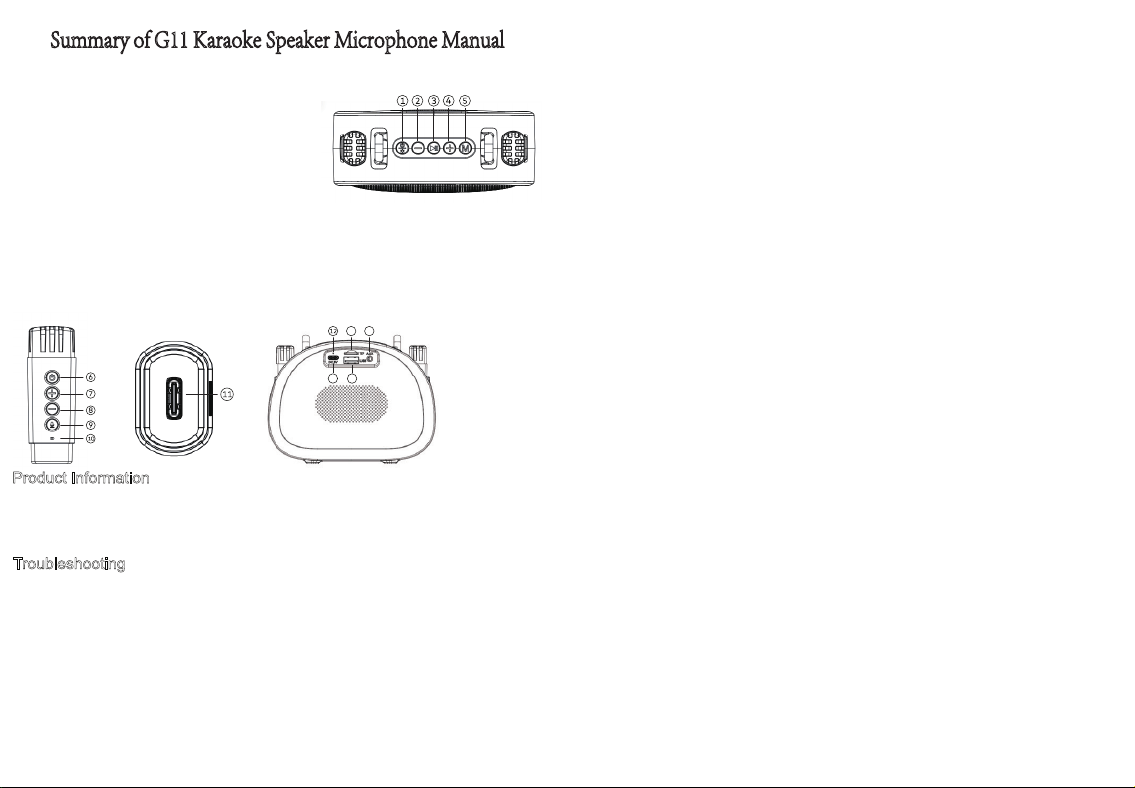
1.Power switch/Light toggle: Long press to turn on/off, short press to switch lights
2.Previous track/Volume -: Short press for previous track, long press to decrease volume
3.Pause/Play: Press briefly to pause/play
4.Next track/volume: Short press for next track, long press to increase volume
5.Mode switch: Manually switch playback modes, Bluetooth/TF card/USB drive, etc.
6.Long press the microphone to turn on/off, short press to pause
7. Short press to increase the microphone volume, long press for the previous track
8.Short press to decrease the microphone volume, long press for the next track
9.Short press to switch magic sound, long press to remove original sound
10.Microphone Indicator: flashes blue when not connected, stays blue when connected; red light on while charging, off when fully charged
12.Speaker indicator light: the blue light flashes when powered on, stays solid blue when connected successfully, turns red during charging, and goes off
14.TF card slot: insert an MP3 audio file to automatically switch to TF mode
15.USB port: Automatically switches to USB mode when an MP3 audio file is inserted
16.AUX port: Use an audio cable to plug into the speaker's AUX port and play music from an external audio device
Product Information
Product Name: Bluetooth Karaoke Speaker Model: G11
Speaker: 52mm diameter
Input Signal: 42DB Power Supply: DC charging + built-in rechargeable battery
Product Size:147.3*60*112mm
Troubleshooting
1.No indicator light lights up after powering on: Check if the speaker has sufficient power, or charge it with a 5V/1A power supply for about 3 to 4 hours.
2.No sound from the microphone: The microphone may be powered off, the wrong playback mode is selected, or the microphone volume is too low.
3.No reverb from the speaker: The reverb switch may be turned off. Turn on the reverb switch.
4.Microphone generates noise: This may be caused by ambient noise, signal interference, or the microphone being placed too close to the speaker.
5.Bluetooth playback cuts off: The distance between devices is too long, or there are obstacles blocking signal transmission between the phone and
6.Failed Bluetooth connection: Excessive distance, obstacles, or the speaker is paired with another mobile phone. Move closer to the phone, clear
13.Charging port: Use a Type-C cable to plug into the charging port to charge (Note: This device does not support fast charging. Forcing fast charging
13
14
15
16
11.Microphone charging port.
Output Power: 5W
Charging Voltage: DC 5V
when fully charged.
may cause damage, and our company will not be responsible).
7.Unable to charge: Check whether the charger works normally and confirm if the red charging indicator at the charging port lights up while charging
Adjust the microphone volume accordingly.
Readjust the microphone’s position and angle.
speaker. Move the phone closer and remove obstructions.
obstacles, and disconnect other paired devices.
the speaker.
Operating Temperature: 25℃
“CAUTION”
"Risk of fire or explosion
if the battery is replaced
by an incorrect type"
FCC Caution
This device complies with part 15 of the FCC Rules. Operation is subject to the following two conditions: (1)
This device may not cause harmful interference, and (2) this device must accept any interference received,
including interference that may cause undesired operation.
Any Changes or modifications not expressly approved by the party responsible for compliance could void
the user's authority to operate the equipment.
Note: This equipment has been tested and found to comply with the limits for a Class B digital device, pursuant
to part 15 of the FCC Rules. These limits are designed to provide reasonable protection against harmful
interference in a residential installation. This equipment generates uses and can radiate radio frequency energy
and, if not installed and used in accordance with the instructions, may cause harmful interference to radio
communications. However, there is no guarantee that interference will not occur in a particular installation.
If this equipment does cause harmful interference to radio or television reception, which can be determined by
turning the equipment off and on, the user is encouraged to try to correct the interference by one or more of the
following measures:
-Reorient or relocate the receiving antenna.
-Increase the separation between the equipment and receiver.
-Connect the equipment into an outlet on a circuit different from that to which the receiver is connected.
-Consult the dealer or an experienced radio/TV technician for help.
The device has been evaluated to meet general RF exposure requirement. The device can be used in
portable exposure condition without restriction.