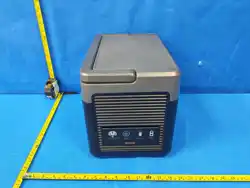
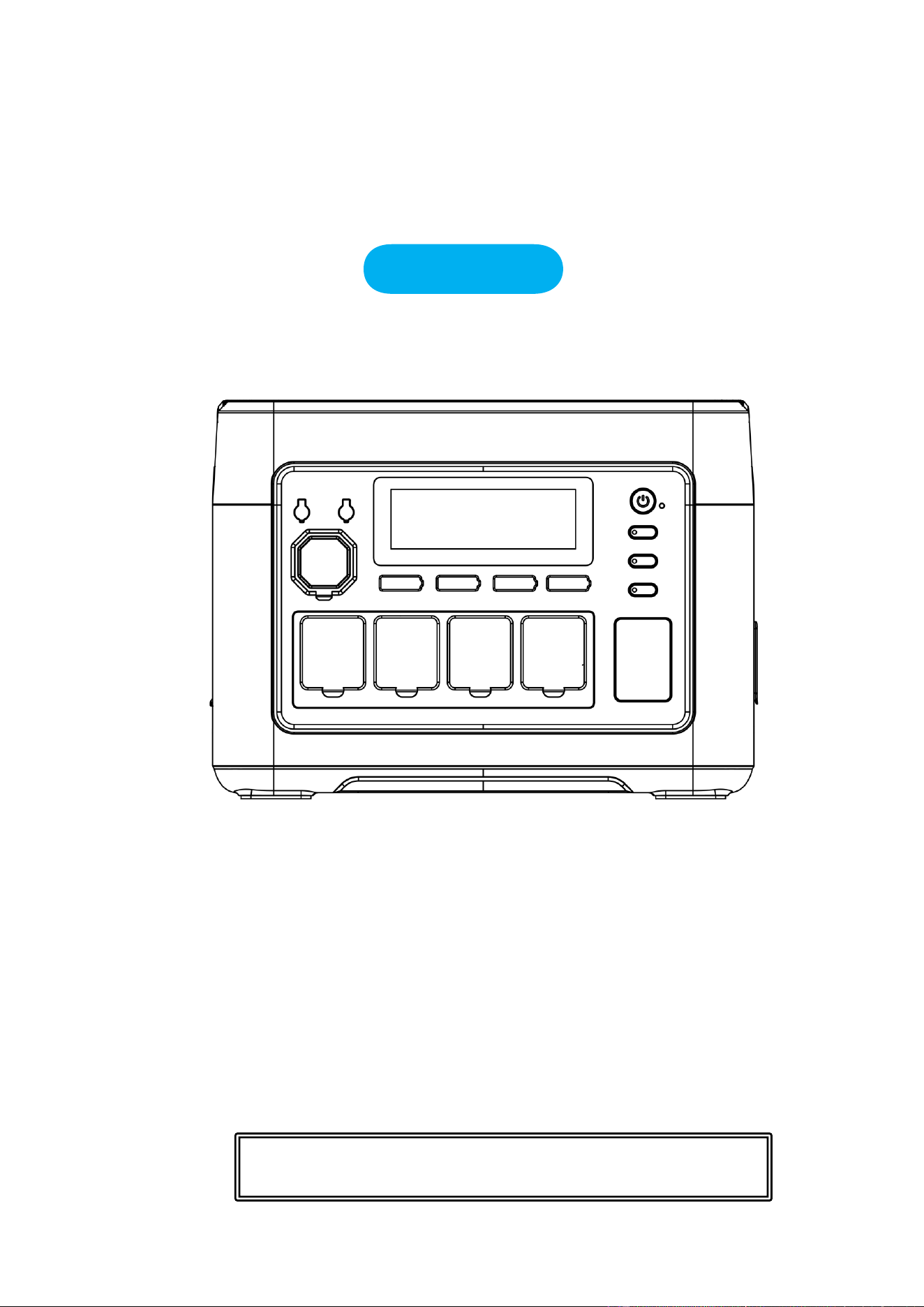
Outdoor Generator
User Manual
PORTABLE POWER STATION
We deeply appreciate you for purchasing the P1500PLUS Portable Energy Storage Power Supply.
Be sure to read this book carefully before using the product to ensure you use it correctly.
The book is required for product reimbursement. Consequently,it is advisable to keep it.
alongside the invoice and other purchase certificates.
To guarantee the safety of this product during transportation, it is only about 30% charged when it is
packed. As such, you are required to charge it immediately after opening and before use.
Please avoid the use of extension cords or cable taps, as this product can be charged directly from
wall sockets etc. When charging this product with a socket, do not use the same socket as other
devices.
P1500PLUS (US)

Disclaimers -------------------------------------------------------------------------- 1
Packing List -------------------------------------------------------------------------- 2
Precautions for use ------------------------------------------------------------------ 2
Specifications ------------------------------------------------------------------------ 4
Product Description ---------------------------------------------------------------- 4
Screen Display Precautions ------------------------------------------------------- 8
Backup Power Mode --------------------------------------------------------------- 9
Backup power mode connection diagram --------------------------------------- 9
Solar panel connection solution --------------------------------------------------10
Onboard charging ------------------------------------------------------------------11
Product Parameters ----------------------------------------------------------------12
FAQ ----------------------------------------------------------------------------------13
Maintenance ------------------------------------------------------------------------15
Content

1
Disclaimers
Before using the product, please read the user manual carefully to ensure that you
fully understand it before use. After reading, please keep the user's manual in a safe
place for future reference. If you use this product incorrectly, you may cause serious
injury to yourself or others, as well as product damage and property damage.
Once you use this product, you can be deemed to have understood, recognized and
accepted all the terms of this manual. Users undertake responsibility for their own
actions and all the consequences that may arise therefrom.
Our company does not assume any responsibility for any loss caused by users'
failure to use the product in accordance with the User Guide. In order to comply
with laws and regulations, the company has the final interpretation of this document
and all related documents of this product.

2
Packing List
Precautions for use
1. Please avoid high temperature and humidity. Please avoid using the product in direct sunlight and
or near a fire.
2. Please be sure not to disassemble or modify the product, as it may cause malfunction or even a
fire.
3. Please dispose off or recycle the product in accordance with the methods stipulated by local laws.
4. Be careful not to drop the product from a high place or expose it to any form of strong impact.
5. Please store or use the product out of the reach of children.
6. Please use the company's genuine products for the accessories. Customers who use non-genuine
products and suffer adverse consequences as a result, cannot enjoy free maintenance.
7. When using this product, please do not interfere with the cooling of the product, please empty the
ventilation space of more than 30CM from the side suction and exhaust port.
8. When the product is not in use, please put the body power off and unplug the power cord. Please
avoid storing the product in a place with high temperature, high humidity and direct sunlight.
9. If you need to store the product for a long period of time, please make sure to deplete the charge
once every 3 months, and then recharge it to about 50%.
10. If there is any doubt that the product body, the auxiliary line and the connecting equipment are
defective, please do not continue to use the product. Instead, contact the after-sales personnel to
solve the problem in time.
11. Please do not store the product for a long time in the car or field warehouse or other places that
may experience extreme high and low temperature, to prevent the battery life from shortening
amongst other failures.
12 The limitation of medical equipment: This product does not assume the power supply of medical
equipment. They include medical ventilators (CPE for hospitals) or artificial lungs (ECMO:
extracorporeal membrane oxygenator). When using this product to other medical devices, please
make sure that there is no restriction on the use of external power supply in consultation with the
manufacturer beforehand.
13. Power supply products may generate electromagnetic fields when they are used, and may affect
normal operation of medical implants such as pedicles, cochlear implants, hearing aid defibrillators,
and personal medical devices. If you are using these medical devices, please contact us about the
restrictions on the use of this product. The basic measures are to ensure a sufficient range of
medical implants, such as a medical implant, a cochlear implant, a hearing aid and a defibrillator.
Portable Energy Storage
Power Supply
AC power cord
User Guide
MC4-XT60

3
4
Specifications
Product Description
This product is a portable power station, suitable for home emergency power backup, outdoor travel,
and emergency disasters that require power. In addition, it can also be used for outdoor work,
amongst other applications.
This product has built-in lithium iron phosphate battery, which supports AC fast charging, vehicle
charging, and solar photovoltaic panel charging. (This product has backup power mode function,
and when the utility power fails, it can be switched on within 10ms for this product to supply
power to electric equipment.)
The AC output of this product is pure sine wave waveform, and can manually be converted from
50HZ to 60HZ to provide better protection for electrical appliances.
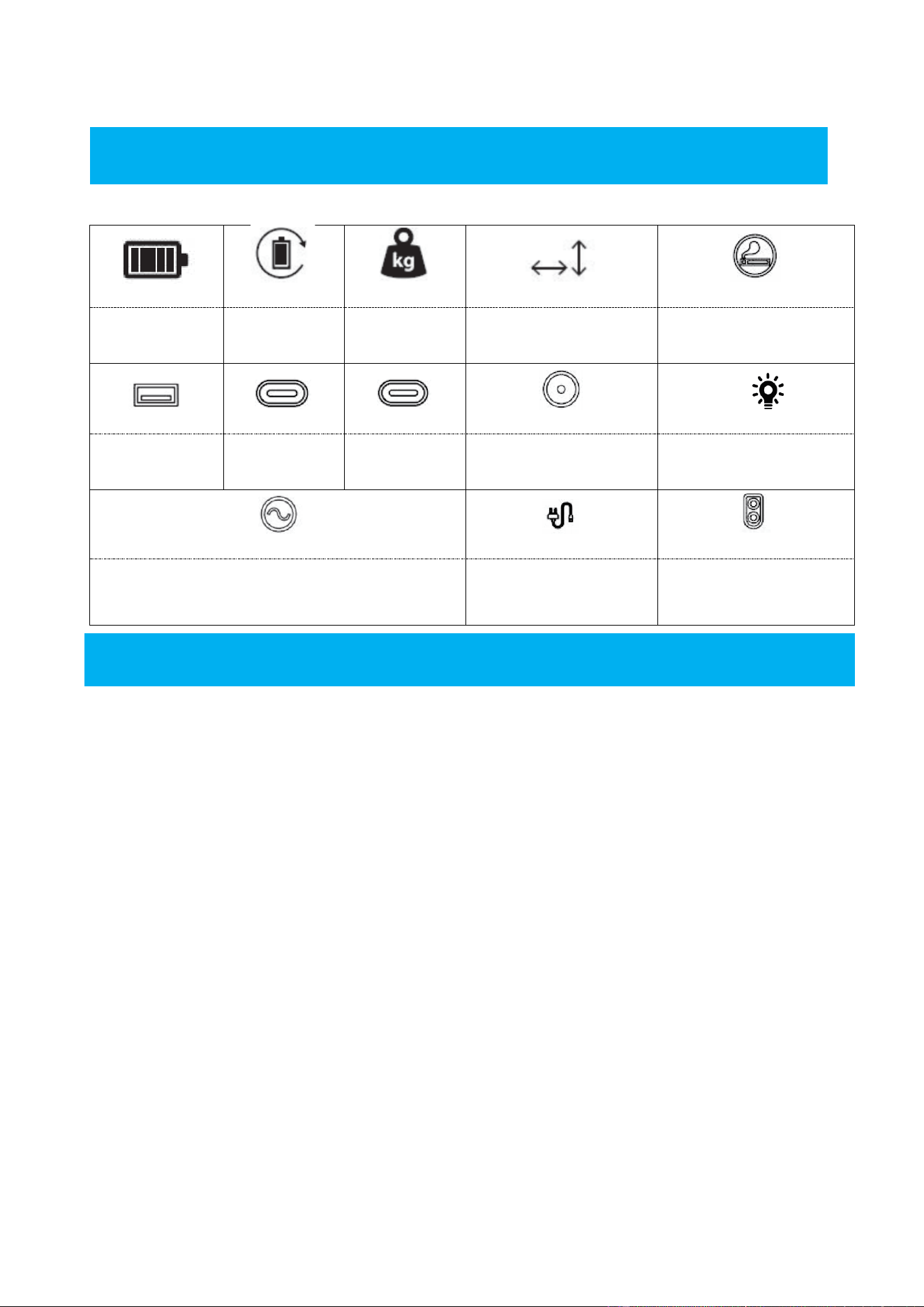
Capacity
Cycle life
Weight
Size
Cigar Lighter*1
LiFePo4
51.2V
≥4000
14.2KG
L346*W228*H251mm
12V/10A
USB-A*2
USB-C*1
USB-C*1
DC5521 Output*2
LED Light
QC3.0 18W
PD-20W
PD-100W
12V/3A
1W
AC
AC Inpu
PV/DC Input
1800W
AC100-120V
50/60HZ
AC Input
100-120V/1200W
12V-50V/11A
500W(MAX)
5
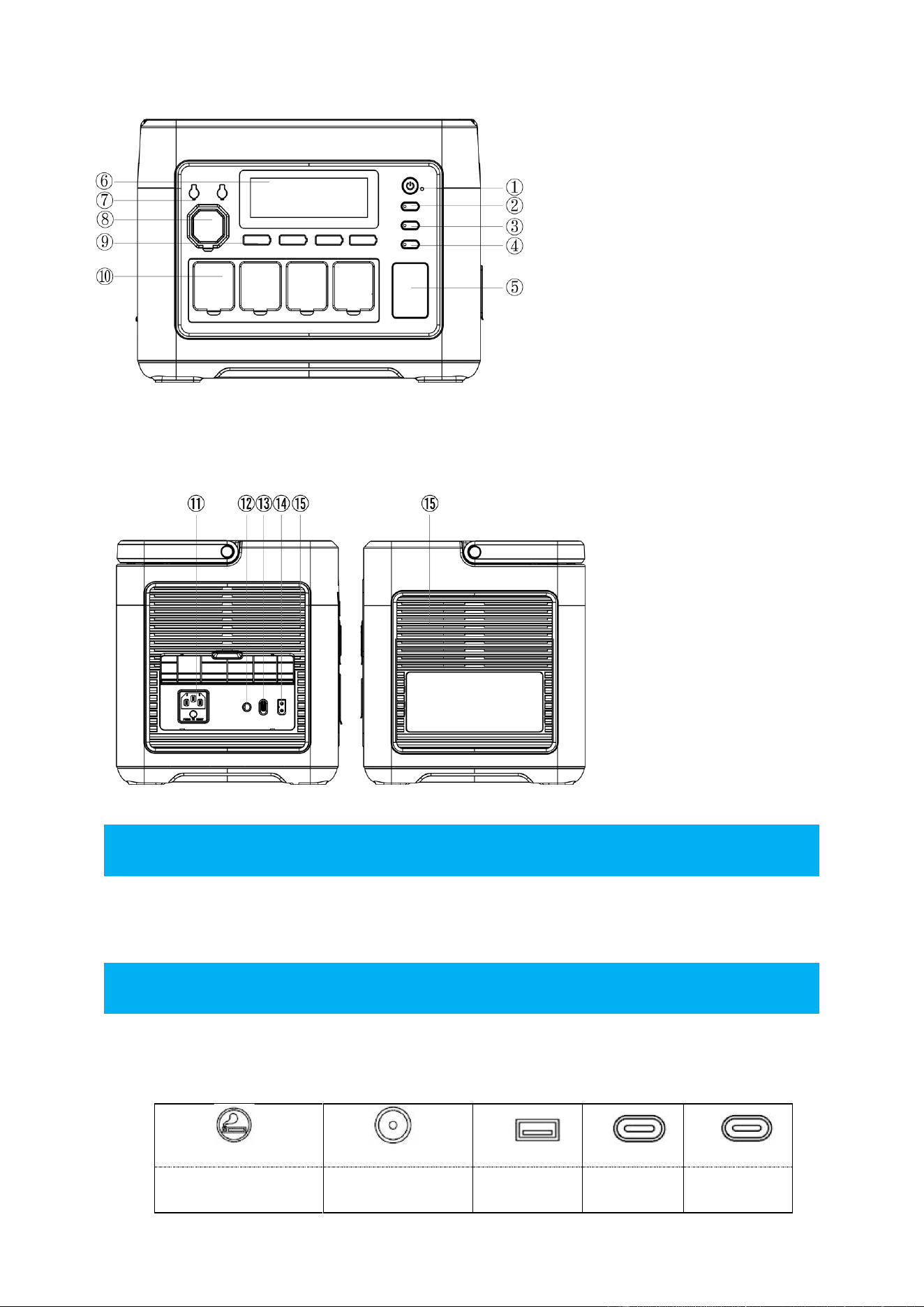
⑪AC charging port
/Overload protection button
⑫ External grounding port
⑬AC fast/slow charge
adjustment switch
⑭ PV/Car input port
⑮Cooling air inlet/ outlet
① Power switch
Use: Press and hold the power button for 3S to turn on the power the system, turn on the LCD
display, and press and hold it again for 3S to turn off the power system.
② DC switch
Use: Short press the DC button to turn on the DC output port in the power-on state, and short
press it again to close it.
Cigar Lighter*1
DC5521Output*2
USB-A*2
USB-C*1
USB-C*1
12V/10A
12V/3A
QC3.0 18W
PD-20W
PD-100W
① Power switch
② DC switch
③ AC switch
④ LED light switch
⑤ LED light
⑥ LCD screen
⑦ DC5521
⑧ Cigar Lighter
⑨ USB-A/Type-C
⑩AC Output port

6
③ AC switch
AC switch(AC output port*4, the total electrical power load should be less than 1800W).
Use: Short press the AC button to open the AC output port in the power-on state, and short
press it again to close it.
1. AC output voltage and frequency standards vary in different countries. Please check the AC
voltage and frequency of the equipment before use.
2.Press the AC button and LED button at the same time to switch the frequency between 50Hz or
60Hz within 3 seconds.
3. By pressing the AC button 10 times in a row, the AC output voltage can be switched in
100V/110V/120V.
④LED switch ⑤LED light
Usage: Short press the LED button to turn on the constant light mode when turned on, short
press the LED button again to turn on the SOS mode, and short press the LED button again to
turn on the flashing mode.
1. Long press the LED switch to turn on the silent mode, and then long press the LED switch
again to turn off the silent mode.
⑥LCD screen
Display the power and usage status of the product.
⑦DC5521
Output:12V/3A
⑧Cigarette Lighter
Output:12V/10A
⑨USB-A/Type-C
USBQC3 . 0
(5 -12V18W)*2
Type-C
(5-12V20W)*1
Type-C
(5 -15V/3.0A;20V/5A 100W )*1

7
⑩AC Output port
Output:100-120V 1800W(US) ,50/60Hz, pure sine wave
⑪AC charging port/Overload protection button
Please use the standard AC charging cable to connect the mains power to the AC charging port
to charge this product. Before using the AC port to charge, make sure the AC voltage and
frequency of the device are consistent with the mains power.
If the power voltage supply is unstable due to lightning or other reasons, or there is a large
voltage input at the AC terminal, in order to protect this product, the overload protection
function (safety circuit breaker) will automatically activate and disconnect the AC input port
from the external device. Please follow the steps below to restore the AC input function of this
product.
1. Turn off the power button and unplug all devices connected to the ports.
2. After confirming that there are no abnormalities in all parts, turn on the power button.
3. Press the overload protection button and connect the AC line to restore the AC input.
⑫External ground port
If necessary, users can choose a grounding wire to connect the product to the earth. The product
does not perform grounding processing by default unless it is in special scenarios.
⑬AC fast/slow charge adjustment switch
When the fluctuation switch is set to AC fast charging mode, it is necessary to ensure that the
output voltage of the power supply equipment meets 100-120V. When the output voltage of the
charging device is 100-120V, the maximum charging power is 1200W.
When the fluctuation switch is set to AC slow charging mode, it is necessary to ensure that the
output voltage of the power supply equipment meets 100-120V. When the output voltage of the
charging device is 100-120V, the maximum charging power is 500W.
⑭PV/Car input port
Use the standard PV/Car port charging cable to connect the solar panel to charge this product.
1. The input of the solar panel can be up to 500W and the maximum voltage is 50V.
2. If the PV/Car input port is charged with a voltage higher than 50V, it will cause product
damage and this fault is not covered by the warranty.
⑮Cooling air inlet/air outlet
When this product reaches a certain temperature during use, the cooling fan will automatically
run. When using this product, do not block the cooling air inlet/outlet, and ensure that no objects
are placed within 30cm of the cooling air inlet/outlet.
8
Introduction to Display Interface
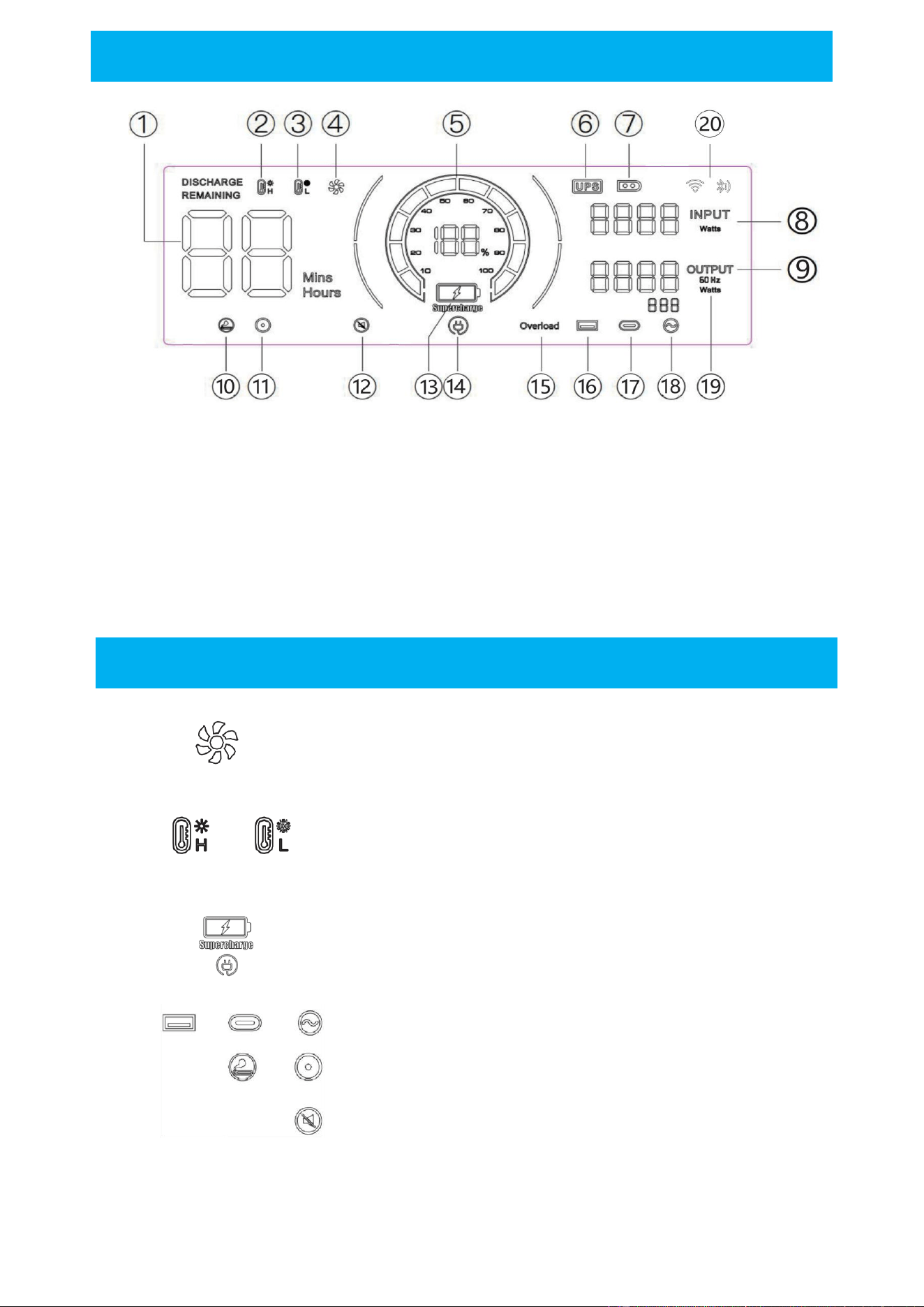
①Using time/ charging time ②High temperature protection ③Low temperature protection
④Fan status ⑤Power status ⑥Backup power mode mode
⑦PV charging mode ⑧Total input power ⑨Total output power
⑩Cigarette lighter(12V) output ⑪DC(12V) output ⑫Silent mode
⑬Fast charging mode ⑭Slow charging mode ⑮Overload protection
⑯USB output ⑰PD output ⑱AC output
⑲Frequency Switching ⑳WIFI/ Bluetooth
Screen Display Precautions
When this icon is on, please ensure that the air inlet on both sides of the
product is not blocked.
When the indicator icon flashes, it means that the internal temperature of
the machine is too high or too low. At this time, the device has turned on
the intelligent protection program and the machine has stopped working
normally. (You need to wait for the machine to return to normal
temperature before you can start working again)
This icon flashes, indicating that the corresponding port output is abnormal.
Please check the load.
When this icon is flashing, it means the corresponding port output is
abnormal, please check the load situation.
When this icon is flashing, it means the product has entered silent mode.
9
Backup Power Mode
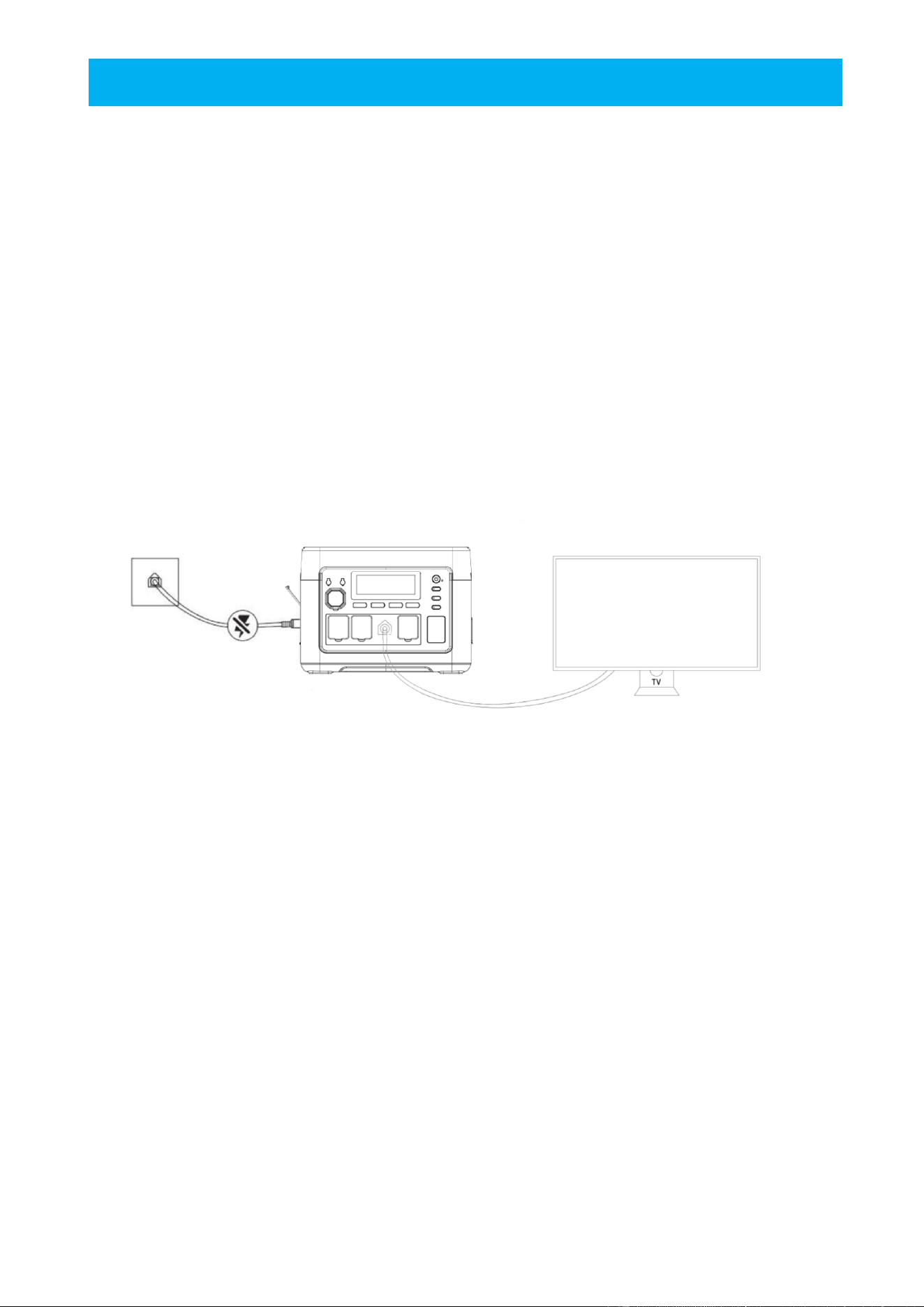
The product has a bypass mode that can complete the output directly from AC power without the
need to pass through the battery.
In backup power mode mode, when the city's AC input is suddenly interrupted, the product can
automatically switch to battery power within 10ms, guaranteeing the normal operation of AC
equipment..
Backup power mode connection diagram
As shown in the figure below, the product is connected between the socket and the electrical
appliances, and the product's power is ON.
When you turn on electrical equipment, the electrical equipment uses alternating current from the
grid directly.
When the mains power is cut off in this state, it will automatically switch to the product's internal
battery power supply.
※In backup power mode, the maximum current of Japanese and American regulations is 14A; in
Backup power mode, the maximum current of Chinese, British, European and Korean regulations is
10A. When the AC output exceeds the maximum current, the UPS icon flashes to indicate overload.
, at the same time the AC icon goes out and the output is interrupted.
10
Solar Charging
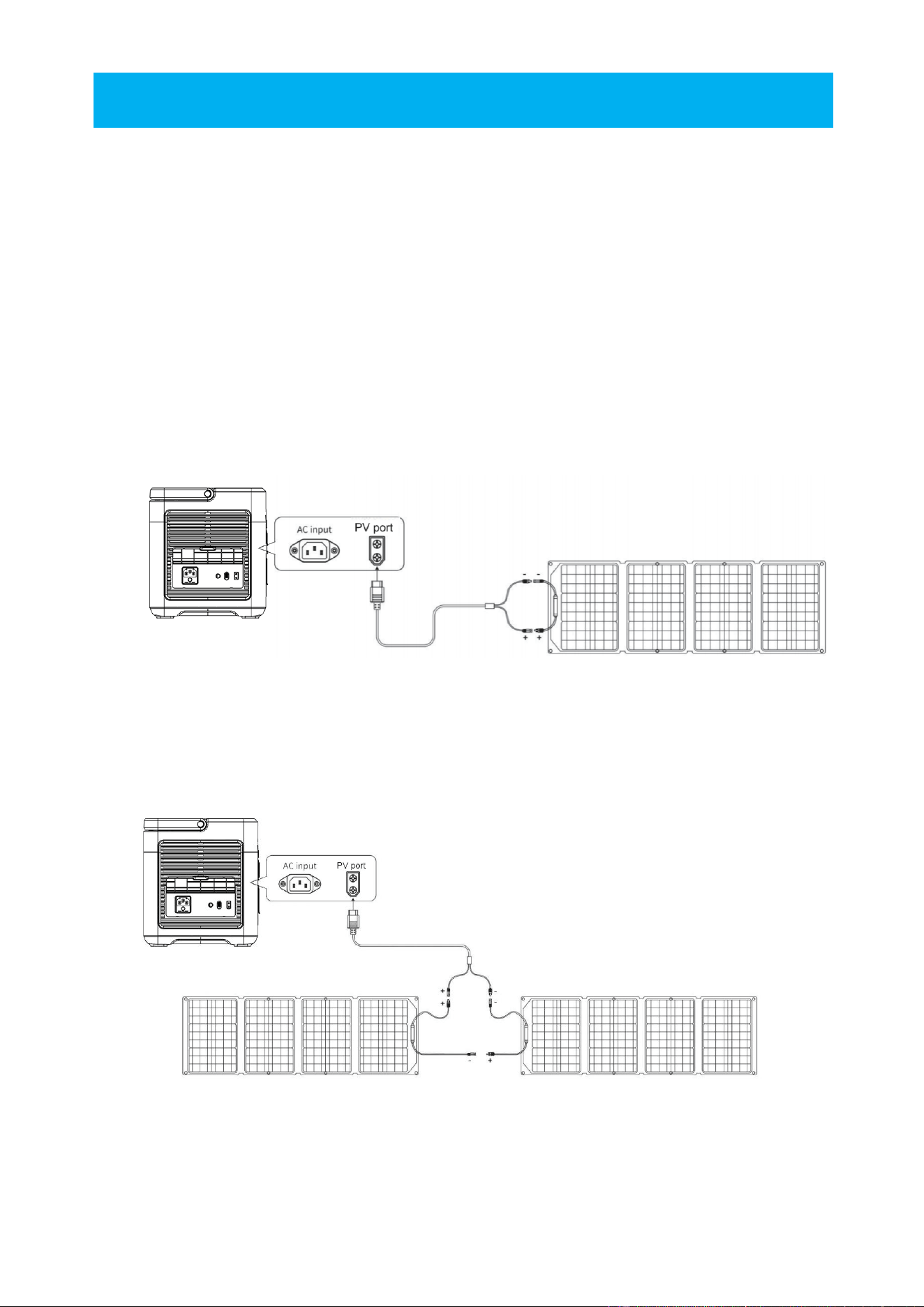
This porduct can both be connected to, and charged by the solar panel.
With a solar panel power of 500W, and at least 3 hours, full charge can be achieved.( Solar panel
charging maximum 500W, maximum input voltage 50V)
※ The charging power of solar panels is determined according to weather and climate conditions
※ Solar panel voltage over 50V will damage the device and may be out of warranty.
Solar panel connection scheme
* Solar charging
Option 1
Option 2
Solar panel(Not include accessory)
Solar panel Solar panel
Solar panel(Not include accessory)
11
Car charging
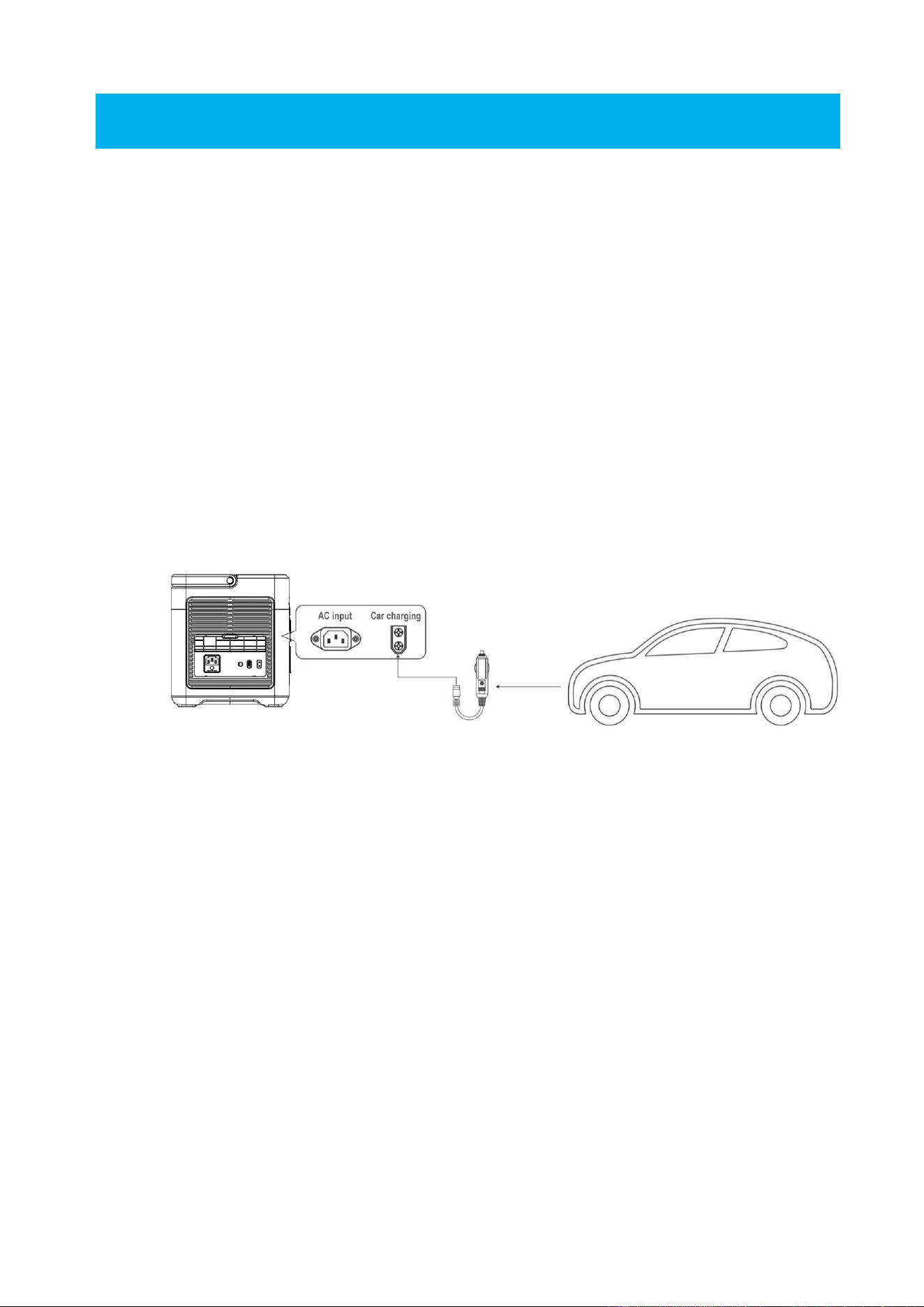
This product can be charged by the cigarette lighter ( accessory: hereinafter referred to as ACC) in
the car by using the ACC charging cable for mobile charging.
Turn the power of the product ON, connect the ACC charging cable to the cigarette lighter in the
car and the XT60 interface on the side of the product, turn on the car engine, and the LCD screen of
the product will show the input power.
※ Onboard charging ought to be done when the car engine is started. Failure to start the engine
may cause the car's battery to run out of power.
※ Onboard charging is usually low power of 90-240W and the charging time is long (12V/8A or
24V/10A). If fast charging is required`, utility power is advised.
.
(Not include accessory)

12
Product Parameters
Produktname
P1500PLUS
Product size
L346*W228*H251mm
Product weight
14.2KG
Battery Capacity
1536WH
AC charge
100-120V,MAX1200W(US)
PV input
12-50V , 500W
AC output
100-120V 1800W(US) ,50/60Hz, pure sine wave
USBQC3.0
(5 - 12V18W)*2
Type-C
(5-12V 20W)*1
Type-C
(5 -20V/5.0A)*1, 100W max with PD3.0-Protokoll
DC 5521
(12V/3A) *2
Car charger output
12V/10A
Backup power mode
100-120Vac/MAX14A(US),(Switchover time≤10ms)
Charging temperature
0-40℃
Operating temperature
-10 ~ 40℃
Ambient humidity
<90%RH
Cycle charge
≥4000

13
FAQ
1. The load power is within the rated power range of the device but cannot be used normally?
The product has low power and needs to be charged.
The peak power of some specific loads will exceed the rated power several times when
starting, causing the equipment to be unable to load normally.
2. Does the product make some noise when used?
When the device is started or used, fans and some inductive devices will operate, resulting in
lower sound.
3. Is it normal for the charging cable to get slightly hot during use?
It is normal. When the charging power of the device is high, there will be slight heating
during the charging process. The cables and wires have been strictly tested and verified and
comply with relevant safety standards.
4. What kind of batteries are used in our devices?
The battery type is lithium iron phosphate battery and complies with relevant safety
standards.
5. What devices does the AC output port of the device support?
It supports the use of related equipment with a rated power less than 1800W, and more than
95% of household appliances can be powered by the equipment. Before use, please confirm
that the output current of a single interface cannot exceed the rated output current of the AC
port.
6. How can I know how long the device has been used?
During product use, you can know the remaining usage time of the product through the
display data on the left side of the screen.
7. How to confirm whether the device is charging?
When the device is charging, the screen will display the charging power, the synchronous
power display area will scroll in cycles, and the AC or PV charging icon will be displayed
accordingly.

14
8. How should we clean the equipment?
Please use a dry, soft, clean cloth or tissue to wipe the product.
9. How is the device stored?
Please turn off the device and store it in a cool, dry environment. If long-term storage is
required, it is recommended to use the remaining power of the device once every three
months and then charge it to the required power for storage, such as 50% power.
10. Can we bring products on the plane?
Please consult the relevant policies of the local shipping company.
11. Is the actual capacity of the product the same as the capacity marked in the user manual?
The capacity in the user manual is the rated capacity of the battery pack of this product.
Because this product will have a certain efficiency loss during the charging and discharging
process. Therefore, the actual output capacity of the product is lower than the capacity
specified in the user manual.
12.What is the maximum output power of a single AC interface?
The maximum output power of a single AC interface cannot exceed the product's rated
output power.

15
Maintenance
1. It is recommended to use or store this product in an environment of 20℃ to 30°C, away
from water, heat, and other metal objects.
2. For safety reasons, please do not store this product in an environment higher than 40℃ or
lower than - 10℃ for a long time.
3. If it is not used for a long time, please charge it to 50% before storing. If the battery is left
unused for a long time when the battery is seriously insufficient, it will cause irreversible
damage to the battery and shorten the cycle life of the product.

16
Fcc Statement
Changes or modifications not expressly approved by the party responsible for
compliance could void the user's authority to operate the equipment.
This equipment has been tested and found to comply with the limits for a Class B
digital device, pursuant to Part 15 of the FCC Rules. These limits are designed
to providereasonable protection against harmful interference in a residential
installation. This equipment generates uses and can radiate radio frequency
energy and, if not installed and used in accordance with the instructions, may
cause harmful interference to radio communications. However, there is no
guarantee that interference will not occur in a particular installation. If this
equipment does cause harmful interference to radio or television reception,
which can be determined by turning the equipment off and on, the user is
encouraged to try to correct the interference by one or more of the following
measures:
--Reorient or relocate the receiving antenna.
--Increase the separation between the equipment and receiver.--Connect the
equipment into an outlet on a circuit different from that to which the receiver
is connected.--Consult the dealer or an experienced radio/TV technician for help
This device complies with part 15 of the FCC rules. Operation is subject to the
following two conditions (1)this device may not cause harmful interference,
and(2) this device must accept any interference received, including interference
that may cause undesired operation.
This equipment complies with FCC radiation exposure limits set forth for an
uncontrolled environment. This equipment should be installed and operated with
minimum distance 20cm between the radiator & your body.