Magnetic-Attachment Poable
Power Bank
Instruction Manual
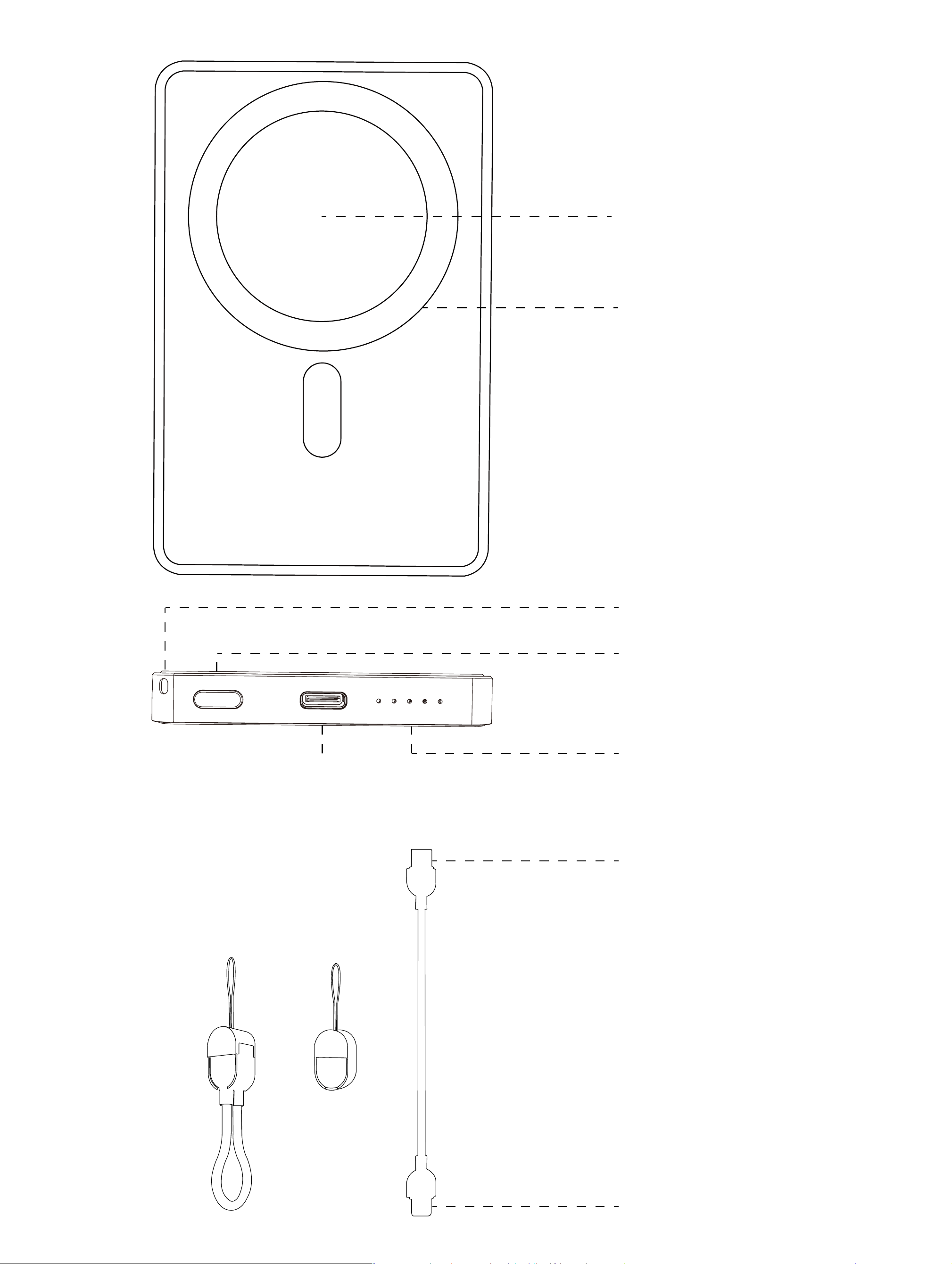
无线充电区域
磁吸位置
电源开关
电量指示
挂绳口
Tye-C
输出/输入接口
Tye-C接口
Tye-C接口
+=
产品型号:Energy A
名称:磁吸式便携移动电源 电池类型:聚合物电池
材质:铝合金+塑胶+硅胶 电池容量:5000mAh
额定容量:5.4 Ah(5V-2A) 能量转化:>60%
Type-C 输入:Type-C(IN)5V=3A 9V=2A
Type-C 输出:Type-C(OTU)5V=3A 9V=2.2A 12V=1.67A MAX
无线输出:15WMAX 总输出:20W(MAX)
产品尺寸:108x70x10.5mm 产品净重:约140g
FCC 警告:
本设备符合 FCC 规则第 15 部分的规定。其使用须遵守以下两项条件:
(1) 本设备不得造成有害干扰;
(2) 本设备必须接受任何接收到的干扰,包括可能导致意外运行的干扰。
未经负责合规方明确批准的任何更改或修改,都可能导致用户丧失操作该
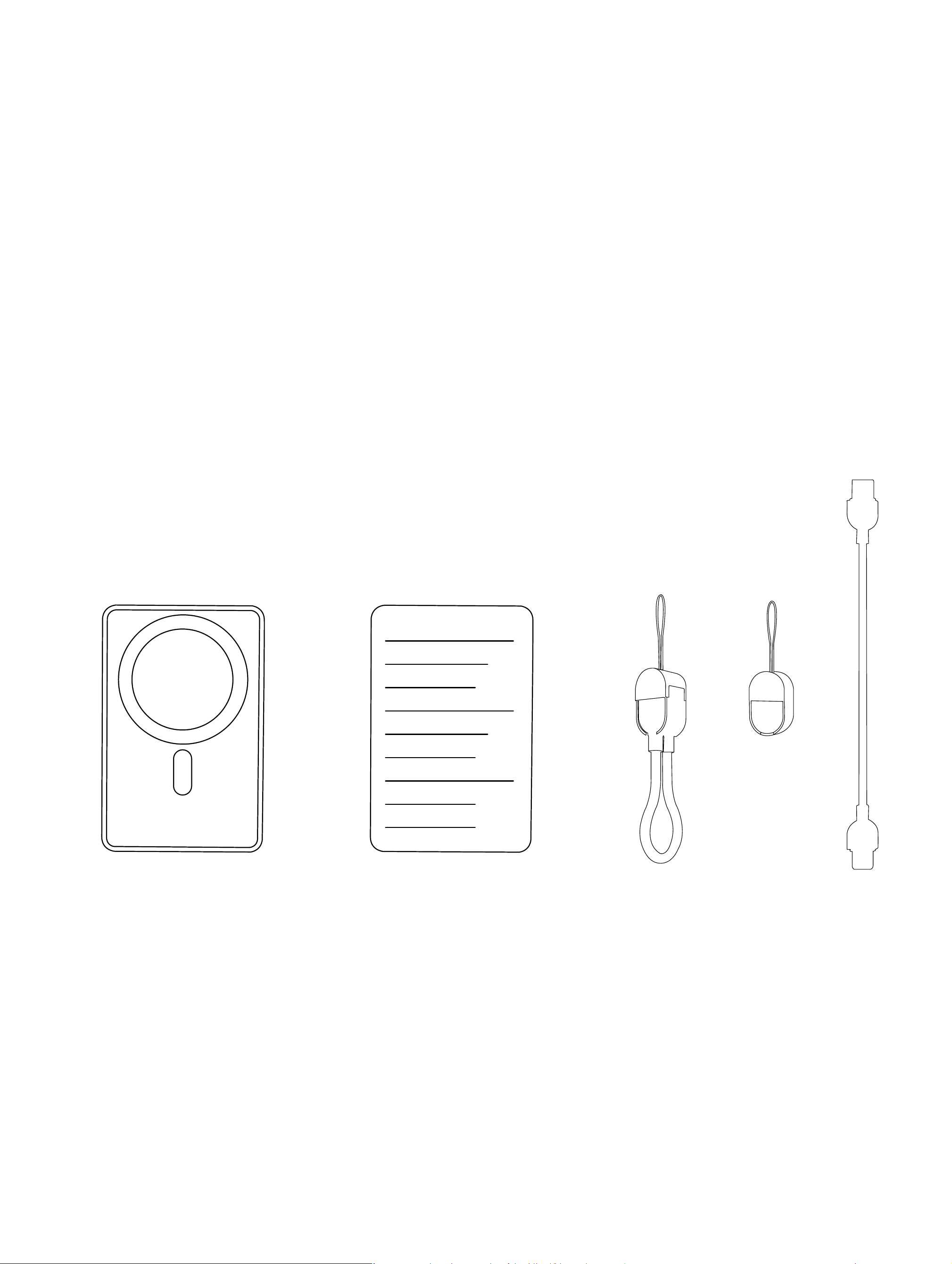
移动电源*1
说明书*1 挂绳数据线*1
包装清单:
+=

按键操作说明:
查看电量时:
按键1次启动电源输出功能,可查看电源剩余电量,电量显示LED灯亮起约
30秒后自动熄灭;
产品描述:
本产品是一款能为手机,平板,电子书、游戏机等数名产品提供有线充电
和无线充电的便携式充电设备,产品具有有线充电和无线充电二合一,磁
吸定位、电量指示,支持iP20W PD 快充、双输出(含无线输出)、15W无线
快充等特点,产品内置F00、过充、过放、温度保护等多种支全保护电路。
设备的权限。
注:本设备已经过测试,符合 FCC 规则第 15 部分对 B 类数字设备的限值
要求。这些限值旨在为住宅安装环境提供合理的保护,防止有害干扰。本
设备会产生、使用并可能辐射射频能量,如果未按照说明进行安装和使用,
可能会对无线电通信造成有害干扰。但是,无法保证在特定安装环境中不
会发生干扰。
如果本设备确实对无线电或电视接收造成有害干扰(可通过关闭和开启设
备来判断),建议用户采取以下一种或多种措施来消除干扰:
-- 调整接收天线的方向或位置。
-- 增加设备与接收器之间的距离。
-- 将设备接入与接收器所连电路不同的
电源插座。
-- 咨询经销商或经验丰富的无线电/电视

注意:
1·本产品支持无线充自动唤醒功能,当手机无线充位置与移动电源磁吸
位对吸时将自动开启无线充功能,为手机进行充电,无越充工作时工作
指示灯蓝色灯长亮,如需关闭无线充只需双击按键,2秒后将自动关机
2·本产品自带 FOD 异物检测功能,当检测到异物时工作指示灯会亮蓝色
并闪烁,但此时不会进行无线充电,闪解约5 秒后 LED 工作指示灯会自动
熄灭。
3· 本产品支持量大 20W 有线输出,当有线输出进入快充时工作指示灯此
时绿色灯长亮。
为移动电源充电时:
接入匹配移动电源接口的充电线时,电量指示灯会跳动,代表连接正常,
并开始为电源充电,如连接充电线后电量指示灯无跳动代表连接失败无充
电,请检查充电线连接是否正常。
有线充输出操作说明:
使用 Type-C充电线连接本电源对应输出端口,电源自动开启输出。个别
款智能手机因兼容性问题,需要按键开启电源输出功能,这属于正常现象
,无须理会,按开关键1次可为外接设备供电。
无线充输出操作说明:
本产品自带无线充自动唤醒功能,手机吸上即可自动开启无线充电;
当按键1次电量 LED 灯亮起,此时 30 秒内将为支持无线充电的手机充电,
将手机放置无线充电区域即可为手机无线充电。如 30 秒内无无线负载接
入,产品则会自动关团无线充电功能。
无线充电温馨提示说明:
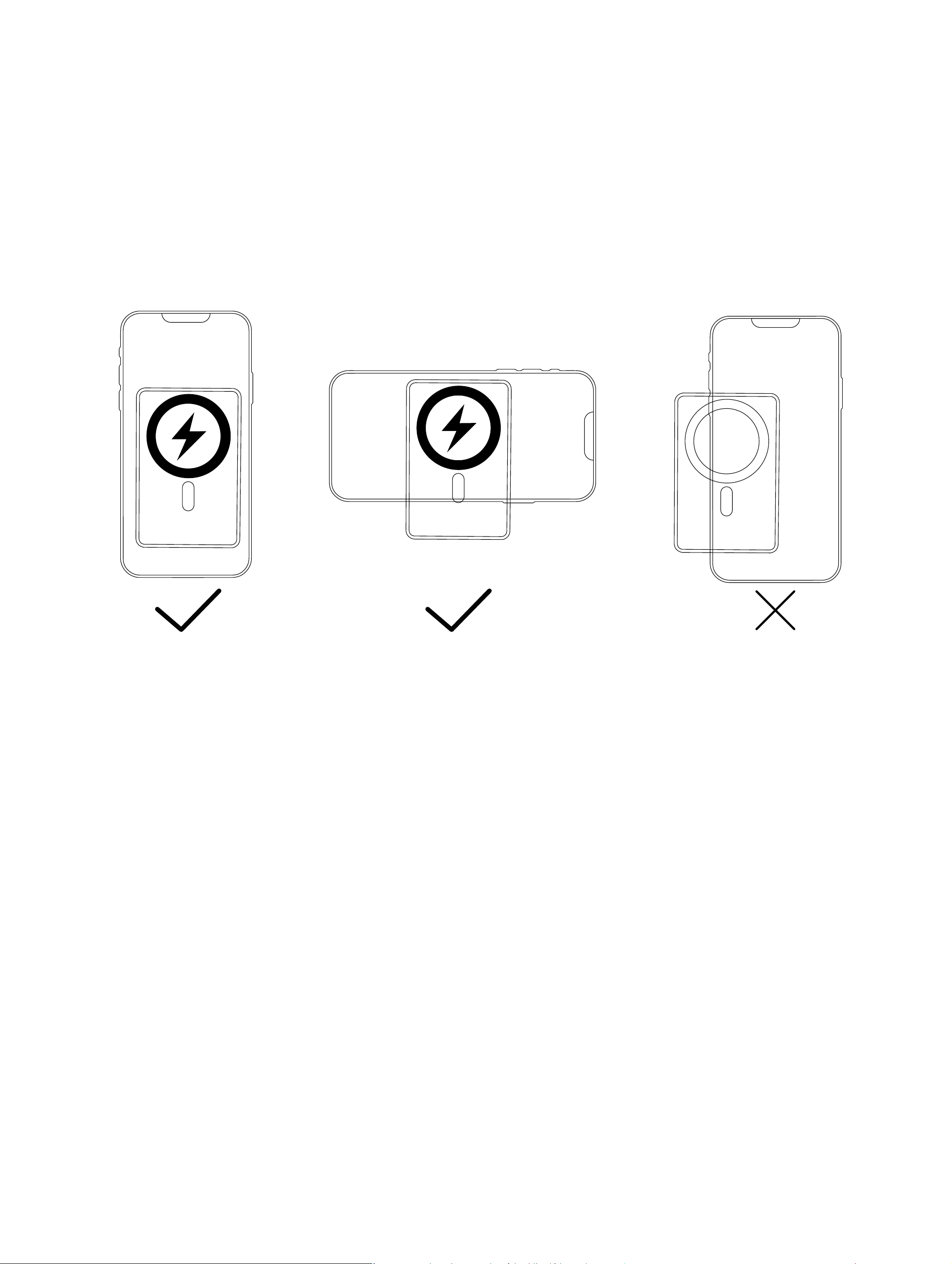
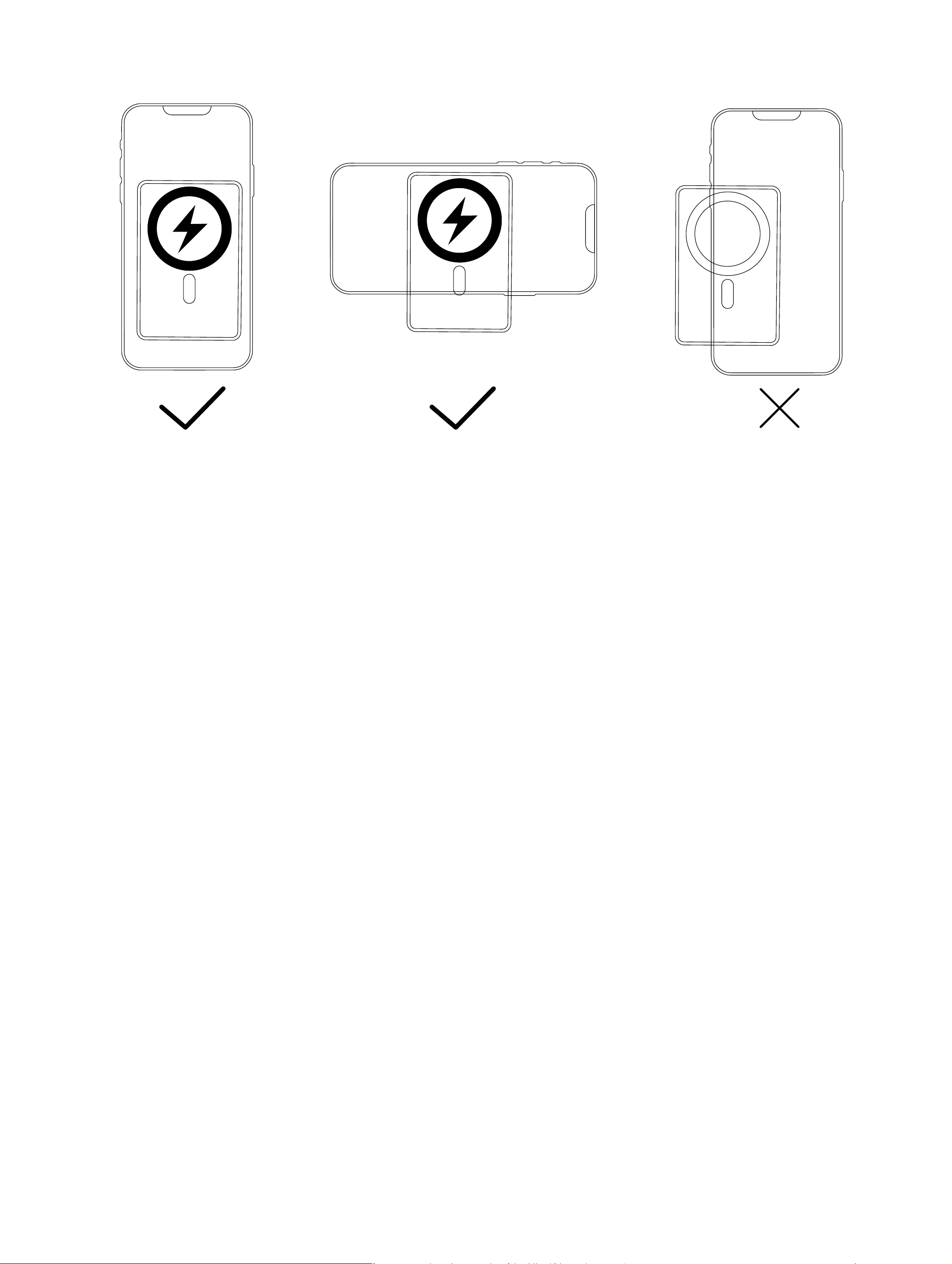
无线充电手机需放置本产品无线充电区域(无线充电线圈发射区域见图示
说明)进行无线充电。本产品充电距离为2mm内,如果无线充电时距离超
过 2mm 则无法进行无线充电,请调整手机无线充电距离在无线充电范围
内。
为本产品充电:
用电源适配器/电脑 US8 端口为本无线充移动电源充电
1·可使用 Type-c充电线,插入本无线充移动电源 Type-c输入端口为电源
充电,充电时电量指示灯闪烁,充满后电量指示灯四颗灯长亮。
2·充电宝指示灯每颗灯代表 25%电量,从左到右依次为25%,50%,75%,
100%,当电量不足5%时第一颗灯开始闪烁,此时需尽快为充电宝充电。
用本产品为手机或其他数码设备充电:
1·检查数码产品的充电电压是否与本产品的输出电压匹配。
2·选择数码产品的原装充电线,一端与数码产品连接,另一端与本产品
的输出口连接,本产品有线输出端将自动开启给手机或其它数码产品充电。

3·给带无线充功能的手机充电时,手机无线充位对吸上磁吸位或者按键1
次,LED 灯即会亮起,此时可支持无线充电将带无线充电功能的手机放在
移动电源无线充电的中心位置,则可为手机进行无线充电,此时工作指示
灯蓝色长亮。
温馨提示:
在使用本产品前请阅读所有的指示和警告,不规范使用将会给产品或人身
安全带来损坏。
1·手机背面充电接触面不带有金属物质,如铁片、指环、金属保护壳等。
2·手机进行充电时,如发现有断续充电或发热严重的情况,很可能是因为
手机接收圈与无线充线圈没有完全对准,手机保护套内部有金属异物,请
尝试冷却手机,拿掉保护套再进行正常位置对准。
3·本产品有过流保护功能,如使用不当产品会关闭或缩小输出功率,降低充
电速度,保安全,请检查设备是否或其他使用不当。
4·请勿将产品置于水中、火中等高温度环境(大于 50 度)和过低温度环境
(低于 -20 度)。勿给儿童玩耍,尤其是让儿童接触配件。
5·请使用干燥软布清洁表面,不要用化学品,肥皂或者洗涤剂清洗。
6·请勿自行拆机,用户不正常使用或不正常放置本产品可能导致本产品寿
命减低或损坏,因此带来的责任不属于保修责任或厂家责任,敬请谅解。
7·移动电源存在转化率,故移动电源电池容量不等同于可充电电量。
8·请定期为您的电源充电(建议最少5个月一次),可维持其长久使用寿命。
9·产品使用不当,容易造成产品本身或者可能危及人身财产安全。
10·如因消费者违反产品说明书不怡当使用或警示,造成的人身及财产损
害将自行承担一切后果,本公司将不承担任何法律责任。
11、非专业人士严禁分解本产品。

12、避免使用超出本产品输出电流的电器或负载(电路会保护,无输出)。
13、避免强烈的物理作用,包括敲击、投掷、践踏、挤压等。
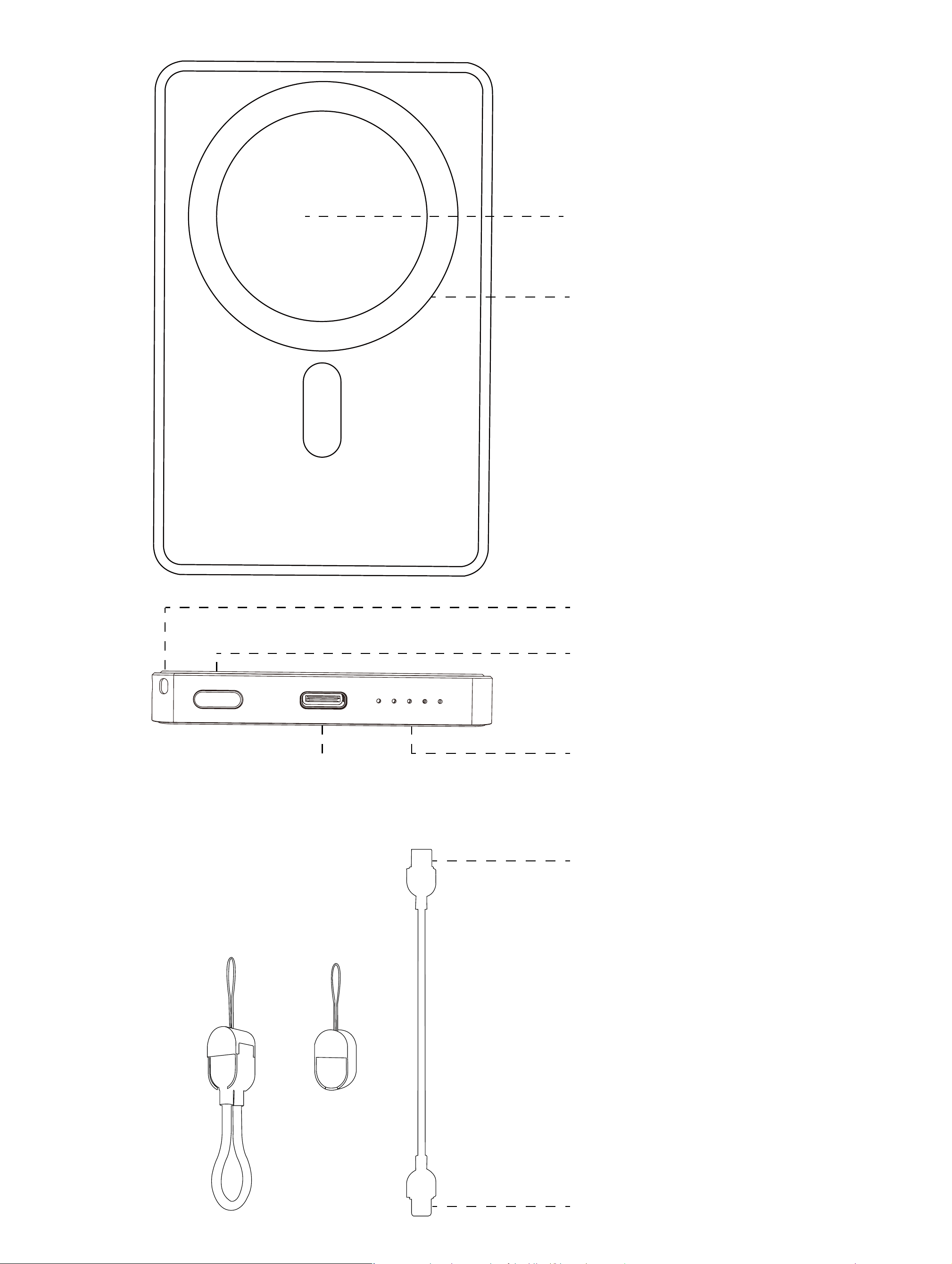
Wireless charging zone
Magnetic attachment point
Power switch
Battery level indicator
Lanyard opening
Tye-C
Input/Output Interface
Tye-C interface
Tye-C interface
+=
Product Model: Energy A
Name: Magnetic-Attachment Portable Power Bank
Battery type: Polymer battery Material: Aluminum alloy + plastic + silicone
Battery capacity: 5000mAh
Rated capacity: 5.4 Ah (5V-2A) Energy conversion: >60%
Type-C Input:Type-C(IN)5V=3A 9V=2A
Type-C Output:Type-C(OTU)5V=3A 9V=2.2A 12V=1.67A MAX
Wireless output:15WMAX Total output:20W(MAX)
Product dimensions:4.25x2.75x0.38inch
Net product weight: approximately 4.93oz
FCC Caution:
This device complies with part 15 of the FCC Rules. Operation is subject to the
following two conditions:
(1) This device may not cause harmful interference, and
(2) this device must accept any interference received, including
interference that may cause undesired operation.
Any changes or modifications not expressly approved by the party
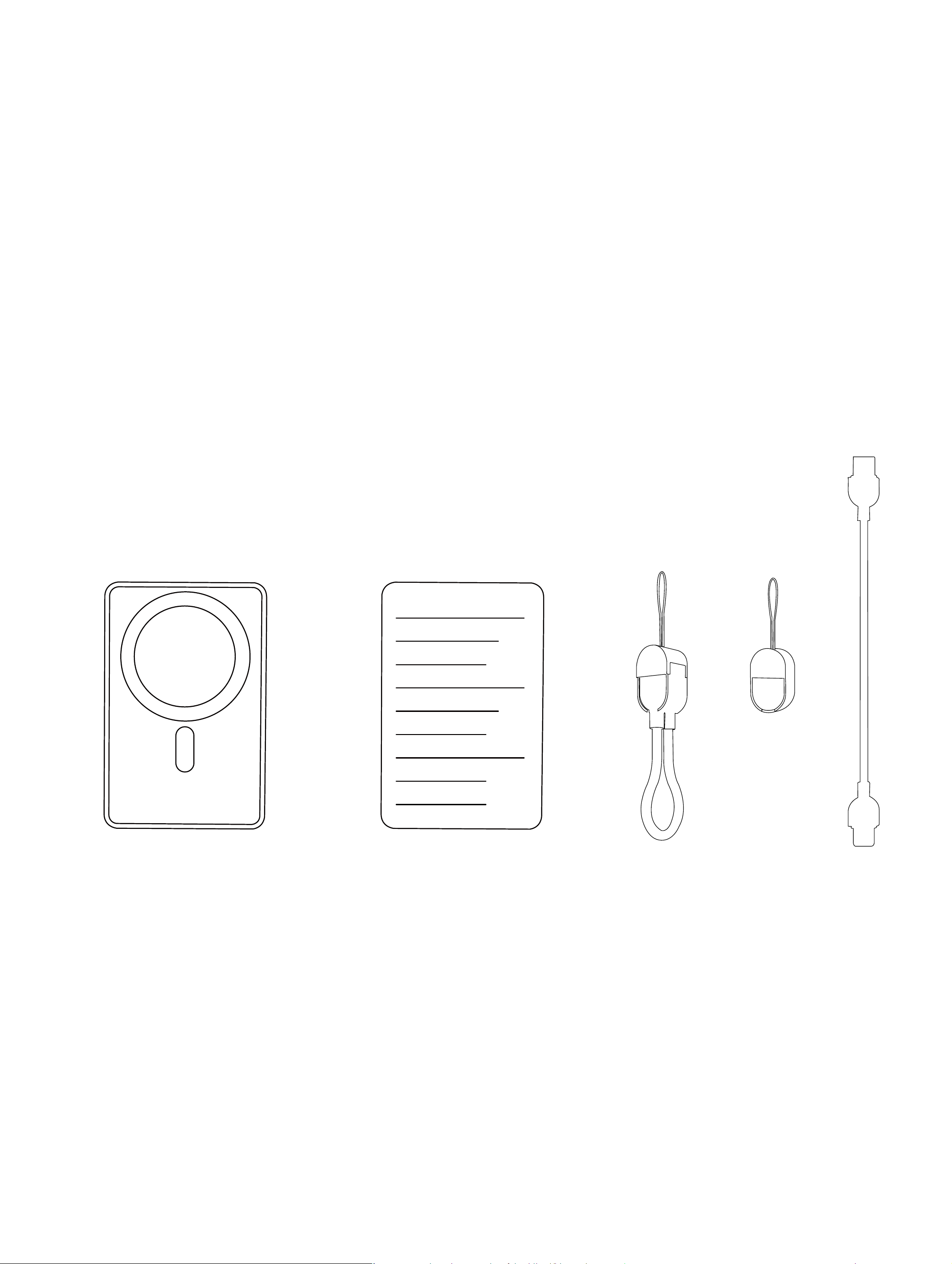
Portable power bank*1
Instruction manual*1 Lanyard data cable*1
Packing List:
+=

Product Description:
This product is a portable charging device capable of providing both wired
and wireless charging for multiple devices such as mobile phones, tablets,
e-readers, and gaming consoles. It features a dual-function design combining
wired and wireless charging, magnetic alignment, and battery level indication.
Supporting iP20W PD fast charging, dual output (including wireless output), and
15W wireless fast charging, the product incorporates multiple comprehensive
responsible for compliance could void the user's authority to operate the
equipment.
NOTE: This equipment has been tested and found to comply with the limits
for a Class B digital device, pursuant to Part 15 of the FCC Rules. These limits
are designed to provide reasonable protection against harmful interference
in a residential installation. This equipment generates, uses and can radiate
radio frequency energy and, if not installed and used in accordance with the i
nstructions, may cause harmful interference to radio communications.
However, there is no guarantee that interference will not occur in a particular
installation.
If this equipment does cause harmful interference to radio or television
reception,
which can be determined by turning the equipment off and on, the user is
encouraged to try to correct the interference by one or more of the following
measures:
-- Reorient or relocate the receiving antenna.
-- Increase the separation between the equipment and receiver.
-- Connect the equipment into an outlet on a circuit different
from that to which the receiver is connected.
-- Consult the dealer or an experienced radio/TV technician for help.
FCCRadiationExposureStatement
The device has been evaluated to meet general RF exposure requirement.

Note:
1·This product supports wireless charging auto-wake functionality. When the
mobile phone aligns with the power bank's magnetic charging position, wireless
charging will activate automatically to charge the device. During operation,
the blue indicator light remains steadily illuminated. To deactivate wireless
charging, simply double-click the button; the device will automatically power
down after 2 seconds.
2·This product incorporates FOD (Foreign Object Detection) functionality. Upon
detecting an obstruction, the operational indicator will illuminate blue and flash
intermittently. Wireless charging will cease during this period. After approximately
5 seconds of flashing, the LED indicator will automatically extinguish.
3·This product supports up to 20W wired output. When wired output enters
fast-charging mode, the operational indicator will display a steady green light.
When charging the power bank:
When connecting the charging cable to the power bank's interface, the battery
indicator light will flash, indicating a successful connection and commencement
of charging. Should the indicator light fail to flash after connecting the cable,
this signifies a failed connection and no charging is occurring. Please verify that
the charging cable is properly connected.
protection circuits including short-circuit protection, overcharge protection,
over-discharge protection, and temperature protection.The device incorporates
comprehensive protection circuits including short-circuit (F00), overcharge,
over-discharge, and temperature protection.
Key Operation Instructions:
To check the remaining charge:
Press the button once to activate the power output function, which will display
the remaining charge. The charge indicator LED will illuminate for approximately
30 seconds before automatically extinguishing.

Wireless Charging Advisory Notice:
To charge your wireless charging mobile phone, place it within the wireless
charging area of this product (refer to the diagram for the wireless charging
coil transmission zone).This product supports wireless charging within a distance
of 2mm. If the distance exceeds 2mm during wireless charging, the function
will not operate.Please adjust your mobile phone's wireless charging position
to ensure it remains within the designated charging range.
Wired Charging Output Operating Instructions:
Connect the Type-C charging cable to the corresponding output port on this
power supply unit, and the unit will automatically activate its output function.
Certain smartphone models may require pressing a button to enable power
output due to compatibility issues. This is normal behaviour and requires no
further action; pressing the power button once will supply power to the connected
device.
Wireless Charger Output Operation Instructions:
This product features an automatic wake-up function for wireless charging; simply
attach your mobile device to initiate charging.Upon pressing the button once,
the battery level LED indicator will illuminate. Within 30 seconds, it will begin
charging compatible wireless charging mobile devices.
Place your mobile phone within the wireless charging area to begin wireless
charging. Should no wireless load be detected within 30 seconds, the product
will automatically deactivate the wireless charging function.
Charging this product:
Charge this wireless charging power bank using a power adapter or computer's
USB 8 port.
1. Use a Type-C charging cable to connect to the power bank's Type-C input
port for charging.The battery indicator lights will flash during charging. Once
fully charged, all four indicator lights will remain steadily lit.
2. Each power bank indicator light represents 25% battery capacity, displaying
levels from left to right: 25%, 50%, 75%, and 100%.When the remaining charge
falls below 5%, the first indicator light will begin to flash. Recharge the power
bank promptly at this stage.
Use this product to charge your mobile phone or other
digital devices:
1·Verify that the charging voltage of your digital device matches this product's
output voltage.
2·Select the original charging cable for your digital device. Connect one end
to the device and the other to this product's output port. The wired output port
will automatically activate to charge your mobile phone or other digital device.

3. When charging a mobile phone with wireless charging capability, align the
phone's wireless charging pad with the magnetic attachment point or press
the button once. The LED indicator will illuminate, signalling readiness for
wireless charging. Position the compatible mobile phone at the centre of the
power bank's wireless charging area to initiate wireless charging. The
operational indicator will display a steady blue light during charging.
Kindly note:
Before using this product, please read all instructions and warnings. Improper
use may cause damage to the product or pose a risk to personal safety.
1. Ensure the charging contact surface on the back of your mobile phone is free
from metallic objects such as metal plates, rings, or metal protective cases.
2. If intermittent charging or excessive heat is observed during charging, this
may indicate the phone's receiving coil is not fully aligned with the wireless
charging coil, or metallic foreign objects within the protective case. Attempt to
cool the phone, remove the protective case, and realign it correctly.
3. This product incorporates overcurrent protection. Improper use may cause
the device to shut down or reduce output power, slowing charging speed for
safety. Check for device malfunction or other misuse.
4. Do not expose the product to high temperatures (above 50°C) or low
temperatures (below -20°C), such as near water or fire. Keep out of reach of
children, particularly preventing them from handling any components.
5·Clean surfaces with a dry, soft cloth. Do not use chemicals, soap, or detergents.
6·Do not disassemble the unit. Improper use or storage may reduce product
lifespan or cause damage. Any resulting liability falls outside warranty coverage
or manufacturer responsibility. Your understanding is appreciated.
7·Power banks involve conversion efficiency; thus, the battery capacity does not
equate to the chargeable amount.
8. Recharge your power bank periodically (recommended at least every five
months) to maintain its longevity.

9. Improper use may cause product malfunction or pose risks to personal safety
and property.
10. Should personal injury or property damage occur due to consumer
non-compliance with the manual or warnings, all consequences shall be borne
solely by the consumer. The company shall not assume any legal liability.
11. Non-professionals are strictly prohibited from disassembling this product.
12. Avoid using electrical appliances or loads exceeding this product's output
current rating (the circuit will protect itself and cease output).
13. Avoid subjecting the unit to severe physical impact, including striking,
throwing, trampling, or crushing.