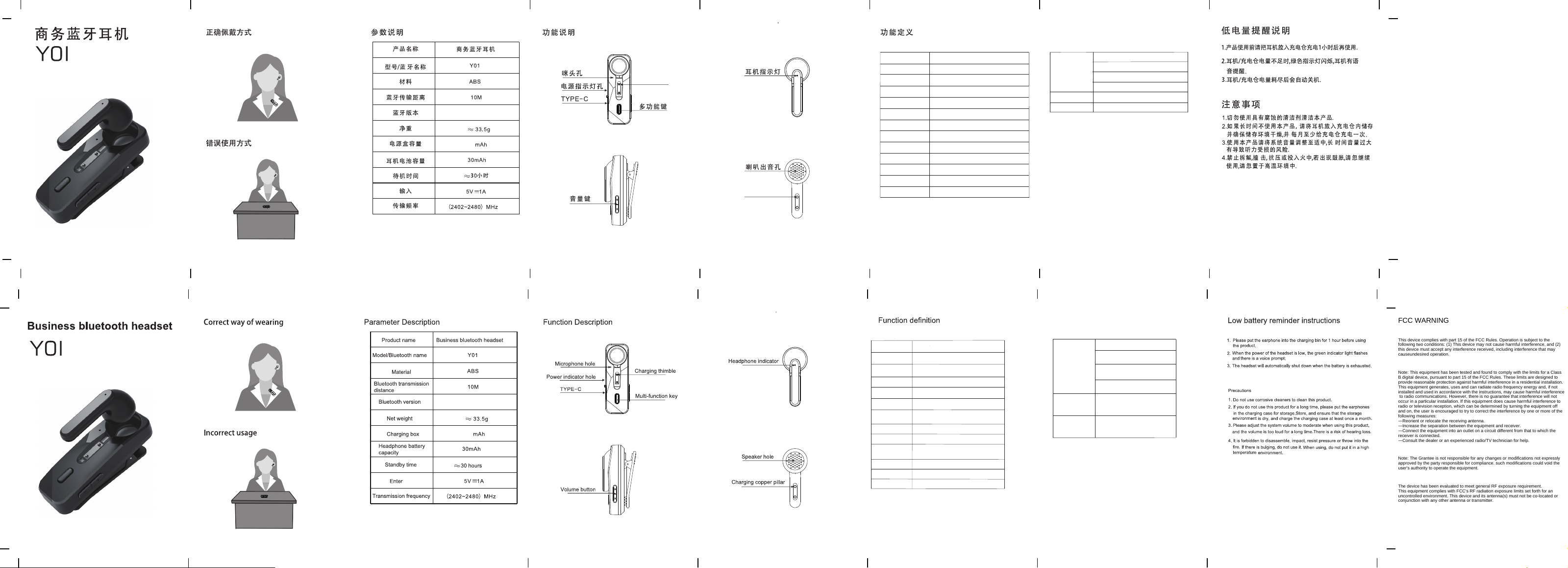
充电接触点
充电接触点
240
6.0
6.0
240
温馨提醒:
1.首次连接手机蓝牙时,请将耳机放入充电仓里,
绿灯长亮后取出耳机, 然后打开手机蓝牙搜索
“Y01”连接即可!
2.如果耳机无法充电,请擦拭并擦干充电接触点。
Warm Reminder:
1:When connecting to your phone's Bluetooth for the first time,
placethe earbuds in the charging case. After the green light stays
on steadily, take out the earbuds, then turn on your phone's
Bluetooth, search for "Y01" and connect.
2:Wipe and dry charging contactsif earbuds can't be charge.
开机 长按多功能按键2秒
关机 长按多功能按键5秒
进入配对状态
绿白灯交替快闪
待连接状态 夹麦快闪,耳机慢闪
连接后状态 所有指示灯熄灭
断开连接 充电仓震动两下,灯会闪
语音助手 长按多功能按键2秒抬起唤醒
播放/ 暂停 短按多功能按键
音量加/ 减 短按音量+/- 按键
切换上/ 下曲 长按音量+/- 按键2秒
来电模式 震动+提示音
接听/ 挂断来电
短按多功能按键
拒接来电 长按多功能按键
Answer/End Call
Power On
Power Off
Long press the multi-function button for 2 seconds
Long press the multi-function button for 5 seconds
Enter Pairing Mode Green and white lights flash alternately quickly
Pending Connection Headset mic flashes quickly, earphone flashes slowly
Connected State
All indicator lights turn off
Disconnect
Charging case vibrates twice, and the light flashes
Play/Pause
Long press the multi-function button for 2 seconds
then release to wake up
Volume Up/Down
Short press the multi-function button
Switch Previous/
Next Track
Short press the volume +/- button
Incoming Call Mode
Long press the volume +/- button for 2 seconds
Voice Assistant
Vibration + prompt tone
Short press the multi-function button
Reject Call
Long press the multi-function button for 2 seconds
Auto Reconnect
to Phone
Auto-reconnect when manually powering on
Auto-reconnect when taking out the
earphone
Auto-reconnect within 5 minutes after
disconnection
Auto-reconnect within 5 minutes after
going out of range
Green light stays on during charging;
white light stays on for 5 seconds
then turns off when fully charged
Green light stays on during charging;
white light stays on for 5 seconds
then turns off when fully charged
Earphone Charging
Mode
Charging Case
Charging Mode
耳机充电模式
充电仓充电模式
自动重连手机
手动开机自动重连
取出耳机自动重连
断开5分钟内自动回连
超距5分钟内自动回连
充电时绿灯长亮,充满白灯亮5秒后熄灭
充电时绿灯长亮,充满白灯亮5秒后熄灭
FCC WARNING
This device complies with part 15 of the FCC Rules. Operation is subject to the
following two conditions: (1) This device may not cause harmful interference, and (2)
this device must accept any interference received, including interference that may
causeundesired operation.
Note: This equipment has been tested and found to comply with the limits for a Class
B digital device, pursuant to part 15 of the FCC Rules. These limits are designed to
provide reasonable protection against harmful interference in a residential installation.
This equipment generates, uses and can radiate radio frequency energy and, if not
installed and used in accordance with the instructions, may cause harmful interference
to radio communications. However, there is no guarantee that interference will not
occur in a particular installation. If this equipment does cause harmful interference to
radio or television reception, which can be determined by turning the equipment off
and on, the user is encouraged to try to correct the interference by one or more of the
following measures:
—Reorient or relocate the receiving antenna.
—Increase the separation between the equipment and receiver.
—Connect the equipment into an outlet on a circuit different from that to which the
receiver is connected.
—Consult the dealer or an experienced radio/TV technician for help.
Note: The Grantee is not responsible for any changes or modifications not expressly
approved by the party responsible for compliance. such modifications could void the
user's authority to operate the equipment.
The device has been evaluated to meet general RF exposure requirement.
This equipment complies with FCC's RF radiation exposure limits set forth for an
uncontrolled environment. This device and its antenna(s) must not be co-located or
conjunction with any other antenna or transmitter.