USER MANUAL
WIRELESS
MICROPHONE
RY-LM01
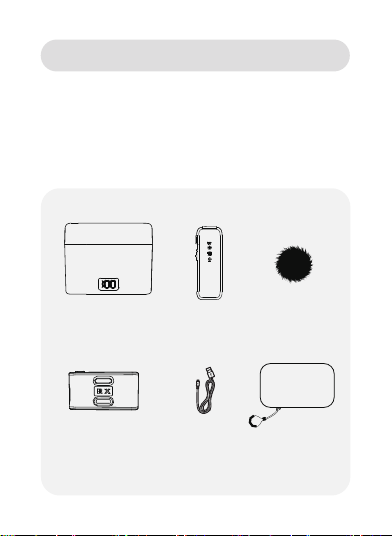
Charging case
Transmitter Microphone
windshield
Storage bag
Receiver
PRODUCT INTRODUCTION
Dear user, thank you for choosing to use our wireless lavalier
microphone. This manual will provide you with clear usage guidelines
to help you quickly get started and fully utilize the product's functions.
It can provide professional level recording and live streaming output,
plug and play, and can be used for online live streaming, video VLOG
shooting, program interviews, interview recording, video teaching and
other scenarios.
Charging cable
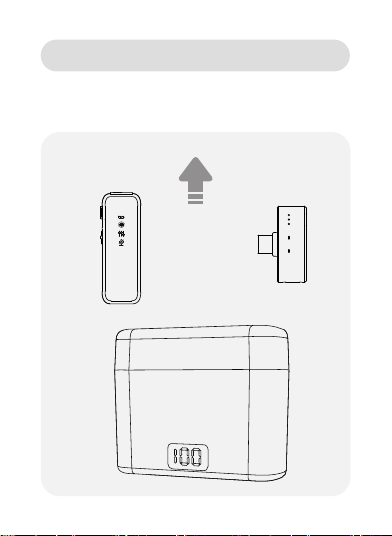
1. Remove the transmitter and receiver
USAGE METHOD
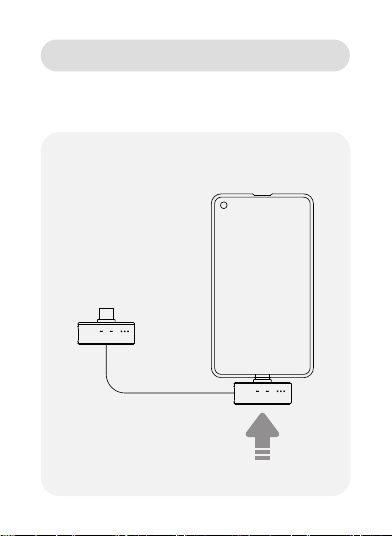
2. The receiver combines Type-C and Lightning
interfaces.Choose the plug matching your phone model and insert it
into the phone.
USAGE METHOD
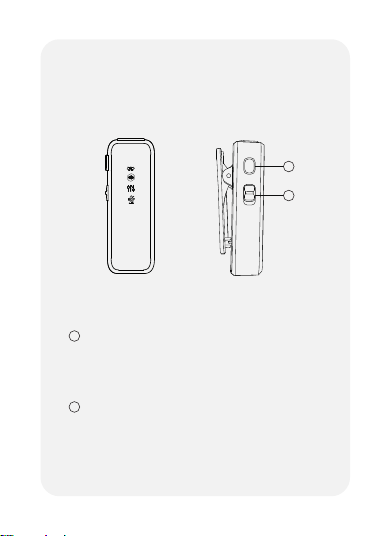
Multi-functional button
TRANSMITTER
BUTTON
1. On/Off-Press for 2s
2. Reverb-Single-Click
3. Mute-Double-Click
1
1
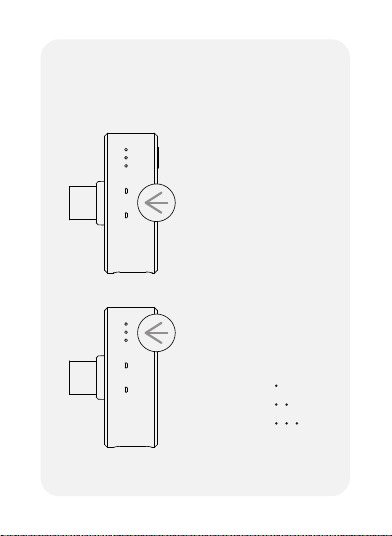
Noise reduction
1. Slide down the key
2
2
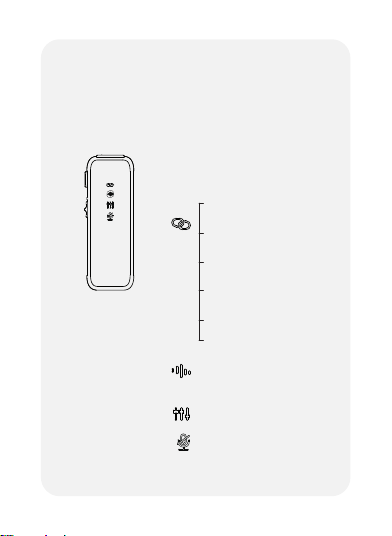
Long blue light on-
Noise reduction on
Long blue light on -
Reverb on
Long blue light on-
Mute on
lndicator light:
Blue light flashing - pairing
Blue light solid on - paired
Long green light on - charging
Green light off - fully charged
Red light flashing - low battery
Red light always on - mute
TRANSMITTER
INDICATOR LIGHT
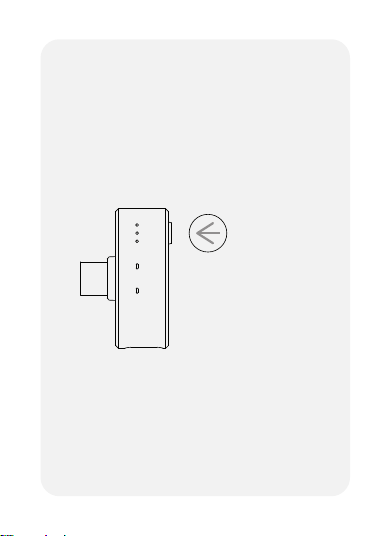
Volume button:
Click the volume button to
increase or reduce volume
(cycle in sequence)
RECEIVER
BUTTON
Paired indicator light
Blue light solid on - paired
Blue light flashing - pairing
RECEIVER
INDICATOR LIGHT
Microphone volume
indicator light
First gear
Second gear
Third gear
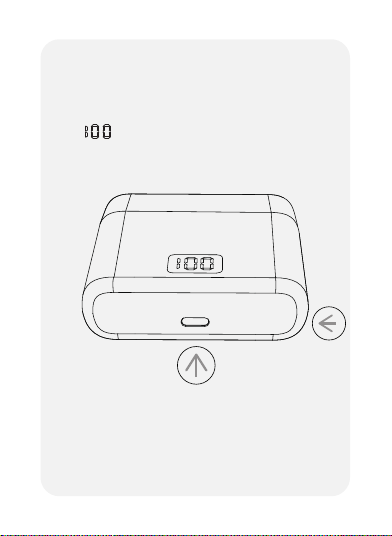
Digital display screen
Charging port
Charging case power indicator
CHARGING CASE
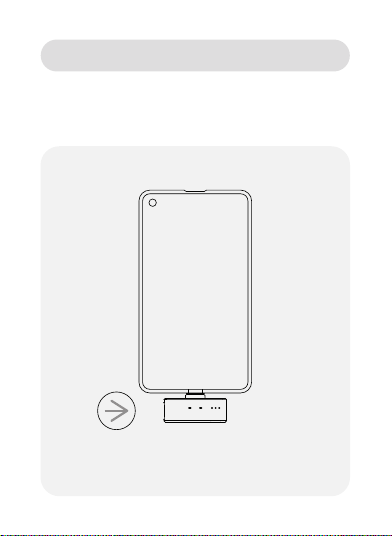
When shooting short videos or live broadcasts
The phone can be charged through the interface on the receiver.
Charging port
PHONE CHARGING

1. Why can't I record normally after connecting to my phone?
*Please check if the connection indicator lights of the microphone
transmitter and receiver are always on.
*Please check if the microphone transmitter battery is sufficient. If the
battery is low, please charge it promptly.
*Some Xiaomi and Huawei phones need to update their phone
versions (Settings > My Device > Version > Check for updates).
*Some brands of mobile phones, such as VIVO, OPPO, Realme,
Oneplus, igoo, etc., require the OTG "function to be turned on and
external recording devices to be turned on
Step 1: Open the "OTG" process: Phone settings > Other settings >
OTG > Open or search for "OTG" in the search box in the settings and
open it)
Step 2: Open the external device process: Settings > Sound and
Vibration > More Sound Settings > Default Recording Device >
External Device
2. Can't the microphone transmitter record for the camera app
that comes with the device?
*Some brands of mobile phones have strict restrictions on the system,
which prevent the microphone transmitter from obtaining audio
permissions, not due to the quality of the microphone. If this situation
occurs, please contact the brand phone manufacturer.
*This product is compatible with the vast majority of apps on the
market. Please try using other apps instead.
3. Is there noise in the recorded sound?
*Check if the microphone transmitter is in noise reduction mode (the
second indicator light is always on). Click the multifunction button to
turn on noise reduction.
FREQUENTLY ASKED QUESTION

4. Is the recorded sound too low?
*Please shorten the distance between the microphone transmitter and
the sound source reasonably to avoid breaking the sound.
*Please click the microphone transmitter volume button on the receiver
to increase the volume.
*Some brands of mobile phones, such as VIVO, OPPO, Realme,
Oneplus, iqoo, etc., require the "OTG" function to be turned on and
external recording devices to be turned on (please follow the first step
of the FAQ).
5. What should I do if there is wind noise?
*If you purchased a model equipped with a windshield, please install
the windshield on the microphone transmitter.
6. What should I do if the connected phone has low battery during
recording?
*Please connect the charging cable to the charging port on the receiver
to charge the phone.
7. What if there is an echo?
*Check if the microphone transmitter has the reverb function turned on
(the third indicator light is on). Double click the multifunction button to
turn off reverb.
*Enter the song request interface in the live broadcast room and set it
to the original sound in the tuning section.
8. What if there is an echo during the live broadcast?
*Please turn off the sound on your phone while watching the live
broadcast, otherwise there will be echoes (phones in the same space
cannot have sound while watching the live broadcast).
FREQUENTLY ASKED QUESTION

Wireless transmission: 2.4GHz
Sound delay:<25ms
Frequency response: 20Hz-20KHz
Sensitivity: -42dB
Signal to noise ratio: -70dB
Transmission distance: 65ft (turning) -131ft (visible)
Transmitter: 360° omnidirectional
Battery life: Microphone transmitter:>7H
Single microphone with charging case:>49H
Battery capacity: Microphone transmitter: 110 mAh
Charging case:600mAh
Input voltage: DC4.5-5.2V
Adapter: 5V/1A
Weight: Microphone transmitter: 10g
Receiver: 5.2g
Charging case: 55g
Size: Microphone transmitter: 1.81*0.62*0.39 Inch
Receiver: 1.65*0.59*0.28 Inch
Charging case: 3.03*2.44*1.06 Inch
PRODUCT PARAMETERS

1. The product contains strong magnetism. To avoid magnetization
effects, please stay away from easily interfering devices such as
magnetic cards, IC cards, implanted medical devices (such as
pacemakers), hard drives, RAM chips, etc.
2. It is strictly prohibited to let the product come into contact with any
liquid, and do not immerse the product in water or wet it. Do not use
the product in rain or damp environments. After contact with water
inside the product, corrosion reactions may occur, leading to battery
self ignition or even explosion.
3. If the product catches fire, please immediately use water, water mist,
sand, fire blanket powder, and carbon dioxide fire extinguishers to
extinguish the fire. Please choose the fire extinguishing method in the
order recommended above based on the actual situation.
4. Please use the product in an environment between -10°C and 45°C,
with a charging environment temperature of 5°C to 45°C.
5. It is prohibited to disassemble the product in any way. If the battery
is punctured during disassembly, it will lead to electrolyte leakage
inside the battery, and even cause a fire or explosion.
6. Mechanical impact, rolling or throwing of products is prohibited. Do
not place heavy objects on the product.
7. Do not place the product in the accessories or inside of heating
equipment, cooking equipment, high-pressure containers, etc. (such as
microwaves, battery ovens, electric ovens, electric heaters,
high-pressure cookers, water heaters, gas stoves, etc.) to prevent the
battery from overheating and exploding.
SAFETY PRECAUTIONS

8. It is prohibited to place products near heat sources (such as stoves
or heaters) or in cars on hot days. Do not store the product in an
environment exceeding 60°C.
9. Do not store the battery for a long time after fully discharging it, to
avoid damage to the battery cell caused by excessive discharge, and it
will not be able to be used again.
10. The charging compartment, data cable, and battery of the original
matching model must be used.
11. Using non certified or non matching charging compartment data
cables or batteries may cause electric shock, fire, explosion, or other
hazards.
Attention:
Due to product version upgrades or other reasons, this manual may be
updated from time to time.
Unless otherwise agreed, this document is only intended as a guide for
use. All statements, information, and suggestions in this document do
not constitute any express or implied warranties.
SAFETY PRECAUTIONS
MANUFACTURER
FCC COMPLIANCE
WARRANTY&SERVICE
This device complies with Part 15 of the FCC Rules.
Operation is subject to the following two conditions:
(1) This device may not cause harmful interference.
(2) This device must withstand any interference received,
including interference that may cause undesired operation.
Shenzhen Hanke Technology Co.,Ltd
Meipeng SKY311, No.3 Hebei Industrial Zone, Zhongxing
Road, Ma'antang Community, Bantian Street, Longgang
District, Shenzhen, Guangdong, China, 518000
This product is covered with Rythflo product and labor warranty
for 24 months from the date of its original purchase.
Any questions welcome to contact us:
support@rythflo.com