User's manual
ZW-T6

Before you use this product, please read all the information
provided with the product carefully, which will help you use this
product better.
1. Features
The first wireless microphone on the market which supports high
sample rate voice/audio signal working bidirectional transmission
among TX1, TX2 and RX devices.
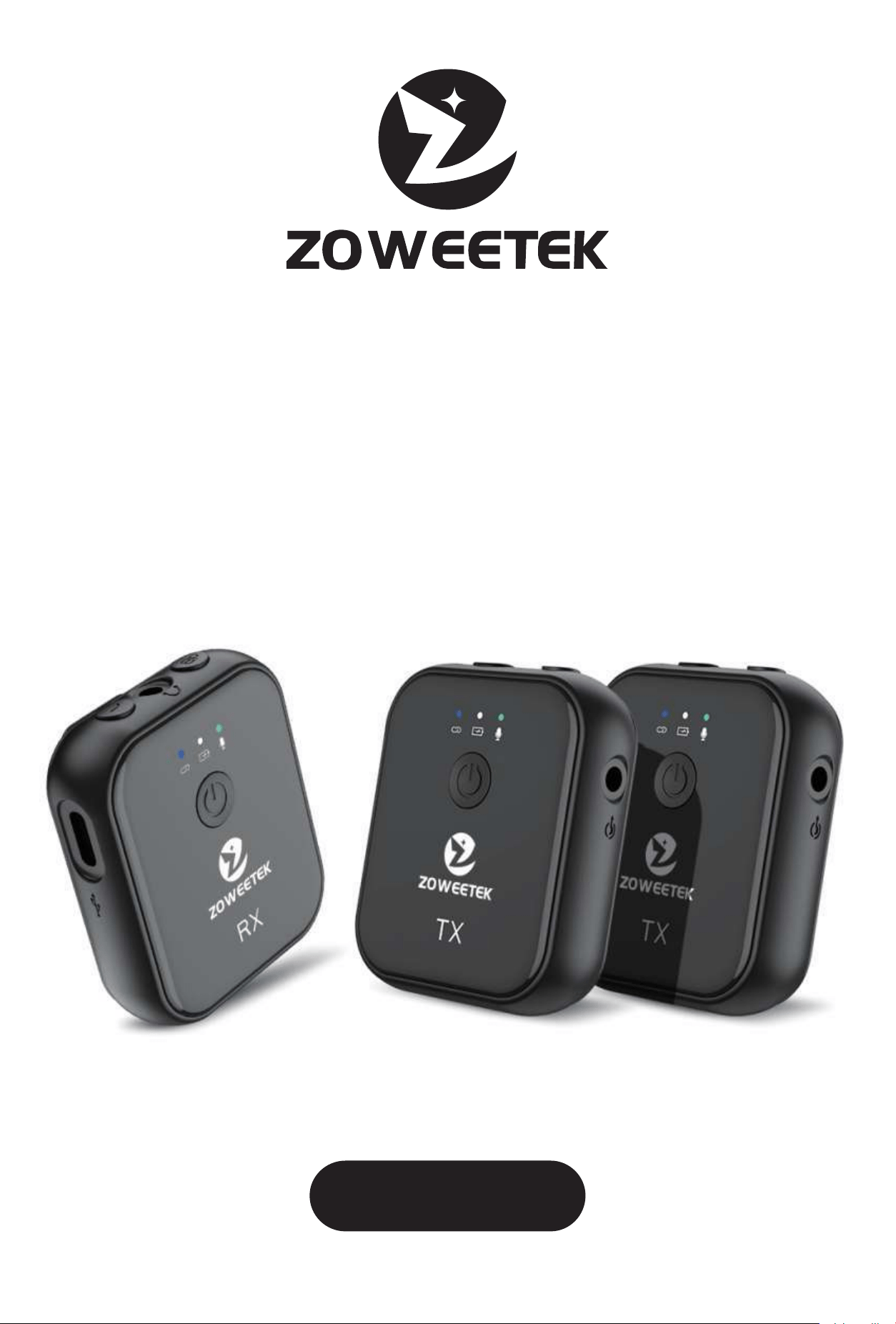
ZOWEETEK T6 is a professional wireless microphone.
●Bluetooth5.1withthelatestLC3codec,providinglow-latency
and high-quality sound performance.
●Workingdistance:lineofsightdistanceupto50meters.
●Supportmonitoringfunctionwhilerecording.
●UniqueTX1,TX2andRXthree-waycommunicatingeachother,
signal bidirectional transmittingamong three devices. RX can
transfer audio to TX1/TX2 while recording voice from TX1/TX2,
and two TXs can also monitor synchronously each other.
●48Ksamplingratewithnoisereduction.
●Extremelyfastpairing,fastconnection.
●Multi-scenarioapplication,vlog,livebroadcast,conference,
store, interview etc.
●Vlogrecordingvideowithbackgroundsoundmixed.

2. Product Precautions
●Ifyoudonotuseitforalongtime,pleasecharge/dischargethe
product every 1 month.
●Thisproductcannotbeusedinhightemperatureorwater.
●Donotdroporhitthemachineviolently.
●Donotdisassemble,repairormodifythisproduct.
●Ifyoudonotuseitforalongtime,pleasecharge/discharge
the product every 1 month.
3. Charging steps
Use the 3-in-1 charging cable to connect the charger to charge.
Can be charged using a computer and a charger.
Charger specifications
Input:AC110-240V50/60Hz100mA
Output:DC5.0V-500mA-1A
Batteryquery:ShortpressthePowerkeyinthepower-on
connection state to query.
Charging indicator prompt description:
Lowpower:themiddlelow-endredlightflashesslowly(250ms).
Charging:themiddleredlightison,andthewhitelightisoff.
Fullycharged:theredlightisoffandthewhitelightison.
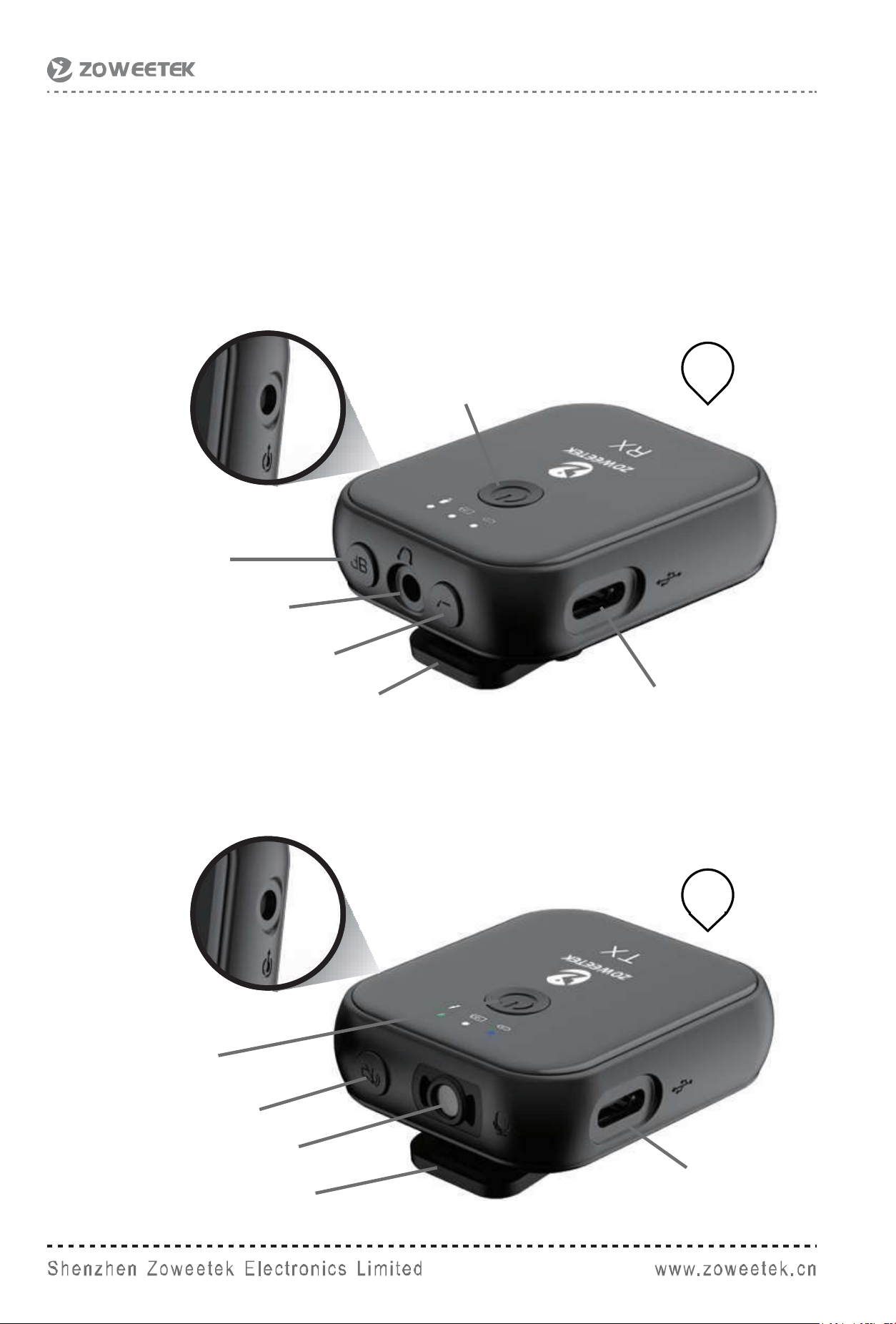
4. Product appearance wireframe
[RX-audio reception; TX-audio transmission]
RX
Receiver
Volumebutton
HeadphoneOutput
NoisereductionSwitch
Clip
Powerswitch
Charging port/audio port
Charging port
TX
Transmitter
3.5mmAudioInput/RecordingOutput
(TRRSconnectedtomobilephone)
3.5monitorOutput/extemalmicrophoneinput
Built-in microphone
Powerswitch
Mute button
Clip

TX-RX Pairing method and power query operation instructions:
●Whenthemachineisturnedon:
1.Pressandholdthemutebuttonfor3sontheTX,theleftblue
light flashes quickly, and enter the pairing mode;
2. RX long press the volume button for 3s, the left blue light flashes
quickly, and enters the pairing mode.
3. Afterthepairingissuccessful,thebluelightontheleftsideof
'TX'/'RX' will change from fast flashing to steady light, indicating
that the pairing is successful.
Note that the machine has been paired successfully at the
factory, and the machine does not need to be paired again
after receiving it.
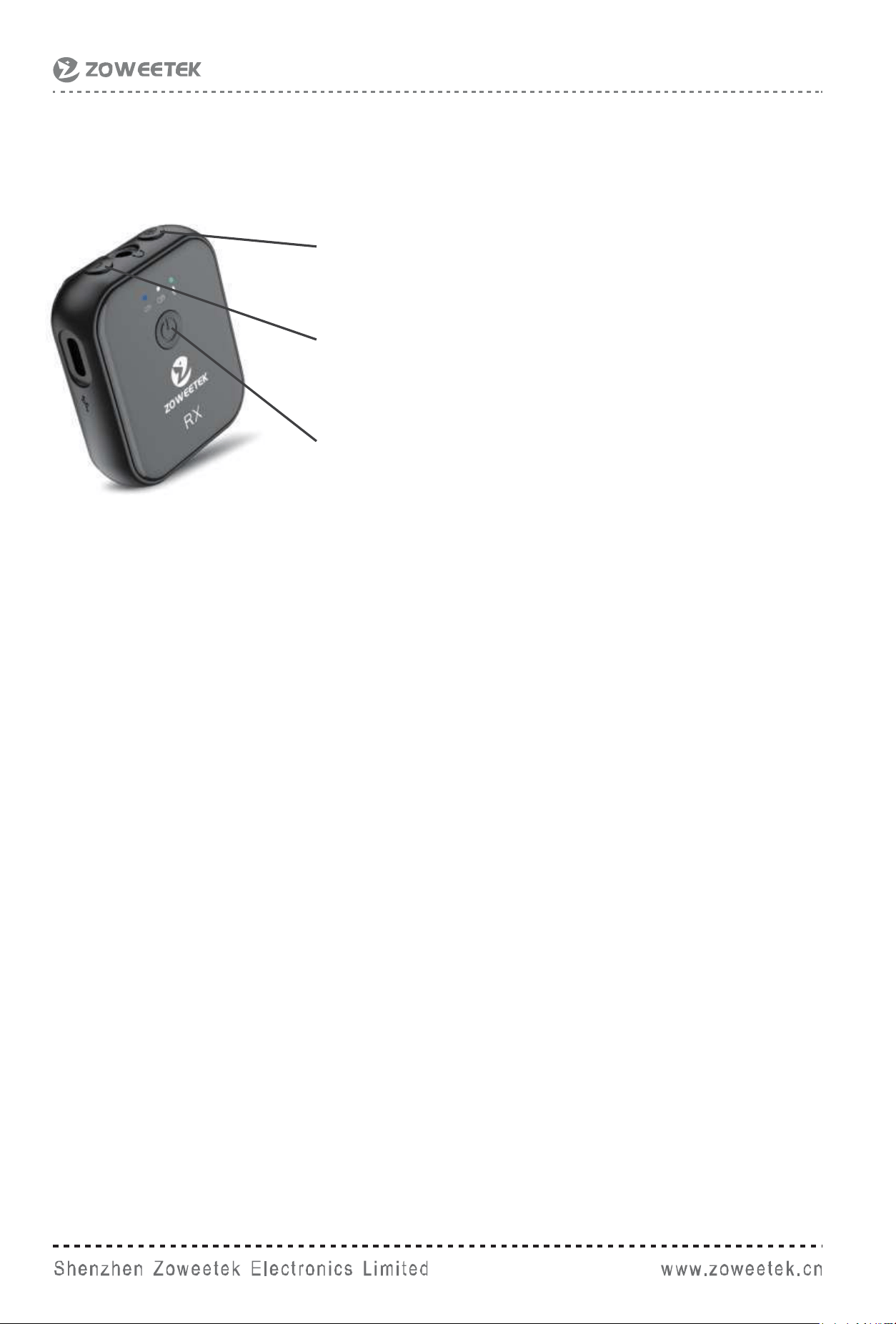
EQlowcutkey,
short press on/off
Volumekeyfunction,
short press volume level to cycle
Poweron/offkeyfunction,
long press on/off
Left blue light:
Pairingstatus:thelightflashesquickly
Connectionstatus:thelightisalwayson
Disconnectedstate:thelightflashesslowly
Middle LED:
Poweron:thewhitelightisalwayson
Lowbattery:theredlightflashesslowly
Charging:theredlightisalwayson
Fullycharged:theredlightisoffandthewhitelightison
ShortpressthePowerkey:thewhitelightflashesslowly,the
power is sufficient, the flashing speed
is fast, the power is low.
WhenconnectedtoaUSBaudiodeviceforrecording,thegreen
light is always on.
Right light:
Advancedvolume:theredlightisalwayson
Mediumvolume:solidgreenlight
Lowvolume:yellowlightisalwayson
EQlow-cutstate:thelightflashesslowly
[RX-Receive] button function and indicator light prompt
operation instructions
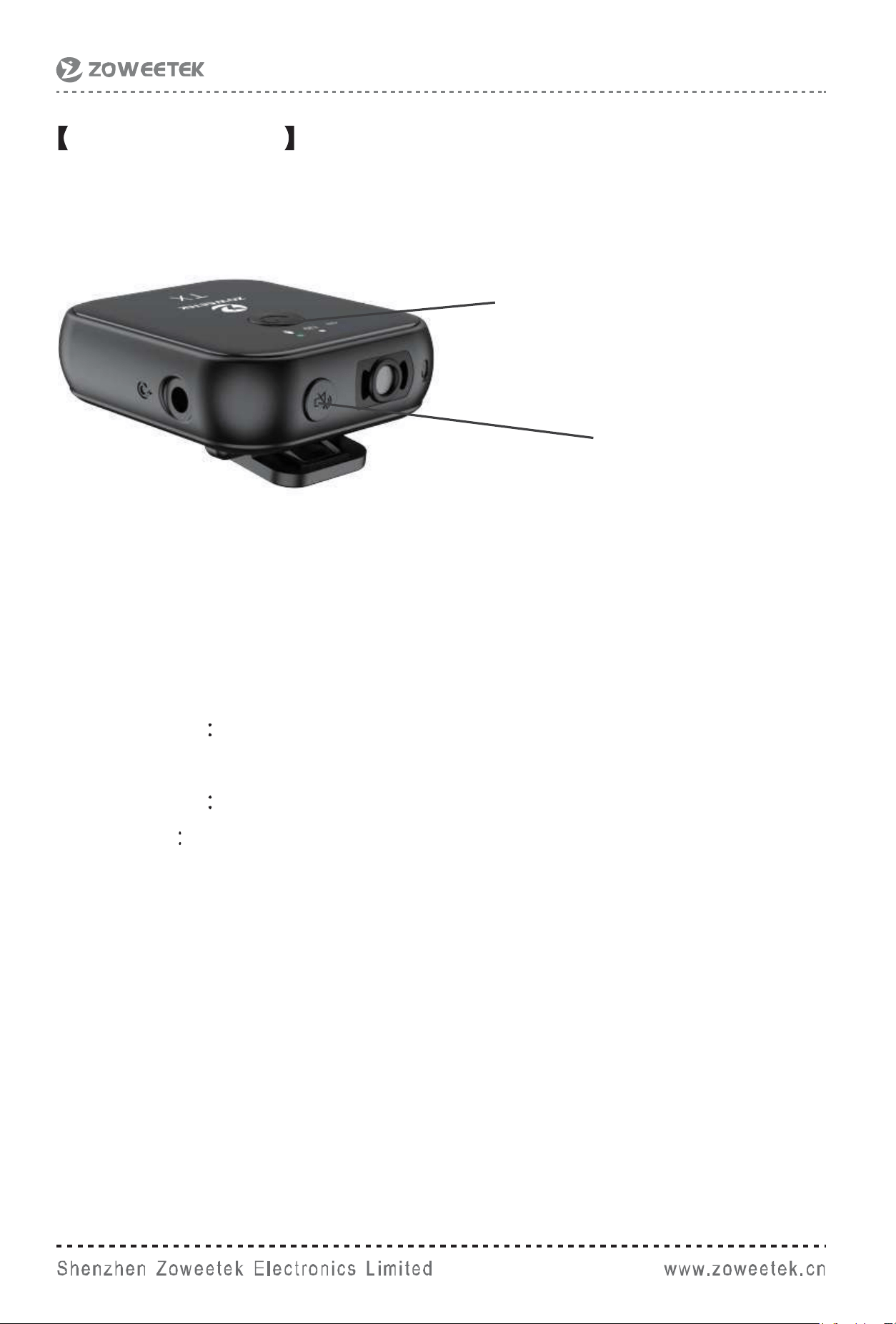
TX-transmission button function and indicator light
prompt operation instructions
Left blue light:
Pairingstatus:thelightflashesquickly
Connectionstatus:thelightisalwayson
Disconnectedstate:thelightflashesslowly
Middle LED
Poweron:thewhitelightisalwayson
Low battery the red light flashes slowly
Charging the red light is always on
Fullycharged:theredlightisoffandthewhitelightison
ShortpressthePowerkey:the white light flashes slowly, the power
is sufficient, the flashing speed is fast,
the power is low.
Right light:
Non-mutedstate:thegreenlightisalwayson
Mutestate:theredlightisalwayson
Enabletheexternalmicrophone:theyellowlightisalwayson
Turnofftheexternalmicrophone:theyellowlightisoff
Mutekeyfunction,
short press on/off
Poweron/offkeyfunction,
long press on/off
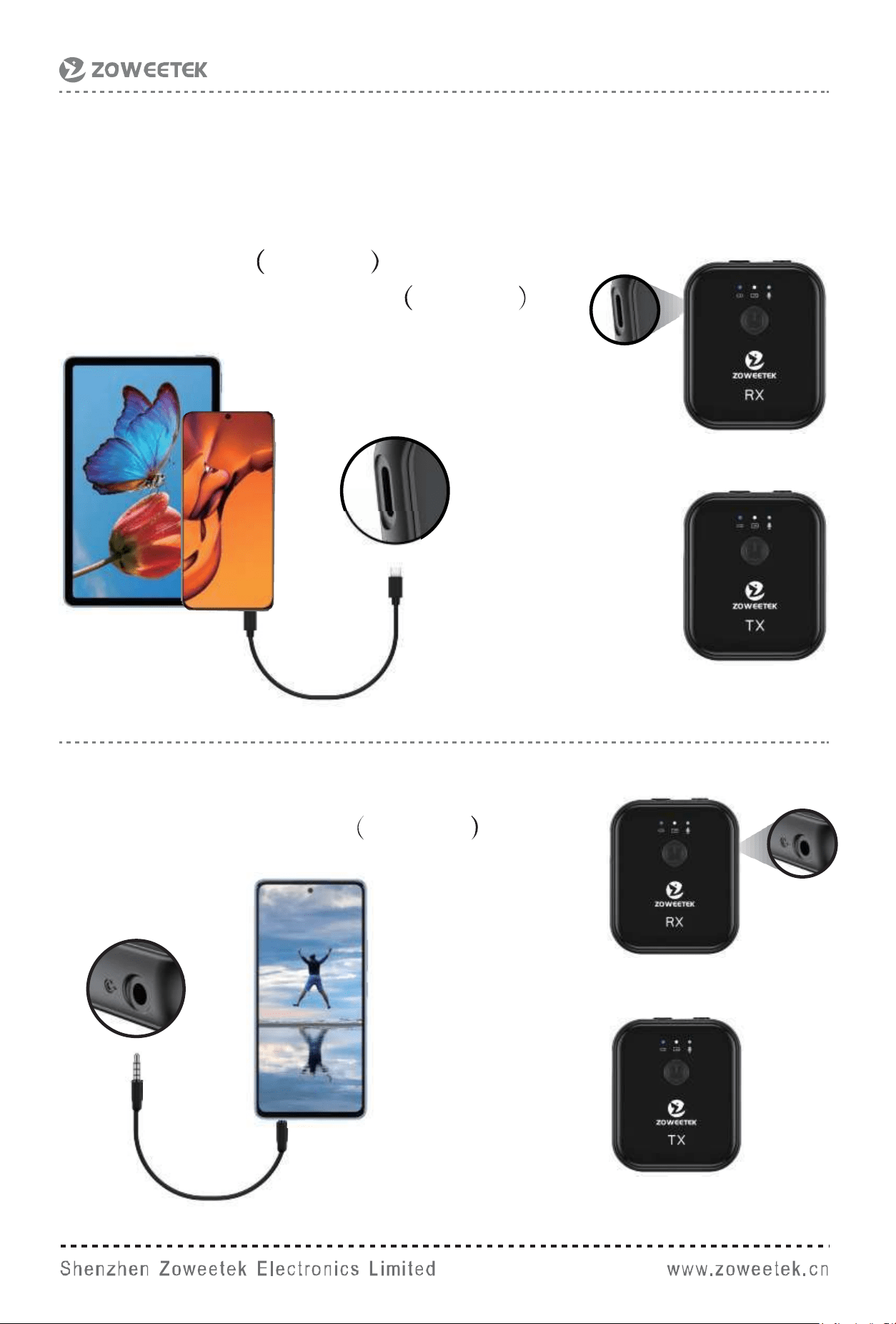
Android phone or tablet connection method
Connectiondiagram:Theinterfaceofthemobilephoneor
tablet is Type-C
1.Type-C cable included
2.Type-Cto3.5mmadapter included
Connectiondiagram:theinterfaceis3.5mm
3.5TRRSto3.5TRRS included
Tansmitter
Receiver
Tansmitter
Receiver
Tansmitter
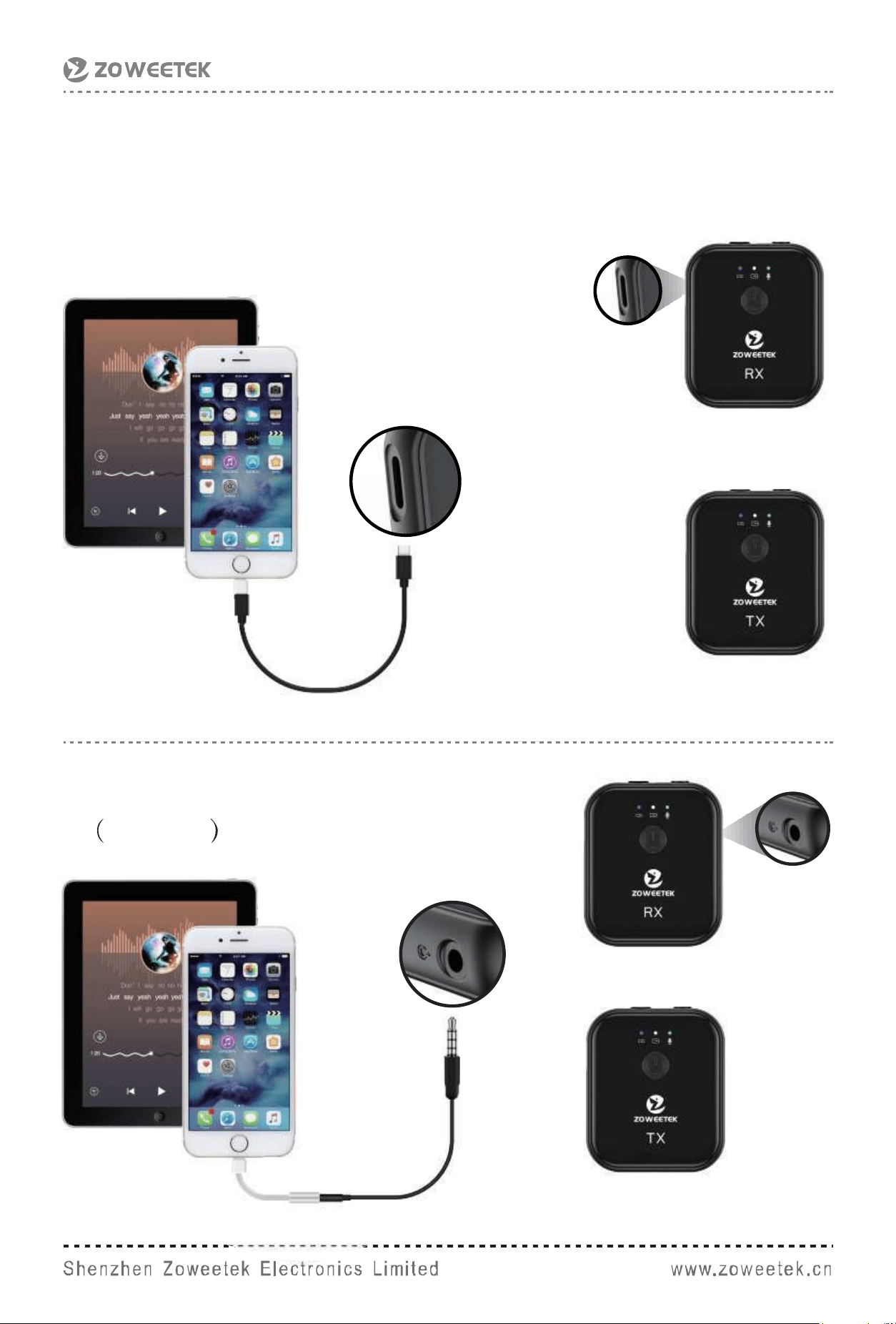
2.Lightningto3.5mmjackadapter
included
1.LightningtoType-Ccable(Notincluded)
iPhone or iPad connection method
Receiver
Tansmitter
Tansmitter
Receiver
Tansmitter
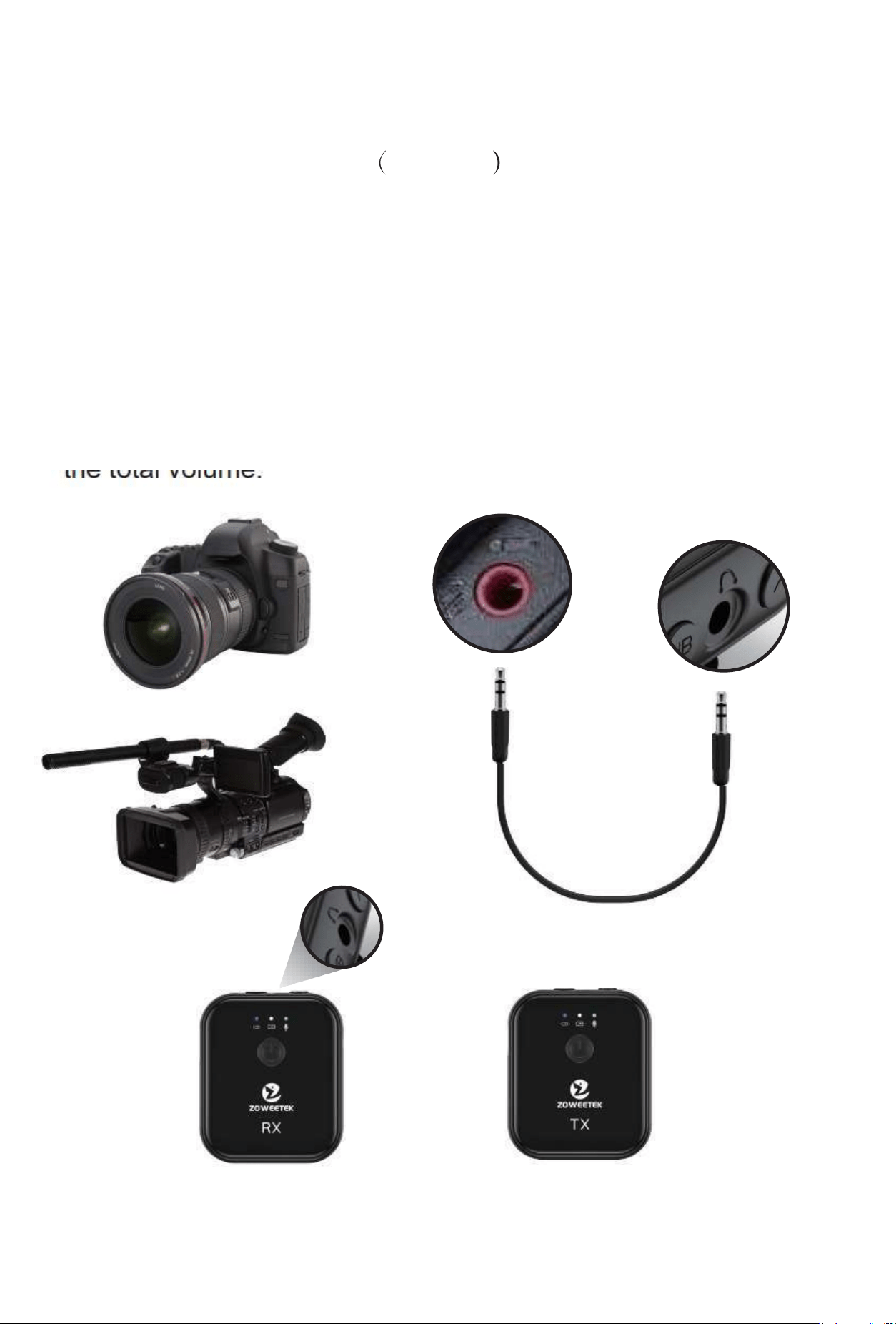
Camera or camcorder connection method
3.5mmTRSCameracable included
Note:
●Forcameraswithmanualrecordingmode,youneedtochange
the recording mode to manual and reduce the recording level to
within10%.
●Forcameraswithoutmanualrecordingmode,therecording
volumeofthecameraneedstobereducedtowithin10%of
the total volume.
Tansmitter
Receiver
Tansmitter
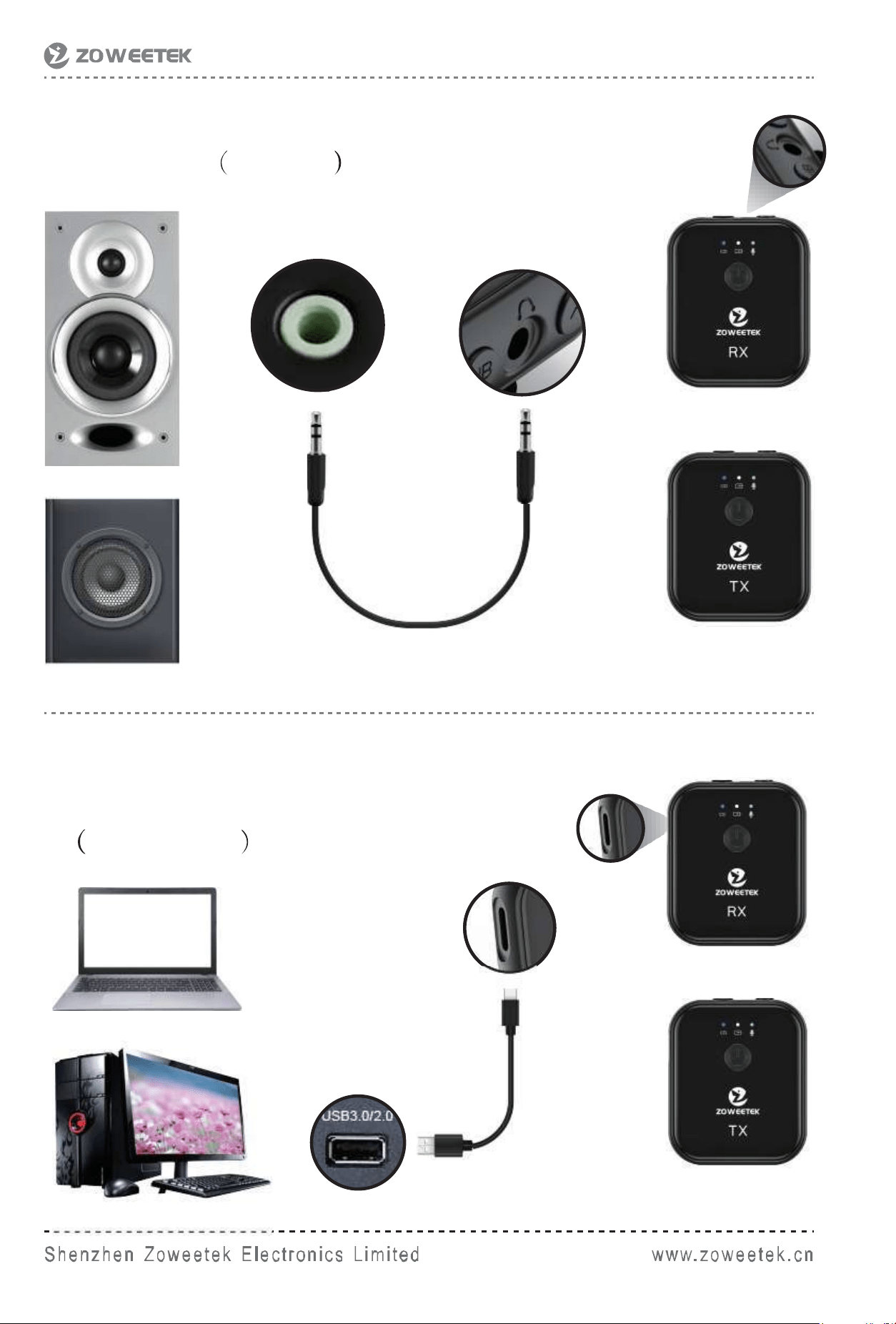
Speaker connectionmethod
3.5mmTRS included
PC or laptop connection method:
2.USB3.0/2.0toType-Ccable
Not included
Receiver
Tansmitter
Tansmitter
Receiver
Tansmitter
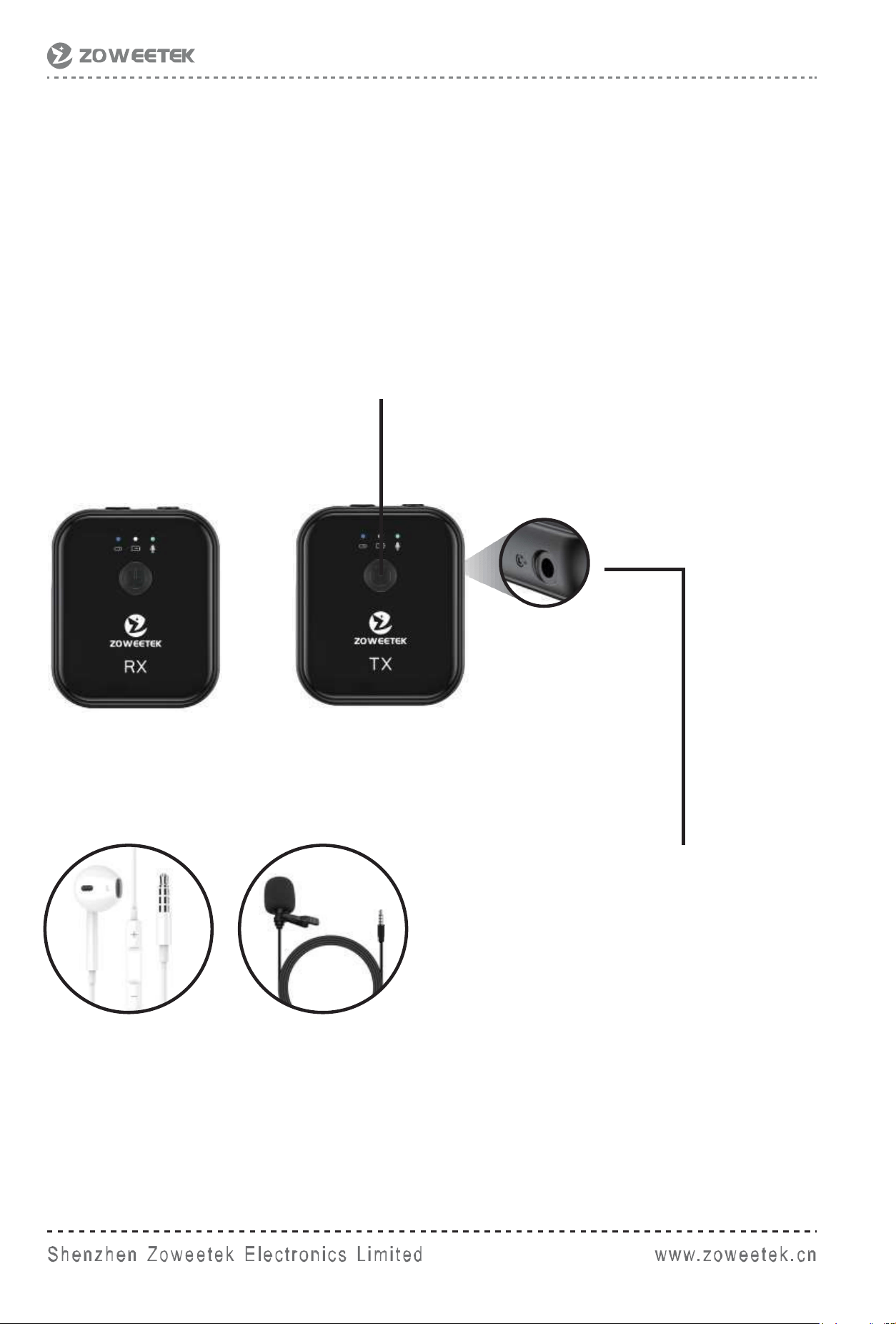
External microphone connection method:
Intheconnectedstate:
Double-clickthe'powerkey',theLEDlightontherightturns
yellow,andtheexternalmicstarts.
Double-clickthe'powerkey'again,therightLEDlightturns
green,andtheexternalmicisturnedoff.
3.5mmTRRSwiredheadphone/
externalMICinsertedintoTX
headphone jack.
Tansmitter
Receiver
Tansmitter
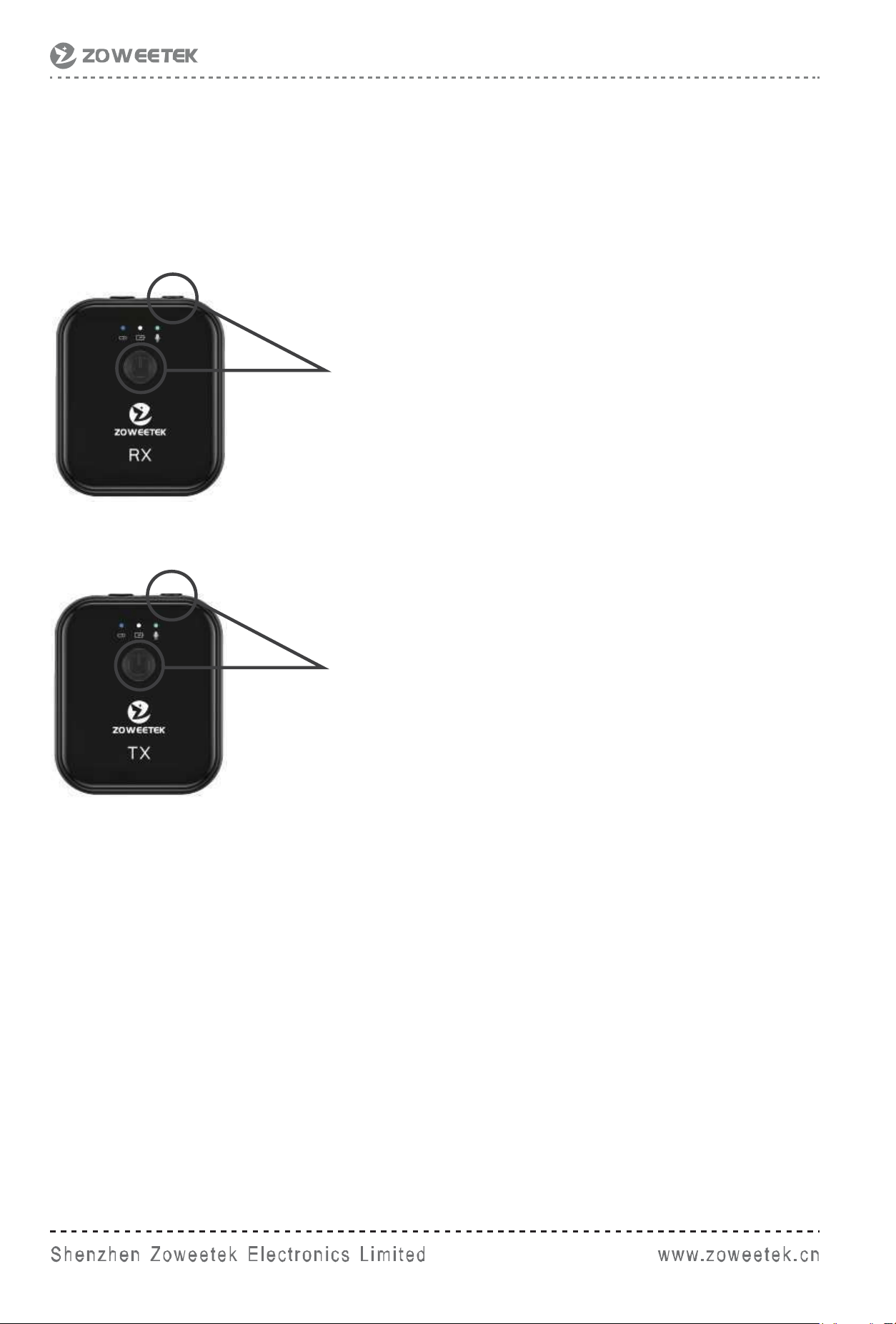
Reset:
WhenanybuttononRXorTXdoesnotwork,youneedto
operate in the following ways.
Tansmitter
Receiver
Pressthepowerbuttonandvolume
button at the same time.
Pressthepowerbuttonandmute
button at the same time.
Tansmitter
●Areceiver(RX)canbeconnectedto2transmitters(TX)atthe
same time, and the three devices are all bidirectionally
connected,andallchannelsmaintaina48Khigh-fidelity
sampling rate.
5. Two-way function description of three-way
and schematic diagram of one-drive two-way
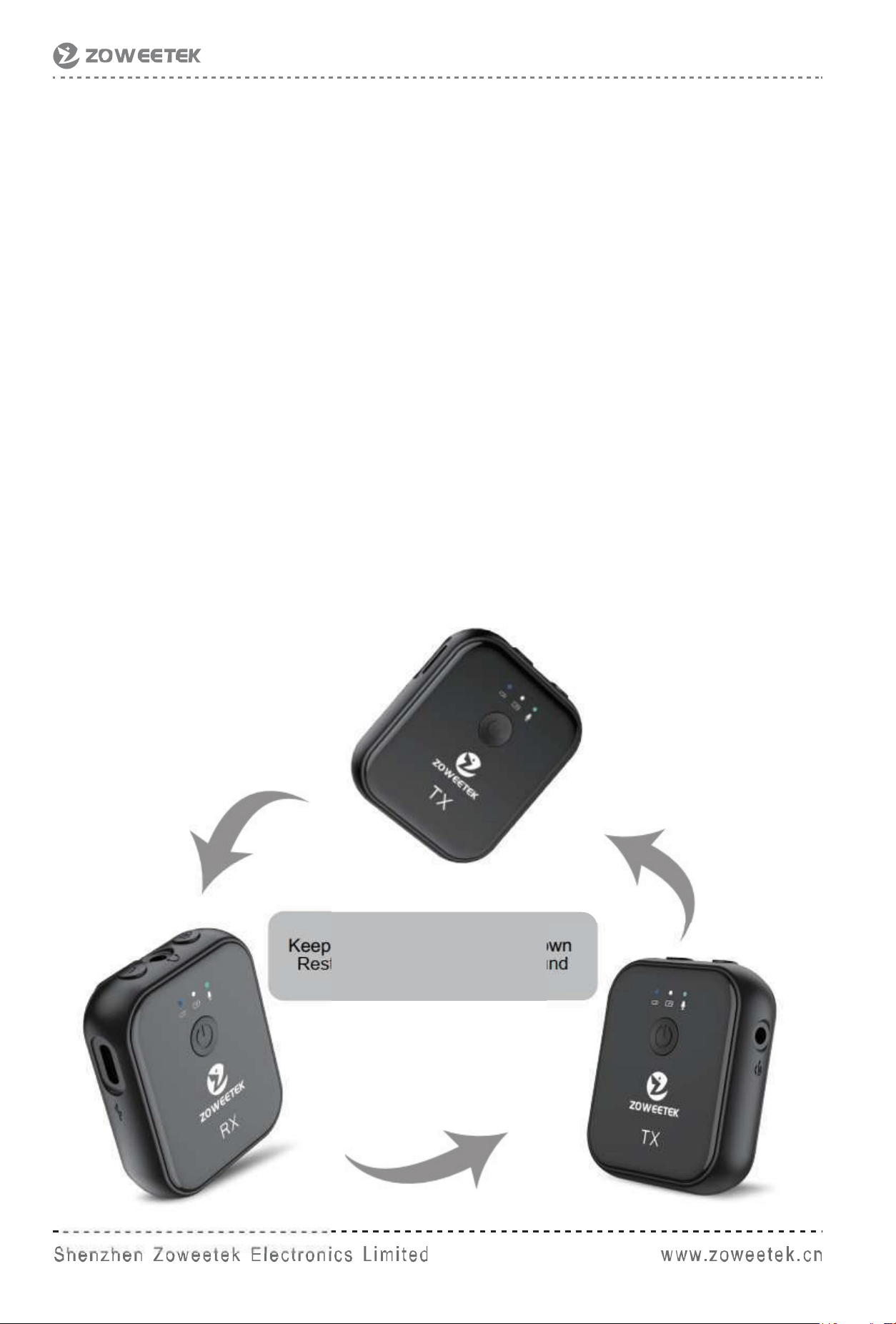
●Twotransmittersuploadaudiotothereceiver,andthereceiver
can send audio to both transmitters at the same time, such as
background music, or various prompts that require off-site
cooperation.
●Thetwotransmittersarealsotwo-wayconnected,andthey
can hear each other's voice, which can make cooperation more
tacit, and better grasp the rhythm of cooperation.
●Receivingandtransmittingtwo-way,three-wayvoice
intercommunication, can easily complete various audio and
video application scenarios such as TikTok connected
microphone, sing and so on.
Keep48Kminingrateupanddown
Restore the most authentic sound
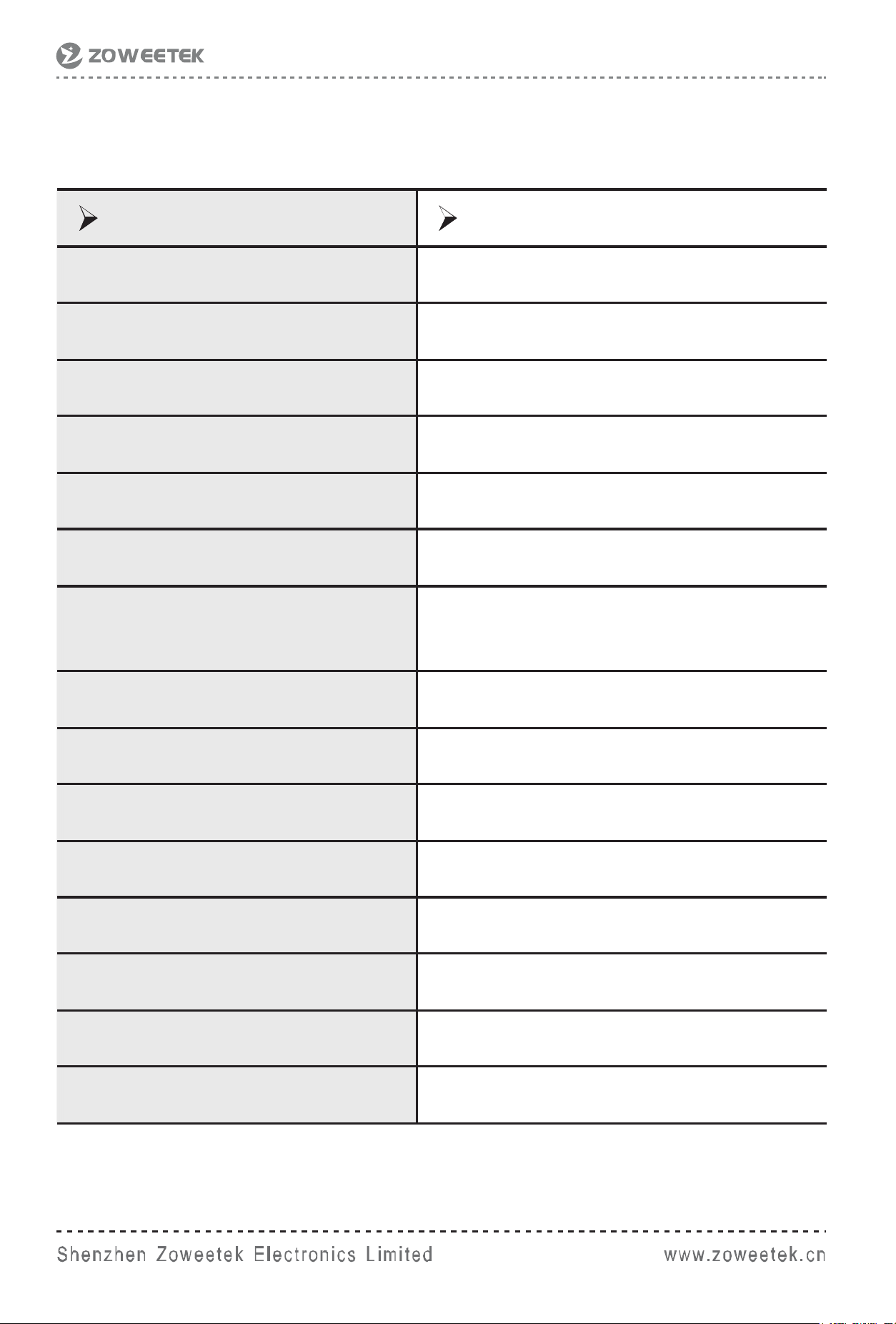
Product name wireless microphone
Bluetooth version Bluetooth5.1
Delay 15ms
Microphone pointing omnidirectional
Frequency Range 50-18KHz
MicrophoneSPL 100dBSPL(1KHz@1m)dBu
Microphonesensitivity -38db
Maximuminputamplitude
800mV(RX,Lineininput),
20mV(TX,microphoneinput)
Audiooutputinterface TRS(RXheadphoneoutput)
Audioinputinterface TRRS
SamplingRate 48KHz
Charging and data interface Type-C,SupportUSBAudio
Battery capacity 300mAH
Charging time 3-5hours
Use distance 160ft
BatteryEndurance 6hours
6. Product Specifications

Note
RXrecordingmethod:USBaudiorecordingandrightAUXmode
cannot be used at the same time.
The3.5mmAUXrecordingmodeontherightsideusesa3.5mm
TRRSaudiocable,andthefunctionisthesameastheUSBType
mode - two-way audio.
Thetop3.5mmaudiooutputisusedforRXmonitoringordigital
camera recording.
lf you have any questions, please feel free to contact us,
we will try our best to provide you the best service.
Wepromise1yearwarranty.
100%ZoweetekGuaranteedProductSatisfaction.
support@zoweetek.cn
Technical support and troubleshooting
Zoweetek Guarantee:
web:www.zoweetek.cn