APP
soundcore
Apple and the Apple logo are trademarks of
Apple Inc.
Google Play and the Google Play
logo are
trademarks of Google Inc.
Download the soundcore app to adjust EQ settings, customize touch controls, update firmware, and
explore more features.
If your earbuds cannot connect to the soundcore app, try re-installing the app or updating it to the
latest version available in your mobile app store.
OVERVIEW
2
3
4 5
1
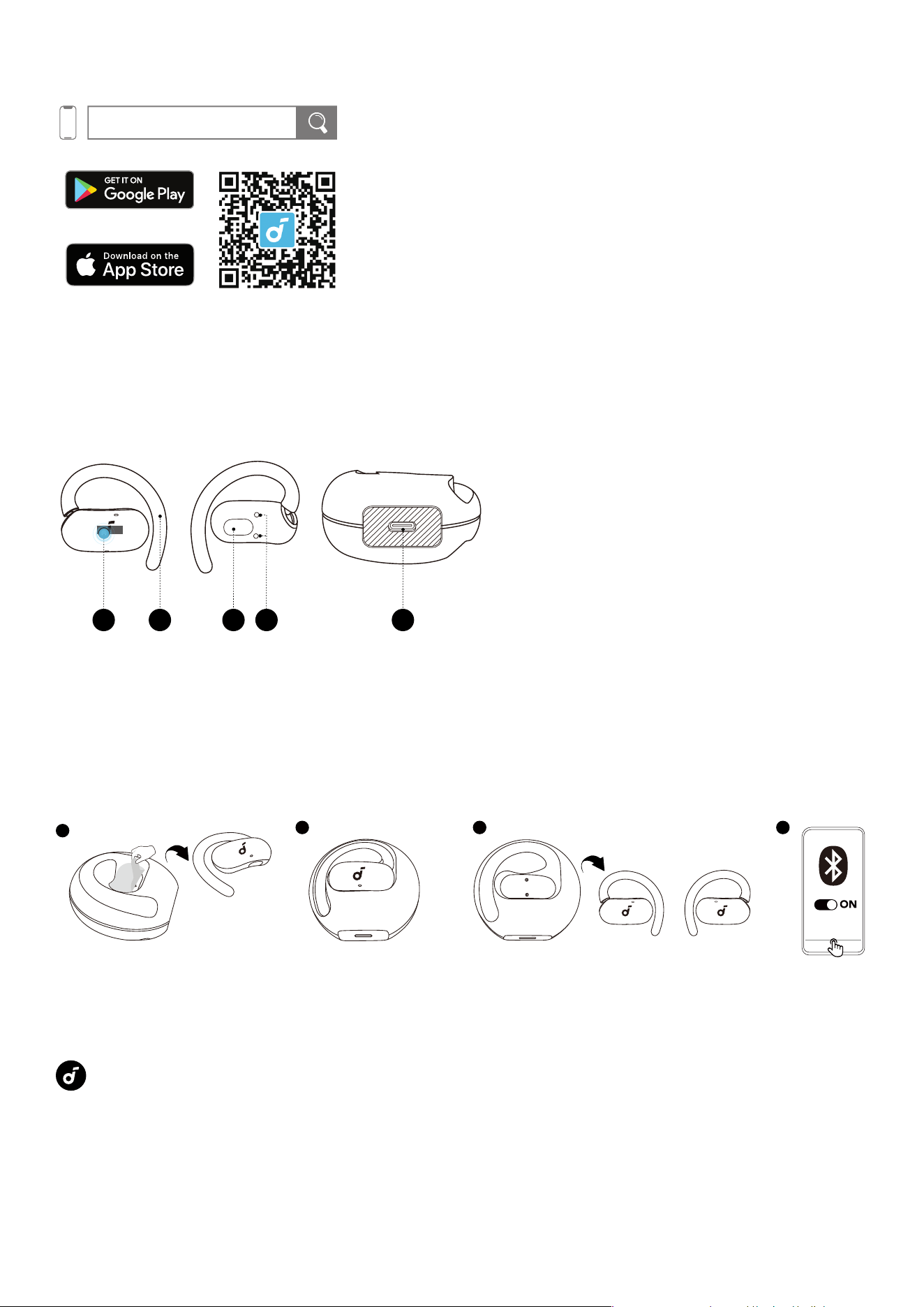
1. Touch-Control Area
2. Adjustable Ear Hook
3. Speaker
4. Charging Contactors
5. USB-C Charging Port
POWERING ON AND PAIRING
1
4
32
soundcore
V40i
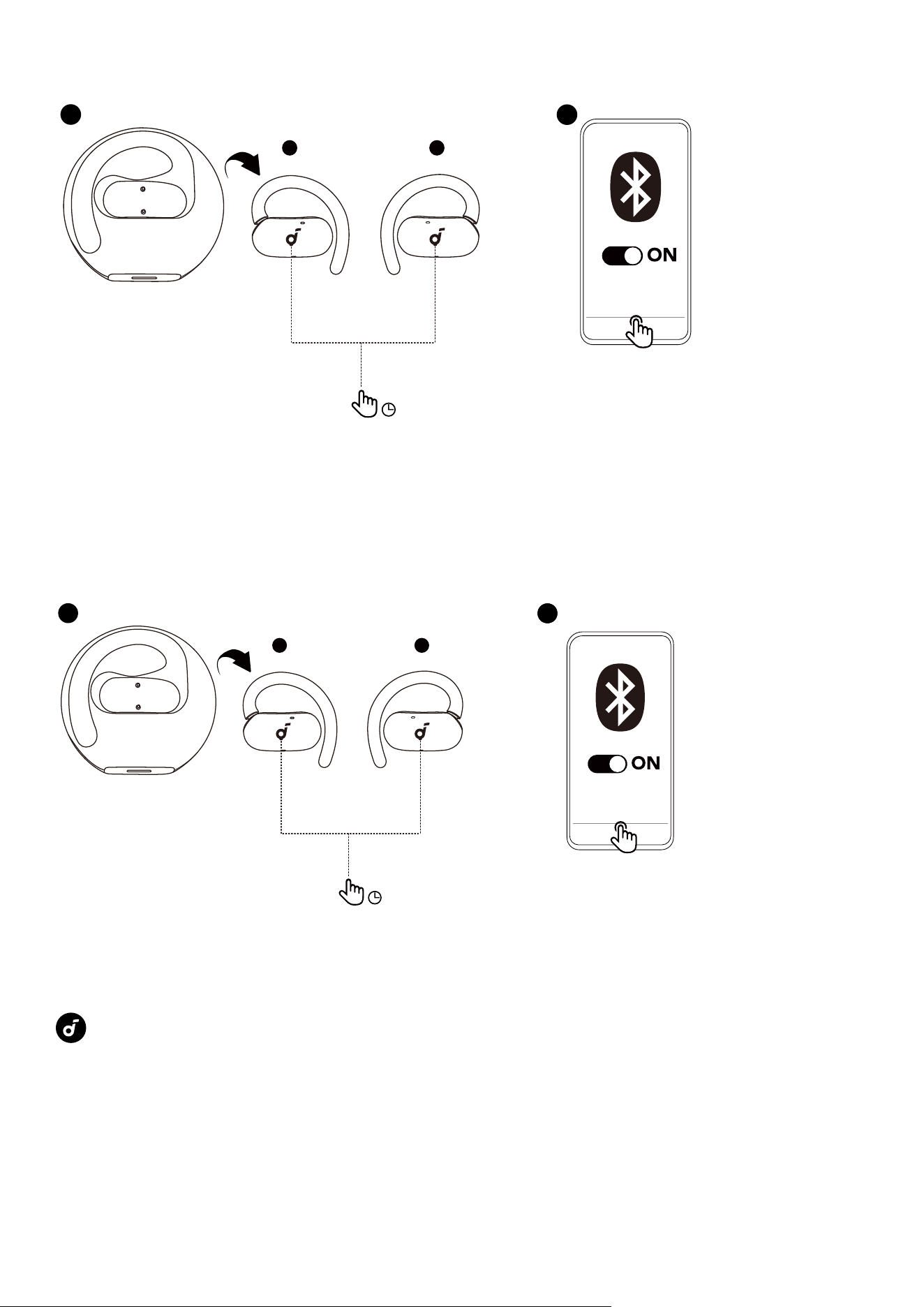
1. For first-time use, remove the insulation stickers.
2. Return the earbuds to the charging case.
3. Take out the earbuds again, they will automatically power on and enter Bluetooth pairing mode.
4. Select "soundcore V40i" from your device's Bluetooth list to connect.
Once connected, the earbuds will automatically reconnect to your device every time you take them out,
as long as you haven't deleted the pairing history from your device.
MANUAL PAIRING
1
2
L R
soundcore
V40i
3s
To manually enter Bluetooth pairing mode, take the earbuds out of the case, then press and hold the
touch-control areas on both earbuds for 3 seconds.
DUAL CONNECTIONS
Dual Connections is enabled by default. To connect your earbuds to two Bluetooth devices
simultaneously, there are two methods:
1
2
L R
soundcore
V40i
3s
2
The Second Device
Method 1: Manually Pair with the Second Device
While wearing the earbuds, press and hold the touch-control areas on both earbuds for 3 seconds until
you hear a sound prompt. You can then proceed to pair with the second device.
。
If your earbuds have been connected to two devices, remove at least one before pairing a new device.
Method 2: Use the soundcore App
In the soundcore app, tap Dual Connections on the main inteace, then proceed to Connect New
Device.
Note: The option names may vary based on your app's language settings. Follow the corresponding
terms in your app to complete the process.
WEARING
1 2 3 4
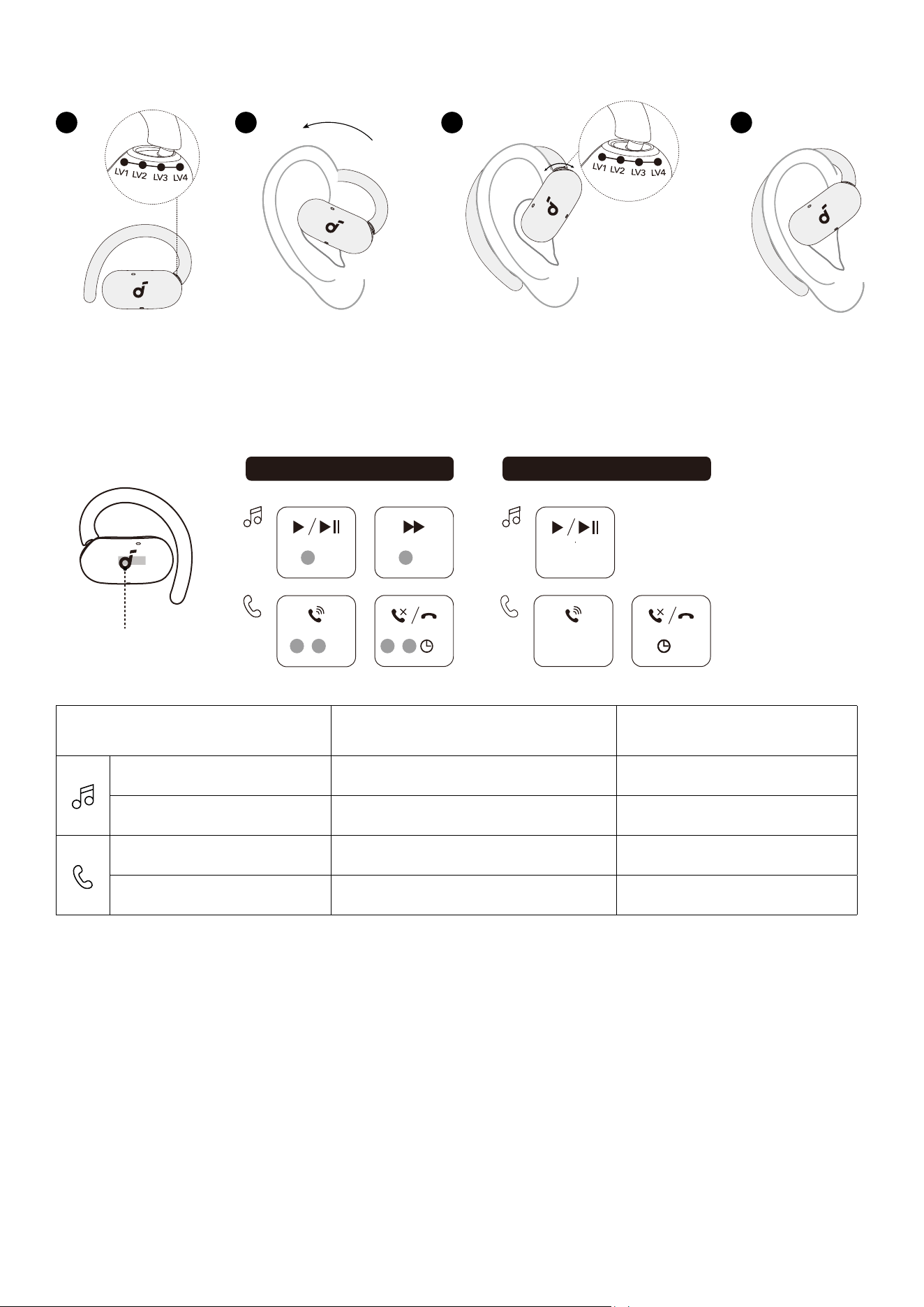
1. Set the ear hooks to the LV4 position, which oers the largest fit.
2. Put on the earbuds and rotate the ear hooks along your outer ear for proper positioning.
3. Adjust between the four positions to find the most comfortable and secure fit.
CONTROLS
×2
×2
Dual Earbuds Single Earbud
R
×2
L
×2
R
L
×2
/
2s
R
L
/
2s
Touch
Control Area
Using Dual Earbuds Using Single Earbud
Play / Pause Audio Double Tap (R) Double Tap
Play the Next track Double Tap (L) /
Answer a Call Double Tap (L / R) Double Tap
Reject a Call / End a Call Tap and Hold for 2 Seconds (L / R) Tap and Hold for 2 Seconds
Customize Touch Controls in the soundcore App
Access Controls on the home page to customize touch commands for the le or right earbud, including
volume adjustment, skipping tracks, play/pause, and voice assistant activation.
CHARGING
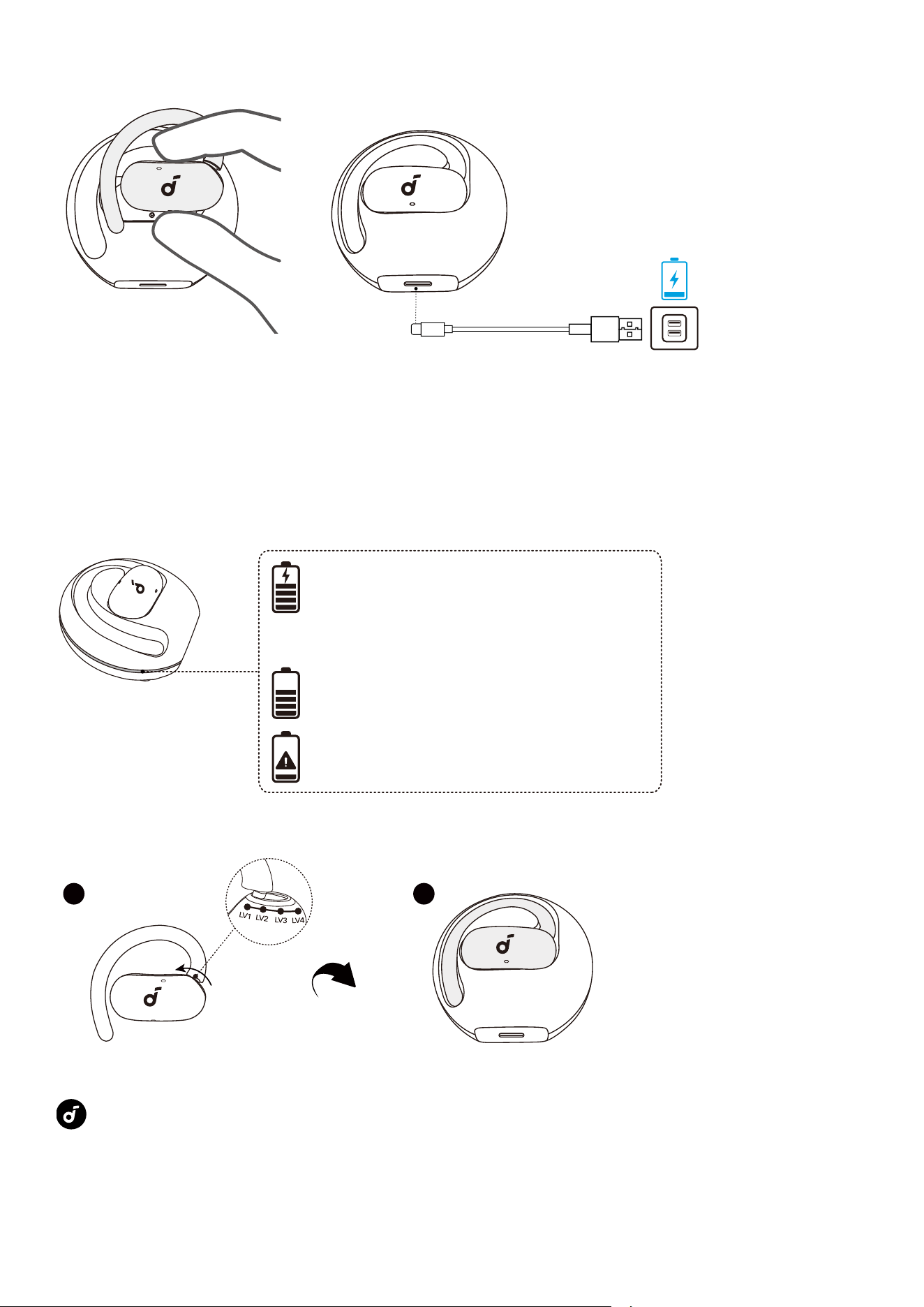
1. Place the earbuds back into the charging case.
•Ensure the earbuds and the USB-C charging port are fully dry before charging.
2. Connect the charging case to a power supply using the included USB-C cable. The case's LED
indicator will flash during charging. Once fully charged, the LED will stay on for 3 seconds before
turning o.
•The case fully recharges in about 2.5 hours via USB-C.
LED Indicator Guide
Charging: Light breathes.
Full: Light o.
Case with 20% charge or more:
Light stays on for 3s.
Case with less than 20% charge:
Light flashes 6 times.
When the earbuds are returned to the case:
POWERING OFF
21
To power o, set the ear hooks to the LV1 position and return the earbuds to the case.
When out of the case, the earbuds will automatically power o aer 30 minutes if not connected. Adjust
the shutdown time in the soundcore app.
RESET
L R
1
10s
10s10s
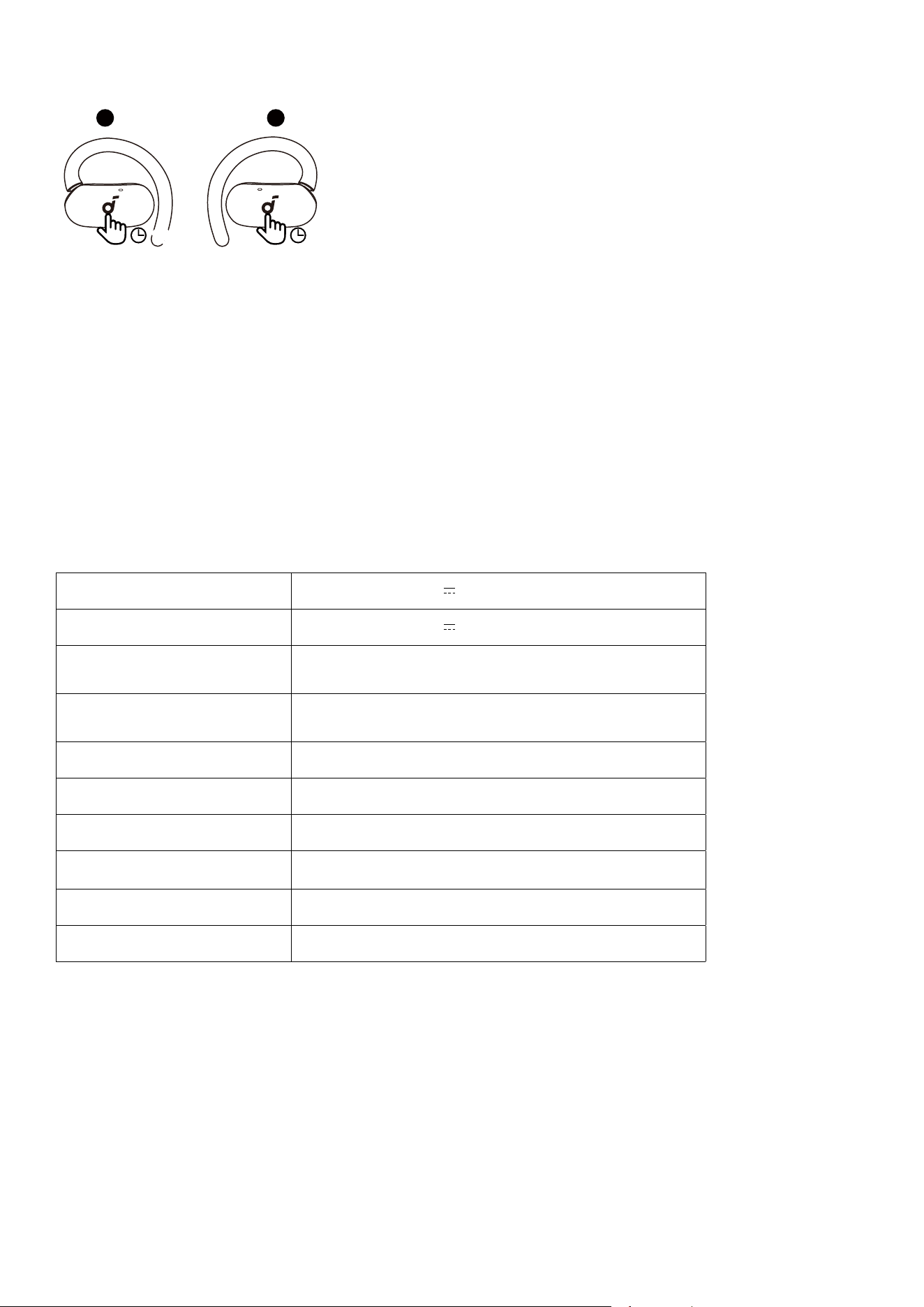
Reset the earbuds if they're malfunctioning.
While wearing them, tap and hold the touch-control areas on both earbuds for 10 seconds until you
hear a voice prompt. Your earbuds are now successfully reset.
FIRMWARE UPDATE
You will be notified when a new firmware version is available while the earclips are connected to the
app. Please note the following during the update process:
1. Do not disconnect your phone or play audio during installation.
2. Do not place the earphones in the charging case.
3. Keep the earphones within 0.5 m of your phone.
SPECS
Specifications are subject to change without notice.
Input Charging Case: 5V 0.5A
Output Charging Case: 5V 0.2A (0.1A Per Port)
Battery Capacity
Earbuds: 60mAh
Charging Case: 470mAh
Charging Time
Earbuds: 1H
Charging Case: 2H
Driver 16 × 13 × 4mm
Frequency Response 20Hz - 20kHz
Impedance 16Ω
Waterproof and Dustproof
Rating (Earbuds)
IP55
Bluetooth Version 5.4
Bluetooth Range 10m (32)

CUSTOMER SERVICE
service@soundcore.com
support.mea@soundcore.com (For Middle East and Africa Only)
support@anker.com (
日本
)
support.kr@anker.com
+1 (800) 988 7973 (US/Canada)
+44 (0) 1604 936200 (UK)
+49 (0) 69 9579 7960 (DE)
03 4455 7823 (
日本
)
+86 400 0550 036 (
中国
)
+82 1666-8470 (
한국
)
+971 8000320817 (UAE)
+966 8008500030 (KSA)
+965 22069086 (Kuwait)
+20 8000000826 (Egypt)
+61 3 8331 4800 (Australia)
+90 (850) 460 14 14 (Türkiye)
+8 (800) 511-86-23 (Russia)
000-8000-504-414 (India)