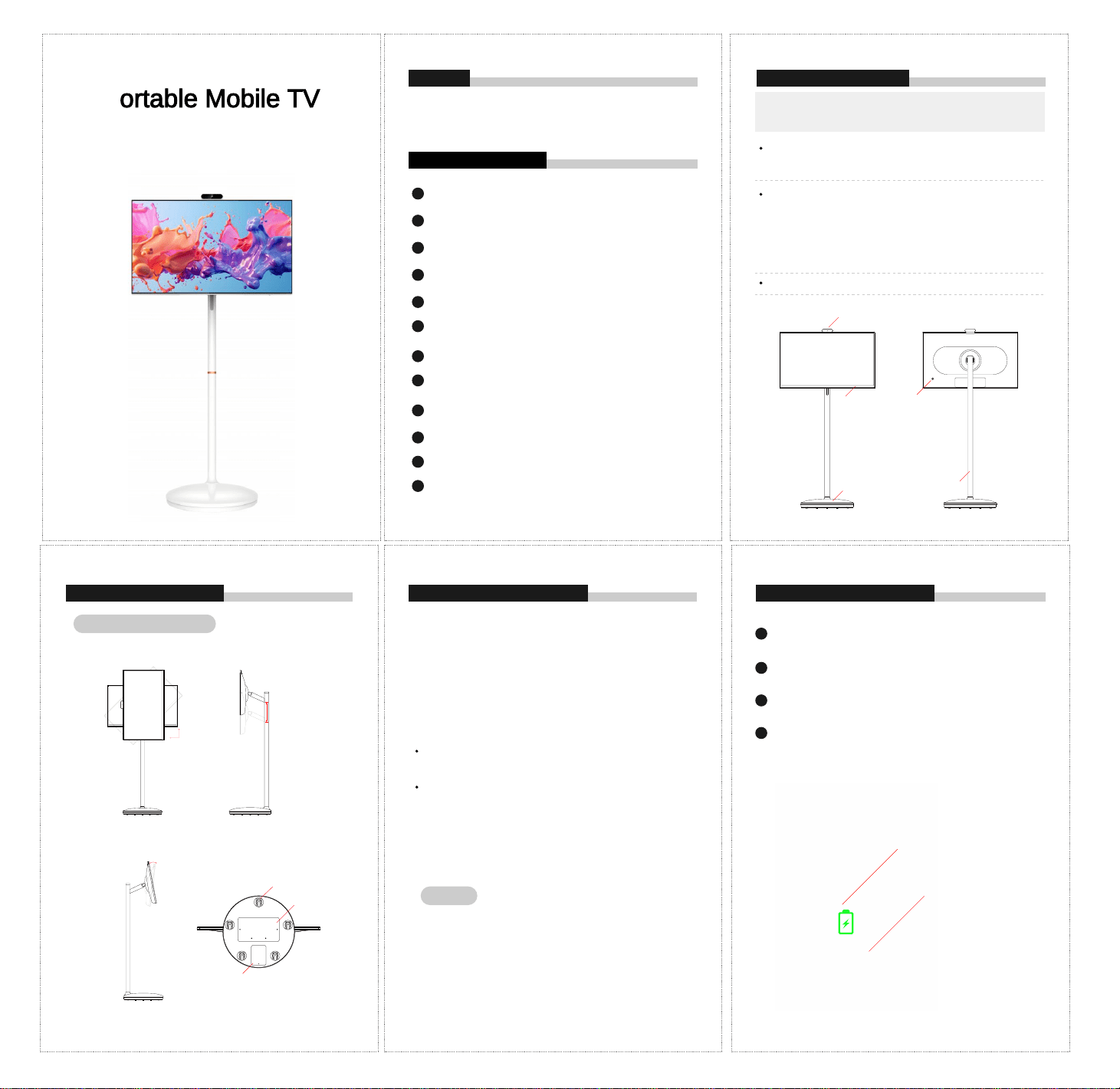
Portable Mobile TV
Instruction Manual
PREFACE PRODUCT INTRODUCTION
SAFETY NOTE WARNING
Thank you for purchasing this smart screen!
Read this user manual carefully before using the product and follow the instructions
for correct usage.
01
Please use the provided power adapter and ensure that the power socket meets
safety standards.
02
Before using the product, make sure that all cables are properly connected and that
the power cord is not damaged.
03
Do not open the device casing to prevent serious damage caused by the high pressure
inside.
04
Do not block or cover the gaps and openings on the device designed for heat dissipation
and ventilation.
05
Avoid placing the product in humid, dusty or high-temperature environments to prevent
damage or malfunction.
06
Unplug the power cord during thunderstorms or when not in use for long periods of time.
07
Do not pour liquids or other objects into the device to avoid electrical faults or safety
hazards.
08
To prevent fires or electric shocks, do not overload the power board or extension cord.
09
During transportation, do not exert excessive pressure on the display or scratch it
with sharp objects, as this may cause damage.
10
Do not place the device on the edge of a table or in a place accessible to children,
to avoid injury or harm.
11
Please keep the product cable in a neat and orderly manner to prevent bumping.
12
If a malfunction occurs, stop using the product immediately. Do not attempt to
disassemble or repair it yourself; contact the original manufacturer or dealer for
assistance.
Regularly clean the screen and outer casing to prevent dust accumulation and
maintain optimal performance.
Use a lint-free, non-abrasive cloth to clean the unit’s surface. Dampen the cloth
with a mild, neutral cleaner to wipe away stubborn stains.
Do not use cleaners containing alcohol or acetone. Instead, use a cleaner
specifically formulated for LCD screens.
Do not spray cleaner directly onto the screen, as it may seep inside the device
and cause an electric shock.
Built-in Battery for All-Day Use
This portable smart screen is a rechargeable, wireless display terminal featuring a
micro-bezel and immersive full-screen design. It combines powerful hardware with flexible
functionality to deliver a premium user experience.
Equipped with an ultra-long standby battery, the device allows you to enjoy music, watch
videos, or handle office tasks anytime, anywhere.
1080P FHD Display with Full Lamination
Smooth Physical Adjustment (Lift, Swivel & Tilt)
The multi-angle adjustable stand offers a customized viewing experience with precise
control:
Height: 170 mm adjustment range with position locking
Rotation: 90° counterclockwise for seamless portrait/landscape switching
Tilt: 30° elevation and 30° pitch angle
BUILT-IN BATTERY DESCRIPTION MAINTENANCE & CLEANINGPRODUCT INTRODUCTION
The base of this product is equipped with a built-in rechargeable battery,
enabling it to operate for a period of time without an external power source.
When the battery is depleted, it can be recharged by connecting the charger
to the DC port on the base. During charging (before full charge), the blue
power indicator light will stay on continuously, while the green light will flash.
When the battery is fully charged, both the blue and green power indicator
lights will stay on continuously.
When discharging without charging (standalone operation), the blue light will
blink and the green light will stay on.
When discharging while charging (using the device while it is plugged in),
both the blue and green lights will blink simultaneously.
To power off the device manually, long-press the power button. Both the blue
and green indicator lights will turn off, and there will be no voltage output.
To power on the device and activate the blue indicator light, manually
long-press the power button again.
Battery runtime is directly proportional to the duration of device usage. To
extend battery lifespan, it is recommended to recharge the battery after use.
Once fully charged, avoid leaving the battery at 100% charge for extended
periods, and do not charge it under extreme temperature or humidity
conditions.
The standard usage times provided in this manual are based on laboratory
test data and may vary depending on actual usage conditions.
Tilt Angle: ±30°
Notes:
Rotation and Height Adjustment
Height Adjustment:
170mm
Rotation: 90°
① Camera
② Display Screen ④ Power Button
⑤ Support Stand③ Wheeled Base
⑧ Support Stand Mount
⑦ Built-in Battery
⑥ Silent Wheels
01
02
03
04
Charge lamp
Green light running indicates charging
Power switch button
Blue, press and hold to power off

This device complies with part 15 of the FCC Rules. Operation is subject to the following two conditions: (1) this device may
not cause harmful interference, and
(2) This device must accept any interference received, including interference that may cause undesired operation.
Changes or modifications not expressly approved by the party responsible for compliance could void the user’s authority to
operate the equipment. This equipment has been tested and found to comply with the limits for a Class B digital device,
pursuant to Part 15 of the FCC Rules. These limits are designed to provide reasonable protection against harmful interference
in a residential installation. This equipment generates uses and can radiate radio frequency energy and, if not installed and
used in accordance with the instructions, may cause harmful interference to radio communications. However, there is no
guarantee that interference will not occur in a particular installation. If this equipment does cause harmful interference to radio
or television reception, which can be determined by turning the equipment off and on, the user is encouraged to try to correct
the interference by one or more of the following measures:
‐‐ Reorient or relocate the receiving antenna.
‐‐ Increase the separation between the equipment and receiver.
‐‐Connect the equipment into an outlet on a circuit different from that to which the receiver is connected.
‐‐ Consult the dealer or an experienced radio/TV technician for help.ct.
This equipment complies with the FCC RF radiation exposure limits set forth for an uncontrolled environment. This equipment
should be installed and operated with a minimum distance of 20cm between the radiator and any part of your body.