Handheld transmitter function
Receiver function
Portable universal
usage method:
wireless microphone
an instruction manual
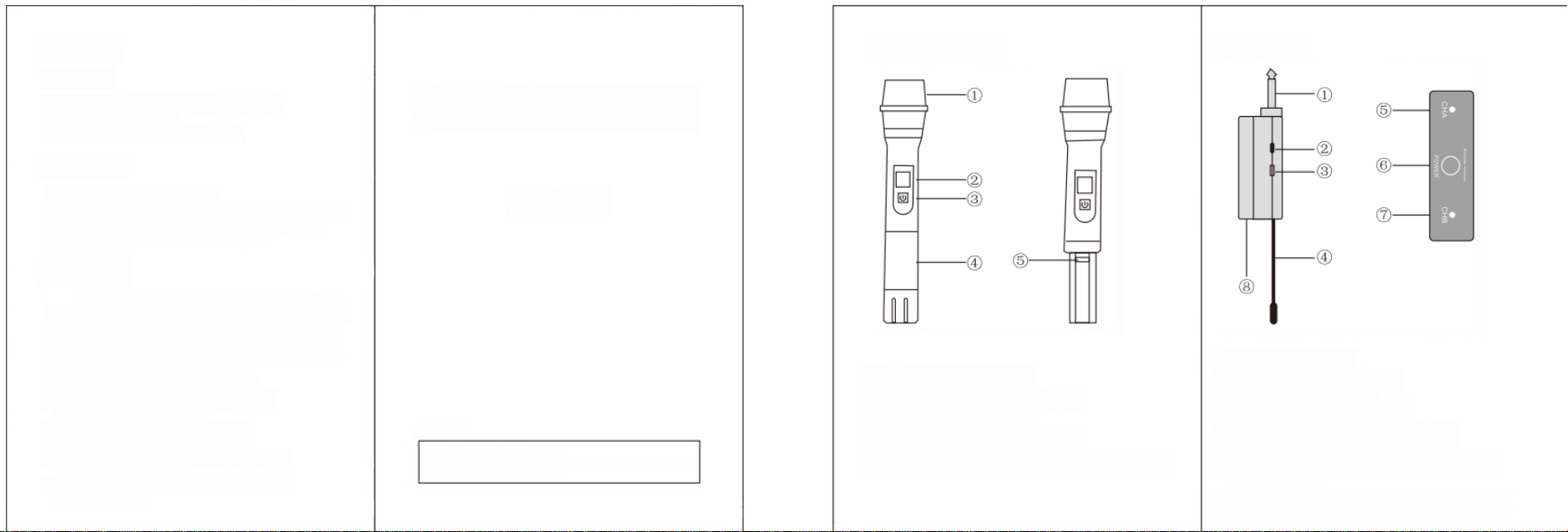
①Audio output: 6.35mm male.
②Power switch: Push up to turn on, push down to turn off.
③Charging interface: Use a data ca
ble for charging.
④Receiving antenna: Receiving sign
als from the
transmitting
end.
⑤Channel A indicator light: When
channel A receives
a signal ,
the signal light is on.
⑥B channel indicator light: When
B channel receives
a signal,
the signal light is on.
⑦Power indicator light: green whe
n the receiver is tur
ned on ,
red when charging.The red light does not light up when fully
charged.
⑧Battery cover: Equipped with 1865
0 replaceable bat
teries,
open the battery cover and replace it directly.
User Notice
1. Unable to present the original valid warranty card and valid invoice.
2. The purchase date, sales unit name (valid with seal), or warranty card are not
fully filled in.
3. Malfunctions or damages caused by force majeure. 4. Faults and damages
caused during transportation and loading and unloading. 5. Malfunctions caused
by failure to follow the instructions and precautions in the manual.
6. Malfunctions caused by disassembling, repairing, or modifying products without
Dear user, thank you for purchasing our product!
Before using this product, please read this manual carefully and operate it
correctly according to the instructions. Please keep this manual safe for futur
e reference
authorization from our company.
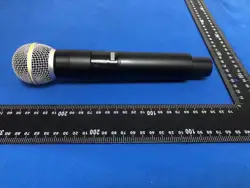
①Nethead: Speak and sing towards this place.
②Status display screen: displays the working
status
and
frequency, etc.
③Power switch: Turn on and off the power.
④Battery cover: Unscrew the tailpipe to fit
the
batter
y
.
⑤Tail cover: At the wireless wave transmission
antenna,
try not to hold it by hand when using it.
1.
Insert the receiver into the microphone input of the
speaker or amplifier;
2. Turn on the power switch of the receiver;
3.
Turn on the handheld microphone (insert the battery).
matters needing attention:
1. Do not place the product in water or fire.
2.
Do not use in areas with signal interference, such as hospitals,
airports, etc.
3.
Please do not disassemble the product without authorization,
otherwise you will lose your warranty eligibility.
4.If the product malfunctions, please contact the dealer,
Warranty Statement:
This product has a warranty period and a "three guarantees"
validity period from the date of sale. If the product malfunctions
during normal use, it can be repaired, replaced, or returned in
accordance with the "three guarantees" regulations. During the
product warranty period, it can enjoy free repair services at the
technical service center of each dealer according to the content
of this warranty clause. During the warranty period (including
the "three guarantees" validity period), paid repair services will
be provided for the following situations, and the three
guarantees service will not be enjoyed;

FCC Warnning:
This equipment has been tested and found to comply with the limits for a Class B digital device,
pursuant to part 15 of the FCC Rules. These limits are designed to provide
reasonable
protection againstharmful interference in a residential installation. This equipment generates,
uses and can radiateradio
frequency
energy
and,
if
not
installed
and
used
in
accordance
with
the
instructions,
maycause
harmful
interference
to
radio
communications.
However,
there
is
no
guarantee
thatinterference
will
not
occur
in
a
particular
installation.
If
this
equipment
does
cause
harmfulinterference to radio or television reception, which can be
determined by turning the equipmentoff
and
on,
the
user
is
encouraged
to
try
to
correct
the
interference
by
one
or
more
of
thefollowing measures:
•
Reorient or relocate the receiving antenna.
•
Increase the separation between the equipment and receiver.
•
Connect the equipment into an outlet on a circuit different from that to which the receiver is
connected.
• Consult the dealer or an experienced radio/TV technician for help.
Caution:
Any
changes
or
modifications
to
this
device
not
explicitly
approved
by
manufacturer
could void your authority to operate this equipment.
This
device
complies
with
part
15
of
the
FCC
Rules.
Operation
is
subject
to
the
following
two
conditions:
(1)This
device
may
not
cause
harmful
interference,
and
(2)
this
device
must
accept
any
interference received, including interference that may cause undesired operation.
This
equipment
complies
with
FCC
radiation
exposure
limits
set
forth
for
an
uncontrolled
environment.
This
equipment
should
be
installed
and
operated
with
minimum
distance
0cm
between the radiator and your body.