Installation Instructions For
MAGIC Fitness Mirror
www.magic.fit
Instruction Booklet.indd 1Instruction Booklet.indd 1 02/12/2024 09:1802/12/2024 09:18
Notice
• Only to be used by persons over 18 years of age.
• If approved in advance by a physician, teenagers over the
age of 13 may use the product under adult supervision.
• In case of palpitation, dizziness, wheezing, nausea and
vomiting during use, stop exercising and rest immediately.
If this continues, seek medical attention.
• Metrics on the screen may be inaccurate. Values should be
used for reference only.
• Do not disassemble. Taking apart the MAGIC Mirror could
create a risk of injury or electric shock.
Advice
• It is suggested that you do some warm-up preparation
before using the product.
• It is suggested that you wear sportswear to avoid sports
injuries caused by uncomfortable clothing.
• It is suggested that you wear sportswear and not loose
clothes during use to avoid affecting posture tracking.
Please read the installation instructions carefully before
usage.
Warning
• Both Wall and Floor installation requires two people.
• Do not install near water.
• Do not install near a fire source.
• Before using the wall installation method to install the
product please make sure that the wall can be drilled into
and loaded.
• Please check for any damage before installation, contact
MAGIC if any issues BEFORE installation.
• People with severe hypertension, coronary heart disease,
cor pulmonale, asthma and vertigo should not use the
product without consulting a doctor.
• Ensure that the mirror will not be in a position where strong
light or sunlight will be focused on the mirror.
Instruction Booklet.indd 2-3Instruction Booklet.indd 2-3 02/12/2024 09:1802/12/2024 09:18
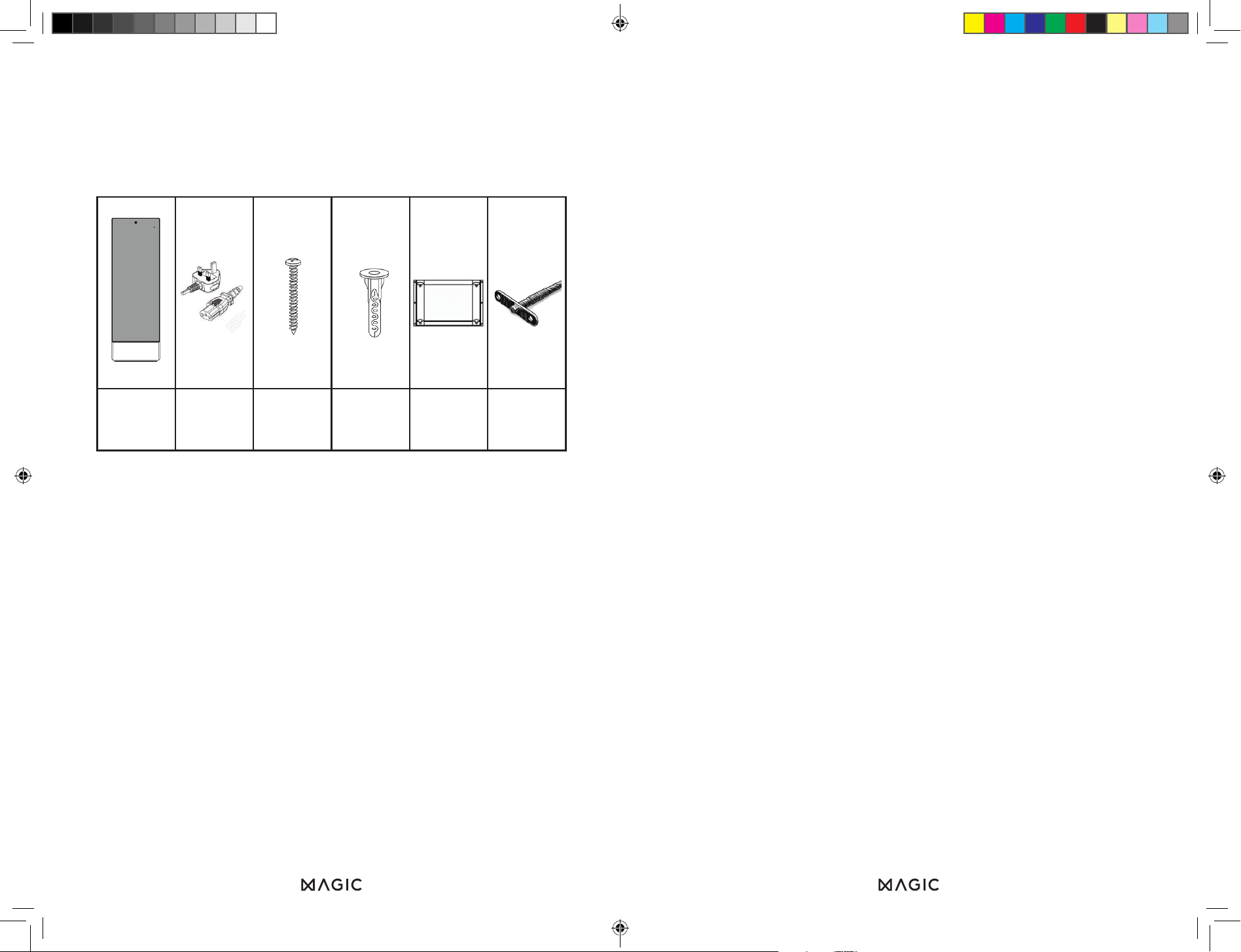
MAGIC
Mirror (1pc)
UK Plug
(1pc)
Wall Screw
(12pcs)
Wall Plug
(4pcs)
Wall
Bracket
(1pc)
Tether
(2pc)
PARTS LIST
• Please ensure all parts are present before installation.
• Please note - your Mounting Bolts and Wall Bracket will be
attached to the rear of the mirror.
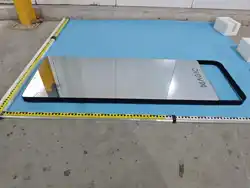
• Remove mirror from box, and place face down on a clean
blanket to avoid scratching.
• Be careful of sharp implements around mirror, always hold
by edges.
Setting up MAGIC in the best possible area will let you get
the most out of your mirror and your workouts.
Lighting
The ReflectAI® tracking works best if you’re well lit and
easily identifiable.
For optimal performance, ensure the camera has a
clear view of you and your workout space, with minimal
background distractions. Keep light sources, such as lamps
and windows, from shining directly at the mirror.
Wear light-coloured workout clothes that contrast with your
background, as blending in will make it harder for MAGIC to
track your movements accurately.
Space
Make sure you have plenty of space to work out. We
recommend an area of at least 2m x 2m to allow yourself to
do all exercises comfortably. Ensure that your area is free of
obstructions that you could bump into as you exercise.
Wi-Fi
The mirror requires an internet connection to work. We
recommend a location where you get a speed of at least
10 Mbps.
WHERE TO PUT YOUR MIRROR
Instruction Booklet.indd 4-5Instruction Booklet.indd 4-5 02/12/2024 09:1802/12/2024 09:18
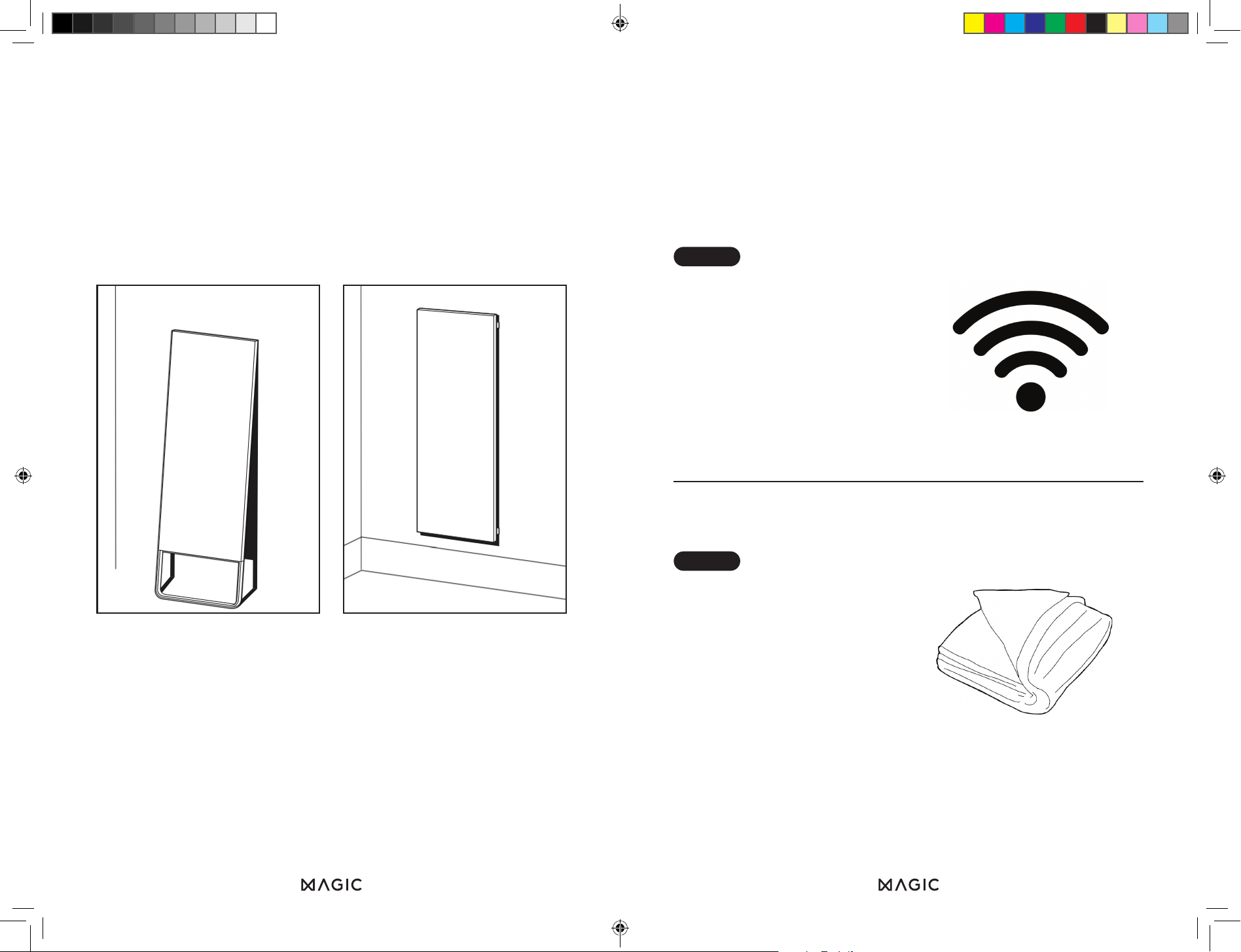
WALL
LEANING
Choose a location for where
your mirror will stand.
Please ensure it’s within
80cm of a power outlet
and you have strong Wi-Fi
signal of at least 10 Mbps.
STEP 1
Wall MountedWall Leaning
MOUNTING
OPTIONS
Unwrap Mirror and lay flat
on a blanket (mirror side
down).
Do not use any sharp tools
to open the mirror.
STEP 2
Instruction Booklet.indd 6-7Instruction Booklet.indd 6-7 02/12/2024 09:1802/12/2024 09:18
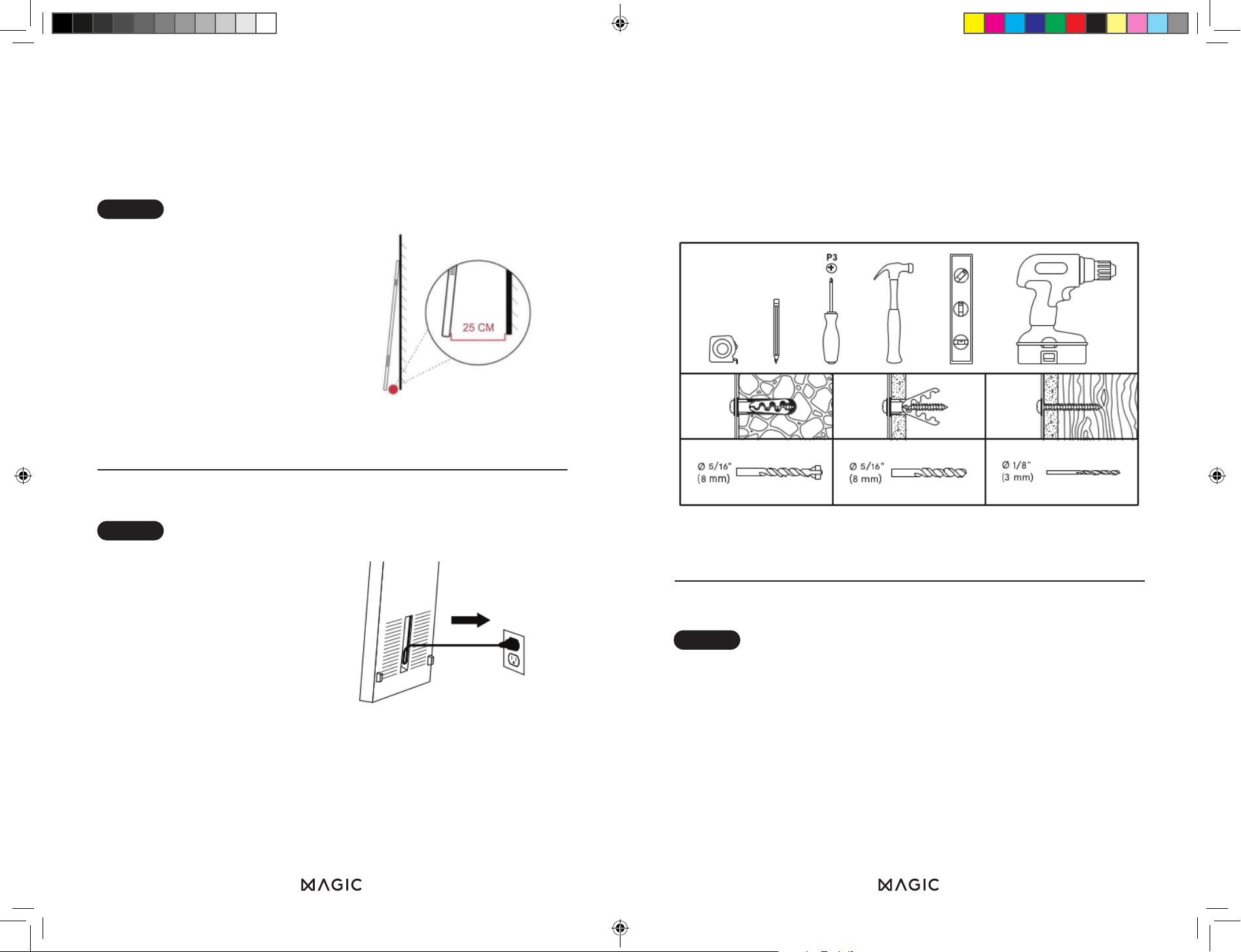
Tools Required
Ensure that you have the correct wall plug for your wall
construction.
Only brick wall plugs are provided.
WALL
MOUNTING
STEP 1
Using two people, lift the
mirror and lean the Mirror
against the wall.
Once leaning, adjust so
that the distance from the
bottom of the mirror to the
wall is 25 cm. Ensure that
the mirror is stable
Plug in your Mirror
Turn on the mirror by
pressing the power button
on the top right of the
mirror
Follow the on screen
instructions and get
sweating!
STEP 3
STEP 4
Instruction Booklet.indd 8-9Instruction Booklet.indd 8-9 02/12/2024 09:1802/12/2024 09:18
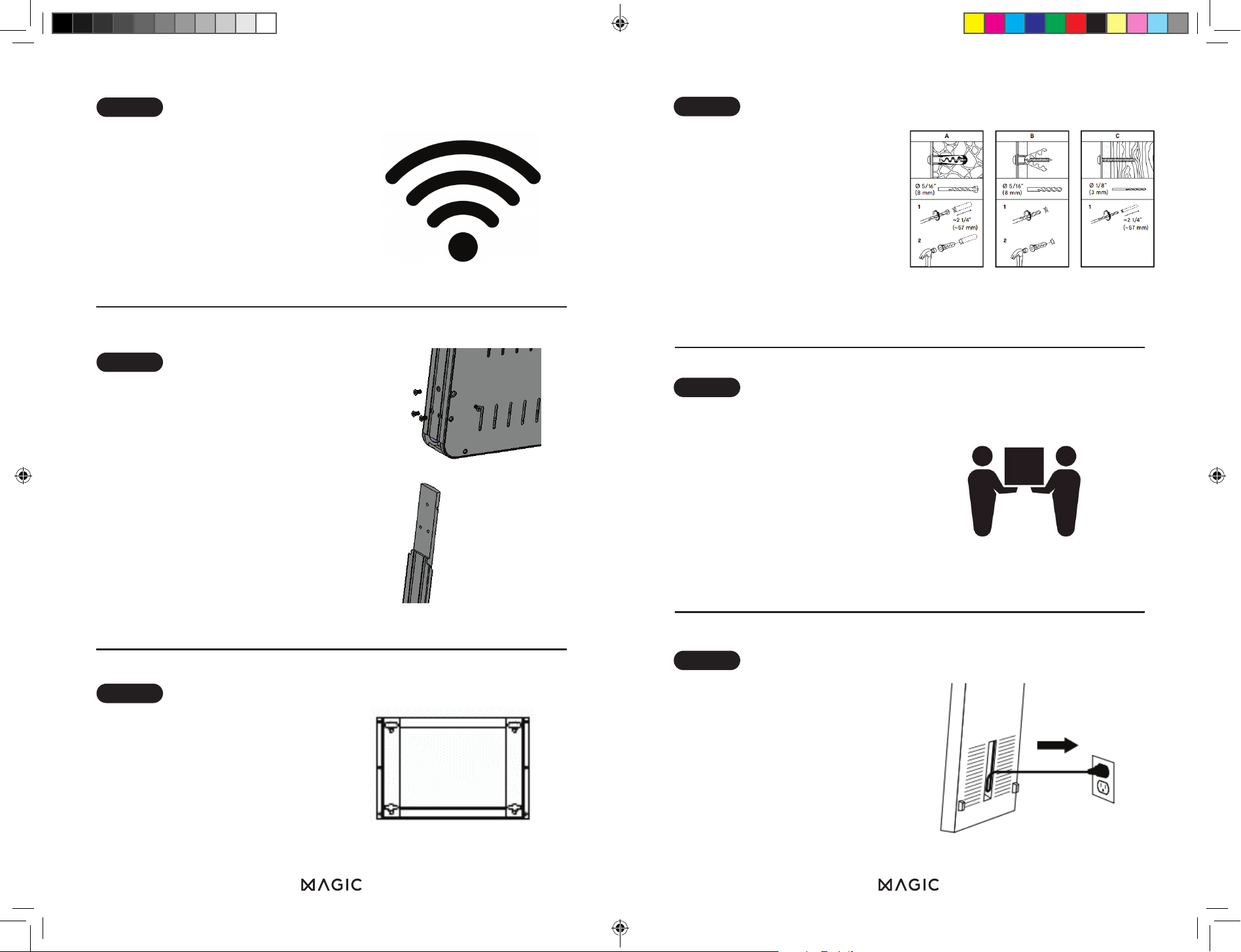
Mount the top of the
bracket to a height of
163 cm on the wall, using
a tape measure and spirit
level. Mark the drill holes
with a pencil, then securely
attach the bracket to the
wall using the appropriate
drill bit and wall plugs.
Carefully lift the mirror and
line up the mounting bolts
with the bracket. Insert the
mounting bolts into all 4
holes on the bracket then
slide down to affix. Ensure
all 4 bolts are inserted and
secure.
Plug In your Mirror
Turn on the mirror by
holding down the button on
the top right of the mirror
Follow the on screen
instructions and get
sweating!
STEP 6
STEP 5
STEP 7
Choose a location for
where your mirror will stand.
Please ensure it’s within
80cm of a power outlet
and you have strong Wi-Fi
signal of at least 10 Mbps.
Unwrap mirror, lay it flat
(mirror side down) on a
blanket, and use a Phillips
head screwdriver to remove
the 8 screws connecting
the stand to the back of the
mirror.
STEP 2
STEP 3
Unscrew wall mounting
bracket from back of mirror.
Once removed replace the
mounting bolts into the
back of the mirror.
STEP 4
Instruction Booklet.indd 10-11Instruction Booklet.indd 10-11 02/12/2024 09:1802/12/2024 09:18
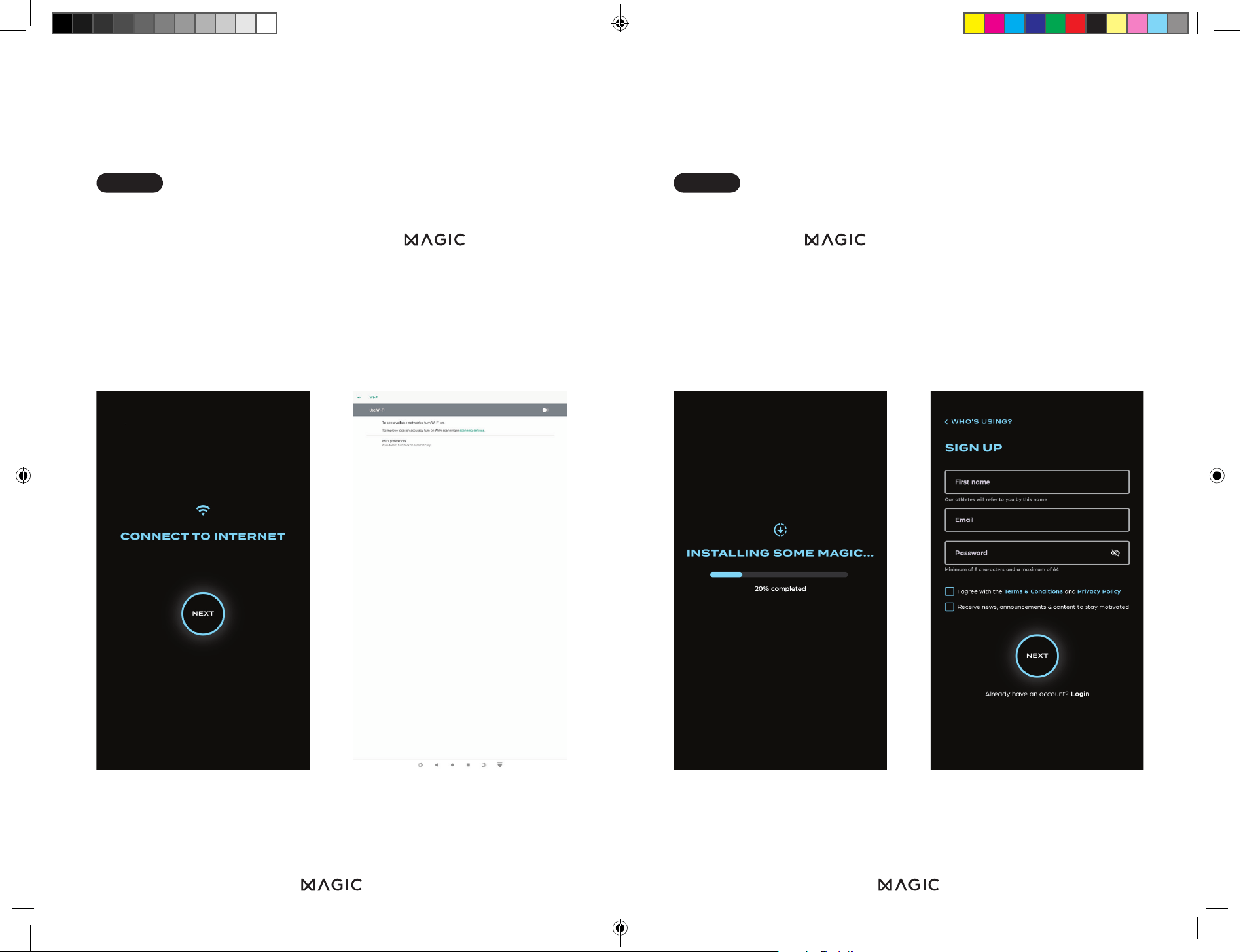
TURNING MIRROR ON FOR
FIRST TIME
When you first plug your mirror in it should automatically
turn on. The first thing you will see is the logo as the
mirror loads. It will then take you to the “Connect to Wi-Fi
Screen”. Please press the “Connect” button. This will take
you to the settings screen where you can select your Wi-Fi
and log in.
Once you connect to the Wi-Fi, the mirror will download the
latest version of .
Next, on the “Sign Up” screen, enter your details to create
your account. You will then receive a verification code via
email. After onboarding, you can add more accounts on the
mirror.
STEP 1 STEP 2
Instruction Booklet.indd 12-13Instruction Booklet.indd 12-13 02/12/2024 09:1802/12/2024 09:18
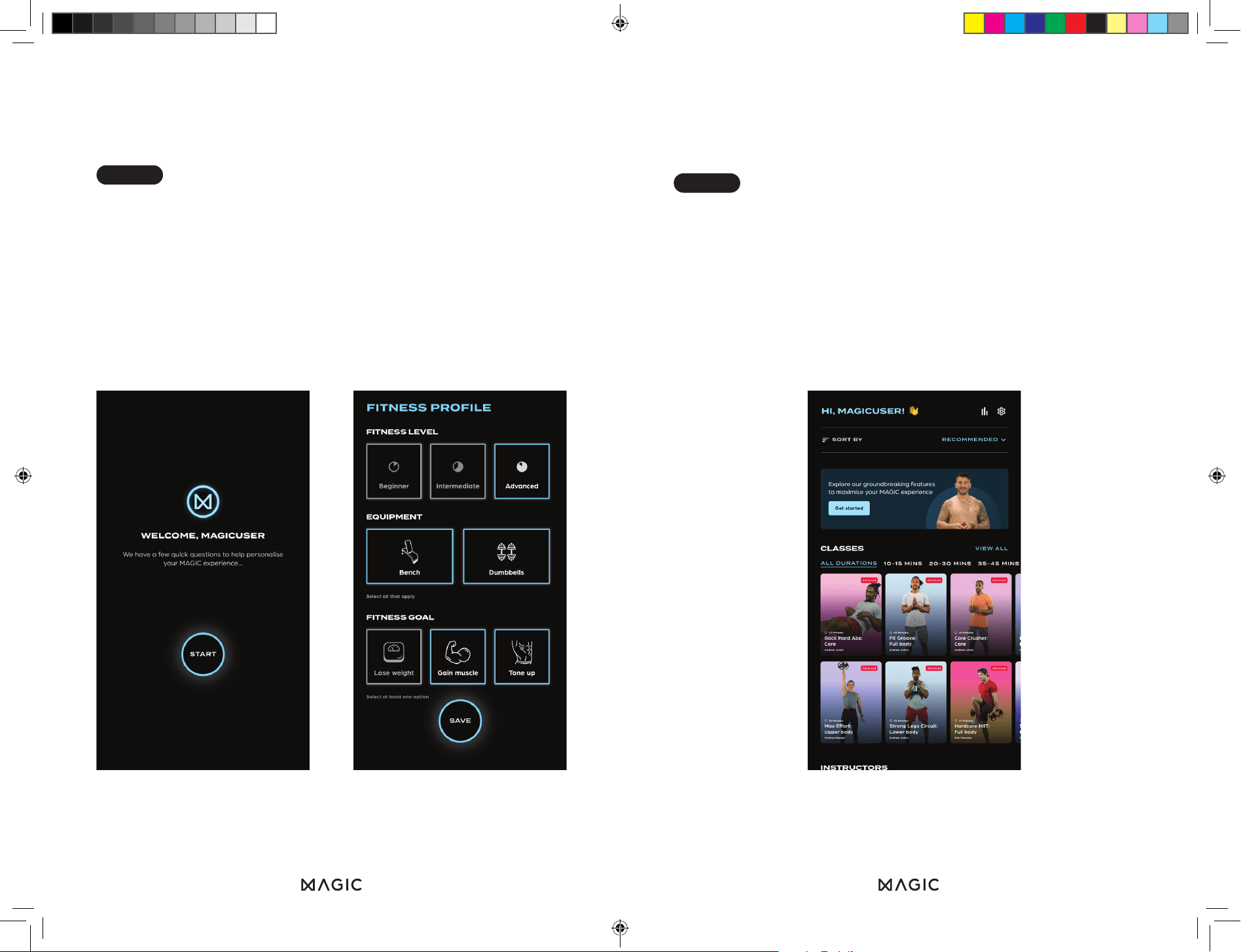
Once your account is created, you'll be guided through
setting up a fitness profile. This includes a series of questions
to customize your dashboard, recommend classes and
workouts, and estimate calorie calculations. You can update
these details anytime in settings under "Fitness Profile."
Once you’ve finished setting up your fitness profile, you’ll be
taken to your dashboard.
The first thing you should see is an invitation to “Get
started”. Pressing this will take you to the tutorial.
STEP 3
STEP 4
Instruction Booklet.indd 14-15Instruction Booklet.indd 14-15 02/12/2024 09:1802/12/2024 09:18
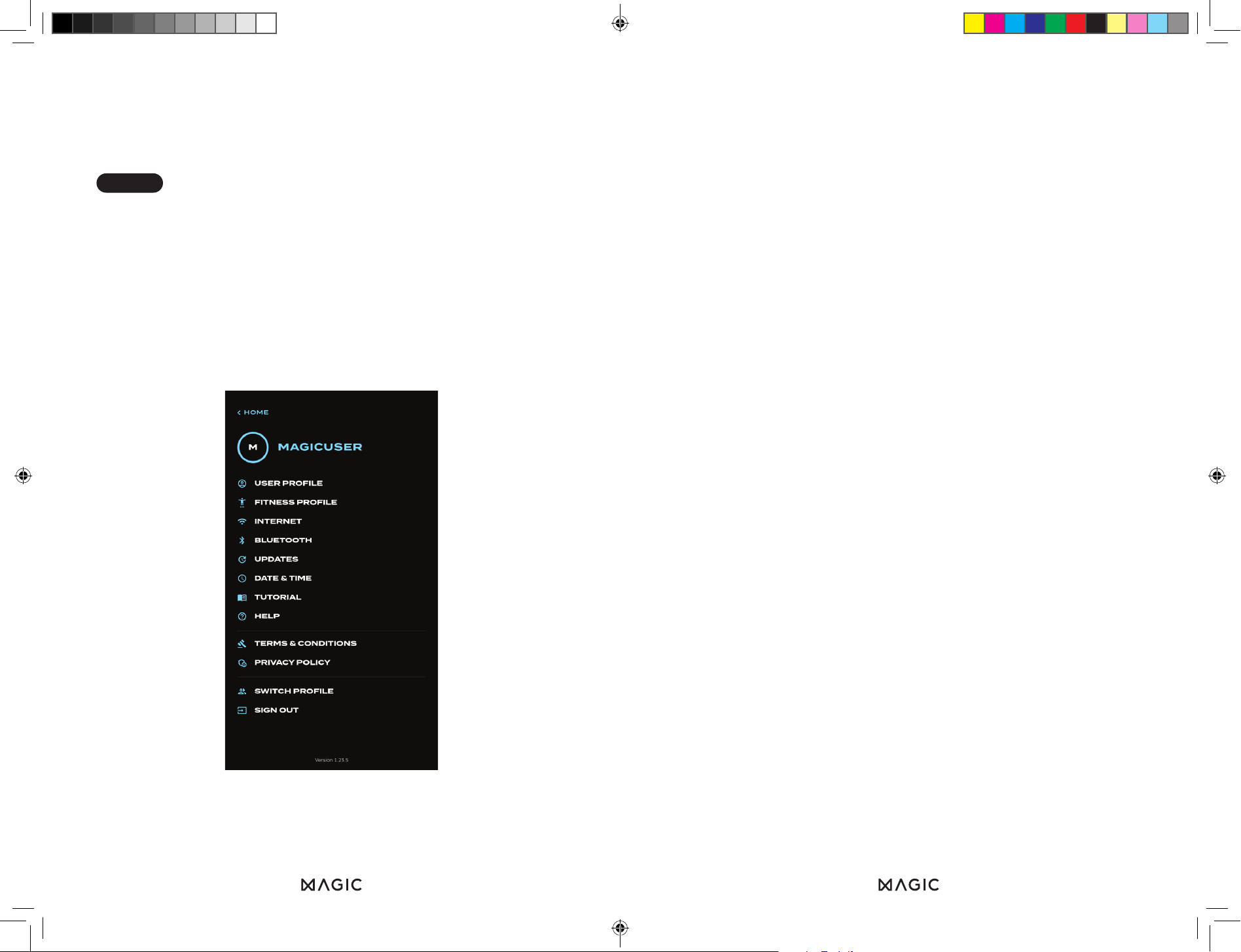
The tutorial should be taken by everyone who’s new to the
mirror - it will walk you through how the mirror works and
make sure you get the most out of it.
If you ever need to go over the tutorial again, it can be
accessed in the settings menu.
HOME SCREEN
You can browse the home screen by scrolling up and down.
Our content is split into different categories:
Classes
Classes range in length from 15 - 45 minutes and are
structured sessions taken all in one go by an instructor,
who talks you through the entire session. They can either
be full body or concentrate on specific body parts and are
categorised by difficulty.
Workouts
Workouts are individual days of a program. They will consist
of a few exercises done for a specific amount of reps and a
specific amount of sets per exercise. Workouts finish when
you have completed all of the reps and sets.
Programs
Programs last for four weeks and are made up of a variety
of different workouts. Each workout will focus on a different
body part, so you’re getting a full body workout over the
week. As the weeks go on the workouts will gradually get
harder, so they are perfect if you want to see how you
improve over time.
Dance
Dance classes are structured similarly to regular classes.
They consist of a single long session, allowing you to learn
the moves step by step before putting it all together at the
end. There are beginner and advanced versions of each
dance.
STEP 5
Instruction Booklet.indd 16-17Instruction Booklet.indd 16-17 02/12/2024 09:1802/12/2024 09:18
ANY QUESTIONS OR
FEEDBACK?
You can always reach us on team@magic.fit
@magicdotfit
facebook.com/magicdotfit
@magicdotfit
@magicdotfit
fit
Follow Us:
www.magic.fit
Instruction Booklet.indd 18Instruction Booklet.indd 18 02/12/2024 09:1802/12/2024 09:18