
USER MANUAL
BQ & Pro Series
LED Panel Device

Table of Contents
Package Content ....................................................... 2
PRODUCT APPLICATION ........................................ 3
MODEL SPECIFICATIONS ....................................... 4
About Red & Near-Infrared Light ............................... 5
Device Getting Started ...............................................6
APP USER GUIDE .................................................... 8
Usage Recommendations ....................................... 10
CLEANING & MAINTENANCE ................................13
Warnings ................................................................. 13
FAQ ......................................................................... 15
TROUBLESHOOTING .............................................16
SPECIFICATIONS ...................................................17
— 2 —
I Package Content
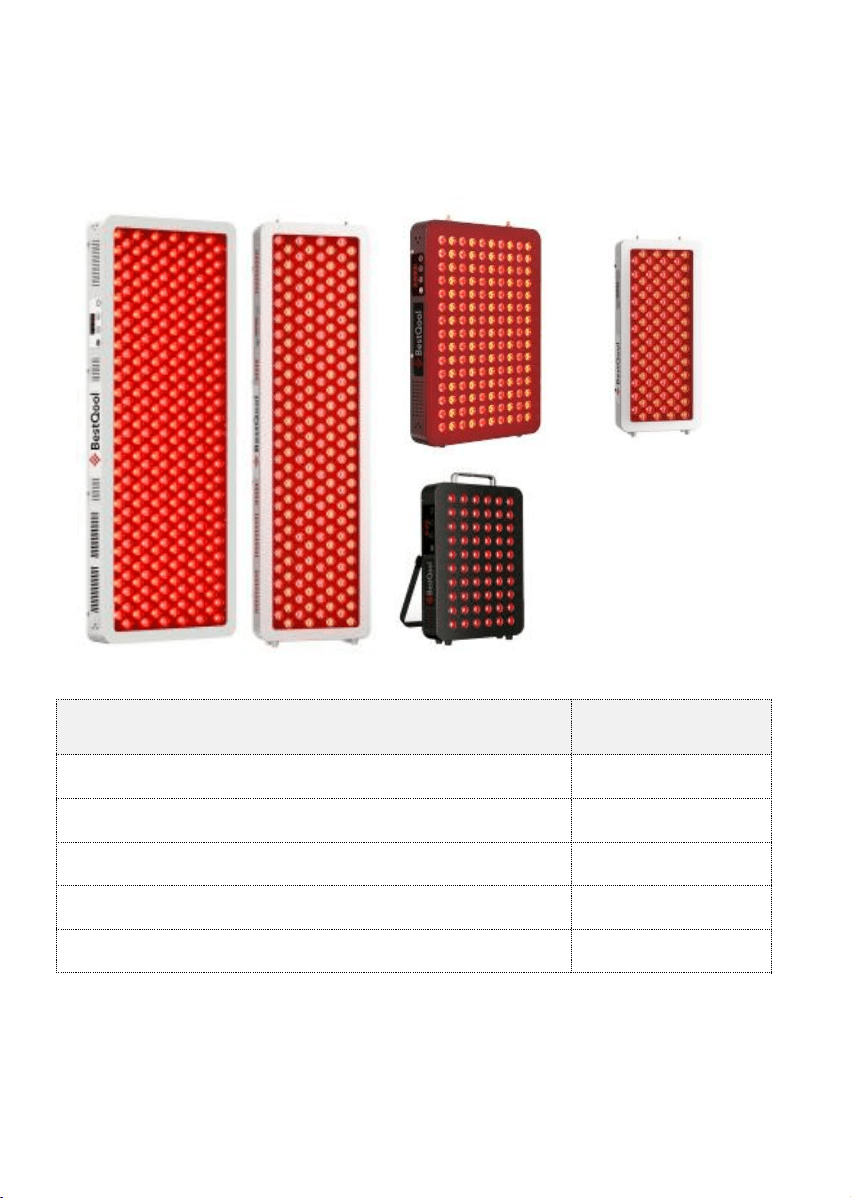
1 package only contains 1 device below
Note : Power cord type (US or EU) is selected at purchase.
Item
Qty
LED Panel Device
1PC
Power Cord (US or EU)
1PC
Protective Goggles
1PC
User Manual
1PC
Quality Assurance Card
1PC
BQ60
BQ150
PRO100
PRO300
PRO200
— 3 —
I PRODUCT APPLICATION
1.1 Intended Use
This product is a wellness and beauty care device .
It uses specific wavelengths of LED light to deliver a comfortable
light therapy experience for general wellness.
1.2 Suitable Applications
Application
Description
Daily Skin Care
General facial and body skin wellness routine
Post-Exercise Comfort
Light therapy after physical activity for muscle
relaxation
Relaxation & Wellness
Creating a comfortable environment for
personal wellness sessions
Beauty Routine Support
Complementing existing skincare and beauty
regimens
General Body Comfort
Broad-area light therapy for overall body
wellness
Not Intended For
Situation
Caution
Use on broken or irritated skin
May cause discomfort
Pregnancy
Consult a professional before use
Photosensitive conditions
Consult a professional before use
Discomfort during use
Stop using it and consult a professional
— 4 —
I MODEL SPECIFICATIONS
Parameter
PRO300
PRO200
PRO100
BQ150
BQ60
Max Power
470W
330W
160W
250W
105W
Color
White
White
White
Black
Black
Dimensions
13.5*2.6*
36.4inch
8.4*2.6*
36.8inch
8.4*2.6*19.
7inch
14.3*2.6*
21.3inch
8.4*2.1*1
3.1inch
Best For
Half
body
Half
body
Calves &
thighs
Abdomen
Back or
legs
Weight
19.1lbs
13.2lbs
6.6lbs
12.2lbs
4.8lbs
LED Count
Dual-
chip 300
Dual-
chip 200
Dual-chip
100
Dual-chip
150
Dual-chip
60
Input
Voltage
AC 100-240V ~ 50/60Hz (Universal)
Mounting
All are for fixed use
Wavelength
630+940nm&660+850nm
Line Profile
Selection
Please select the correct power cord for your region at
time of purchase:
American-style power cord OR European standard power
cable.
— 5 —
I About Red & Near-Infrared Light
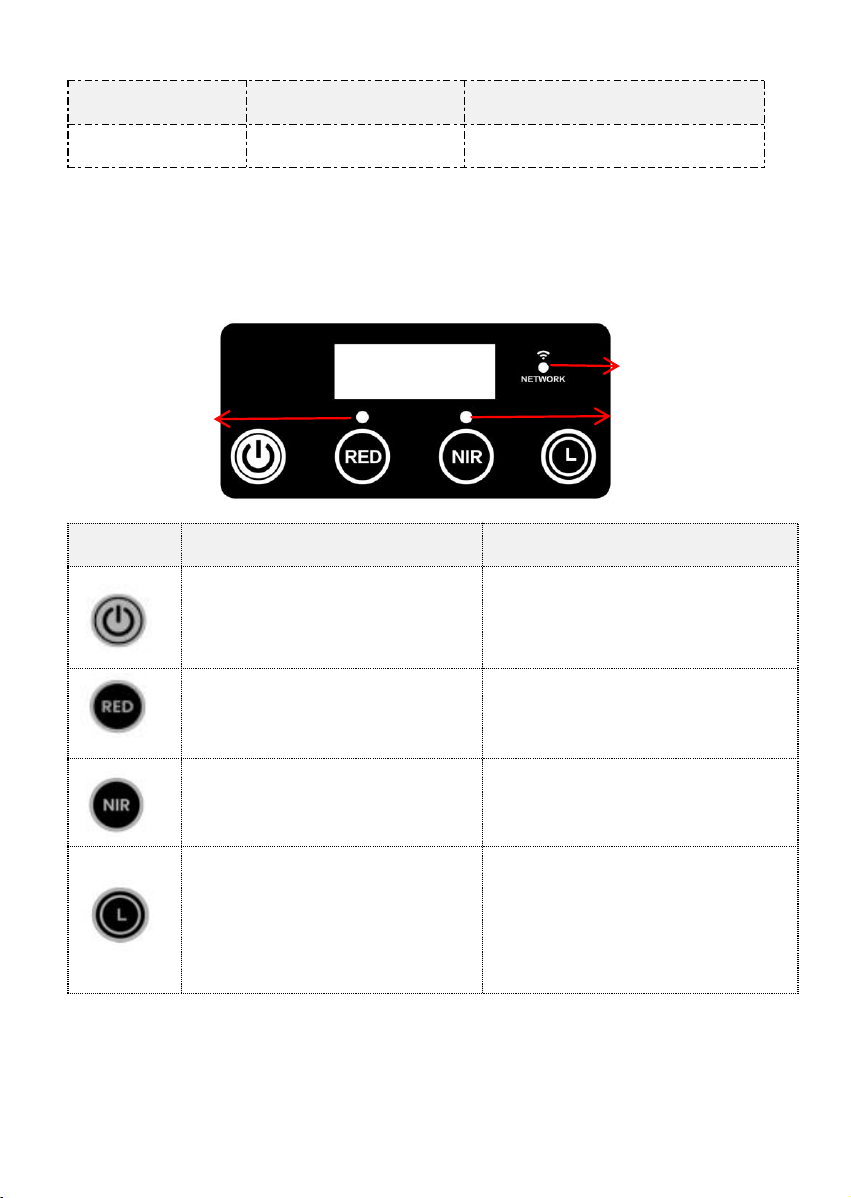
Wavelength Specifications
Wavelength
Penetration
Best For
630nm
Surface
Skin wellness, daily care
660nm
Medium
Skin vitality, circulation support
850nm
Deep
Muscle comfort, joint wellness
— 6 —
Wavelength
Penetration
Best For
940nm
Very Deep
Deep tissue comfort
I Device Getting Started
*BUTTON FUNCTIONS
Button
Short Press
Long Press(in standby “–:–”)
Starts 6s countdown
→ auto ON both RED & NIR
Screen Off
Toggle RED light ON/OFF
Delete WiFi → re-pairing mode
Toggle NIR light ON/OFF
Start WiFi pairing ;
Press again → disable WiFi
Cycle timer:
5→10→15→20→25→30→35
→40→CXXX(Shows for 8S ,
then returns to 40:00)→5 min
/
Tip : 1) Press Power button again while lights are ON to turn all
lights OFF.
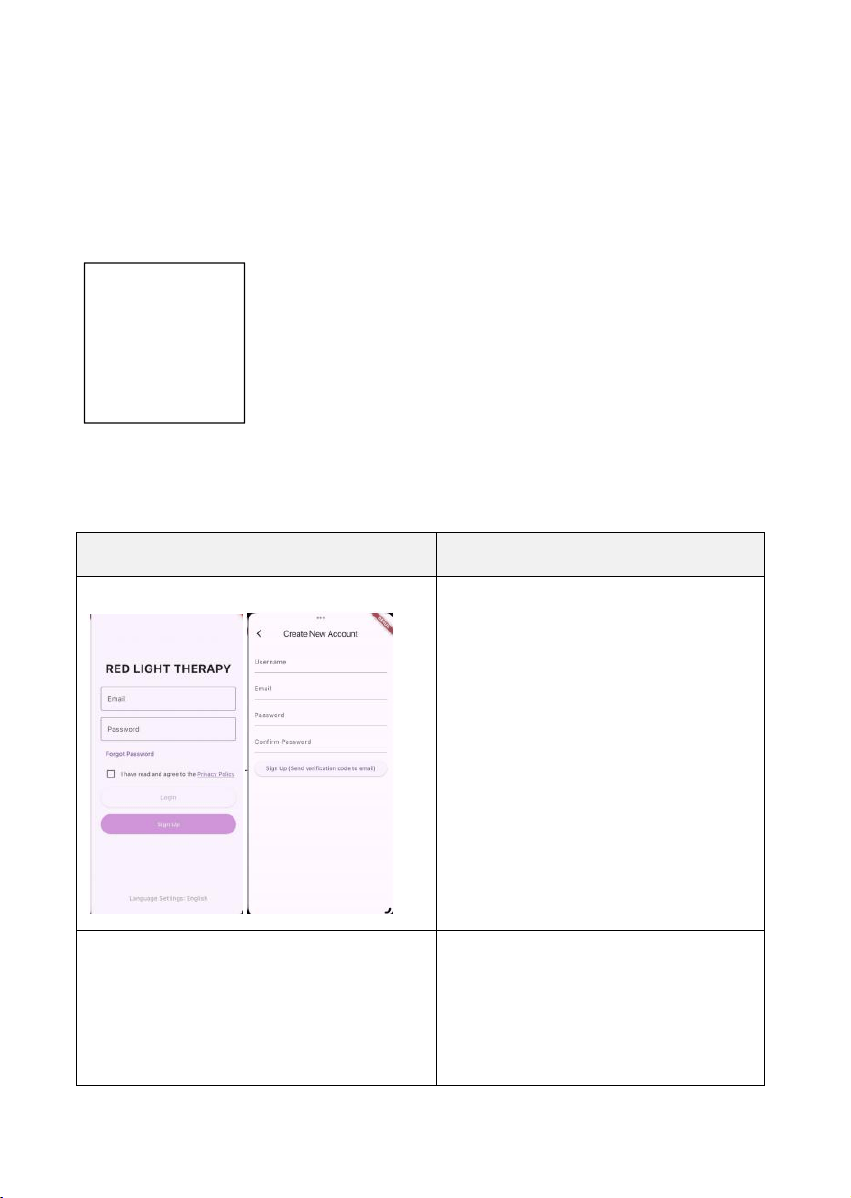
NIR Working
Indicator Light
RED Working
Indicator Light
Network Status
Indicator Light

— 7 —
2)CXXX: Represents the cumulative number of consecutive
single-use sessions lasting ≥10 minutes
*INDICATORS
1) RED Working Indicator Light:
OFF:RED light OFF
On(Green):RED light ON
2) NIR Working Indicator Light:
OFF:NIR light OFF
On(Green):NIR light ON
3) Network Indicator
OFF:Network disabled
ON(blue) :
RAPID FLASH :Waiting to connect to Wi-Fi (AP)
Constant-speed flash :Connected to a WIFI (AP) hotspot but not to the
device server
Continuous intermittent double flickering:The device has saved the Wi-Fi
(AP) network configuration information, but it cannot currently connect to
the Wi-Fi (AP).
Always On :The device, WIFI (AP), and device server are all connected
successfully
— 8 —
I APP USER GUIDE
*Download the APP
Scan the QR code below or search “Red Light Care” in the App Store or
Google Play.
Interface Schematic
Step Instructions
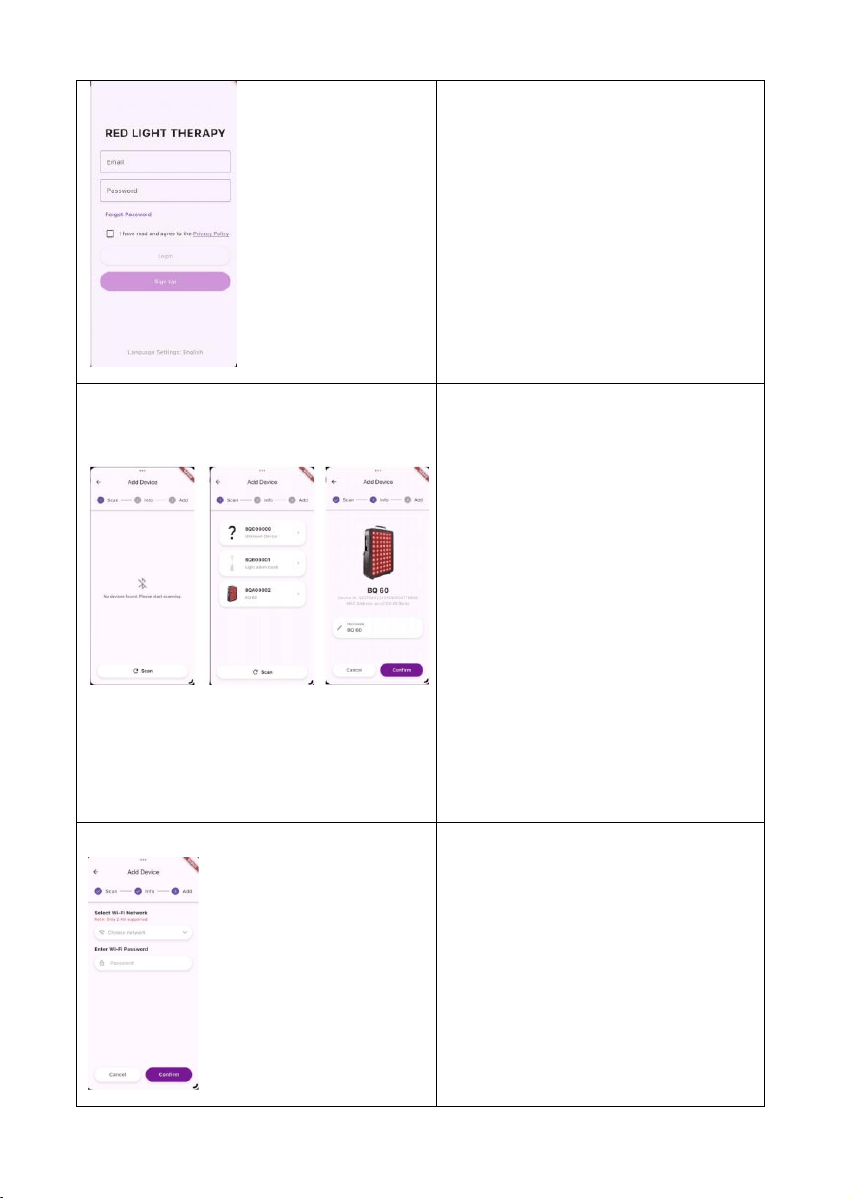
Step 1: Create Account
1. Open the APP
2. Agree to terms
3. Click 'Sign Up' to register an
account
4. Enter the username, email
address, password, and other
required information
5. Account registration succeeded
after verification
Step 2: Create Account
1. Enter the registered email
address and password
2. Agree to terms
3. Click 'Login' to sign in
QR Code
— 9 —
4. You can use the app only after
successful login
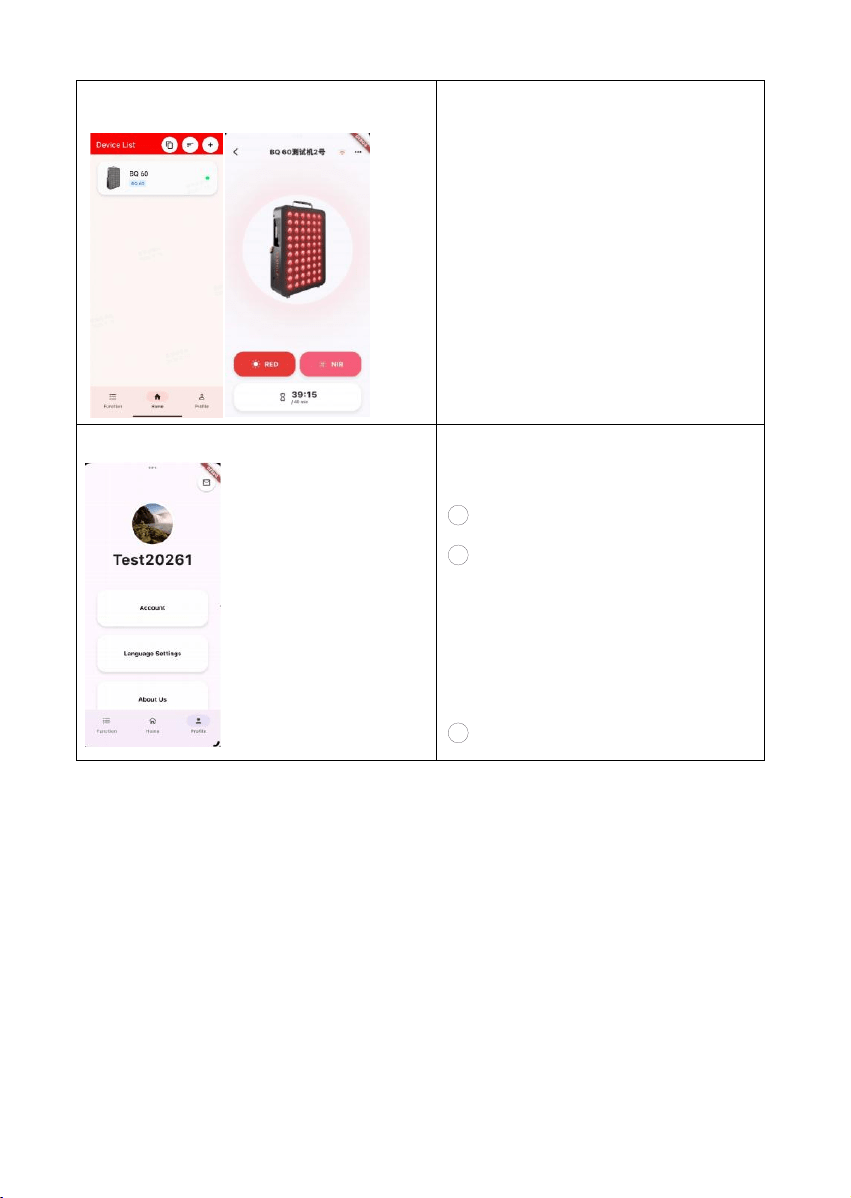
Step 3: Add Your Device
1. Click the '+' on the Home page
to add a device
2. Enable Bluetooth & Location
3. Ensure the device is in
distribution network mode
(network indicator light flashes)
and that the Wi-Fi AP is
functioning normally
4. Tap "Scan" to find device
5. Click the image of the pre-
connected device to confirm its
detail
Step 4: Connect to WiFi
1. Select your 2.4GHz WiFi
network
2. Enter WiFi password
3. Tap “Confirm”
4. Wait for “Binding Successful”
— 10 —
I
Usage Recommendations
Each use of the product provides internal nourishment to the body.
Most users observe noticeable improvements after approximately
3 weeks of consistent use. With continued application, you will
experience significant changes.
Frequency:Use it 5 times per week
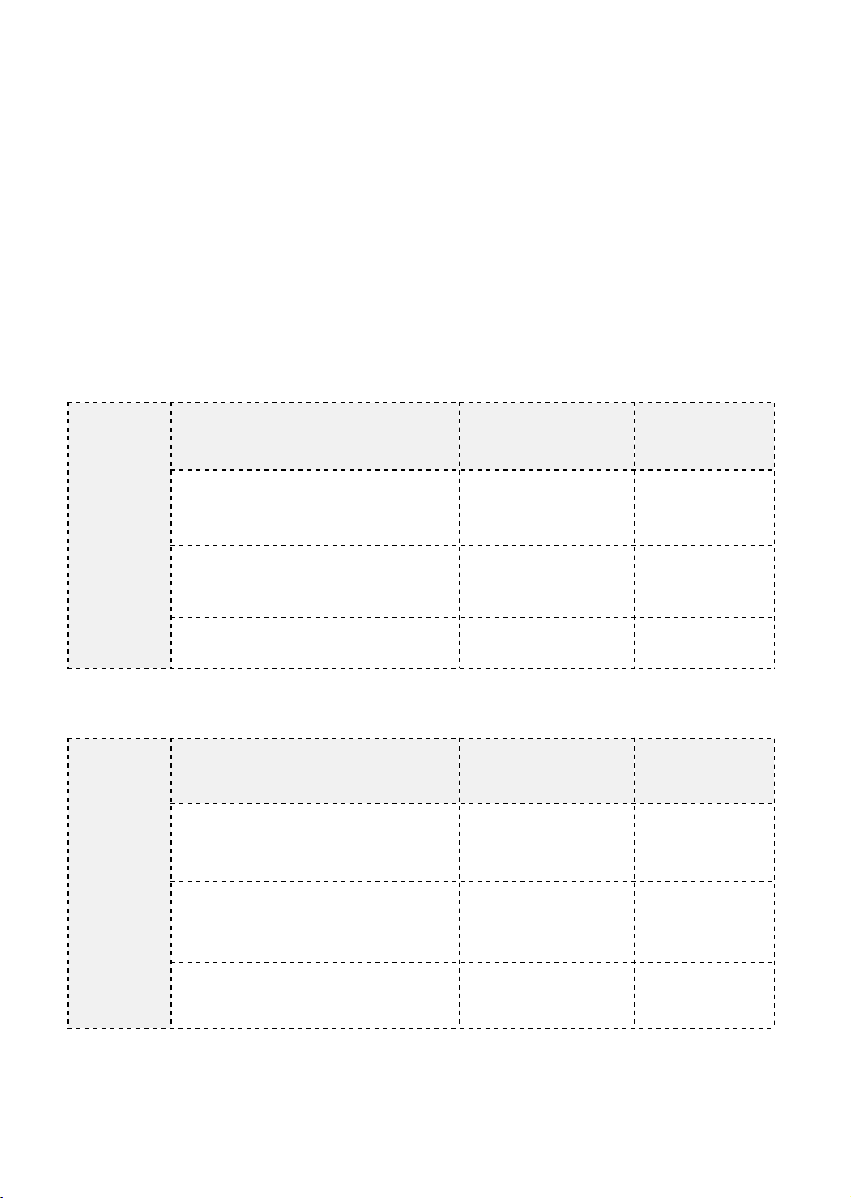
Step 5: Control the Device
1. In the device list, click the
device image
2. Turn on/off red light and near-
infrared light, and set the
physiotherapy duration (5–40
minutes).
Step6: Profile & Settings
1. Click 'Profile' to enter the
personal settings page
1 Account Details
2
Language Settings:English,
Chinese (Simplified), Chinese
(Traditional),Spanish, German ,
French , Portuguese,Italian ,
Japanese, Korean
3
About Us
— 11 —
Distance:Keep the device about 6 inches (15 cm)from the target
area.
Before Use Turn on both red and near-infrared lights and undress
the therapy area.
Always wear protective goggles during use.
Total Therapy Time in 1 Day (better split into 2 sessions)
Note: Time is based on usage at 6 inches distance.
BQ60
(Black)
Care Goal
Wavelength
Time
Facial skin
RED
(630+660nm)
10-15 min
Back or legs
NIR
(850+940nm)
15-20 min
Daily wellness
RED + NIR
10-15 min
BQ150
(Black)
Care Goal
Wavelength
Time
Abdomen
RED
(630+660nm)
15-20 min
Core comfort
NIR
(850+940nm)
20-25 min
Mid-body wellness
RED + NIR
20-25 min
— 12 —
PRO100
(White)
Care Goal
Wavelength
Time
Calves & thighs
RED
(630+660nm)
15-20 min
Lower body comfort
NIR
(850+940nm)
20-30 min
Leg wellness
RED + NIR
15-20 min
PRO200
(White)
Care Goal
Wavelength
Time
Half body skin
RED
(630+660nm)
20-25 min
Deep muscle comfort
NIR
(850+940nm)
25-30 min
Full body wellness
RED + NIR
20-25 min
PRO300
(White)
Care Goal
Wavelength
Time
Professional skin care
RED
(630+660nm)
20-30 min
Athletic recovery
NIR
(850+940nm)
25-35 min
Maximum coverage for
professional use
RED + NIR
20-30 min
— 13 —
| CLEANING & MAINTENANCE
Task
Method
Frequency
Exterior cleaning
Wipe with soft dry cloth
After each use
LED panel cleaning
Wipe gently with microfiber cloth
Weekly
Ventilation check
Ensure no dust blockage
Monthly
Power cord check
Inspect for damage
Monthly
Installation Stability
Check
Ensure secure mounting
Monthly
Storage
Cool, dry place away from sunlight
/
Note: The product surface may be disinfected using 75% alcohol
solution. During disinfection, wiping should be employed instead of
immersion disinfection. Additionally, high-temperature, high-
pressure, or high-humidity disinfection methods are not
recommended..
| Warnings
The warnings stated in the user manual are intended to ensure
that you use the product safely and correctly, preventing harm to
yourself and others.
1 Do not drop your light in water or wherever they may get wet.
Water and electricity can be dangerous mixtures.
2 For safety reasons, disconnect the power supply to the
equipment in case of a lightning strike.
3 Do not touch powered device plugs or switches with wet
hands.

— 14 —
4 When using the device, avoid direct exposure to the LED light
source. Always wear the provided protective goggles.
5 Keep away from children
6 Do not disassemble, repair, or modify this product without
authorization, as it may cause accidents or malfunctions.
7 Protect the product from drops
8 Do not use on broken or irritated skin.
9 Consult a professional if you are pregnant or have light-
sensitive conditions.
10 Unplug when not in use for extended periods.
11 Use only the provided power cord.
12 This product should not be used in high temperature or high
humidity environments.
— 15 —
|FAQ
— 16 —
|TROUBLESHOOTING
Problem
Cause
Solution
Screen off, no power
No power
Check whether the socket
power supply is normal.
Screen on,Lights not
working
The countdown
has ended or the
lights are not
turned on
Press the‘ RED ’or‘ NIR ’
light button again ;
No abnormalities
detected when powered
on, but the device
display window shows no
content.
The device is in
screen-off mode
Normal — screen-off sleep
mode, press any key to
activate
Display shows “CXXX”
Session counter
display
Normal — Wait 10 seconds
or press any key to exit
The app cannot control
the device
WiFi not configured
Long press NIR 3s to enter
pairing
APP shows device offline
Network changed
Reconfigure WiFi in APP
WARRANTY
Item
Detail
Warranty Period
Within XX month from the date of purchase
Coverage
Manufacturing defects under normal use
Exclusions
Damage from misuse, unauthorized modification,
or non-original power cord
— 17 —
|SPECIFICATIONS
General Specifications
Parameter
Specification
Product Name
LED Panel Device
Models
BQ60 / BQ150 / PRO100 / PRO200 /
PRO300
Timer Range
5 / 10 / 15 / 20 / 25 / 30 / 35 / 40 minutes
Control
Physical buttons &APP remote
Input
AC 100-240V ~ 50/60Hz (Universal)
Power Supply
AC mains direct (wall outlet)
Power cable size selection
US Standard (Type A/B) or EU Standard
(Type C/F) — selectable
Operating Environment
a) ambient temperature :10℃~40℃;
b) Relative Humidity:30%~75%RH;
c) Ambient pressure:80kPa~110kPa
Transportation & Storage
Conditions
a) ambient temperature:-10℃~60℃;
b) Relative Humidity:10%~90%RH;
c) Ambient pressure:70kPa~110kPa;
d) Store in a well-ventilated and dry place.
|REGULATORY COMPLIANCE
*FCC STATEMENT
This equipment has been tested and found to comply with the
limits for a Class B digital device, pursuant to part 15 of the FCC
Rules. These limits are designed to provide reasonable protection

— 18 —
against harmful interference in a residential installation. This
equipment generates, uses and can radiate radio frequency
energy and, if not installed and used in accordance with the
instructions, may cause harmful interference to radio
communications. However, there is no guarantee that interference
will not occur in a particular installation. If this equipment does
cause harmful interference to radio or television reception, which
can be determined by turning the equipment off and on, the user is
encouraged to try to correct the interference by one or more of the
following measures:
Reorient or relocate the receiving antenna.
Increase the separation between the equipment and receiver.
Connect the equipment into an outlet on a circuit different from that
to which the receiver is connected.
Consult the dealer or an experienced radio/TV technician for help.
Caution: Any changes or modifications to this device not explicitly
approved by manufacturer could void your authority to operate this
equipment.
This device complies with part 15 of the FCC Rules. Operation is
subject to the following two conditions: (1) This device may not
cause harmful interference, and (2) this device must accept any
interference received, including interference that may cause
undesired operation.
RF Exposure Information

— 19 —
This equipment complies with FCC radiation exposure limits set
forth for an uncontrolled environment. This equipment should be
installed and operated with minimum distance 20cm between the
radiator and your body.
*CE-RED Declaration : This device complies with the following
EU directives: Directive 2014/53/EU (RED),
Thank you for choosing our LED Panel Device!
For firmware updates and latest features, please keep
your APP up to date.
Document Version : V1.0
Date : 2026-07-14
© 2026 [Company Name]. All rights reserved.