IX
、
C o m m o n p r o b le m s :
V
、
Function Introduction:
1. V ic e o c a l l W h e n a v isito r rin g s th e d o o rb e l, th e m o b ile a p o w il re c e ive a
re m in d er n o tfic a tio n a n c c lick o n t h e p u s h p o p -u p to e n te r th e v ic e o ,la n g p res s
' C a
n co n d
u c t in t
e rc o m
|
2 . AP P re m o te m o n ito rin g : W h e n y o u w a n t t o o b s e rv e t h e o u td o o r s it u a tio n
yo u c a n rem otely ch eck th e situa tio n at th e d o o r th ro ug h th e m obile APP.
3. D e v i c e s h a rin g ; E n t e r t h e r e a l- t im e in t e r f a c e o f t h e A P P , dlick o n S e ti n g s - S h a r e
D evice- A d d Share - En ter A c co un t in th e u p p er r ig h t com e r,
(N o te : Shared m e m bers n eed to cdownload an d reg ster the ' IT Life' a p o frs t)
4 . N ig h t v sio n : E q u ip p e d w ith a p h o to s e n sit v e s e n so r, t h e LED f l l ig h t a uto m a tic ally
turns on in dark environments.
5 . L ow b a tte ry re m i n d e r. W h e n t h e b a tt e r y le ve l is low , t h e a p p w ll p u s h a l o w
b a tte ry r e m in c e r, pleas e c h a rg e it in a tim e ly m a n ne r.
6 .W o rk in d ica to r lig h t : W a rk sta tu
s. B lu e in d ic a t o r lig h t i s a lw ay s o n
D istrib u tion n e tw ark sta tus: B lu e in d ic a to r lig h t flash in g
C h a rging status. The red indicator ig h t is always o n , f i l y ch arged and tum e d o ff.
Add
Dev
ice
Done
Cancel
What should be noted before use?
1
、
A p p e ara n c e in tro d u c tio n :
Ding dong:
p h o n e n u m b e r o r e m a l ac d re s s a n d c i c k C o n tir u e .The n e n te r t h e v e n ific a tio n
co de t o log in to th e A P P t Try N o w lo gin ca n n o t a d d d o o rb e ll d e vices n o rm a lly
p lea se r e g iste r a n d lo g in. }
X
AddDevice
R : Be fore use , p lea s e c a r e fu ly re a d o u r us e r m a n u a l a n d fo llo w th e d e ta lle d s te p s .
W he n tak in g t o th e doorb ell, p le a se pla c e your p h o n e a t le a st 5 m away fro m t h e
do orbe l t o av o id signa l interfere nc e o r n oise.
Choo se W i- Fi a n d e n te r pa ssw a rd
Doorbell:
Ybu a re a d v ig d t o en a b le B ueto oth .
S a c h i n g for m a rt y d w c e . H u l s u e y u r d e k e h a
1 d e c t t t o n d u c c e a f
EwbeBLetoe dd sore WF o tc s e a r
r te n t p s g n ec m
3 .AP P p er m is s io n s p o p - u p p r o m p t s , su c h a s m e s s a g e p u sh , a c c es s g e og ra p h ic al
lo c a tio n , c o n ne ct pe n p h e ra l de vices , e tc , p lea s e s e t t o ' A llc w ' .
C n n a
N a t-2 c 2 s
S
mart doorbell
Turn a n Bluetocth
A od ad s usc esstu y
N ew Tiw rty D evks'
P
When coes the doorbell need to be restarted and how to reset t ?
R. W he n th e d o o rb e ll ca n
n o t w o rk pro p erly o r ca n n
ot con ne ct to th e p h o n e ,
it n ee ds t o b e re s ta rte d a n d r e s e t. P re ss an d h o ld t r e 'R e s e t' b u tto n , h e a r a "b e e p '
p r o m p t s o u n d , re start a n d re s e t, a n d th e n a d d th e d e v ice a g a in.
8
Go tu s t
Aod M anualy
IV
、
A d d in g a d e vic e :
1. T urn o n th e b lu e to o th an d lo ca tio n p e rm issio n fun ctions o f th e m o b ile p h o n e .
2 . P r e s s th e d o o r te ll b u tto n to tu r n o n th e de v ice . W h en u sin g it fo r th e f ir s t ti m e .
p r e ss th e d o o r b e ll b u t t o n tw ic e in a r o w t o s ta r t th e d e w ice. T h e w o r k in g in d ic a to r
lig h t w ill f la s h , a n d t h e d e v ic e will e n t e r t h e d i s tr ib u tio n n e tw o r k m o d e .
3. O p e n th e A P P e n t e r t h e " H o m e p a g e " , c lic k ' + ' o n t h e u p p e r r i g h t c o r n e r o f
th e p a g e , t h e APP w l l au tom atic ally sc a n a n d c isc o v er th e d e v ic e , dick ' Add".
Neal
p e c tris
Socm
W ha t sh o u d I do if the repeatec a d d tia n o f devices fa is?
Jm a da s h
med cn
? ∵
R:A fte r th e fi s t failed a dd ition , please re sta rt the d o o rb e l, lon g press th e ' R e se t
b u tton , h e a r a "b e e p ' prormpt so un d , and th en tr y acd ing a ga in. Tne device o n ly
su p p o rts 2 .4G H z W F I n e tw o rk Please e n s u re th e t y o u a re u s n g a 2 .4G Hz W IF I
rg
e ae t
w
In s tru c tio n m a n u a l V1 .0
m
IREWm
2 g > m l
7
5. After fully charging the d o orb e l, install it within th e range o f W F i signal
c o v e ra g e a n d g c o d s ig n al.
Kind Remincer:
/
门 (入
re tw o r k a n d e n te r t h e co rrec t W F i p a s w o rd .
N o te 5 G n e tw o rk s a re n o t currently su p p o rted , a n d all routers w ill have a 2. 4G H z
n e tw o rk o p tio n .
4 . C a n t preview a n d w atch tr e d o o r t e l vid e o co rrectly?
R. Check f the netw ork is fu n ction ing p ro perly an c b ring the do o rb e l closer to the
ro u te r. If i t s tll c a n n o t be used , plea se restart th e d oo r b el a n d ad d it a g ain.
5 . H ow t o c h a n g e th e d o o rb e ll n etw o rk t o a n o th e r r o u te r?
R .F rs t d e lete th e de v ice o n th e a p p , a n d th en rec o n fig u re the ne tw ork fo r th e
doorbell.
b . A cce ss p e rm s sio n m a n a g e m e n t, e n a b le W LAN , B lu eto o th , a n d n e a rto y
?
①
When charg ing, th e charging in dica to r light is re d .
②
A fter b e in g fuly c h a rg ed , th e c h a rg in g in dicator lig ht g o es o u t.
V
、
D o o r b e ll a n d d in g D o n g m a tc h in g
d e v c e s , an d s e le c t A w a y s Allow.
⑩
indca tor lig h t
S pe ak er P a ir n g k e y
Volume size
1
Add Device
Dene
<
Add Dewlce
B Music to g gle
9 USB Charging Port
←
Aep l e
①
Aep t eh u ne r
6
ou e sevismdto eutte BAatssth
Sem ching tor ra s ty d nv ent .s b e t u e y o u r
1 t
o w eeta serw m g iv e r v o
4
Adostart
1
、
D o w n la a d m o d e o f APP:
F o r A nd roid p h o n e s ,i t c a n b e d o w n lo a d e d fro m t s o w n a p p m a rk et o r A p p
Treasure Search[ IT Life ] . For lO S phones, search fo r' IT L fe ' in th e APP
Im ielig e t D c a r ta l
1 . P ow e r o n t h e c in g D o n g m a c h in e ( e ft) ;
2 . L o n g p re s s t h e p a
r i n g b u t t o n o f d in g
D o n g m a c h i n e f o r 3 s e c o n d s (a s s h o w n
in th e pic tu re ), an d th e in d c a to r b lin k s
3 . Press th e d
o o rb e ll b u r to n
(righ t), d in g
D o ng m a c h in e rin g s, th a t is , th e m a tc h
is successful.
Pwmlulons
D s co v erin g d ev hc as
…
Tip to t n d
k io n thuo y Dawicr
Deny
Neu?y
Ahayys s o w
C urg e WLaN co vec sray
Store t o download.
6 .W h y a m I u n a b le to re c e ive p u s h m ess ag e n o tf ic a tio n s t h ro u g h m y m o b lle a p p ?
R. P e a s e e n su r e th a t t h e a p p i s ru nn in g p ro p e rly o n yo ur p h o n e a n d th a t th e
p h o n e s y ste m h as e n a b le d r e le va n t p u s h fu nc tio ns s u c h a s S M S n o ti c a t io n s a n d
p e rrriss io n c o n frm a tio n .
A d d M a nu sly
taee
Csnefl
t a
O u r g e B uatooth to m e eth sty
0
8
6 * m a
S a g
Carm eet t s nearty dev ic n
0 g o m t o o w t o e m m
0
U g
W- F
7. E q u p m e n t in s ta lla tion loc a tio n?
s m
Note:
4 .A fter a d d n g th e d o o rbell, selec t th e 2 .4 G H z WIFi ne tw ork a n d e n te r th e p a ssw o rd .
The n, c ic k o n N e x t . Please k e e p th e ro u ter, pho n e, a n d d o o rbe ll as close as
p o s s ib le . A fter successful ad d itian , click F in ish .
V1. M o b ile m e s s ag e p u sh
E nter m o bl le p h o n e - S et tin g s - n o t f i c a to n a n d
s ta tu s b a r - A p p licatio n n o tf ic a tio n m a n a g e m e n t
open IT life APP no tfication permission, enable
n otific atio n , s u s p e n s io n , lock s c re e n , s o u r d r e m i n d e r
and other notification functions.
(N o te : D u e t o d ffe r e n t m o b ile p h on e m o d e ls, t h e
o p e ra ti o n i n te rf a c e a n d o p t io n s a r e d f f e r e n t ,
< m =
R: D o n o t in s ta ll d o o rb e lls o n m eta l d o o r s t o p r e v e r t the m f r o m b lo c k ing W i f i
s ig n a s . W h e n in s ta lin g th e d o o r b e ll, p lea se fo llo w th e u se r m a n u a l to c o m p le te
th e o p e r a tio n . A fter te st in g th at th e do ortbell is w ork ing pro p e rly , install it i n t h e
b e st sig n a l po sition .
a. If th e d e v ice is n o t a u to m a tic a lly sea rche d, p lea s e c lic k " Turn o n B lue to o th in
t h e p ict u re b e lo w a n d s e t "A lo w d e vi c e p e rm is si o ns n e a r th is a p p lc a tio n ".
③
Photosens
itive sensor
①
M ic ro p h o n e
②
Lens
④
Doorbe
ll button
⑤
W o rk ing in d ica tor lig h t rin g
⑦
S p ea ker C h a rging p o r t
R eset b utton
(N o te : l f th e c o n n e c tio n is n o t s uc c es sful, please re s e t th e d e v ic e and re c o nn ec t )
Ⅲ、
A P P re gistra tio n:
1. Fo r t h e f r s t d o w rlo a d a n d us e , p le a se
c lick " R e g ste r'il f y o u h a v e a n a c co un t,
click"Login"
2 . Click "R eg ste r', r e ad "Privacy P olicy', a n d dick ' A g r e e ' E n ter a va lid m o b lle
P lease re ad i t ca refu ly b e fo re u se a n d keep i t fo r fu tu re ref e re n c e
plea se ch o o se in dep e n de ntly )
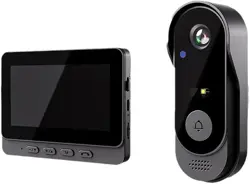
Intelligent visual doorbell
Any changes or modifications not expressly approved by the party responsible for
compliance could
void the user’s authority to operate the equipment.
This device complies with Part 15 of the FCC Rules. Operation is subject to the following
two
conditions:
(1) this device may not cause harmful interference, and
(2) this device must accept any interference received, including interference that may
cause undesired operation.
Note: This equipment has been tested and found to comply with the limits for a Class B
digital device, pursuant to Part 15 of the FCC Rules. These limits are designed to provide
reasonable protection against harmful interference in a residential installation. This
equipment generates, uses, and can radiate radio frequency energy, and if not installed
and used in accordance with the instructions, may cause harmful interference to radio
communications. However, there is no guarantee that interference will not occur in a
particular installation. If this equipment does cause harmful interference to radio or
television reception, which can be determined by turning the equipment off
and on, the user is encouraged to try to correct the interference by one or more of the
following
measures:
– Reorient or relocate the receiving antenna.
– Increase the separation between the equipment and receiver.
– Connect the equipment into an outlet on a circuit different from that to which the
receiver is
connected.
– Consult the dealer or an experienced radio/TV technician for help.
This equipment complies with FCC radiation exposure limits set forth for an uncontrolled
environment. This equipment should be installed and operated with minimum distance
20cm between the radiator and your body.