PLUG-ZW
Z-Wave Indoor On/O Plug
Z-Wave 800 LR · 908.42 MHz
I N S T A L L A T I O N M A N U A L
V0000786 · © 2026 Versa Wireless Inc.
S P E C I F I C A T I O N S
Power 125 VAC, 60 Hz
Max load 15 A general purpose or resis(ve
Load types 10 A / 1250 W tungsten · 1/2 HP motor
Frequency 908.42 / 916 MHz mesh · 912 / 920 MHz LR
Range
Up to 1300 3 direct-to-controller (LR) · 330
3 (100 m) per hop (mesh)
Outlet 1 switched, grounded 3-wire
Use Indoor, dry loca(on
Dimensions
2.63" x 1.54" x 1.14" (66.8 x 39.0 x 29.0
mm)
Opera(ng temp. 32–104 °F (0–40 °C)
Warranty 2 years
Features
• Grounded switched outlet, controlled locally or from your Z-
Wave hub
• Z-Wave 800 Series · Long Range (LR hub required)
• S2 security and SmartStart QR setup
• Auto on/o (mers and power-failure memory
• Adjustable LED indicator brightness
• Acts as a Z-Wave repeater to extend your network
LED indicator
LED Meaning
Blue, steady Outlet on
Blue, Iashing Add (inclusion) in progress
Purple, Iashing Remove (exclusion) in progress
Green, 2 s Add / remove successful
Red Network failure
Brightness is adjustable — see parameter 7.
B E F O R E Y O U I N S T A L L
⚠ Do not exceed 15 A. Do not plug in washers, dryers, refrigerators,
or motors over 1/2 HP. Do not use to control electric heaters or any
appliance that could become hazardous if switched unaLended.
Where to use it
• Plug directly into a grounded 3-wire receptacle. Do not use an
extension cord or power strip.
• Indoor, dry loca(ons only.
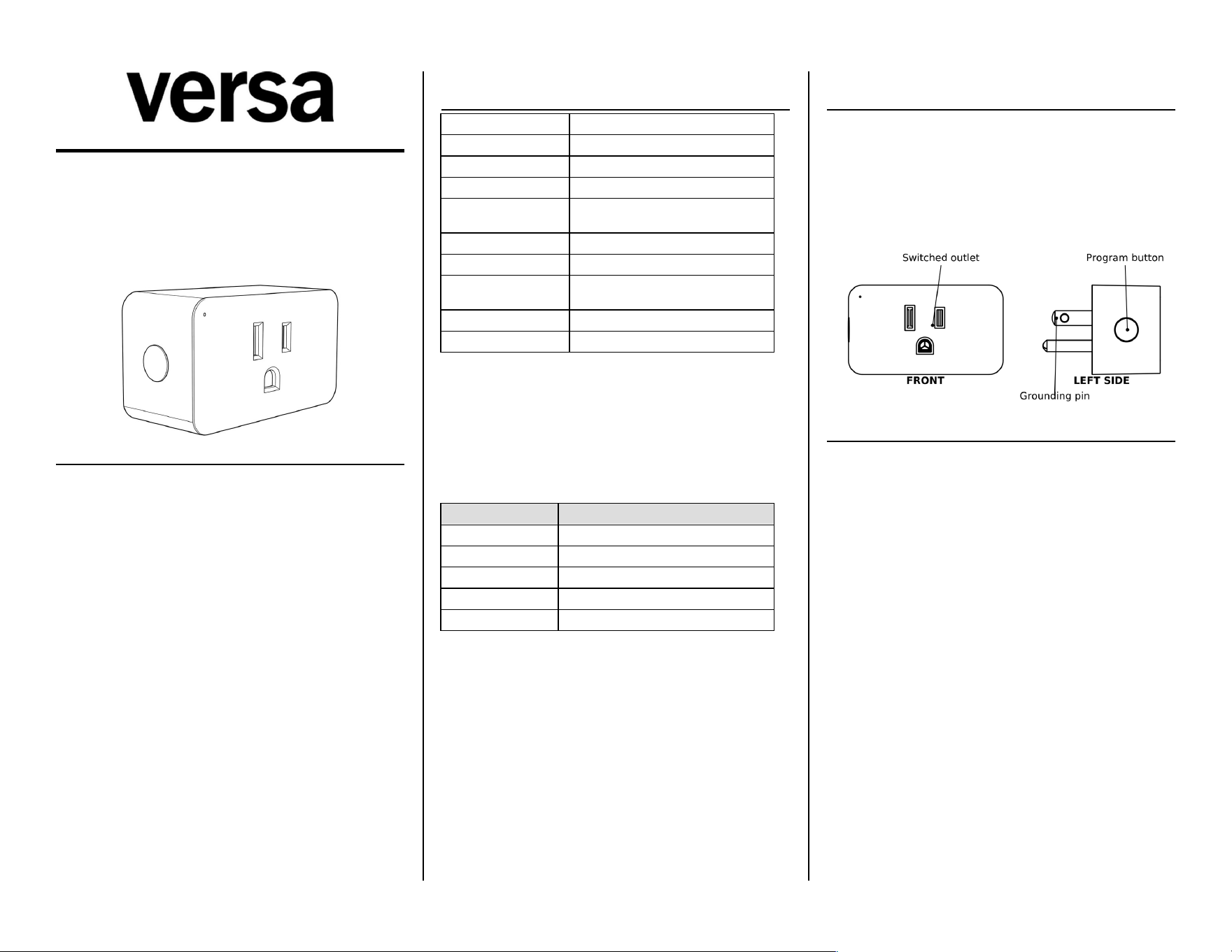
• Leave the buLon on the side of the unit reachable.
I N S T A L L A T I O N
1. Plug the unit in. Press the buLon once — the outlet should
switch and the LED should respond. If nothing happens, try
another receptacle.
2. Add it to your network. Complete Z-Wave Network Setup
before you connect a load.
3. Plug in the load. Connect the lamp or appliance you want to
control to the switched outlet.
⚠ Install per the Na(onal Electrical Code (NFPA 70) and local
regula(ons in the US, or the Canadian Electrical Code in Canada. If
unsure, consult a qualiMed, licensed electrician.
Doc: V0000786
Z - W A V E N E T W O R K S E T U P
Add to network (inclusion)
Start inclusion on your Z-Wave hub, then press the buLon 3 (mes
quickly. The LED Iashes blue, then lights green for 2 seconds when
the device is added.
SmartStart / Long Range
Scan the Z-Wave QR code on the device with a SmartStart hub. The
QR code contains the device's DSK — do not remove or damage it. Z-
Wave Long Range requires SmartStart inclusion and an LR-enabled
hub.
Remove from network (exclusion)
Start exclusion on your hub, then press the buLon 3 (mes quickly.
The LED Iashes purple, then lights green for 2 seconds when the
device is removed.
Factory reset
Click the buLon twice quickly, then hold it for at least 10 seconds.
Removing the device from your hub also restores factory defaults.
Use a reset only if your primary controller is missing or inoperable —
all custom seRngs are erased.
First power-up
If the plug has never been on a Z-Wave network, the outlet powers
up o and the blue LED lights. If it was on a network before, it
returns to its last state and seRngs.
Bu5on func(ons
Press 1× Outlet on / o
Press 3× Z-Wave network conMgura(on
Press 2×, then hold 10 s Factory reset
Associa(on groups
Group 1: Lifeline (Z-Wave Plus Lifeline, Binary Switch Report). Group
2: Basic Set, follows the switched outlet. Up to 5 nodes per group.
Z - W A V E I N T E R O P E R A B I L I T Y
This product can be included and operated in any Z-Wave network
with Z-Wave cer(Med devices from other manufacturers. All non-
baLery nodes in the network act as repeaters, regardless of vendor,
to increase network reliability.
Z - W A V E D E V I C E C L A S S
Generic: SWITCH BINARY · SpeciMc: NOT USED · Role: Always On
Slave
Command classes: ZWAVEPLUS_INFO_V2 · SECURITY_2 · SUPERVISION ·
TRANSPORT_SERVICE_V2 · ASSOCIATION_V2 · ASSOCIATION_GRP_INFO_V3 ·
MULTI_CHANNEL_ASSOCIATION_V3 · VERSION_V3 ·
MANUFACTURER_SPECIFIC_V2 · DEVICE_RESET_LOCALLY · POWERLEVEL ·
INDICATOR_V3 · FIRMWARE_UPDATE_MD_V5 · CONFIGURATION_V4 ·
SWITCH_BINARY_V2 · BASIC_V2
P A R A M E T E R S E T T I N G S
# Parameter Def. Values
1 LED indicator (6×) 0
0=on with outlet, 1=inverted,
2=disabled
2 Auto turn-o (mer 0 0=disabled, 1–65535 min
4 Auto turn-on (mer 0 0=disabled, 1–65535 min
6
Power-failure state
(10×)
2 0=o, 1=on, 2=last state
7 LED brightness (8×) 2 0=bright, 1=medium, 2=low
Sizes: 1, 4, 4, 1, 1 bytes. Set the (mers from your hub. Where a press
count is shown, each press sequence advances the value one step in
order, so 0 to 2 takes two sequences. The green LED Iashes twice to
conMrm a change (three (mes for the (mers).
C E R T I F I C A T I O N S & C O M P L I A N C E
• Conforms to UL Std. 60730-1:2016 · Cer(Med to CSA Std.
E60730-1:2015 · Intertek 5030071
• FCC Part 15 Class B · FCC ID: 2AD9XPLUG-ZW
• Z-Wave 800 Series · Z-Wave Long Range
FCC compliance
This device complies with Part 15 of the FCC Rules. Opera(on is
subject to: (1) this device may not cause harmful interference; (2)
this device must accept any interference received, including
interference that may cause undesired opera(on. Changes or
modiMca(ons not expressly approved by the party responsible for
compliance could void the user's authority to operate the
equipment.
FCC Class B
This equipment has been tested and complies with Part 15 Class B
limits, providing reasonable protec(on against interference in
residen(al installa(ons. If interference occurs (verify by powering o
and on), try:
• Reorient or relocate the receiving antenna.
• Increase separa(on between equipment and receiver.
• Connect to a circuit dierent from the receiver.
• Consult a qualiMed radio/TV technician.
RF exposure
This equipment complies with FCC radia(on exposure limits set forth
for an uncontrolled environment. Install and operate with a
minimum distance of 20 cm between the radiator and any person.
S A F E T Y & W A R N I N G S
⚠ RISK OF FIRE / SHOCK / BURNS
Do not exceed 15 A general purpose or resis(ve, 10 A / 1250 W
tungsten, or a 1/2 HP motor. Plug directly into a grounded 3-wire
receptacle — do not use an extension cord or power strip. Indoor,
dry loca(ons only.
Medical equipment
Do not use this plug to control medical or life-support equipment.
Controlling appliances
Use extreme cau(on with appliances. Schedules, automa(ons, or
network errors may cycle a device uninten(onally. Do not include
appliance-controlling devices in groups or scenes, and do not use Z-
Wave to control electric heaters or any device that could become
hazardous if unaLended.
W A R R A N T Y
Versa Wireless products are warranted free from manufacturing
defects for two years from the original date of consumer purchase.
Limited to repair or replacement; does not cover consequen(al or
incidental damage. This warranty is in lieu of all other warran(es
expressed or implied. Some states do not allow such limita(ons, so
they may not apply to you. You may have other rights that vary by
state.
versawireless.com
Doc: V0000786