Use the USB-C data port – up to 5Gbps.
Does not support charging or CD readers, including
Apple SuperDrive.
5
USB 3.1
USB 3.1 USB 3.0
UP TO
5Gbps
USB 3.1
USB 3.1 USB 3.0
UP TO
10Gbps
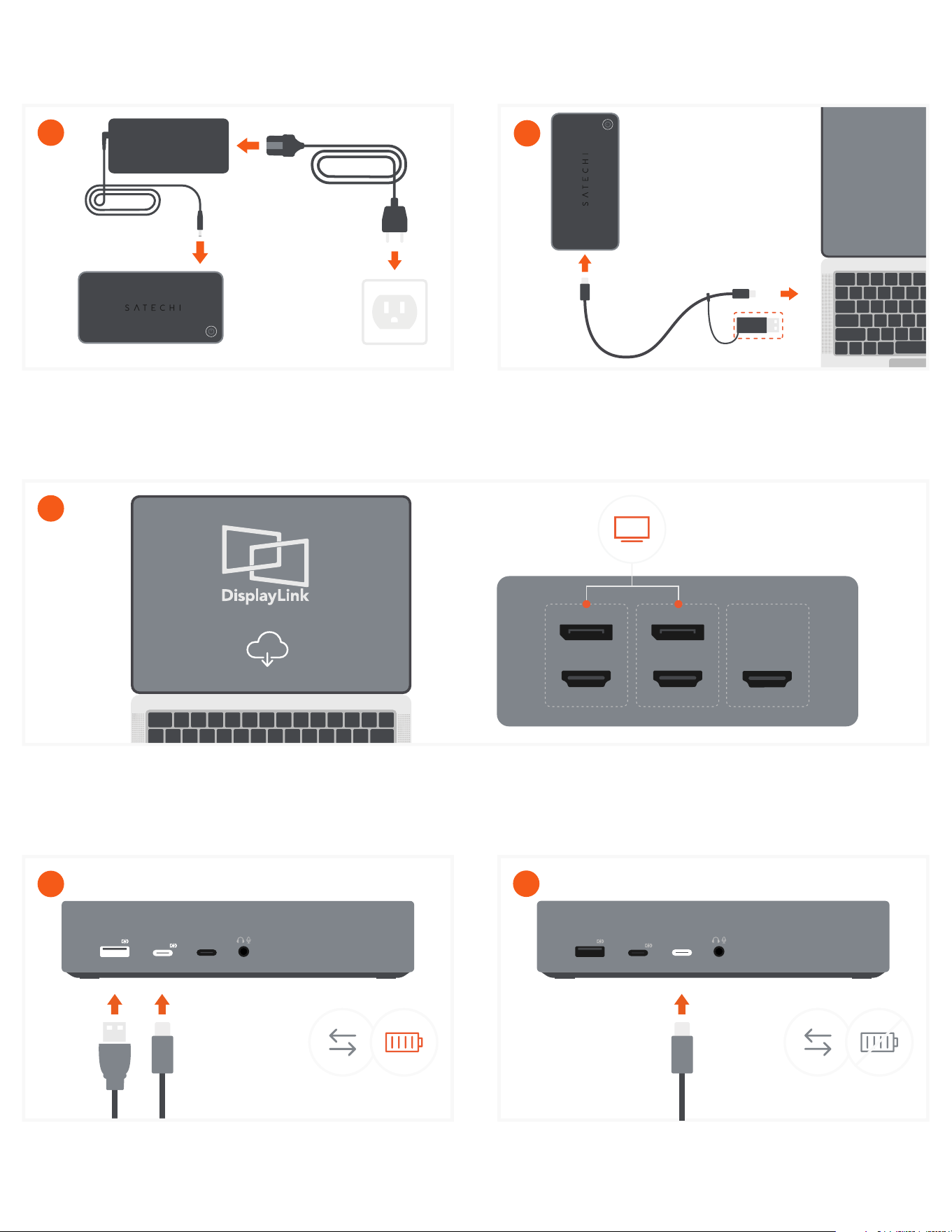
Use the USB-A and USB-C 3.1 ports for fast charging
and transfers – up to 10Gbps.
Does not support CD readers, including Apple
SuperDrive.
4
DISPLAY 3 DISPLAY 2
DISPLAY 1
Download and Install DisplayLink Software on your host device:
https://satechi.net/pages/displaylink-instructions
DisplayLink software must be installed in order for HDMI and DisplayPorts in Display 2 & 3 groups to output video.
3
2
Connect the included USB-C cable to your host device.
Cable can be connected to host device with USB-A port
by using USB-C to USB-A adapter attached.
Connect the included power adapter to the Dock.
Once connected, the dock will automatically turn on. To
turn the dock off you must press the power button
located on top of the dock.
1
QUICK GUIDE
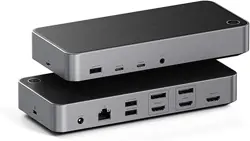
TRIPLE 4K DISPLAY DOCKING STATION
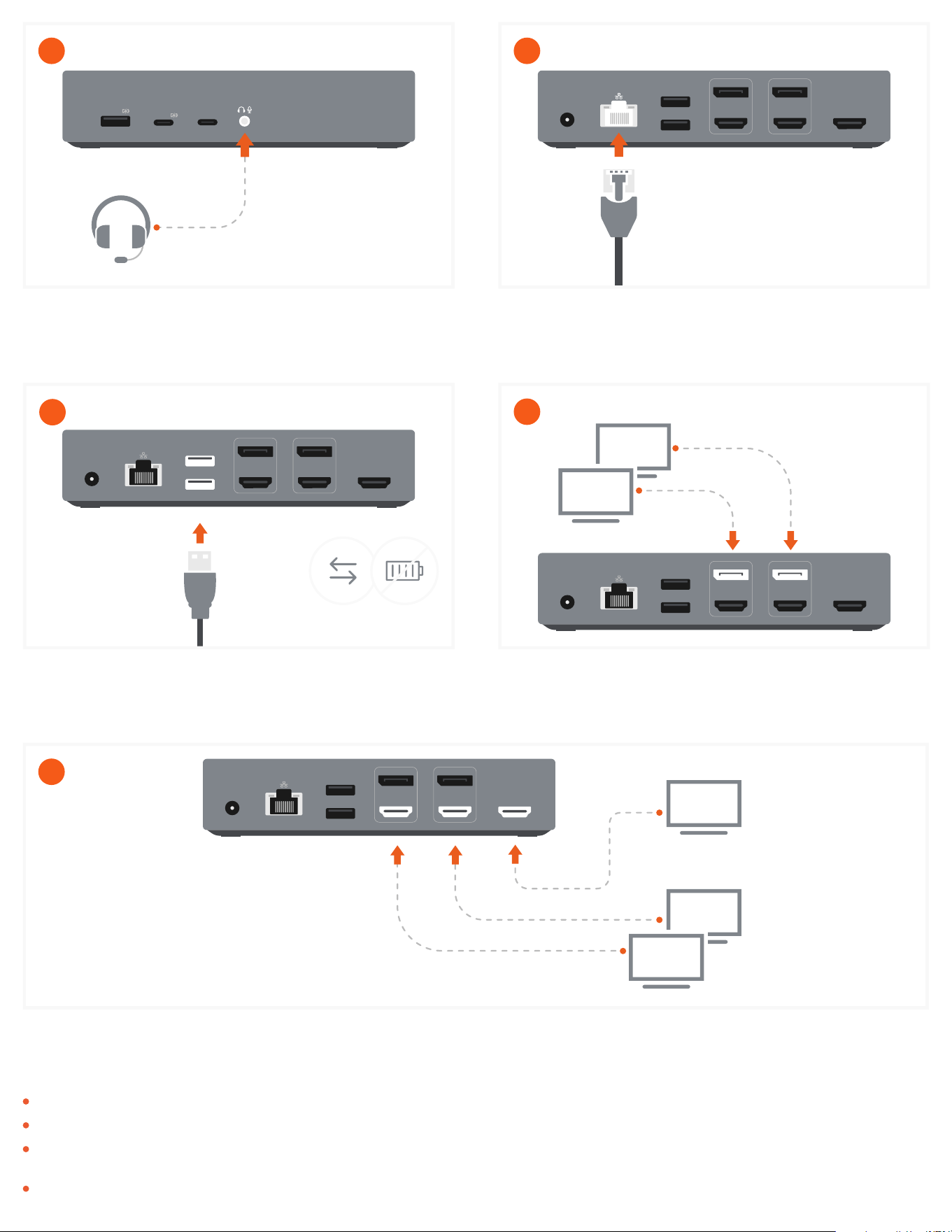
Use DisplayPort cables to connect up to two
DisplayPort-enabled monitors using DisplayLink.
9
DISPLAY 3 DISPLAY 2
USB 3.0 5GBPs
DC 24V
USB 3.0 5GBPs
DISPLAY 1
Use HDMI cables to connect up to three HDMI-enabled monitors.
You must connect one HDMI via Display 1 (DP Alt mode) and the others using HDMI in Display 2 & 3 via DisplayLink.
10
DISPLAY 3 DISPLAY 2
USB 3.0 5GBPs
DC 24V
USB 3.0 5GBPs
DISPLAY 1
DP Alt mode
DisplayLink
DisplayLink
DISPLAY 3 DISPLAY 2
USB 3.0 5GBPs
DC 24V
USB 3.0 5GBPs
DISPLAY 1
UP TO
5Gbps
Use the two USB-A 3.0 ports for file transfers – up to
5Gbps.
Does not support charging or CD readers, including
Apple SuperDrive.
8
DISPLAY 3 DISPLAY 2
USB 3.0 5GBPs
DC 24V
USB 3.0 5GBPs
DISPLAY 1
Connect an RJ45 Ethernet cable to the dock’s Gigabit
Ethernet port.
Up to 1Gbps.
7
When using the USB-A connection the host device will not receive power.
DisplayLink software must be installed to achieve up to three external displays.
When connecting to USB-A host device using included adapter, only video groups 2 and 3 will function via DisplayLink software. Video group 1 will
not function when using USB-A host device.
Prior to powering o Docking Station, ensure all external storage devices are properly ejected. If you don't eject external storage devices properly,
data on them may be damaged or corrupted.
Attention:
USB 3.1
USB 3.1 USB 3.0
Attach audio device to 3.5mm Audio I/O jack.
You will need to change sound output/input settings
when connecting headphones/mic. (System
Preferences > Sound > Output/Input > USB Audio).
6