PLUG-OD-ZW
Z-Wave Outdoor Dual-Outlet Plug
Z-Wave 800 LR
I N S T A L L A T I O N M A N U A L
V0000783 · © 2026 Versa Wireless Inc.
S P E C I F I C A T I O N S
Part number PLUG-OD-ZW
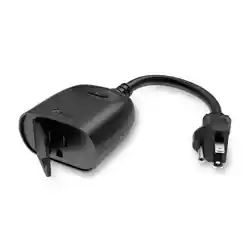
Type Outdoor plug-in module, 2 outlets
Power 125 VAC, 60 Hz
Maximum load 15 A total between the 2 outlets
Load types
15 A general purpose · 15 A resis0ve · 1250
W incandescent · 1250 W tungsten · 1/2 HP
motor
Frequency 908.42 / 916 MHz mesh · 912 / 920 MHz LR
Range
Up to 1300 6 direct-to-controller (LR) ·
33096 (1009m) per hop (mesh)
Security S2 · SmartStart
Use Indoor / outdoor · IP65
Opera)ng temp. -4 to 122 °F (-20 to 50 °C)
Material Polycarbonate
Dimensions 5.5 × 2.2 × 4.5 in (140 × 56 × 115 mm)
Cord length 6.1 in (155 mm)
Version V1.0 (SDK 7.24.1 · Z-Wave 8.2)
Warranty 2 years
Features
• Two grounded outlets, each controlled independently
• Z-Wave 800 Series with Long Range — up to 1,300 6
• S2 security with SmartStart QR enrollment
• IP65 enclosure rated for outdoor use
• Auto on/oE 0mers per outlet; state memory a6er a power
failure
• Always powered — acts as a Z-Wave repeater
LED indicator
LED Meaning
Blue, steady
An outlet is on (parameter 1); also lit on Hrst
power-up, before inclusion
Blue, oE Both outlets oE
Blue, Iashing Adding to network (inclusion)
Purple, Iashing Removing from network (exclusion)
Green, 2 s Add or remove successful
B E F O R E Y O U I N S T A L L
⚠ Read all instruc0ons before use. Do not exceed 15 A total
between the two outlets. Do not use this plug to control medical or
life-support equipment, electric heaters, or any device that could
become hazardous if switched unaMended.
• Plug only into a covered Class A GFCI-protected weatherproof
receptacle. The cover must close completely over the plug and
cord. If one is not provided, contact a qualiHed electrician for
proper installa0on.
• The receptacle must be on a circuit with 20 A branch-circuit
overcurrent protec0on.
• Do not use an extension cord.
• Mount the unit more than 1 6 above the ground surface.
• Do not install or use within 10 6 of a pool. Do not use in a
bathroom.
I N S T A L L T H E P L U G
1. Check the receptacle. ConHrm it is weatherproof, GFCI
protected, and on a 20 A protected branch circuit.
2. Plug in the unit. Hang it ver0cally with the outlets facing
downward to preserve the waterproof func0on of the
enclosure.
3. Add it to your network. Follow Z-Wave network setup before
connec0ng a load.
4. Connect your load. Plug in the devices you want to control.
⚠ Install per the Na0onal Electrical Code (NFPA 70) and local
regula0ons in the United States, or the Canadian Electrical Code and
local regula0ons in Canada. Where required by code, installa0on
must be performed by a qualiHed, licensed electrician. If unsure,
consult an electrician.
T R O U B L E S H O O T I N G
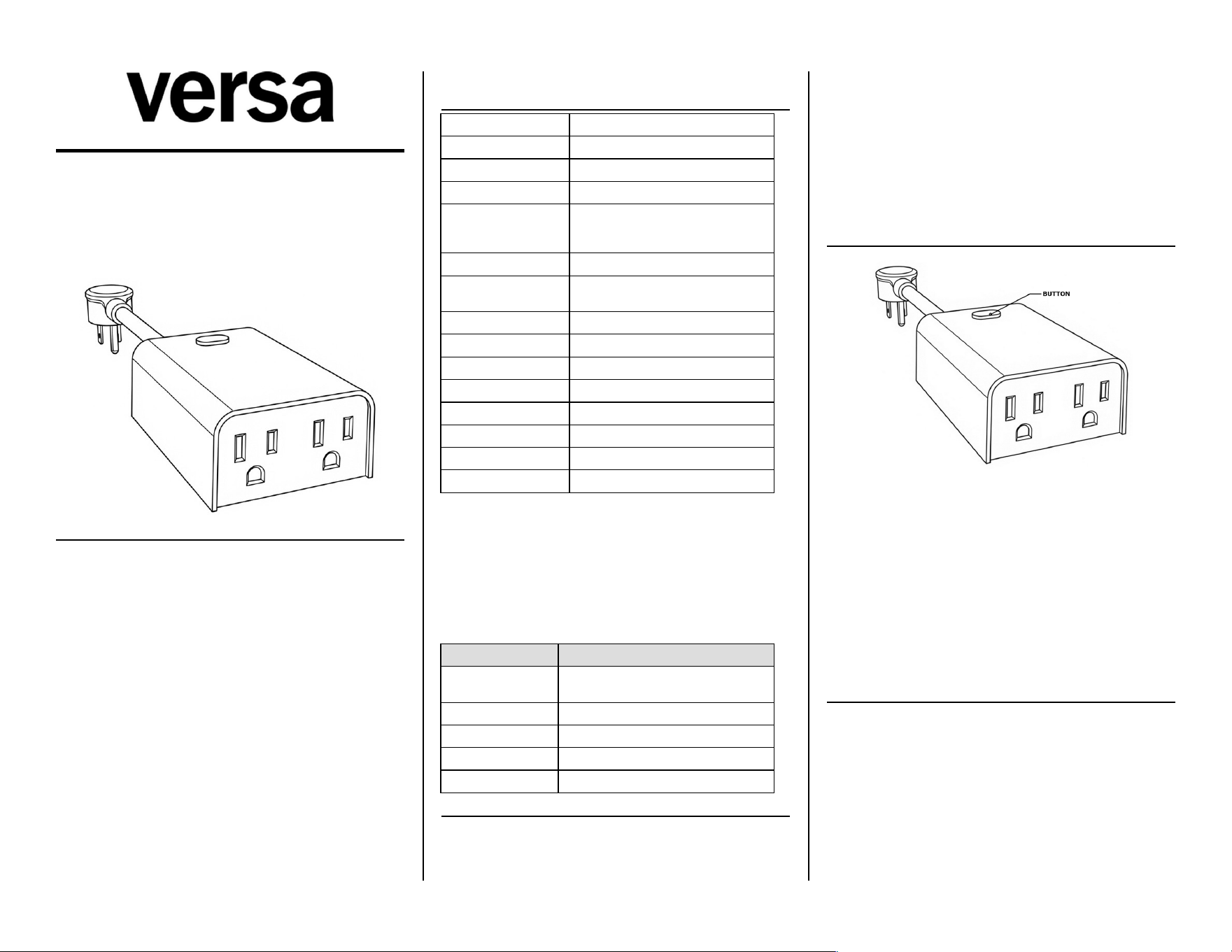
• Will not add: conHrm the controller is in Add mode, then press
the buMon 3 0mes quickly. Move the plug closer to the
controller and retry.
• S0ll will not add: the plug may already be paired. Run an
exclusion Hrst, then add it again.
• Outlets did not come back a6er an outage: parameter 6 sets
what happens when power returns. The default restores the
state from before the outage.
Doc: V0000783
Z - W A V E N E T W O R K S E T U P
Add to network (inclusion)
Put your Z-Wave controller into Add (inclusion) mode, then press
the buMon 3 0mes quickly. The blue LED Iashes; the green LED lights
for 2 seconds when the device is added. Auto-add: the LED begins
blinking within 30 seconds of Hrst plug-in.
SmartStart and Long Range
Scan the Z-Wave QR code on the unit with a SmartStart-capable
controller. The DSK code is printed on the packaging box — do not
remove or damage it. Z-Wave Long Range requires SmartStart
inclusion and an LR-enabled controller.
Remove from network (exclusion)
Put your controller into Remove (exclusion) mode, then press the
buMon 3 0mes quickly. The purple LED Iashes; the green LED lights
for 2 seconds when the device is removed.
Factory reset
Click the buMon 2 0mes quickly, then hold for at least 10 seconds.
The light Iashes once when the reset succeeds. Use this only if your
primary controller is missing or inoperable. Removing the device
from the hub also restores factory defaults.
Bu6on func)ons
Control Func)on
Tap 1× Le6 outlet on / oE
Tap 2× Right outlet on / oE
Hold 3 s All outlets on / oE
Tap 6× Cycle parameter 1 (LED indicator)
Tap 8× Cycle parameter 7 (LED brightness)
Tap 10× Cycle parameter 6 (state a6er power failure)
First power-up
On Hrst power-up before the plug has ever joined a network, both
relays turn oE and the blue LED turns on. If it was previously
included, each outlet returns to its last state with a so6 start.
Associa)on groups
Group 1 — Lifeline (Binary Switch Report), up to 5 nodes. Group 2 —
le6 outlet, sends Basic Set, triggered by buMon control of the local
load; up to 5 nodes. Associa0on is available through the gateway
only. The group ID for the right outlet is [TBD] pending factory
conHrma0on.
P A R A M E T E R S E T T I N G S
# Parameter Def. Values
1 LED indicator (tap 6×) 0 0=Relay, 1=pos, 2=ON, 3=OFF
2 Auto 0mer OFF, le6 outlet 0 Minutes 1–65535. 0=disabled.
3 Auto 0mer OFF, right outlet 0 Minutes 1–65535. 0=disabled.
4 Auto 0mer ON, le6 outlet 0 Minutes 1–65535. 0=disabled.
5 Auto 0mer ON, right outlet 0 Minutes 1–65535. 0=disabled.
6
State a6er power failure
(tap 10×)
2 0=oE, 1=on, 2=memory
7
Indicator brightness (tap
8×)
2 0=Bright, 1=Medium, 2=Low
Parameter sizes: 1, 4, 4, 4, 4, 1, 1 bytes. Parameters 2–5 are set from
your controller.
Z - W A V E I N T E R O P E R A B I L I T Y
This product can be included and operated in any Z-Wave network
with Z-Wave cer0Hed devices from other manufacturers; all non-
baMery nodes act as repeaters, regardless of vendor.
C E R T I F I C A T I O N S & C O M P L I A N C E
• Conforms to UL Std. 60730-1:2016 · Cer0Hed to CSA Std.
E60730-1:2015 · Intertek 5030071
• FCC Part 15 Class B · FCC ID: 2AD9XPLUG-OD-ZW
• Z-Wave 800 Series · Long Range · S2 · SmartStart
FCC compliance
This device complies with Part 15 of the FCC Rules. Opera0on is
subject to: (1) this device may not cause harmful interference; (2)
this device must accept any interference received, including
interference that may cause undesired opera0on. Changes or
modiHca0ons not expressly approved by the party responsible for
compliance could void the user's authority to operate the
equipment.
FCC Class B
This equipment has been tested and complies with Part 15 Class B
limits, providing reasonable protec0on against interference in
residen0al installa0ons. If interference occurs (verify by powering oE
and on), try:
• Reorient or relocate the receiving antenna.
• Increase separa0on between equipment and receiver.
• Connect to a circuit diEerent from the receiver.
• Consult a qualiHed radio/TV technician.
RF exposure
This equipment complies with FCC radia0on exposure limits set forth
for an uncontrolled environment. Install and operate with a
minimum distance of 20 cm between the radiator and any person.
S A F E T Y & W A R N I N G S
⚠ RISK OF FIRE / SHOCK / BURNS. Do not exceed 15 A total
between the two outlets. Do not use an extension cord. Plug only
into a covered Class A GFCI weatherproof receptacle on a 20 A
protected branch circuit. Hang the unit ver0cally with the outlets
facing downward, more than 1 6 above the ground.
Medical equipment
Do not use this plug to control medical or life-support equipment.
Controlling appliances
Use extreme cau0on with appliances. Schedules, automa0ons, or
network errors may cycle a device uninten0onally. Do not include
appliance-controlling devices in groups or scenes, and do not use Z-
Wave to control electric heaters or any device that could become
hazardous if unaMended.
SAVE THESE INSTRUCTIONS — this manual contains important
safety and opera)ng instruc)ons.
Z - W A V E D E V I C E C L A S S
Generic: 0x10 GENERIC_TYPE_SWITCH_BINARY · SpeciHc: 0x00
SPECIFIC_TYPE_NOT_USED · Role: Always On Slave · 2 endpoints ·
Mfr ID: 0x0464 · Type: 0xAC01 · Product: 0x0097
Command classes: ZWAVEPLUS_INFO · SWITCH_BINARY_V2 · ASSOCIATION ·
MULTI_CHANNEL_ASSOCIATION_V2 · ASSOCIATION_GRP_INFO ·
TRANSPORT_SERVICE_V2 · VERSION · MANUFACTURER_SPECIFIC ·
DEVICE_RESET_LOCALLY · INDICATOR · POWERLEVEL · SECURITY_2 ·
MULTI_CHANNEL_V4 · SUPERVISION · FIRMWARE_UPDATE_MD_V5 ·
CONFIGURATION_V4
W A R R A N T Y
Versa Wireless products are warranted free from manufacturing
defects for two years from the original date of consumer purchase.
Limited to repair or replacement; does not cover consequen0al or
incidental damage. This warranty is in lieu of all other warran0es
expressed or implied. Some states do not allow such limita0ons, so
they may not apply to you. You may have other rights that vary by
state.
versawireless.com
Doc: V0000783