mTS1000 Series Tripod Turnstile User Manual
Page | 1 Copyright © 2024 ZKTECO CO., LTD. All Rights Reserved.
Thank you for choosing our product. Please read the instructions carefully
before operation. Follow these instructions to ensure that the product is
functioning properly. The images shown in this manual are for illustrative
purposes only.
For further details, please visit our Company’s website
www.zkteco.com.
User Manual
Comet Series Speed Gate
Applicable Model(s): Comet-S1000, Comet-S1200
Date: February 2024
Doc Version: 1.1
English

Comet Series Speed Gate User Manual
Page | 2 Copyright © 2024 ZKTECO CO., LTD. All Rights Reserved.
Copyright © 2024 ZKTECO CO., LTD. All rights reserved.
Without the prior written consent of ZKTeco, no portion of this manual can be copied or forwarded in any
way or form. All parts of this manual belong to ZKTeco and its subsidiaries (hereinafter the "Company" or
"ZKTeco").
Trademark
is a registered trademark of ZKTeco. Other trademarks involved in this manual are owned by
their respective owners.
Disclaimer
This manual contains information on the operation and maintenance of the ZKTeco equipment. The
copyright in all the documents, drawings, etc. in relation to the ZKTeco supplied equipment vests in and is
the property of ZKTeco. The contents hereof should not be used or shared by the receiver with any third
party without express written permission of ZKTeco.
The contents of this manual must be read as a whole before starting the operation and maintenance of the
supplied equipment. If any of the content(s) of the manual seems unclear or incomplete, please contact
ZKTeco before starting the operation and maintenance of the said equipment.
It is an essential pre-requisite for the satisfactory operation and maintenance that the operating and
maintenance personnel are fully familiar with the design and that the said personnel have received
thorough training in operating and maintaining the machine/unit/equipment. It is further essential for the
safe operation of the machine/unit/equipment that personnel has read, understood and followed the
safety instructions contained in the manual.
In case of any conflict between terms and conditions of this manual and the contract specifications,
drawings, instruction sheets or any other contract-related documents, the contract conditions/documents
shall prevail. The contract specific conditions/documents shall apply in priority.
ZKTeco offers no warranty, guarantee or representation regarding the completeness of any information
contained in this manual or any of the amendments made thereto. ZKTeco does not extend the warranty
of any kind, including, without limitation, any warranty of design, merchantability or fitness for a particular
purpose.
ZKTeco does not assume responsibility for any errors or omissions in the information or documents which
are referenced by or linked to this manual. The entire risk as to the results and performance obtained from
using the information is assumed by the user.
ZKTeco in no event shall be liable to the user or any third party for any incidental, consequential, indirect,
special, or exemplary damages, including, without limitation, loss of business, loss of profits, business
interruption, loss of business information or any pecuniary loss, arising out of, in connection with, or

Comet Series Speed Gate User Manual
Page | 3 Copyright © 2024 ZKTECO CO., LTD. All Rights Reserved.
relating to the use of the information contained in or referenced by this manual, even if ZKTeco has been
advised of the possibility of such damages.
This manual and the information contained therein may include technical, other inaccuracies or
typographical errors. ZKTeco periodically changes the information herein which will be incorporated into
new additions/amendments to the manual. ZKTeco reserves the right to add, delete, amend or modify the
information contained in the manual from time to time in the form of circulars, letters, notes, etc. for better
operation and safety of the machine/unit/equipment. The said additions or amendments are meant for
improvement /better operations of the machine/unit/equipment and such amendments shall not give any
right to claim any compensation or damages under any circumstances.
ZKTeco shall in no way be responsible (I) in case the machine/unit/equipment malfunctions due to any
non-compliance of the instructions contained in this manual (ii) in case of operation of the
machine/unit/equipment beyond the rate limits (iii) in case of operation of the machine and equipment in
conditions different from the prescribed conditions of the manual.
The product will be updated from time to time without prior notice. The latest operation procedures and
relevant documents are available on http://www.zkteco.com
If there is any issue related to the product, please contact us.
ZKTeco Headquarters
Address ZKTeco Industrial Park, No. 32, Industrial Road,
Tangxia Town, Dongguan, China.
Phone +86 769 - 82109991
Fax +86 755 - 89602394
For business-related queries, please write to us at: sales@zkteco.com.
To know more about our global branches, visit www.zkteco.com.

Comet Series Speed Gate User Manual
Page | 4 Copyright © 2024 ZKTECO CO., LTD. All Rights Reserved.
About the Company
ZKTeco is one of the world’s largest manufacturer of RFID and Biometric (Fingerprint, Facial, Finger-vein)
readers. Product offerings include Access Control readers and panels, Near & Far-range Facial Recognition
Cameras, Elevator/floor access controllers, Turnstiles, License Plate Recognition (LPR) gate controllers and
Consumer products including battery-operated fingerprint and face-reader Door Locks. Our security
solutions are multi-lingual and localized in over 18 different languages. At the ZKTeco state-of-the-art
700,000 square foot ISO9001-certified manufacturing facility, we control manufacturing, product design,
component assembly, and logistics/shipping, all under one roof.
The founders of ZKTeco have been determined for independent research and development of biometric
verification procedures and the productization of biometric verification SDK, which was initially widely
applied in PC security and identity authentication fields. With the continuous enhancement of the
development and plenty of market applications, the team has gradually constructed an identity
authentication ecosystem and smart security ecosystem, which are based on biometric verification
techniques. With years of experience in the industrialization of biometric verifications, ZKTeco was
officially established in 2007 and now has been one of the globally leading enterprises in the biometric
verification industry owning various patents and being selected as the National High-tech Enterprise for 6
consecutive years. Its products are protected by intellectual property rights.
About the Manual
This manual introduces the operations of Comet Series Speed Gate.
All figures displayed are for illustration purposes only. Figures in this manual may not be exactly consistent
with the actual products.
Features and parameters with ★ are not available in all devices.
Comet Series Speed Gate User Manual
Page | 5 Copyright © 2024 ZKTECO CO., LTD. All Rights Reserved.
Document Conventions
Conventions used in this manual are listed below:
GUI Conventions
For Software
Convention Description
Bold font Used to identify software interface names e.g. OK, Confirm, Cancel.
>
Multi-level menus are separated by these brackets. For example, File > Create >
Folder.
For Device
Convention Description
< >
Button or key names for devices. For example, press <OK>.
[ ]
Window names, menu items, data table, and field names are inside square
brackets. For example, pop up the [New User] window.
/
Multi-
level menus are separated by forwarding slashes. For example,
[File/Create/Folder].
Symbols
Convention Description
This represents a note that needs to pay more attention to.
The general information which helps in performing the operations faster.
The information which is significant.
Care taken to avoid danger or mistakes.
The statement or event that warns of something or that serves as a cautionary
example.

Comet Series Speed Gate User Manual
Page | 6 Copyright © 2024 ZKTECO CO., LTD. All Rights Reserved.
Table of Contents
1 OVERVIEW ............................................................................................................................................ 8
FEATURES ........................................................................................................................................................ 8 1.1
APPEARANCE AND SYSTEM COMPONENTS ........................................................................................................ 9 1.2
1.2.1
APPEARANCE ........................................................................................................................................ 9
1.2.2 SYSTEM COMPONENTS ..................................................................................................................... 10
MECHANICAL SYSTEM .................................................................................................................................... 11 1.3
ELECTRONIC CONTROL SYSTEM ...................................................................................................................... 11 1.4
WORKING PRINCIPLE ...................................................................................................................................... 12 1.5
SYSTEM COMPOSITION ................................................................................................................................... 13 1.6
TECHNICAL SPECIFICATIONS ........................................................................................................................... 14 1.7
2
FUNCTION INTRODUCTION .............................................................................................................. 16
FINGERPRINT VERIFICATION★ ....................................................................................................................... 16 2.1
CARD VERIFICATION ....................................................................................................................................... 17 2.2
QR CODE VERIFICATION ................................................................................................................................. 18 2.3
PALM VERIFICATION★ .................................................................................................................................. 18 2.4
FACIAL VERIFICATION★ ................................................................................................................................ 19 2.5
3
CONTROL SYSTEM INTRODUCTION ................................................................................................. 22
ACCESS CONTROL BOARD★ .......................................................................................................................... 22 3.1
MASTER MOTOR DRIVING CONTROLLER BOARD ............................................................................................. 24 3.2
SLAVE MOTOR DRIVING CONTROLLER BOARD ................................................................................................ 26 3.3
LIGHT CURTAIN CONTROL BOARD .................................................................................................................. 28 3.4
LIGHT CONTROL BOARD ................................................................................................................................. 29 3.5
WIRING DIAGRAM .......................................................................................................................................... 30 3.6
MENU OF SPEED GATE ................................................................................................................................... 31 3.7
VOICE PLAYBACK CONTENT CORRESPONDENCE TABLE ................................................................................... 45 3.8
ERROR CODE FOR TURNSTILE .......................................................................................................................... 48 3.9
4
MAINTENANCE .................................................................................................................................. 49
CHASSIS MAINTENANCE ................................................................................................................................. 49 4.1
MOVEMENT MAINTENANCE ............................................................................................................................ 49 4.2
POWER SUPPLY MAINTENANCE ...................................................................................................................... 49 4.3
5
TROUBLESHOOTING.......................................................................................................................... 50
6 PACKING LIST .................................................................................................................................... 51

Comet Series Speed Gate User Manual
Page | 7 Copyright © 2024 ZKTECO CO., LTD. All Rights Reserved.
Revision History
Revision Date Author Reviewer Description
V1.0 08/09/2023 Yang Kaijin Original Document
V1.1 02/23/2024 Yang Kaijin
The appearance of the device, wiring
diagram and function menu have
been changed. Voice playback have
been added.
Comet Series Speed Gate User Manual
Page | 8 Copyright © 2024 ZKTECO CO., LTD. All Rights Reserved.
1 Overview
Speed gate Comet series is high-end pedestrian passage gate device developed, produced and sold
by ZKTeco, boasting a durable aluminum shell treated for anti-corrosion. Its motor, powered by a
precision-type planetary reducer BLDC (Brushless DC) motor. Equipped with high-quality infrared
sensors, it delivers accurate detection, and strong anti-interference, and adapts to various
environments with multiple logic judgments. Featuring the latest driver technology, it supports
multiple mode switching and includes protections against over-current, over-voltage, and over-
temperature, making it ideal for office buildings, commercial establishments, and other upscale
locations.
Features 1.1
Long service life, capable of opening and closing the gate more than 6 million times when
measured.
Multi alarm function, such as break-in, wrong direction entry and door open overtime alert.
Emergency mode automatically opens the gate in case of power failure or fire signal trigger.
Security function prevents unauthorized entry by engaging a pair of clutches if the barrier is
forced, automatically resetting after engagement.
Self-protection function to prevent strong intrusion, excessive current and other special
circumstances, such as damage to the product, death, etc.
Comet Series Speed Gate User Manual
Page | 9 Copyright © 2024 ZKTECO CO., LTD. All Rights Reserved.
Multiple anti-pinch functions ensure pedestrian safety, including infrared anti-pinch protection
and secondary infrared blocking.
Unload the force when encountering blocking to prevent bruising pedestrians.
Combined with peripheral verification devices, it supports face, human ID, RFID card, ESD
device, sweep code and other verification methods.
Memory function allows passage of multiple people after several consecutive swipes.
Development interfaces available for system integration.
Aluminum alloy case ensures long-lasting durability.
Operates smoothly, silently, and consumes low power.
An embedded LED strip is situated along the barrier's side, oering a spectrum of 7 RGB colours
and a range of visual eects. This feature is fully customizable to meet our customer's unique
preferences.
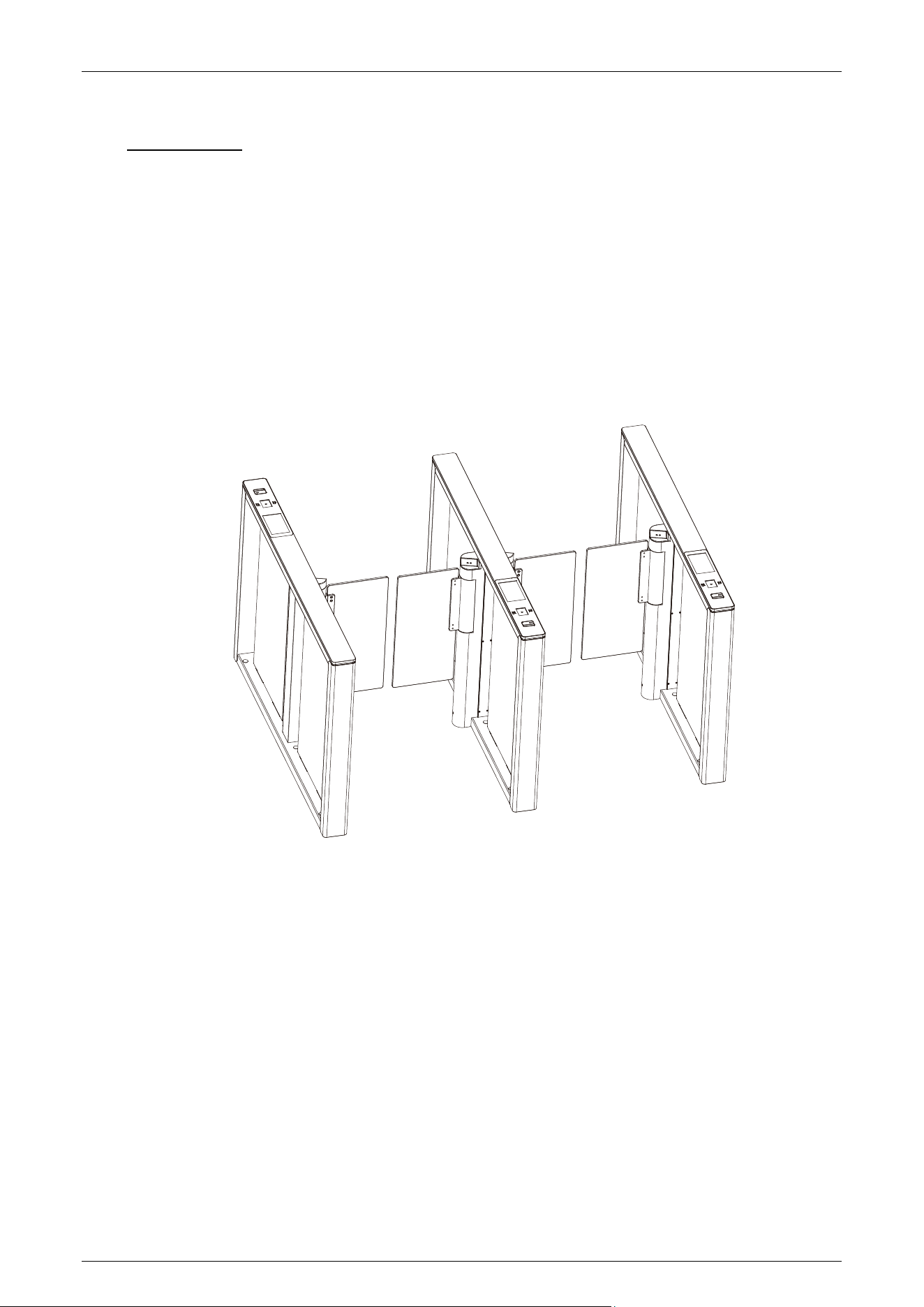
Appearance and System Components 1.2
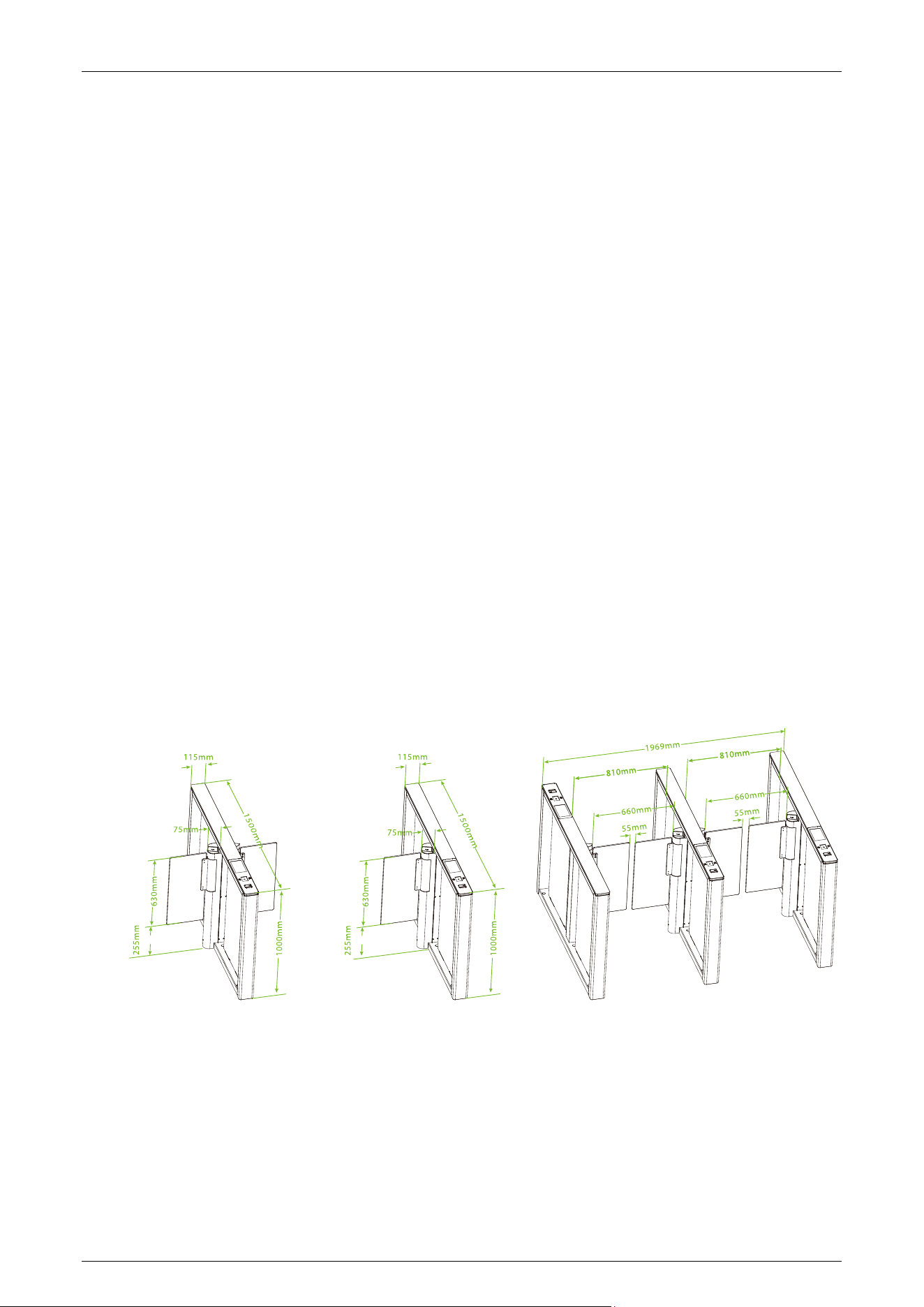
1.2.1 Appearance
The appearance and dimensions of the Comet series are shown in the figure below:
Comet Series Speed Gate User Manual
Page | 10 Copyright © 2024 ZKTECO CO., LTD. All Rights Reserved.
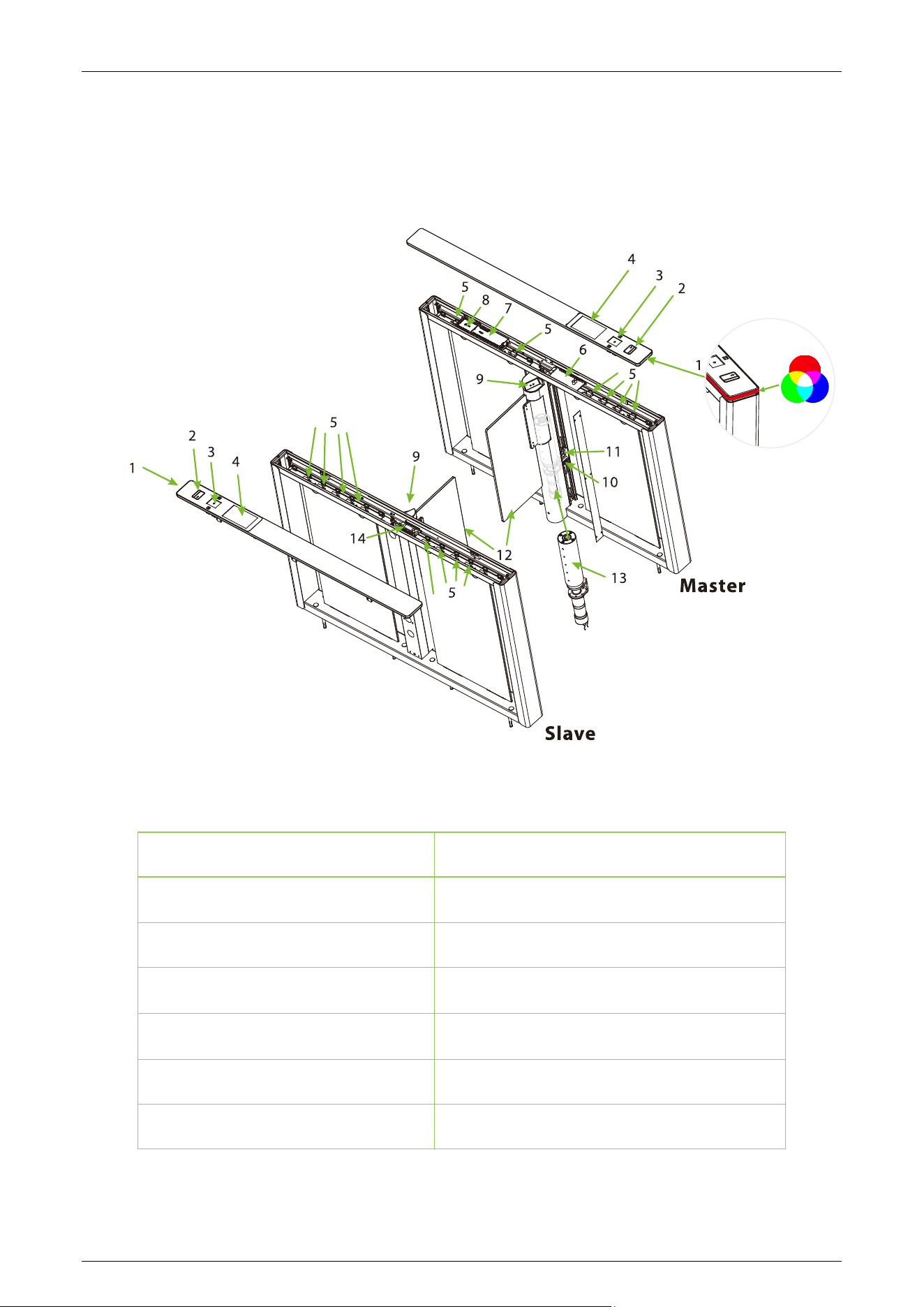
1.2.2 System Components
The system components of the Comet series are shown below:
1. Traffic Indicator
2. Card Reading
3. Verification Units★
4. 7-inch Touchscreens★
5. Infrared Sensor
6. Master Turnstile Controller Board
7. Access Controller Board ★
8. Infrared Expansion★
9. Facial Recognition Machine ★
10. Power Supply
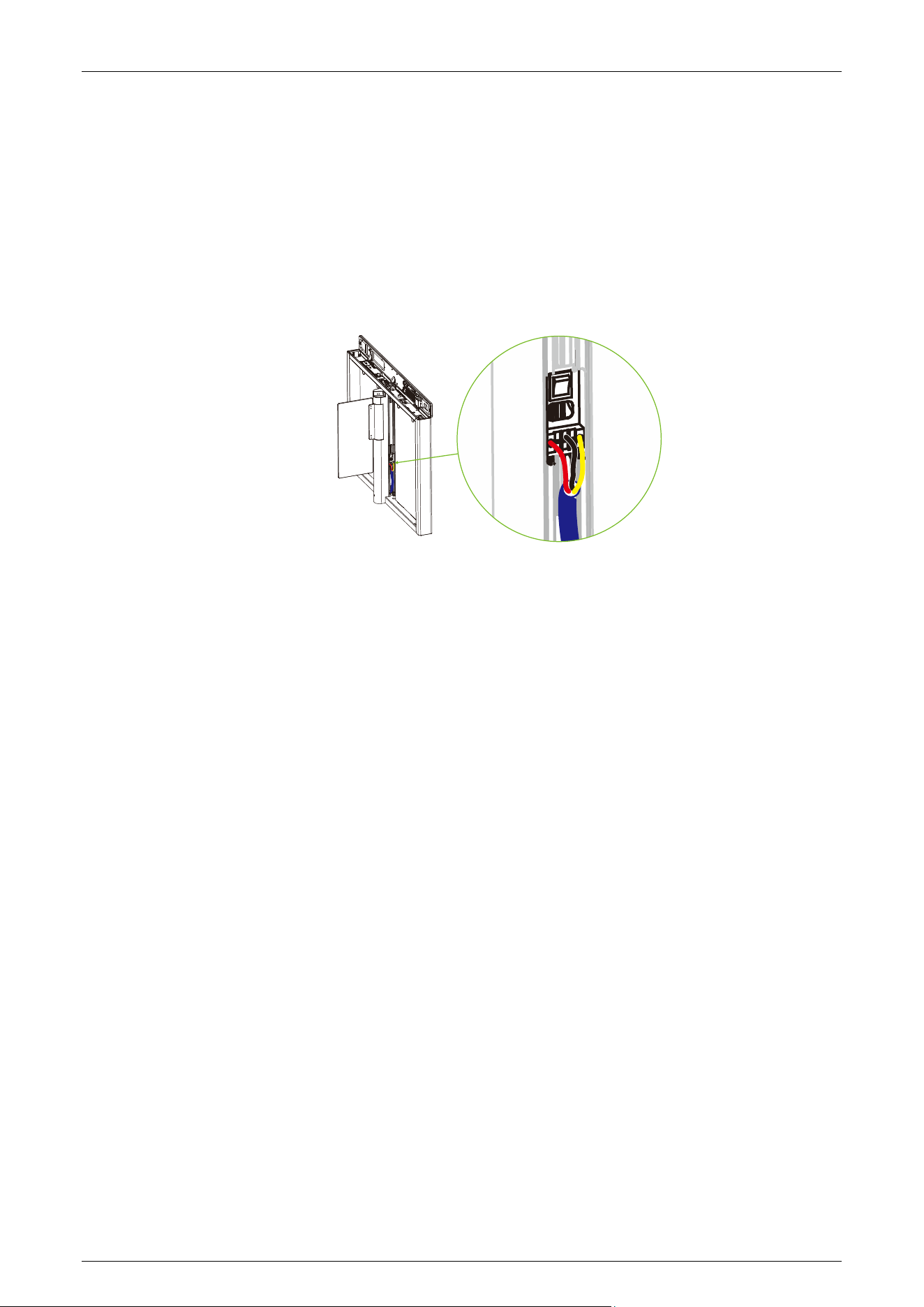
11. Motor Switch
12. Swing Arm
13. Motor
14. Slave Turnstile Controller Board

Comet Series Speed Gate User Manual
Page | 11 Copyright © 2024 ZKTECO CO., LTD. All Rights Reserved.
Mechanical System 1.3
The mechanical system of the turnstile consists of the chassis and the core component. The chassis
serves as a carrier where the Traffic Indicator, Reader, QR code scanner/Palm scanner★, Fingerprint
reader★, Camera★, Infrared Sensor and the Door lock are installed. The core component mainly
consists of the Motor, Frame, Bearing and Swing Arm.
Electronic Control System 1.4
The electronic control system of a turnstile mainly consists of the Reader/QR code scanner/ Palm
scanner★/Fingerprint reader★/Camera★, Infrared Sensor, Turnstile Control Board, Traffic Indicator
and Alarm.
Reader: The reader reads the data on the card and transmits it to the Access Controller.
Fingerprint Reader★: The device compares the fingerprint that is being pressed onto the
fingerprint reader with all the fingerprint data and sends it to the Access Controller.
Palm Scanner★: The device compares the palm image collected by the palm module with all the
palm data templates in the device and sends it to the Access Controller.
QR code Reader: The device compares the acquired QR code with all QR code data registered in the
device and sends it to the Access Controller.
Camera
★: The device compares the collected facial images with all of the face data registered in
the device and then sends it to the Access Controller.
Infrared Sensor: It detects the position of the pedestrian and plays a role in ensuring safety and
protection.
Turnstile Control Board: The Turnstile control board is the system’s control center that receives
signals from the Card reader/fingerprint reader★/QR code reader/ Palm scanner★/Camera★. The
IR performs logical calculation and processing of these signals and then sends executive commands
to the Traffic Indicator, Electric Motor, and alarm.
Traffic Indicator: When the gate is closed, the system will illuminate the red indicator. However,
when someone successfully passes the verification, the system will illuminate the green indicator.
Alarm: The alarm gives the voice and light alarm if the system detects any unauthorized entry to the
passage, false direction entry, anti-tailgate and other violations.
Comet Series Speed Gate User Manual
Page | 12 Copyright © 2024 ZKTECO CO., LTD. All Rights Reserved.
Working Principle 1.5
1. When the device is powered on, the device undergoes a Power-On Self-Test (POST). If no issues
are detected during the test, the device will operate normally. If a failure is detected, the system
will display relevant error messages on the digital tube, allowing the user to quickly identify and
resolve the problem.
2. When a valid card/fingerprint★/QR code/Palm★/Face★, the display will show whether it is
successful or not, and the buzzer will give a positive audible prompt to the pedestrian,
indicating that successfully verified. Then, the card reader/fingerprint reader★/QR code
reader/Palm scanner★/Camera★ sends signals to the Access Controller to request permission
to pass through the passage. The Access Controller will send the signal to the Turnstile Control
Board.
3. After receiving the signal from the card/fingerprint★/QR code/Palm★/Face★ and the Infrared
Sensor, the Turnstile Control Board will send valid control signals to the servo motor driver. At
this time, if the system is in forbidden passing mode, the mode indicator light will turn red, and
the Turnstile Control Board will not accept signals of card/fingerprint★/QR code/Palm★/Face
★.
4. After the passenger passes through the channel in accordance with the opening direction of
the swing arm, the Infrared Sensor will continuously monitor the pedestrian's movement
throughout the passage. It will continue to send signals to the Turnstile Control Board until the
pedestrian completes the passage.
5. If the pedestrian enters the passage without verifying their identification or presents an invalid
card/fingerprint★/QR code/Palm★/Face★ the system will sound an audible alarm to alert the
pedestrian to stop. The alarm signal will persist until the pedestrian retreats from the passage.
Only after a card/fingerprint★/QR code/Palm★/Face★ is successfully verified can the
pedestrian process through the passage.
Note: Make sure the ground wire of the system is reliably connected to avoid personal injuries or
other accidents.
Comet Series Speed Gate User Manual
Page | 13 Copyright © 2024 ZKTECO CO., LTD. All Rights Reserved.
System Composition 1.6
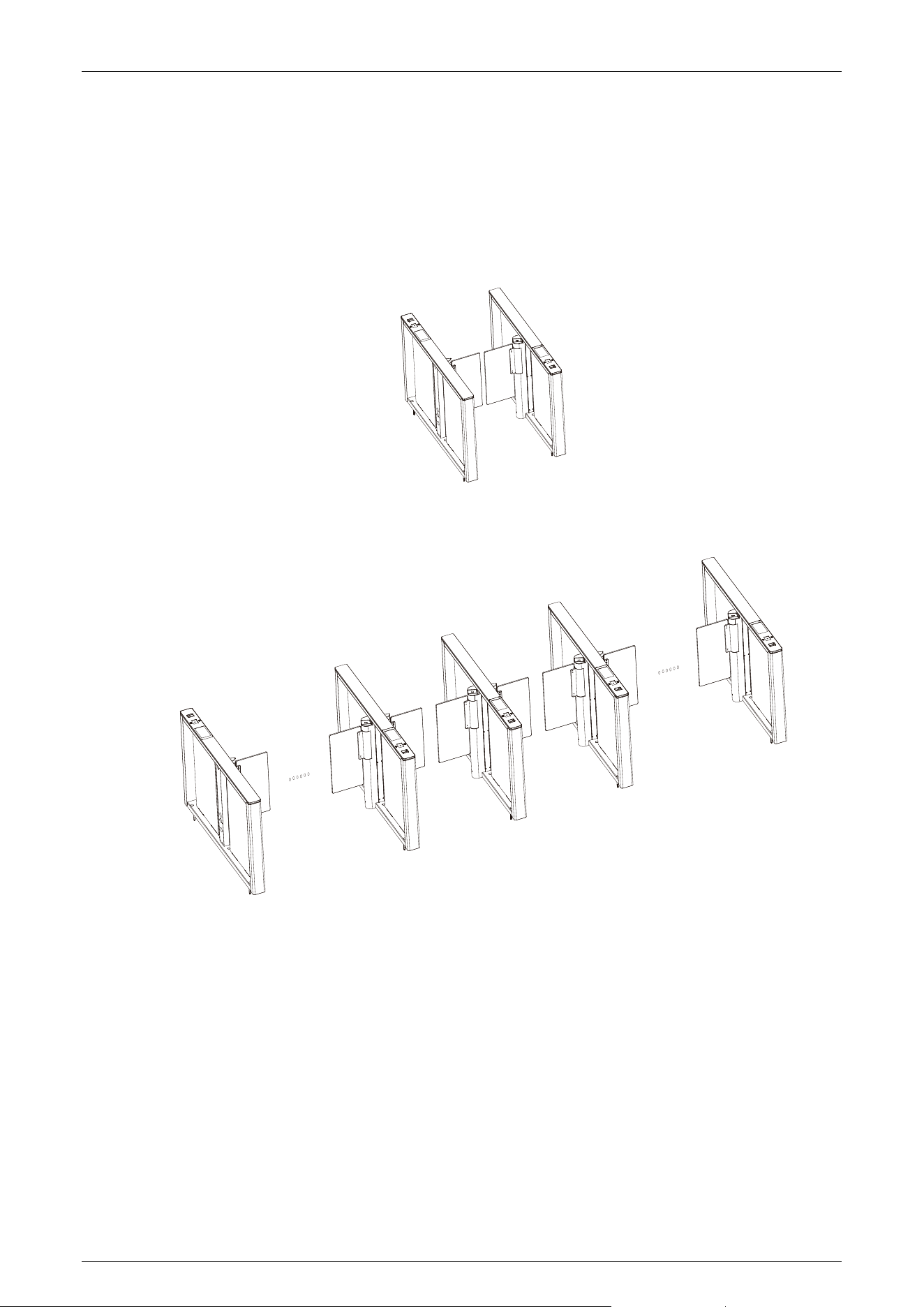
The single-passage management system consists of two single-core speed gates. The multi-passage
management system consists of two single-core speed gates and multiple dual-core speed gates.
The single-lane management system:
The multi-lane management system:

Comet Series Speed Gate User Manual
Page | 14 Copyright © 2024 ZKTECO CO., LTD. All Rights Reserved.
Technical Specifications 1.7
Feature Specification
Communication TCP/IP, RS485
Input Voltage AC110V/240V, 50/60Hz
Input Control Signal Dry contact
Output Voltage DC 24V
Protection Level N/A
Time of Gate Opening/Closing 0.8 to 3s
Operating Humidity 5% to 80% (Non-condensing)
Operating Temperature
-28°C to 60°C (Standard)
Throughput Rate Up to 25 people/min (Using credentials)
Infrared Sensor 8 pairs
LED Indicator Support (RGB color)
Working Environment Indoor
Drive Unit Brushless motor
Barrier Movement Swing
Lane Width 660mm (Option: 900mm)
MCBF 6 Millions
Dimension (mm) (L*W*H) 1500*115*998.4
Net Weight 50kg*2 (±5kg)

Comet Series Speed Gate User Manual
Page | 15 Copyright © 2024 ZKTECO CO., LTD. All Rights Reserved.
Gross Weight 64kg*2 (±5kg)
Noise
<60dB
Certifications CE and FCC
Traffic Indicator
Green: Lane available
Red: Lane unavailable
Comet Series Speed Gate User Manual
Page | 16 Copyright © 2024 ZKTECO CO., LTD. All Rights Reserved.
2 Function Introduction
Fingerprint Verification
★
2.1
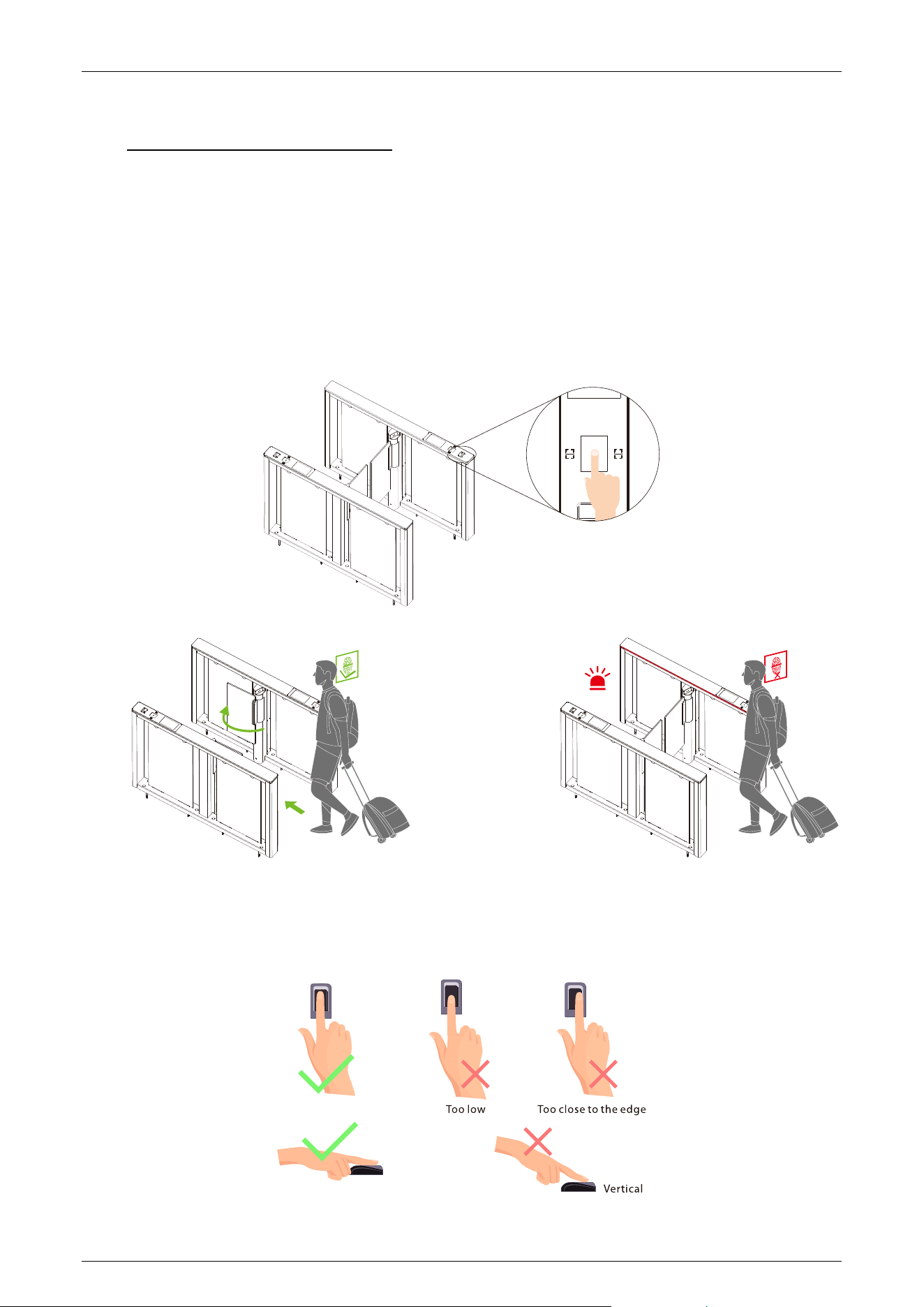
In this verification mode, the device compares the fingerprint that is being pressed onto the
fingerprint reader with all the fingerprint data sends and it to the Access Controller.
The device enters the fingerprint authentication mode when a user presses their finger onto the
fingerprint scanner.
Recommended fingers: It is recommended to use the index, middle, or ring finger for registration
and avoid using the thumb or little finger, as they are difficult to accurately press onto the
fingerprint reader.
Comet Series Speed Gate User Manual
Page | 17 Copyright © 2024 ZKTECO CO., LTD. All Rights Reserved.
Note: Please ensure that you use the correct method when pressing your fingers onto the
fingerprint reader for registration and identification. It is important to follow the proper guidelines
to avoid any recognition issues. Please note that our company will not be liable for any recognition
issues that may arise from incorrect usage of the product. We reserve the right to make the final
interpretation and modifications of this matter.
Card Verification 2.2
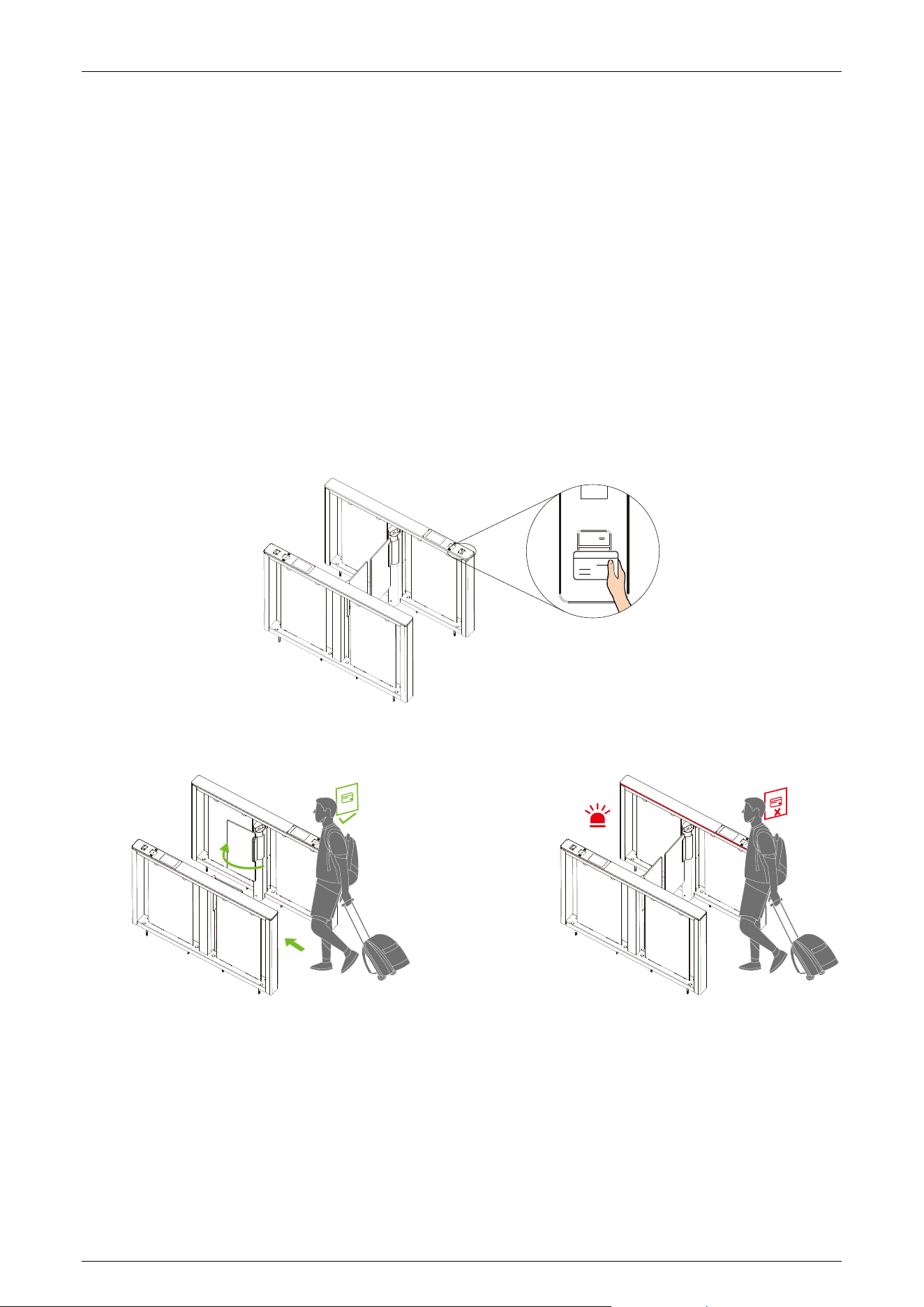
In the Card Verification mode, the device compares the card number in the card induction area with
all the card number data registered in the device and sends it to the Access Controller.
When a user presses their card on the card reading area, the device enters card authentication mode.
Comet Series Speed Gate User Manual
Page | 18 Copyright © 2024 ZKTECO CO., LTD. All Rights Reserved.
QR Code Verification 2.3
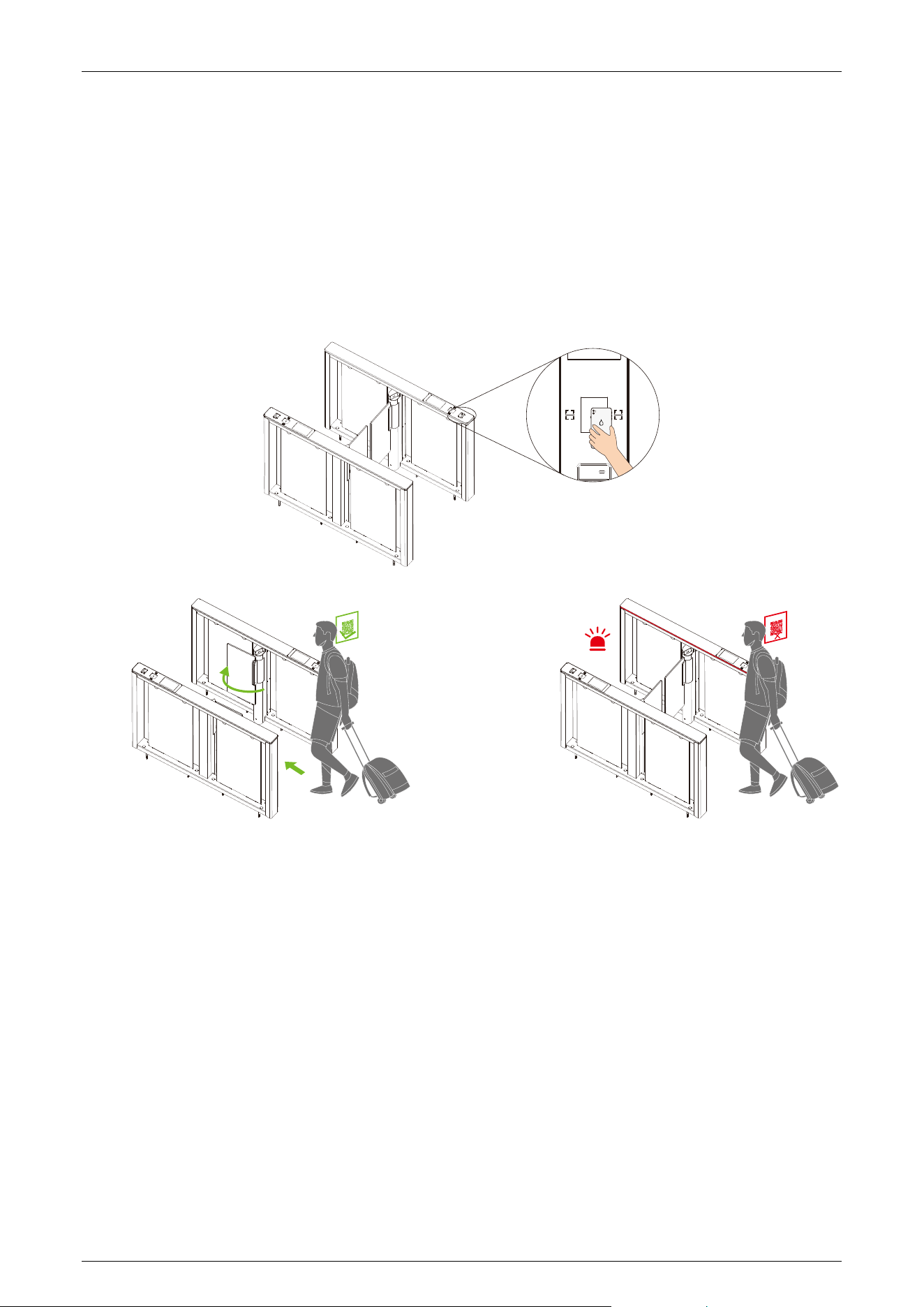
In the QR code Verification mode, the device scans the QR code on the user's mobile phone using
the QR code scanner. It then compares the scanned data with the registered QR code and sends the
result to the Access Controller.
When the user places the mobile phone displaying the QR code on top of the QR code scanner, the
device enters the QR code authentication mode.
Palm Verification★ 2.4
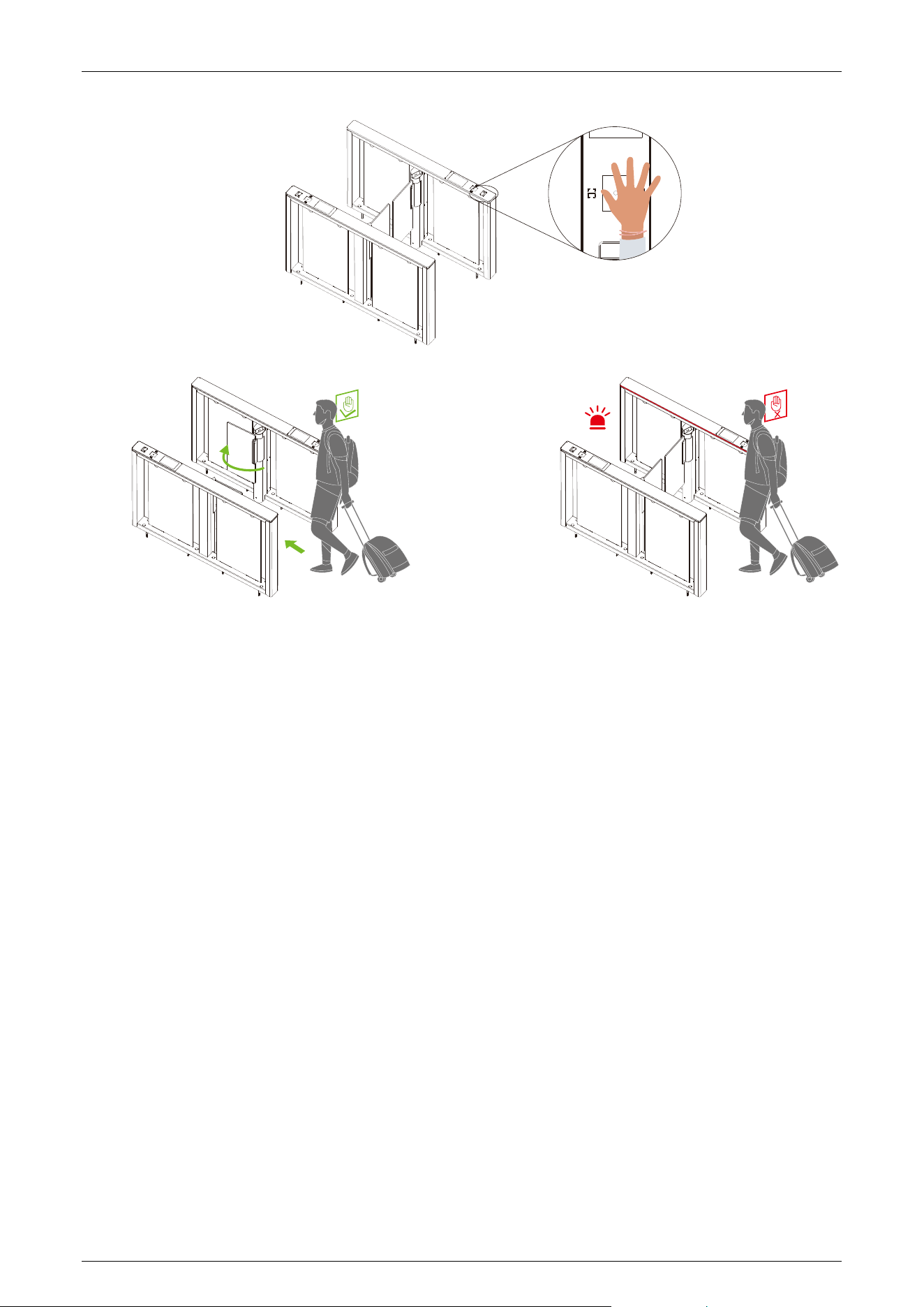
This verification mode compares the palm image collected by the palm module with all the palm
data templates in the device and sends it to the Access Controller. When the user places his/her
palm 20 to 50cm above the palm scanner, the device enters the palm verification mode.
Comet Series Speed Gate User Manual
Page | 19 Copyright © 2024 ZKTECO CO., LTD. All Rights Reserved.
Note:
1. Place your palm within 20 to 50 cm of the device.
2. Place your palm in the palm collection area, such that the palm is placed parallel to the device.
3. Make sure to keep space between your fingers.
Facial Verification
★
2.5
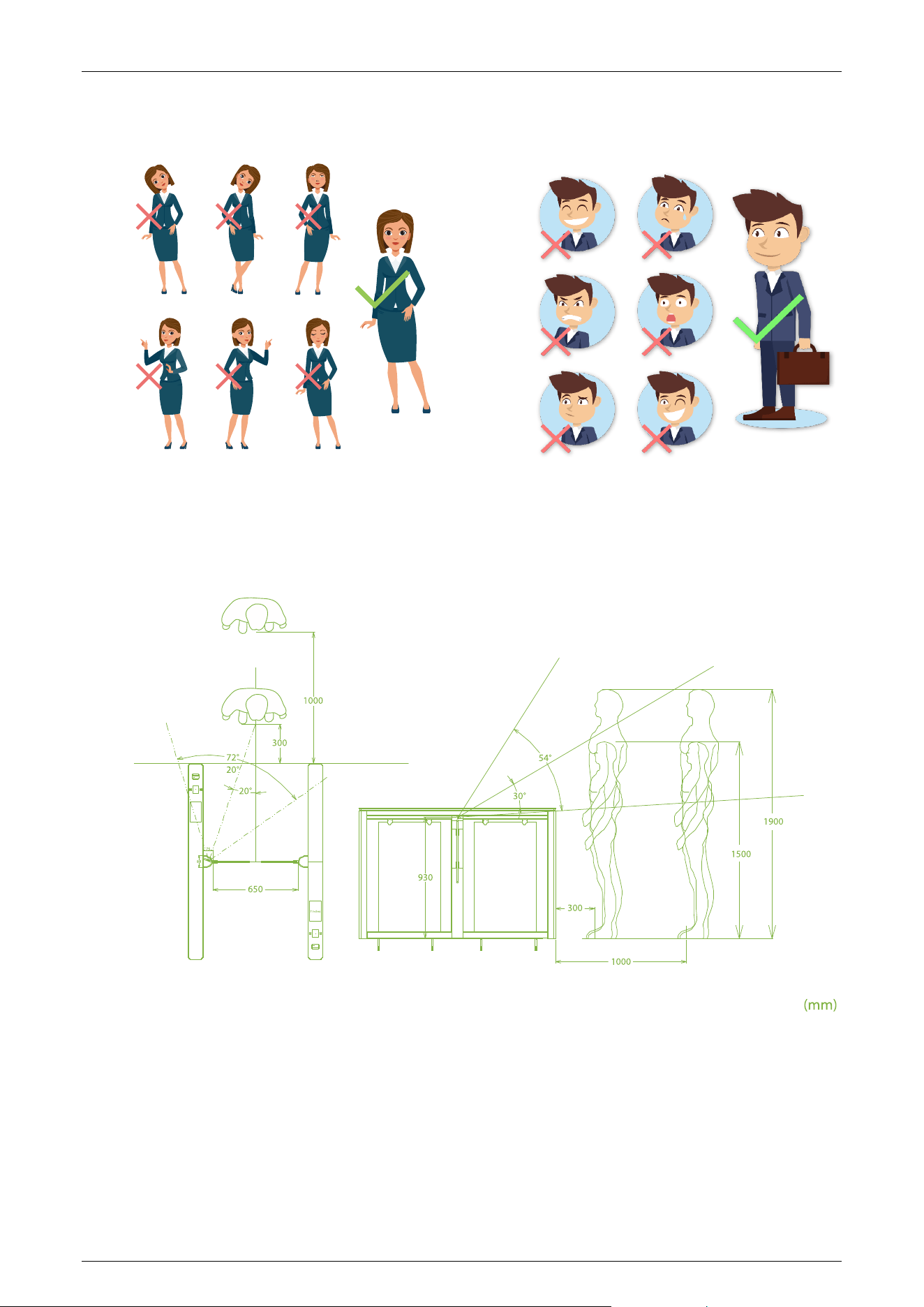
In this verification mode, the device compares the collected facial images with all registered face
data in the device and then sends it to the Access Controller.
Please try to keep your face centered on the screen during authentication. When registering your
face, ensure that you face toward the camera and remain still.
Comet Series Speed Gate User Manual
Page | 20 Copyright © 2024 ZKTECO CO., LTD. All Rights Reserved.
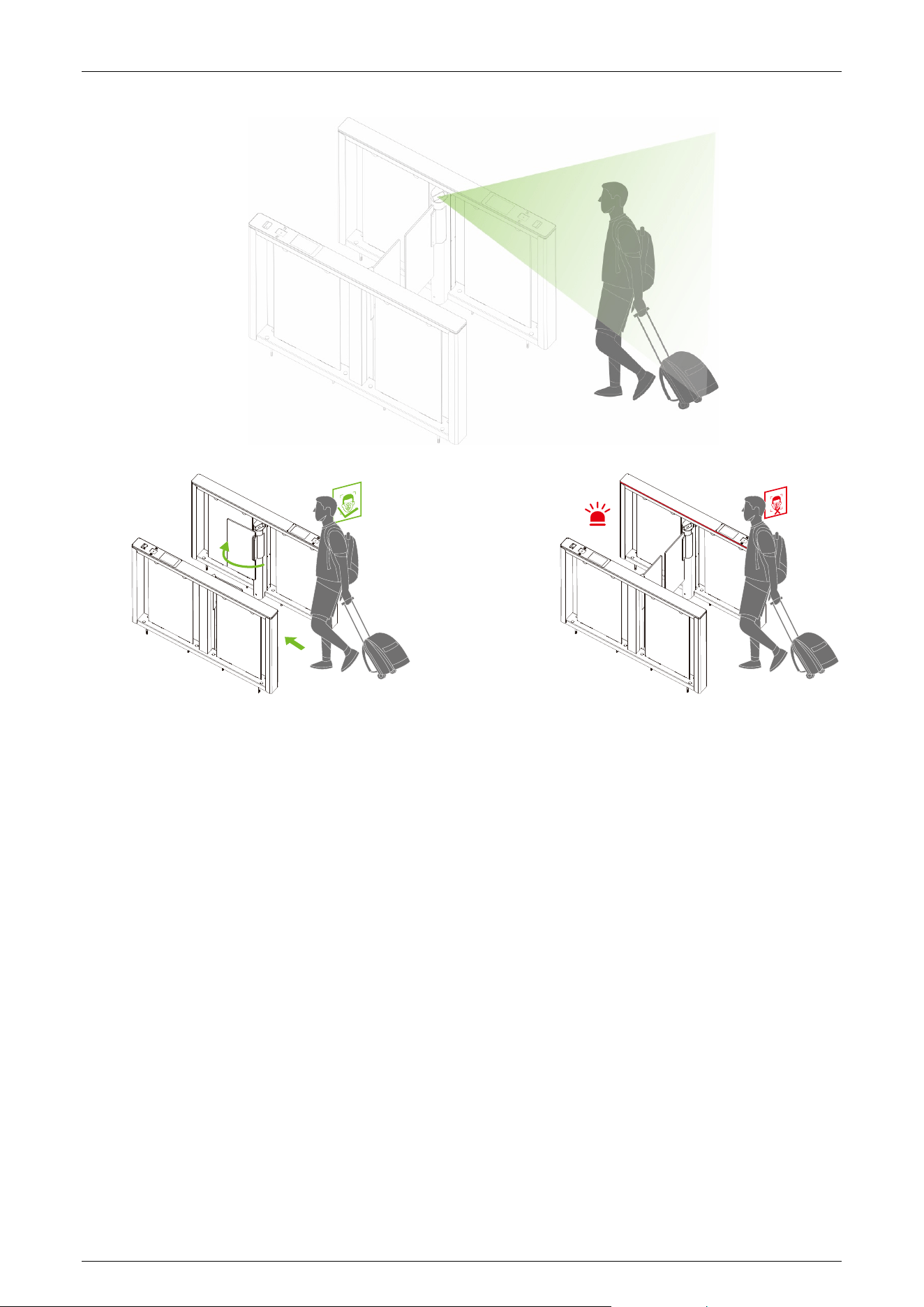
Recommended Standing Posture and Facial Expression:
Note: Please keep your facial expression and standing posture natural while enrollment or
verification.
Recommended Distance and Angle for Facial Recognition:
Comet Series Speed Gate User Manual
Page | 21 Copyright © 2024 ZKTECO CO., LTD. All Rights Reserved.
Comet Series Speed Gate User Manual
Page | 22 Copyright © 2024 ZKTECO CO., LTD. All Rights Reserved.
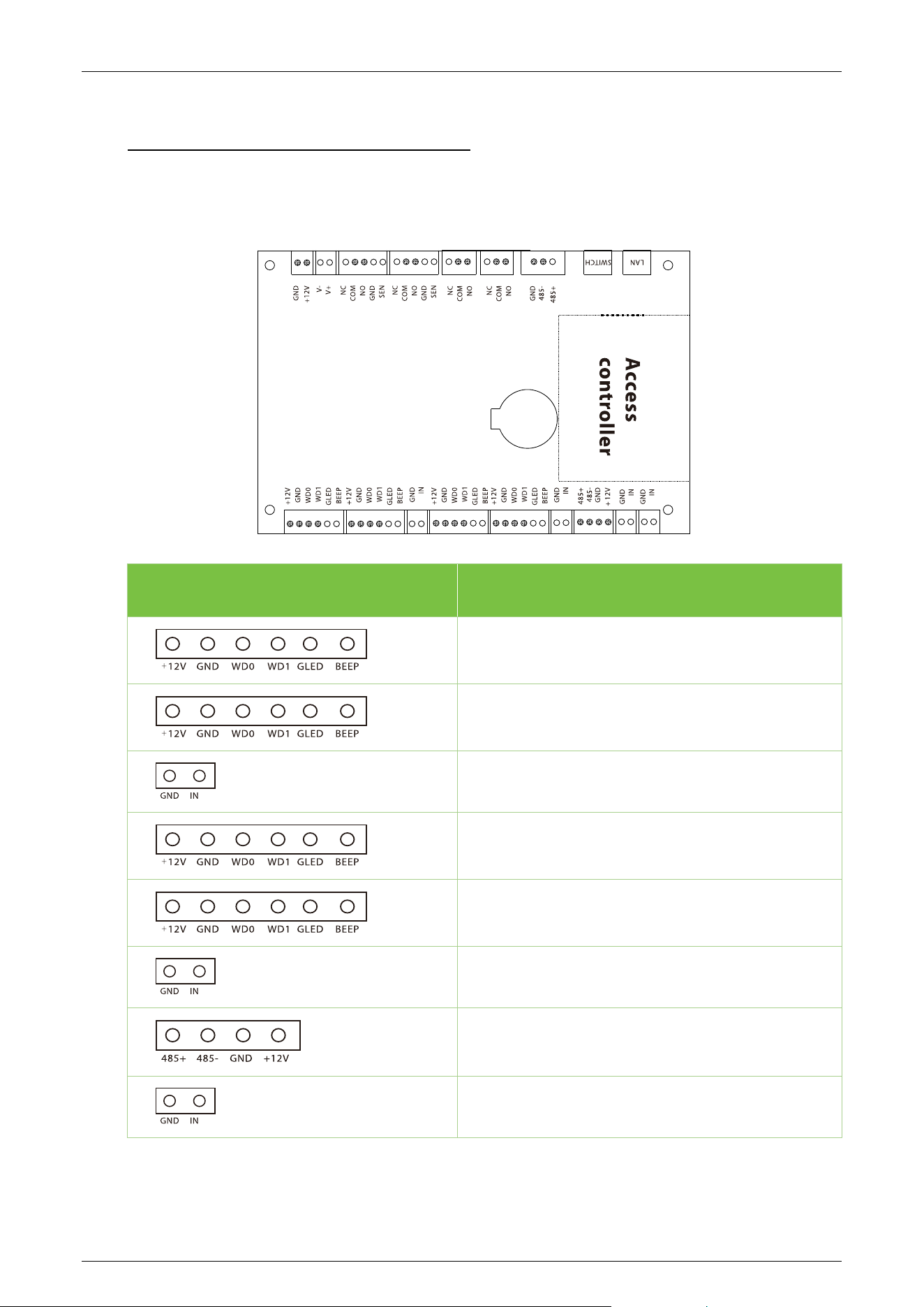
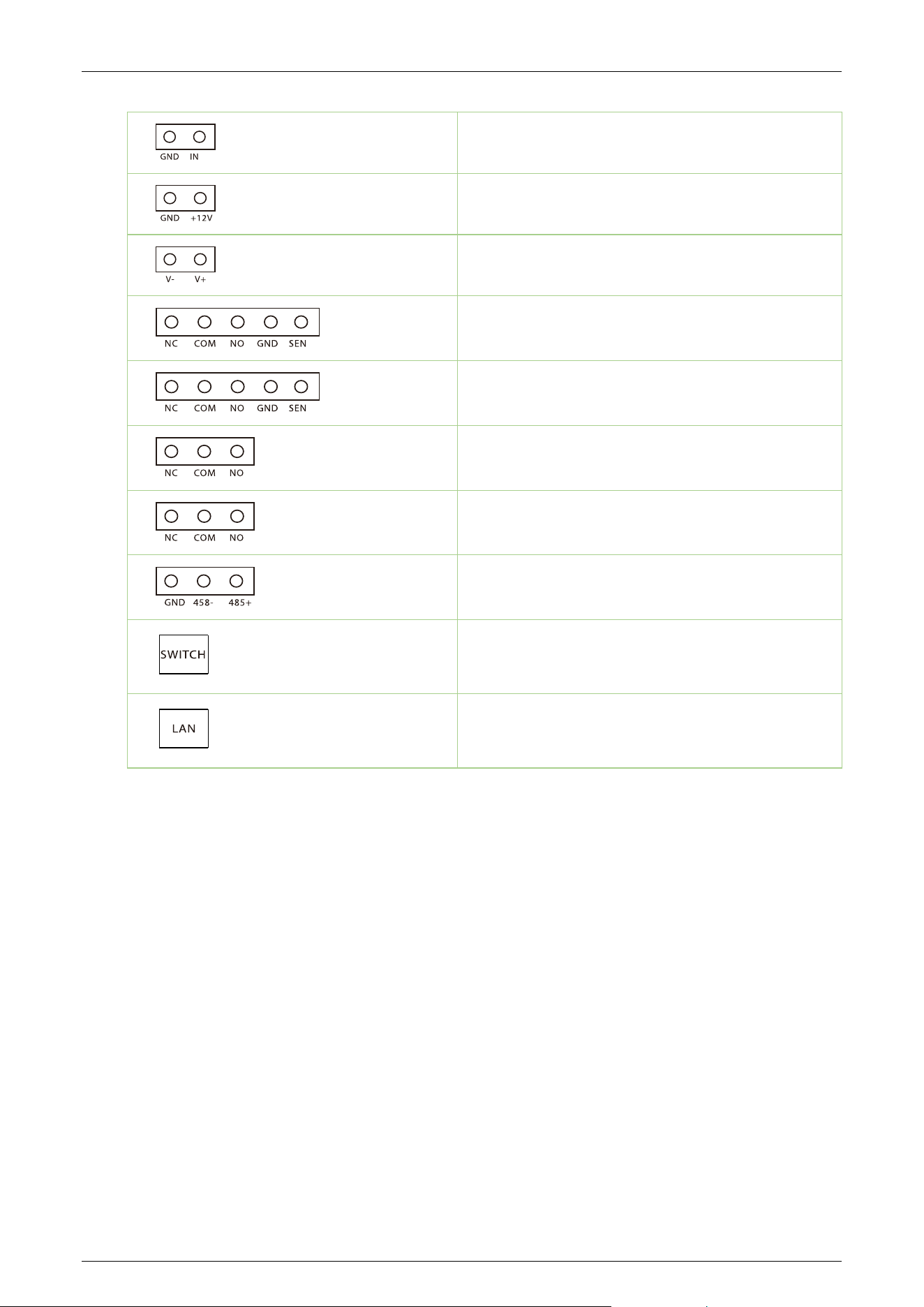
3 Control System Introduction
Access Control Board
★
3.1
Terminal Description
Reader
Reader
Button
Reader
Reader
Button
RS485
Auxiliary Input
Comet Series Speed Gate User Manual
Page | 23 Copyright © 2024 ZKTECO CO., LTD. All Rights Reserved.
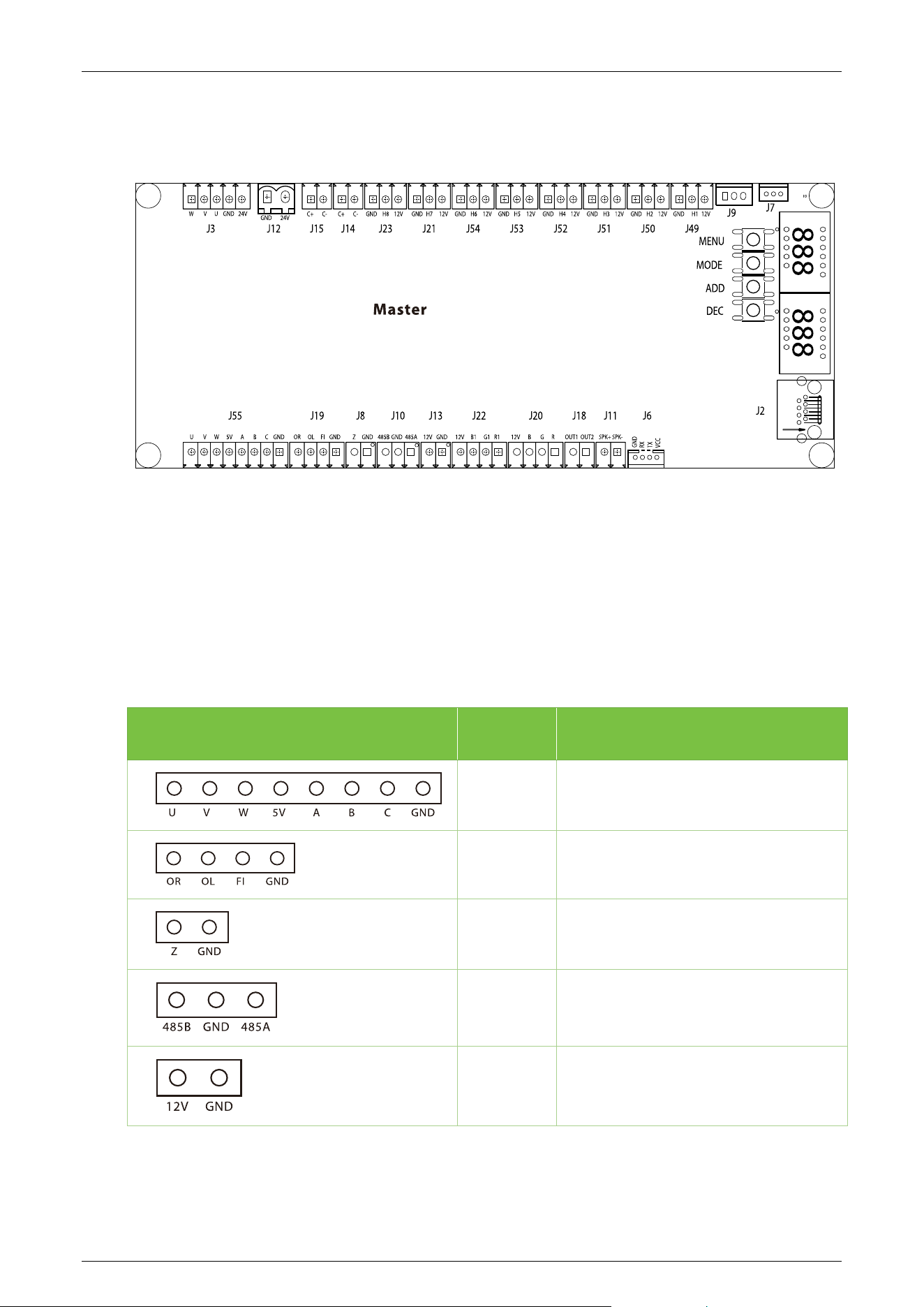
Auxiliary Input
Power In
Lock
Lock
Lock
Auxiliary Output
Auxiliary Output
485 Connections
Switch
Ethernet
Comet Series Speed Gate User Manual
Page | 24 Copyright © 2024 ZKTECO CO., LTD. All Rights Reserved.
Master Motor Driving Controller Board 3.2
There are 4 keys on the master motor driving controller, "MENU", "MODE", "ADD" and "DEC".
MENU: Used to access the Settings menu and confirm modified values
MODE: Returns to the previous menu and cancels the current operation.
ADD: Navigate to the upper menu item and increase the value.
DEC: Navigate to the lower menu item and decrease the value.
Terminal No. Description
J55 Motor
J19 Open Input and Firefighting Interface
J8 Reserved
J10 RS485
J13 Power in
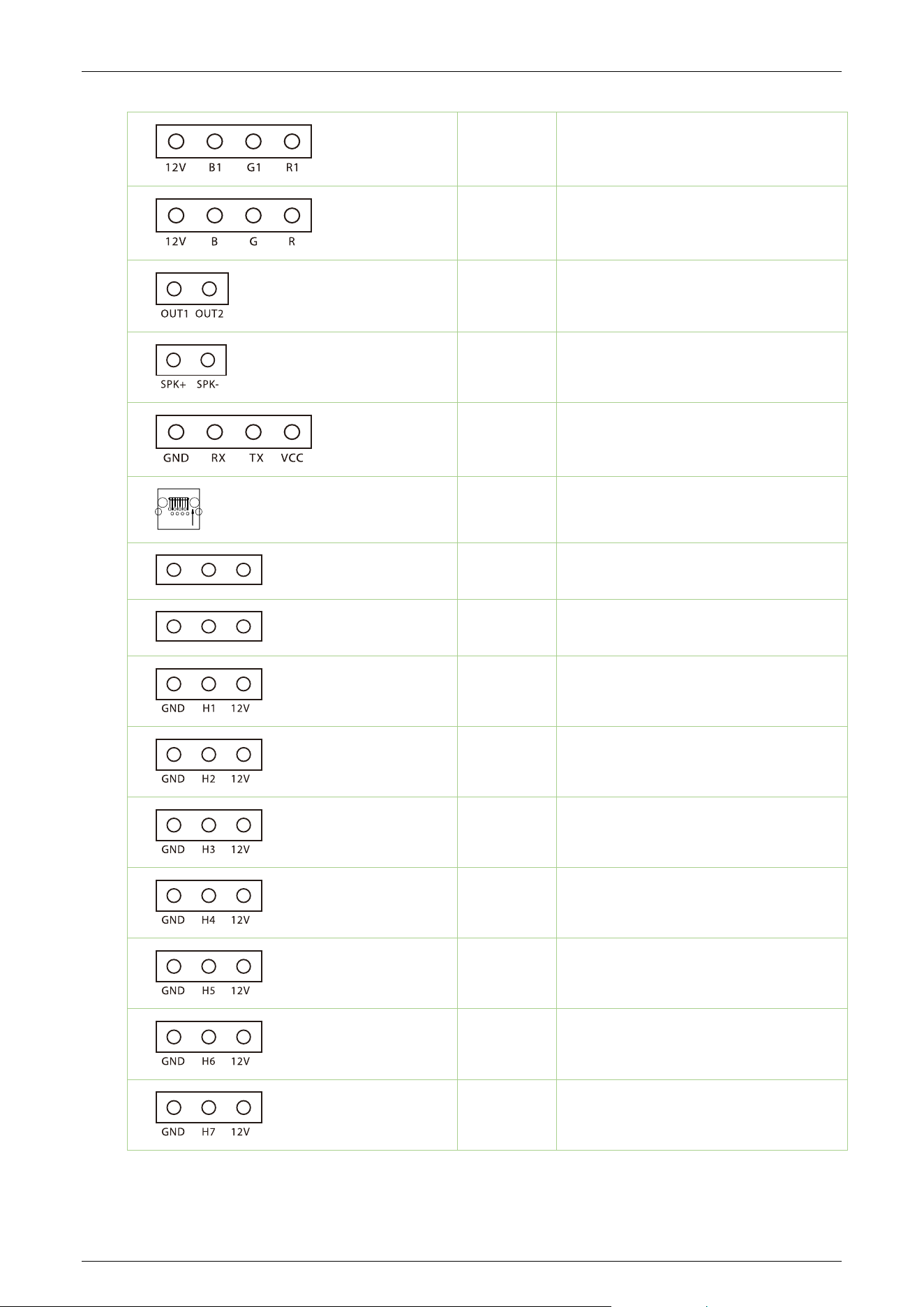
Comet Series Speed Gate User Manual
Page | 25 Copyright © 2024 ZKTECO CO., LTD. All Rights Reserved.
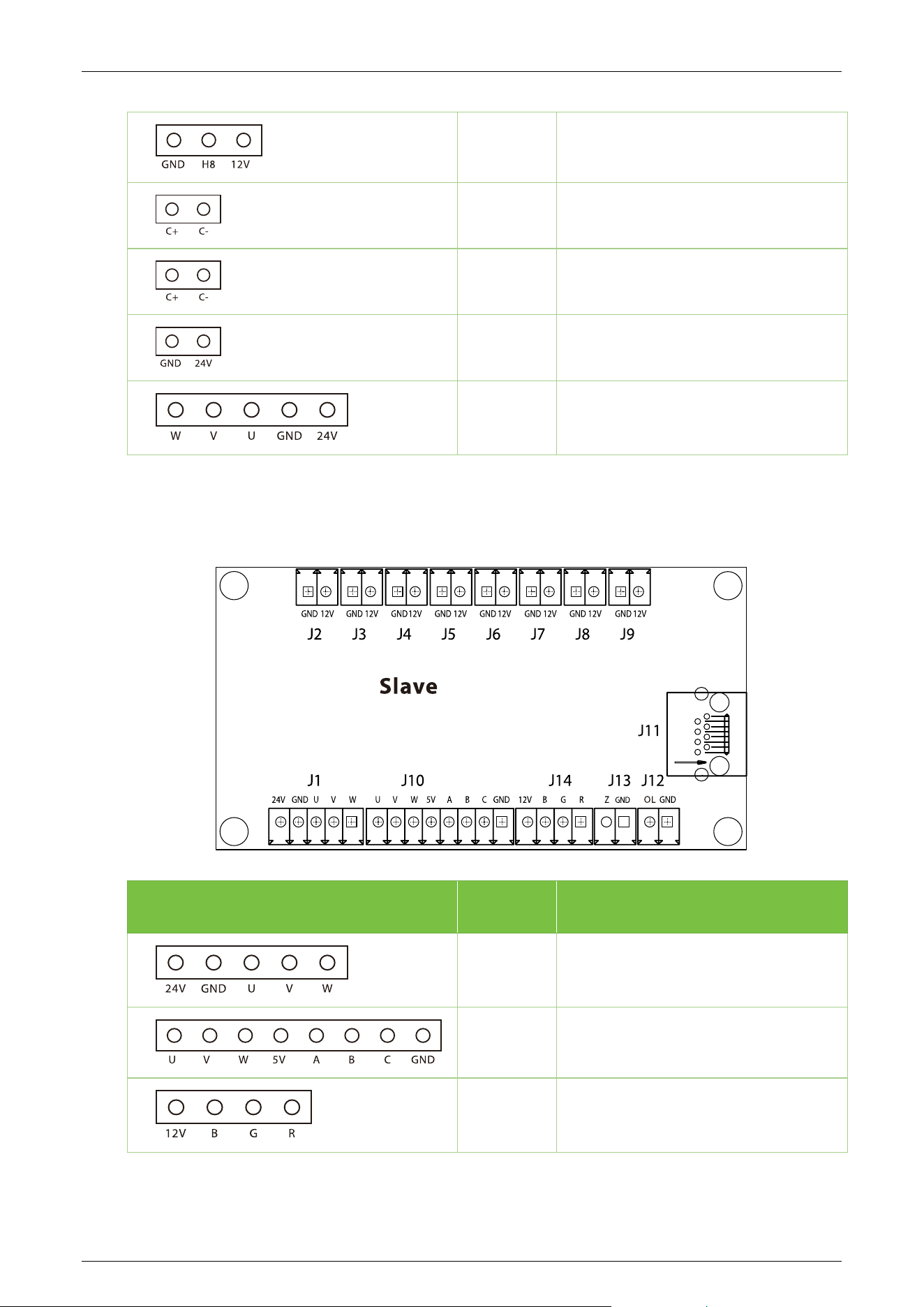
J22 Indicator light
J20 Indicator light
J18 Reserved
J11 Speaker
J6 RS232 communication
J2 Ethernet/POE interface
J7 IR sensor receiving port
J9 Reserved
J49 IR sensor receiving port
J50 IR sensor receiving port
J51 IR sensor receiving port
J52 IR sensor receiving port
J53 IR sensor receiving port
J54 IR sensor receiving port
J21 IR sensor receiving port
Comet Series Speed Gate User Manual
Page | 26 Copyright © 2024 ZKTECO CO., LTD. All Rights Reserved.
J23 IR sensor receiving port
J14 Clutch
J15 Clutch
J12 24V DC power supply
J3 Motor line
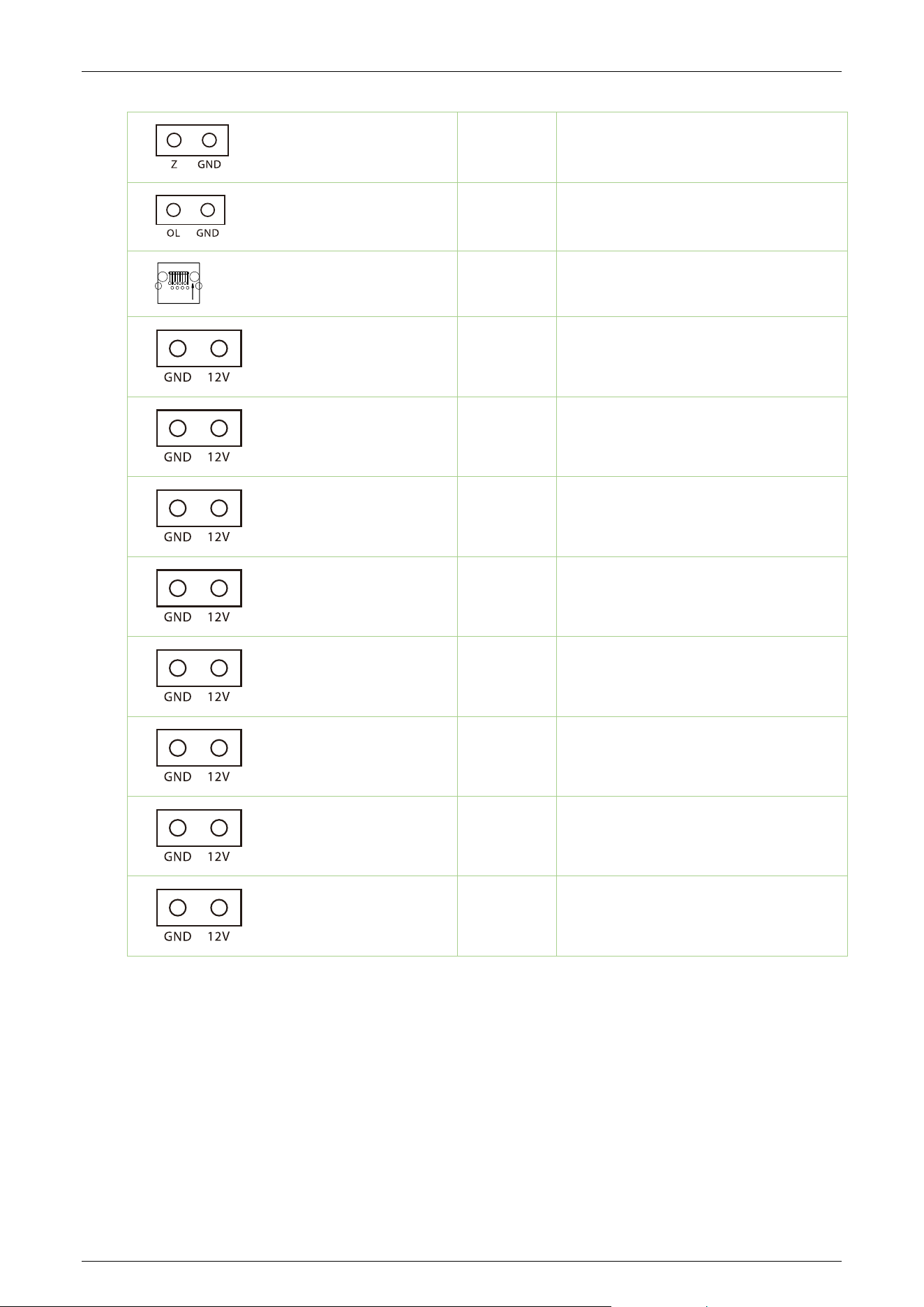
Slave Motor Driving Controller Board 3.3
Terminal No. Description
J1 Motor line
J10 Motor
J14 Indicator light
Comet Series Speed Gate User Manual
Page | 27 Copyright © 2024 ZKTECO CO., LTD. All Rights Reserved.
J13 Reserved
J12 Open Input
J11 Ethernet/POE interface
J9 Infrared sensor transmitting port
J8 Infrared sensor transmitting port
J7 Infrared sensor transmitting port
J6 Infrared sensor transmitting port
J5 Infrared sensor transmitting port
J4 Infrared sensor transmitting port
J3 Infrared sensor transmitting port
J2 Infrared sensor transmitting port
Comet Series Speed Gate User Manual
Page | 28 Copyright © 2024 ZKTECO CO., LTD. All Rights Reserved.
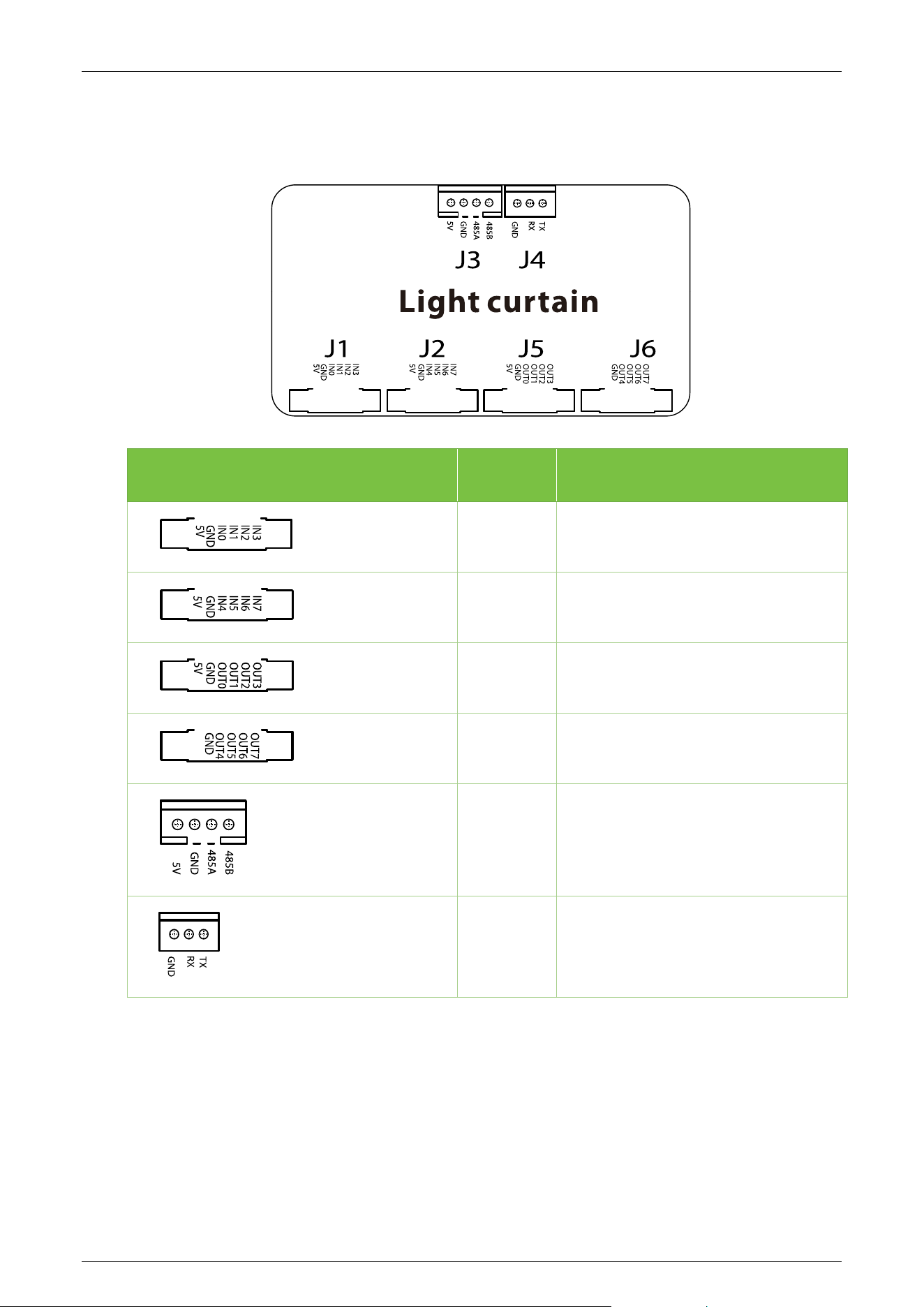
Light Curtain Control Board 3.4
Terminal No. Description
J1 Reserved
J2
Reserved
J5
Reserved
J6
Reserved
J3 RS485
J4 Infrared sensor transmitting port
Comet Series Speed Gate User Manual
Page | 29 Copyright © 2024 ZKTECO CO., LTD. All Rights Reserved.
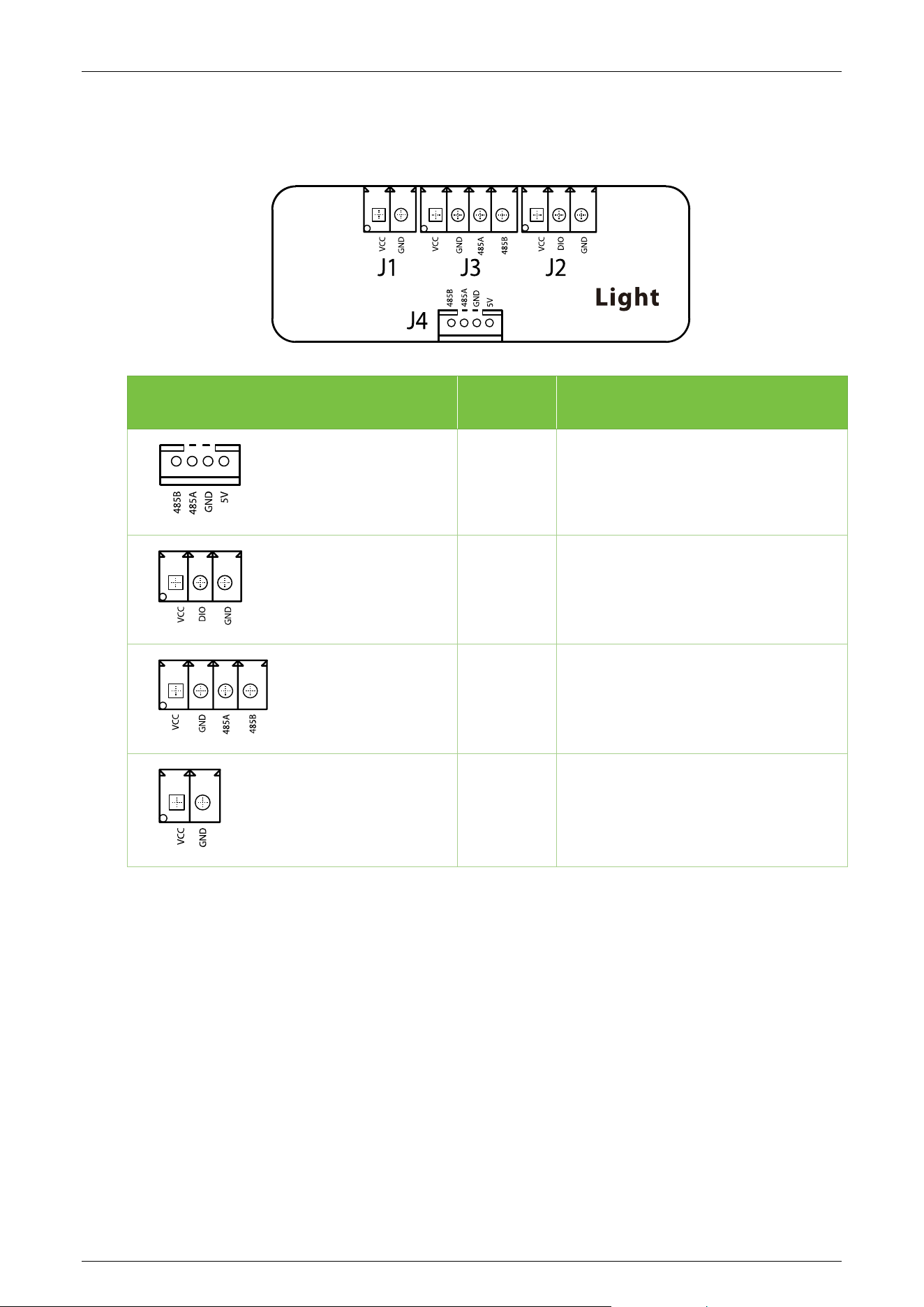
Light Control Board 3.5
Terminal No. Description
J4 RS485
J2
Indicator light
J3
Indicator light
J1
5V DC power supply
Comet Series Speed Gate User Manual
Page | 30 Copyright © 2024 ZKTECO CO., LTD. All Rights Reserved.
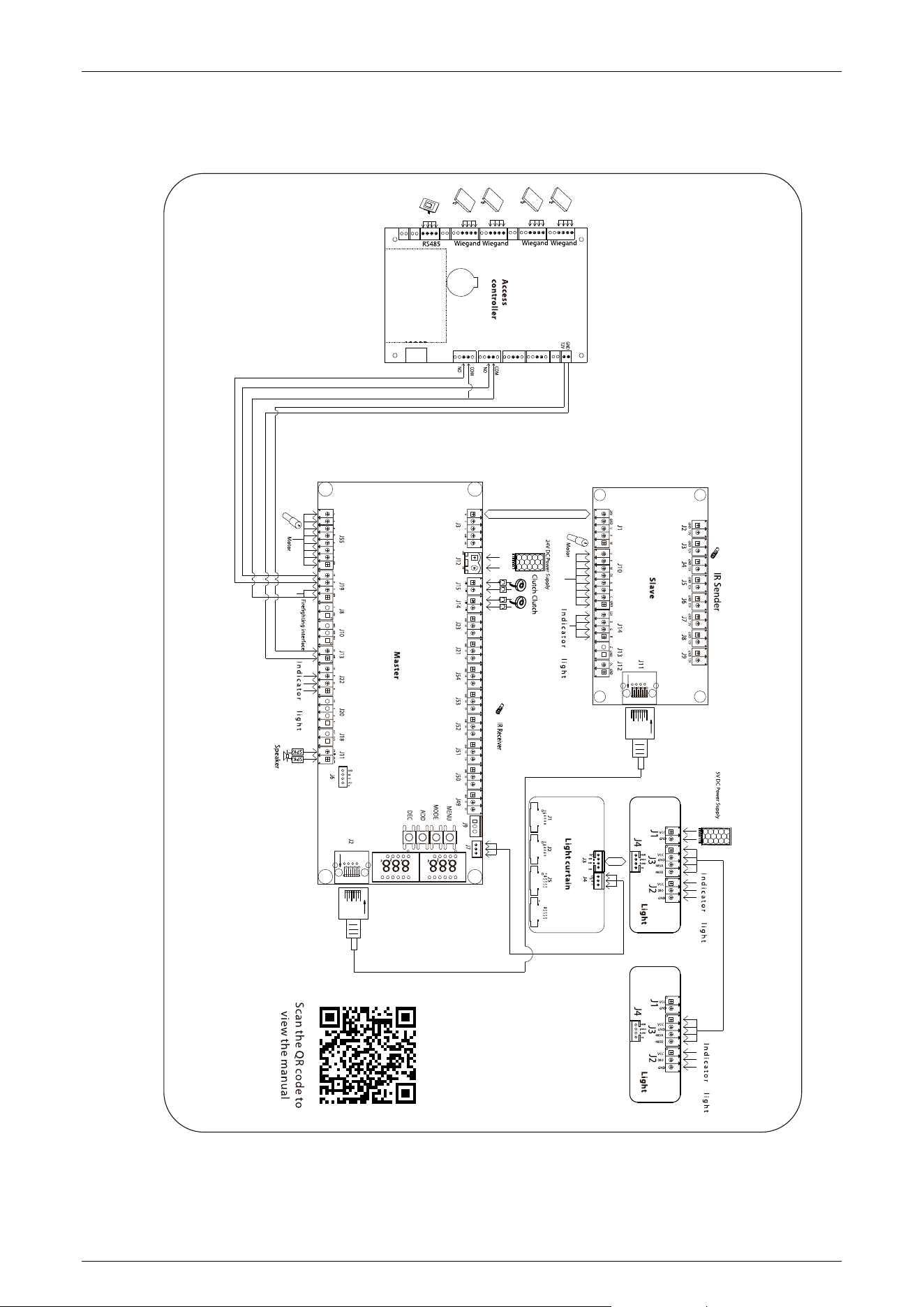
Wiring Diagram 3.6
Comet Series Speed Gate User Manual
Page | 31 Copyright © 2024 ZKTECO CO., LTD. All Rights Reserved.
Menu of Speed Gate 3.7
Display Mode (01EXXX)
(01E000) Displays current position of the gate
(01E001) Infrared input signal
(01E002) Controls input signal
(01E003) Test mode (the digital LED displays "---" in the test mode)
(01E004) Version number (Default)
(01E005) Master Hall, slave Hall
(01E006) Slave position
(01E007) Light curtain infrared status
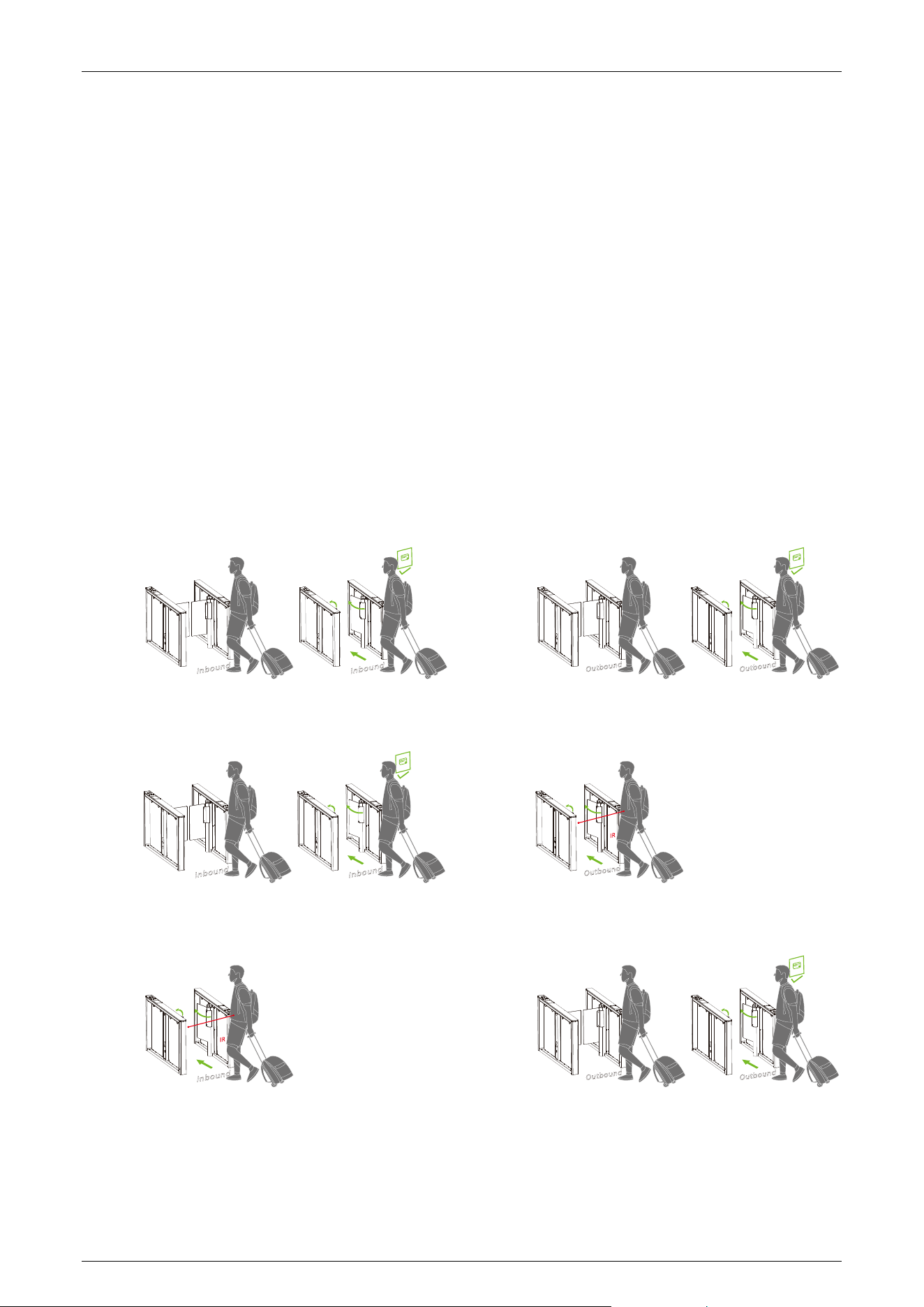
Opening Mode Setting (02EXXX)
(02E001) Two-way controlled, both need verification (Default).
(02E002) In need verification, out free.
(02E003) In free, out need verification.
Comet Series Speed Gate User Manual
Page | 32 Copyright © 2024 ZKTECO CO., LTD. All Rights Reserved.
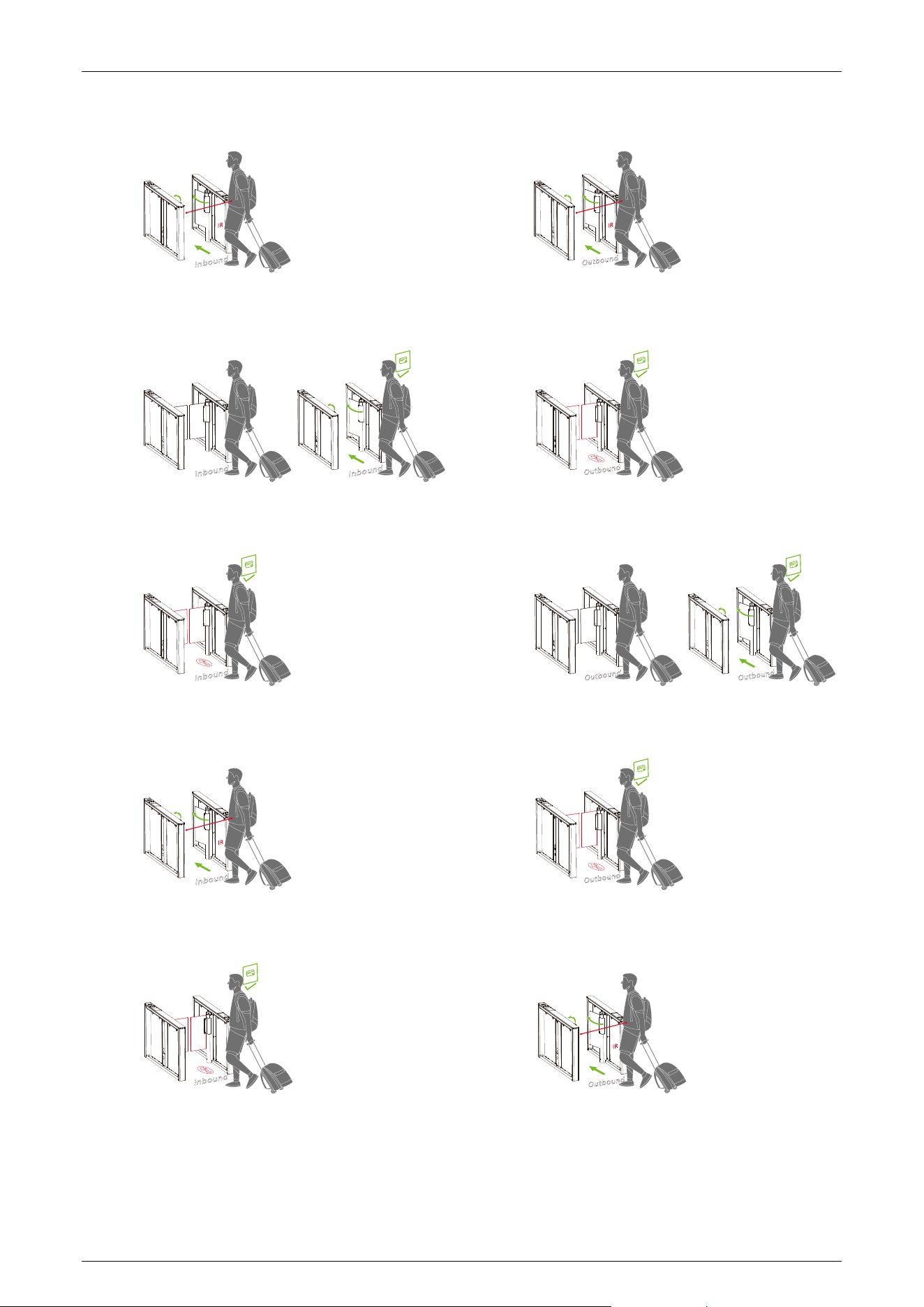
(02E004) Two-way free.
(02E005) In need verification, out prohibited.
(02E006) In prohibited, out need verification.
(02E007) In free, out prohibited.
(02E008) In prohibited, out free.
Comet Series Speed Gate User Manual
Page | 33 Copyright © 2024 ZKTECO CO., LTD. All Rights Reserved.
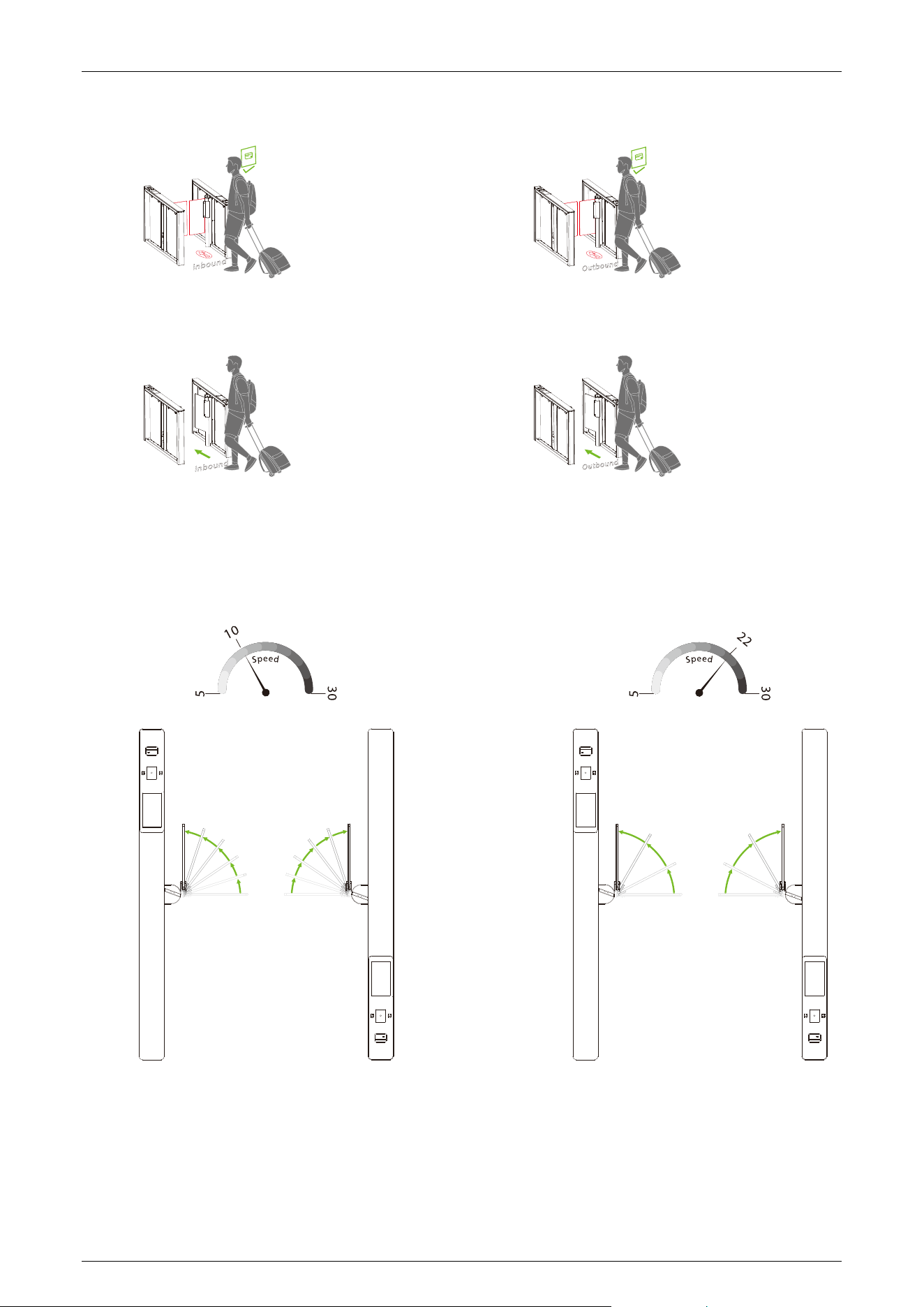
(02E009) Two-way prohibited.
(02E010) Two-way normally open.
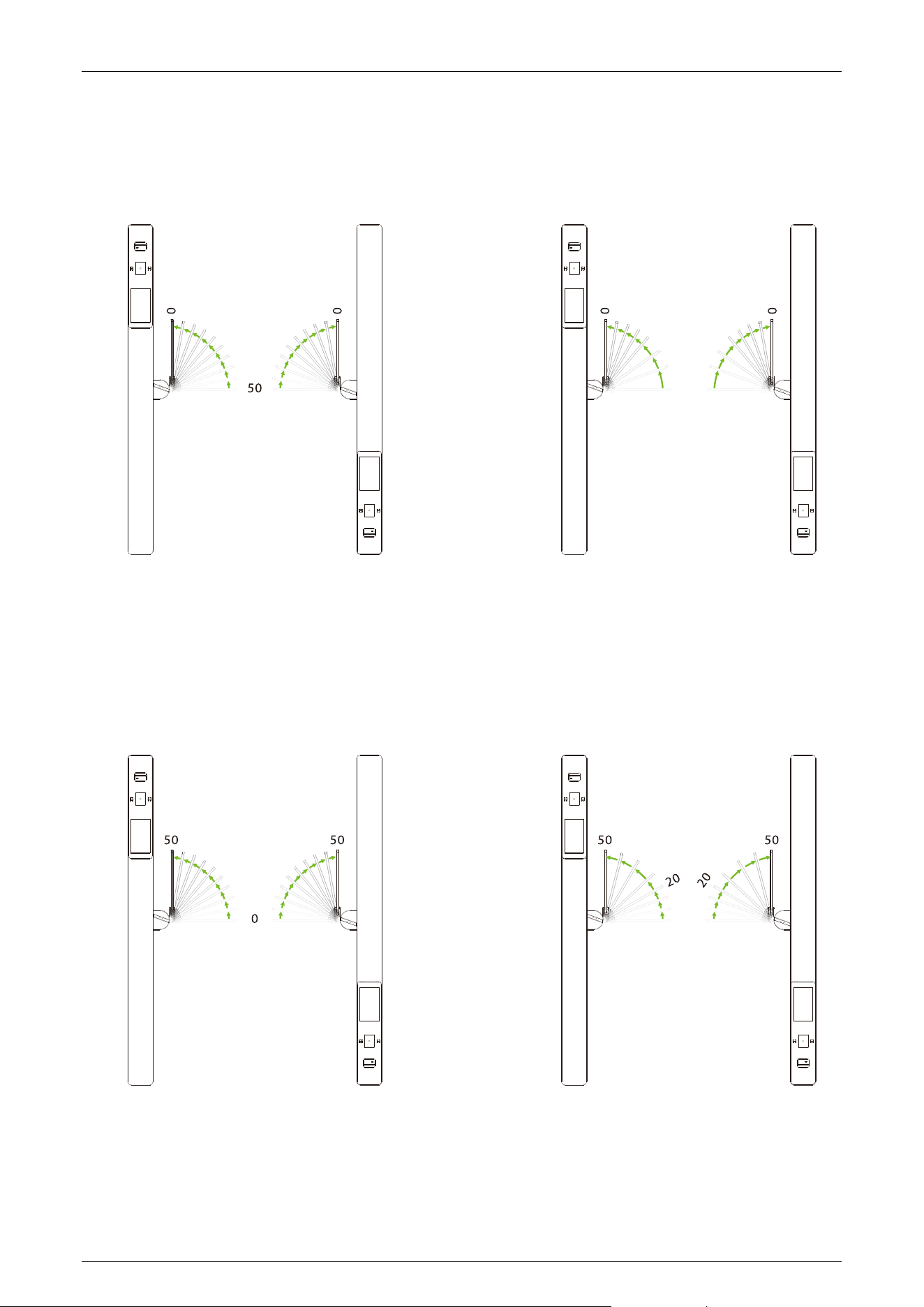
Gate Opening Speed (03EXXX)
To adjust the gate opening speed, you can set a larger number for a faster opening. The Gate
Opening Speed can be configured between 5 and 30, with a default value of 22.
Comet Series Speed Gate User Manual
Page | 34 Copyright © 2024 ZKTECO CO., LTD. All Rights Reserved.
Gate Opening Deceleration Distance (04EXXX)
A larger number increases the deceleration time, enhancing the stability of the swing arm operation.
The Gate Opening Deceleration Distance can be set between 0 and 50, with a default value of 15.
Gate Opening Compensation Speed (05EXXX)
This setting is used when the swing arm cannot fully open or shakes during operation. A larger
number results in faster compensation speed. The Gate Opening Compensation Speed can be set
between 0 and 50, with a default value of 20.
Comet Series Speed Gate User Manual
Page | 35 Copyright © 2024 ZKTECO CO., LTD. All Rights Reserved.
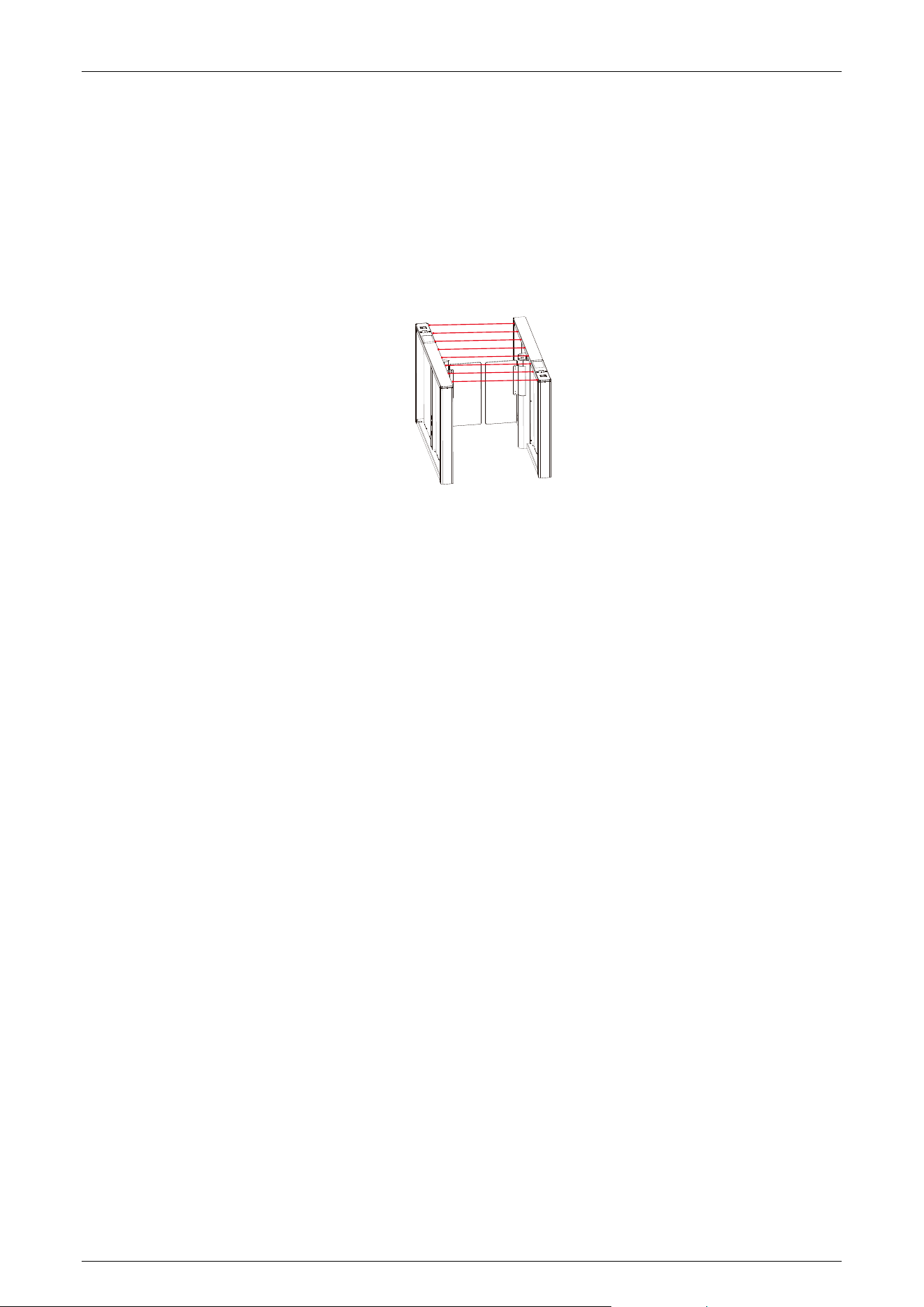
Infrared Quantity Selection (06EXXX)
Choose the number of pairs of infrared sensors to apply to the device. The normal infrared mode
supports a maximum of 8 pairs. If more than 8 pairs are needed, it switches to light curtain mode,
requiring the corresponding configuration of the light curtain board.
Note: After selecting the number of logical infrared pairs, the available infrared interfaces are
equipped with anti-pinch functionality.
Master Position Adjustment (07EXXX)
1. Adjust the position only when Comet the series is installed properly.
2. During zero position setup, you can manually adjust the swing arm for fine-tuning. If the barrier
exceeds a specific angle, the adjustment becomes invalid (indicated by a digital LED displaying
07E000).
Swing Barrier
(07E001) Zero position
(07E002) Right position
(07E003) Left position
Flap Barrier
(07E001) Zero position
(07E002) Open position
Slave Position Adjustment (08EXXX)
(08E001) Zero position
(08E002) Right position
(08E003) Left position
Comet Series Speed Gate User Manual
Page | 36 Copyright © 2024 ZKTECO CO., LTD. All Rights Reserved.
Motor Type Selection (09EXXX)
Choose the motor type, which can be set from 0 to 4. Please ensure to set the motor type of this
turnstile accurately according to the actual product.
(09E000) L-shaped swing barrier
(09E001) Flap barrier
(09E002) Speed gate
(09E003) Integrated planetary motors
(09E004) Split planetary motors
RS485 Address (10EXXX)
It can be set between 0 to 254 and the default value is 0.
Open Duration Time (11EXXX)
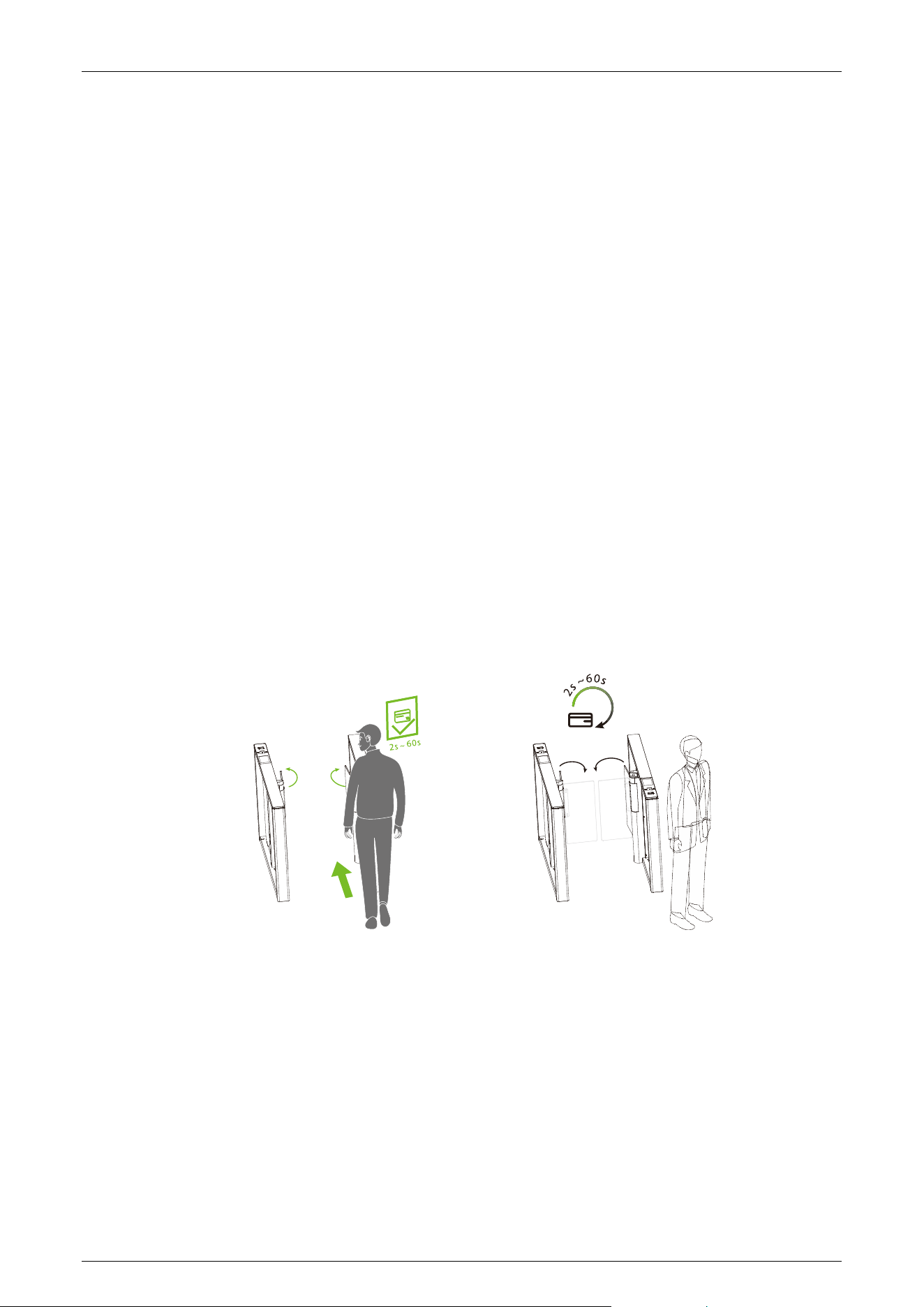
The valid time period after a successful verification can be configured. Once the set time is reached,
the gate will automatically close. The longer the number set, the longer the valid time. The valid
value ranges from 2 to 60 seconds, with a default value of 5 seconds.
Gate Closing Delay Time (12EXXX)
Set the delay time of gate closing after passing. The valid value for gate closing delay time can be set
between 0 to 60s and the default value is 0s.
Comet Series Speed Gate User Manual
Page | 37 Copyright © 2024 ZKTECO CO., LTD. All Rights Reserved.
Movement Replacement (13EXXX)
The master motor board is designed to accommodate different turnstiles, and the turnstiles vary in
the type of movement.
(13E000) Swing barrier A (Swing barrier)
(13E001) Swing barrier B (Swing barrier)
(13E002) AA (Speed gate)
(13E003) BB (Flap barrier in the International Zone)
(13E004) AB (Flap barrier for China)
(13E005) BA (Flap barrier for China)
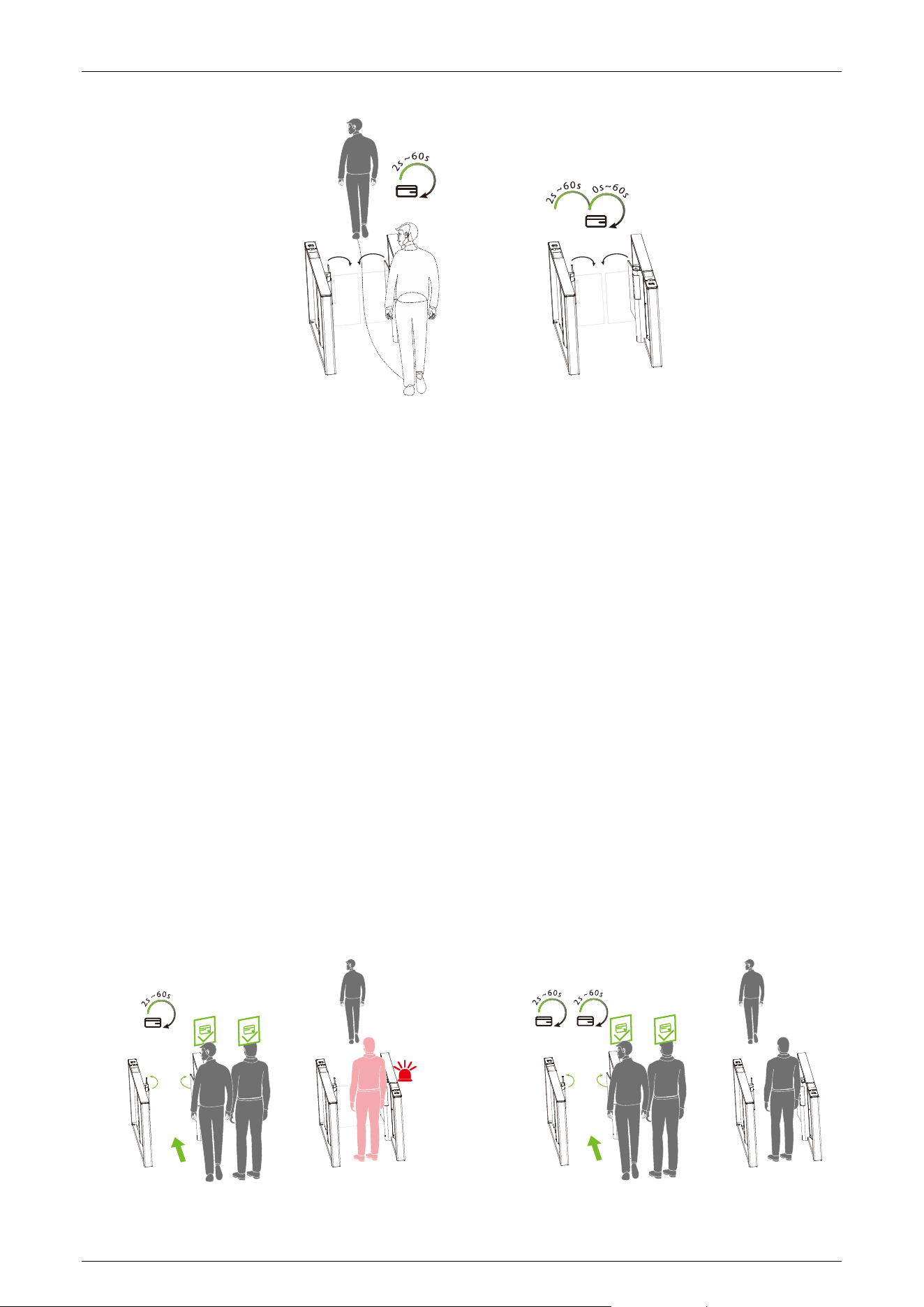
Gate Opening Memory (14EXXX)
When more than two legal access signals are given at the same time (including the same direction
and the opposite direction), the system will remember all pass requests and complete each pass in
turn.
(14E000) Close (Default)
(14E001) Open
Comet Series Speed Gate User Manual
Page | 38 Copyright © 2024 ZKTECO CO., LTD. All Rights Reserved.
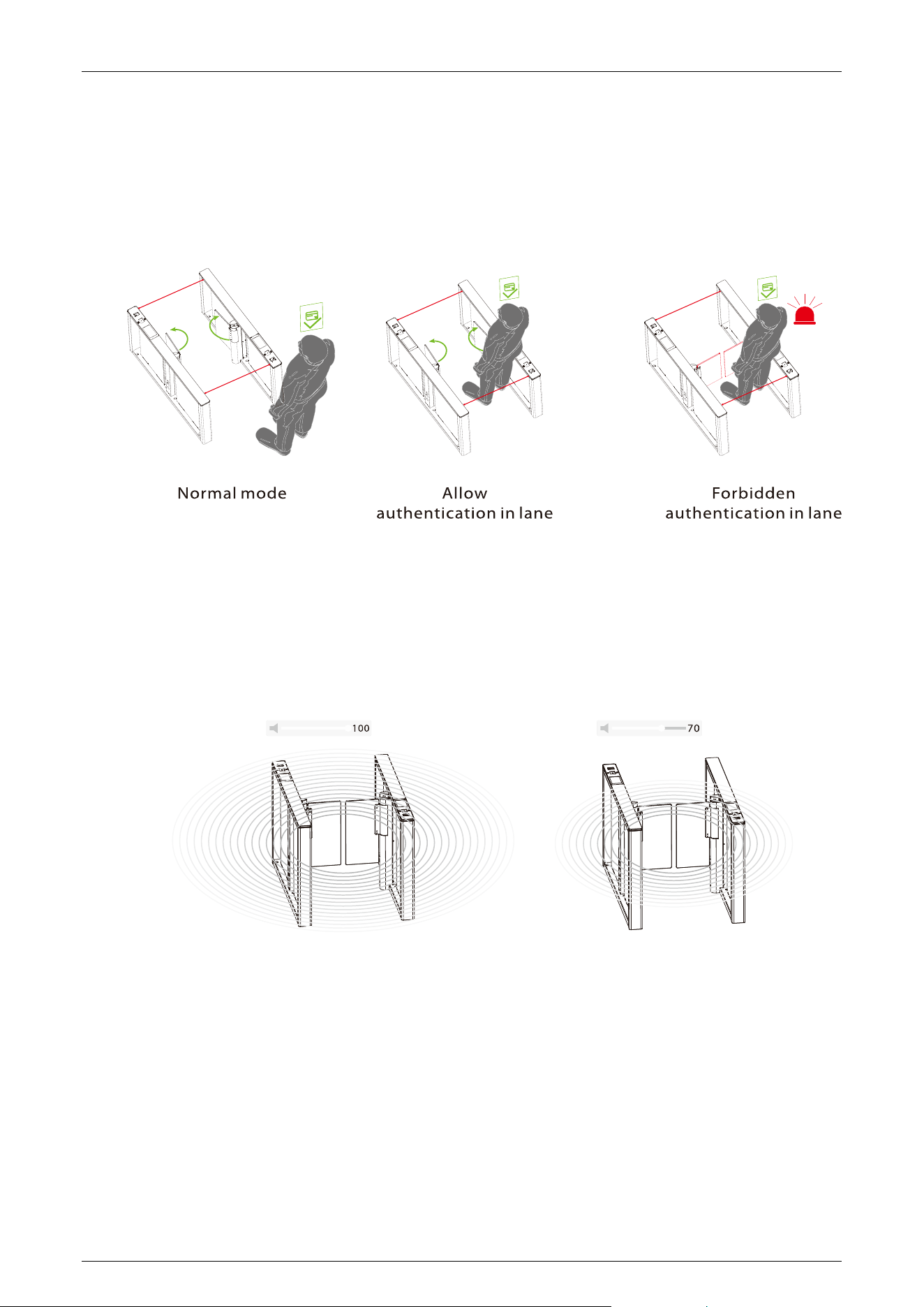
Authentication in Lane (15EXXX)
It allows pedestrian verification during the IR sensor triggered.
(15E000) Allow (Default)
(15E001) Forbidden
Volume Setting (16EXXX)
Volume Setting is used for adjusting the volume of the device. The larger the number is set, the
louder the volume. The valid value for Volume Setting can be set between 1 to 100 and the default
value is 70.
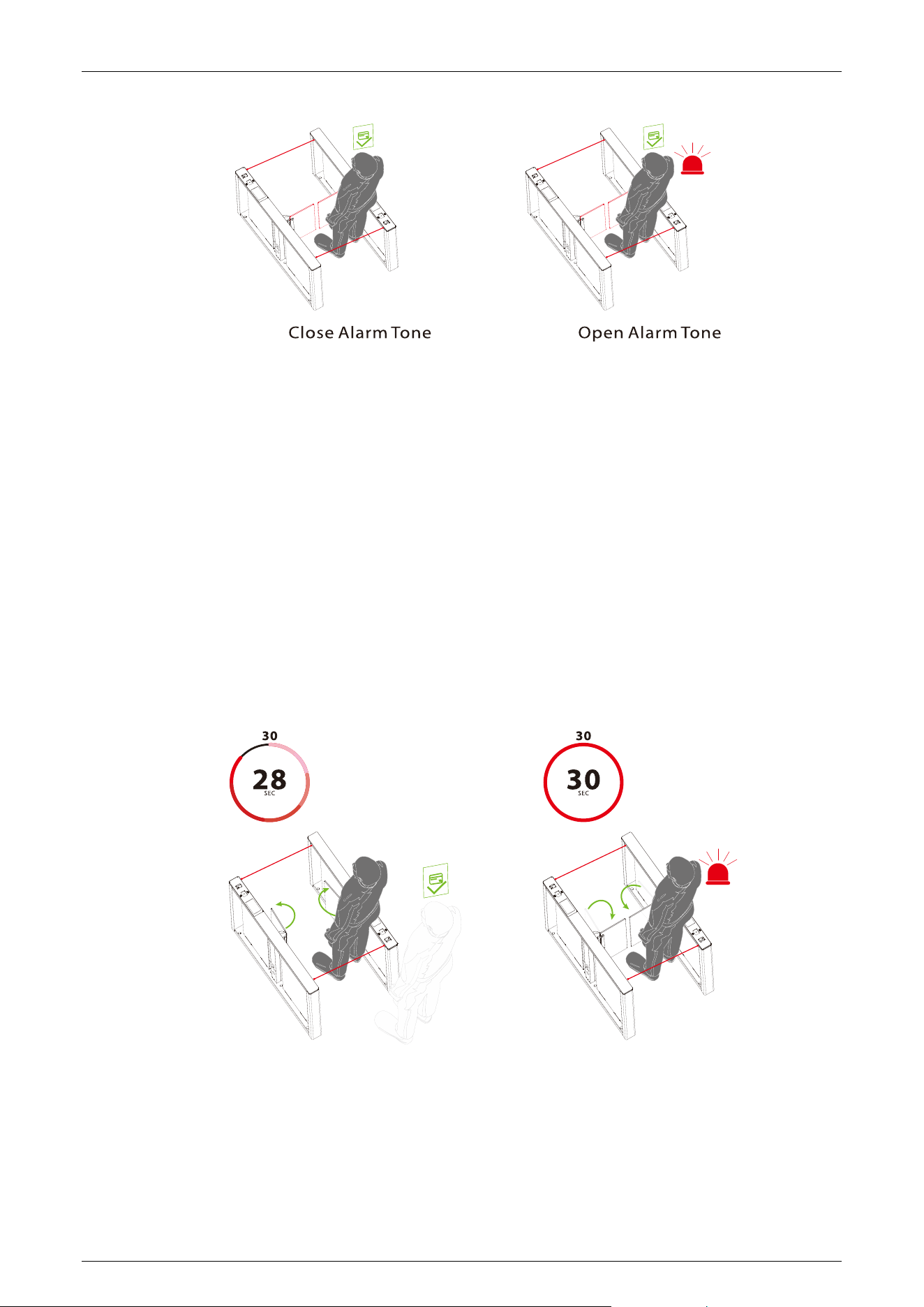
Close Alarm Tone (17EXXX)
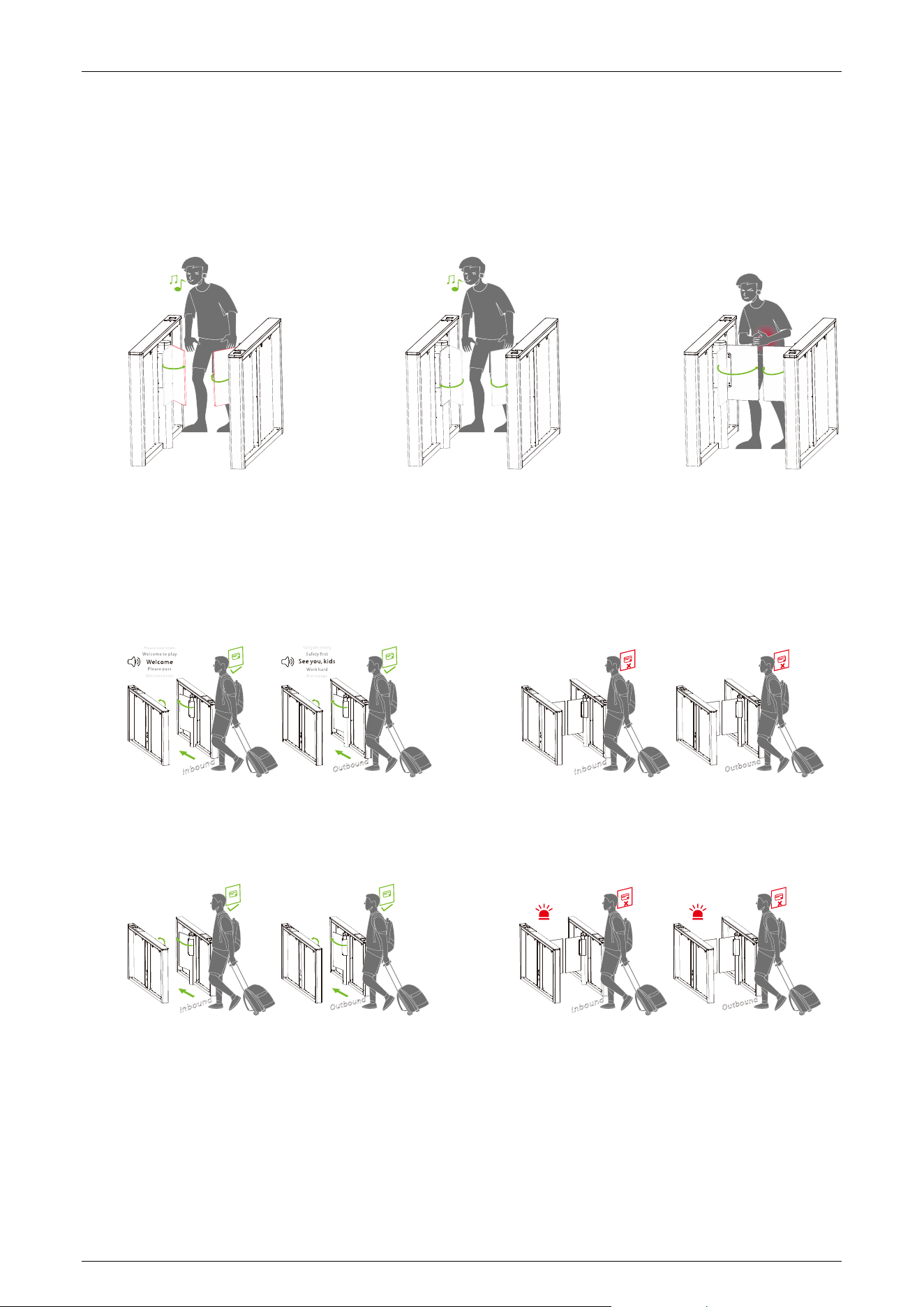
When the alarm tone is turned off, the Turnstile will not emit an alarm tone when encountering an
alarm situation. The following figure shows an example of the prohibition of authentication in lane:
(17E000) Close
(17E001) Open (Default)
Comet Series Speed Gate User Manual
Page | 39 Copyright © 2024 ZKTECO CO., LTD. All Rights Reserved.
Bluetooth Switch (18EXXX)
Turn on the Bluetooth function to facilitate the device to connect to the cell phone software to use.
For security reasons, Bluetooth will be turned off automatically if it is still not successfully connected
to the cell phone software after 50 seconds of Bluetooth being turned on.
(18E000) Close
(18E001) Open
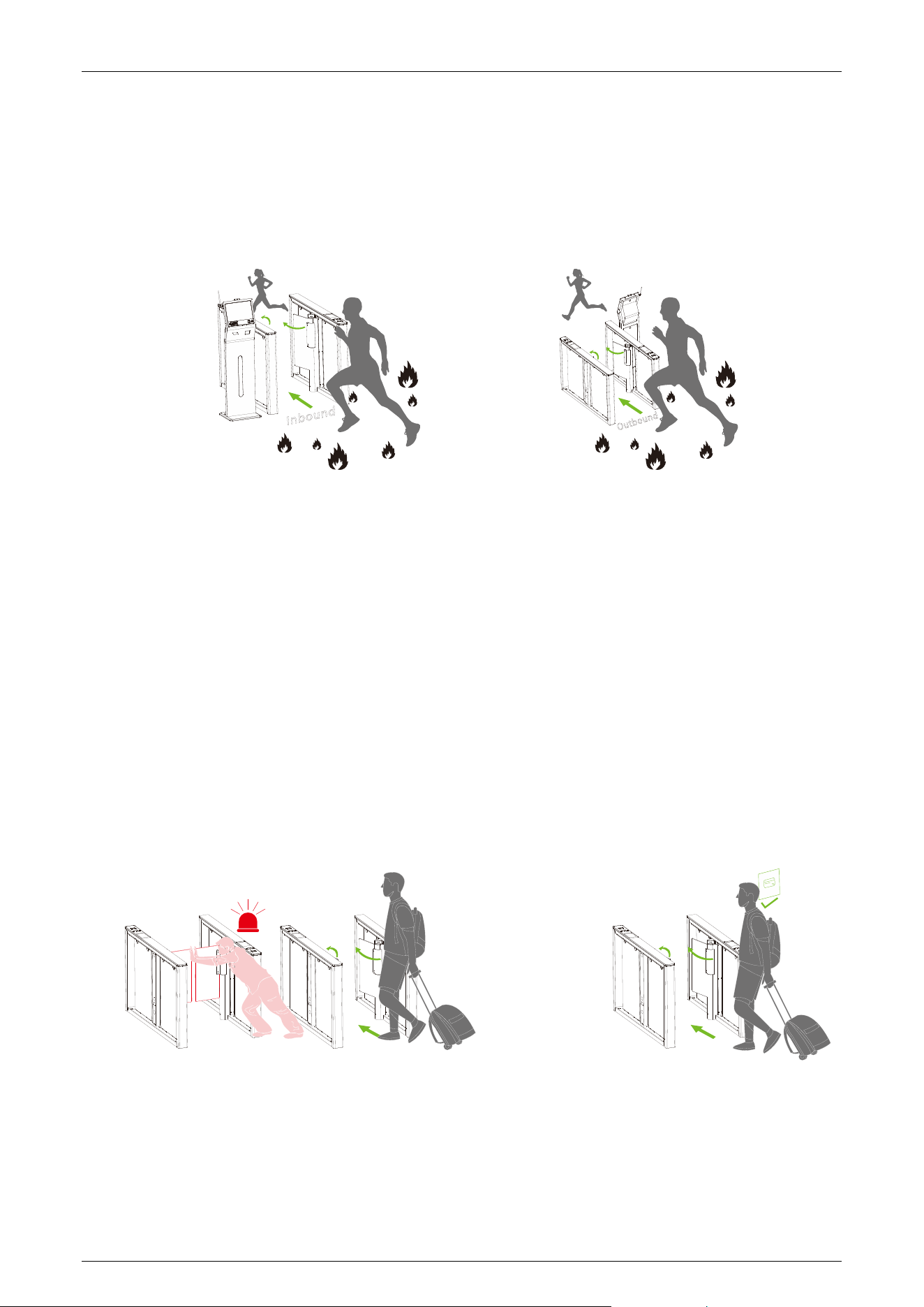
Stay Duration Time (19EXXX)
Set the duration of stay in the channel after successful verification. The valid value for Stay Duration
Time can be set between 5 to 30 seconds and the default value is 10s.
Force Adjustment (20EXXX)
The larger the number, the greater the efficiency of the gate opening and closing force. The valid
value for Force Adjustment can be set between 10 to 60 and the default value is 40.
Comet Series Speed Gate User Manual
Page | 40 Copyright © 2024 ZKTECO CO., LTD. All Rights Reserved.
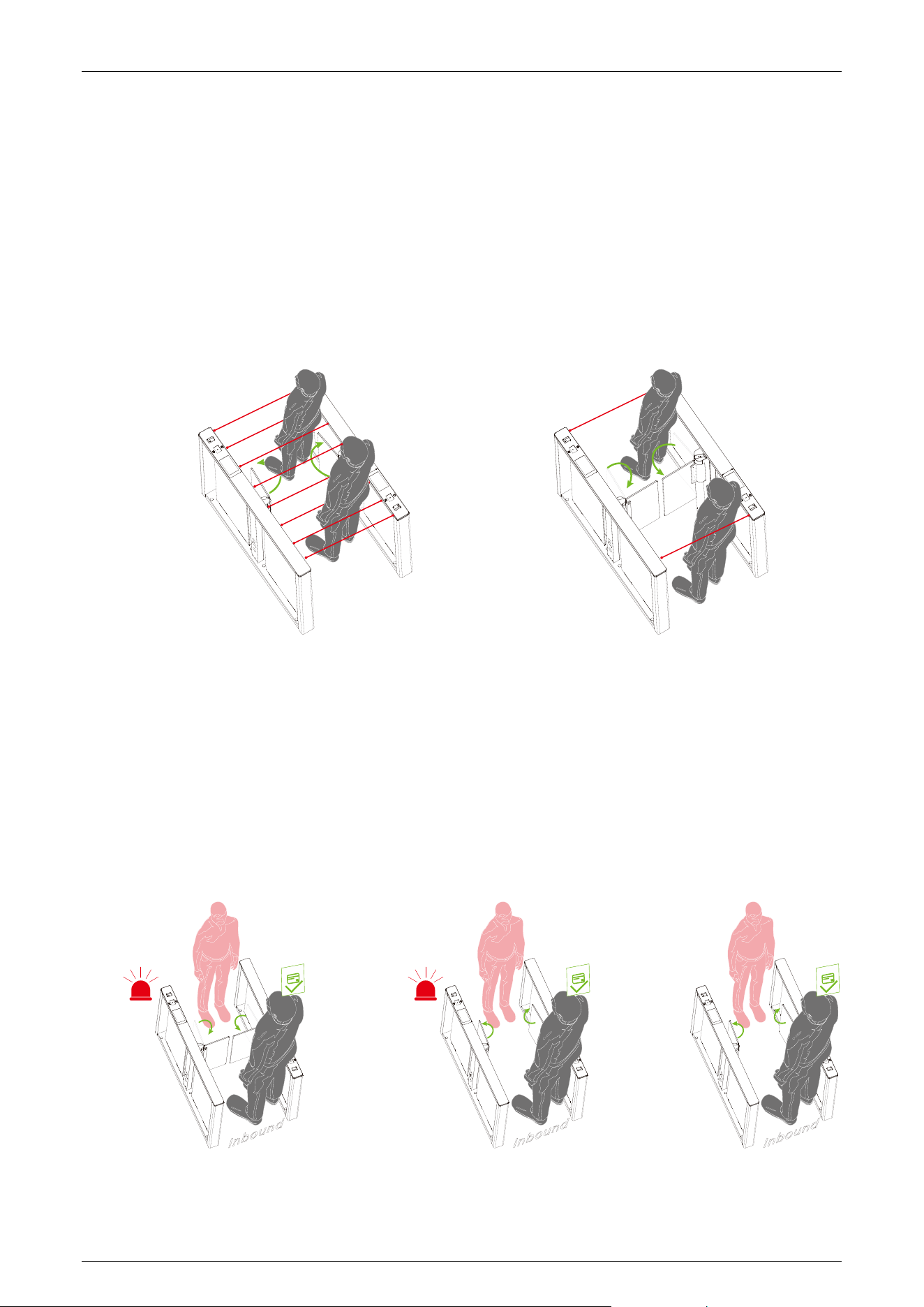
Fire Opening Direction (21EXXX)
According to the external fire device, select the corresponding type of trigger mode.
(21E000) Entry direction (Default)
(21E001) Exit direction
Clutch Locking Stroke (22EXXX)
Set the angle at which the clutch starts. The larger the number, the bigger the angle. The valid value
for Clutch Locking Stroke can be set between 0 to 99, and the default value is 0. When setting it to 0
do not lock it, adapting it to movements without a clutch.
Clutch Locking Mode (23EXXX)
When the gate is unlocked in an unauthorized way, the clutch gets locked automatically. The Clutch
Locking Mode can be set as:
(23E000) Automatic unlock (Default)
(23E001) Authentication to unlock.
Comet Series Speed Gate User Manual
Page | 41 Copyright © 2024 ZKTECO CO., LTD. All Rights Reserved.
Restore Factory Setting (24EXXX)
(24E001) Restore factory settings.
(24E002) Restart the device.
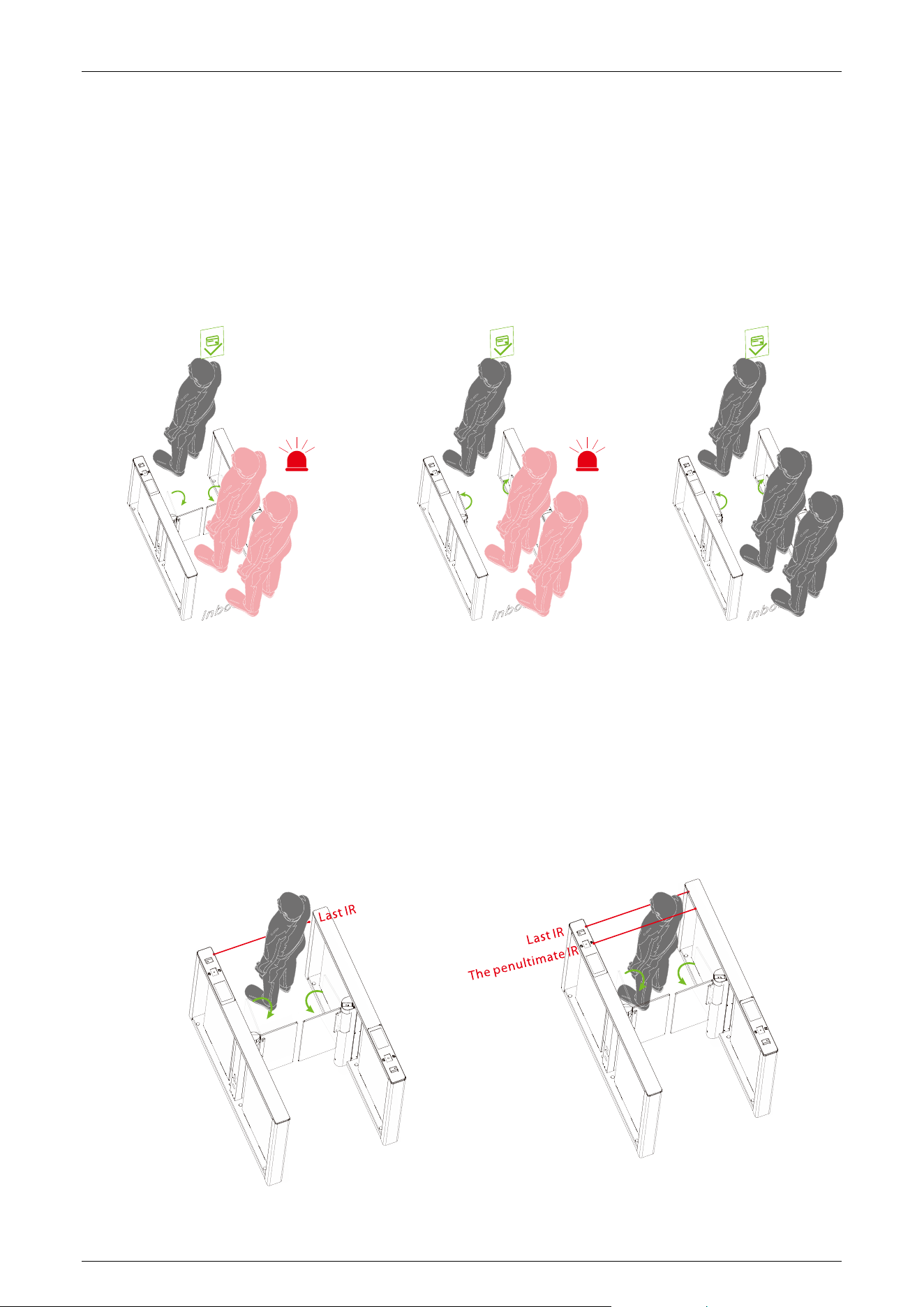
Anti-pinch Area Setting (25EXXX)
(25E000) All Infrared anti-pinch (Default)
(25E001) First and last pair are not anti-pinch.
False Direction Entry (26EXXX)
When the Anti-pinch Area Setting needs to be set to (25E001) only, the False Direction Entry (26E000)
is effective.
(26E000) Close (For flap barrier)
(26E001) Only alarm (Default)
(26E002) No detection
Comet Series Speed Gate User Manual
Page | 42 Copyright © 2024 ZKTECO CO., LTD. All Rights Reserved.
Anti-tailgate Setting (27EXXX)
When the Anti-pinch Area Setting needs to be set to (25E001) only, the Anti-tailgate Setting (27E000)
is effective.
(27E000) Close (For flap barrier)
(27E001) Only alarm (Default)
(27E002) No detection
Gate Closing Position (28EXXX)
When the Anti-pinch Area Setting needs to be set to (25E001) only, the Gate Closing Position
(28E001) is effective.
(28E000) Last pair (Default)
(28E001) Penultimate pair
Comet Series Speed Gate User Manual
Page | 43 Copyright © 2024 ZKTECO CO., LTD. All Rights Reserved.
Anti-pinch Action Setting (29EXXX)
(29E000) Stop (Default)
(29E001) Open
(29E002) Close the function
Voice Switching (30EXXX)
Sets whether the device announces a voice or an alarm tone.
(30E000) Voice playback
(30E001) Alarm tone (Default)
Swing Arm Type (31EXXX)
(31E000) Ordinary swing arm (Default)
(31E001) Larger swing arm

Comet Series Speed Gate User Manual
Page | 44 Copyright © 2024 ZKTECO CO., LTD. All Rights Reserved.
(31E002) Ultra swing arm
Right Synchronous Adjustment (32EXXX)
You can adjust the synchronization of the Master through this menu, the larger the value, the faster
the response of the Master to open the gate, the setting range lies between 30 to 200, and the
default value is 100.
Left Synchronous Adjustment (33EXXX)
You can adjust the synchronization of the Slave through this menu, the larger the value, the faster
the response of the Slave to open the gate, the setting range lies between 30 to 200, and the default
value is 100.
Entrance Direction Voice (34EXXX)
Select the voice to enter the direction, the setting range lies between 0 to 60, and the default value
is 0.
Exit Direction Voice (35EXXX)
Select the voice to exit the direction, the setting range lies between 0 to 60, and the default value is
17.
Zero Position Strength Adjustment (36EXXX)
Set the strength of the swing arm to return to the zero position, the larger the value, the stronger
the strength, the valid value of the zero position strength adjustment is 1 to 10, and the default
value is 2.
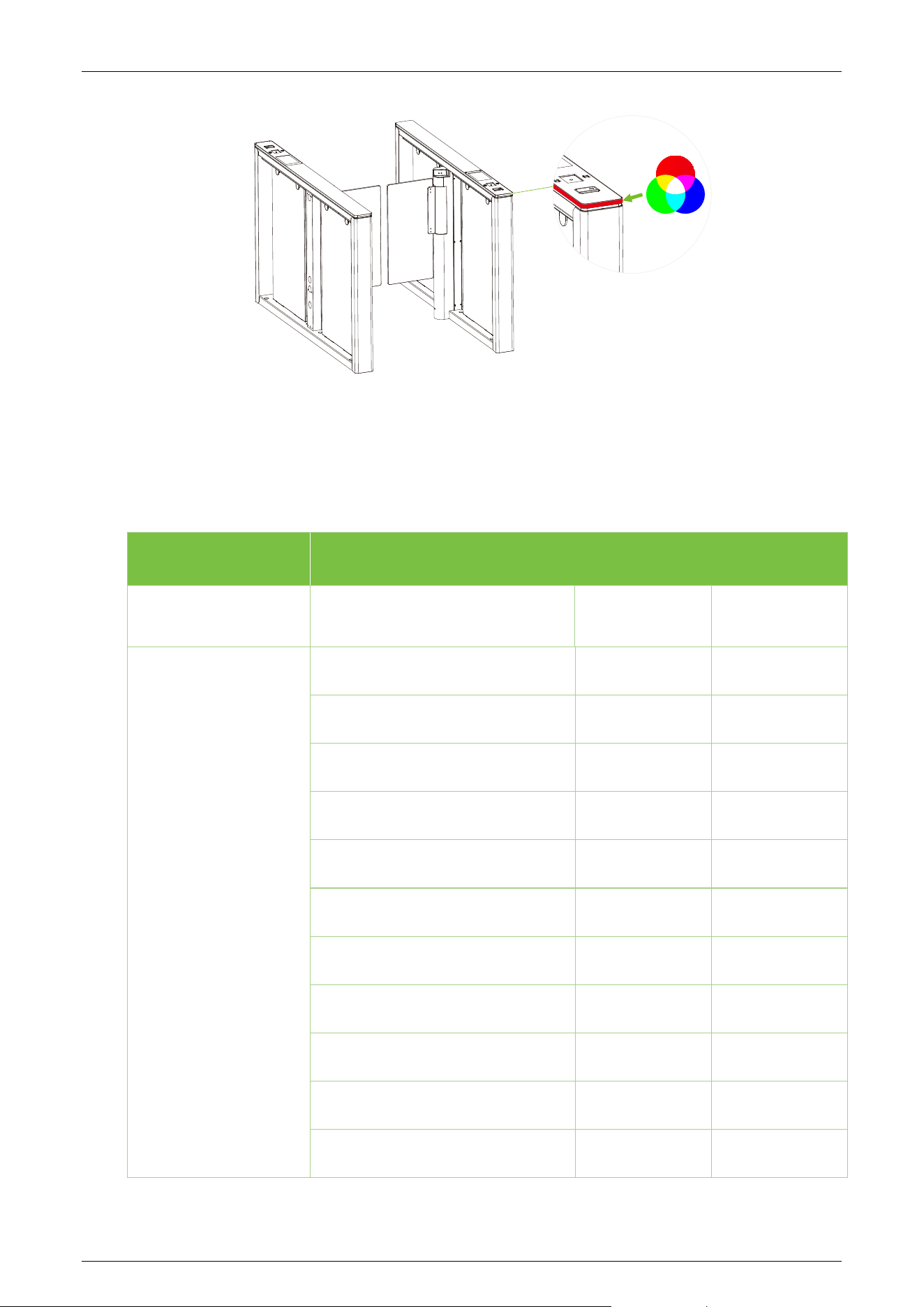
Standby Colour (37EXXX)
An embedded LED strip is situated along the barrier's side, offering a spectrum of 7 RGB colors and a
range of visual effects. This feature is fully customizable to meet our customer's unique preferences.
Comet Series Speed Gate User Manual
Page | 45 Copyright © 2024 ZKTECO CO., LTD. All Rights Reserved.
Voice Playback Content Correspondence Table 3.8
Item Voice Content
Control board
program failure
System failure! 0001 Not valid
Inbound verification
passed
Welcome! 0060 Valid
Welcome home! 0061 Valid
Peace be with you! 0062 Valid
I wish you good health! 0063 Valid
Please pass! 0064 Valid
We welcome your patronage! 0065 Valid
Please be safe! 0066 Valid
Welcome to play! 0067 Valid
Have a nice trip! 0068 Valid
Please slow down! 0069 Valid
Be safe, please wear a helmet! 0070 Valid

Comet Series Speed Gate User Manual
Page | 46 Copyright © 2024 ZKTECO CO., LTD. All Rights Reserved.
Successful registration and good
luck!
0071
Valid
Welcome home, and have a good
trip!
0072
Valid
Ticket checks approved. Welcome
aboard!
0073
Valid
Get to work safely and get home
safely!
0074
Valid
Please pass in order! 0075 Valid
“Dong” 0076 Valid
Outbound
Verification passed
Bon voyage! 0080 Valid
Welcome to the next visit! 0081 Valid
Safety first 0086 Valid
Work hard! 0087 Valid
See you, kids! 0088 Valid
Please authenticate and pass! 0004 Not valid
Tailgate entry! 0014 Not valid
False direction entry
without
authentication
False direction entry!
0016
Not valid
Prohibited, please use other
access!
0007
Not valid
Verify that the stay in
the channel at the
time of passage
exceeds 5s!
Pass quickly and do not linger! 0015
Not valid
Illegal ramming of
the swing arm
Forced entry, please be advised! 0008
Not valid

Comet Series Speed Gate User Manual
Page | 47 Copyright © 2024 ZKTECO CO., LTD. All Rights Reserved.
The following abnormal alarms
Please verify outside the channel
The device is set up to
"Prohibit authentication
in Lane ", and personnel
entering the channel are
prompted to exit the
out-of-channel
verification.
0005
System reboot in progress System reboot prompts 0006
Fire switch activation
A fire signal is detected
and the fire setting is
executed.
0011
Infrared anomaly
Infrared anomaly
detected
0012
Alarm tone 2
Alarm tone playback in
alarm status
0031
Welcome 0002
Bon voyage! 0003
Out-of-channel card
swipe
0004
“Dong” 0029
Break-in 0009
Please reboot the
system.
0013
Please correct the zero
position
0017
0030 Sound effect 1 0030
Comet Series Speed Gate User Manual
Page | 48 Copyright © 2024 ZKTECO CO., LTD. All Rights Reserved.
Error Code for Turnstile 3.9
Error Code Cause
ER0002
Power-on Self-test failure, Hall Limit Detection Error
ER0004
Run Timeout
ER0008
Clutch Locked
ER016
The code disk detection failed.
ER032
Electric Motor Shaft Lock Protection failure

Comet Series Speed Gate User Manual
Page | 49 Copyright © 2024 ZKTECO CO., LTD. All Rights Reserved.
4 Maintenance
Chassis Maintenance 4.1
The chassis is made of aluminum stainless steel or cold rolled sheet steel. If it has been used for a
long time, the surface may have rust stains. Clean the surface thoroughly with a clean cloth regularly.
Apply anti-rust oil on the surface, but do not cover the infrared sensor.
Movement Maintenance 4.2
Before performing maintenance, turn off the power. Open the door, wipe the surface dust, and
apply lubricant for smooth movement.
Power Supply Maintenance 4.3
Switch off the power supply before maintenance.
Check the power plug connection, if found loose, fix it properly.
Do not change any connection position randomly.
Periodically check the insulation of the external power supply.
Do periodic checks for any kind of leakage.
Check if the technical parameters of the interface are normal.
Check the service life of the electronic components and replace them accordingly.
Caution: All maintenance procedures mentioned above for speed gates must be conducted by a
professional technician, particularly for the movement and electric control components. To ensure
operational safety, always switch off the power supply when the speed gate is not in use.

Comet Series Speed Gate User Manual
Page | 50 Copyright © 2024 ZKTECO CO., LTD. All Rights Reserved.
5 Troubleshooting
No.
Failure Descriptions Analysis and Solution
1
The mode indicator light does not
respond or the indication is incorrect.
Check that the control panel mode
indicator wiring is correct or that the
contact is poor.
2
After swiping the card, there is only a
speed gate unlocked.
Check the mode setting of the master and
slave devices and the 8-core, and 2-core
connection lines. See the wiring diagram for
the specific connection circuit.
3
The speed gate doesn’t close when the
opening delay time is ended.
Check to see if the opening delay time is
too long or whether the IR sensor is
covered.
4
When the gate is self-tested, the swing
arm is not in the normal closing
position!
In the process of self-
test, there are
obstacles, please remove the obstacles, and
restart the self-test after power-on!
Comet Series Speed Gate User Manual
Page | 51 Copyright © 2024 ZKTECO CO., LTD. All Rights Reserved.
6 Packing List
The package consists of the following items:
Comet-Series 1
Power Cable 1
Card
1
Expansion Screw M12*100
6
Washer
6
Expansion Screw Washers
6
Stainless Steel
Maintenance Wipes
1
Hex Wrench
1

Page | 52 Copyright © 2024 ZKTECO CO., LTD. All Rights Reserved.
ZKTeco Industrial Park, No. 32, Industrial Road,
Tangxia Town, Dongguan, China.
Phone : +86 769 - 82109991
Fax : +86 755 - 89602394
www.zkteco.com
Copyright © 2024 ZKTECO CO., LTD. All Rights Reserved.