
SES 6020BK
EN
ESPRESSO COFFEE MACHINE WITH
ABUILT-IN GRINDER
Translation of the original manual
SES 6020BK
A
1
4
5
9
11
12
13
7 8
2
3
19 20
15 16 17 18
14
6
10
B
1 2 3 4
7 8 7
5 6
C
D
E
F
G
G2G1
H
H1 H2
H3
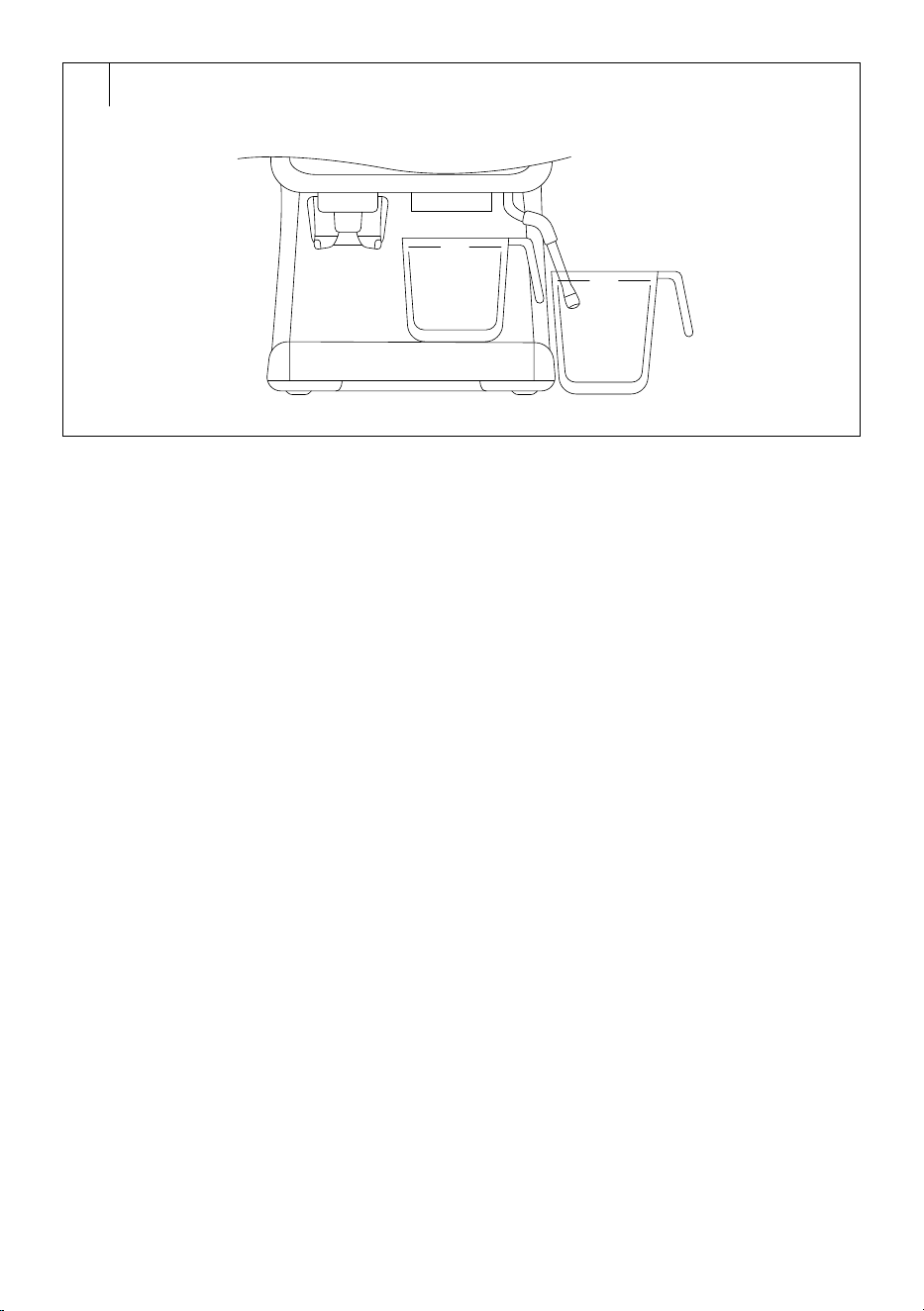
I
1 L
1 L

- 1 -
01/2026
2026, .
EN
Espresso Coffee Machine with aBuilt-in Grinder
User Manual
Important Safety Instructions
READ CAREFULLY AND STORE FOR FUTURE USE.
• This appliance is not to be used by children. Keep this
appliance and its power cable out of the reach of children.
• The appliance may be used by persons with reduced
physical, sensory or mental abilities or lack of experience
and knowledge, provided they are supervised or have
been instructed on the safe use of the appliance and
understand the potential hazards.
• Children must not play with the appliance.
• Cleaning and maintenance must not be performed by
unsupervised children.
• Keep the appliance and its power cord out of reach of
children younger than 8 years of age.
• If the mains cable is damaged, have it replaced in
aprofessional service centre in order to prevent
adangerous situation. Never use the appliance if the
power cable is damaged.
• Always clean the parts of the appliance that come into
contact with food with clean warm water and alittle neutral
dishwashing liquid, rinse them with clean water and wipe
dry.
ESPRESSO COFFEE MACHINE WITH ABUILT-IN GRINDER
- 2 -
01/2026
2026, .
WARNING:
Incorrect use may lead to injury.
Always disconnect the appliance from the power
socket if you are leaving it unattended and before
assembly, disassembly or cleaning.
• This appliance is intended for household use. It is also
suitable for personal non-commercial use in spaces such
as:
– kitchenettes in stores, offices and other workplaces;
– agriculture;
– hotels, motels and other residential spaces;
– bed and breakfast establishments.
• The appliance must not be immersed in water when it is
being cleaned.
WARNING:
The filling hole must not be opened during use.
WARNING:
Prevent the plug from getting wet.
• The outer surface of the appliance heats up during use
and may be hot for some time after use. Be very careful.
• The appliance must not be placed in acabinet when in
use.
. . . . . . . . . . . . . . . . . . . . . . . . . . . . . . . . . . . . . . . . . . . . . . . . . . . . . . . . . . . . . . . . . . . . . . . . . . . . . . . . . . . . . . . . . . . . . . . . . . . . . . . . . . . . . . . . . . . . . . . . . . . . . . . . . . . . . . . . . . . .
- 3 -
01/2026
2026, .
Additional Important Safety Instructions forUse of the Appliance
• Before connecting the appliance to apower socket, make sure that its nominal voltage indicated on the rating plate matches the electrical voltage of
the socket.
• Connect the appliance only to aproperly earthed socket. For safety reasons, we do not recommend using adaptors or extension cables.
• Do not place the appliance on windowsills, sink drain trays or unstable surfaces. Always place the appliance on astable, flat and dry surface.
• Do not place the appliance on an electric or gas stove or near an open flame.
• Never use the appliance in the immediate vicinity of abath, shower or swimming pool.
• The appliance is designed formaking coffee or tea (only by dispensing hot water). Use the appliance only for its intended purpose.
• Do not use the appliance outdoors.
• Use the appliance according to the instructions in this user manual. Failure to do so may result in injury, damage to the appliance, or ahazardous
situation.
• Leave at least 15 cm of free space around and above the appliance to ensure proper air circulation during operation.
• Only use the top surface of the appliance to warm cups, the portafilter or filters. Do not use it to store other items.
• Fill the water tank with clean, cold water. Do not pour heated water or other liquids into the tank or insert any objects into it.
• Never fill the coffee bean hopper with ground or instant coffee, caramelised or otherwise specially treated coffee beans, cocoa beans or other items
that may damage the appliance.
• Before turning on the appliance, make sure that:
– the drip tray and grille are in place;
– the water tank is filled with asufficient amount of water and is properly in place. The water level must not exceed the maximum mark;
– the coffee bean hopper is correctly installed in the appliance and contains coffee beans.
• Never start, use or switch on the appliance withan empty water tank or an empty coffee bean hopper. This can damage the appliance.
• Take extra care when operating the appliance to avoid scalding with hot water or steam.
• The hot water or steam dispenser may only be used continuously for amaximum of 99 seconds.
• Regularly check the water level in the tank while using the appliance. If the water level drops below the minimum mark, refill the tank according to
the instructions in this manual. Before adding water, first turn the appliance off and disconnect it from the power socket.
• Use the built-in coffee grinder only for grinding coffee beans. Do not use it for any other purposes.
• Ensure that no hair or other items enter the grinder area during the grinding process. The coffee bean hopper lid should always be properly closed
unless you are topping up the coffee beans.
• Be careful when handling the full drip tray. The water can be hot and there is arisk of scalding or burns.
• The appliance is equipped with abuilt-in thermal fuse that switches it off when the pump is idling to prevent damage. If such asituation occurs,
unplug the power cable and allow the appliance to cool down for at least 30 minutes. Then you can use it again.
• Do not move the appliance with acup of coffee placed on the drip tray grid or with cups placed on the surface designated for warming them.
• Ensure that the power cable does not come into contact with hot surfaces.
• Do not leave the power cord hanging over the edge of atable or awork bench.
• Unplug the appliance from the power socket by pulling on the plug, not the power cable. Otherwise, you may damage the mains cable or the socket.
• Make sure that the power cable and plug do not come into contact with water or other fluids.
• To avoid the risk of electric shock, do not repair or modify the appliance yourself. All repairs should be carried out by an authorised service centre.
Tampering with the appliance may result in the loss of your legal rights regarding faulty performance or warranty for quality.
. . . . . . . . . . . . . . . . . . . . . . . . . . . . . . . . . . . . . . . . . . . . . . . . . . . . . . . . . . . . . . . . . . . . . . . . . . . . . . . . . . . . . . . . . . . . . . . . . . . . . . . . . . . . . . . . . . . . . . . . . . . . . . . . . . . . . . . . . . . .
EXPLANATION OF SYMBOLS PLACED ON THE PRODUCT OR INTHE ACCOMPANYING DOCUMENTATION
The product meets all the basic requirements of the applicable EU directives.
This symbol on products or accompanying documents means that used electric or electronic products must not be added to ordinary
municipal waste.
. . . . . . . . . . . . . . . . . . . . . . . . . . . . . . . . . . . . . . . . . . . . . . . . . . . . . . . . . . . . . . . . . . . . . . . . . . . . . . . . . . . . . . . . . . . . . . . . . . . . . . . . . . . . . . . . . . . . . . . . . . . . . . . . . . . . . . . . . . . .
- 4 -
01/2026
2026, .
• Thank you for purchasing our SENCOR product; we hope it will serve
to your satisfaction.
• Prior to using this appliance, please read the user manual thoroughly,
even in cases when you are already familiar with the use of similar
types of appliances. Use the appliance only as described in this
user manual. Keep the manual for future reference. If you pass the
appliance on to another person, ensure that this user manual is
included.
• Carefully unpack the appliance and make sure not to discard any part
of the packaging material until you have removed all its components.
It is recommended that you keep the original packaging, packing
material, receipt and confirmation of the extent of the seller'sliability
or warranty certificate at least for the duration of the legal right to
file adefect claim or the quality warranty. When transporting the
appliance, we recommend repackaging it in the original box provided
by the manufacturer.
. . . . . . . . . . . . . . . . . . . . . . . . . . . . . . . . . . . . . . . . . . . . . . . . . . . . . . . . . . . . . . . . . . . .
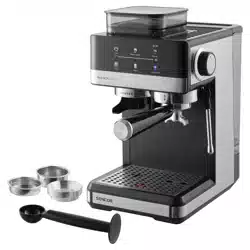
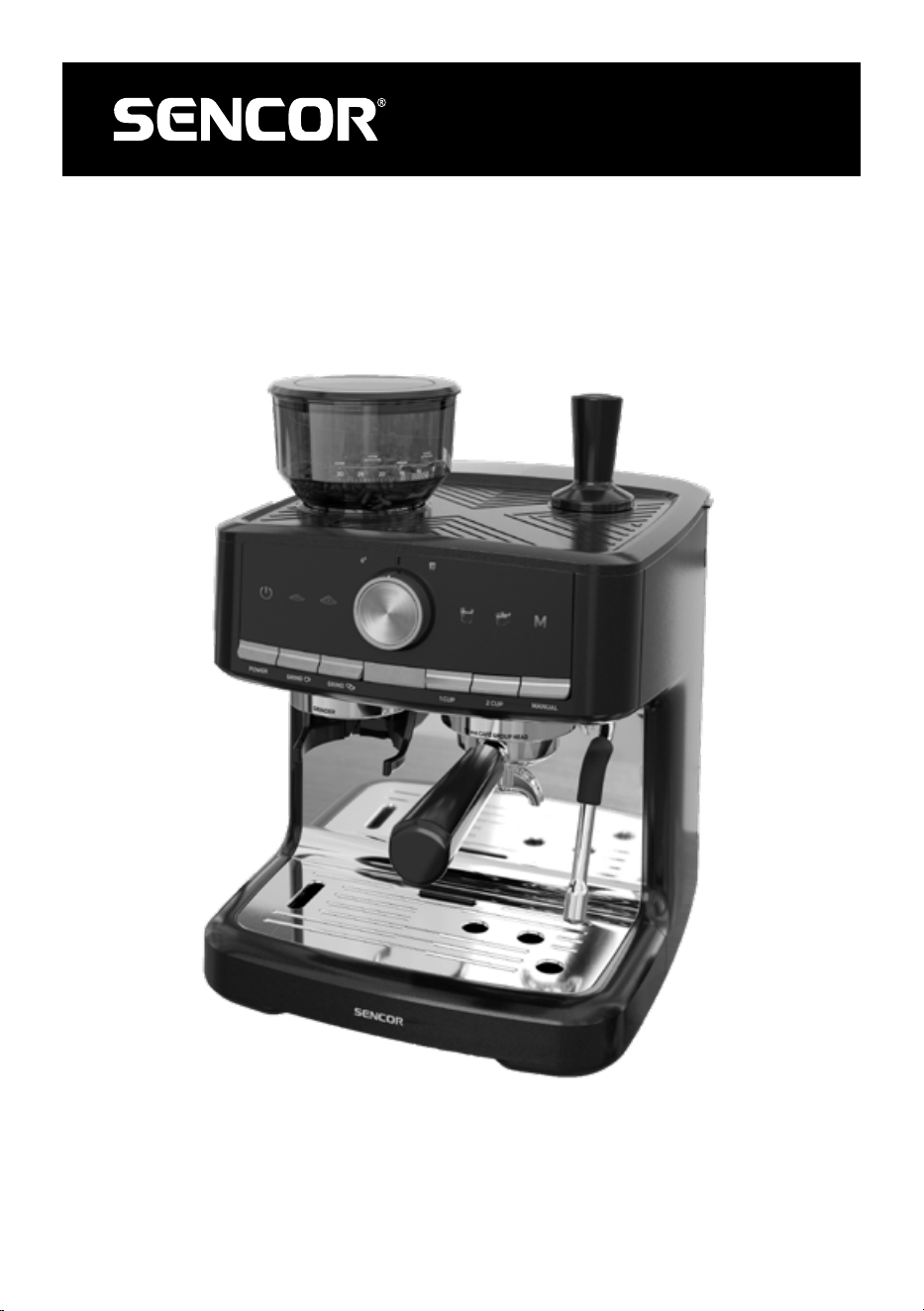
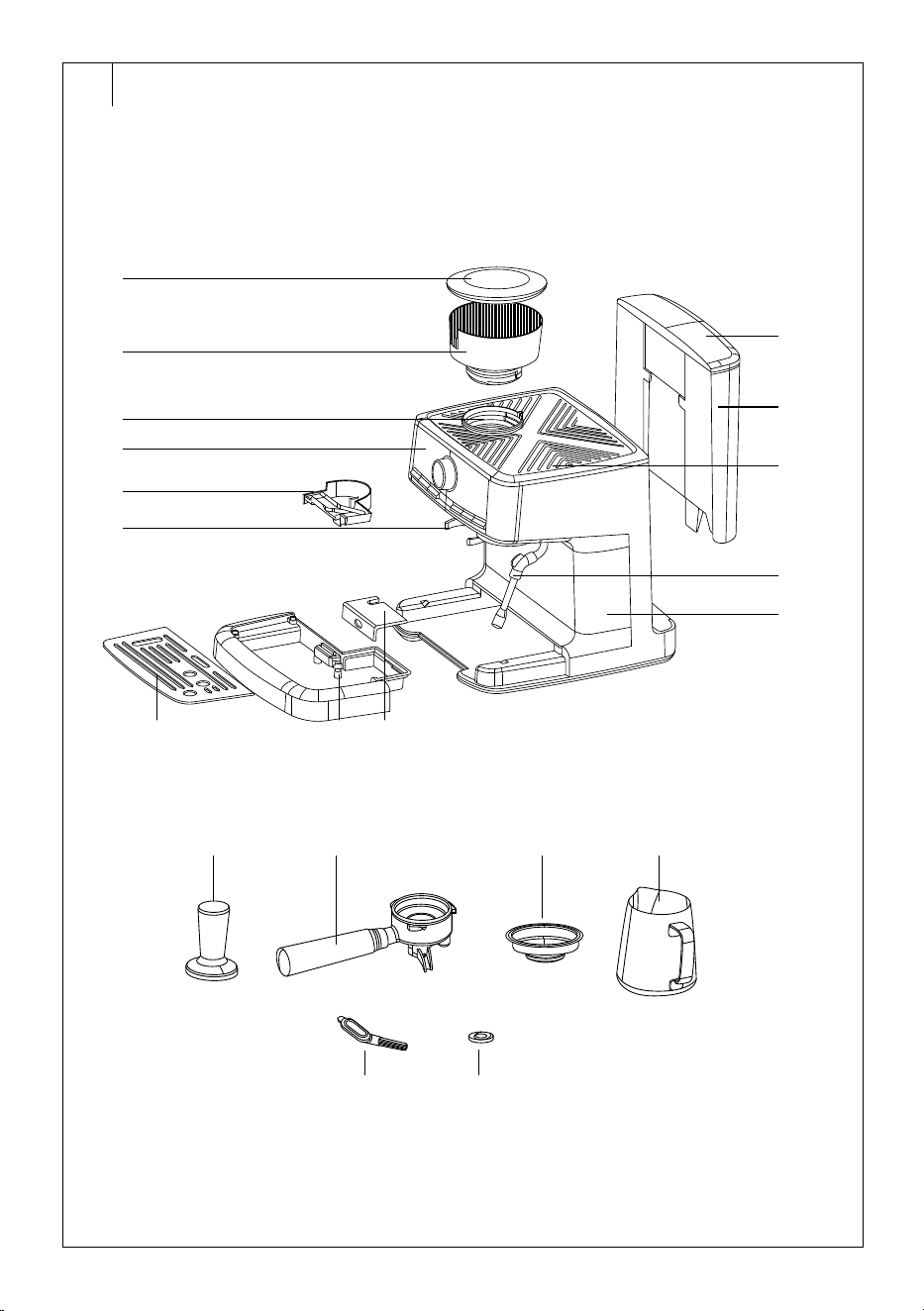
DESCRIPTION OF THE COFFEE MACHINE
A1 Coffee bean hopper lid
A2 Coffee bean hopper
A3 Built-in grinder
A4 Control panel
A5 Portafilter holder
A6 Drip tray grid
A7 Drip tray
A8 Drip tray cover
A9 Storage box for accessories
A10 Cup warming plate
A11 Lid of the water tank with
built-in handle
A12 Water tank
A13 Rotating steam nozzle
A14 Coffee machine body
A15 Tamper
A16 Portafilter
A17 Filters for 1 cup and2 cups
A18 Stainless steel jug
A19 Cleaning brush
A20 Cleaning tool
. . . . . . . . . . . . . . . . . . . . . . . . . . . . . . . . . . . . . . . . . . . . . . . . . . . . . . . . . . . . . . . . . . . .
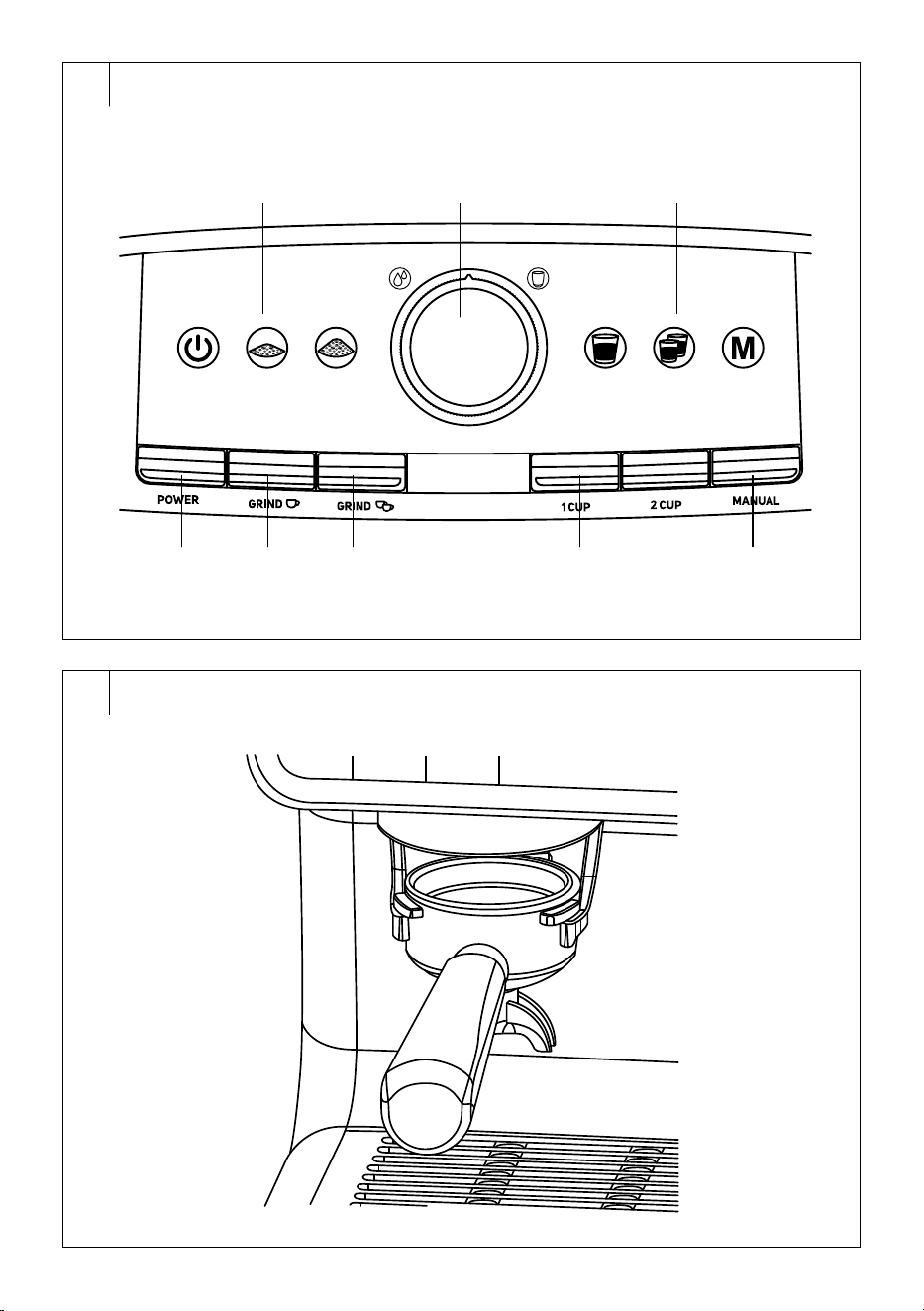
DESCRIPTION OF THE CONTROL PANEL
B1 POWER button to switch the
coffee machine on/off
B2 GRIND button for brewing
1 cup of coffee
B3 GRIND button for grinding
double batches of coffee
B4 1 CUP button to make 1 cup of
Espresso
B5 2 CUP button to make 2 cups
of Espresso
B6 MANUAL button formanual
coffee preparation
B7 Operation icons
B8 Hot water and steam spout
control
Hot water dispensing
Hot steam dispensing
Centre position = off
. . . . . . . . . . . . . . . . . . . . . . . . . . . . . . . . . . . . . . . . . . . . . . . . . . . . . . . . . . . . . . . . . . . .
INTENDED USE
• The Sencor SES 6020BK coffee machine is designed forpreparing
coffee beverages (Espresso, Americano, Cappuccino or Latte) using
freshly roasted coffee beans. The coffee grinder is designed togrind
freshly roasted coffee beans. The coffee machine'ssteam wand is
used todispense hot water andfroth milk.
. . . . . . . . . . . . . . . . . . . . . . . . . . . . . . . . . . . . . . . . . . . . . . . . . . . . . . . . . . . . . . . . . . . .
BEFORE FIRST USE
• Before first use, remove the appliance and its accessories from the
packaging and discard all promotional labels and tags. Check that
neither the appliance nor any of its components is damaged.
• Check that there are no stickers or foils left on the display.
• Make sure you have removed all accessories from thepackaging.
• Wipe the outer surface of the appliance with aslightly dampened
sponge and then wipe dry.
• Remove the water tank from the appliance. Remove the red plug from
the water outlet, otherwise no water will be pumped into the coffee
machine. Rinse it with clean water and asmall amount of neutral
dishwashing detergent. Then thoroughly rinse with clean water, dry,
and place it back into the coffee machine.
• Remove the drip tray and grille from themachine.
• Wash the drip tray withgrid andstorage box for accessories,
portafilter, stainless steel filters andtamper inwarm water withalittle
kitchen detergent using asoft sponge. Then rinse with clean water
and dry.
• Wipe the outer surface of the coffee machine and the coffee bean
hopper, including the lid, with aslightly damp andwell-wrung sponge,
dry with aclean cloth.
• Insert the water tank in to the rear of the appliance. Push gently so that
it sits properly in its place.
• Insert the storage box into the coffee machine. Place the grid onto the
drip tray and put it back into the coffee machine.
• Place the portafilter, stainless steel filters and the tamper on the top
surface.
Positioning the coffee machine
• Place the coffee machine on aflat, dry and clean surface at
asufficient distance from the power socket.
• Ensure there is enough free space around it for manipulation, at least
15 cm on all sides.
• Do not place the coffee machine in aclosed space when using it.
. . . . . . . . . . . . . . . . . . . . . . . . . . . . . . . . . . . . . . . . . . . . . . . . . . . . . . . . . . . . . . . . . . . .
SETUP BEFORE USE
Drip tray
• The drip tray with agrid catches drops of brewed coffee when the
portafilter is removed, hot water used to froth milk, and any spilled
milk during frothing. Therefore, make sure that both parts are correctly
installed andinserted into the appliance.
• We recommend emptying the appliance andwashing the drip
tray after each use. When washing, follow the instructions in the
"CLEANING AND MAINTENANCE" section.
Note:
The drip tray is equipped with afullness indicator. It is
afloat. When the liquid level in the drip tray pushes it up,
the drip tray must be emptied.
Storage box
• The storage box (A9) with accessories (filter, cleaning brush and
cleaning tool) is located behind the drip tray. Remove the drip tray to
take out the storage box with accessories.
Warming the cups
• Once you turn on the coffee machine, the cup warming plate will
automatically heat up. Place empty coffee cups upside down on to
surface and let them warm up.
Filling the water tank
• The maximum capacity of the water tank is 2.5 l.
• The hopper lid forms one part with thehandle. Pull out the handle to
open the lid.
• Grasp the tank by the handle and lift it upwards.
• Fill it with cold potable water up to the maximum mark and insert
it back. The moldings on the inner wall must fit the protrusions in
thecoffee machine.
• Then close the lid of the water tank. The water tank must be properly
seated in place for water to be pumped into the internal system.
• The water you pour into the water tank should ideally be at room
temperature (approximately 25 °C). Too cold water can negatively
affect the final taste of the coffee beverage. Do not leave the remaining
EN
Espresso Coffee Machine with aBuilt-in Grinder
User Manual
- 5 -
01/2026
2026, .
water in the water tank for more than one day. For brewing quality
fresh coffee, it is necessary to use fresh water. Otherwise, the final
taste of the coffee drink may be adversely affected.
Warning:
Do not overfill the water tank. Never fill the water
tank with warm, hot or sparkling water or liquids such
as milk. Do not fill the water tank when it is inserted
in the appliance. You risk splashing the appliance
overfilling the water tank.
Adding coffee beans to the hopper
• Remove the hopper lid and pour fresh coffee beans into the hopper.
Put the lid back on.
• The hopper is not suitable forstoring coffee beans for along period
of time. If you do not plan to use the coffee machine for along time,
remove the hopper andpour the unused coffee beans into asuitable
container. Store coffee beans in an airtight container in acool and
dry place.
Note:
Themaximum capacity of the hopper is 250 g of coffee
beans. Do not overfill it. Never fill the hopper with ground or
instant coffee, caramelised or otherwise specially treated
coffee beans, cocoa beans or other items that may damage
the appliance.
Adjusting the grind coarseness
• The grinding coarseness is adjusted by turning the hopper clockwise
or anticlockwise so that the line on the hopper is always aligned with
the number on the grinding coarse scale.
• You can adjust the grinding coarseness in30 levels: from 1 (finest) to
30 (coarsest).
• For espresso coffee, we recommend setting the grind level to 12–14.
Adjust the grind size as needed.
• Adjust the grinding coarseness byone step at atime. The change of
the settings will show after the second to third cup.
• If the coffee flows out very slowly, it means that the beans are ground
too finely and acoarser grind should be set. If the coffee flows out too
quickly, it means that the beans are ground too coarsely and afiner
grind should be set.
. . . . . . . . . . . . . . . . . . . . . . . . . . . . . . . . . . . . . . . . . . . . . . . . . . . . . . . . . . . . . . . . . . . .
TURNING THE COFFEE MACHINE ON
• Insert the mains cable plug into the mains socket.
• Press the POWER button, the coffee machine will turn on andstarts
to preheat. The icons of the 1 CUP, 2 CUP, MANUAL and hot water
andsteam icons will flash, indicating that the machine is heating up.
• Once the coffee machine is preheated, the control panel lights up.
• When switching on for the first time, it is recommended to rinse the
coffee machine for the first time withan inserted lever andafilter.
Place asmaller cup of approximately 100 ml under the lever
andpress the 2 CUP button. Wait for the water to drain into the cup
and the control panel will light up again. Pour out the water from the
cup.
• Rinse the portafilter and filter basket under the running warm water
and dry thoroughly.
. . . . . . . . . . . . . . . . . . . . . . . . . . . . . . . . . . . . . . . . . . . . . . . . . . . . . . . . . . . . . . . . . . . .
PREPARATION FOR GRINDING COFFEE
Inserting and removing the filter
• Insert the selected stainless steel filter in the portafilter. Push gently so
that the filter fits well into the hole in theportafilter.
• If you will be preparing one cup of coffee, insert astainless steel
filter for 1 cup. If you are preparing two cups of coffee, or astronger
espresso coffee, insert astainless steel filter for 2 cups.
• Allow the filter andportafilter to cool down for awhile before removing
them. If the filter is difficult to take out, you can use acutlery knife,
which you insert between the edge of the filter andthe edge of the
portafilter, andmove the knife upwards to release the filter from
theportafilter.
Warning:
Before removing the filter from theportafilter, make
sure that both the filter and theportafilter have cooled
down. Do not remove the filter from the portafilter
immediately after making coffee. They are very hot
andthere is arisk of injury.
Grinding coffee
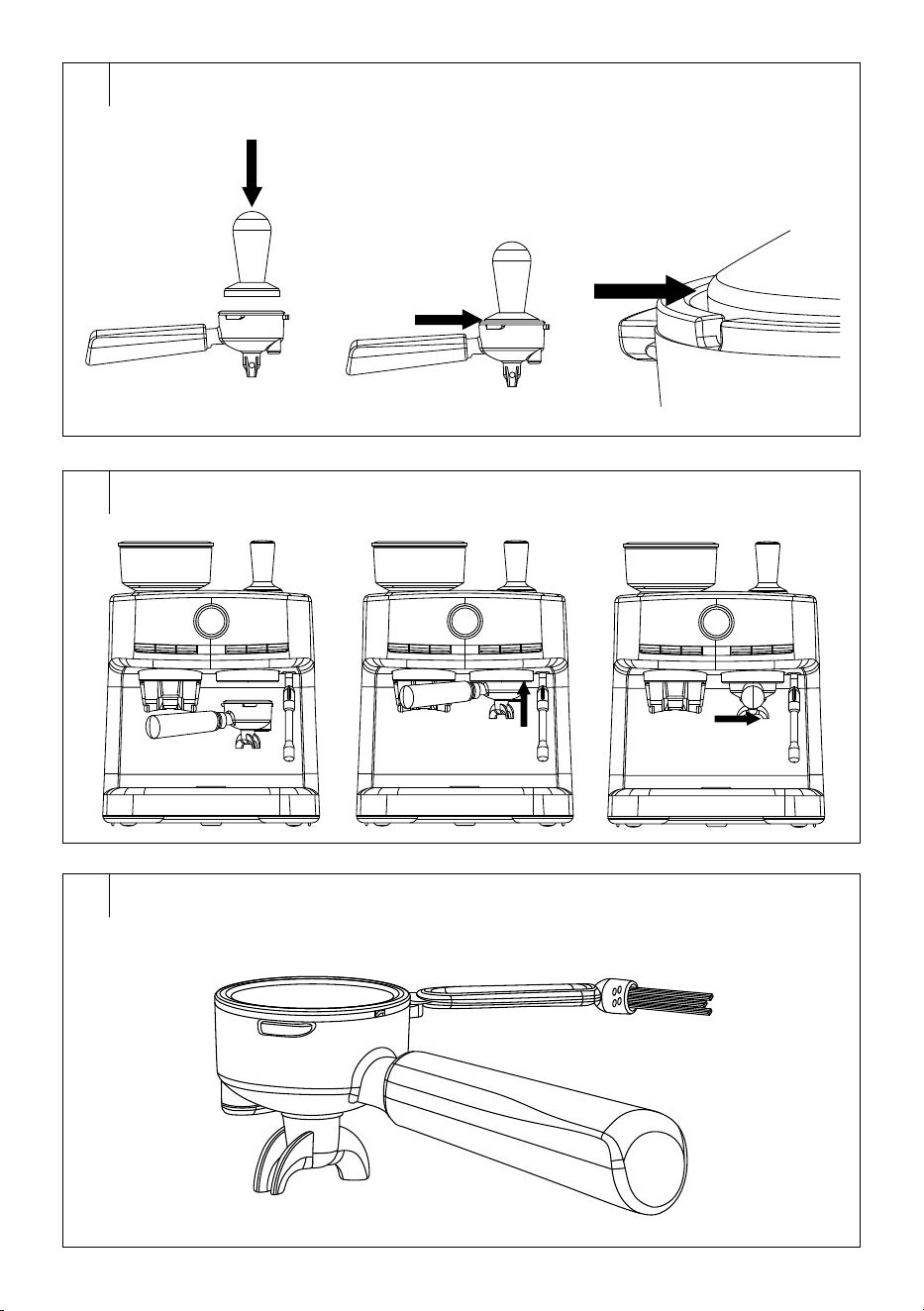
• Insert the portafilter into the holder – see Figure C.
• Adjust the grinding coarseness as necessary – see the previous part
of the manual Setting the grinding coarseness.
• Use the GRIND
or GRIND button to start grinding.
• Apre-set amount of ground coffee is ground into the filter. For one cup
it is approximately 12–13 g, for two cups it is approximately 18–19 g.
• The grinding process will automatically stop once the pre-set amount
of coffee has been ground into the filter.
• If you need to stop the grinding process earlier, press the GRIND
or
GRIND button.
• Carefully remove the portafilter from the holder andremove the
portafilter attachment if you have installed it.
Note:
You can adjust the grinding time according to your personal
preferences, according to the type of coffee or the degree
of roasting of the coffee beans. Follow the instructions in
the USER SETTINGS / ADJUSTING THE AMOUNT OF
GROUND COFFEE section.
Coffee Tamping
• Spread the ground coffee evenly in the filter.
• To tamp the coffee, use the supplied tamper. First, gently squeeze
to bring the ground coffee together, then squeeze firmly to tamp the
ground coffee properly. Finally, turn the tamper slightly while it is in
the filter to smooth the surface of the ground coffee – see Figure D.
• When squeezing coffee, constant andcontinuous pressure on the
surface of the ground coffee is more important than the number
of squeezes. We recommend squeezing the coffee with aforce of
approximately 15 kg.
• Clean the edges of the filter thoroughly of any ground coffee residue.
Otherwise, the tightness of coffee brewing could be affected.
Inserting and Removing the Portafilter in the Brew Head
• Place the portafilter underneath the brew head so that the handle
is pointing to the left and aligned with the INSERT icon on the brew
head. To attach the portafilter to the brew head, turn the handle to the
right into the LOCK position – see Figure E.
• To remove the portafilter from the brew head, turn the handle to the
left all the way to the INSERT icon. Remove it from the brew head and
move it above arubbish bin.
• Rotate the portafilter so that the filter with the used coffee points
downwards.
• Use acoffee spoon to remove the coffee grounds. Avoid contact with
the surface of the filter or portafilter as they may still be hot.
• Before taking the filter out of theportafilter, cool it under cold running
water. Then rinse the filter and the portafilter under clean running
water and dry them thoroughly.
Preparing Coffee Beverage
1. Place acup/cups or amug/mugs under the portafilter.
2. After you have placed the portafilter with the tamped coffee in the filter
in the brew head, press the 1 CUP button to prepare 1 cup of Espresso
or the 2 CUP button to prepare adouble Espresso.
3. The coffee preparation will start. First, the coffee is brewed by
releasing asmall amount of hot water into the strainer toswell the
ground coffee in thestrainer. After amoment, full coffee extraction
begins.
- 6 -
01/2026
2026, .
4. The coffee machine automatically stops brewing once the preset
amount of coffee has been poured into the cup.
5. Remove the cup/cups with thedrink.
6. Remove the portafilter from the brew head andclean it following
the instructions inthe “CLEANING ANDMAINTENANCE” section.
We recommend waiting for about 5 seconds before removing the
portafilter from the brew head. This will naturally release the pressure
and make it easier to remove the portafilter.
• You can cancel the coffee preparation by pressing the button of the
drink being prepared.
• If you need to adjust the amount of coffee dispensed/coffee
dispensing time, follow the instructions inthe USER SETTINGS/
ADJUSTING THE AMOUNT OF COFFEE” section.
Manual Preparation of Coffee
1. Insert the 1-cup or 2-cup filter basket in the portafilter, grind 1 or 2 cups
worth of coffee in the portafilter, tamp andinsert the portafilter in the
brew head.
2. Place acup/cups or amug/mugs under the portafilter.
3. Press the MANUAL button.
4. The coffee preparation will start. First, the coffee is brewed by
releasing asmall amount of hot water into the strainer toswell the
ground coffee in thestrainer. After amoment, full coffee extraction
begins.
5. Once the desired amount of coffee has been delivered to the cup(s),
press the MANUAL button to stop the coffee brewing.
6. Remove the cup/cups with thedrink.
7. Remove the portafilter from the brew head andclean it following
the instructions inthe “CLEANING ANDMAINTENANCE” section.
We recommend waiting for about 5 seconds before removing the
portafilter from the brew head. This will naturally release the pressure
and make it easier to remove the portafilter.
• You can cancel the coffee preparation by pressing the button of the
drink being prepared.
Frothing milk
• Hot frothed milk can be used tomake Cappuccino, Latte, hot
chocolate, hot cocoa or other non-caffeinated beverages.
1. Pour fresh, cold whole milk into the jug. The milk level should not be
higher than the bottom edge of the sink.
2. Point the tip of the steam nozzle into the opening in thegrille.
3. Turn the control to the hot steam dispensing position. Let the steam
escape for afew seconds. Then turn the control to the middle position
and the hot steam release stops. This step will clean the steam nozzle,
remove any dirt and heat the milk frothing system.
4. Immerse the steam nozzle in the milk in the jug so that the tip of the
steam nozzle is immersed 1 to 2 cm below the surface.
5. Turn the control to the hot steam dispensing position and the hot
steam will be dispensed. Keep the tip of the steam nozzle submerged
just under the surface of the milk to blow hot air into the milk andstart
forming foam. You can tilt the jug slightly to achieve aswirling
movement of milk in thejug.
6. Once the milk has been frothed to suit your needs, dip the steam
nozzle deeper into the milk to warm up the entire milk content in
thejug. We recommend holding the jug by its bottom with your other
hand so that you can easily estimate the temperature of the milk.
7. Once the bottom of the jug is hot to the touch, the milk is warm
enough.
8. Turn the control to the middle position andwait for the hot steam
dispensing to come to astop. Only then remove the steam nozzle
from the jug.
9. Wipe the tip of the steam nozzle with aslightly damp cloth and briefly
start the hot steam dispenser by turning the control to the hot steam
dispenser position to remove milk residues. Clean the steam nozzle
according to the instructions in the CLEANING AND MAINTENANCE
section.
10. Pour the hot frothed milk into the prepared coffee to prepare
aCappuccino or Latte, or pour it over the hot chocolate or cocoa.
Note:
Always wait for the hot steam dispensing to stop before
removing the steam nozzle from the milk, otherwise there is
arisk that the milk will come out.
Note:
The maximum hot steam dispensing time is 5 minutes. Do
not use this function longer.
. . . . . . . . . . . . . . . . . . . . . . . . . . . . . . . . . . . . . . . . . . . . . . . . . . . . . . . . . . . . . . . . . . . .
DISPENSING HOT WATER
• Hot water can be used, for example, toquickly heat cups or prepare
tea.
1. Place acup/mug under the steam wand.
2. Turn the control to the hot water dispensing position and the hot water
dispensing will start.
3. Once the desired amount of water has been poured into the cup/mug,
turn the control to the middle position. The hot water dispensing will
stop.
. . . . . . . . . . . . . . . . . . . . . . . . . . . . . . . . . . . . . . . . . . . . . . . . . . . . . . . . . . . . . . . . . . . .
REHEATING THE ESPRESSO MACHINE
• The coffee machine can reheat to the operating temperature between
individual uses. This is normal.
• The coffee machine cannot be started when it is heating up (except for
grinding), so always wait for it to finish.
. . . . . . . . . . . . . . . . . . . . . . . . . . . . . . . . . . . . . . . . . . . . . . . . . . . . . . . . . . . . . . . . . . . .
USER SETTINGS
Adjusting the Amount of Ground Coffee
• You can adjust the grinding time for 1 or 2 cups as follows:
1. Press and hold the GRIND
or GRIND button. The button
flashes when pressed.
2. Keep the button pressed until the desired amount of coffee is ground
into the filter in the portafilter. Then release the button.
3. The adjustment of the amount of ground coffee will be stored in the
memory of the coffee machine.
• If you need to return the adjusted amount of ground coffee to the
default value, press and hold the POWER andGRIND buttons
(for 1 cup) or the POWER andGRIND buttons (for 2 cups)
simultaneously for 2 seconds. The coffee machine resets the initial
amount of ground coffee.
Adjusting the coffee volume
1. Press and hold the 1 CUP, 2 CUP or MANUAL button. The button
flashes when pressed.
2. Keep the button pressed until the desired volume of coffee is poured
into the cup. Then release the button. You can adjust the volume of
coffee dispensed: up to 150 ml (1 CUP), up to 250 ml (2 CUP), up to
310 ml (MANUAL).
3. Adjusting the volume of coffee will be saved to the memory of the
coffee machine.
• If you need to return the adjusted volume of coffee dispensed to
the default value, press and hold the POWER and1 CUP (for 1 cup),
POWER and2 CUP (for 2 cups) or POWER andMANUAL (for manual
coffee preparation) buttons simultaneously.
Restoring default factory settings
• Perform this step to return the values of the coffee machine (grinding,
temperature, volume of coffee, etc.) to the default values.
• To perform the factory settings, press and hold the POWER,
GRIND
and GRIND buttons simultaneously for approximately
3 seconds. Ashort audible warning sounds and the operating icons
on the control panel flash twice. This indicates that the factory settings
have been successfully restored.
Turning off the coffee machine
• Press the POWER button for along time to shut down the coffee
machine.
• To switch the appliance completely off, unplug the power cord from
the socket.
- 7 -
01/2026
2026, .
Automatic shut-off
• Set the time after which the coffee machine automatically switches
off.
• Press and hold the GRIND
and1 CUP buttons for 3 seconds. The
icons of the POWER and2 CUP buttons start flashing.
• Press one of thebuttons to set the automatic shut-off time:
– 1 CUP: automatic shut-off after 10 minutes;
– 2 CUP: automatic shut-off after 20 minutes;
– MANUAL: automatic shut-off after 30 minutes;
– If you do not press any button, the coffee machine will exit the
automatic shut-off setting andreturn to the ready state.
• Press the POWER button to confirm. The setting will be saved in
memory.
• When the coffee machine turns off automatically, pressing the
POWER button will turn it on again.
Notification of an Empty Water Tank
• When the coffee machine detects that the water tank is almost
empty, the icons of the beverage preparation buttons will flash and an
acoustic alert will sound.
• Refill the water tank according to the instructions in the section
“FILLING THE WATER TANK”.
. . . . . . . . . . . . . . . . . . . . . . . . . . . . . . . . . . . . . . . . . . . . . . . . . . . . . . . . . . . . . . . . . . . .
CLEANING AND MAINTENANCE
• Before cleaning, turn the iron off with the POWER button, unplug the
power cord from the mains socket and let it cool down completely.
Warning:
Do not use abrasive cleaning agents, solvents, etc.
to clean any parts of the appliance, as these could
damage the surface.
Warning:
To prevent the risk of electric shock, do not immerse
the appliance, power cable, or plug into water or any
other liquid.
Daily cleaning and maintenance
• Regular cleaning and maintenance are crucial for the proper
functioning and longevity of the appliance.
• Before cleaning, switch off the appliance, unplug it and allow it to
cool down.
• Should be cleaned after each use:
– used filters andportafilter;
– steam nozzle;
– drip tray and grille.
• Should be cleaned regularly:
– water tank;
– coffee bean hopper;
– grinder.
Warning:
No part of your coffee machine is dishwasher safe.
Cleaning the filter, portafilter and brew head
• The used filter and portafilter must be thoroughly cleaned after each
use.
1. Remove the portafilter with the used coffee from the brew head.
Dispose of the coffee grounds in the compost or in regular municipal
waste. If the coffee grounds are difficult to remove from the filter, use
cleaning tool, acutlery knife or spoon.
2. Remove the filter from the portafilter (see Figure F).
Warning:
Take extra care as the coffee grounds, filter and
portafilter are very hot after use. There is arisk of
burns.
3. Rinse the filter and portafilter under warm running water and wipe
them dry with aclean cloth.
4. Wipe the bottom of the brew head with adamp cloth to remove
ground coffee residues.
5. Insert the portafilter (without the filter) into the brew head.
6. Turn on the coffee machine andlet it heat up. Place acup/bowl under
the portafilter.
7. Press the 1 CUP button andlet the coffee machine finish brewing. This
will clean the brew head andremove any ground coffee residues.
8. Remove andrinse the portafilter.
Note:
Place the portafilter and filters on the heating plate so that
they are preheated and ready for the next use.
Caution:
Do not wash the portafilter or filters in thedishwasher.
There is arisk of them being damaged.
Note:
If the holes in the filter become clogged, use the cleaning
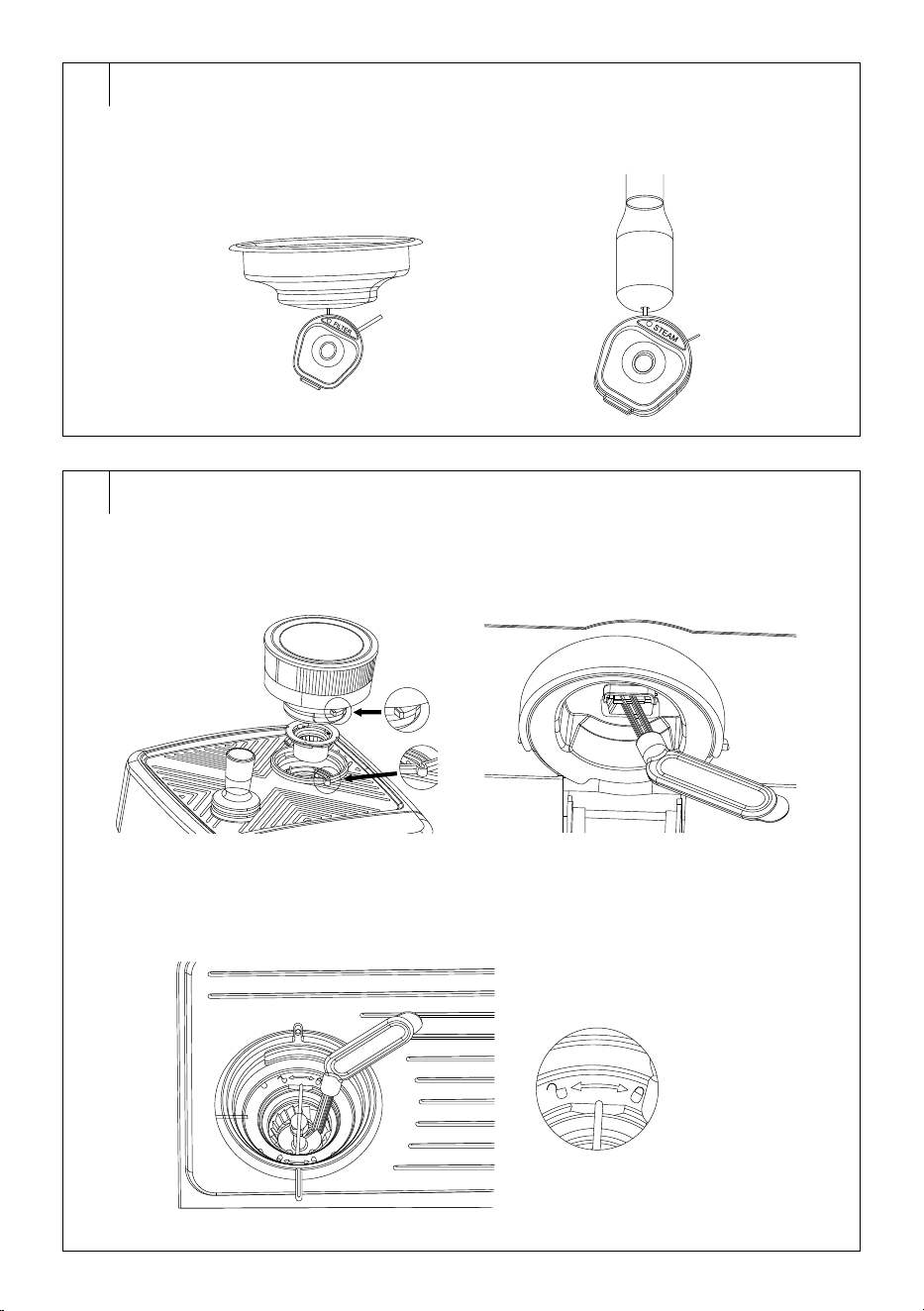
aid needle toremove the dirt – see figure G1.
Cleaning the steam wand
• The steam wand should be cleaned after each use to prevent deposits
and unwanted odours from dried milk residues.
• After each use: Point the steam nozzle above the grid of the drip tray
and start the steam for afew seconds. This will remove most of the
milk residue in the nozzle. Wipe the steam wand with aslightly damp
cloth.
• Every 2–3 months: Unscrew the end of the steam nozzle. Immerse
it in atub of warm water containing alittle descaling agent. Leave it
overnight. Then pour out the water and clean the end of the steam
nozzle properly. Ifnecessary, use acleaning aid needle. Rinse under
warm running water. Screw back on andtest to make sure that the
steam wand is not blocked.
• Blocked openings: If the opening in the steam nozzle is blocked
with milk residue, use aneedle or pin to remove it manually – see
Figure G2. Then run hot water through the steam nozzle for about 40
seconds.
Cleaning the drip tray
• The drip tray is equipped with afullness indicator. It is afloat that
extends above the edge of the drip tray grid. Insuch acase, it is
necessary to empty andwash the drip tray andthe grid. However, we
recommend emptying andwashing the drip tray andgrid every day if
you use the coffee machine regularly.
• Pull out the drip tray from thecoffee machine andcarefully transfer it
to the kitchen sink or sink.
• First, remove the grid from the tray and then pour out the water. Wash
the tray and grille in warm water with aneutral dishwashing detergent.
Rinse both parts under running water, dry them, and place them back
in their positions.
Cleaning the water tank
• Pull out the handle to open the lid.
• Grasp the tank by the handle and lift it upwards.
• Pour out the remaining water.
• Rinse it with clean water and asmall amount of neutral dishwashing
detergent. Then thoroughly rinse with clean water, dry, and place it
back into the coffee machine.
- 8 -
01/2026
2026, .
Coffee bean hopper
• Remove the coffee bean hopper from the coffee machine by turning
it counterclockwise until the down arrow symbol on the hopper is
aligned with the open lock symbol on the edge of the coarseness
indicator. Pull upwards to remove the hopper from the coffee machine
– see Figure H1.
• Remove the lid and move any beans into an airtight container.
• Wipe the hopper with aslightly damp cloth and wipe with adry cloth.
• Rinse the lid of the hopper with clean water and asmall amount of
neutral dishwashing detergent. Then rinse it properly with clean water,
dry it and put it back in place.
• Place the hopper in the body of the coffee machine so that the down
arrow symbol on the hopper aligns with the open lock symbol on the
edge of the coarseness indicator. Turn the hopper clockwise.
Warning:
Before inserting the coffee bean hopper into
the coffee machine, always make sure that it is
completely dry. Otherwise, damage to the grinder
and the coffee machine may occur.
Cleaning the grinder
1. Remove the coffee bean hopper from the coffee machine body.
Remove the lid and move any beans into an airtight container.
2. Insert the empty tank back into the coffee machine. Insert the
portafilter with the installed filter (for 1 or 2 cups) into the holder.
3. Press the GRIND button andlet the grinder run. Repeat as long as
ground coffee falls into the filter.
4. Once the grinder starts to grind empty, press the GRIND button
again to stop grinding.
5. Remove the portafilter fromthe holder, discard the ground coffee
andremove the coffee bean hopper.
6. From underneath, clean the grinder dispensing port – see figure H2.
7. Use the cleaning brush to remove coffee bean residue fromthe
upper andlower grinding stones = see Figure H3, or you can use the
handheld vacuum cleaner with the brush head.
8. Remove the upper grinding stone by lifting up the metal handle and
turning it slightly clockwise andpulling it out of thegrinder.
Warning:
Never wash the grinding stones with water or in any
other liquid. Always use the supplied cleaning brush
or aclean, dry cloth.
9. Insert the upper grinding stone into the grinder so that the stops on the
upper grinding stone fit into the groove in thegrinder. Turn the upper
grinding stone counter clockwise until you feel resistance.
Cleaning the outer casing
• Wipe the outer surface of the appliance with aslightly damp cloth
and dry it.
. . . . . . . . . . . . . . . . . . . . . . . . . . . . . . . . . . . . . . . . . . . . . . . . . . . . . . . . . . . . . . . . . . . .
DESCALING
• Over time, minerals from the water can build up in the machine’sinner
circuit. This is anatural process. Therefore, regular descaling is
necessary. Mineral deposits can spoil the taste of your coffee and
negatively impact the functionality and lifespan of the coffee machine.
• We recommend descaling of the coffee machine every 4 to 6 months
depending on the hardness of water and frequency of use. However,
the coffee machine warns of the need for descaling by flashing
the icons of the 1 CUP, 2 CUP, MANUAL and hot water andsteam
buttons. Press any button to end the descaling warning.
• We recommend using descaling agents for coffee machines, which
are commonly available in shops, for example the SESXD 001 Sencor
Liquid Descaler.
• Prepare adescaling solution ofwater anddescaling agent following
the dilution/preparation instructions given on the packaging/enclosed
leaflet.
Preparing for Descaling
• Fill up the water tank with descaling solution to the max mark. Place
the tank back into the coffee machine.
• Empty the drip tray and put it back in the coffee machine.
• Insert the filter for 2 cups into the portafilter and install the portafiler in
the brew head.
• Place abowl (with acapacity of at least 1 l) under the brew head and
direct the steam nozzle to the second bowl (withacapacity of at least
1 l) – see Figure I.
Descaling the espresso machine
• Switch on the coffee machine and wait for it to heat up.
• Press and hold the GRIND
, 1 CUP and2 CUP buttons
simultaneously for 5 seconds. The hot water icon will be lit.
• Turn the control to the hot water position to start the 1st stage of
descaling.
• When the icons of the GRIND
and2 CUP buttons flash, turn the
control to the central position.
• Pour the remaining solution out of the water tank andempty the
bowls.
Warning:
Be careful not to get burnt by the hot water.
• Rinse the water tank, pour 1 l of fresh cold water into it andput the tank
back into the coffee machine.
• Put the bowls under the brew head and the steam nozzle again.
• Turn the control to the hot steam position and the 2nd flush phase
will start.
• Leave the coffee machine to complete the flush process.
• When the hot water andsteam icons are flashing, the flush is
complete.
• Empty the bowls ofwater andpour fresh cold water into the tank.
Note:
You can cancel the descaling process by moving the
controller to the center position andpressing the POWER
button.
Note:
If you need to activate the descaling process manually,
press and hold the GRIND , 1 CUP and2 CUP buttons
simultaneously for 3 seconds.
Storage
• If the appliance will not be used for an extended period, unplug it
from the power socket, let it cool down, and clean it following the
instructions provided above.
• Before storing, ensure that the appliance and all accessories are
thoroughly clean and dry.
• Store the appliance in adry, clean, and well-ventilated place away
from extreme temperatures and out of the reach of children or pets.
. . . . . . . . . . . . . . . . . . . . . . . . . . . . . . . . . . . . . . . . . . . . . . . . . . . . . . . . . . . . . . . . . . . .
- 9 -
01/2026
2026, .
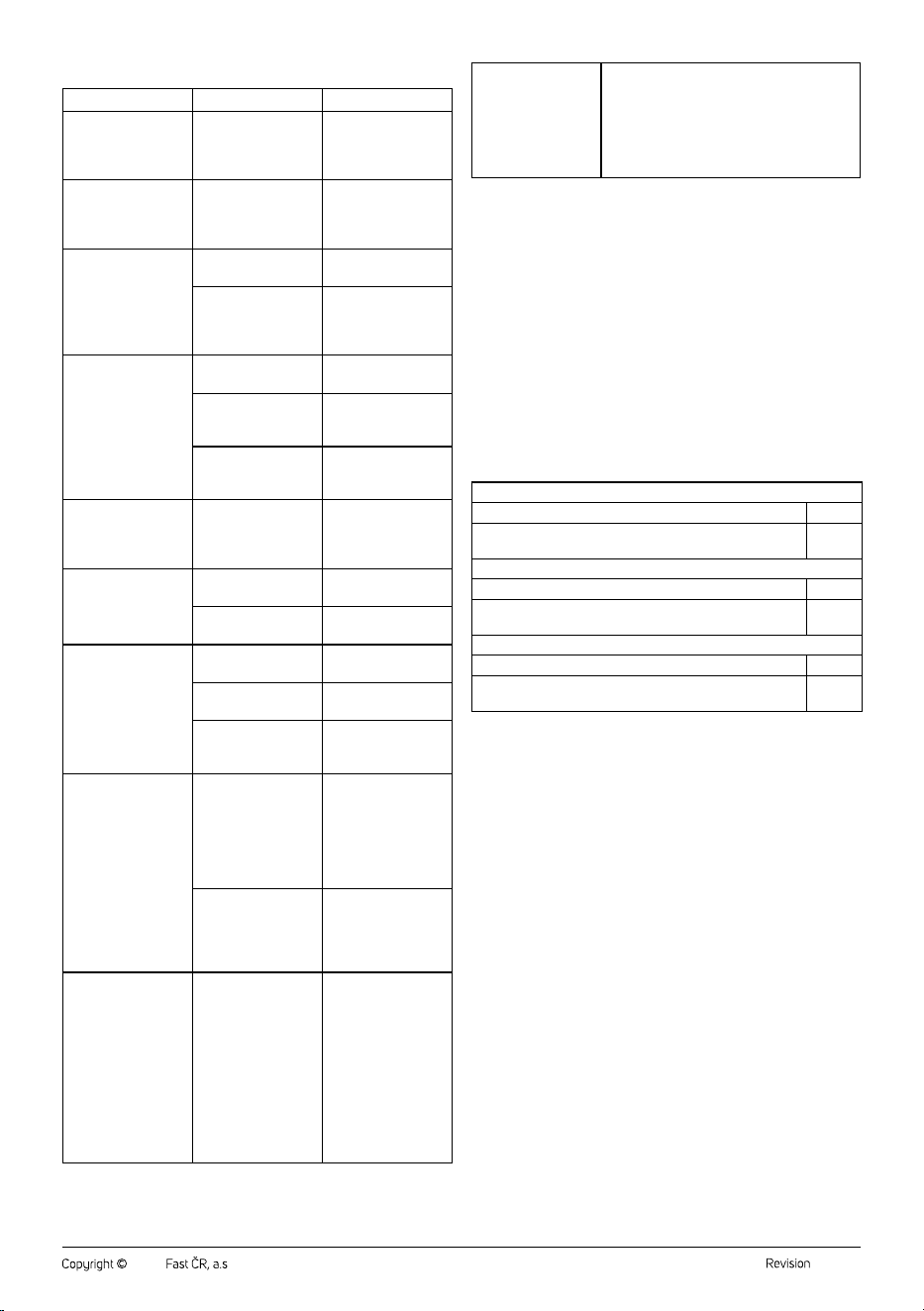
TROUBLESHOOTING
Problem Cause Solution
The coffee machine
does not switch on.
The power cable
plug is not properly
inserted in the mains
socket.
Properly insert the
plug into the power
socket.
The icons of the
coffee grinding
buttons are not lit.
The coffee bean
hopper is not
inserted or is inserted
incorrectly.
Insert the coffee bean
hopper, or check that
it is correctly inserted.
There is water under
the coffee machine.
The drip tray is full. Empty and clean the
drip tray.
The water tank
is cracked or not
properly positioned in
thecoffee machine.
Have the tray
replaced or removed
andreinserted.
The coffee just drips,
does not flow at all, or
the portafilter cannot
be inserted into the
brew head.
The coffee is too fine. Select acoarser grind
coarseness.
There is too much
ground coffee in the
filter.
Reduce the amount
of ground coffee in
the filter.
The ground coffee is
tamped too much.
Apply reasonable
force (15–20kg) when
tamping.
There is no aroma in
the prepared coffee.
The coffee beans
are old, or you have
chosen acoarser
grind level.
Use freshly roasted
coffee beans or
choose afiner grind
level.
The coffee machine
does not dispense
steam.
The coffee machine
in not warmed up.
Let the coffee
machine preheat.
The steam nozzle is
clogged.
Clean the steam
wand.
The coffee dispenses
too quickly.
Coffee is too coarse. Select afiner level of
grinding.
There is too little
coffee in the filter.
Add more ground
coffee to the filter.
The ground coffee is
inadequately tamped.
Apply reasonable
force (15–20kg) when
tamping.
The coffee flows
over the edge of the
portafilter inserted in
the brew head.
The portafilter is not
properly inserted in
the brew head.
Turn the portafilter
until you feel
resistance – the
handle of the
portafilter is
perpendicular to the
coffee machine.
The edge of the filter
is dirty from ground
coffee residue.
After tamping, wipe
the ground coffee
residue offthe edge
ofthe filter andthe
portafilter.
After the steam has
been dispensed, it is
not possible to brew
coffee or dispense hot
water.
After the steam
is released, the
pressure must be
released to lower the
temperature. Itis not
possible to make any
coffee or dispense hot
water during this time.
The coffee machine
draws cold water
to quickly cool the
heating element.
It takes 20–30
seconds to release
the pressure andcool
down. After that, you
can normally make
coffee anddispense
hot water.
When the coffee
machine is heating
up, preparing coffee
or dispensing
steam, you can hear
aclattering or hissing
sound.
These are normal sounds that the coffee
machine makes. Do not be surprised or
disturbed by this.
If the problem is not listed in the table or if the problem persists, switch off
the coffee machine, disconnect it from the power source, and contact an
authorised service centre.
. . . . . . . . . . . . . . . . . . . . . . . . . . . . . . . . . . . . . . . . . . . . . . . . . . . . . . . . . . . . . . . . . . . .
TECHNICAL SPECIFICATIONS
Rated voltage range ..............................................................................220–240 V~
Rated frequency ..........................................................................................50–60 Hz
Rated power input ................................................................................1350-1650 W
....................................................................................................(coffee grinder: 150 W)
Noise level .....................................................................≤75 dB (A) (brewing coffee)
..............................................................................≤85 db (A) (grinding coffee beans)
The declared noise emission level of the appliance is ≤75 dB (A) (brewing
coffee) and ≤85 db (A) (grinding coffee beans), which represents alevel
Aof acoustic power with respect to areference acoustic power of 1 pW.
Values Provided according to Commission Regulation EU 2023/826
Off Mode
Power consumption in off mode 0 W
Time needed for the equipment to automatically reach off
mode
0 min
Standby Mode
Power consumption in standby mode –
Time needed for the equipment to automatically reach
standby mode
–
Networked Standby Mode (Wi-Fi)
Power consumption in networked standby –
Time needed for the equipment to automatically reach
networked standby mode
–
. . . . . . . . . . . . . . . . . . . . . . . . . . . . . . . . . . . . . . . . . . . . . . . . . . . . . . . . . . . . . . . . . . . .
INSTRUCTIONS AND INFORMATION ON DISPOSAL
OF USED PACKAGING MATERIAL
Dispose of used packaging material at the designated municipal waste
disposal site.
. . . . . . . . . . . . . . . . . . . . . . . . . . . . . . . . . . . . . . . . . . . . . . . . . . . . . . . . . . . . . . . . . . . .
DISPOSAL OF USED ELECTRICAL AND ELECTRONIC
EQUIPMENT
Used electrical andelectronic products must not be disposed of in
ordinary municipal waste. To enable the proper disposal, renewal and
recycling of these products, deliver them to the designated collection
points. Alternatively, in some European Union states or other European
countries the products can be returned to the local retailer when buying
an equivalent new product. By disposing of this product correctly, you
help to conserve valuable natural resources and prevent any potential
adverse impact on the environment and human health that could result
from improper waste disposal. For more details, contact your local
authority or nearest collection point. Fines may be imposed for the
improper disposal of this type of waste as per national regulations.
For business entities in European Union States
If you wish to dispose of electrical and electronic equipment, please
request the necessary information from your retailer or supplier.
Disposal in other countries outside the European Union
To dispose of this product elsewhere, request the necessary information
on the correct disposal method from local authorities or your retailer.
. . . . . . . . . . . . . . . . . . . . . . . . . . . . . . . . . . . . . . . . . . . . . . . . . . . . . . . . . . . . . . . . . . . .
Changes to text and technical parameters are reserved.