BG-USW-24
2x4 USB 3.2 Gen 1 Peripheral Sharing Switcher with 5Gbps Data
Transfer/Auto Switching and RS-232 Control
User Manual

BZBGEAR BG-USW-24 PRODUCT MANUAL
Address: 830 National Drive #140, Sacramento, CA 95834, USA · Tel: +1(888)499-9906 · Email: support@bzbgear.com 2

BZBGEAR BG-USW-24 PRODUCT MANUAL
TABLE OF CONTENTS
Statement 4
Safety Precaution 4
Introduction 5
Features 5
Packing List 6
Specifications 7
Operation Controls and Functions 8
Auto Switching Function 9
ASCII Commands 10
Connection Diagram 11
Troubleshooting 12
Tech Support 13
Limited Product Warranty Terms 13
Mission Statement 14
Copyright 14
Address: 830 National Drive #140, Sacramento, CA 95834, USA · Tel: +1(888)499-9906 · Email: support@bzbgear.com 3

BZBGEAR BG-USW-24 PRODUCT MANUAL
Statement
Please read these instructions carefully before connecting, operating, or configuring this
product. Please save this manual for future reference.
Safety Precaution
● To prevent damaging this product, avoid heavy pressure, strong vibration, or immersion
during transportation, storage, and installation.
● The housing of this product is made of organic materials. Do not expose to any liquid,
gas, or solids which may corrode the shell.
● Do not expose the product to rain or moisture.
● To prevent the risk of electric shock, do not open the case. Installation and maintenance
should only be carried out by qualified technicians.
● Do not use the product beyond the specified temperature, humidity, or power supply
specifications.
● This product does not contain parts that can be maintained or repaired by users.
Damage caused by dismantling the product without authorization from BZBGEAR is not
covered under the warranty policy.
● Installation and use of this product must strictly comply with local electrical safety
standards.
Address: 830 National Drive #140, Sacramento, CA 95834, USA · Tel: +1(888)499-9906 · Email: support@bzbgear.com 4

BZBGEAR BG-USW-24 PRODUCT MANUAL
Introduction
The BG-USW-24 USB 3.2 Gen1 2×4 Peripheral Sharing Switch enables two host
computers to share up to four USB devices with reliable, high-speed performance.
Fully compliant with USB 3.2 Gen1, it supports data transfer rates of up to 5Gbps
and is backward compatible with USB 2.0 and USB 1.1 devices, making it suitable
for bandwidth-intensive peripherals such as USB docking stations, HD cameras,
and storage devices.
Designed for professional integration, the switch supports front-panel button
control, RS-232 command switching, and automatic host switching with power-off
memory to retain system state after reboot. LED indicators provide clear host
status, while built-in over-current protection and dedicated 5V/1A power per USB
port ensure stable and safe operation. With multi-platform support and true
plug-and-play functionality, it is well-suited for professional AV, IT, broadcast, and
control room environments.
Features
● USB 3.2 Gen1 Compliance: Supports data transfer speeds up to 5Gbps with
backward compatibility for USB 2.0 and USB 1.1 devices.
● 2×4 Peripheral Sharing: Allows two computers to share up to four USB devices
without reconnecting cables.
● High-Bandwidth Device Support: Ideal for USB docking stations, HD cameras,
storage devices, and other performance-intensive peripherals.
● Multiple Switching Methods: Supports front-panel push-button control, RS-232
commands, and automatic switching operation.
● Auto Switching Function: Automatically prioritizes the most recently active host
computer for seamless transitions.
● Power-Off Memory: Retains switching state and auto-switch configuration after
power loss or reboot.
● LED Status Indicators: Provides clear visual indication of the currently active host
computer.
● Per-Port Power Output: Delivers dedicated 5V/1A power to each USB device port
for stable peripheral operation.
● Over-Current Protection: Protects connected devices from power surges and
electrical faults.
● Multi-Platform Compatibility: Fully compatible with Windows, macOS, and Linux
operating systems.
● Plug-and-Play Operation: Requires no drivers or software installation for immediate
deployment.
● Professional Mounting Support: Includes mounting ears and hardware for secure
rack or surface installation.
Address: 830 National Drive #140, Sacramento, CA 95834, USA · Tel: +1(888)499-9906 · Email: support@bzbgear.com 5

BZBGEAR BG-USW-24 PRODUCT MANUAL
Packing List
● 1 × USB 3.2 Gen1 2×4 Peripheral Sharing Switch
● 2 × USB 3.0 Cables (Type-A to Type-B, 1.8 m)
● 2 × Mounting Ears
● 4 × Machine Screws (KM3 × 4)
● 1 × 12V / 2.5A Multinational Locking Power Supply
● 1 × User Manual
Address: 830 National Drive #140, Sacramento, CA 95834, USA · Tel: +1(888)499-9906 · Email: support@bzbgear.com 6
BZBGEAR BG-USW-24 PRODUCT MANUAL
Specifications
Technical
USB Compliance
USB 3.2 Gen1, USB 2.0 and USB 1.1
Data Transfer Rates
5Gbps
ESD Protection
IEC 61000-4-2: ±8kV (Air-gap) & ±4kV (Contact)
Connection
HOST Ports
2 × USB HOST [USB 3.0 Type B, 9-pin female]
DEVICE Ports
4 × USB DEVICES [USB 3.0 Type A, 9-pin female]
Control Port
1 × RS-232 [DB-9]
Mechanical
Housing
Metal Enclosure
Color
Black
Dimensions (W × D × H)
4.9in × 3.1in × 1.2in / 125mm × 80mm × 30mm
Weight
0.7lb [319g]
Power Supply
DC 12V / 2.5A (US/EU standard, CE/FCC/UL certified)
Power Consumption
Typical: 21.12W, Standby: 0.6W
Operating
Operating Temperature
32–104°F / 0–40°C
Storage Temperature
-4–140°F / -20–60°C
Relative Humidity
20–90% RH (no-condensing)
Address: 830 National Drive #140, Sacramento, CA 95834, USA · Tel: +1(888)499-9906 · Email: support@bzbgear.com 7
BZBGEAR BG-USW-24 PRODUCT MANUAL
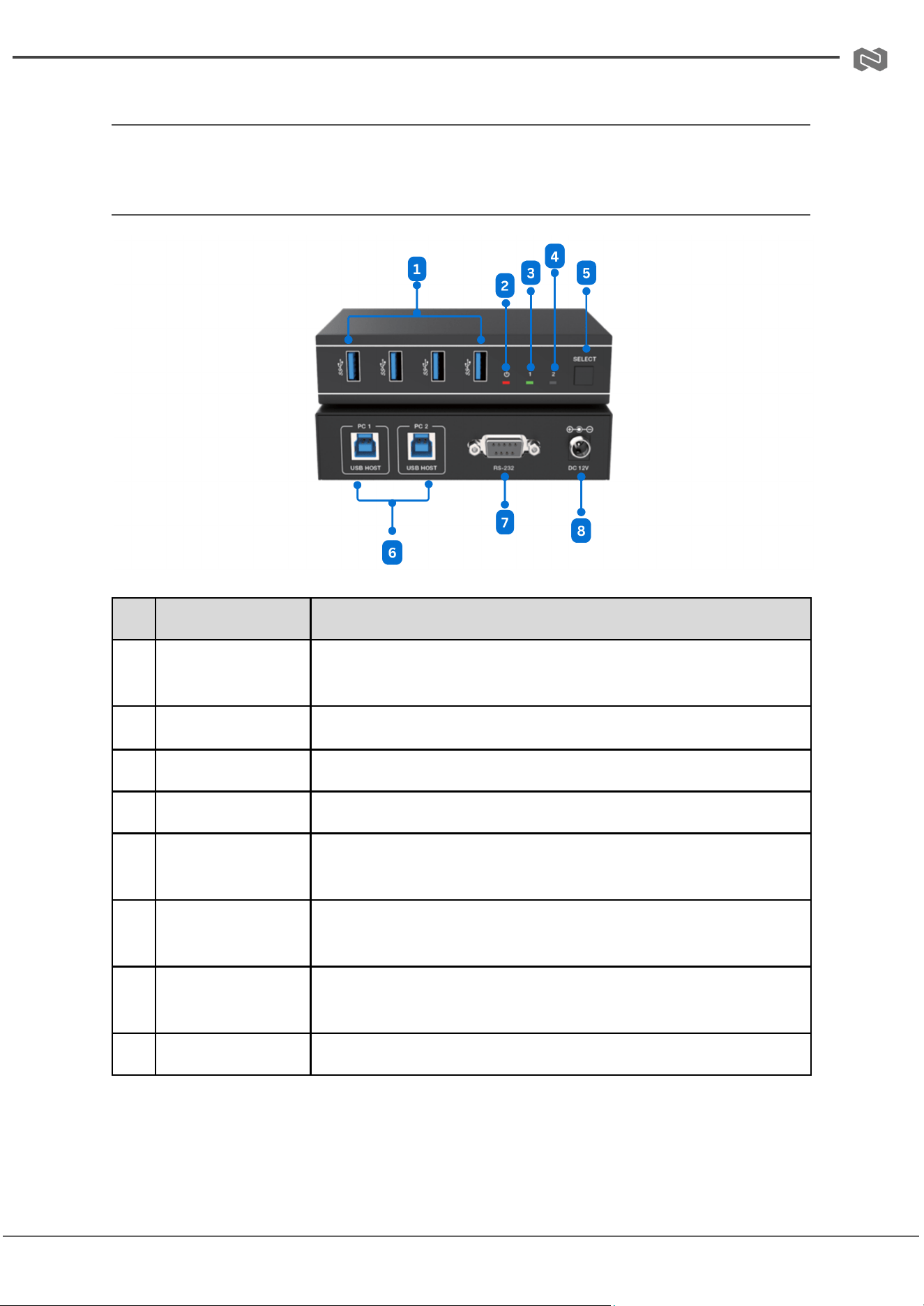
Operation Controls and Functions
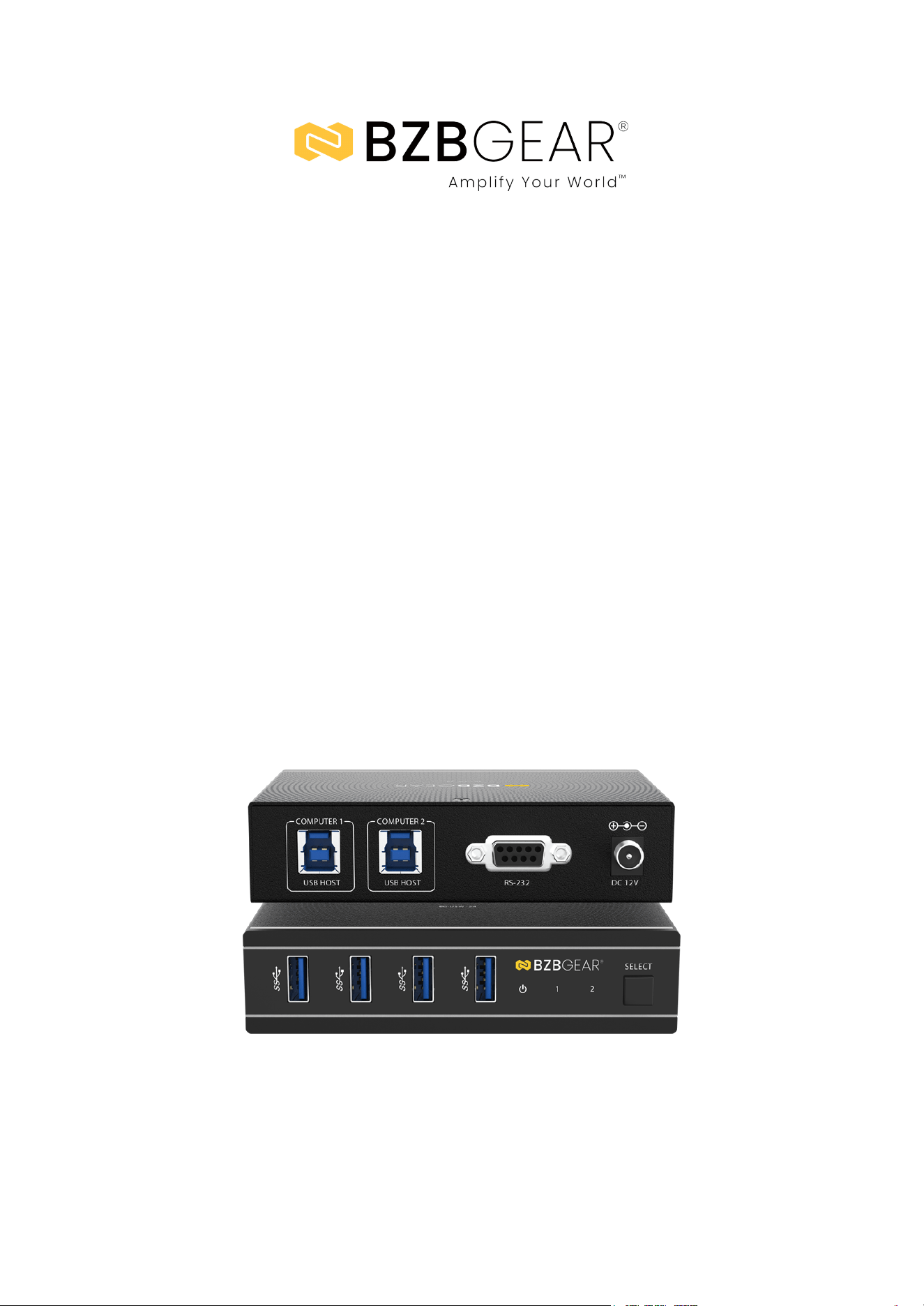
Front and Rear Panel
No.
Name
Function Description
1
USB 3.0 Ports
USB 3.2 Gen1 device ports, connect USB flash drives,
cameras, keyboards, mice, etc.
2
Power LED
Lights red when the product is powered on.
3
USB Select LED 1
Lights green when PC 1 is selected as the active host.
4
USB Select LED 2
Lights green when PC 2 is selected as the active host.
5
SELECT Button
Short press: switch input between PC 1/2. Long press (3 sec):
enable/disable auto switching.
6
PC 1/2 USB
HOST Ports
Connect to two host computers (PC 1 and PC 2).
7
RS-232 Port
Serial control port for RS-232 pass-through or sending ASCII
commands from a PC/control system.
8
DC 12V
Power input port (DC 12V / 2.5A).
Address: 830 National Drive #140, Sacramento, CA 95834, USA · Tel: +1(888)499-9906 · Email: support@bzbgear.com 8

BZBGEAR BG-USW-24 PRODUCT MANUAL
Auto Switching Function
The auto switching function allows the USB 3.2 Gen1 2×4 Peripheral Sharing Switch to
automatically manage active host selection without manual input. This function can be
enabled or disabled via the front-panel SELECT button or through RS-232 serial
command control.
● When enabled:
○ If only one USB HOST is connected and the second host is later connected,
the system automatically switches to the most recently connected host
(last-in priority).
○ If both USB HOST ports are active and one host is disconnected, the system
automatically switches to the remaining active host.
○ If only one host remains connected, the system does not switch to another
host until it is reconnected.
● When disabled:
○ The switch will only change hosts manually via the SELECT button or
RS-232 commands.
○ Automatic switching and LED updates are ignored.
LED Indicators:
The corresponding USB Select LED lights green to indicate the currently active host
computer.
This feature ensures seamless connectivity and prevents interruptions when connecting or
disconnecting multiple computers, making the switch ideal for professional AV, IT, and
control room environments.
Address: 830 National Drive #140, Sacramento, CA 95834, USA · Tel: +1(888)499-9906 · Email: support@bzbgear.com 9
BZBGEAR BG-USW-24 PRODUCT MANUAL
ASCII Commands
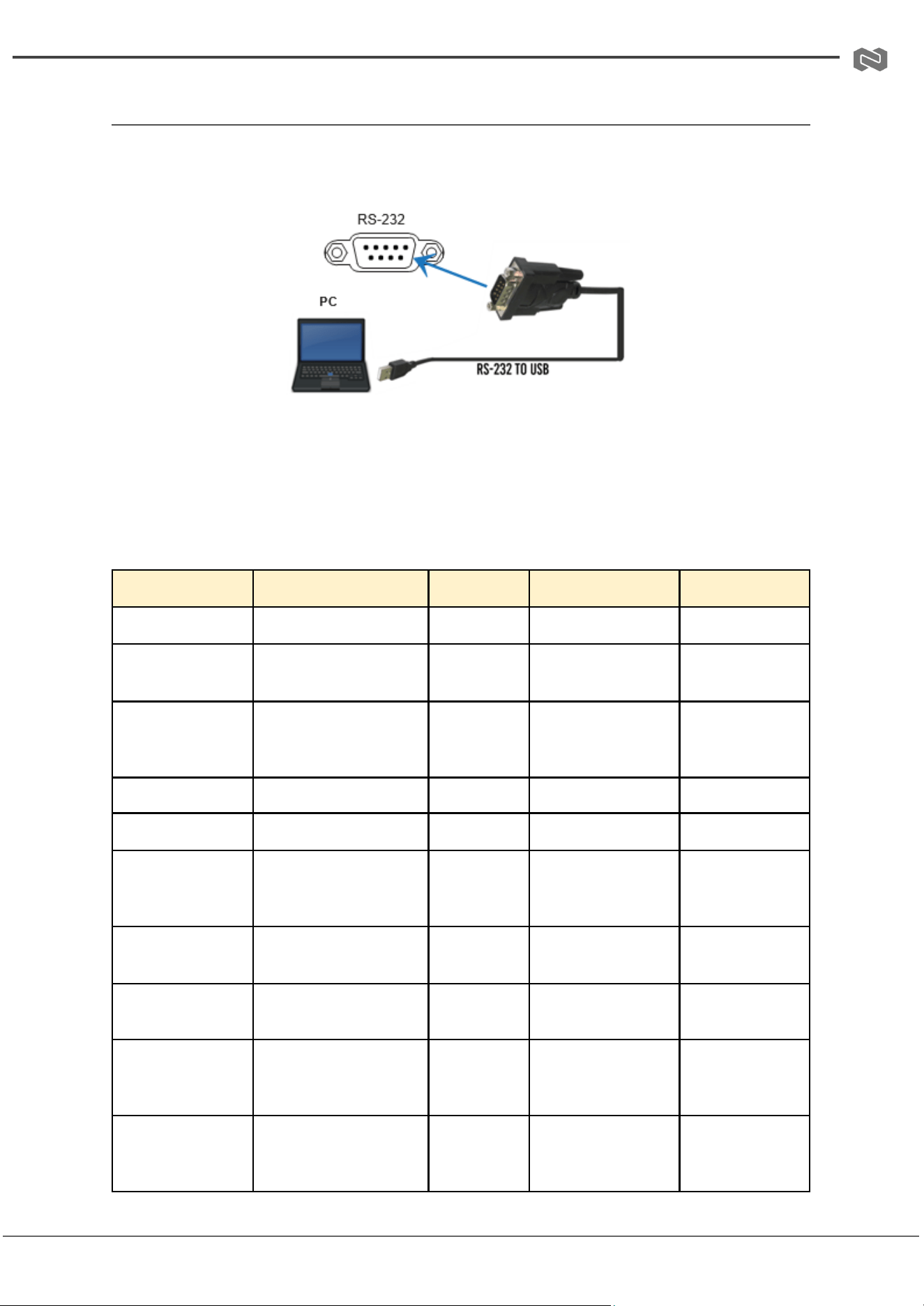
● Serial Port Settings: Baud rate 115200, 8 data bits, 1 stop bit, no parity.
● Connection: Use the RS-232 port on the device. If connecting to a PC
without a native RS-232 port, use an RS-232-to-USB adapter.
● Command Format: Commands must end with the delimiter !. Parameters are
separated by spaces.
● Feedback: The device will return status or confirmation messages in
response to each command.
● Functionality: ASCII commands allow full control over input selection, auto
switching, reboot, factory reset, and querying device status.
Command Code
Function Description
Example
Feedback
Default Setting
help!
List all commands
help!
—
—
status!
Get device current
status
status!
—
—
r fw version!
Get firmware version
r fw
version!
MCU BOOT:
Vx.xMCU APP:
Vx.xx.xx
—
r type!
Get device model
r type!
2x1 KVM Switcher
—
s reboot!
Reboot the device
s reboot!
reboot…
—
s reset!
Reset to factory
defaults
s reset!
reset to factory
defaults system
initializing…
—
s output y in
source x!
Route input source to
output (y=0; x=1~2)
s output 0
in source 1!
output 0 in source
1!
1=input
12=input 2
r output y in
source!
Get output selected
input source
r output 0
in source!
output 0 in source
x! (x=1 or 2)
—
s output y auto
switch x!
Enable/disable auto
switch (y=0; x=1/0)
s output 0
auto switch
1!
output 0 auto
switch 1!
0=disable auto
switch1=enable
auto switch
r output y auto
switch!
Get output auto switch
status
r output 0
auto switch!
output 0 auto
switch x! (x=0 or 1)
0=disable auto
switch1=enable
auto switch
Address: 830 National Drive #140, Sacramento, CA 95834, USA · Tel: +1(888)499-9906 · Email: support@bzbgear.com 10
BZBGEAR BG-USW-24 PRODUCT MANUAL
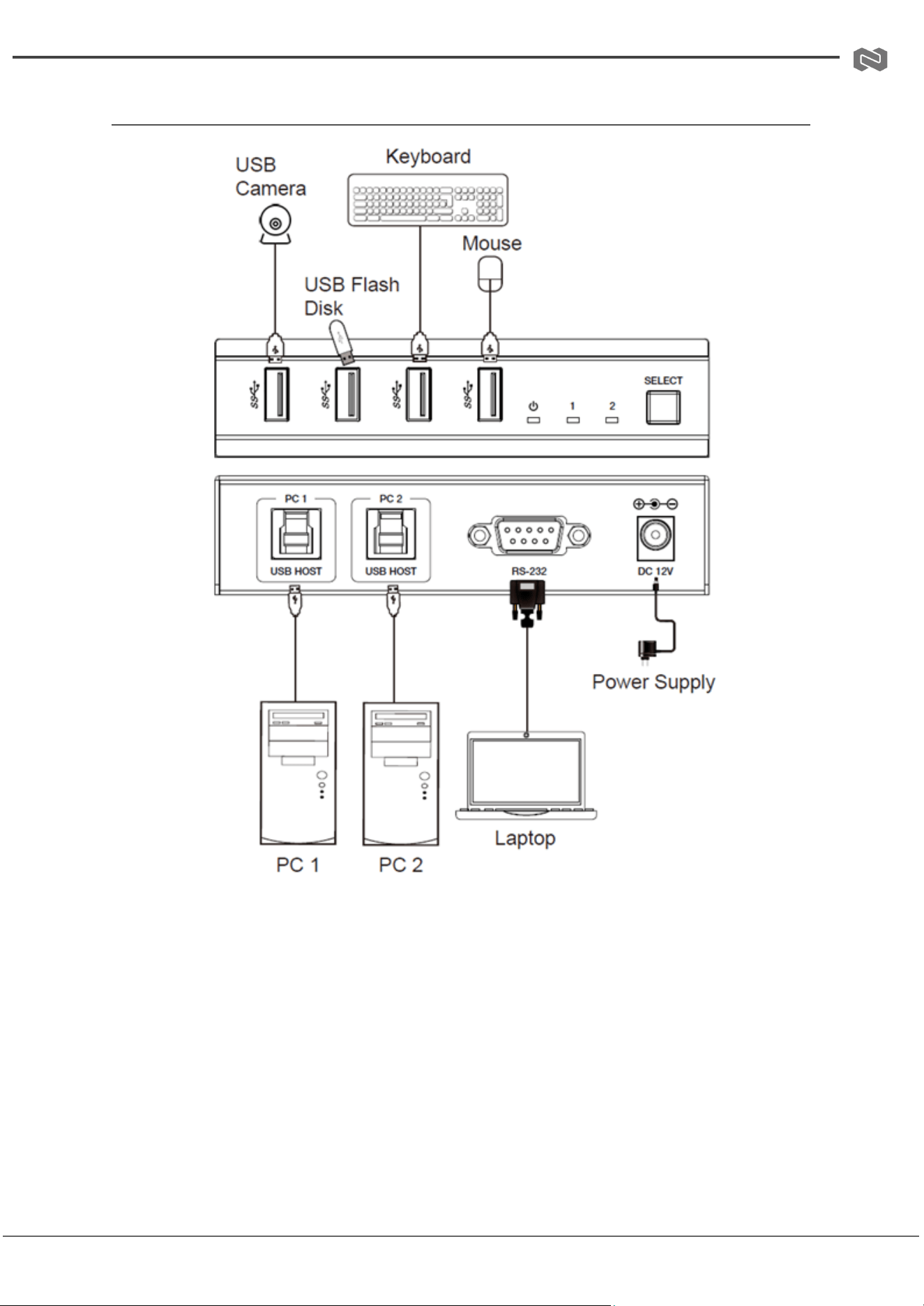
Connection Diagram
Address: 830 National Drive #140, Sacramento, CA 95834, USA · Tel: +1(888)499-9906 · Email: support@bzbgear.com 11
BZBGEAR BG-USW-24 PRODUCT MANUAL
Troubleshooting
Problems
Causes
Solutions
No Power / All LED off
Power supply not connected,
connected fully, or wrong power
supply.
Check if the power supply is
connected correctly and the
output voltage value is within
recommended specifications.
No sound or sound issues
The HDMI connection is faulty,
the audio format is not
supported by the displays, or
the source player is set to
another port for audio output
Check if the HDMI cables are
connected correctly.
Check if the audio format is
supported by the display and
that a user has not changed the
supported audio format on the
player`s audio output. Ensure
output settings from the HDMI
source device as set correctly.
No picture or picture flickers
The HDMI cable may be faulty
or the category cable quality is
faulty.
Check if the HDMI
and category cable connections
are correct and undamaged.
Change to another good
working HDMI cable or category
cable (CAT6 or better cable is
recommended).
Address: 830 National Drive #140, Sacramento, CA 95834, USA · Tel: +1(888)499-9906 · Email: support@bzbgear.com 12

BZBGEAR BG-USW-24 PRODUCT MANUAL
Tech Support
Have technical questions? We may have answered them already!
Please visit BZBGEAR’s support page (bzbgear.com/support) for helpful information and
tips regarding our products. Here you will find our Knowledge Base
(bzbgear.com/knowledge-base) with detailed tutorials, quick start guides, and step-by-step
troubleshooting instructions. Or explore our YouTube channel, BZB TV
(youtube.com/c/BZBTVchannel), for help setting up, configuring, and other helpful how-to
videos about our gear.
Need more in-depth support? Connect with one of our technical specialists directly:
Phone
1.888.499.9906
Email
support@bzbgear.com
Live Chat
bzbgear.com
Limited Product Warranty Terms
Pro Line: 5-year warranty from the date of purchase for AV/Broadcasting products bought
on or after August 1, 2024.
Essential Line: 3-year warranty from the date of purchase for AV/Broadcasting products
bought on or after August 1, 2024.
Cables: Lifetime Limited Product Warranty.
For complete warranty information, please visit bzbgear.com/warranty.
For questions, please call 1.888.499.9906 or email support@bzbgear.com.
Address: 830 National Drive #140, Sacramento, CA 95834, USA · Tel: +1(888)499-9906 · Email: support@bzbgear.com 13

BZBGEAR BG-USW-24 PRODUCT MANUAL
Mission Statement
BZBGEAR is a breakthrough manufacturer of high-quality, innovative audiovisual equipment
ranging from AVoIP, professional broadcasting, conferencing, home theater, to live
streaming solutions. We pride ourselves on unparalleled customer support and services.
Our team offers system design consultation, and highly reviewed technical support for all
the products in our catalog. BZBGEAR delivers quality products designed with users in
mind.
Copyright
All the contents in this manual and its copyright are owned by BZBGEAR. No one is allowed
to imitate, copy, or translate this manual without BZBGEAR’s permission. This manual
contains no guarantee, standpoint expression or other implies in any form. Product
specification and information in this manual is for reference only and subject to change
without notice.
All rights reserved. No reproducing is allowed without acknowledgement.
Address: 830 National Drive #140, Sacramento, CA 95834, USA · Tel: +1(888)499-9906 · Email: support@bzbgear.com 14