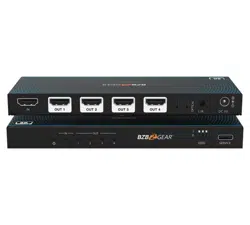
BG-8K-24A
2x4 8K UHD HDMI 2.1 48Gbps Splitter with Auto Downscaling/
HDR-to-SDR Conversion/Audio De-Embedding/RS-232
(8K60/4K120 and VRR/ALLM/QMS/QFT/SBTM Support)
User Manual

BZBGEAR BG-8K-24A PRODUCT MANUAL
Address: 830 National Drive #140, Sacramento, CA 95834, USA · Tel: +1(888)499-9906 · Email: support@bzbgear.com 2

BZBGEAR BG-8K-24A PRODUCT MANUAL
TABLE OF CONTENTS
Statement 4
Safety Precaution 4
Introduction 5
Features 5
Packing List 6
Specifications 7
Operation Controls and Functions 9
EDID Settings List (DIP Switch Configuration) 11
IR Pin Definition 12
IR Remote Control 12
Key Functions 12
IR Operation Notes 13
API Commands 14
Connection Diagram 19
Troubleshooting 20
Tech Support 21
Limited Product Warranty Terms 21
Mission Statement 22
Copyright 22
Address: 830 National Drive #140, Sacramento, CA 95834, USA · Tel: +1(888)499-9906 · Email: support@bzbgear.com 3

BZBGEAR BG-8K-24A PRODUCT MANUAL
Statement
Please read these instructions carefully before connecting, operating, or configuring this
product. Please save this manual for future reference.
Safety Precaution
● To prevent damaging this product, avoid heavy pressure, strong vibration, or immersion
during transportation, storage, and installation.
● The housing of this product is made of organic materials. Do not expose to any liquid,
gas, or solids which may corrode the shell.
● Do not expose the product to rain or moisture.
● To prevent the risk of electric shock, do not open the case. Installation and maintenance
should only be carried out by qualified technicians.
● Do not use the product beyond the specified temperature, humidity, or power supply
specifications.
● This product does not contain parts that can be maintained or repaired by users.
Damage caused by dismantling the product without authorization from BZBGEAR is not
covered under the warranty policy.
● Installation and use of this product must strictly comply with local electrical safety
standards.
Address: 830 National Drive #140, Sacramento, CA 95834, USA · Tel: +1(888)499-9906 · Email: support@bzbgear.com 4

BZBGEAR BG-8K-24A PRODUCT MANUAL
Introduction
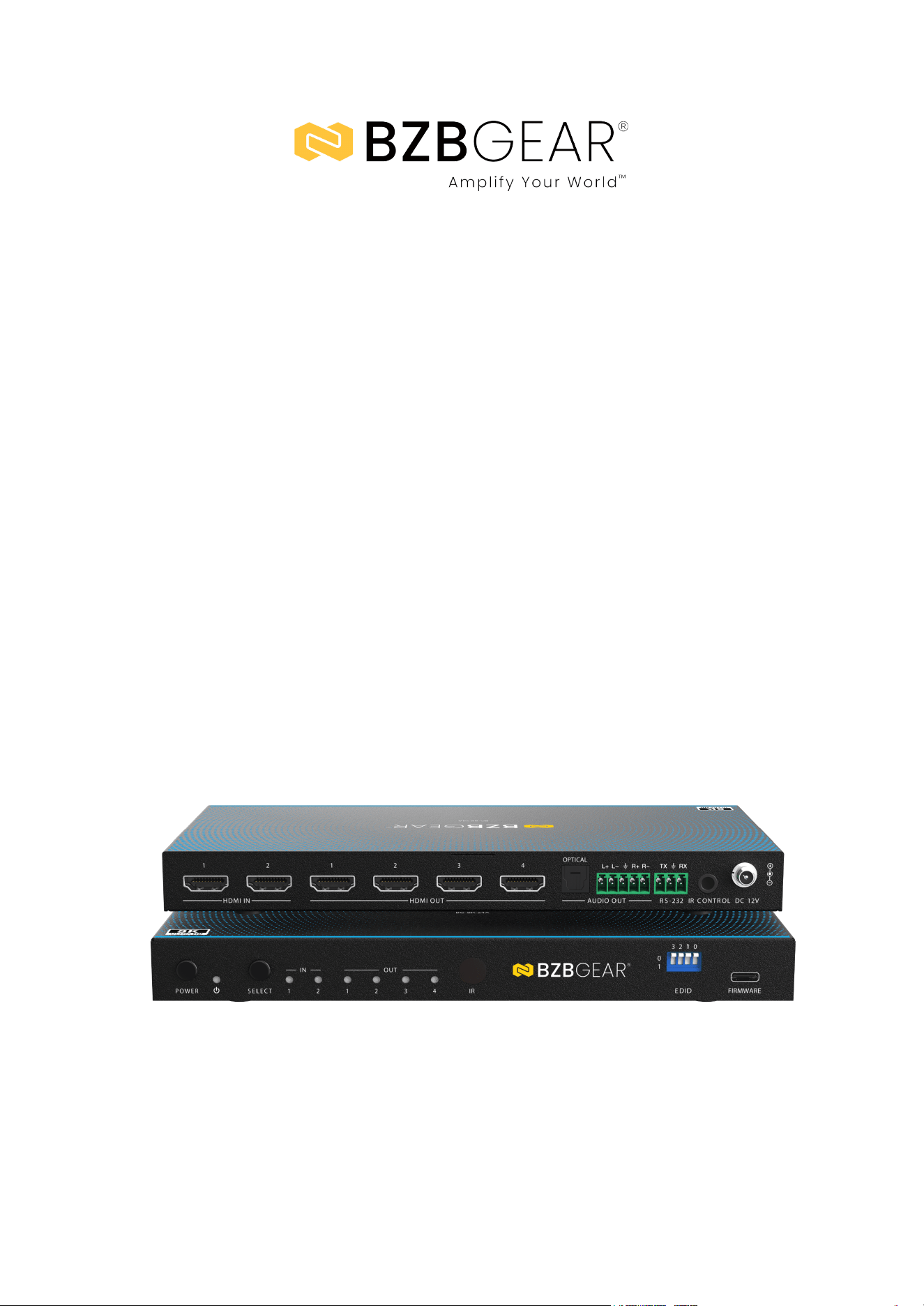
The BG-8K-24A is a high-performance 48Gbps HDMI 2.1 2×4 distribution amplifier
designed to switch between two HDMI sources and simultaneously distribute the
selected signal to up to four HDMI displays. It supports resolutions up to 8K@60Hz
and 4K@120Hz, with full compatibility for HDR formats including HDR10, HDR10+,
Dolby Vision, and HLG. Each HDMI output can independently downscale video and
convert HDR to SDR, ensuring seamless integration with mixed-resolution and
legacy displays while maintaining optimal signal quality across all outputs.
In addition to advanced video handling, the BG-8K-24A features comprehensive
audio de-embedding, providing digital optical and balanced or unbalanced analog
audio outputs with adjustable gain. Built-in EDID management, auto or manual input
switching, and an internal HDMI test pattern generator simplify system configuration
and troubleshooting. The unit can be controlled via front-panel buttons, IR remote,
or RS-232/API commands, making it well suited for professional AV installations,
control-system environments, and high-end residential or commercial applications
where reliability, flexibility, and future-proof 8K performance are required.
Features
● 48Gbps HDMI 2.1 Bandwidth: Supports full HDMI 2.1 data rates for
uncompromised 8K and high-frame-rate 4K video transmission.
● 2×4 HDMI Distribution Amplifier: Switches between two HDMI inputs and
distributes the selected source to up to four HDMI outputs simultaneously.
● 8K and High Frame Rate Support: Supports resolutions up to 8K@60Hz (4:2:0) and
4K@120Hz (4:4:4), ideal for next-generation video sources.
● Advanced HDR Compatibility: Pass-through support for HDR, HDR10, HDR10+,
Dolby Vision, and HLG for enhanced contrast and color performance.
● Independent Output Downscaling: Each HDMI output supports independent
8K-to-4K or 8K-to-1080p downscaling for mixed-resolution display environments.
● HDR to SDR Conversion: Per-output HDR-to-SDR conversion ensures
compatibility with legacy SDR displays.
● Audio De-Embedding: Extracts audio from HDMI sources to digital optical (S/PDIF)
and balanced or unbalanced analog audio outputs.
● Adjustable Analog Audio Gain: Provides gain control for analog audio outputs to
optimize audio levels for connected amplifiers or processors.
● Auto and Manual Input Switching: Supports automatic input switching via HDMI
5V detection or manual switching via front panel, IR, or control system.
● Advanced EDID Management: Built-in EDID presets, pass-through, and
user-defined EDID options ensure reliable HDMI handshaking.
● Internal HDMI Signal Generator: Integrated test pattern generator simplifies
system setup, verification, and troubleshooting.
● Comprehensive Control Options: Control via front-panel buttons, IR remote,
RS-232, or USB-C service port using ASCII API commands.
Address: 830 National Drive #140, Sacramento, CA 95834, USA · Tel: +1(888)499-9906 · Email: support@bzbgear.com 5

BZBGEAR BG-8K-24A PRODUCT MANUAL
● HDCP 2.3 Compliance: Fully compliant with HDCP 2.3 for secure playback of
protected content.
● Professional Metal Enclosure: Durable metal housing designed for reliable
operation in professional AV installations.
Packing List
● 1× BG-8K-24A 48Gbps 2×4 HDMI 2.1
Distribution Amplifier
● 1× 12V/1A Locking Power Supply
(Multinational)
● 1× IR Remote Control
● 1× IR Wideband Receiver Cable (1.5 m)
● 1× 3-Pin to 3.5 mm Phoenix Connector
(RS-232)
● 1× 5-Pin to 3.5 mm Phoenix Connector
(Analog Audio)
● 2× Mounting Ears
● 4× Mounting Screws (KM3 × 6)
● 1× User Manual
Address: 830 National Drive #140, Sacramento, CA 95834, USA · Tel: +1(888)499-9906 · Email: support@bzbgear.com 6
BZBGEAR BG-8K-24A PRODUCT MANUAL
Specifications
Technical Specifications
HDMI Compliance
HDMI 2.1
HDCP Compliance
HDCP 2.3
Video Bandwidth
48Gbps
Supported Input
2× HDMI Type-A (19-pin female)
Supported Output
4× HDMI Type-A (19-pin female)
Audio Output
1× Optical (S/PDIF), 1× L/R analog (5-pin 3.5mm Phoenix)
Control Ports
1× RS-232 (3-pin 3.5mm Phoenix), 1× IR IN (3.5mm stereo jack), 1×
USB-C (Service)
Max Resolution
Up to 8K@60Hz 4:2:0 12-bit / 8K@30Hz 4:4:4 12-bit / 4K@120Hz
4:4:4 12-bit
Color Depth
8 / 10 / 12-bit
Color Space
RGB, YCbCr 4:4:4 / 4:2:2 / 4:2:0
HDR Support
HDR, HDR10, HDR10+, Dolby Vision, HLG
Audio Formats
(HDMI)
LPCM, Dolby Digital/Plus/EX, Dolby TrueHD, Dolby Atmos, DTS
formats incl. DTS-HD Master Audio
Optical Audio
Output
Up to LPCM / Dolby / DTS 5.1CH
Analog Audio
Output
LPCM 2CH (balanced/unbalanced with gain control)
Audio Output Level
8.2 dBu (2 Vrms balanced), 2.2 dBu (1 Vrms unbalanced max)
Frequency
Response
20Hz – 20kHz (+0.5 dB / -1 dB)
Audio S/N Ratio
99 dB @ 2 Vrms, 1 kHz (A-weighted)
Audio THD+N
<0.2% @ 0 dBV, 1 kHz
IR Frequency
Wideband 20kHz – 60kHz
IR Input Level
12Vp-p
Mechanical Specifications
ESD Protection
IEC 61000-4-2: ±8kV air, ±4kV contact
Address: 830 National Drive #140, Sacramento, CA 95834, USA · Tel: +1(888)499-9906 · Email: support@bzbgear.com 7
BZBGEAR BG-8K-24A PRODUCT MANUAL
Power Supply
DC 12V / 1A
Power
Consumption
6.24W (Max)
Housing
Metal enclosure
Dimensions
220mm × 110mm × 21.5mm
Weight
620g
Operating
Temperature
32°F to 104°F / 0°C to 40°C
Storage
Temperature
-4°F to 140°F / -20°C to 60°C
Operating Humidity
20%–80% RH (non-condensing)
Storage Humidity
10%–90% RH (non-condensing)
Address: 830 National Drive #140, Sacramento, CA 95834, USA · Tel: +1(888)499-9906 · Email: support@bzbgear.com 8
BZBGEAR BG-8K-24A PRODUCT MANUAL
Operation Controls and Functions
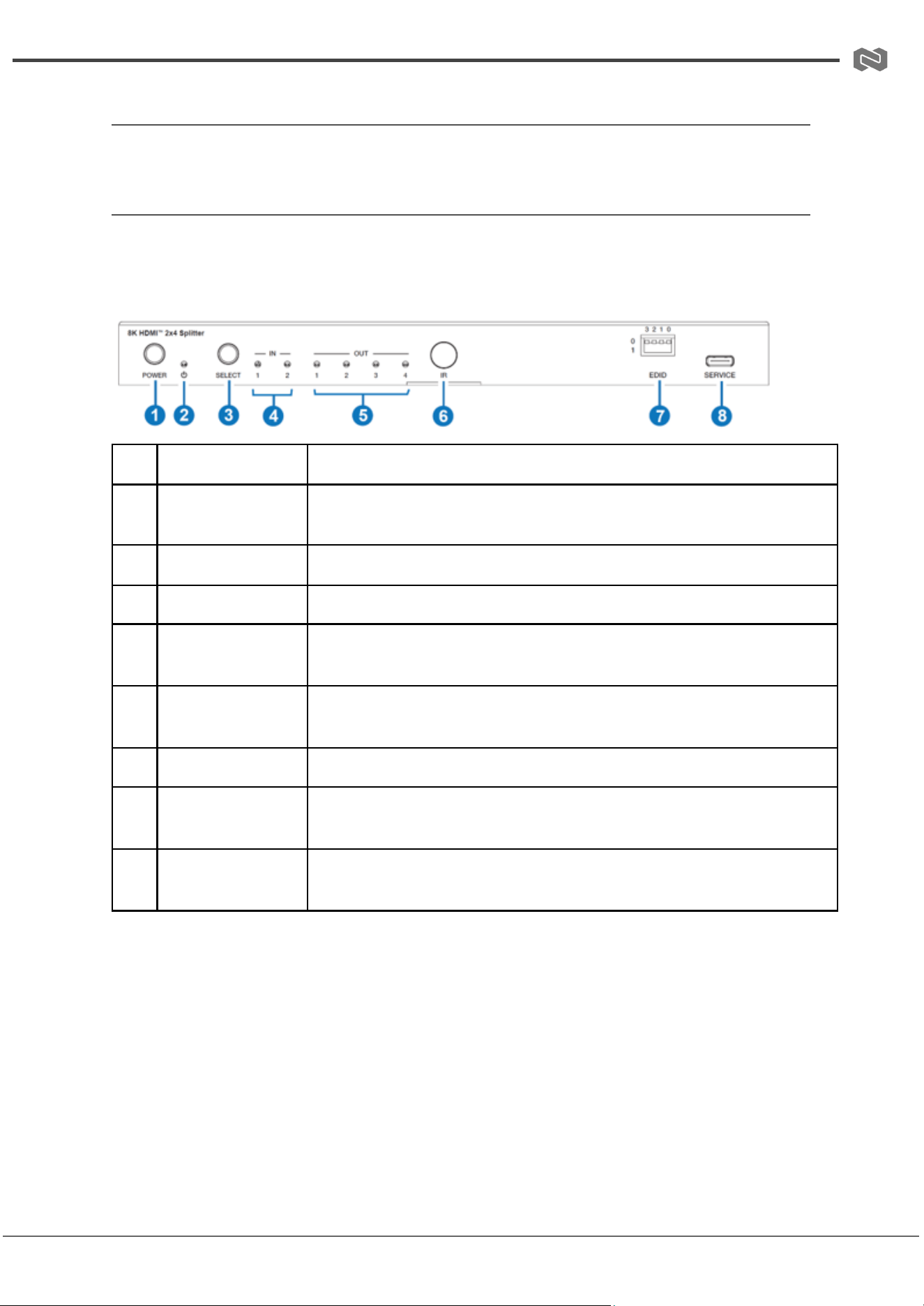
Front and Rear Panel
Front Panel
No.
Name
Function Description
1
POWER button
Press to power ON the device. Press and hold to enter standby mode.
2
POWER LED
Indicates power status. Green = ON, Red = Standby.
3
SELECT button
Cycles through HDMI input sources (IN 1 / IN 2).
4
IN LED (1–2)
Indicates the currently selected input source. The corresponding LED
turns green.
5
OUT LED (1–4)
Indicates active HDMI output ports. LED lights when a display is
detected.
6
IR window
Receives IR signals from the remote control or IR extender.
7
EDID DIP switch
Used to select EDID mode settings based on connected display
requirements.
8
SERVICE (USB-C)
USB-C service port used for firmware upgrades and maintenance.
Address: 830 National Drive #140, Sacramento, CA 95834, USA · Tel: +1(888)499-9906 · Email: support@bzbgear.com 9
BZBGEAR BG-8K-24A PRODUCT MANUAL
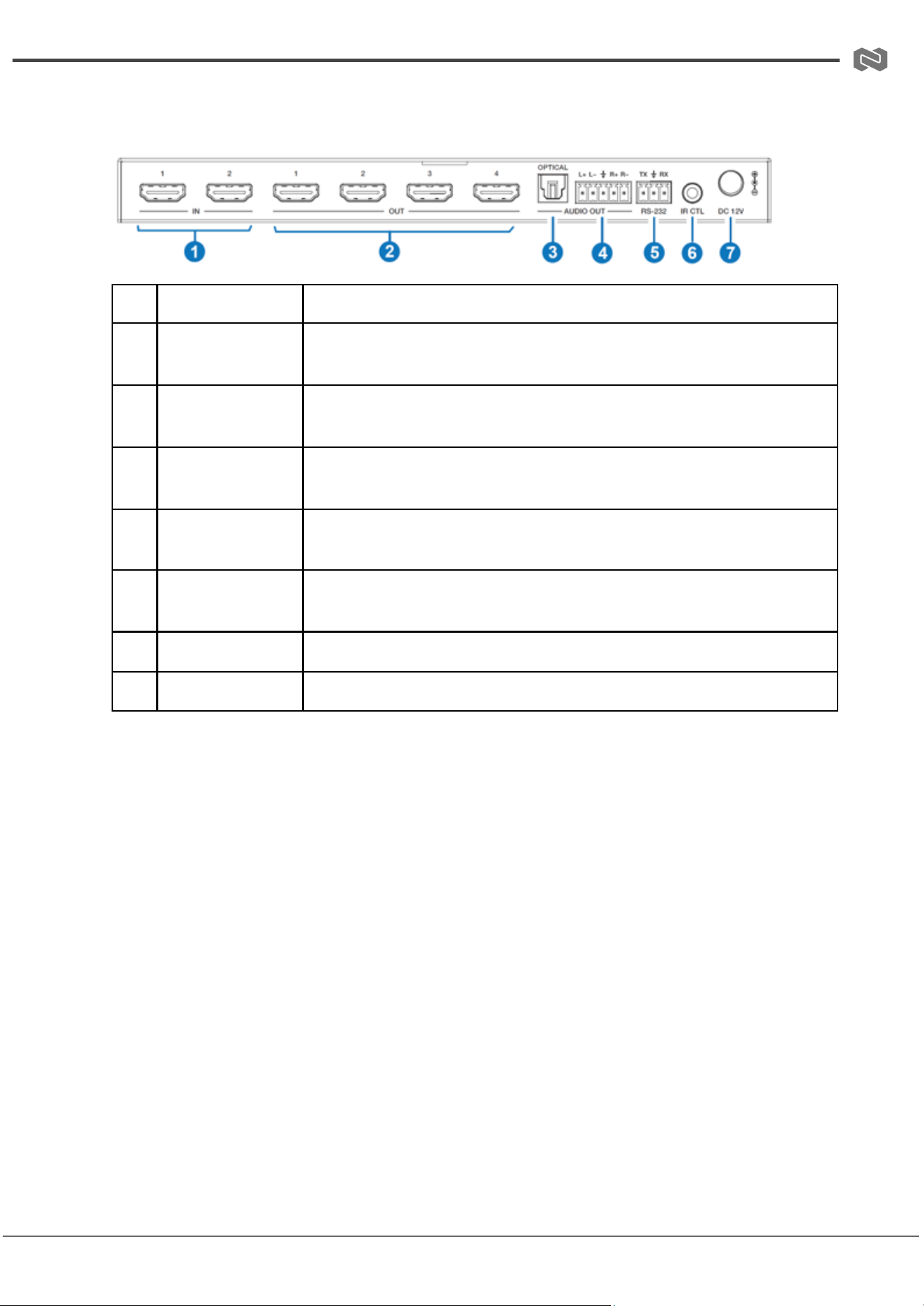
Rear Panel
No.
Name
Function Description
1
IN 1–2 (HDMI)
HDMI input ports for connecting source devices (e.g., Blu-ray
player, PC, game console).
2
OUT 1–4 (HDMI)
HDMI output ports for connection to displays such as TVs,
monitors, or projectors.
3
OPTICAL
(S/PDIF)
Digital audio output for connection to amplifiers, soundbars, or AV
receivers.
4
L/R AUDIO OUT
Analog audio output (balanced/unbalanced) with gain control
support.
5
RS-232
Serial control port for integration with control systems using API
commands.
6
IR CTL
12V IR input port for external IR receiver connection.
7
DC 12V
Power input port for 12V/1A power adapter.
Address: 830 National Drive #140, Sacramento, CA 95834, USA · Tel: +1(888)499-9906 · Email: support@bzbgear.com 10
BZBGEAR BG-8K-24A PRODUCT MANUAL
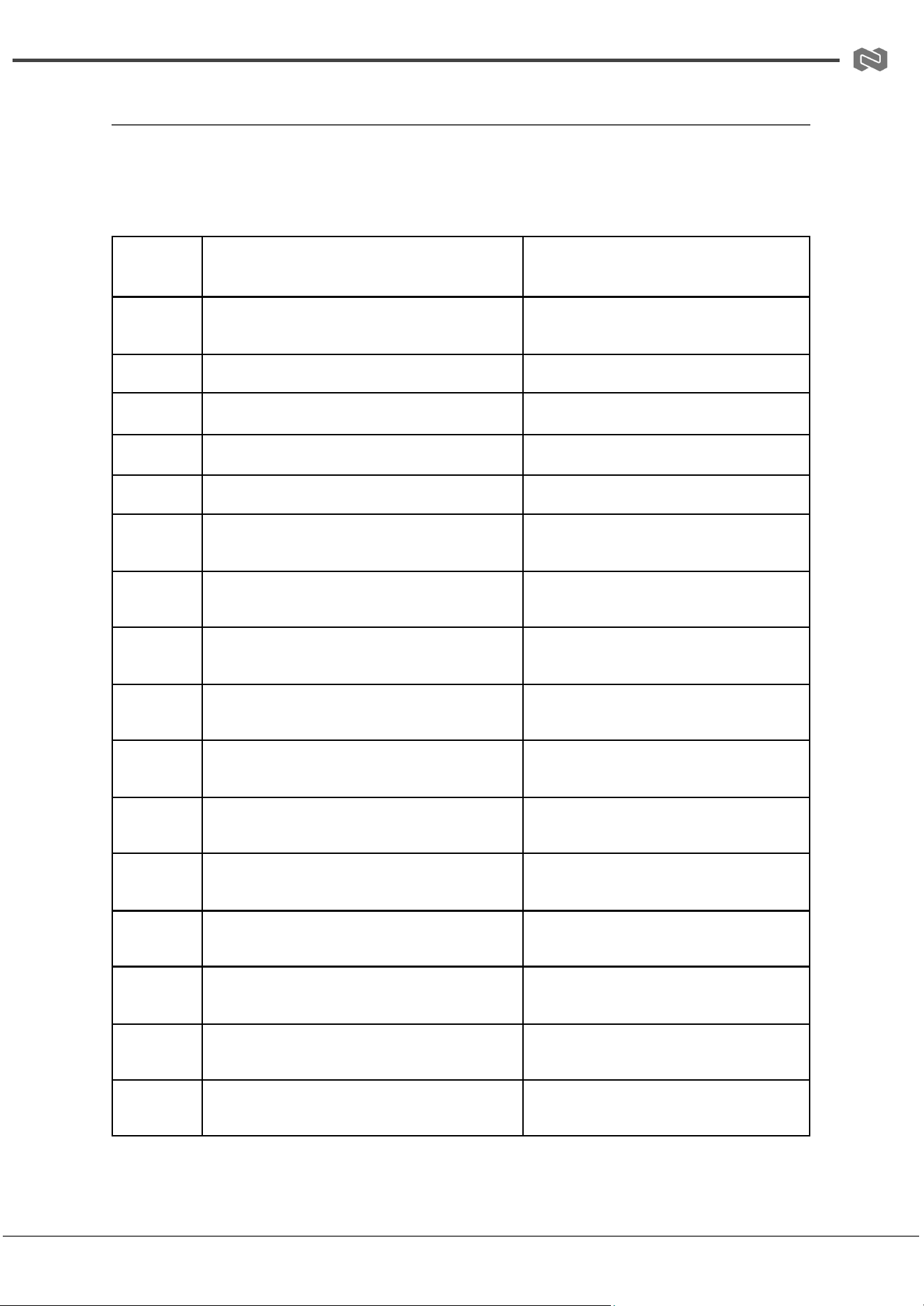
EDID Settings List (DIP Switch Configuration)
The EDID DIP switch allows selection of predefined EDID profiles to ensure optimal
compatibility between source and display devices. Each setting defines resolution, audio
format, and advanced video features.
DIP
Setting
EDID Mode
Description
0000
Pass-through (Default)
Copies EDID from Sink 1 (connected
display).
0001
1080p@60Hz / 2CH PCM
Full HD video with stereo audio.
0010
1080p@60Hz / 5.1 DTS/Dolby
Full HD video with multichannel audio.
0011
4K@60Hz 4:4:4 8-bit / 2CH PCM
UHD resolution with stereo audio.
0100
4K@60Hz 4:4:4 8-bit / 5.1 DTS/Dolby
UHD with multichannel audio.
0101
4K@120Hz 10-bit HDR/Dolby Vision / 2CH
PCM
High refresh UHD with HDR support.
0110
4K@120Hz 10-bit HDR/Dolby Vision / 5.1
DTS/Dolby
HDR UHD with surround audio.
0111
4K@120Hz 12-bit HDR/Dolby Vision / 2CH
PCM
Enhanced color depth UHD with stereo
audio.
1000
4K@120Hz 12-bit HDR/Dolby Vision / 5.1
DTS/Dolby
High-end HDR UHD with surround
audio.
1001
8K@60Hz 4:2:0 10-bit HDR/Dolby Vision /
2CH PCM
8K resolution with stereo audio.
1010
8K@60Hz 4:2:0 10-bit HDR/Dolby Vision /
5.1 DTS/Dolby
8K with surround audio support.
1011
8K@60Hz 4:2:0 12-bit HDR/Dolby Vision /
2CH PCM
Higher color depth 8K with stereo
audio.
1100
8K@60Hz 4:2:0 12-bit HDR/Dolby Vision /
5.1 DTS/Dolby
Full-feature 8K with surround audio.
1101
8K@60Hz 12-bit HDR with VRR/DSC / 2CH
PCM
8K gaming mode with variable refresh
support.
1110
8K@60Hz 12-bit HDR with VRR/DSC / 5.1
DTS/Dolby
Advanced gaming + surround audio
mode.
1111
User / Custom EDID
Reserved for custom or
software-defined EDID settings.
Address: 830 National Drive #140, Sacramento, CA 95834, USA · Tel: +1(888)499-9906 · Email: support@bzbgear.com 11
BZBGEAR BG-8K-24A PRODUCT MANUAL
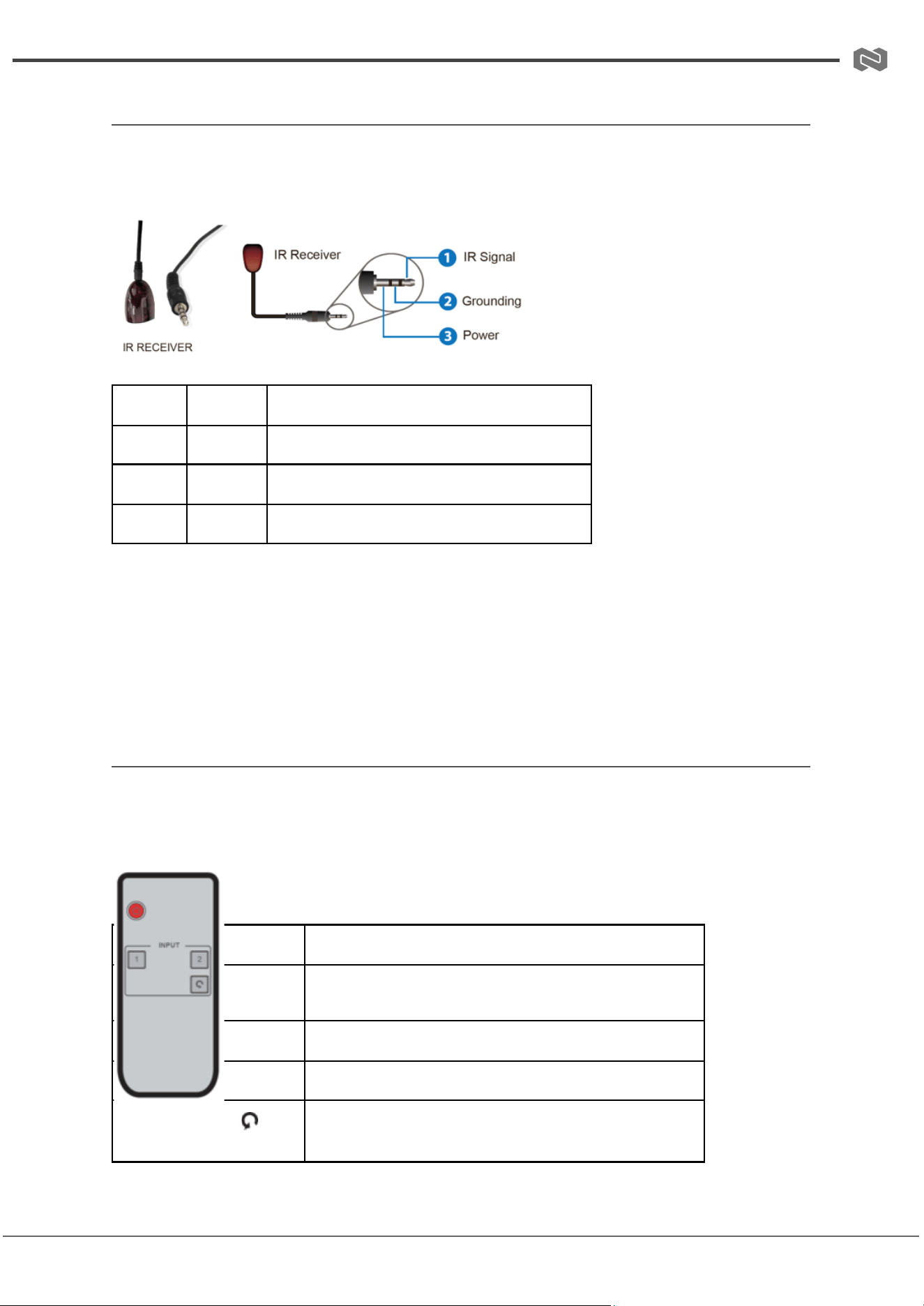
IR Pin Definition
The IR control interface allows the device to receive external IR signals via the IR CTL port
or the included IR receiver cable.
Pin
Signal
Description
Tip
IR Signal
Infrared data input (modulated IR signal)
Ring
+12V
Power supply for external IR receiver
Sleeve
GND
Ground reference
IR Input Specification:
● IR input level: 12Vp-p
● IR frequency range: 20KHz – 60KHz (wideband support)
● Transmission distance: up to 3m over HDMI cable (with compatible IR pass-through
setup)
IR Remote Control
The included IR remote control allows basic switching and power control of the BG-8K-24A
without using front panel buttons or API commands.
Key Functions
Button
Function Description
Power
Turns the device ON or places it into
standby mode
1
Selects HDMI Input 1
2
Selects HDMI Input 2
(Switch Button)
Cycles between Input 1 and Input 2
sequentially
Address: 830 National Drive #140, Sacramento, CA 95834, USA · Tel: +1(888)499-9906 · Email: support@bzbgear.com 12

BZBGEAR BG-8K-24A PRODUCT MANUAL
IR Operation Notes
● The IR remote communicates through the front panel IR receiver window or external
IR receiver connected to IR CTL.
● Ensure there is a clear line of sight between the remote and IR receiver for reliable
operation.
● If IR control is disabled via API, the remote will not function until re-enabled.
● Multiple button presses will cycle or override current input selection depending on
system state.
Address: 830 National Drive #140, Sacramento, CA 95834, USA · Tel: +1(888)499-9906 · Email: support@bzbgear.com 13
BZBGEAR BG-8K-24A PRODUCT MANUAL
API Commands
The BG-8K-24A supports ASCII command control via RS-232 (Phoenix port) and USB-C
Service port. Commands must be sent using standard serial communication software.
Communication Protocol
Service Port (USB-C Virtual RS-232)
● Baud Rate: 115200 (fixed)
● Data Bit: 8
● Stop Bit: 1
● Parity: None
● Purpose: Internal debugging / firmware service
RS-232 Phoenix Port (Control System Integration)
● Baud Rate: 4800 ~ 115200 (configurable)
● Data Bit: 8
● Stop Bit: 1
● Parity: None
Command Format
● All commands are ASCII strings
● Each command must end with: <CR><LF>
● Example: set input 1<CR><LF>
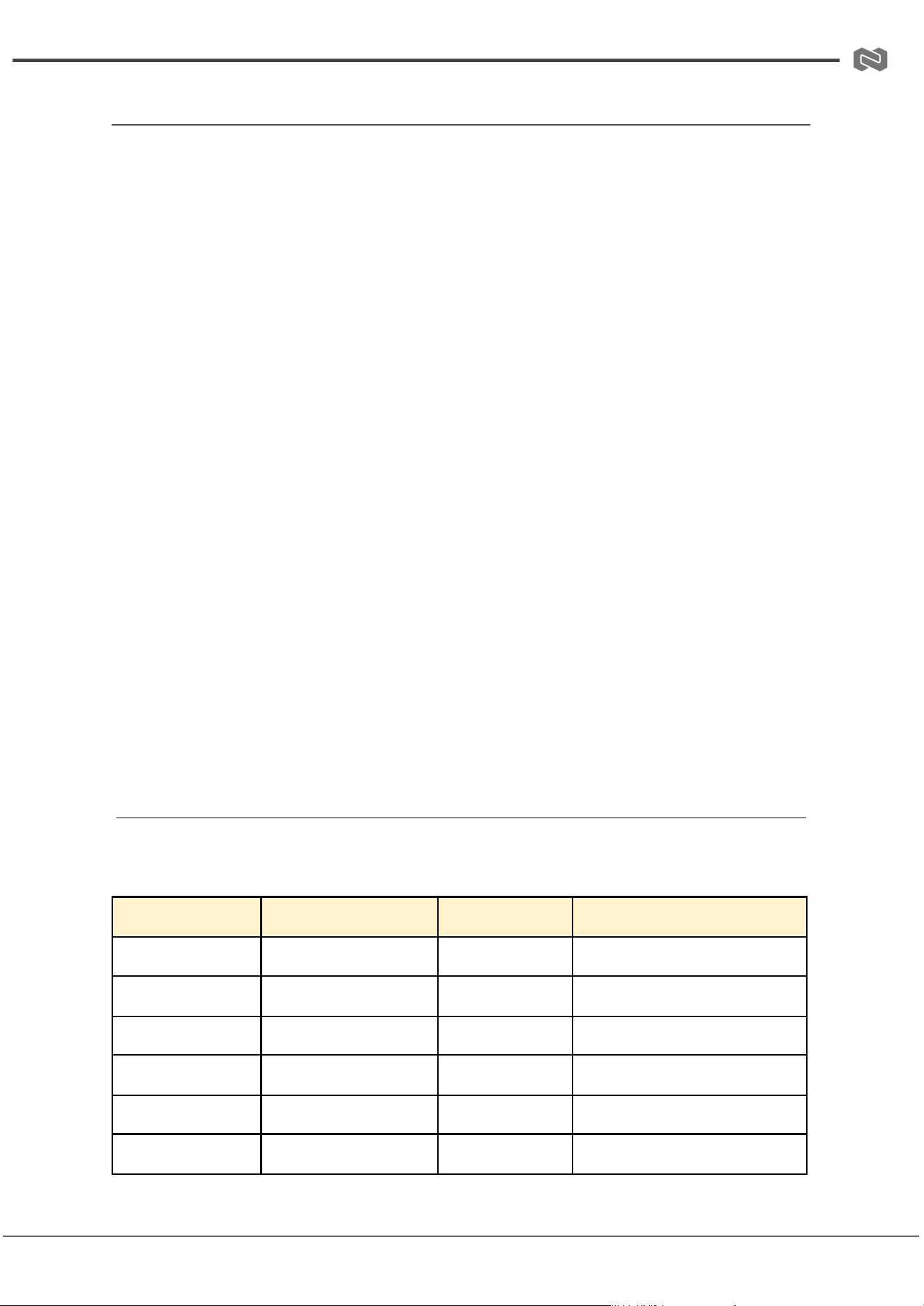
Basic System Commands
Command
Function
Example
Feedback
?
List all commands
?
Command list
help
List all commands
help
Command list
get fw version
Get firmware version
get fw version
1.0.0
set power on/off
Power control
set power on
Power ON / OFF status
get power
Get power status
get power
Power On
set reboot
Reboot system
set reboot
Restart message
Address: 830 National Drive #140, Sacramento, CA 95834, USA · Tel: +1(888)499-9906 · Email: support@bzbgear.com 14
BZBGEAR BG-8K-24A PRODUCT MANUAL
set reset
Factory reset
set reset
Reset confirmation prompt
get status
System status report
get status
Full system status
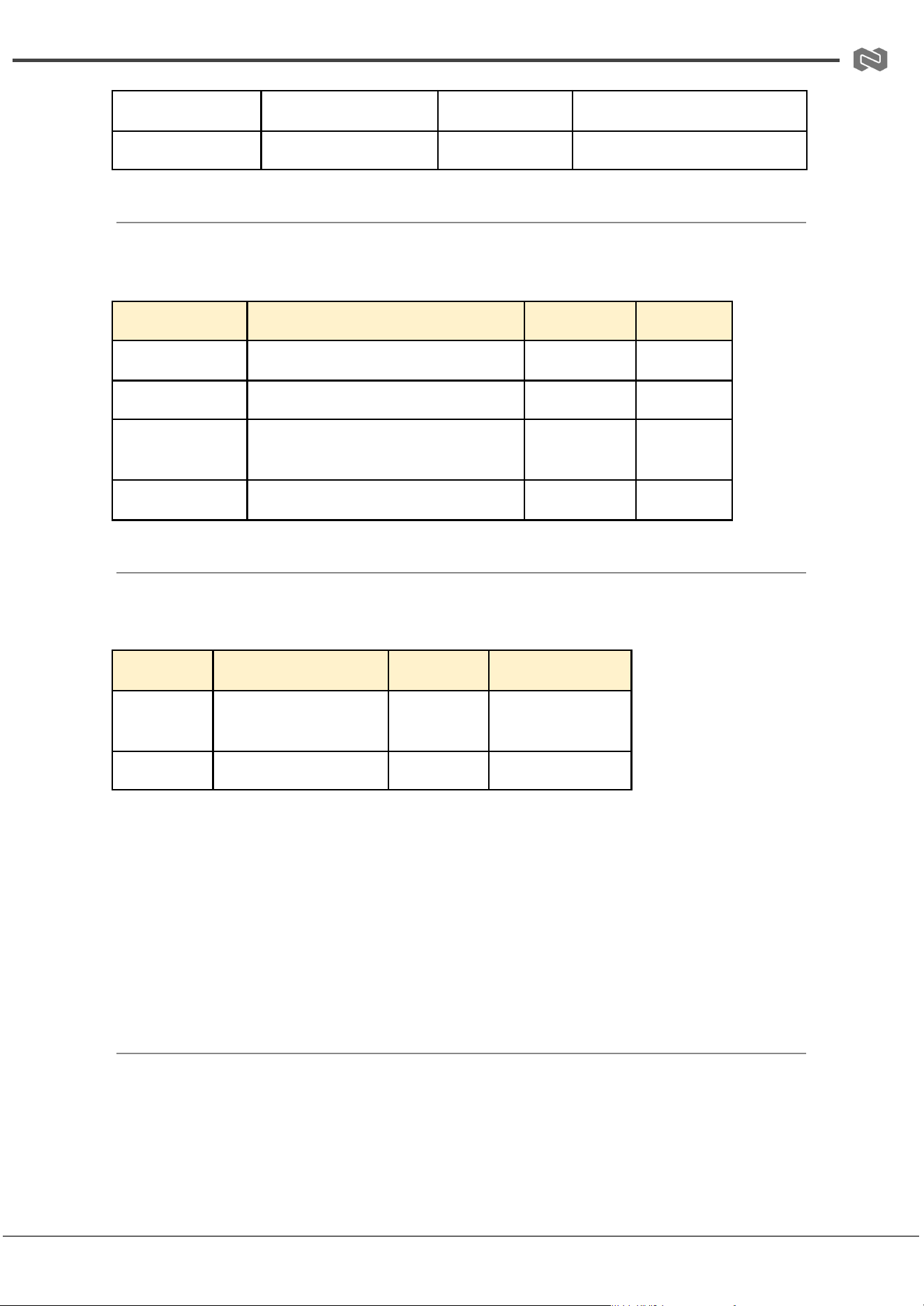
IR & Front Panel Control
Command
Function
Example
Feedback
set IR on/off
Enable/disable IR
set IR off
IR On/Off
get IR
IR status
get IR
IR On
set key on/off
Enable/disable front panel
buttons
set key off
Key Off
get key
Key status
get key
Key On
Baud Rate Control
Command
Function
Example
Feedback
set baud x
Set RS-232 baud
rate
set baud 6
115200
get baud
Get baud rate
get baud
Current baud
Baud Values:
● 1 = 4800
● 2 = 9600
● 3 = 19200
● 4 = 38400
● 5 = 57600
● 6 = 115200
Address: 830 National Drive #140, Sacramento, CA 95834, USA · Tel: +1(888)499-9906 · Email: support@bzbgear.com 15
BZBGEAR BG-8K-24A PRODUCT MANUAL
Input Control
Command
Function
Example
Feedback
set input x
Select HDMI input
set input 1
Input HDMI 1
get input
Get active input
get input
Input HDMI 1
get hdmi5v
Detect HDMI 5V
get hdmi5v
HDMI 1: 5V
Auto Switching
Command
Function
Example
Feedback
set autoswitch on/off
Enable auto switching
set autoswitch on
On
get autoswitch
Get auto-switch status
get autoswitch
On
Output Control
Command
Function
Example
Feedback
set output x downscale
y
Set scaling
mode
set output 0 downscale 0
Auto
get output x downscale
Get scaling
mode
get output 0 downscale
Status
set output x display y
Set display
mode
set output 0 display 2
AVMUTE / Pattern
get output x display
Get display
mode
get output 0 display
Status
set output x HDCP y
Set HDCP mode
set output 0 HDCP 2
Follow source
get output x HDCP
Get HDCP mode
get output 0 HDCP
Status
Address: 830 National Drive #140, Sacramento, CA 95834, USA · Tel: +1(888)499-9906 · Email: support@bzbgear.com 16
BZBGEAR BG-8K-24A PRODUCT MANUAL
EDID Control
Command
Function
Example
Feedback
set edid x to y
Set EDID mode
set edid 0 to 0
Applied
get edid x
Get EDID setting
get edid 0
Current EDID
get edid data x
Read EDID data
get edid data 0
HEX data
set user edid x <data>
Set custom EDID
set user edid 1 <data>
Success
get user edid x
Get custom EDID
get user edid 1
Data
Audio Control
Command
Function
Example
Feedback
set analog mute on/off
Mute audio
set analog mute on
On
get analog mute
Get mute status
get analog mute
On/Off
set analog gain x
Set gain (-79dB to 0dB)
set analog gain -10dB
Applied
get analog gain
Get gain value
get analog gain
Value
Signal Generator
Command
Function
Example
Feedback
set generator x y
Set test pattern
set generator 1 1
8K Color Bar
get generator
Get generator
status
get generator
Active mode
Address: 830 National Drive #140, Sacramento, CA 95834, USA · Tel: +1(888)499-9906 · Email: support@bzbgear.com 17

BZBGEAR BG-8K-24A PRODUCT MANUAL
Notes
● All responses are returned as ASCII strings over serial interface
● Each command must end with <CR><LF>
● get status returns a full multi-line system diagnostic report including:
○ Power state
○ Input selection
○ EDID configuration
○ Output resolution and scaling status
○ HDCP status
○ Cable detection and signal state
Address: 830 National Drive #140, Sacramento, CA 95834, USA · Tel: +1(888)499-9906 · Email: support@bzbgear.com 18
BZBGEAR BG-8K-24A PRODUCT MANUAL
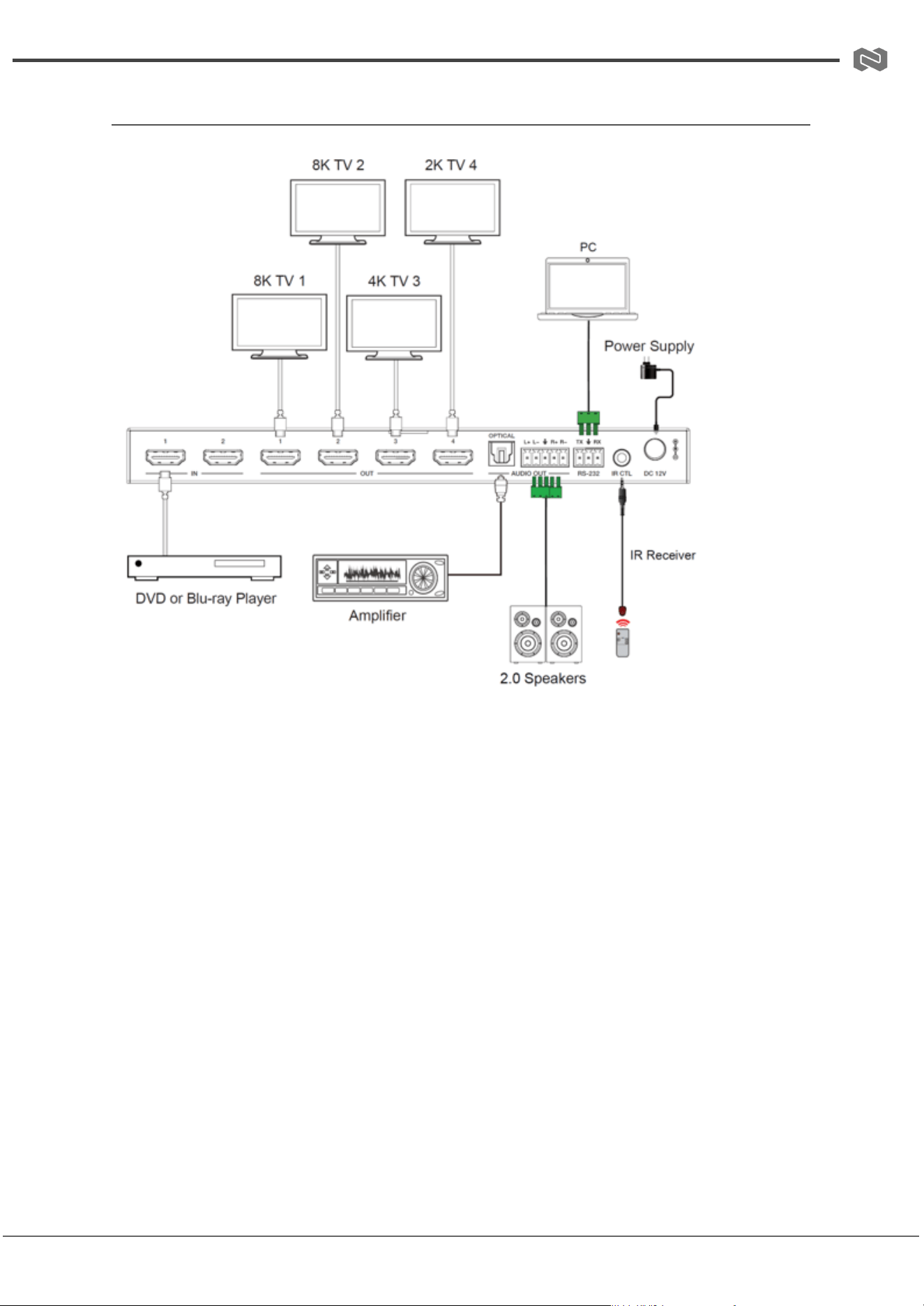
Connection Diagram
Address: 830 National Drive #140, Sacramento, CA 95834, USA · Tel: +1(888)499-9906 · Email: support@bzbgear.com 19
BZBGEAR BG-8K-24A PRODUCT MANUAL
Troubleshooting
Problems
Causes
Solutions
No Power / All LED off
Power supply not connected,
connected fully, or wrong power
supply.
Check if the power supply is
connected correctly and the
output voltage value is within
recommended specifications.
No sound or sound issues
The HDMI connection is faulty,
the audio format is not
supported by the displays, or
the source player is set to
another port for audio output
Check if the HDMI cables are
connected correctly.
Check if the audio format is
supported by the display and
that a user has not changed the
supported audio format on the
player`s audio output. Ensure
output settings from the HDMI
source device as set correctly.
No picture or picture flickers
The HDMI cable may be faulty
or the category cable quality is
faulty.
Check if the HDMI
and category cable connections
are correct and undamaged.
Change to another good
working HDMI cable or category
cable (CAT6 or better cable is
recommended).
Address: 830 National Drive #140, Sacramento, CA 95834, USA · Tel: +1(888)499-9906 · Email: support@bzbgear.com 20

BZBGEAR BG-8K-24A PRODUCT MANUAL
Tech Support
Have technical questions? We may have answered them already!
Please visit BZBGEAR’s support page (bzbgear.com/support) for helpful information and
tips regarding our products. Here you will find our Knowledge Base
(bzbgear.com/knowledge-base) with detailed tutorials, quick start guides, and step-by-step
troubleshooting instructions. Or explore our YouTube channel, BZB TV
(youtube.com/c/BZBTVchannel), for help setting up, configuring, and other helpful how-to
videos about our gear.
Need more in-depth support? Connect with one of our technical specialists directly:
Phone
1.888.499.9906
Email
support@bzbgear.com
Live Chat
bzbgear.com
Limited Product Warranty Terms
Pro Line: 5-year warranty from the date of purchase for AV/Broadcasting products bought
on or after August 1, 2024.
Essential Line: 3-year warranty from the date of purchase for AV/Broadcasting products
bought on or after August 1, 2024.
Cables: Lifetime Limited Product Warranty.
For complete warranty information, please visit bzbgear.com/warranty.
For questions, please call 1.888.499.9906 or email support@bzbgear.com.
Address: 830 National Drive #140, Sacramento, CA 95834, USA · Tel: +1(888)499-9906 · Email: support@bzbgear.com 21

BZBGEAR BG-8K-24A PRODUCT MANUAL
Mission Statement
BZBGEAR is a breakthrough manufacturer of high-quality, innovative audiovisual equipment
ranging from AVoIP, professional broadcasting, conferencing, home theater, to live
streaming solutions. We pride ourselves on unparalleled customer support and services.
Our team offers system design consultation, and highly reviewed technical support for all
the products in our catalog. BZBGEAR delivers quality products designed with users in
mind.
Copyright
All the contents in this manual and its copyright are owned by BZBGEAR. No one is allowed
to imitate, copy, or translate this manual without BZBGEAR’s permission. This manual
contains no guarantee, standpoint expression or other implies in any form. Product
specification and information in this manual is for reference only and subject to change
without notice.
All rights reserved. No reproducing is allowed without acknowledgement.
Address: 830 National Drive #140, Sacramento, CA 95834, USA · Tel: +1(888)499-9906 · Email: support@bzbgear.com 22