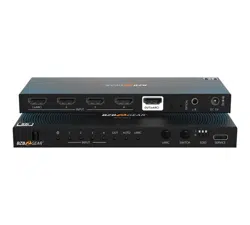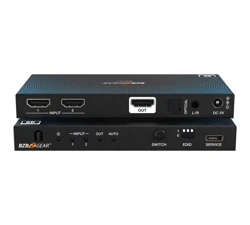
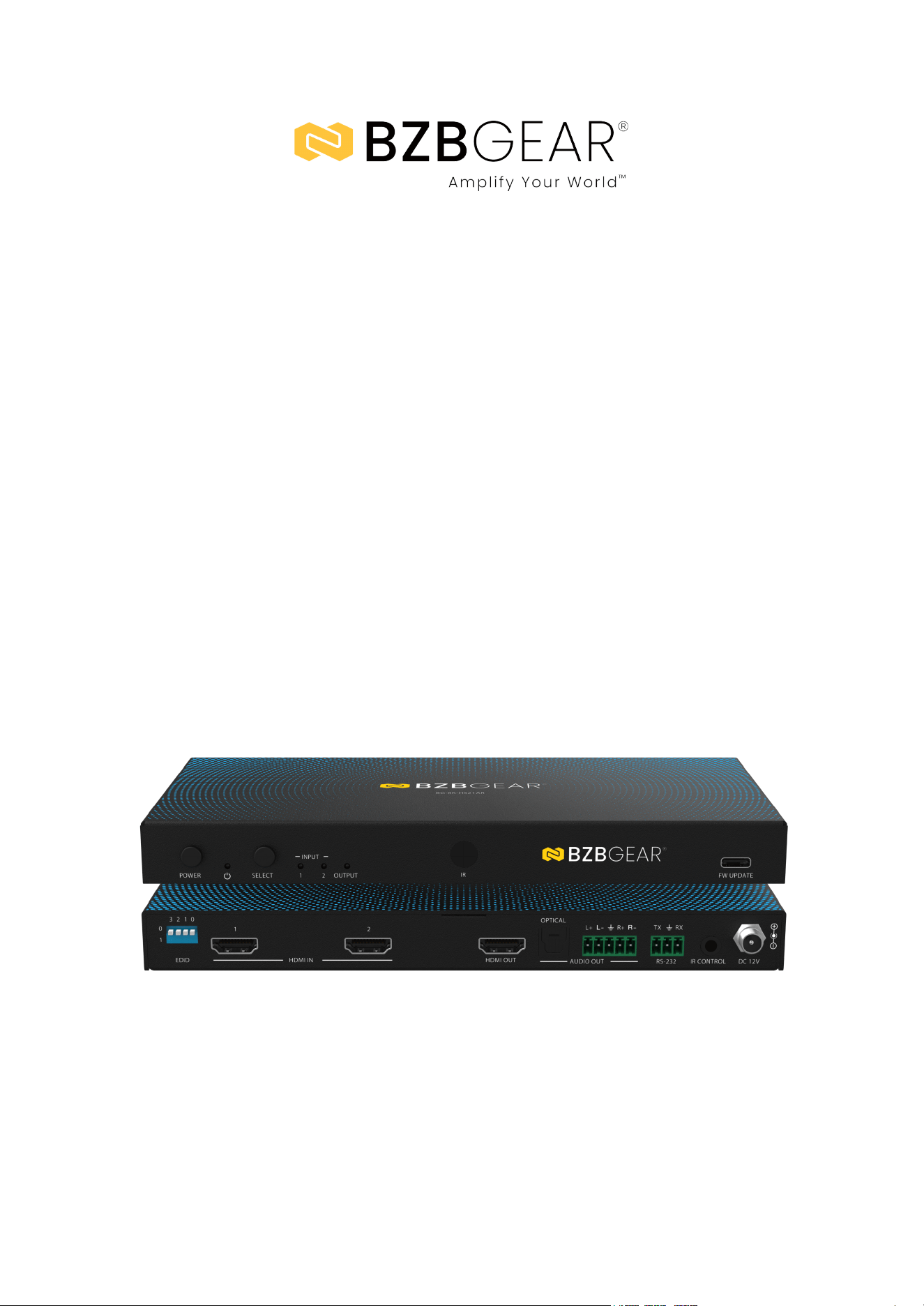
BG-8K-HS21AR
8K UHD 2×1 HDMI Switcher – HDMI 2.1, 48Gbps, 8K60/4K120, HDR,
Audio De-Embedding, EDID Management, Signal Generator
User Manual

BZBGEAR BG-8K-HS21AR PRODUCT MANUAL
Address: 830 National Drive #140, Sacramento, CA 95834, USA · Tel: +1(888)499-9906 · Email: support@bzbgear.com 2

BZBGEAR BG-8K-HS21AR PRODUCT MANUAL
TABLE OF CONTENTS
Statement 4
Safety Precaution 4
Introduction 5
Features 5
Packing List 6
Specifications 7
Operation Controls and Functions 9
IR Remote 12
ASCII Communication Protocol Overview 13
Connection Diagram 16
Troubleshooting 17
Tech Support 18
Limited Product Warranty Terms 18
Mission Statement 18
Copyright 18
Address: 830 National Drive #140, Sacramento, CA 95834, USA · Tel: +1(888)499-9906 · Email: support@bzbgear.com 3

BZBGEAR BG-8K-HS21AR PRODUCT MANUAL
Statement
Please read these instructions carefully before connecting, operating, or configuring this
product. Please save this manual for future reference.
Safety Precaution
● To prevent damaging this product, avoid heavy pressure, strong vibration, or immersion
during transportation, storage, and installation.
● The housing of this product is made of organic materials. Do not expose to any liquid,
gas, or solids which may corrode the shell.
● Do not expose the product to rain or moisture.
● To prevent the risk of electric shock, do not open the case. Installation and maintenance
should only be carried out by qualified technicians.
● Do not use the product beyond the specified temperature, humidity, or power supply
specifications.
● This product does not contain parts that can be maintained or repaired by users.
Damage caused by dismantling the product without authorization from BZBGEAR is not
covered under the warranty policy.
● Installation and use of this product must strictly comply with local electrical safety
standards.
Address: 830 National Drive #140, Sacramento, CA 95834, USA · Tel: +1(888)499-9906 · Email: support@bzbgear.com 4

BZBGEAR BG-8K-HS21AR PRODUCT MANUAL
Introduction
The BG-8K-HS21AR is a high-performance 2×1 HDMI switcher designed to
seamlessly switch between two 8K HDMI sources and deliver crystal-clear video to
a single 8K display. Supporting resolutions up to 8K@60Hz 4:2:0 12-bit, 8K@30Hz
4:4:4 12-bit, and 4K@120Hz 4:4:4 12-bit, this device ensures stunning visual quality
in compliance with the HDMI 2.1 and HDCP 2.3 standards. Full compatibility with
HDR10, HDR10+, Dolby Vision, and ALLM/VRR pass-through guarantees
exceptional color performance and dynamic range for a premium viewing
experience.
Beyond video switching, the BG-8K-HS21AR features digital and analog audio
de-embedding, offering analog audio output with gain control. A built-in HDMI
signal generator simplifies troubleshooting and diagnostics, while advanced EDID
management and integrated signal equalization ensure stable and reliable signal
transmission. Users can operate the device through front panel buttons, an IR
remote, or RS-232 API commands, with auto or manual switching modes for added
flexibility.
Features
● 8K & 4K120 Support: Up to 8K@60Hz YCbCr 4:2:0 12-bit, 8K@30Hz RGB/YCbCr
4:4:4 12-bit, and 4K@120Hz RGB/YCbCr 4:4:4 12-bit
● HDMI Audio Formats: LPCM, Dolby Digital/Plus/EX, Dolby TrueHD, Dolby Atmos,
DTS, DTS-EX, DTS 96/24, DTS High-Resolution Audio, DTS-HD Master Audio, and
DSD.
● Flexible Switching Modes: Supports both automatic and manual input switching.
● Multiple Control Options: Control via front panel buttons, IR remote, and RS-232
API commands.
● Versatile Audio De-Embedding: Extracts both digital and analog audio with analog
output featuring adjustable gain control.
● HDR Pass-Through: Compatible with HDR, HDR10, HDR10+, Dolby Vision, ALLM
(Auto Low Latency Mode), and VRR (Variable Refresh Rate)
● HDCP 2.3 Compliant: Ensures secure transmission of protected content.
● Enhanced Signal Integrity: Equipped with built-in equalization, retiming, and signal
driving capabilities.
● Advanced EDID Management: Offers flexible EDID handling for optimal device
compatibility.
● Compact and Install-Friendly Design: Designed for easy integration into a variety
of professional AV environments.
Address: 830 National Drive #140, Sacramento, CA 95834, USA · Tel: +1(888)499-9906 · Email: support@bzbgear.com 5

BZBGEAR BG-8K-HS21AR PRODUCT MANUAL
Packing List
● 1x BG-8K-HS21AR Switcher
● 1x IR Remote
● 1x 5pin-3.5mm Phoenix Connector (male)
● 1x 3pin-3.5mm Phoenix Connector (male)
● 1x IR Wideband Receiver Cable (1.5m)
● 2x Mounting Ear
● 4x Machine Screw (KM3*4)
● 1x 12V/1A Multinational Locking Power Supply
● 1x User Manual
Address: 830 National Drive #140, Sacramento, CA 95834, USA · Tel: +1(888)499-9906 · Email: support@bzbgear.com 6
BZBGEAR BG-8K-HS21AR PRODUCT MANUAL
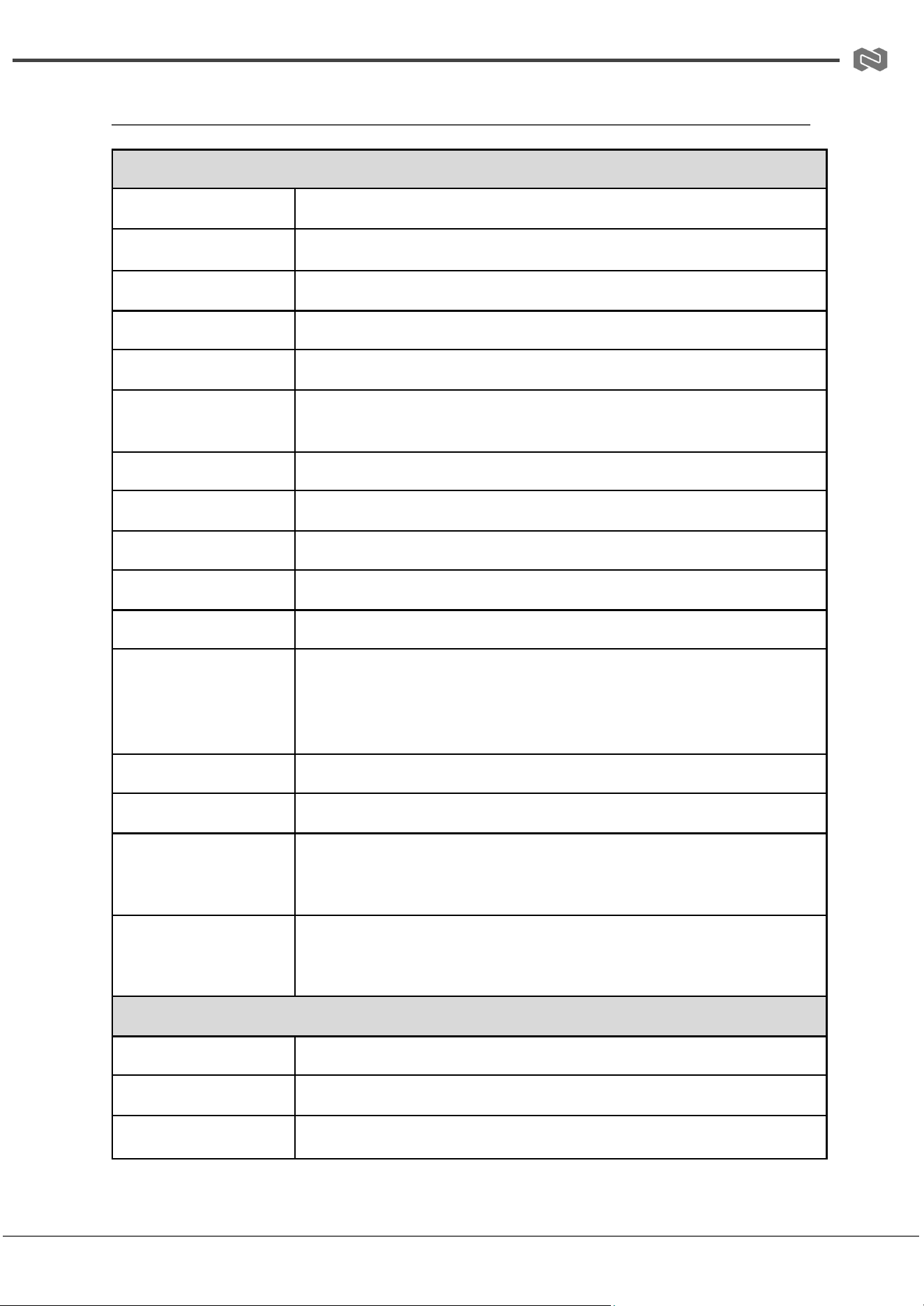
Specifications
Technical Specifications
HDMI Compliance
HDMI 2.1
HDCP Compliance
HDCP 2.3
Video Bandwidth
48 Gbps
Audio Latency
No latency
Video Latency
No latency
Video Resolution
Up to 8K@60 YCbCr 4:2:0 12-bit, 8K@30 RGB/YCbCr 4:4:4 12-bit,
or 4K@120 RGB/YCbCr 4:4:4 12-bit
Color Depth
8-bit / 10-bit / 12-bit
Color Space
RGB, YCbCr 4:4:4, YCbCr 4:2:2, YCbCr 4:2:0
HDR
HDR, HDR10, HDR10+, Dolby Vision, HLG
IR Level
12 Vp-p
IR Frequency
Wideband 20 kHz – 60 kHz
Audio Formats
HDMI Input/Output: LPCM, Dolby Digital/Plus/EX, Dolby TrueHD,
Dolby Atmos, DTS, DTS-ES, DTS-96/24, DTS High Res, DTS-HD
Master Audio, DSD Audio De-embedding Output: Optical: Up to
LPCM/Dolby/DTS 5.1CH Analog: LPCM 2CH only
ESD Protection
IEC 61000-4-2: ±8 kV (air-gap discharge), ±4 kV (contact discharge)
Input Ports
2x HDMI IN [Type A, 19-pin female]
Output Ports
1x HDMI OUT [Type A, 19-pin female]
1x Optical Audio OUT [S/PDIF, female]
1x L/R Audio OUT [5-pin 3.5mm Phoenix connector]
Control Interfaces
1x RS-232 [3-pin 3.5mm Phoenix connector]
1x IR CTL [3.5mm stereo mini-jack]
1x SERVICE [USB Type-C, update port]
Mechanical Specifications
Housing
Metal enclosure
Silkscreen Color
Black
Dimensions (W×D×H)
8.7in × 4.3in × 0.85in / 220 mm × 110 mm × 21.5 mm
Address: 830 National Drive #140, Sacramento, CA 95834, USA · Tel: +1(888)499-9906 · Email: support@bzbgear.com 7

BZBGEAR BG-8K-HS21AR PRODUCT MANUAL
Weight
1.3 lbs [595 g]
Power Supply
Input: AC 100–240V, 50/60 Hz
Output: DC 12V/1A (US/EU standards, CE/FCC/UL certified)
Power Consumption
5.04 W (Max)
Operating
Temperature
14°F to 113°F / -10°C to 45°C
Storage Temperature
-4°F to 140°F / -20°C to 60°C
Relative Humidity
20% to 90% RH (non-condensing)
Recommended
HDMI Cable
Video Resolution
8K – 2 m / 6.6 ft (Ultra HDMI 2.1)
4K60 – 8 m / 26 ft
4K24 – 12 m / 39 ft
1080P – 15 m / 49 ft
The use of a “Premium High-Speed HDMI” cable is highly recommended.
Address: 830 National Drive #140, Sacramento, CA 95834, USA · Tel: +1(888)499-9906 · Email: support@bzbgear.com 8
BZBGEAR BG-8K-HS21AR PRODUCT MANUAL
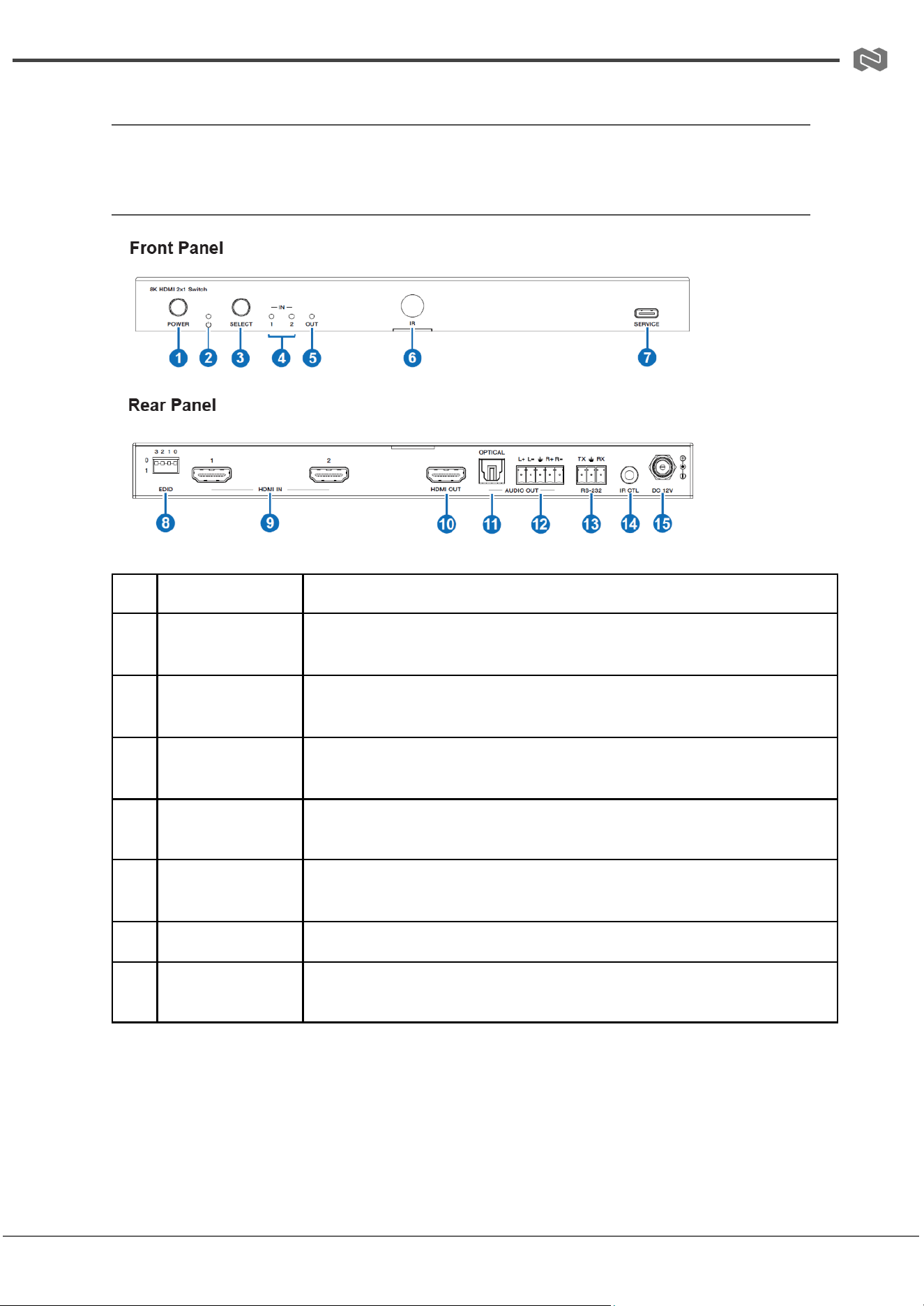
Operation Controls and Functions
Front and Rear Panel
No.
Name
Function Description
1
POWER button
Press to power the device on or off.
2
POWER LED
Lights green when the device is operating; red when in standby.
3
SELECT button
Signal source selection button. Press to switch between the two
HDMI input signals to the HDMI OUT port.
4
IN LED (1~2)
Lights green when HDMI IN 1 or 2 is selected as the signal source.
5
OUT LED
Lights green when a display is connected and receiving a signal
from the HDMI OUT port.
6
IR Window
Receives IR remote control signals.
7
SERVICE
USB-C port for firmware updates, software debugging, and API
command control.
Address: 830 National Drive #140, Sacramento, CA 95834, USA · Tel: +1(888)499-9906 · Email: support@bzbgear.com 9
BZBGEAR BG-8K-HS21AR PRODUCT MANUAL
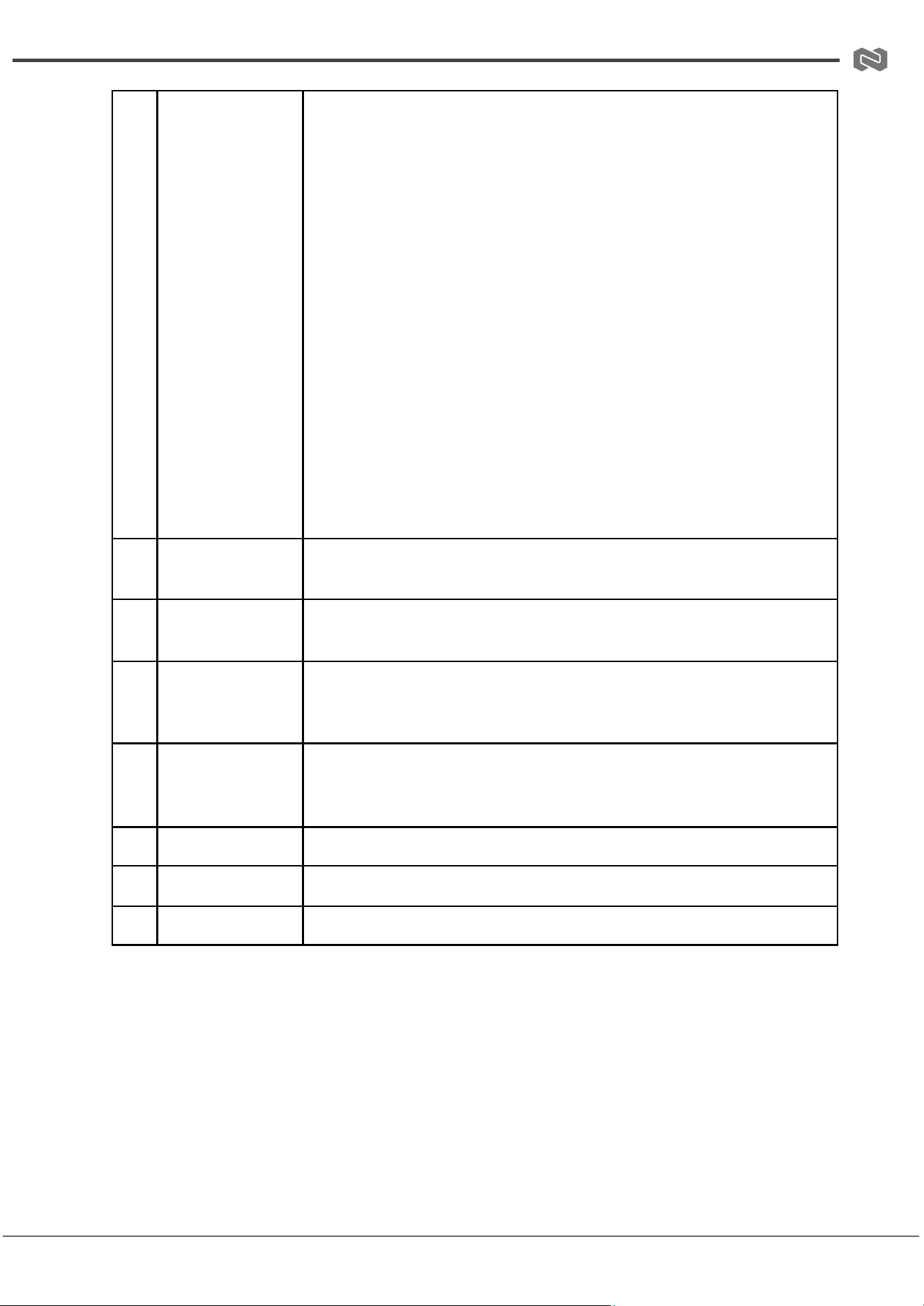
8
EDID DIP switch
4-pin DIP switch for EDID configuration:
0000 - EDID pass-through (Copy from Sink 1) (Factory Default)
0001 - 1080p@60Hz, Audio 2CH PCM
0010 - 1080p@60Hz, Audio 5.1CH DTS/Dolby
0011 - 4K@60Hz 4:4:4 8-bit, Audio 2CH PCM
0100 - 4K@60Hz 4:4:4 8-bit, Audio 5.1CH DTS/Dolby
0101 - 4K@120Hz 4:4:4 10-bit HDR/DV, Audio 2CH PCM
0110 - 4K@120Hz 4:4:4 10-bit HDR/DV, Audio 5.1CH DTS/Dolby
0111 - 4K@120Hz 4:4:4 12-bit HDR/DV, Audio 2CH PCM
1000 - 4K@120Hz 4:4:4 12-bit HDR/DV, Audio 5.1CH DTS/Dolby
1001 - 8K@60Hz 4:2:0 10-bit HDR/DV, Audio 2CH PCM
1010 - 8K@60Hz 4:2:0 10-bit HDR/DV, Audio 5.1CH DTS/Dolby
1011 - 8K@60Hz 4:2:0 12-bit HDR/DV, Audio 2CH PCM
1100 - 8K@60Hz 4:2:0 12-bit HDR/DV, Audio 5.1CH DTS/Dolby
1101 - 8K@60Hz 4:2:0 12-bit HDR/DV, Audio 2CH PCM (Incl.
VRR/DSC)
1110 - 8K@60Hz 4:2:0 12-bit HDR/DV, Audio 5.1CH DTS/Dolby
(Incl. VRR/DSC)
1111 - EDID via software if available, or 1080p@60Hz, Audio 2CH
PCM
9
HDMI IN port
(1~2)
HDMI input ports. Connect to source devices such as DVD players
or game consoles using HDMI cables.
10
HDMI OUT port
HDMI output port. Connect to a display device such as a TV or
monitor using an HDMI cable.
11
OPTICAL
(AUDIO OUT)
Optical audio output port.
12
L+/L-/R+/R-
(AUDIO OUT)
Analog audio output port. Supports: – Balanced output (max
2Vrms): L+, L-, R+, R- – Unbalanced output (max 1Vrms): L+, R+
13
RS-232
RS-232 serial port for API command control.
14
IR CTL
12V IR signal receiving port.
15
DC 12V
12V/1A power input port.
Address: 830 National Drive #140, Sacramento, CA 95834, USA · Tel: +1(888)499-9906 · Email: support@bzbgear.com 10
BZBGEAR BG-8K-HS21AR PRODUCT MANUAL
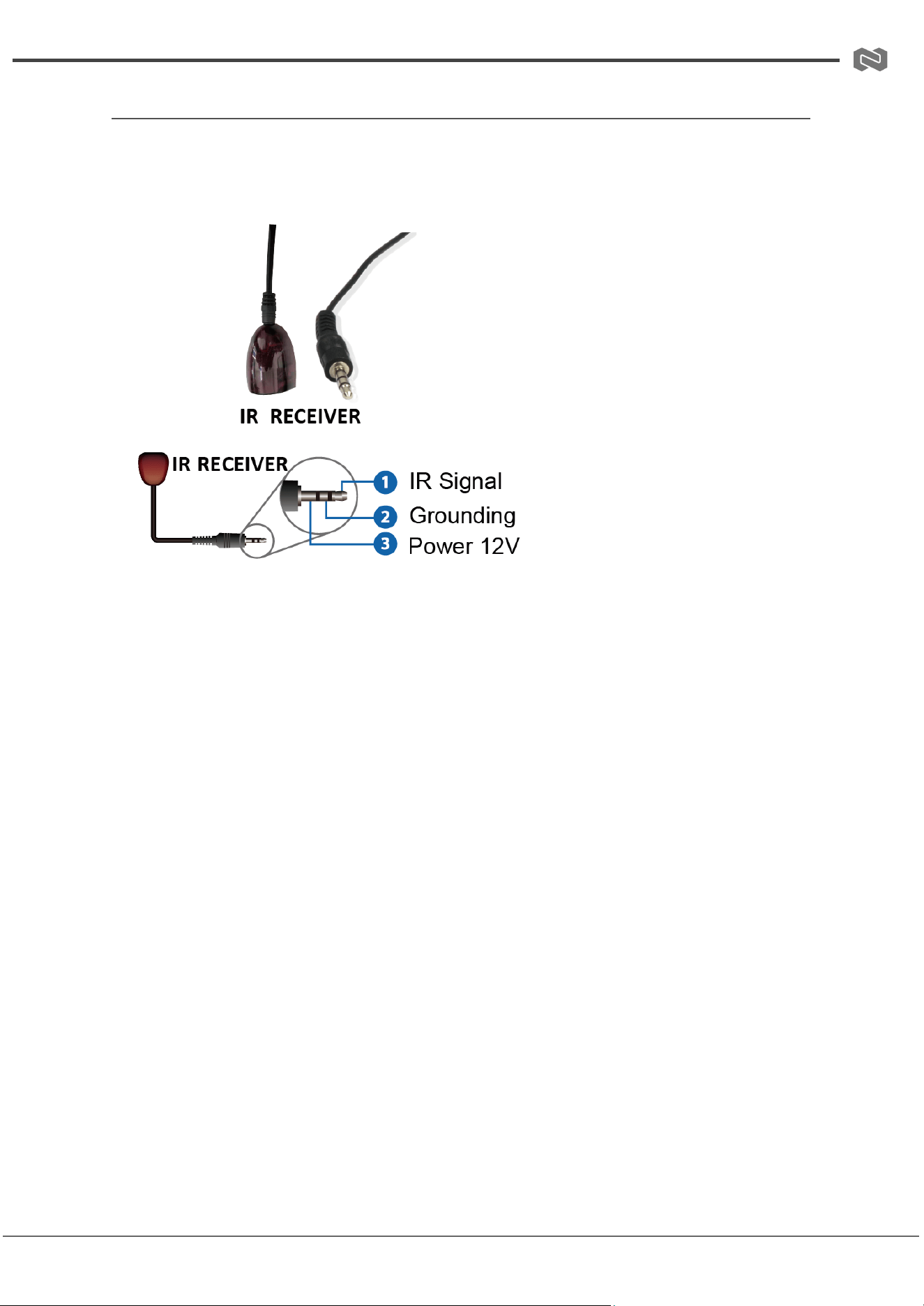
IR Cable Pin Assignment
The IR receiver cable pin assignment is as follows:
Note:
● When the angle between the IR receiver and the remote control is within ±45°, the
effective transmission distance is 0–5 meters.
● When the angle is within ±90°, the transmission distance extends up to 8 meters.
Address: 830 National Drive #140, Sacramento, CA 95834, USA · Tel: +1(888)499-9906 · Email: support@bzbgear.com 11
BZBGEAR BG-8K-HS21AR PRODUCT MANUAL
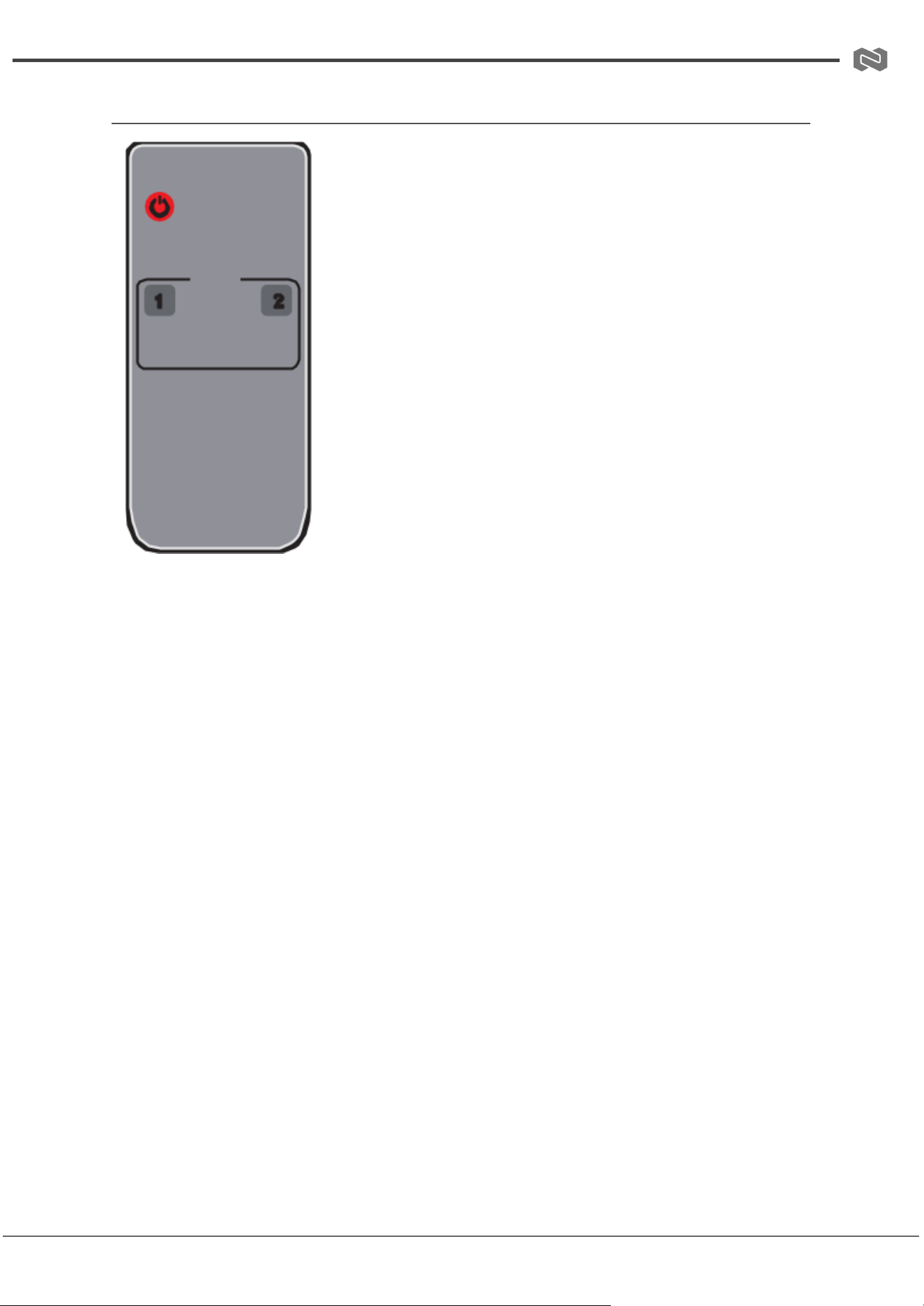
IR Remote
Power
Turn the device on or set it to standby mode.
INPUT
1 / 2: Press the "1" or "2" button to select the corresponding
HDMI input (HDMI IN 1 or HDMI IN 2) and route it to the HDMI
OUT port.
◀/▶: Press this button to cycle between HDMI IN 1 and HDMI
IN 2 and output the selected source to the HDMI OUT port.
Address: 830 National Drive #140, Sacramento, CA 95834, USA · Tel: +1(888)499-9906 · Email: support@bzbgear.com 12

BZBGEAR BG-8K-HS21AR PRODUCT MANUAL
ASCII Communication Protocol Overview
● Service Port: USB-C virtual RS-232 (Internal debug)
● Baud Rate (Service Port): 115200 (Fixed)
● Data Bit: 8
● Stop Bit: 1
● Parity Bit: None
● Command End Mark: <CR><LF>
Command
Code
Function
Description
Example
Feedback
Factory Default
?
Get the list of all
commands
?
list all commands
help
Get the list of all
commands
help!
list all commands
get fw
version
Get firmware
version
get fw
version
mcu boot:vx.xx.xx
mcu app:vx.xx.xx
set power
on/off
Set device power
on/off
set power on
/ set power
off
power on / power off
get power
Get device power
status
get power
power on / power off
set reboot
Reboot the
device
set reboot
reboot…
set reset
Reset to factory
defaults
set reset
reset to factory
defaults
get status
Get system
status
get status
See detailed note
(feedback spans
multiple lines)
set IR
on/off
Set IR on/off
set IR on /
set IR off
IR on / IR off
on
get IR
Get IR on/off
status
get IR
IR on / IR off
set key
on/off
Set front panel
key on/off
set key on /
set key off
key on / key off
on
Address: 830 National Drive #140, Sacramento, CA 95834, USA · Tel: +1(888)499-9906 · Email: support@bzbgear.com 13

BZBGEAR BG-8K-HS21AR PRODUCT MANUAL
get key
Get front panel
key status
get key
key on / key off
set baud x
Set RS-232 baud
rate (x=1~6)
set baud 6
baud rate 115200
115200
get baud
Get RS-232 baud
rate
get baud
baud rate 115200
set input x
Set input video
source (x=0~2)
set input 1
input HDMI 1
1
get input
Get input port
get input
input HDMI 1
get hdmi5v
Get HDMI 5V
detection
get hdmi5v
HDMI 1: 5V / HDMI 2:
none
set
autoswitch
x
Set
auto-switching
(x=on/off)
set
autoswitch
on
autoswitch on /
autoswitch off
on
get
autoswitch
Get
auto-switching
status
get
autoswitch
autoswitch on /
autoswitch off
set output
display y
Set output
display mode
(y=0~3)
set output
display 2
output display input
video / AVMUTE /
internal pattern
1
get output
display
Get output
display mode
get output
display
off / input video /
AVMUTE / internal
pattern
set output
HDCP y
Set HDCP mode
(y=0~4)
set output
HDCP 1
follow sink / source /
force HDCP 1.4 / 2.2
1
get output
HDCP
Get HDCP mode
get output
HDCP
follow sink / source /
force HDCP 1.4 / 2.2
set analog
mute x
Set analog audio
mute (x=on/off)
set analog
mute on
analog mute on / off
off
get analog
mute
Get analog audio
mute status
get analog
mute
analog mute on / off
Address: 830 National Drive #140, Sacramento, CA 95834, USA · Tel: +1(888)499-9906 · Email: support@bzbgear.com 14

BZBGEAR BG-8K-HS21AR PRODUCT MANUAL
set analog
gain x
Set analog audio
gain (x=0dB ~
-79dB)
set analog
gain -79dB
analog gain -79dB
0dB
get analog
gain
Get analog audio
gain value
get analog
gain
analog gain -79dB
set
generator x
y
Set signal
generator
resolution and
pattern
set generator
1 1
generator 8K30Hz
color bar
get
generator
Get signal
generator
resolution and
pattern
get generator
generator 8K30Hz
color bar
set edid x
to y
Set EDID for
input ports (x=02,
y=032)
set edid 0 to
0
EDID: HDMI
1080p@60Hz, Audio
2CH PCM
HDMI
1080p@60Hz,
Audio 2CH PCM
get edid x
Get EDID of input
ports (x=0~2)
get edid 0
HDMI input 1/2: HDMI
1080p@60Hz, Audio
2CH PCM
get edid
data x
Get raw EDID
data (x=0~2)
get edid data
0
<00 FF FF FF….>
set user
edid x
Set custom EDID
(x=1~2, y=256
bytes)
set user edid
1 <00 FF...>
user defined 1 EDID is
loaded successfully
get user
edid x
Get user defined
EDID (x=1~2)
get user edid
1
user defined 1 EDID
<00 FF...>
Address: 830 National Drive #140, Sacramento, CA 95834, USA · Tel: +1(888)499-9906 · Email: support@bzbgear.com 15
BZBGEAR BG-8K-HS21AR PRODUCT MANUAL
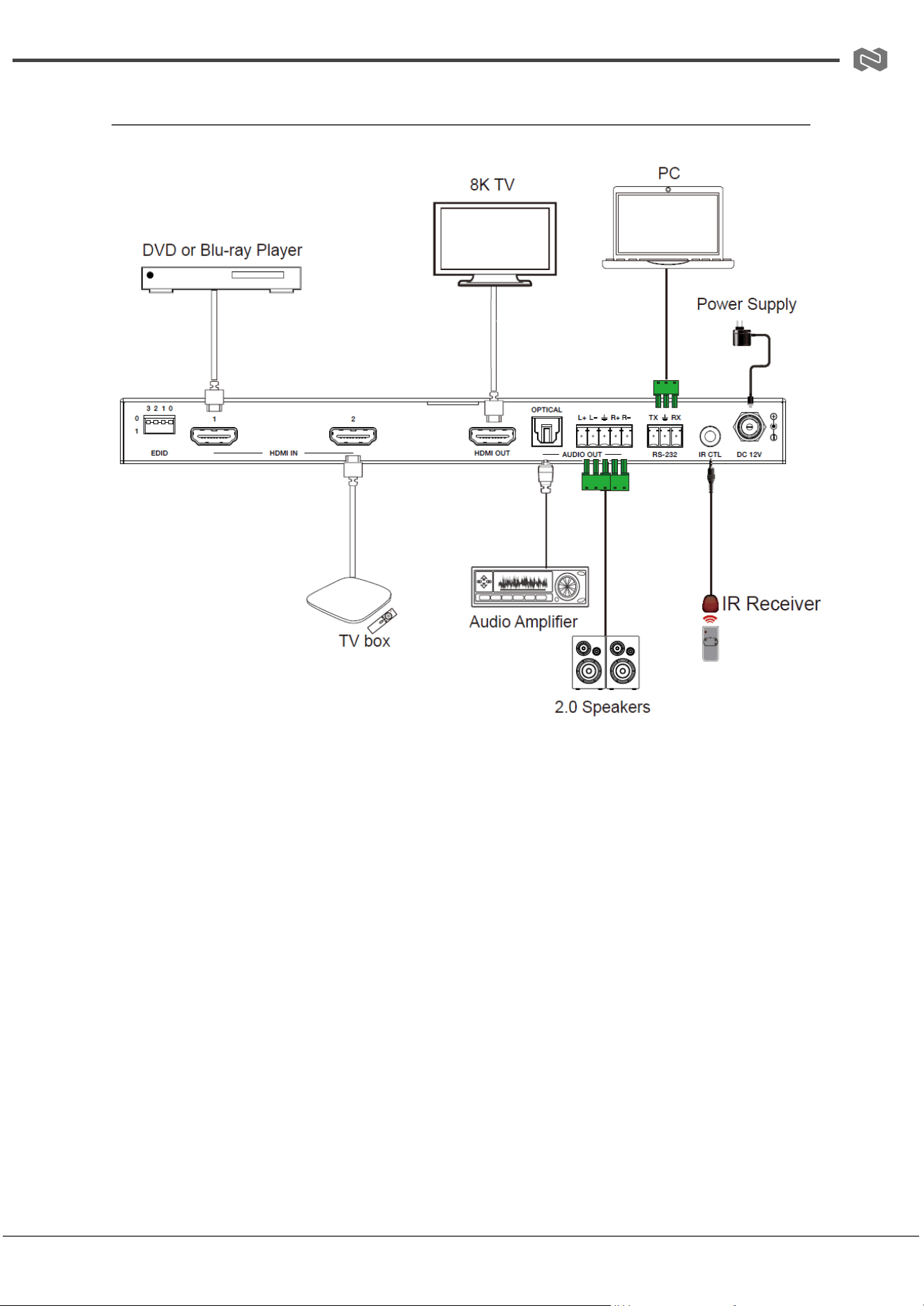
Connection Diagram
Address: 830 National Drive #140, Sacramento, CA 95834, USA · Tel: +1(888)499-9906 · Email: support@bzbgear.com 16

BZBGEAR BG-8K-HS21AR PRODUCT MANUAL
Troubleshooting
Problems
Causes
Solutions
No Power / All LED off
Power supply not connected,
connected fully, or wrong power
supply.
Check if the power supply is
connected correctly and the
output voltage value is within
recommended specifications.
No sound or sound issues
The HDMI connection is faulty,
the audio format is not
supported by the displays, or
the source player is set to
another port for audio output
Check if the HDMI cables are
connected correctly.
Check if the audio format is
supported by the display and
that a user has not changed the
supported audio format on the
player`s audio output. Ensure
output settings from the HDMI
source device as set correctly.
No picture or picture flickers
The HDMI cable may be faulty
or the category cable quality is
faulty.
Check if the HDMI
and category cable connections
are correct and undamaged.
Change to another good
working HDMI cable or category
cable (CAT6 or better cable is
recommended).
Address: 830 National Drive #140, Sacramento, CA 95834, USA · Tel: +1(888)499-9906 · Email: support@bzbgear.com 17

BZBGEAR BG-8K-HS21AR PRODUCT MANUAL
Tech Support
Have technical questions? We may have answered them already!
Please visit BZBGEAR’s support page (bzbgear.com/support) for helpful information and
tips regarding our products. Here you will find our Knowledge Base
(bzbgear.com/knowledge-base) with detailed tutorials, quick start guides, and step-by-step
troubleshooting instructions. Or explore our YouTube channel, BZB TV
(youtube.com/c/BZBTVchannel), for help setting up, configuring, and other helpful how-to
videos about our gear.
Need more in-depth support? Connect with one of our technical specialists directly:
Phone
1.888.499.9906
Email
support@bzbgear.com
Live Chat
bzbgear.com
Limited Product Warranty Terms
Pro Line: 5-year warranty from the date of purchase for AV/Broadcasting products bought
on or after August 1, 2024.
Essential Line: 3-year warranty from the date of purchase for AV/Broadcasting products
bought on or after August 1, 2024.
Cables: Lifetime Limited Product Warranty.
For complete warranty information, please visit bzbgear.com/warranty.
For questions, please call 1.888.499.9906 or email support@bzbgear.com.
Mission Statement
BZBGEAR is a breakthrough manufacturer of high-quality, innovative audiovisual equipment
ranging from AVoIP, professional broadcasting, conferencing, home theater, to live
streaming solutions. We pride ourselves on unparalleled customer support and services.
Our team offers system design consultation, and highly reviewed technical support for all
the products in our catalog. BZBGEAR delivers quality products designed with users in
mind.
Copyright
All the contents in this manual and its copyright are owned by BZBGEAR. No one is allowed
to imitate, copy, or translate this manual without BZBGEAR’s permission. This manual
contains no guarantee, standpoint expression or other implies in any form. Product
specification and information in this manual is for reference only and subject to change
without notice.
All rights reserved. No reproducing is allowed without acknowledgement.
Address: 830 National Drive #140, Sacramento, CA 95834, USA · Tel: +1(888)499-9906 · Email: support@bzbgear.com 18