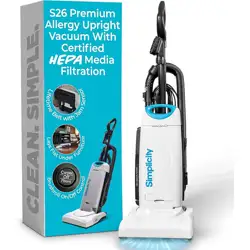
Owner’s Manual
S26

1
CONTENTS
Getting Started
Important Safety Instructions
2
Polarization Instructions
3
Description of the Vacuum
4-5
Assembling the Vacuum
Attaching the Handle to the Vacuum
6
Unwinding the Power Cord
6
Storing the Vacuum
6
Operation
Reclining the Handle
7
Vacuuming Carpet, Rugs, and Bare Floors
7
Brushroll Auto Shutoff Feature
7
Vacuuming Under Furniture
8
Carrying the Vacuum
8
Attachment Cleaning
Telescopic Wand Cleaning
9
Cleaning Tools
10-11
Adjusting the Suction Power for Tool Cleaning and Plush Carpet
11
Disconnecting the Hose
11
Maintenance and Care
When to Replace The Vacuum Bag
12
Replacing the Vacuum Bag
13
Replacing the Filters
14
Belt Protection Breaker Reset
15
Thermal Motor Protection
15
Lifetime Belt
16
Annual Checkup
16
Power Cord Care
16
Problem Solving Guide
Troubleshooting
17
How to Contact Your Authorized Vacuum Retailer
17
Key Replacement Parts
17
For Best Performance
17
Warranty
18

2
SAVE THESE INSTRUCTIONS
IMPORTANT SAFETY INSTRUCTIONS
When using an electrical appliance, basic precautions
should always be followed, including the following:
READ ALL INSTRUCTIONS BEFORE USING THIS
APPLIANCE. FOR HOUSEHOLD USE ONLY.
IMPORTANT:
The manufacturer cannot accept responsibility for damage
caused when the appliance is not used according to the
instructions, or for uses other than those for which it was intended.
WARNING:
To reduce the risk of fire, electric shock, damage or injury:
• Do not leave appliance when plugged in.
Unplug from outlet when not in use
and before servicing.
• Do not use outdoors or on wet surfaces.
• Do not allow to be used as a toy. Close
attention is necessary when used by
or near children.
• Use only as described in this manual.
Use only manufacturer’s recommended
attachments.
• Do not use with a damaged cord or
plug. If appliance is not working as it
should, has been dropped, damaged,
left outdoors, or dropped into water,
return it to an Authorized Vacuum
Retailer for service.
• Do not pull or carry by the cord, use
the cord as a handle, close a door on
the cord, or pull the cord around sharp
edges or corners. Do not run appliance
over the cord. Keep the cord away
from heated surfaces.
• Do not unplug by pulling on the cord. To
unplug, grasp the plug, not the cord.
• Do not use the pet hair remover tool on
pets.
• Do not handle the plug or appliance
with wet hands.
• Do not put any object into openings.
Do not use with any opening blocked;
keep free of dust, lint, hair and anything
that may reduce air flow.
• Keep hair, loose clothing, fingers and all
parts of the body away from openings
and moving parts.
• Do not pick up anything that is burning
or smoking, such as cigarettes, matches
or hot ashes.
• Do not use without a vacuum bag and/or
filters in place.
• Turn off all controls before unplugging.
• Use extra care when cleaning on stairs.
• Do not use to pick up flammable or
combustible liquids such as gasoline
or use in areas where they may be
present.
• Do not attempt to service the unit while
appliance is plugged in.
3
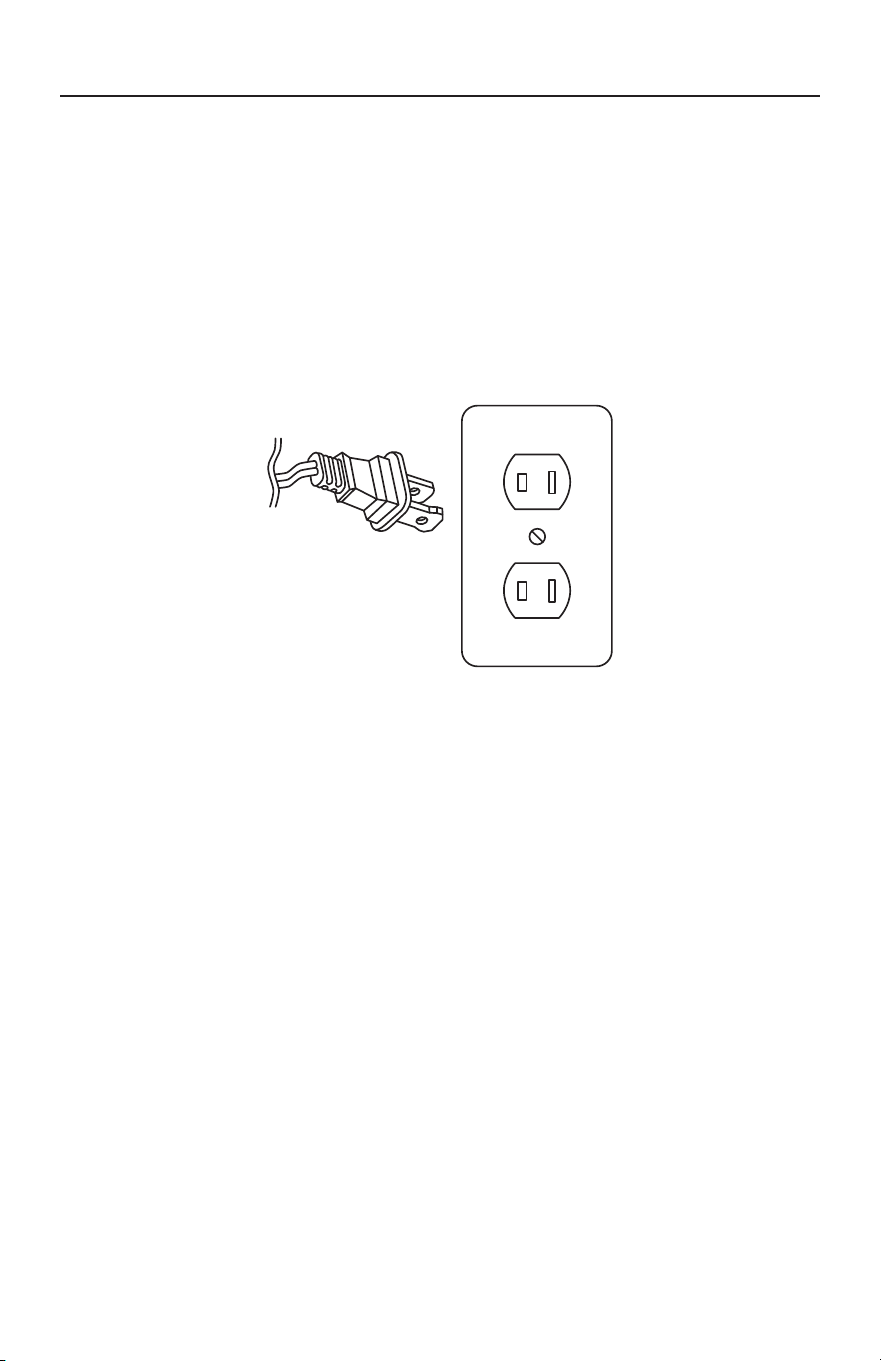
Power Cord, 2-Wire Polarized Cord
To reduce the risk of electric shock, the vacuum is equipped with a polarized
alternating current line plug (a plug having one blade wider than the other). This
plug will fit into the power outlet only one way. This is a safety feature. If you are
unable to insert the plug fully into the outlet, try reversing the plug. If the plug
should still fail to fit, contact a qualified electrician to replace the obsolete outlet.
Do not defeat the safety purpose of the polarized plug.
POLARIZATION INSTRUCTIONS
4
1
4
9
7
8
12
10
2
5
11
6
24
DESCRIPTION OF THE VACUUM
22
14
15
13
21
17
16
18
19
20
23
3

5
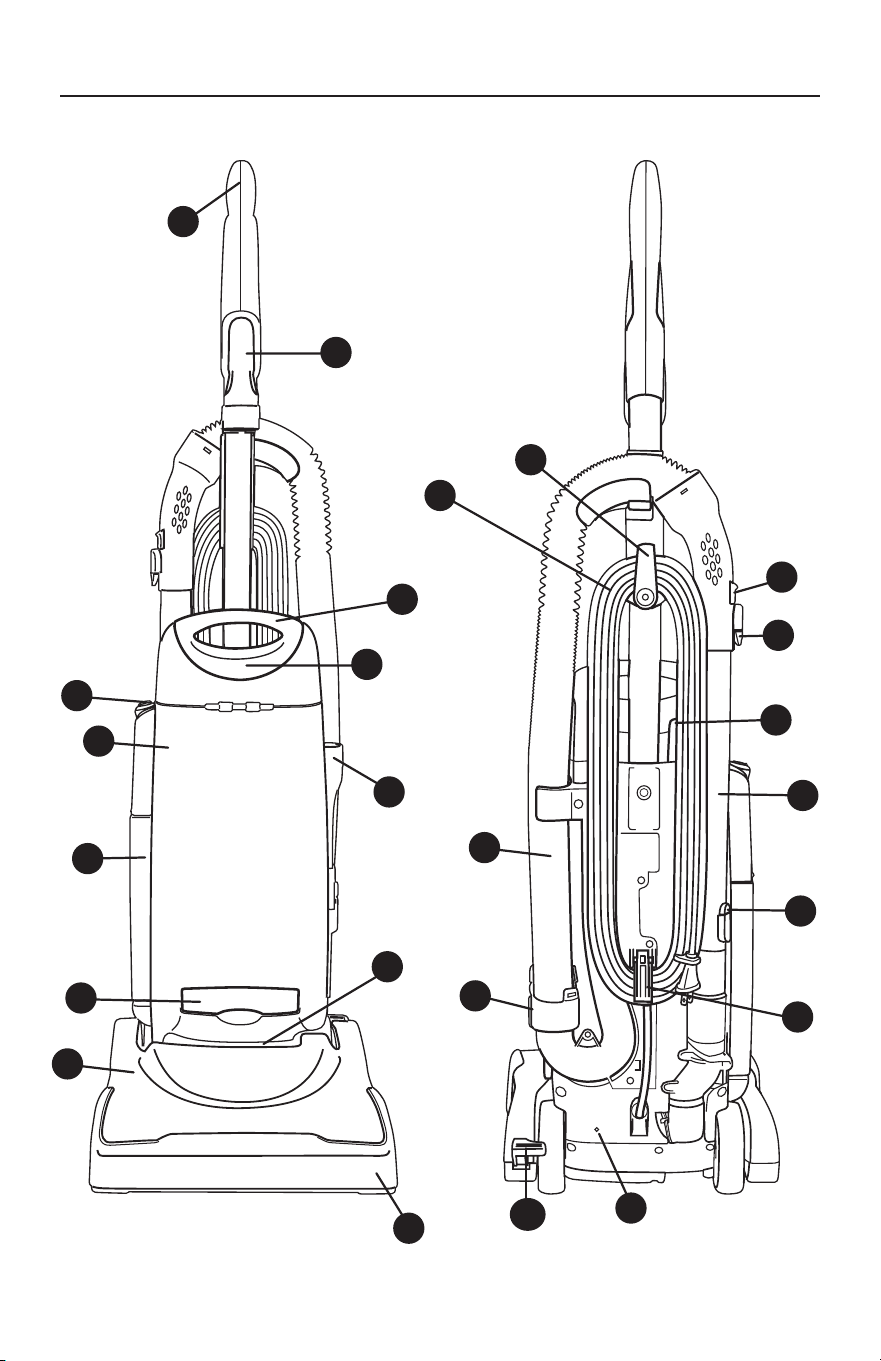
1 Molded Handle Grip
2 Dusting Brush/Upholstery Tool
3 Power Cord
4 Carrying Handle
5 Full Bag/Clog Indicator
6 Crevice Tool
7 On/Off Switch
8 Bag compartment
9 Post Filter
10 Secondary Filter
1 1 Vacuum Nozzle
12 Furniture Guard
13 Quick Release Cord Hook
14 Suction Relief Valve
15 Wand Release Button
16 Bag Compartment Button
17 Telescopic Wand
18 Wand Extension Button
19 Lower Cord Hook
20 Hose Disconnect Cuff
2 1 Stretch Hose
22 Handle Release Pedal
23 Thermal Reset Button
24 Belt Protection Breaker Reset Button
DESCRIPTION OF THE VACUUM
6
ASSEMBLING THE VACUUM
Attaching the Handle to the Vacuum
NOTE: Do not plug in the vacuum until
it is completely assembled.
The vacuum cleaner and the handle are
packed separately and require assembly.
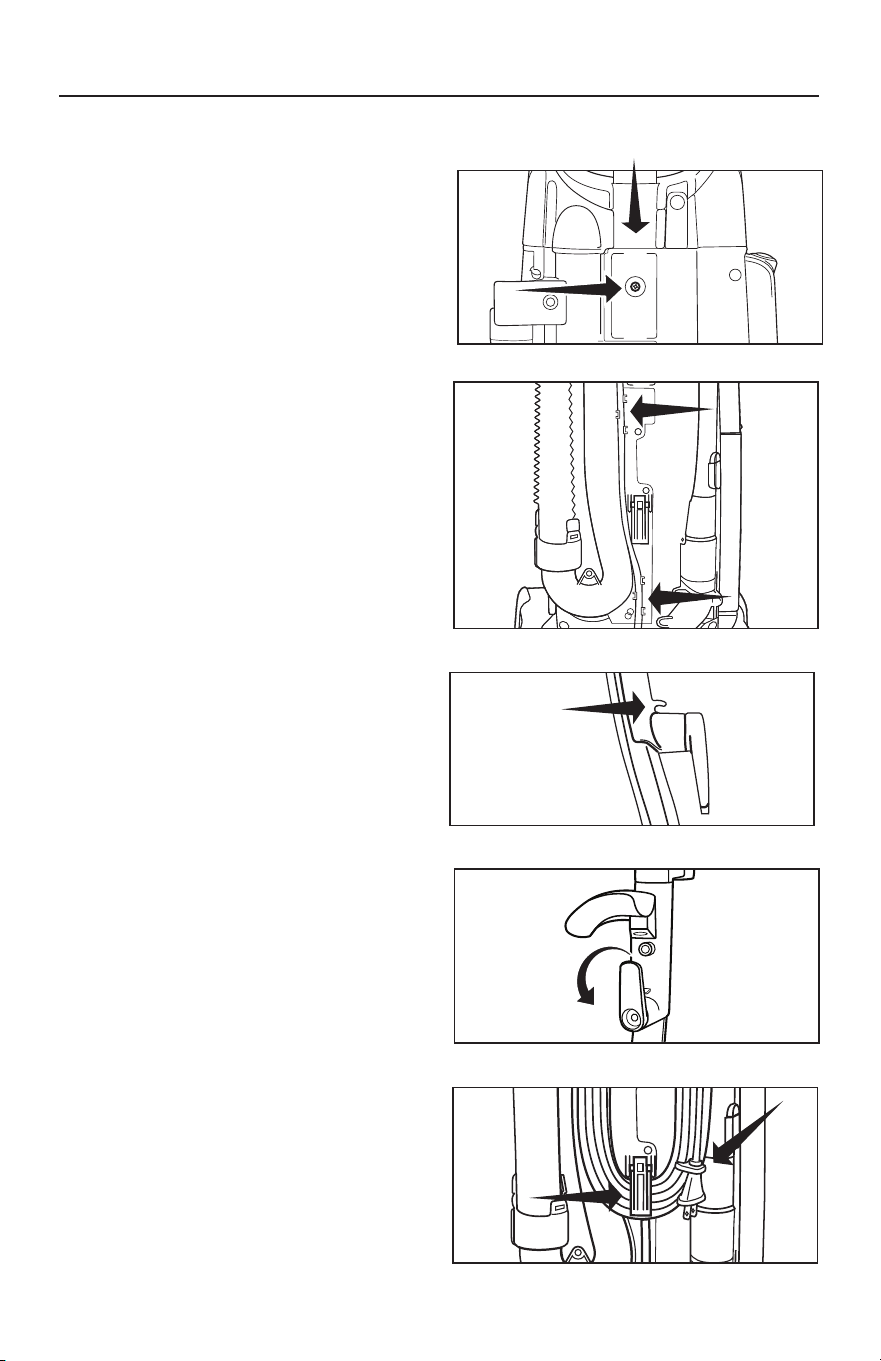
• Remove the handle screw located
on the back of the vacuum (Fig. 1).
Insert the handle downward into the
body of the vacuum. Insert screw
and tighten.
• Thread the cord through the two
cord guides on the back of the
vacuum (Fig. 2).
• Secure the cord under the cord
guide above upper cord hook (Fig. 3).
• Open the bag compartment cover by
pressing the bag compartment button
on the back of the vacuum to ensure a
vacuum bag is in place.
Unwinding the Power Cord
• The Quick Release Upper Cord Hook
rotates to allow for quick access to the
power cord. Turn the upper cord hook
downward and you can quickly drop
the power cord to the floor without
unwinding it from the cord hooks (Fig. 4).
• Your vacuum is now ready for use.
Storing the Vacuum
• When storing the vacuum cleaner, turn
the Quick Release Upper Cord Hook
to the upright position and wrap the
power cord around the upper cord
storage hook (Fig. 4) and the spring-
activated lower cord hook (Fig. 5).
Fasten the plug to the wrapped cord
using the channel on the plug.
Fig. 2
Fig. 1
Fig. 5
Fig. 4
Fig. 3
7
OPERATION
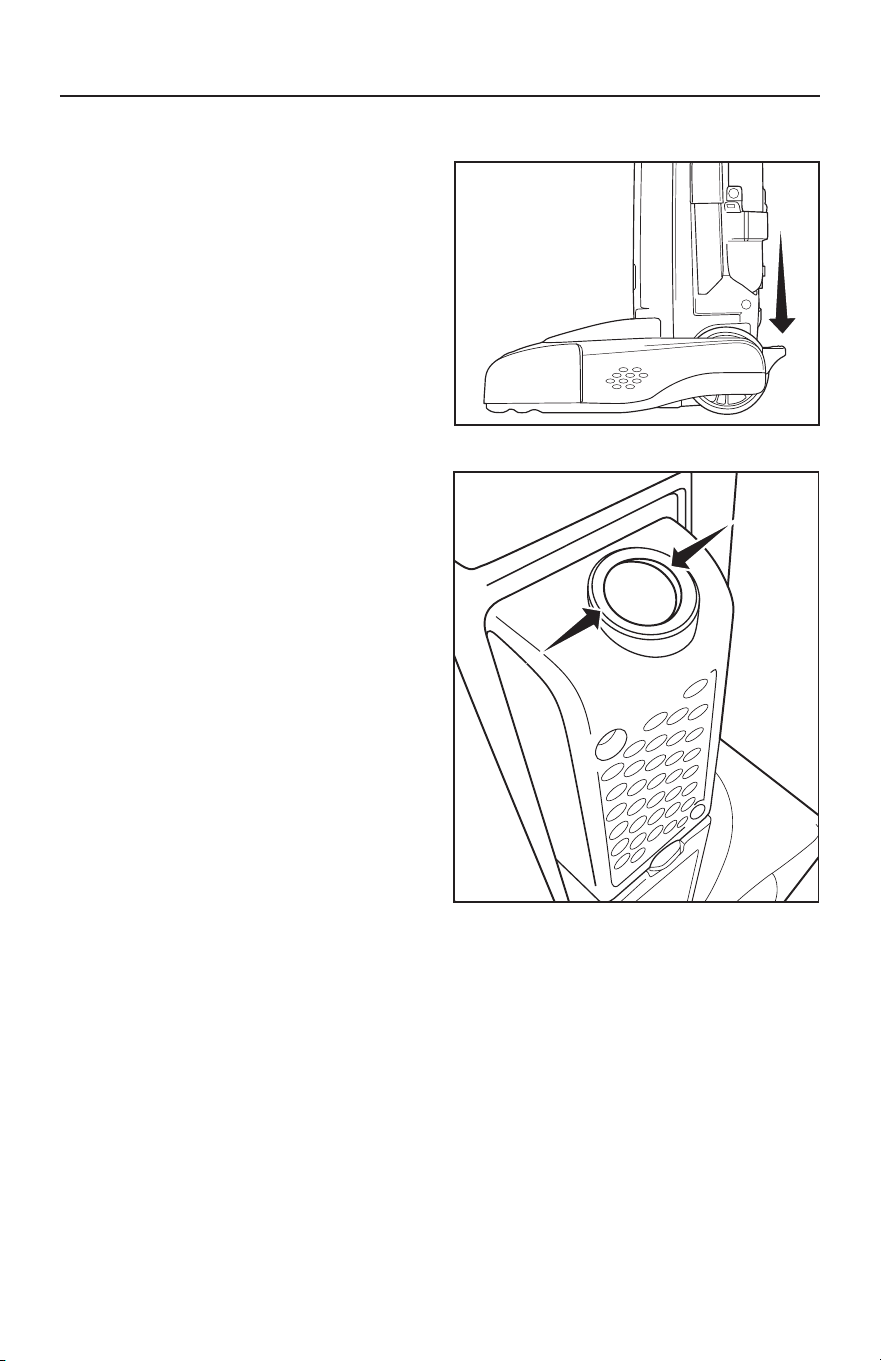
Reclining the Handle
Press the Handle Release Pedal with your
foot to recline the handle (Fig. 1).
Vacuuming Carpet
For carpet cleaning, recline the handle
and push the On/Off Switch to the
Carpet position (Fig. 1).
Vacuuming Rugs and Bare
Floors
Recline the handle and push the On/Off
switch to the Floors position (Fig. 2).
Brushroll Auto Shut-Off Feature
When the vacuum is turned on in carpet
mode and in the upright position, the
brushroll will stop spinning to reduce
the possibility of damaging flooring
surfaces. The brushroll will spin when the
handle is reclined.
Always turn the vacuum cleaner off before
unplugging it from the electrical outlet.
Fig. 2
Fig. 1
8
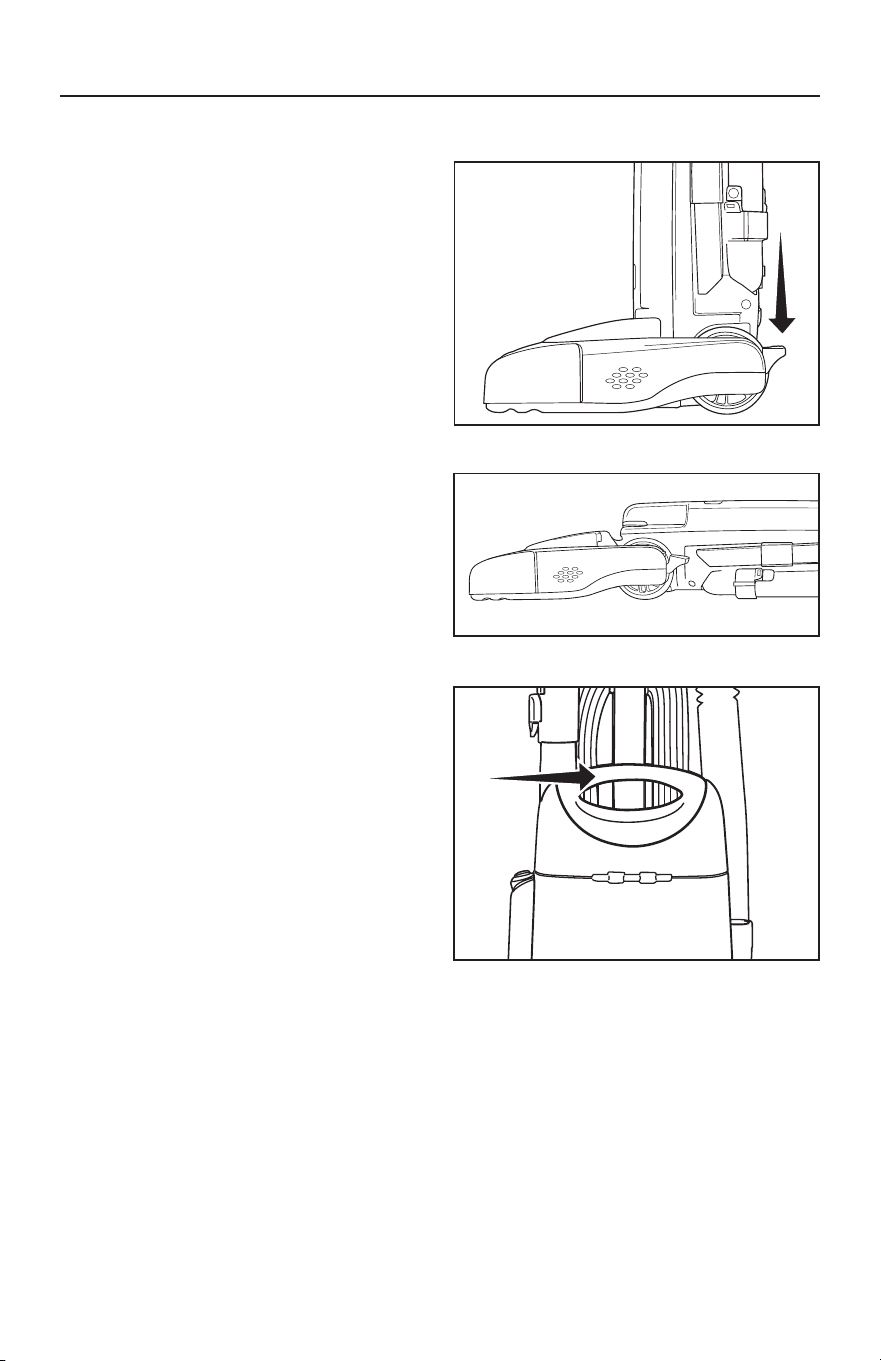
Vacuuming Under Furniture
Your vacuum will lie flat on the floor for
effective cleaning under beds and tables.
• Press the Handle Release Pedal once
for normal vacuuming (Fig. 1).
• Press the Handle Release Pedal a second
time to enable the vacuum to lie flat on
the floor (Fig. 2).
Carrying the Vacuum
To safely transport your vacuum, especially
when carrying the vacuum up and down
stairs, use the Carrying Handle located at
the top of the bag compartment (Fig. 3).
OPERATION
Fig. 2
Fig. 3
Fig. 1
9
ATTACHMENT CLEANING
Telescopic Wand Cleaning
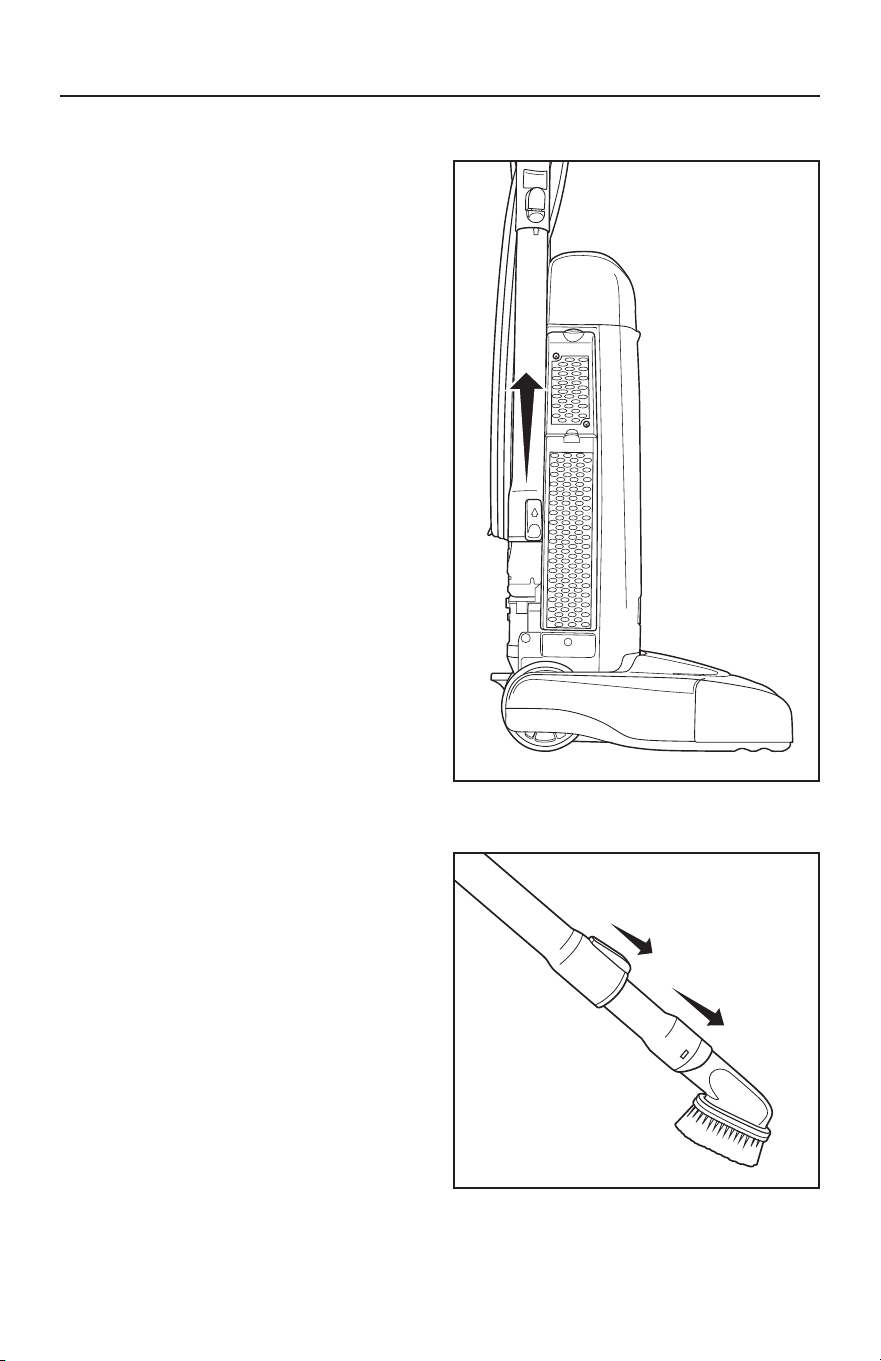
Your vacuum is a comprehensive
cleaning system equipped with a dusting
brush/upholstery tool, crevice tool,
telescopic wand and a stretch hose.
The vacuum must be in the upright
position for attachment cleaning (Fig. 1).
• Remove the Telescopic Wand from the
body of the vacuum by pulling it up and
out of the holder.
• Extend the wand by sliding the Wand
Extension Button forward while extending
the wand to desired length (Fig. 2).
• Attach any of the tools to the end of
the Telescopic Wand.
• When finished with wand cleaning,
insert the wand back into the vacuum
and secure it by pushing the wand
into the holder.
Fig. 1
Fig. 2
10
ATTACHMENT CLEANING
Cleaning Tools
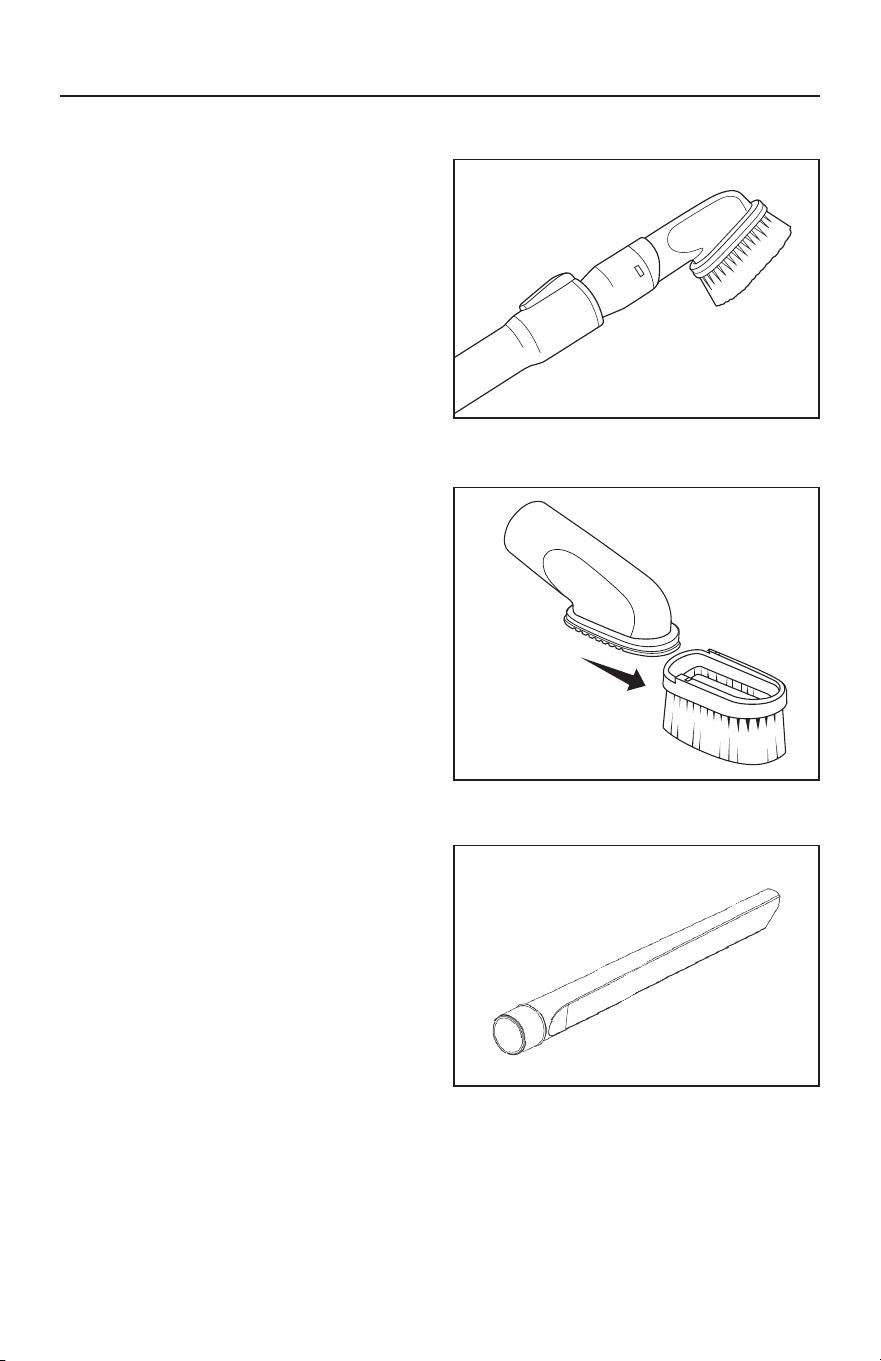
Your vacuum is equipped with a dusting
brush/upholstery tool and crevice tool.
• Remove the telescopic wand from the
vacuum.
• Insert any of the tools onto the end
of the wand.
Dusting Brush
Ideal for table tops, shelves, blinds or
hard surface floors (Fig. 1).
Upholstery Tool
Ideal for soft surfaces and furniture.
Remove the dusting brush clip for
upholstery cleaning (Fig. 2).
C revice Tool
Ideal for tight places like between seat
cushions or corners (Fig. 3).
Fig. 3
Fig. 1
Fig. 2
11
Fig. 1
ATTACHMENT CLEANING
Cleaning Tools
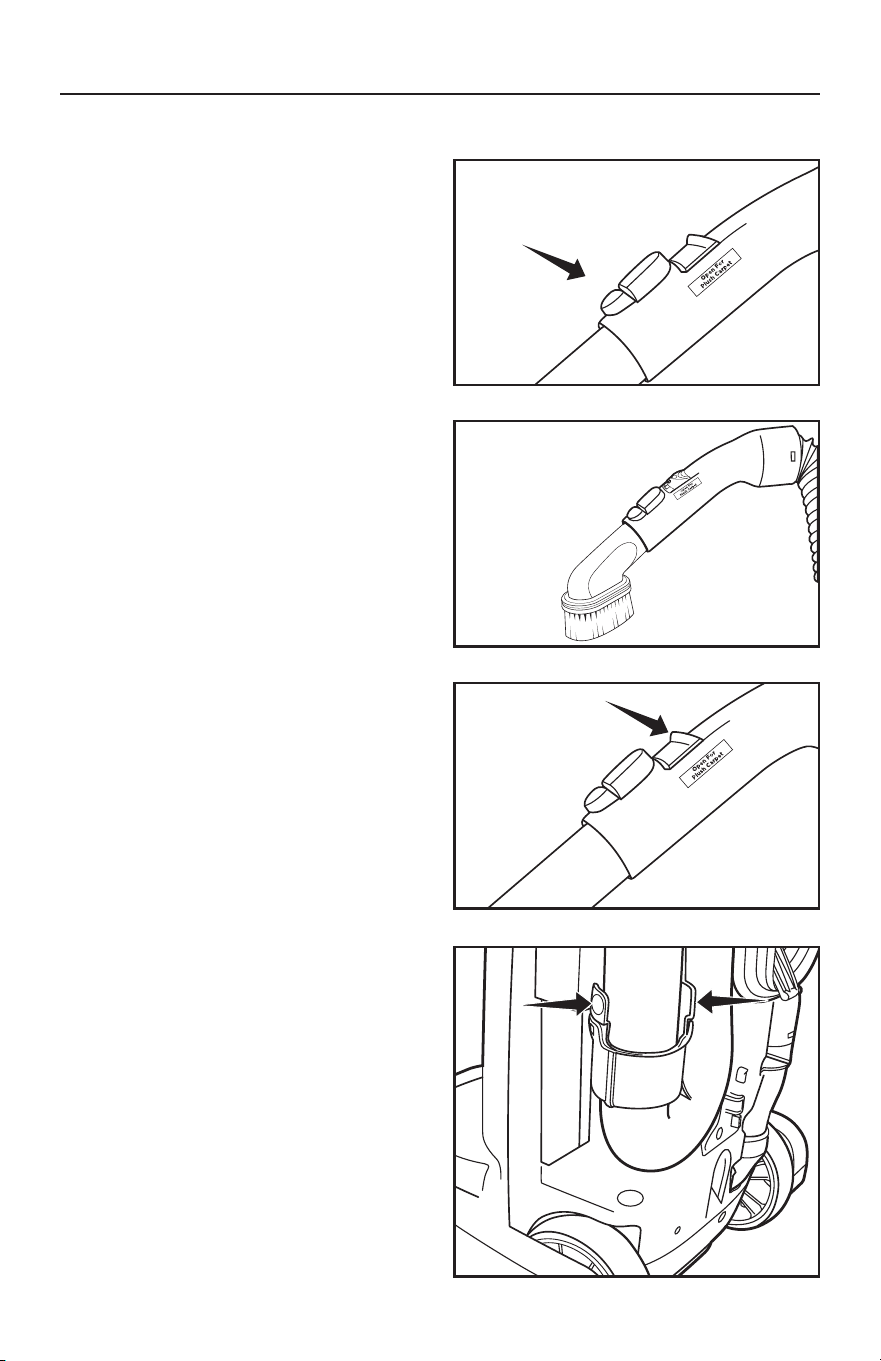
The cleaning tools can also be attached
to the curved handle for tasks where the
wand is not needed.
• Disconnect the wand from the curved
handle by pressing the Wand Release
Button (Fig. 1).
• Attach any of the cleaning tools
directly to the curved handle (Fig. 2).
Adjusting the Suction Power for
Tool Cleaning and PlushCarpet
Full suction power may be too strong
for some cleaning situations. For example,
reduced suction power would be
appropriate for cleaning sheer curtains
or plush, thick carpet.
• Locate the Suction Relief Valve on
the hose handle and slide it back
(Fig.3). This reduces the suction power
coming through the tool. Slide the valve
forward when finished to restore full
suctionpower.
Fig. 2
Fig. 3
Fig. 4
Disconnecting the Hose
The hose can be disconnected from the
vacuum by pressing the two buttons on
the sides of the Hose Disconnect Cuff
located low on the back of the vacuum
(Fig. 4). This provides a method for
removing debris from the hose.
12
MAINTENANCE AND CARE
When to Replace the Vacuum
Bag (Full Bag Indicator)
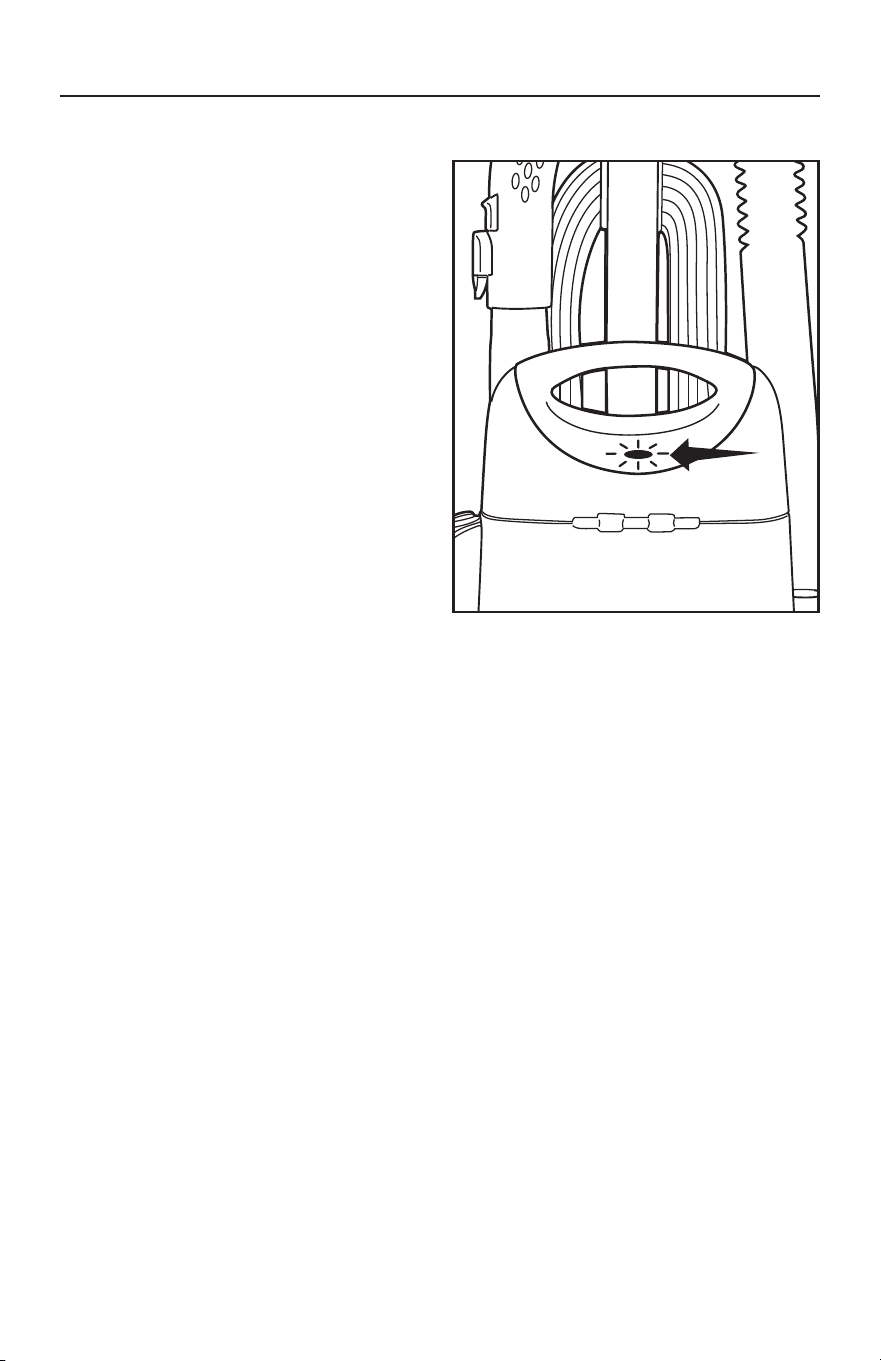
The Full Bag Indicator is designed to show
when the bag is full or when there is a
clog in the vacuum (Fig. 1).
The indicator can turn red when
vacuuming fine powders such as
flour or dr ywall dust before the bag is
actually full. These materials can quickly
block the bag pores, significantly reducing
airflow. The vacuum bag should still be
changed.
The indicator may also turn red during
attachment cleaning. If so, the vacuum bag
does not need to be changed.
NOTE: The vacuum bags are disposable
and intended to only be used once.
Do not attempt to reuse the bag, as
suction and filtration performance will
be greatly reduced.
Fig. 1
13
MAINTENANCE AND CARE
NOTE: Unplug the vacuum cleaner from
the electrical outlet before changing
the bag.
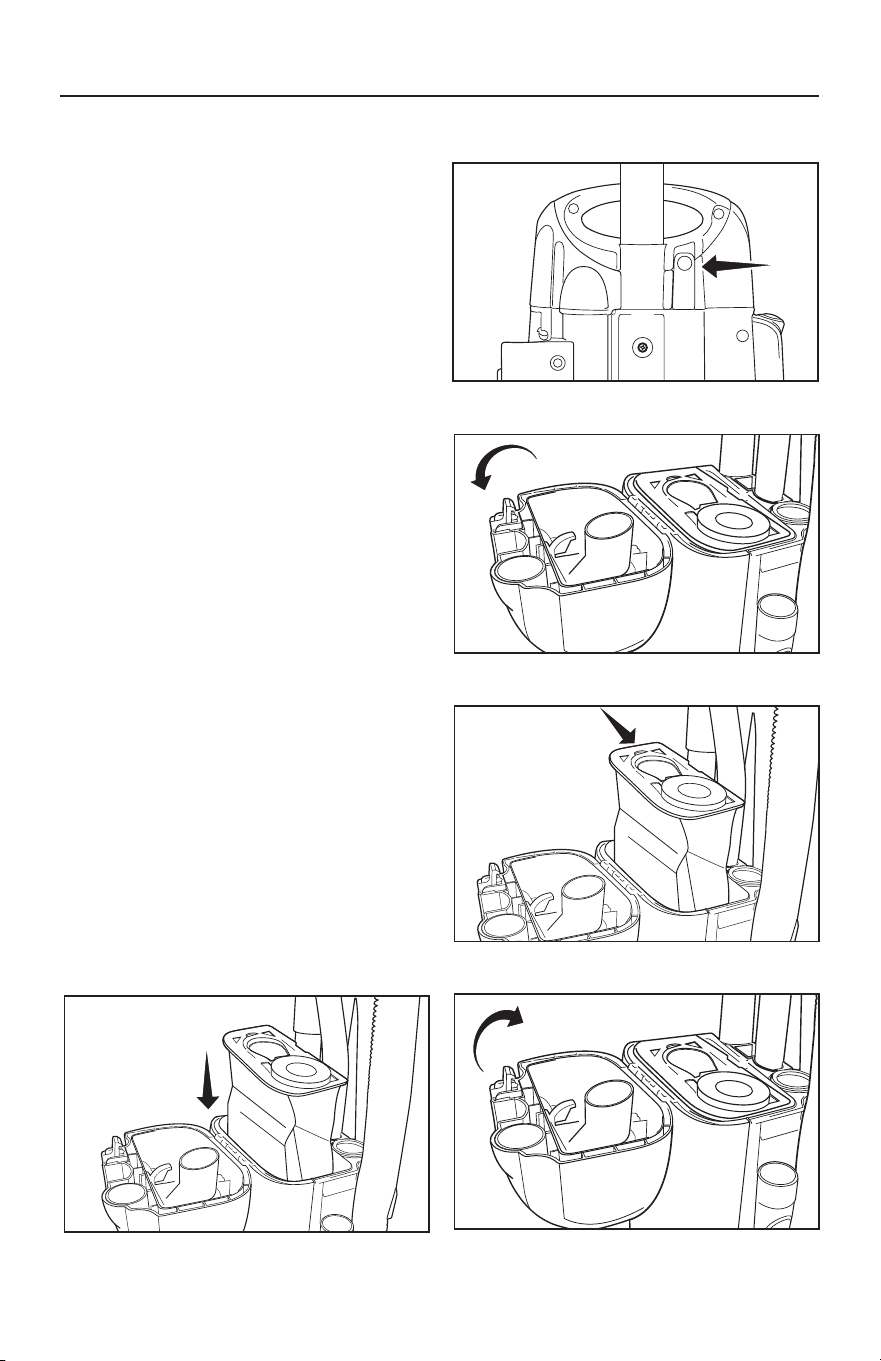
Replacing the Vacuum Bag
• To access the vacuum bag press the
bag compartment button on back of
vacuum (Fig. 1).
• Open the bag compartment lid (Fig. 2).
• Remove the used vacuum bag by
lifting up on the collar ring and pulling
straight up (Fig. 3). Discard the
used bag.
• To install a new bag, drop the bag into
the bag compartment, ensuring the
bag collar is aligned in the top of the
compartment (Fig. 4).
• Replace the cover and press the lid
release button to secure it into place
(Fig. 5).
Fig. 1
Fig. 4
Fig. 2
Fig. 5
Fig. 3
NOTE: Unplug the vacuum cleaner
from the electrical outlet before
changing the bag.
14
MAINTENANCE AND CARE
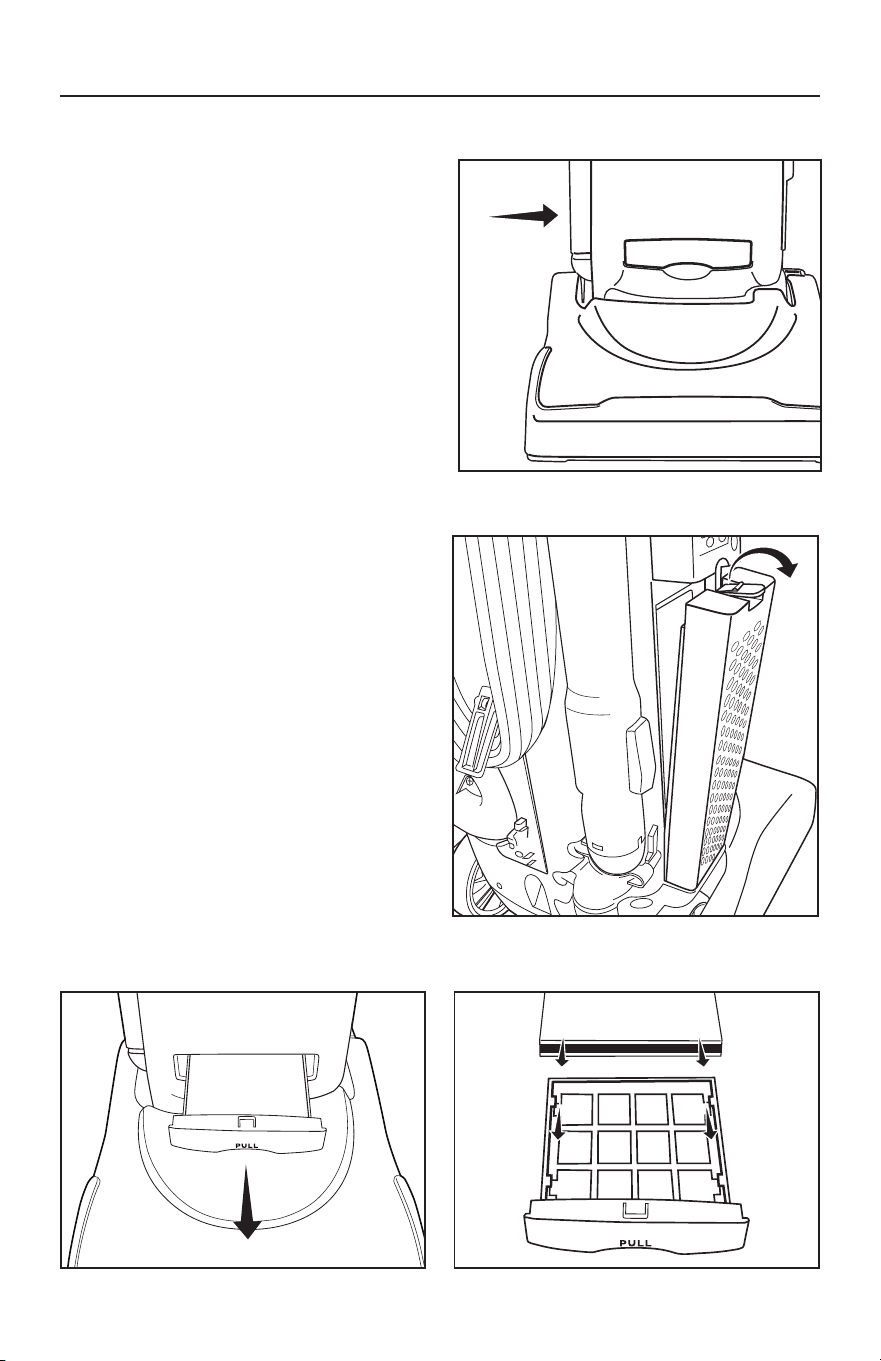
Replacing the Post Filter
• The post filter is located on the side of
the vacuum (Fig. 1).
• Push down on the tab on the top to
remove the used filter and discard it
(Fig. 2).
• To insert a new filter, position the tabs
on the bottom of the filter cartridge
into the vacuum. Then snap it into place.
Replacing the Secondary Filter
• Pull the filter holder compartment
on the front of the vacuum straight
out (Fig. 3).
• Remove and throw away the used
filter.
• Insert a new filter under the tabs in
the holder (Fig. 4). Then align the filter
holder into the vacuum and slide it
into place.
NOTE: Filters cannot be washed and reused.
Fig. 1
Fig. 2
Fig. 3
Fig. 4
15
MAINTENANCE AND CARE
CAUTION! To Reduce the Risk of Injury
From Moving Parts, Unplug Before Servicing.
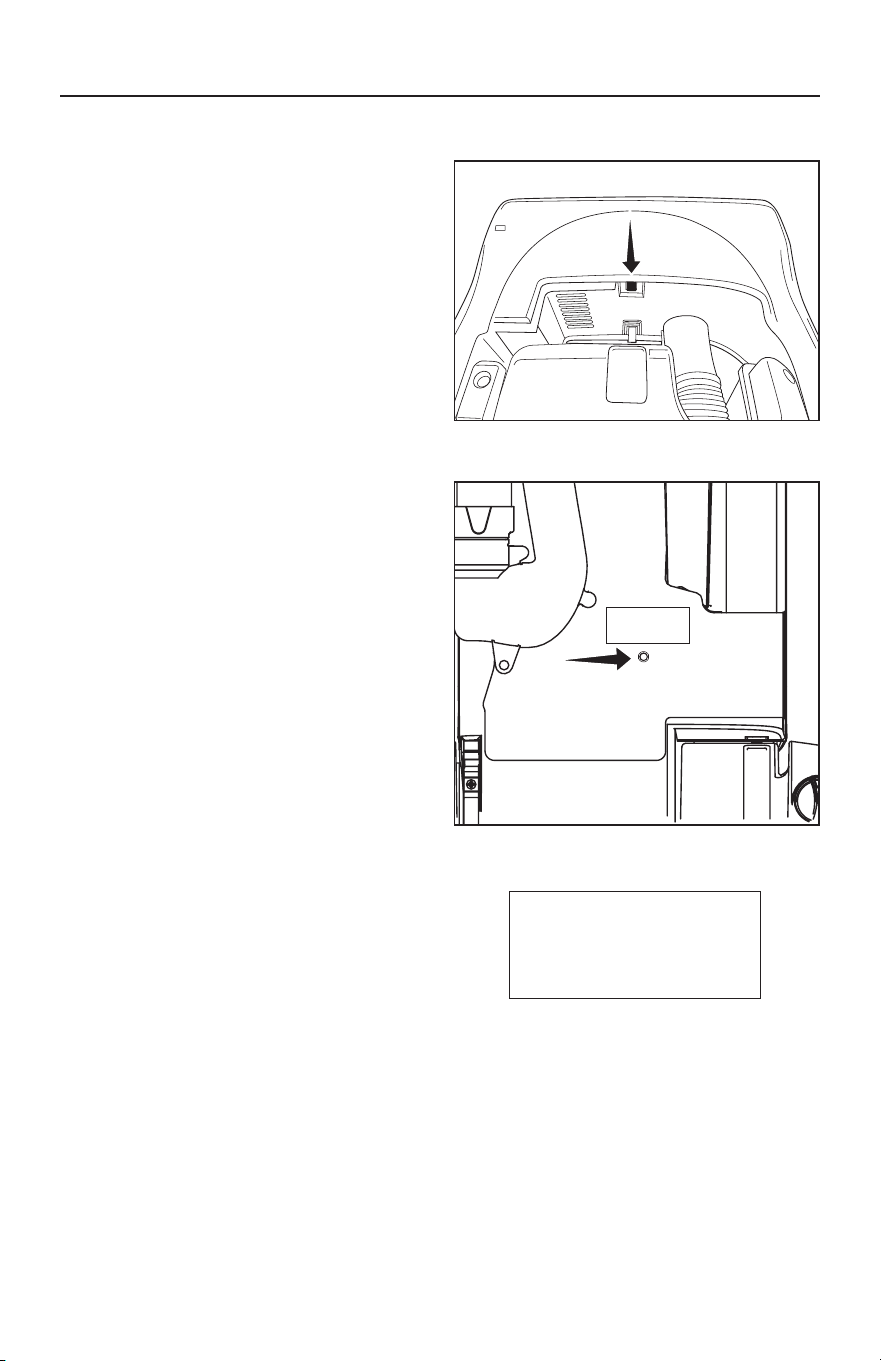
Belt Protection Breaker Reset
If the Belt Protection System shuts off
your vacuum, follow these steps:
• Unplug the vacuum.
• Recline the vacuum to the flat position.
• Locate the Breaker Reset Button under
the top of the nozzle (Fig. 1).
• Press the Reset Button and resume
vacuuming.
Thermal Motor Protection
Your vacuum is equipped with a safeguard
to recognize when the vacuum might
overheat and shuts itself off. When this
happens the headlights are still on but
the motors shut off. Common reasons
why a vacuum may overheat include
operating with a full bag or when there
is a clog in the vacuum.
If the Thermal Motor Protection System
shuts off your vacuum, follow these steps:
• Unplug the vacuum.
• Inspect the vacuum for a full bag
condition or a hose clog and correct
the problem.
• Locate the Thermal Motor Protection
Reset Button on the back of the vacuum
(Fig. 2). Press the button and resume
vacuuming.
If problem continues, contact an
Authorized Vacuum Retailer.
Thermal Reset
If problem persists,
consult owner’s manual
or contact retailer.
1. Unplug machine
2. Locate problem
source (clogged
hose or full bag)
3. Correct problem
4. Press reset button
Fig. 2
Fig. 1
Thermal Reset
If problem persists,
consult owner’s manual
or contact retailer.
1. Unplug machine
2. Locate problem
source (clogged hose
or full bag)
3. Correct problem
4. Press reset button

16
Lifetime Belt
Your vacuum belt is covered with a lifetime belt warranty. Should the vacuum belt
break, simply bring your vacuum to an Authorized Simplicity Retailer for a free
replacement or contact customer service at https://www.simplicityvac.com/
warranty-information. To find an Authorized Simplicity Retailer, please visit
http://www.simplicityvac.com/where-to-buy.
Annual Checkup
To keep your vacuum in peak operating condition, it is recommended you bring
your vacuum to an Authorized Simplicity Retailer for an annual checkup. The
Retailer will conduct a comprehensive examination to ensure your vacuum is in top
operating condition.
Power Cord Care
• If the cord or plug has any apparent damage, refrain from using the vacuum. Please
visit an Authorized Simplicity Retailer for a new cord or plug.
• When the vacuum is in use, hold the cord to keep from running over it.
• Avoid obstructions and do not pull the cord around sharp edges or corners.
• Always keep the cord away from heated surfaces and never close doors on it as this
may cause damage to the wiring.
• To unplug, always grasp the plug, not the cord.
MAINTENANCE AND CARE
17
PROBLEM SOLVING GUIDE
Troubleshooting
WARNING! To reduce the risk of electrical shock or injury from moving parts,
unplug the vacuum before servicing or cleaning the vacuum.
CAUTION! To Reduce the Risk of Electric Shock, Do Not Handle Plug or Appliance
with Wet Hands.
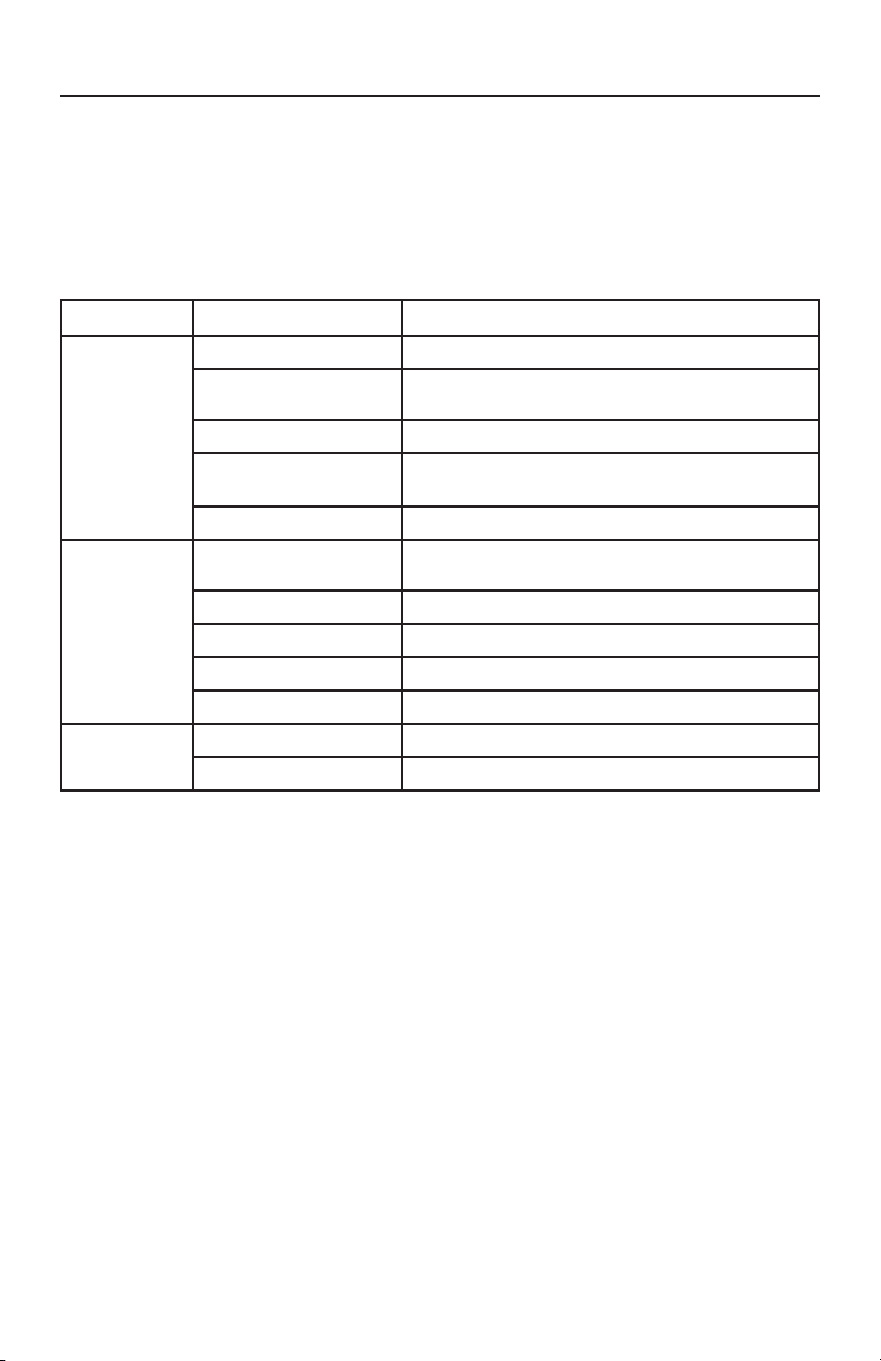
PROBLEM CHECK POINT POSSIBLE SOLUTION
Vacuum won’t
turn on.
Power Cord Plug unit in firmly.
House Fuse or Breaker
Check house fuse or breaker. Replace fuse/reset
breaker.
Vacuum Bag or Hose Replace bag or remove obstacle.
Thermal Motor
Protection Reset Button
Press reset button.
Needs Service Take to an Authorized Vacuum Retailer.
Vacuum won’t
pick up or low
suction.
Carpet Button
Press “Carpet” button on – it will illuminate when
it’s on.
Vacuum Bag Replace full bag.
Filter Replace clogged filter.
Hose Remove obstacle.
Belt Take to an Authorized Vacuum Retailer.
Dust escaping
from vacuum
Bag Compartment Lid Secure latch on bag compartment lid.
Filter Review filter installation (pages 14).
How to Contact an Authorized Vacuum Retailer
Any other service should be performed by an Authorized Simplicity Vacuum Retailer.
To locate your nearest Authorized Simplicity Retailer, visit our website at
SimplicityVac.com or call 888-974-6759.
Key Replacement Parts
• Genuine Charcoal-Infused HEPA Vacuum Bags: S26HC-6
• Genuine Pleated HEPA and Granulated Charcoal Filter Set: SF26
For Best Performance
• Keep your vacuum clean and in good operating condition.
• Change the vacuum bag once a month or when the full bag light is illuminated
to maximize cleaning performance.
• Always use genuine vacuum bags and replacement parts. Use of other products
may result in poor cleaning performance, potential vacuum cleaner damage
and may void vacuum warranty. Genuine products are designed for maximum
cleaning performance.
• Have your vacuum checked annually by an Authorized Simplicity Retailer.
• Store your vacuum carefully in a dry area.
• For optimum cleaning performance and safety, follow your owner’s manual instructions.

18
What is Covered:
This warranty covers any defects in material and workmanship in your new vacuum
and applies exclusively to the original purchaser.
How Long Coverage Lasts:
Visit Simplicityvac.com for warranty information.
What is Not Covered:
• Damage to the vacuum which occurs from neglect, abuse, alterations, accident,
misuse or improper maintenance.
• Normal replacement items: disposable filters, belts and filters.
What Simplicity Will Do:
This warranty provides, at no cost to you, all labor and parts to keep this vacuum in
correct operating condition during the warranted period.
How to Get Service:
Warranty service can only be obtained by presenting the vacuum to an Authorized
Simplicity Service Center. A proof-of-purchase and product serial number will be
required before service is rendered. To locate your nearest Simplicity Service Center,
please call 888-974-6759 or visit www.SimplicityVac.com.
THIS WARRANTY IS EXCLUSIVE AND IN LIEU OF ANY AND ALL OTHER
WARRANTIES WHETHER WRITTEN, ORAL, EXPRESSED OR IMPLIED, (INCLUDING
ANY WARRANTY OF MERCHANTABILITY OR FITNESS FOR A PARTICULAR
PURPOSE). THIS WARRANTY DISCLAIMS LIABILITY FOR INCIDENTAL OR
CONSEQUENTIAL DAMAGES.
How State Law Applies:
This warranty gives you specific legal rights, and you may also have other rights
which vary from state to state.
Owner’s Warranty Information (keep this for your records)
Store name
Store Address City State Zip
Telephone Date of purchase
Serial number Model number
Register your warranty online at SimplicityVac.com
WARRANTY

19
Simplicityvac.com/register-warranty
For complete warranty information visit
Simplicityvac.com/warranty-information
We want to hear from you!
Please let us know what you think of your
new vacuum by leaving a product review
on Simplicityvac.com.