ENGLISH_index
Safety and Reference
OWNER’S MANUAL
www.lg.com
Copyright © 2026 LG Electronics Inc.
All Rights Reserved.
LED TV*
Please read this manual carefully
before operating your set and retain it
for future reference.
* LG LED TV applies LCD screen with LED backlights.
The model and serial number of the product are
located on the back and on one side of the product.
Record them below in case you ever need service.
Model
Serial No.
*MFL058493322601REV01*
Supplier`s Declaration of
Conformity
Trade Name LG
Responsible
Party
LG Electronics USA,
Inc.
Address 111 Sylvan Avenue,
North Building,
Englewood Cliffs,
NJ07632
E-mail lg.environmental@
lge.com
LG Customer Information Center
For inquires or comments, visit www.
lg.com or call;
1-800-243-0000
USA, Consumer
User
1-888-865-3026
USA, Commercial
User
Register your product Online!
www.lg.com
115QNED92BU
55LX7BPUA
65LX7BPUA
2
Important Safety Instruction
• Read these instructions.
• Keep these instructions.
• Heed all warnings.
• Follow all instructions.
• Do not use this apparatus near water.
• Clean only with dry cloth.
• Do not block any ventilation openings. Install in accordance with the manufacturer’s instructions.
• Do not install near any heat sources such as radiators, heat registers, stoves, or other apparatus (including amplifiers) that produce heat.
• Do not defeat the safety purpose of the polarized or grounding-type plug. A polarized plug has two blades with one wider than the other. A grounding type
plug has two blades and a third grounding prong. The wide blade or the third prong are provided for your safety. If the provided plug does not fit into your
outlet, consult an electrician for replacement of the obsolete outlet.
• Protect the power cord from being walked on or pinched particularly at plugs, convenience receptacles, and the point where they exit from the apparatus.
• Only use attachments/accessories specified by the manufacturer.
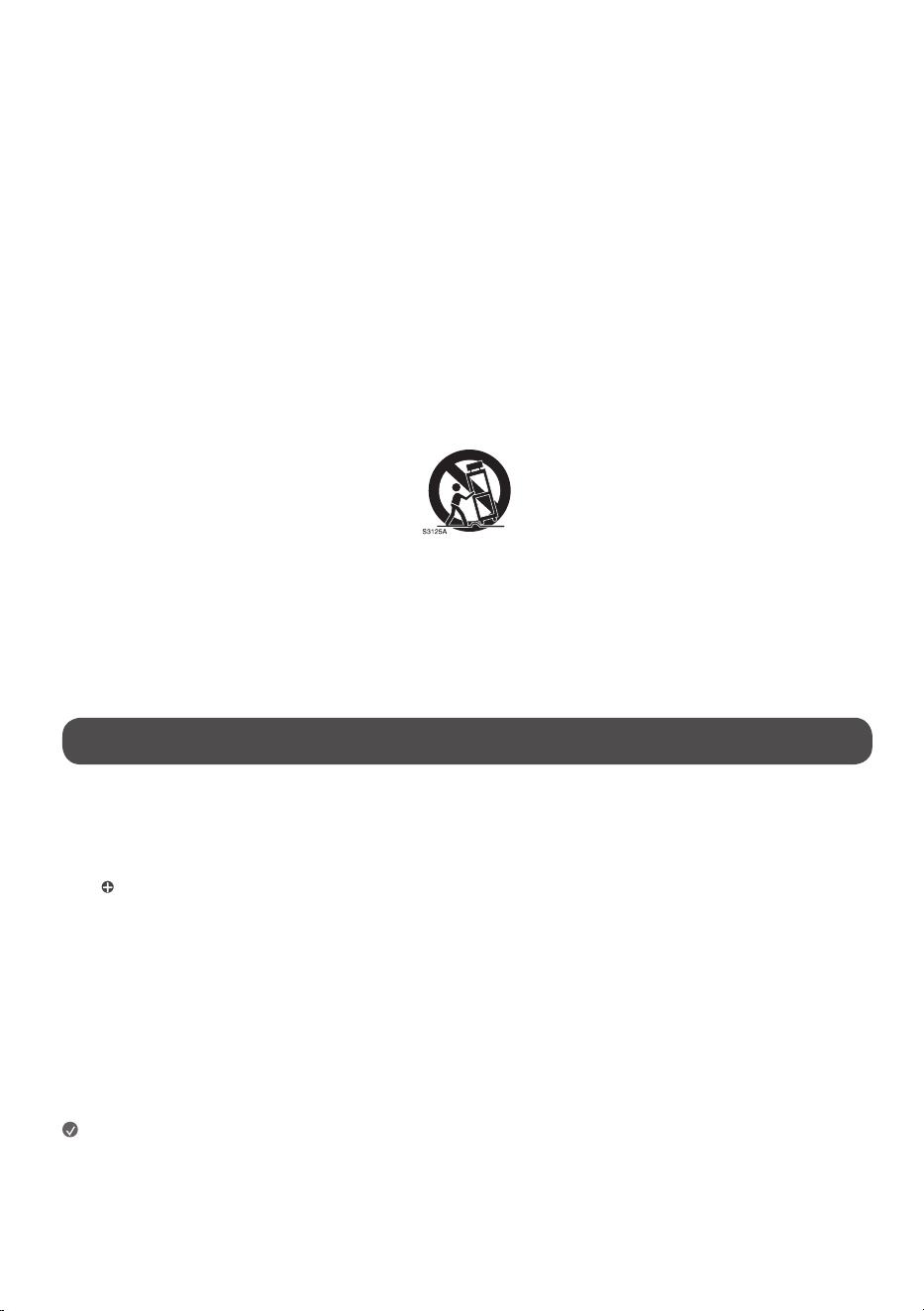
• Use only with the cart, stand, tripod, bracket, or table specified by the manufacturer, or sold with the apparatus. When a cart is used, use caution when
moving the cart/apparatus combination to avoid injury from tip-over.
• Unplug this apparatus during lightning storms or when unused for long periods of time.
• Refer all servicing to qualified service personnel. Servicing is required when the apparatus has been damaged in any way, such as power-supply cord or
plug is damaged, liquid has been spilled or objects have fallen into the apparatus, the apparatus has been exposed to rain or moisture, does not operate
normally, or has been dropped.
Before reading this manual
• Read this manual thoroughly before operating your TV, and keep it for future reference.
• On the website you can download the manual including installation, use, troubleshooting, specifications, license etc and view its contents on your PC or
mobile device.
• User Guide : For more information about this TV, read the USER GUIDE embedded in the product. (Depending upon model)
- : This icon indicates that application may depend upon model in Quick Setup Guide.
Optional Extras
• Optional extras can be changed or modified for quality improvement without any notification. Contact your dealer for buying these items. These devices
work only with certain models.
• The model name or design may be changed due to the manufacturer’s circumstances or policies.
• Magic Motion Remote Control :
Check whether your TV model supports Bluetooth in the Wireless Module Specification to verify whether it can be used with the Magic Motion Remote
Control.
• A cable to connect antennas and external devices must be purchased separately.
Note
• Product specifications or contents of this manual may be changed without prior notice due to upgrade of product functions.
• The items supplied with your product may vary depending upon the model.
• Image shown may differ from your TV.
3
Warning! Safety instructions
CAUTION
RISK OF ELECTRIC SHOCK
DO NOT OPEN
CAUTION : TO REDUCE THE RISK OF ELECTRIC SHOCK, DO NOT REMOVE COVER (OR BACK). NO USER-SERVICEABLE PARTS INSIDE. REFER TO QUALIFIED SERVICE
PERSONNEL.
This symbol is intended to alert the user to the presence of uninsulated “dangerous voltage” within the product’s enclosure that may be of sufficient
magnitude to constitute a risk of electric shock to persons.
This symbol is intended to alert the user to the presence of important operating and maintenance (servicing) instructions in the literature
accompanying this apparatus.
WARNING : TO REDUCE THE RISK OF FIRE AND ELECTRIC SHOCK, DO NOT EXPOSE THIS PRODUCT TO RAIN OR MOISTURE.
• TO PREVENT THE SPREAD OF FIRE, KEEP CANDLES OR OTHER ITEMS WITH
OPEN FLAMES AWAY FROM THIS PRODUCT AT ALL TIMES.
• Do not place the TV and/or remote control in the following
environments:
- Keep the product away from direct sunlight.
- An area with high humidity such as a bathroom.
- Near any heat source such as stoves and other devices that produce
heat.
- Near kitchen counters or humidifiers where they can easily be exposed
to steam or oil.
- An area exposed to rain or wind.
- Do not expose to dripping or splashing and do not place objects filled
with liquids, such as vases, cups, etc. on or over the apparatus (e.g., on
shelves above the unit).
- Near flammable objects such as gasoline or candles, or expose the TV
to direct air conditioning.
- Do not install in excessively dusty places.
Otherwise, this may result in fire, electric shock, combustion/explosion,
malfunction or product deformation.
• Ventilation
- Install your TV where there is proper ventilation. Do not install in a
confined space such as a bookcase.
- Do not install the product on a carpet or cushion.
- Do not block or cover the product with cloth or other materials while
unit is plugged in.
• Take care not to touch the ventilation openings. When watching the TV
for a long period, the ventilation openings may become hot.
• Protect the power cord from physical or mechanical abuse, such as being
twisted, kinked, pinched, closed in a door, or walked upon. Pay particular
attention to plugs, wall outlets, and the point where the cord exits the
device.
• Do not move the TV while the Power cord is plugged in.
• Do not use a damaged or loosely fitting power cord.
• Be sure to grasp the plug when unplugging the power cord. Do not pull
on the power cord to unplug the TV.
• Do not connect too many devices to the same AC power outlet as this
could result in fire or electric shock.
• Disconnecting the Device from the Main Power
- The power plug is the disconnecting device. In case of an emergency,
the power plug must remain readily accessible.
• Do not let your children climb or cling onto the TV. Otherwise, the TV
may fall over, which may cause serious injury.
• Outdoor Antenna Grounding (Can differ by country):
- If an outdoor antenna is installed, follow the precautions below.
An outdoor antenna system should not be located in the vicinity of
overhead power lines or other electric light or power circuits, or where
it can come in contact with such power lines or circuits as death or
serious injury can occur.
Be sure the antenna system is grounded to provide some protection
against voltage surges and built-up static charges.
Section 810 of the National Electrical Code (NEC) in the U.S.A. provides
information with respect to proper grounding of the mast and
supporting structure, grounding of the lead-in wire to an antenna
discharge unit, size of grounding conductors, location of antenna
discharge unit, connection to grounding electrodes and requirements
for the grounding electrode.
Antenna grounding according to the National Electrical Code, ANSI/
NFPA 70
• Never touch this apparatus or antenna during a lightning storm. You may
be electrocuted.
• Make sure the power cord is connected securely to the TV and wall
socket. If not secured, damage to the Plug and socket may occur and in
extreme cases a fire may break out.
• Do not insert metallic or inflammable objects into the product. If a
foreign object is dropped into the product, unplug the power cord and
contact the customer service.
• Do not touch the end of the power cord while it is plugged in. You may
be electrocuted.
4
• If any of the following occur, unplug the product immediately
and contact your local customer service.
- The product has been damaged.
- If water or another substance enters the product (like an AC adapter,
power cord, or TV).
- If you smell smoke or other odors coming from the TV
- When lightning storms or when unused for long periods of time.
Even if the TV is turned off by remote control or button, AC power source
is connected to the unit if still unplugged in.
• Do not use high voltage electrical equipment near the TV (e.g., a bug
zapper). This may result in product malfunction.
• Do not attempt to modify this product in any way without written
authorization from LG Electronics. Accidental fire or electric shock
can occur. Contact your local customer service for service or repair.
Unauthorized modification could void the user’s authority to operate
this product.
• Use only authorized attachments / accessories approved by LG
Electronics. Otherwise, this may result in fire, electric shock, malfunction,
or product damage.
• Never disassemble the AC adapter or power cord. This may result in fire
or electric shock.
• Handle the adapter carefully to avoid dropping or striking it. An impact
could damage the adapter.
• To reduce the risk of fire or electrical shock, do not touch the TV with wet
hands. If the power cord prongs are wet or covered with dust, dry the
power plug completely or wipe dust off.
• Batteries
- Store the accessories (battery, etc.) in a safe location out of the reach
of children.
- Do not short circuit, disassemble, or allow the batteries to overheat.
Do not dispose of batteries in a fire. Batteries should not be exposed
to excessive heat.
- Caution: Risk of fire or explosion if the battery is replaced by an
incorrect type.
• Moving
- When moving, make sure the product is turned off, unplugged, and
all cables have been removed. It may take 2 or more people to carry
larger TVs. Do not press or put stress on the front panel of the TV.
Otherwise, this may result in product damage, fire hazard or injury.
• Keep the packing anti-moisture material or vinyl packing out of the
reach of children.
• Do not allow an impact shock or any objects to fall into the product, and
do not drop anything onto the screen.
• Do not press strongly upon the panel with a hand or a sharp object such
as a nail, pencil, or pen, or make a scratch on it. It may causedamage
to screen.
• Cleaning
- When cleaning, unplug the power cord and wipe gently with a soft/
dry cloth. Do not spray water or other liquids directly on the TV. Do
not clean your TV with chemicals including glass cleaner, any type of
air freshener, insecticide, lubricants, wax (car, industrial), abrasive,
thinner, benzene, alcohol etc., which can damage the product and/
or its panel. Otherwise, this may result in electric shock or product
damage.
Installation
Lifting and moving the TV
When moving or lifting the TV, read the following to prevent the TV from
being scratched or damaged and for safe transportation regardless of its type
and size.
• It is recommended to move the TV in the box or packing material that
the TV originally came in.
• Before moving or lifting the TV, disconnect the power cord and all cables.
• When holding the TV, the screen should face away from you to avoid
damage.
• Hold the top and bottom of the TV frame firmly. Make sure not to hold
the transparent part, speaker, or speaker grille area.
• Use at least two people to move a large TV.
• When transporting the TV, do not expose the TV to jolts or excessive
vibration.
• When transporting the TV, keep the TV upright; never turn the TV on its
side or tilt towards the left or right.
• When handling the TV, be careful not to damage the protruding buttons.
• Avoid touching the screen at all times, as this may result in damage to
the screen.
• Do not place the product on the floor with its front facing down without
padding. Failure to do so may result in damage to the screen.
• When attaching the stand to the TV set, place the screen facing down on
a cushioned table or flat surface to protect the screen from scratches.
Mounting on the Table
1 Lift and tilt the TV into its upright position on a table.
• Leave a minimum of 10 cm (4 inches) space from the wall for proper
ventilation, (Depending upon model).
2 Connect the power cord to a wall outlet.
5
• Do not apply foreign substances (oils, lubricants, etc.) to the screw parts
when assembling the product. (Doing so may damage the product.)
• Do not use any unapproved items to ensure the safety and lifespan of
the product.
• Any damages or injuries by using unapproved items are not covered by
the warranty.
• If you install the TV on a stand, you need to take actions to prevent the
product from overturning. Otherwise, the product may fall over, which
may cause injury.
• When assembling the stand, ensure that all of the provided screws are
attached. If the screws are not fully tightened, the product may tilt or
tip over, resulting in damage. Tightening the screws with excessive force
may cause them to come off due to abrasion of the screw joint.
Securing TV to the Wall
1 Insert and tighten the eye-bolts or TV brackets and bolts on the back of
the TV.
• If there are bolts inserted at the eye-bolts position, remove the bolts
first.
2 Mount the wall brackets with the bolts to the wall. Match the location of
the wall bracket and the eye-bolts on the rear of the TV.
3 Connect the eye-bolts and wall brackets tightly with a sturdy rope or
cable. Make sure to keep the rope parallel to the flat surface.
• Use a platform or cabinet that is strong and large enough to support the
TV securely.
• Brackets, bolts, and ropes are optional. You can obtain additional
accessories from your local dealer.
Mounting to the Wall
Attach an optional wall mount bracket at the rear of the TV carefully and
install the wall mount bracket on a solid wall perpendicular to the floor.
When you attach the TV to other building materials, please contact qualified
personnel. LG recommends that wall mounting be performed by a qualified
professional installer. Please use a wall mount bracket where the device is
adequately secured to the wall with enough space to allow connectivity to
external devices. It is advised to connect all the cables before installing fixed
wall mounts.
• Ask a professional installer appointed by the store for installation of the
product.
Installation by someone other than a professional installer is extremely
dangerous and may result in personal injury.
• Do not install the product in an unstable site that cannot withstand its
weight.
If the installation site lacks sufficient rigidity, the product may fall and
cause personal injury.
• Remove the stand before installing the TV on a wall mount by
performing the stand attachment in reverse.
• For more information of screws and wall mount bracket, refer to manual
included in the separately purchased wall mount.
• If you intend to mount the product to a wall, attach VESA standard
mounting interface (optional parts) to the back of the product. When you
install the set to use the wall mounting bracket (optional parts), fix it
carefully so as not to drop.
• When mounting a TV on the wall, make sure not to install the TV by
hanging the power and signal cables on the back of the TV.
• Do not install this product on a wall if it could be exposed to oil or oil
mist. This may damage the product and cause it to fall.
• When installing the Full Contact Wall Mount, the TV may not be
contacted firmly against the wall due to some wall conditions.
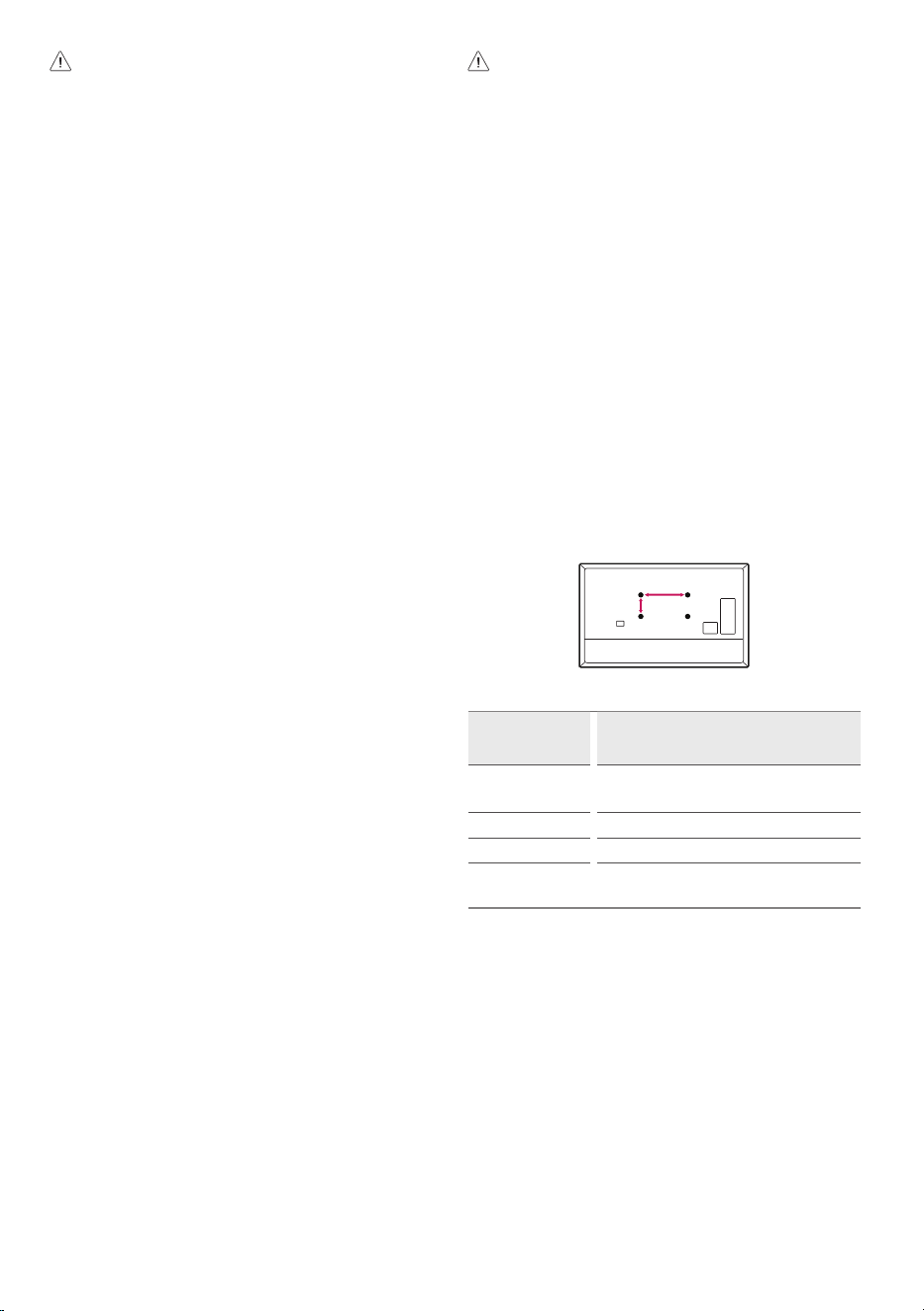
A
B
Model 115QNED92* 55LX7* 65LX7*
VESA (A x B) (mm)
1000 x 700
1000 x 500
300 x 400 400 x 400
Standard screw M8 M6 M6
Number of screws 4 4 4
Wall mount
bracket (optional)
Buy a suitable wall mount kit in the market by
referring to this table for each model.
6
Precautions for Safety
(Wall mount included model only)
• Do not hang on the product or subject it to severe impact after
installation.
Doing so may cause the product to fall and cause personal injury.
• When installing the product on a wall, do not hang the power line or
signal cables from the back of the TV.
This can damage the cords, resulting in a fire, electrical shock or
malfunction of the product.
• Be sure to wear work gloves when installing the product.
- Installing with unprotected hands may result in injury.
• Be sure to have at least two people when installing the product or
adjusting the product’s height.
Attempting to perform installation or adjustments personally may result
in personal injury or damage to the product.
• Make sure a wall is available prior to proceeding with installation. Make
use of the anchors and screws provided with the product.
Use of any unauthorized anchors or screws may not support the
product’s weight, which poses safety risks.
Before Installation
(Wall mount included model only)
• Installation of this product on a concrete wall or wood stud is
recommended. Installation of this product on other surfaces (Dry wall,
plywood, bricks, etc.) is not recommended. Improper installation may
result in the product falling.
• Install the product only on a vertical wall.
Do not install on a tilted wall that exceeds building standards or on the
heavily titled wall or ceiling.
LG is not responsible for problems caused by improper installation of the
product, e.g., heavily tilted walls and ceilings.
• Check the enclosed accessories before installation. We are not
responsible for any lost or damaged accessories after the inner
packaging is opened.
• When an infant or small child swallows the enclosed accessories,
various safety accidents such as choking may occur. Keep the enclosed
accessories out of the reach of infants and children.
• When tightening screws, tighten until fully snug.
Avoid using excessive force when tightening the screws. Doing so may
damage the wall and product or reduce the rigidity or performance of
the product.
• Avoid installing a TV that exceeds the specified tensile load, and do not
allow any external force to be applied to the product.
• Avoid accidents by using work tools with care during installation.
Tools for Installation
• “+” shaped screwdriver (manual or electric) / level / drill / Ø 8 mm drill
bit for concrete or Ø 4 mm drill bit for steel
Securing TV to the Wall
(Wall mount included model only)
• Please use the TV close to the wall after installation.
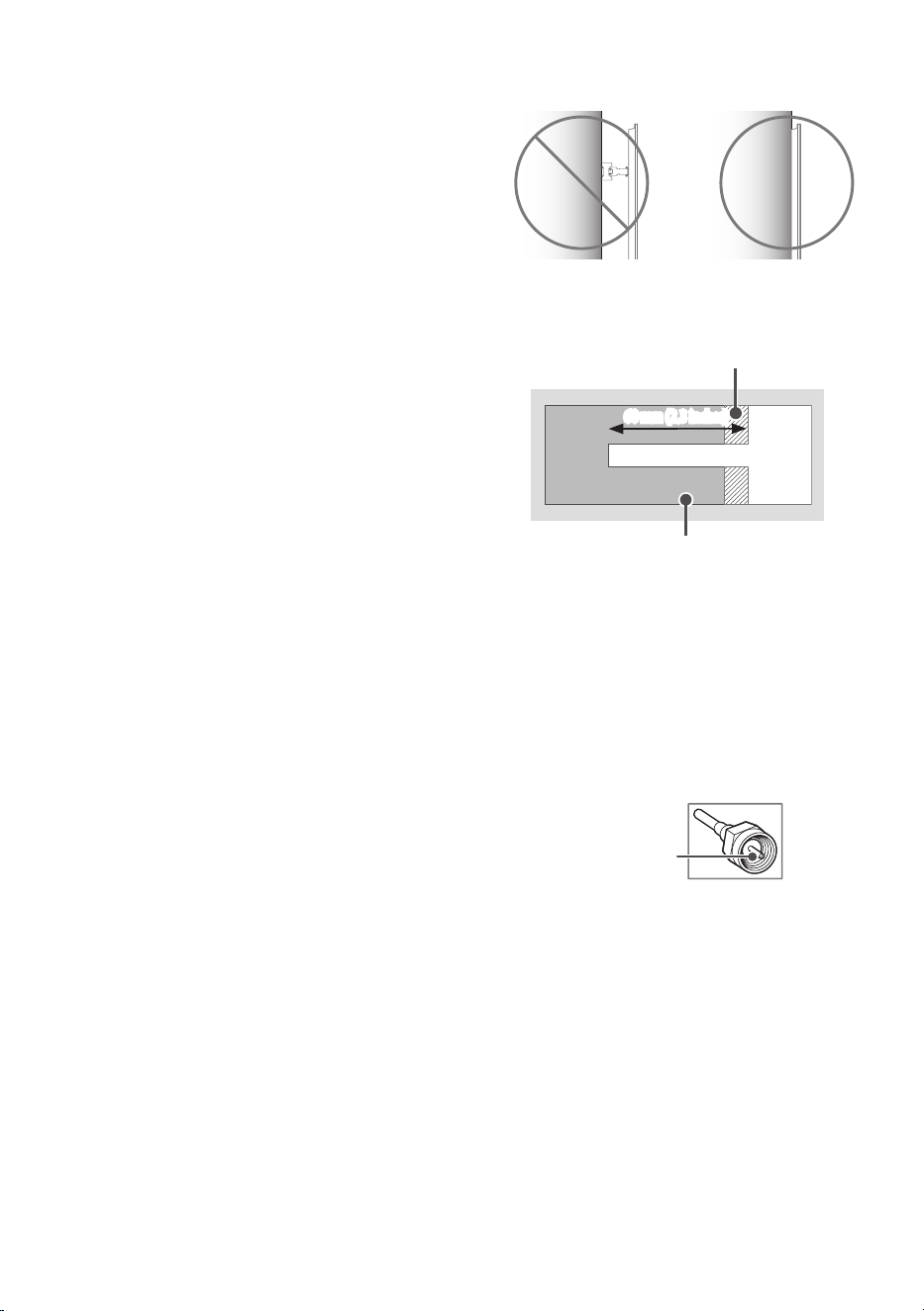
For installation on wood stud
Drywall
Wood stud
60 mm (2.3 inches)
Use the Ø4mm drill bit for wood to drill holes with the depth of 60mm (2.3
Inches). (Clean the drilled hole.)
Without using the wall mounting anchor, fasten the wall mounting screw
directly to the wood stud.
Antenna/Cable
Connect an antenna, cable, or cable box to watch TV while referring to the
following. The illustrations may differ from the actual items and an RF cable
is optional.
Copper wire
• Make sure not to bend the copper wire of the RF cable.
• Complete all connections between devices, and then connect the power
cord to the power outlet to prevent damage to your TV.
• Use a signal splitter to use 2 TVs or more.
• DTV Audio Supported Codec: MPEG, Dolby Digital
• This TV cannot receive Ultra HD (3840 x 2160 pixels) broadcasts directly
because the related standards have not been confirmed (Depending
upon country).
7
Starting TV
Turning on the TV
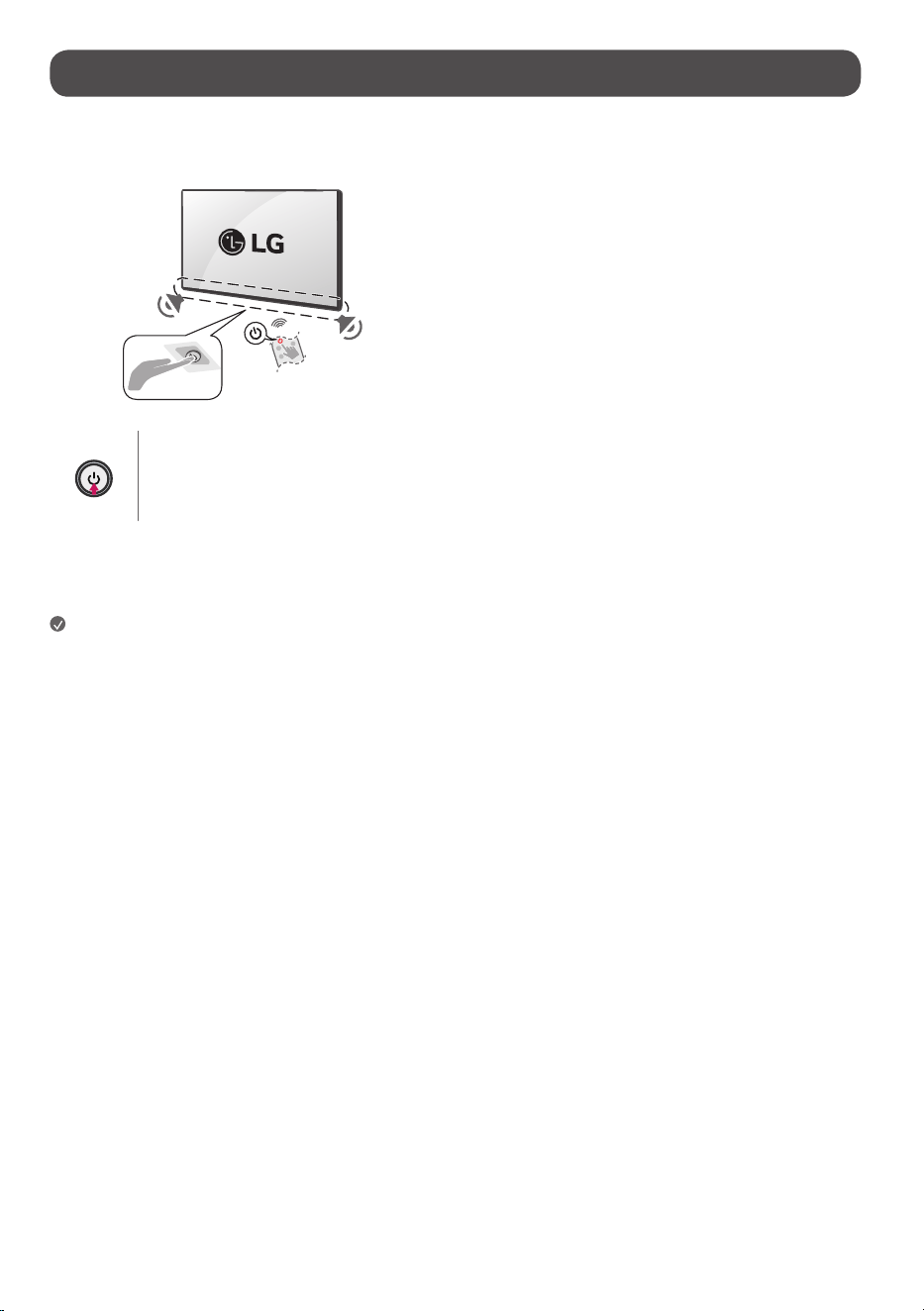
You can simply operate the TV functions, using the button.
Power On (Press)
Power Off
1)
(Press and Hold)
Menu Control (Press
2)
)
Menu Selection (Press and Hold
3)
)
1) All running apps will close.
2) You can access and adjust the menu by pressing the button when TV is on.
3) You can use the function when you access menu control.
Note
• When the TV is turned on for the first time after being shipped from the
factory, initialization of the TV may take approximately one minute.
• Your TV’s OSD (On Screen Display) may differ slightly from that shown in
this manual (Depending upon model).
• The device must be easily accessed to a location outlet near the access.
Some devices are not made by turning on / off button, turning off the
device and unplugging the power cord (Depending upon model).
8
Connections
You can connect various external devices to the TV. For more information on
external device’s connection, refer to the manual provided with each device.
HDMI
• When connecting the HDMI cable, the product and external devices
should be turned off and unplugged.
Note
• If the device connected to Input Port also supports HDMI Deep Color,
your picture may be clearer. However, if the device doesn’t support it, it
may not work properly. In that case, change the TV’s [HDMI Deep Color]
setting to off (Depending upon model).
• Use a certified cable with the HDMI logo attached. If you do not use a
certified HDMI cable, the screen may not display or a connection error
may occur.
• Recommended HDMI cable types (3m (9.84feet) or less)
- Ultra High Speed HDMI
®
/™ cable
USB
Some USB Hubs may not work. If a USB device connected through a USB Hub
is not detected, connect it directly to the USB port on the TV. (Depending
upon model)
Note
• For an optimal connection, HDMI cables and USB devices should have
bezels less than 10mm (0.39inches) thick and 18mm (0.7inches)
width. (Depending upon model)
• Use an extension cable that supports
if the USB cable or USB
flash drive does not fit into your TV’s USB port.
External Devices
Supported external devices are: Blu-ray player, HD receivers, DVD players,
VCRs, audio systems, USB storage devices, PC, gaming devices, and other
external devices. For more information on external device’s connection, refer
to the manual provided with each device.
Note
• The external device connections shown may differ slightly from
illustrations in a manual.
• In PC mode, there may be noise associated with the resolution, vertical
pattern, contrast or brightness. If noise is present, change the PC output
to another resolution, change the refresh rate to another rate or adjust
the brightness and contrast on the [Picture] menu until the picture is
clear. Depending upon the graphics card, some resolution settings may
not allow the image to be positioned on the screen properly.
• The TV may be capable of operating without a set-top-box from a
multichannel video programming distributor (MVPD).
Remote RS-232C setup
To obtain the RS-232C external control setup information, please visit www.
lg.com. Download and read the manual, (Depending upon model).
• Do not drop the product or let it fall over when connecting external
devices. Otherwise, this may result in injury or damage to the product.
• When connecting external devices such as video game consoles, make
sure the connecting cables are long enough. Otherwise, the product may
fall over, which may cause injury or damage the product.
9
Product Information
Open Source Software Notice
Information
To obtain the source code that is contained in this product, under GPL, LGPL,
MPL, and other open source licenses that have the obligation to disclose
source code, and to access all referred license terms, copyright notices, please
visit https://opensource.lge.com.
LG Electronics will also provide open source code to you for a charge covering
the cost of performing such distribution upon email request toopensource@
lge.com.
This offer is valid to anyone in receipt of this information for a period of three
yearsafter our last shipment of this product.
Licenses
(Magic Motion Remote Control supported models only)
Specications
Product specifications may be changed without prior notice due to upgrade of product functions.
Estimated yearly energy consumption indicated on the FTC label is measured in accordance with the Test Procedures for Television Sets (USA only).
The actual energy consumption depends on the usage environment (The content watched, TV settings, etc.).
• For information of the power supply and power consumption, refer to the label attached to the product.
- The typical power consumption is measured in accordance with IEC 62087 or each country’s energy regulations.
* On some models, the label is inside the external device connection terminal cover.
* Depending upon the model or country, the typical power consumption may not be on label.
Power requirement AC 120V~ 50/60Hz
(Depending upon country)
Broadcasting Specifications
Television system Terrestrial / Cable / Satellites Digital TV
External antenna impedance 75 Ω
Environment Condition
Operating Temperature 0°C to 40°C (32°F to 104°F) Storage Temperature -20°C to 60°C (-4°F to 140°F)
Operating Humidity Less than 80% Storage Humidity Less than 85%
10
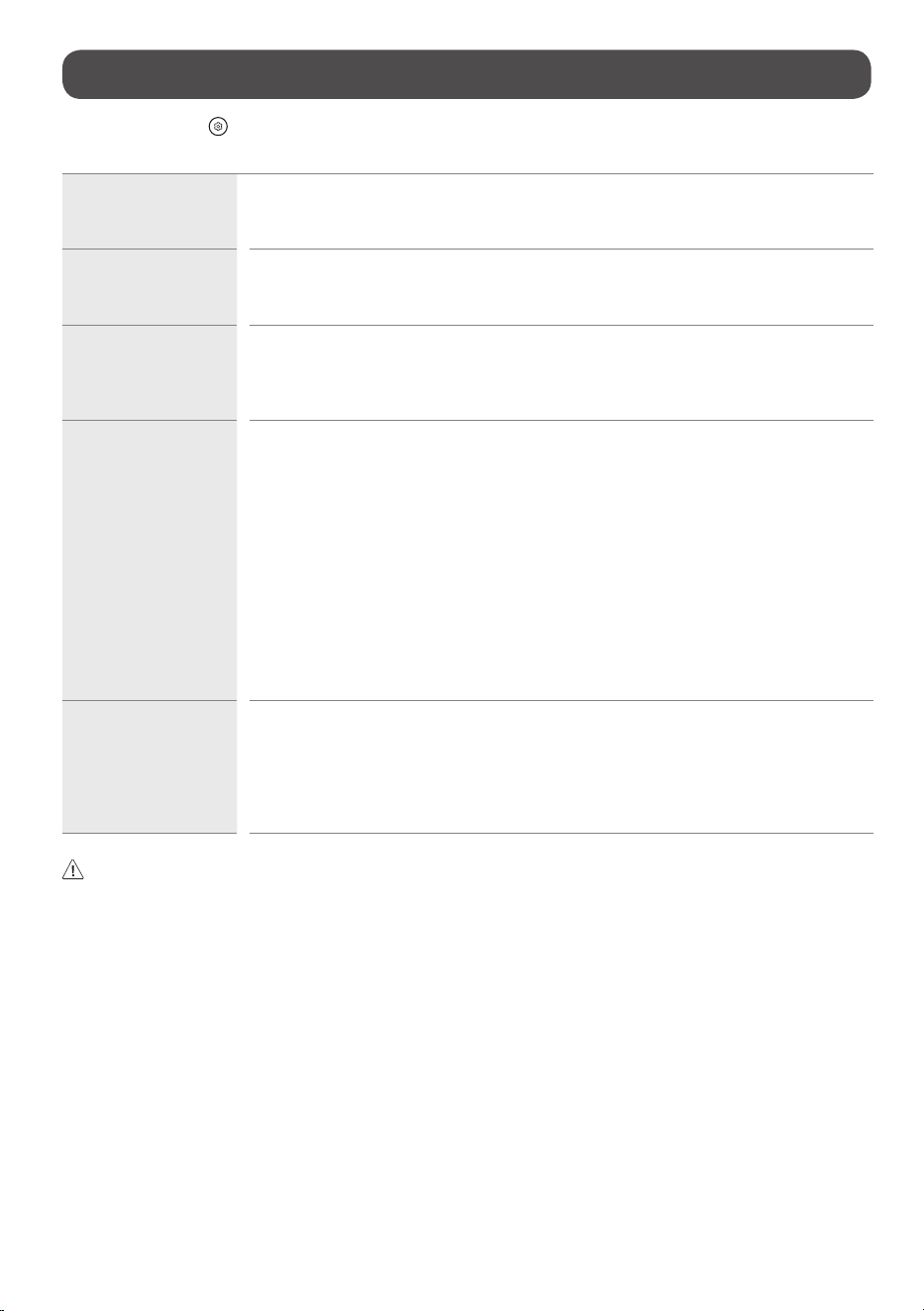
Troubleshooting
In TV / HDMI input, press the button on the remote control three times to display the model name and serial number on the screen.
For detailed information or videos, visit www.lg.com for the troubleshooting page.
Cannot control the TV with
the remote control.
• Check if anything such as tape has been placed over the receiver.
• Check if there is any obstacle between the product and the remote control.
• Replace the batteries with new fresh ones.
No image display and no
sound is produced.
• Check if the product is turned on.
• Check if the power cord is connected to a wall outlet.
• Check if there is a problem in the wall outlet by connecting other products.
The TV turns off suddenly. • Check the power control settings. The power supply may be interrupted.
• Check if the auto-off function is activated on the settings related time.
• The auto-off function may have worked. This product is equipped with an auto-off function that automatically
turns off the power if the remote control is not used for 15 minutes without an input signal.
Abnormal Display • If the product feels cold to the touch, there may be a small “flicker” when it is turned on. This is normal, there is
nothing wrong with product.
• This panel is an advanced product that contains millions of pixels. You may see tiny black dots and/or brightly
colored dots (red, blue or green) at a size of 1ppm on the panel. This does not indicate a malfunction and does not
affect the performance and reliability of the product. This phenomenon also occurs in third-party products and is
not subject to exchange or refund.
• You may find different brightness and color of the panel depending upon your viewing position(left/right/top/
down). This phenomenon occurs due to the characteristic of the panel. It is not related to the product performance,
and it is not malfunction.
• Avoid touching the screen or holding your finger(s) against it for long periods of time. Doing so may produce some
temporary distortion effects on the screen.
• Displaying a still image for a prolonged period of time may cause an image sticking. Avoid displaying a fixed image
on the TV screen for an extended length of time.
Generated Sound • Cracking noise A cracking noise that occurs when watching or turning off the TV is generated by plastic thermal
contraction due to temperature and humidity. This noise is common for products where thermal deformation is
required.
• Electrical circuit humming/panel buzzing A low level noise is generated from a high-speed switching
circuit, which supplies a large amount of current to operate a product. It varies depending upon the product. This
generated sound does not affect the performance and reliability of the product.
• When cleaning the product, be careful not to allow any liquid or foreign objects to enter the gap between the upper, left or right side of the panel and the
guide panel, (Depending upon model).
• Make sure to wring any excess water or cleaner from the cloth.
• Do not spray water or cleaner directly onto the TV screen.
• Make sure to spray just enough of water or cleaner onto a dry cloth to wipe the screen.

11
Regulatory
FCC Notice
(For USA)
This equipment has been tested and found to comply with the limits for a Class B digital device, pursuant to Part 15 of the FCC Rules.
These limits are designed to provide reasonable protection against harmful interference in a residential installation. This equipment
generates, uses, and can radiate radio frequency energy and, if not installed and used in accordance with the instructions, may cause
harmful interference to radio communications. However, there is no guarantee that interference will not occur in a particular installation. If
this equipment does cause harmful interference to radio or television reception, which can be determined by turning the equipment off and
on, the user is encouraged to try to correct the interference by one or more of the following measures:
- Reorient or relocate the receiving antenna.
- Increase the separation between the equipment and the receiver.
- Connect the equipment to an outlet on a circuit different from that to which the receiver is connected.
- Consult the dealer or an experienced radio/TV technician for help.
This device complies with part 15 of the FCC Rules. Operation is subject to the following two conditions: (1) this device may not cause harmful
interference and (2) this device must accept any interference received, including interference that may cause undesired operation. Any
changes or modifications in construction of this device which are not expressly approved by the party responsible for compliance could void
the user’s authority to operate the equipment. and For indoor use only, use outdoors or in other modes not covered by this manual may violate the FCC regulation
and violate the user authority to use the product.
FCC Radio Frequency Interference Requirements (for UNII devices)
(For USA)
High power radars are allocated as primary users of the 5.25 to 5.35 GHz and 5.65 to 5.85 GHz bands. These radar stations can cause interference with and/or
damage this device. This device cannot be co-located with any other transmitter.
Transmitters in the 5.925-7.125 GHz band are prohibited from operating to control or communicate with unmanned aircraft systems.
FCC RF Radiation Exposure Statement
(For USA)
[For having wireless function (WLAN, Bluetooth,...)]
This equipment complies with FCC radiation exposure limits set forth for an uncontrolled environment. This transmitter must not be co-located
or operating in conjunction with any other antenna or transmitter. This equipment should be installed and operated with minimum distance
20cm (7.8inches) between the antenna and your body. Users must follow the specific operating instructions for satisfying RF exposure compliance.
(Device for using 5925 - 7125 MHz)
1) FCC regulations restrict the operation of this device to indoor use only.
2) The operation of this device is prohibited on oil platforms, cars, trains, boats, and aircraft, except that operation of this device is permitted in large aircraft
while flying above 10,000 feet in the 5.925-6.425 GHz band.
3) Operation of transmitters in the 5.925-7.125 GHz band is prohibited for control of or communications with unmanned aircraft systems.
NOTE TO CABLE/TV INSTALLER
(For USA)
This reminder is provided to call the CATV system installer’s attention to Article 820-40 of the National Electric Code (U.S.A.). The code provides guidelines for
proper grounding and, in particular, specifies that the cable ground shall be connected to the grounding system of the building, as close to the point of the cable
entry as practical.
LG Take-back & Recycling Policy
(For USA)
LG Electronics offers a customized e-waste take-back & recycling service that meets local needs and requirements in the countries where e-waste regulations are
in place, and also provides product take-back & recycling service voluntarily in some regions. LG Electronics evaluates products’ recyclability at the design step
selectively, with the goal of improving recyclability where practicable. Through these activities, LG Electronics seeks to contribute to conserving natural resources
and protecting the environment. For more information, please visit our global site at
https://www.lg.com/recycling
12
WARNING! (STABILITY HAZARD)
A television set may fall, causing serious personal injury or death. Many injuries, particularly to children, can be avoided by taking simple precautions such as:
- ALWAYS use cabinets or stands or mounting methods recommended by the manufacturer of the television set.
- ALWAYS use furniture that can safely support the television set.
- ALWAYS ensure the television set is not overhanging the edge of the supporting furniture.
- ALWAYS educate children about the dangers of climbing on furniture to reach the television set or its controls.
- ALWAYS route cords and cables connected to your television so they cannot be tripped over, pulled or grabbed.
- NEVER place a television set in an unstable location.
- NEVER place the television set on tall furniture (for example, cupboards or bookcases) without anchoring both the furniture and the television set to a
suitable support.
- NEVER place the television set on cloth or other materials that may be located between the television set and supporting furniture.
- NEVER place items that might tempt children to climb, such as toys and remote controls, on the top of the television or furniture on which the television
is placed.
If the existing television set is going to be retained and relocated, the same considerations as above should be applied.
Symbols
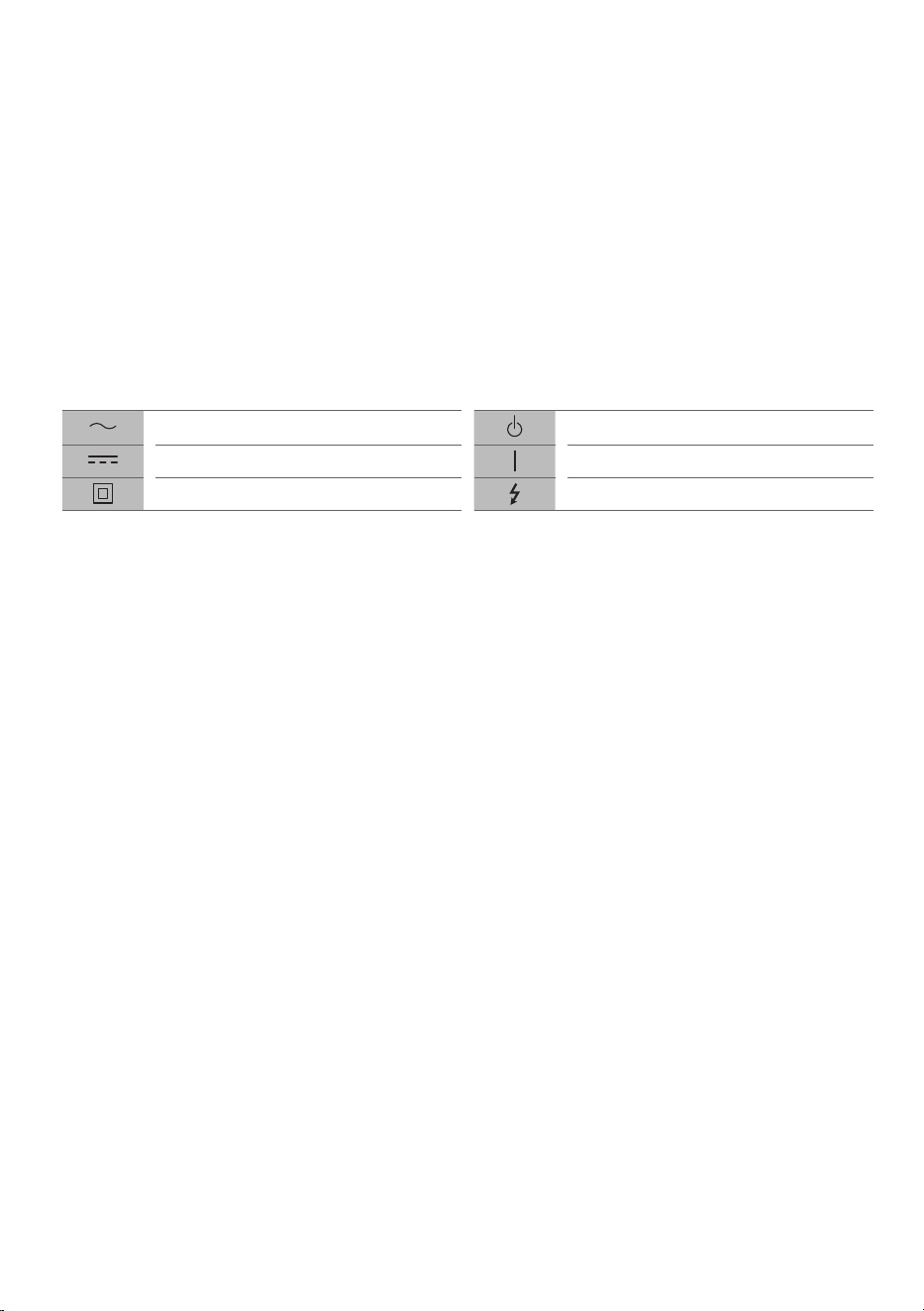
Refers to alternating current (AC). Refers to stand-by.
Refers to direct current (DC). Refers to “ON” (power).
Refers to class II equipment. Refers to dangerous voltage.
13
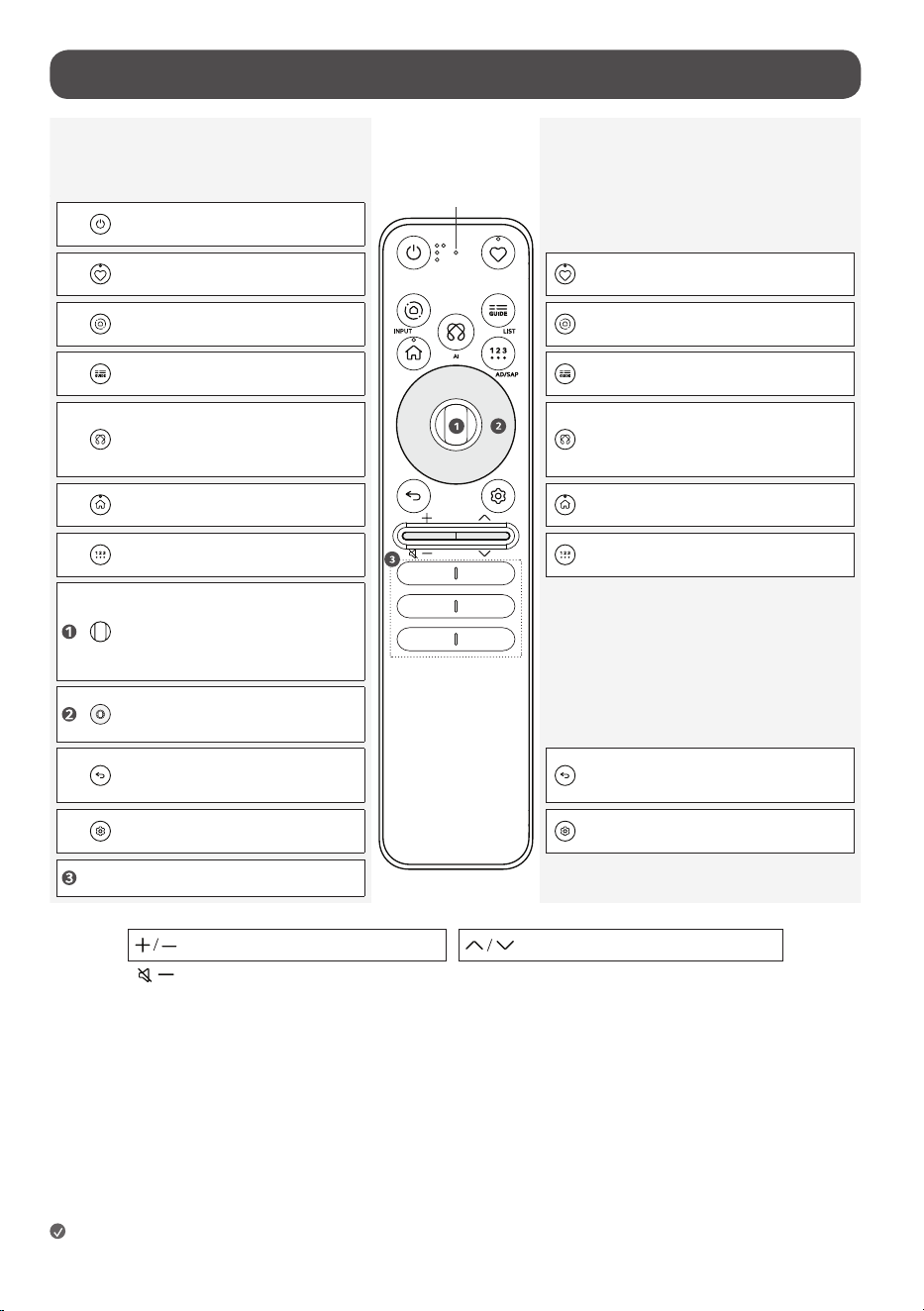
Using Magic Motion Remote Control
Short press
Basic Guide
Long press
Extension Guide
Power: Turns the TV On or Off.
Select Custom Menu / Accessibility. Accesses the Accessibility Shortcuts.
Displays the Home Hub. Changes the Input Source.
Accesses the TV Guide. Accesses the saved Channel List.
Check for recommended content. (Some
recommended services may not be available
in some countries.)
Speak to the remote control while pressing
and holding the button to use the Voice
Recognition feature.
Displays the Home Menu. To enable the Screen Zoom.
Displays more remote control functions. Enables SAP (Second Audio Program) Feature.
Press to select menu and operate device.
(play/pause, etc.)
Scroll up and down Scrolls the screen or
change channels.
Up, Down, Left, Right Navigation
buttons.
Move to the Previous Step.
The screen displayed on the TV is closed and the
Home Menu appears.
Displays the Quick Settings Menu. Displays the All Settings Menu.
Various content service buttons.
Push up and down to Adjust the Volume. Push up and down to Change Channels.
Push down long press to Mute.
Microphone
Note
• The terms in this manual are used in general terms to help users understand and may not match the terms displayed on the screen.
14
The descriptions in this manual are based on the buttons on the remote
control. Please read this manual carefully and use the TV correctly.
This remote uses infrared light. When in use, it should be pointed in the
direction of the TV’s remote sensor.
(Some buttons and services may not be provided depending upon models
or regions.)
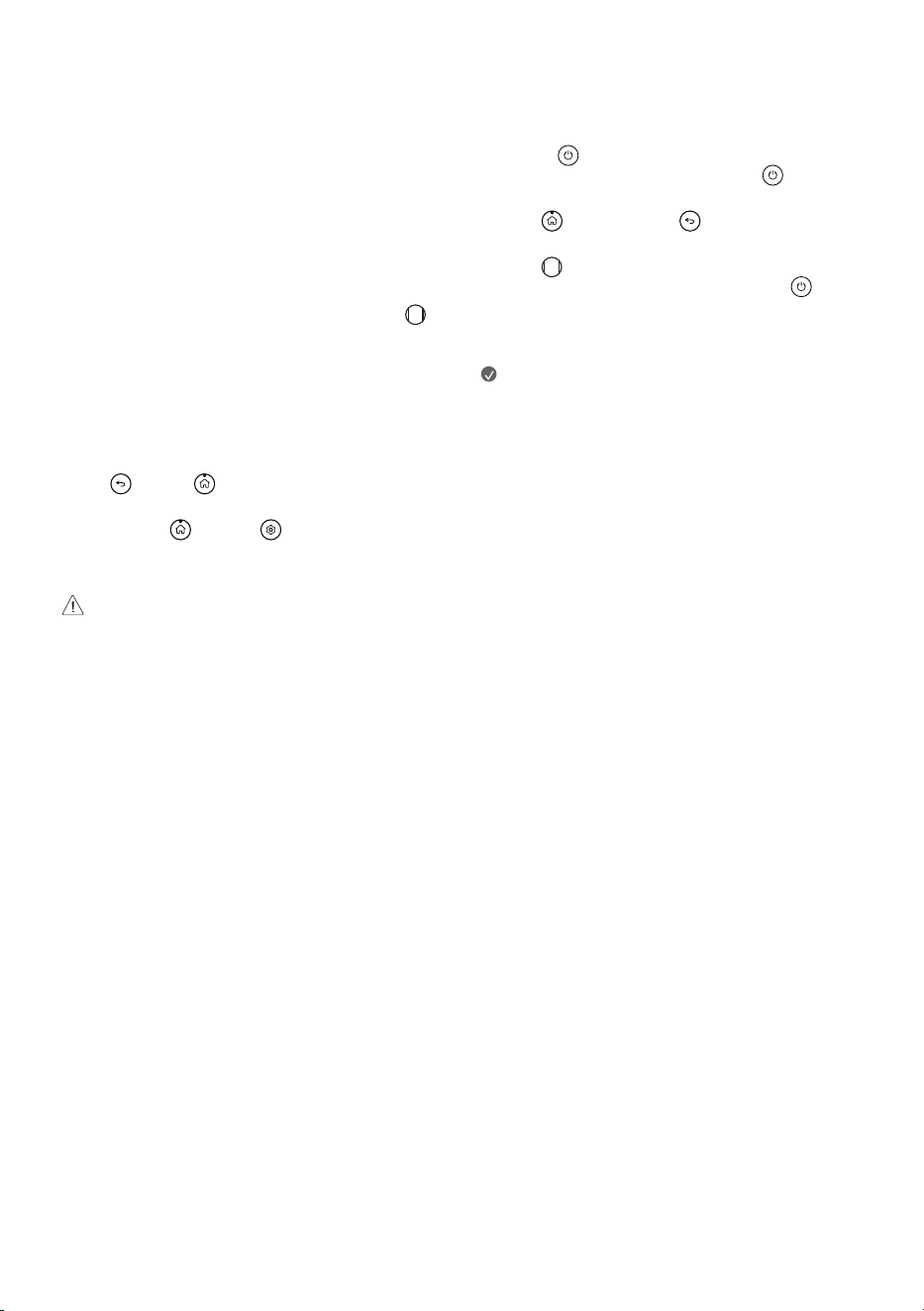
How to register the Magic Motion
Remote Control
To use the Magic Motion Remote Control, first pair it with your TV.
1 Put batteries into the Magic Motion Remote Control and turn the TV on.
2 Point the Magic Motion Remote Control at your TV and press the
Wheel (OK) on the remote control.
* If the TV fails to register the Magic Motion Remote Control, try again after
turning the TV off and back on.
How to deregister the Magic Motion
Remote Control
Press the (Back) and (Home) buttons at the same time, for five
seconds, to unpair the Magic Motion Remote Control with your TV.
* Press and hold the (Home) and (Q. Settings) buttons for more
than 5 seconds to disconnect and re-register the Magic Motion Remote
Control at the same time.
• It is recommended that an Access Point (AP) be located more than
0.2m(0.65ft) away from the TV. If the AP is installed closer than
0.2m(0.65ft), the Magic Motion Remote Control may not perform as
expected due to frequency interference.
Using Always Ready
(Depending upon model)
You can operate the TV and connect to Bluetooth with direct voice recognition
while the power is off.
* Pressing the (Power) button while watching TV switches the screen
to [Always Ready] that is turned on, and pressing the (Power) button
once more turns the screen to [Always Ready] that is turned off.
* Press the (Home) button or the (Back) button to watch TV when
the screen is in [Always Ready] that is turned on.
* Press the Wheel (OK) button to display the wallpaper when the
screen is in [Always Ready] that is turned off, and press the (Power)
button to watch TV.
Note
• Using Always Ready may increase energy consumption.