Owner’s Manual
S20PET


1
Important Safety Instructions
2
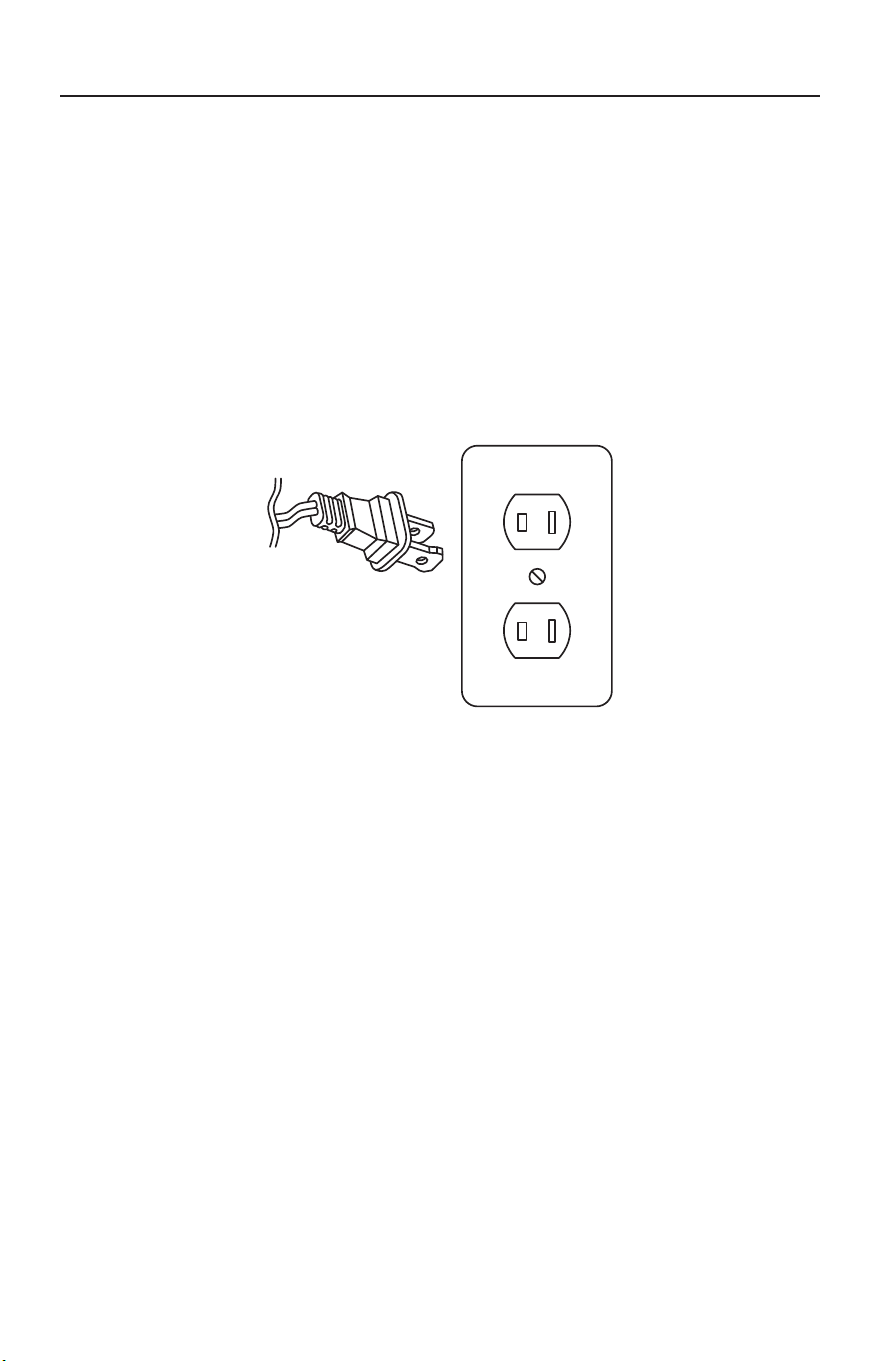
Two-Wire Polarized Cord
3
Parts Identification
4
Replacement Belts and Filters
4
How to Assemble and Operate the Vacuum
5
How to Empty the Dust Container
5
How to Adjust the Height
5
How to Adjust the Handle
6
How to Clean the Filters
6
On-Board Tool Cleaning
7
How to Replace the Belt and Headlight Bulb
8
Thermal Motor Protection
9
Troubleshooting
10
For Best Performance
10
Warranty
11
INDEX

2
IMPORTANT SAFETY INSTRUCTIONS
When using an electrical appliance, basic precautions
should always be followed, including the following:
READ ALL INSTRUCTIONS BEFORE USING THIS
APPLIANCE. FOR HOUSEHOLD USE ONLY.
IMPORTANT:
The manufacturer cannot accept responsibility for damage
caused when the appliance is not used according to the instructions, or for uses other
than those for which it was intended.
WARNING:
To reduce the risk of fire, electric shock, damage or injury:
• Do not leave appliance unattended
when plugged in. Unplug from outlet
when not in use and before servicing.
• WARNING: ELECTRIC SHOCK COULD
OCCUR IF USED OUTDOORS OR ON
WET SURFACES.
• Do not allow to be used as a toy. Close
attention is necessary when used by or
near children.
• Use only as described in this manual.
Use only manufacturer’s recommended
attachments.
• Do not use with damaged cord or plug.
If appliance is not working as it should,
has been dropped, damaged, left
outdoors or dropped into water, return
it to a service center.
• Do not pull or carry by cord, use cord
as a handle, close a door on cord,
or pull cord around sharp edges
or corners. Do not run appliance
over cord. Keep cord away from
heated surfaces.
• Do not unplug by pulling on cord. To
unplug, grasp the plug, not the cord.
• Do not handle plug or appliance with
wet hands.
• Turn off all controls before unplugging.
• Do not put any object into openings.
Do not use with any opening blocked;
keep free of dust, lint, hair and anything
that may reduce air flow.
• Keep hair, loose clothing, fingers and all
parts of body away from openings and
moving parts.
• Do not pick up anything that is burning
or smoking, such as cigarettes, matches
or hot ashes.
• Do not use without vacuum filters
in place.
• Use extra care when cleaning on stairs.
• Do not use to pick up flammable or
combustible liquids such as gasoline
or use in areas where they may
be present.
• Do not attempt to service the unit while
appliance is plugged in.
SAVE THESE INSTRUCTIONS
3
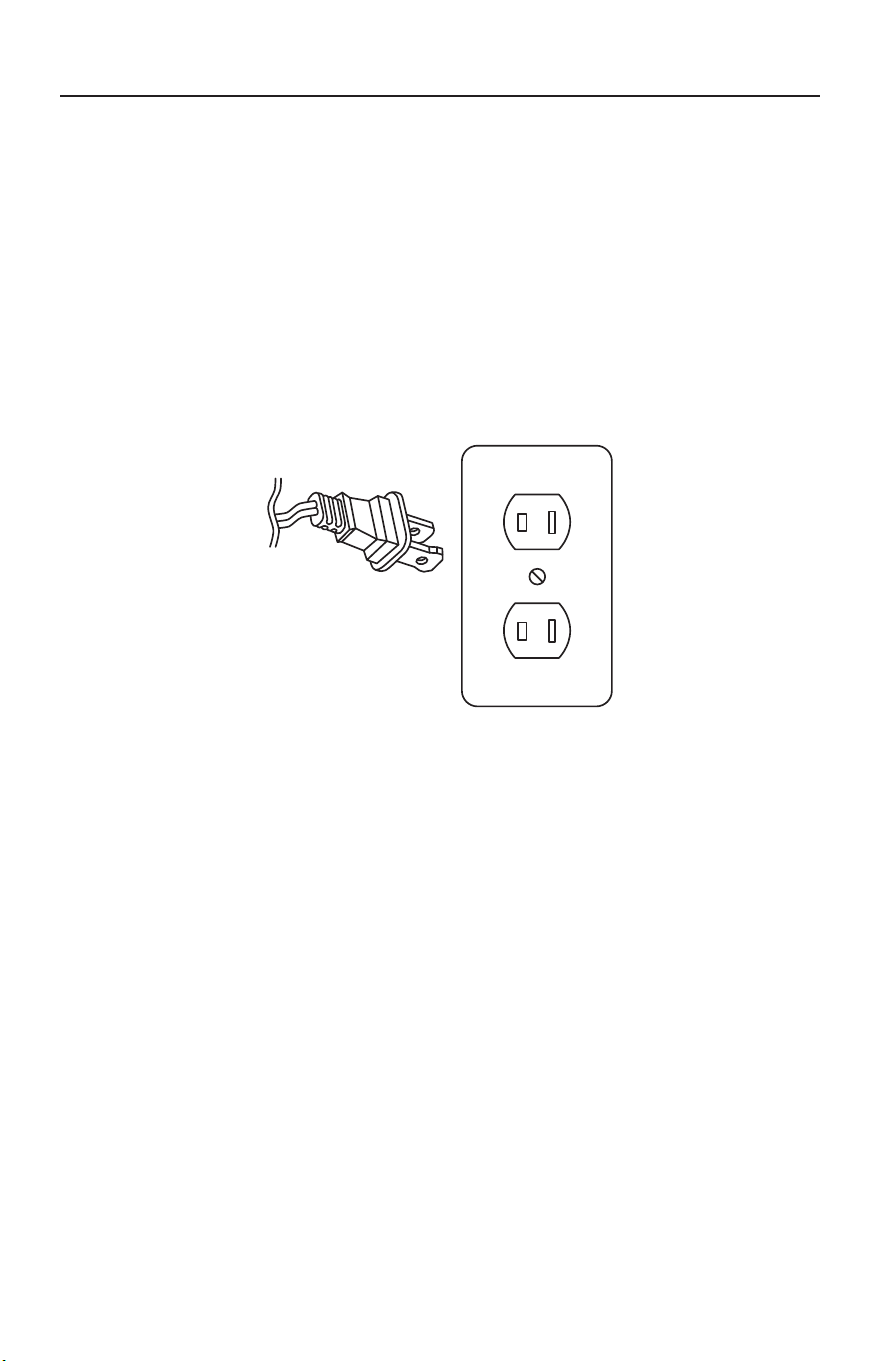
Power Cord, 2-Wire Polarized Cord
To reduce the risk of electric shock, the charger is equipped with a polarized
alternating current line plug (a plug having one blade wider than the other). This
plug will fit into the power outlet only one way. This is a safety feature. If you are
unable to insert the plug fully into the outlet, try reversing the plug. If the plug
should still fail to fit, contact a qualified electrician to replace the obsolete outlet.
Do not defeat the safety purpose of the polarized plug.
POLARIZATION INSTRUCTIONS
4
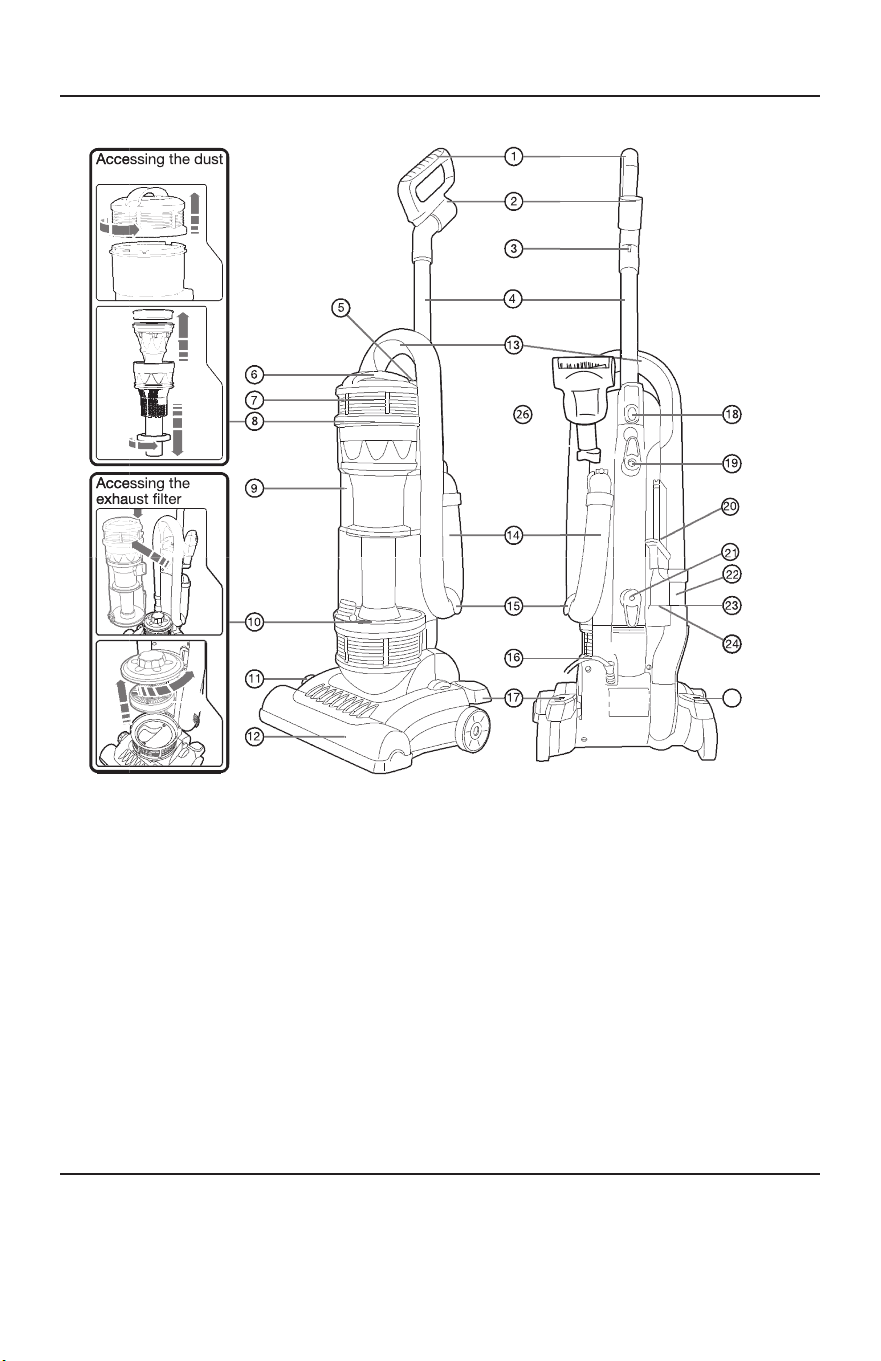
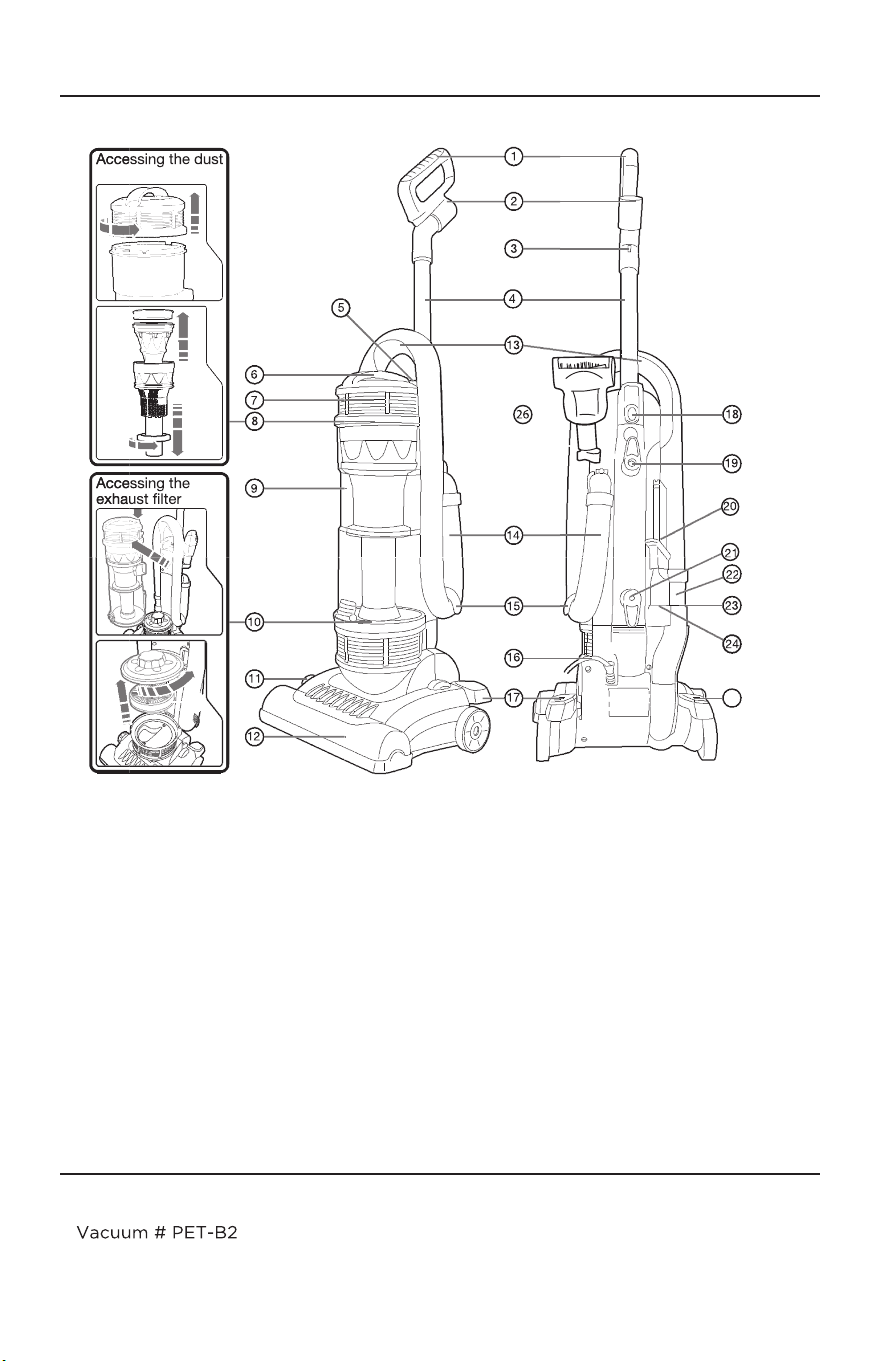
PARTS IDENTIFICATION
REPLACEMENT BELT AND FILTER
• Genuine Simplicity Vacuum Belt
Part # PET-B2
• Genuine Simplicity Filter Set
Part # SF20PET
container filter
25
(1)
H andle Grip
(2)
Handle Hose Inlet
(3)
Cord Clip
(4)
Dust Container Release
Button
(5)
Dust Container Handle
(6)
Dust Container Lid
(7)
Dust Container Filter
(8)
Dust Container
(9)
Exhaust Filter
(10)
HeightAdjustment Dial
(11)
Nozzle
(12)
Hose Storage and
Carrying Handle
(13)
(14)
(15)
Hose
(16)
Hose Storage Hook
(17)
Power Cord
(18)
Handle Release Pedal
Handle Tube Release Button
Rotating Cord Storage Hook
(19)
(20)
(21)
Crevice with Dusting
Brush Combination Tool
(22)
Cord Storage Hook
(23)
Hose Suction End
(24)
Side Hose Outlet
Crevice Tool Storage
Power Pedal
Handheld Trubo Brush
H andle Tube
(25)
(26)
5
HOW TO ASSEMBLE AND OPERATE THE VACUUM
HOW TO EMPTY THE DUST CONTAINER
HOW TO ADJUST THE HEIGHT
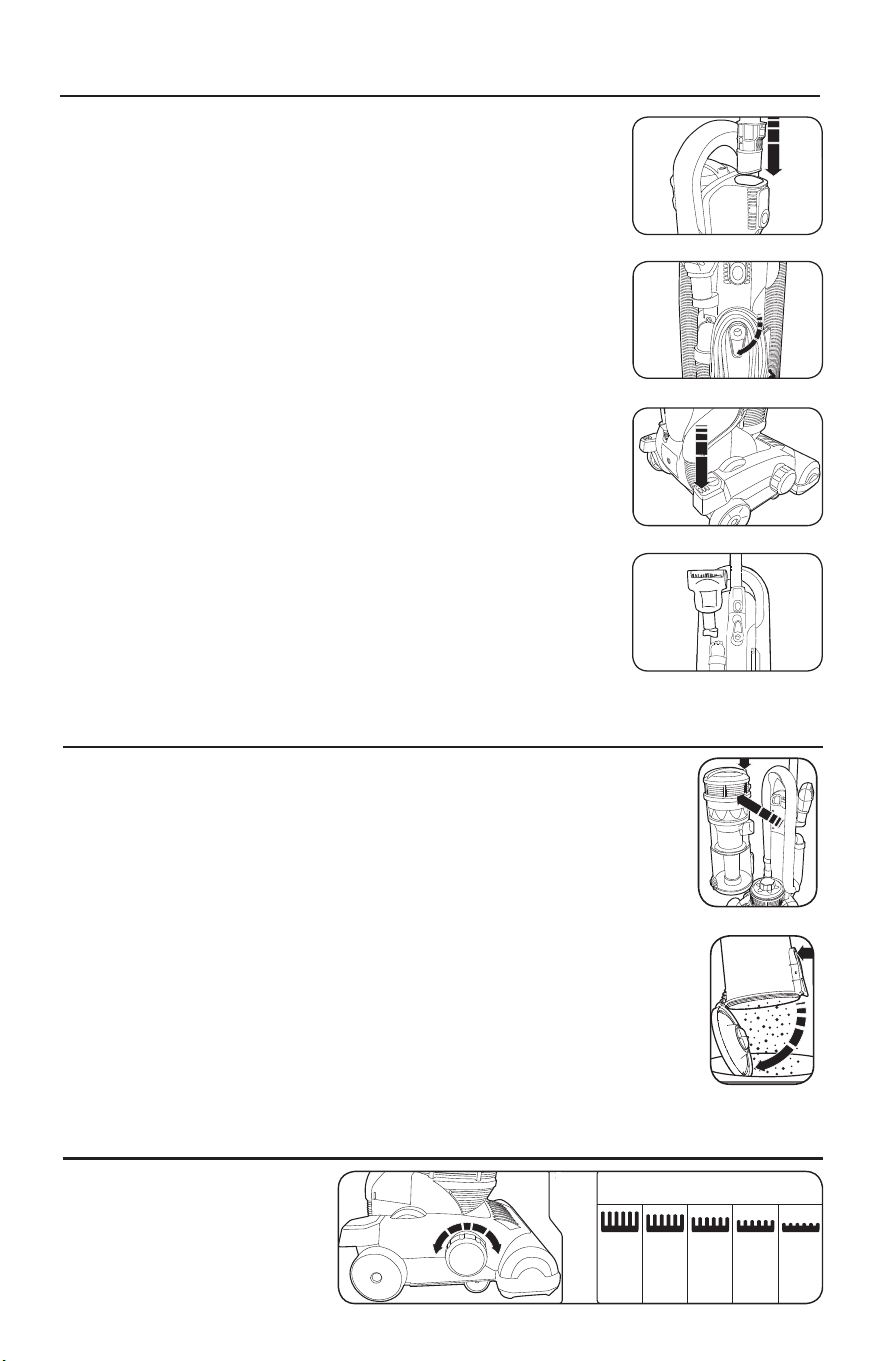
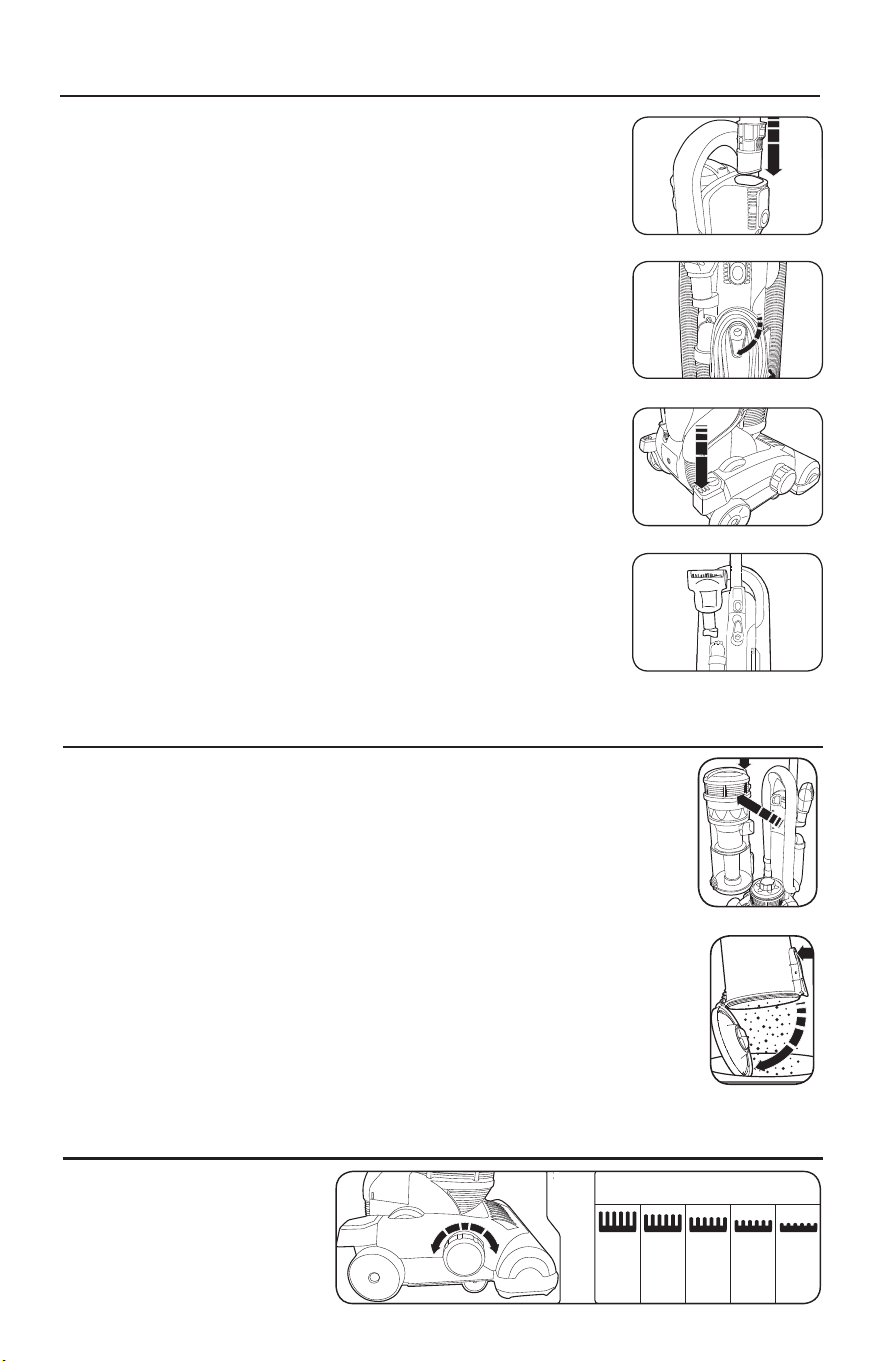
How to Attach the Handle to the Vacuum
The vacuum and the handle are packed separately.
1. Slide the handle into the slots on top of the vacuum until it
clicks into place (Fig. 1).
2. Turn the upper cord storage hook to the upright position
and wind the power cord around the cord storage hooks
when storing the vacuum.
How to Release the Power Cord
1. The upper cord hook has a quick-release. To release the
cord, rotate the hook downward (Fig. 2).
2. Return the cord hook to the upright position before
rewinding the cord.
On/Off Switch
1. To turn the vacuum on, push the power pedal on the side of
the vacuum nozzle (Fig. 3).
2. To turn the vacuum off, push the pedal again.
Hand Held Turbo Brush
Attach the brush to the storage holder on the vacuum (Fig. 4).
Always operate the vacuum with the dust container installed.
Empty the dust container as needed or when it fills to the MAX line.
How to Empty the Dust Container
1. Unplug the vacuum. Press the dust container release button to
remove it from the vacuum (Fig. 5).
2. Press the dust container empty button to open the lid of the
container, releasing the contents into a trash bin (Fig. 6).
3. Close the dust container lid until it clicks and replace the container
into the vacuum.
How to Adjust the
Nozzle Height
Rotate the height adjustment
dial to the type of floor being
vacuumed (Fig. 7).
4
Using in upright mode / Assembly
1
Attach the tube/handle (1) to the main body of
the cleaner.
2
Tu r n the rotatable cord storage cleat (20) to
release the power cord (17). Plug in to the mains
outlet. To keep the cord away from the floor
brush, locate in the cord hook (3).
3
Settings for the
floor brush height adjustment dial (10)
Tools Deep
pile
carpet
Deep to
medium
pile
carpet
Medium
pile
carpet
Smooth
carpet
and
hard
floors
Rotate the floor brush height adustment dial (10) to suit the floor being vacuumed (refer to table above).
4
Switch on the vacuum cleaner by pressing the
power pedal (26).
5
Release from the upright position by pressing the
upright release pedal (18) with your foot.
IMPORTANT: To prevent damage to carpets,
never leave the cleaner switched on in one
place for an extended period.
6
When full, or after use, empty the dust canister (8).
Press the dust canister release button (4) to remove
the dust canister from the vacuum cleaner.
Press the dust canister empty button (27) to open
the base of the dust canister, releasing the contents
into a bin or a bag. Allergy sufferers may wish to
seal the bag around the dust canister before
emptying to p revent dust escaping.
VC73420MUK Rev1_Instruction Book 30/04/2012 12:17 Page 4
4
Using in upright mode / Assembly
1
Attach the tube/handle (1) to the main body of
the cleaner.
2
Tu r n the rotatable cord storage cleat (20) to
release the power cord (17). Plug in to the mains
outlet. To keep the cord away from the floor
brush, locate in the cord hook (3).
3
Settings for the
floor brush height adjustment dial (10)
Tools Deep
pile
carpet
Deep to
medium
pile
carpet
Medium
pile
carpet
Smooth
carpet
and
hard
floors
Rotate the floor brush height adustment dial (10) to suit the floor being vacuumed (refer to table above).
4
Switch on the vacuum cleaner by pressing the
power pedal (26).
5
Release from the upright position by pressing the
upright release pedal (18) with your foot.
IMPORTANT: To prevent damage to carpets,
never leave the cleaner switched on in one
place for an extended period.
6
When full, or after use, empty the dust canister (8).
Press the dust canister release button (4) to remove
the dust canister from the vacuum cleaner.
Press the dust canister empty button (27) to open
the base of the dust canister, releasing the contents
into a bin or a bag. Allergy sufferers may wish to
seal the bag around the dust canister before
emptying to p revent dust escaping.
VC73420MUK Rev1_Instruction Book 30/04/2012 12:17 Page 4
4
Using in upright mode / Assembly
1
Attach the tube/handle (1) to the main body of
the cleaner.
2
Tu r n the rotatable cord storage cleat (20) to
release the power cord (17). Plug in to the mains
outlet. To keep the cord away from the floor
brush, locate in the cord hook (3).
3
Settings for the
floor brush height adjustment dial (10)
Tools Deep
pile
carpet
Deep to
medium
pile
carpet
Medium
pile
carpet
Smooth
carpet
and
hard
floors
Rotate the floor brush height adustment dial (10) to suit the floor being vacuumed (refer to table above).
4
Switch on the vacuum cleaner by pressing the
power pedal (26).
5
Release from the upright position by pressing the
upright release pedal (18) with your foot.
IMPORTANT: To prevent damage to carpets,
never leave the cleaner switched on in one
place for an extended period.
6
When full, or after use, empty the dust canister (8).
Press the dust canister release button (4) to remove
the dust canister from the vacuum cleaner.
Press the dust canister empty button (27) to open
the base of the dust canister, releasing the contents
into a bin or a bag. Allergy sufferers may wish to
seal the bag around the dust canister before
emptying to p revent dust escaping.
VC73420MUK Rev1_Instruction Book 30/04/2012 12:17 Page 4
4
Using in upright mode / Assembly
1
Attach the tube/handle (1) to the main body of
the cleaner.
2
Tu r n the rotatable cord storage cleat (20) to
release the power cord (17). Plug in to the mains
outlet. To keep the cord away from the floor
brush, locate in the cord hook (3).
3
Settings for the
floor brush height adjustment dial (10)
Tools Deep
pile
carpet
Deep to
medium
pile
carpet
Medium
pile
carpet
Smooth
carpet
and
hard
floors
Rotate the floor brush height adustment dial (10) to suit the floor being vacuumed (refer to table above).
4
Switch on the vacuum cleaner by pressing the
power pedal (26).
5
Release from the upright position by pressing the
upright release pedal (18) with your foot.
IMPORTANT: To prevent damage to carpets,
never leave the cleaner switched on in one
place for an extended period.
6
When full, or after use, empty the dust canister (8).
Press the dust canister release button (4) to remove
the dust canister from the vacuum cleaner.
Press the dust canister empty button (27) to open
the base of the dust canister, releasing the contents
into a bin or a bag. Allergy sufferers may wish to
seal the bag around the dust canister before
emptying to p revent dust escaping.
VC73420MUK Rev1_Instruction Book 30/04/2012 12:17 Page 4
4
Using in upright mode / Assembly
1
Attach the tube/handle (1) to the main body of
the cleaner.
2
Tu r n the rotatable cord storage cleat (20) to
release the power cord (17). Plug in to the mains
outlet. To keep the cord away from the floor
brush, locate in the cord hook (3).
3
Settings for the
floor brush height adjustment dial (10)
Tools Deep
pile
carpet
Deep to
medium
pile
carpet
Medium
pile
carpet
Smooth
carpet
and
hard
floors
Rotate the floor brush height adustment dial (10) to suit the floor being vacuumed (refer to table above).
4
Switch on the vacuum cleaner by pressing the
power pedal (26).
5
Release from the upright position by pressing the
upright release pedal (18) with your foot.
IMPORTANT: To prevent damage to carpets,
never leave the cleaner switched on in one
place for an extended period.
6
When full, or after use, empty the dust canister (8).
Press the dust canister release button (4) to remove
the dust canister from the vacuum cleaner.
Press the dust canister empty button (27) to open
the base of the dust canister, releasing the contents
into a bin or a bag. Allergy sufferers may wish to
seal the bag around the dust canister before
emptying to p revent dust escaping.
VC73420MUK Rev1_Instruction Book 30/04/2012 12:17 Page 4
Fig. 1
Fig. 2
Fig. 3
Fig. 5
Fig. 6
Fig. 7
4
Using in upright mode / Assembly
1
Attach the tube/handle (1) to the main body of
the cleaner.
2
Tu r n the rotatable cord storage cleat (20) to
release the power cord (17). Plug in to the mains
outlet. To keep the cord away from the floor
brush, locate in the cord hook (3).
3
Settings for the
floor brush height adjustment dial (10)
Tools Deep
pile
carpet
Deep to
medium
pile
carpet
Medium
pile
carpet
Smooth
carpet
and
hard
floors
Rotate the floor brush height adustment dial (10) to suit the floor being vacuumed (refer to table above).
4
Switch on the vacuum cleaner by pressing the
power pedal (26).
5
Release from the upright position by pressing the
upright release pedal (18) with your foot.
IMPORTANT: To prevent damage to carpets,
never leave the cleaner switched on in one
place for an extended period.
6
When full, or after use, empty the dust canister (8).
Press the dust canister release button (4) to remove
the dust canister from the vacuum cleaner.
Press the dust canister empty button (27) to open
the base of the dust canister, releasing the contents
into a bin or a bag. Allergy sufferers may wish to
seal the bag around the dust canister before
emptying to p revent dust escaping.
VC73420MUK Rev1_Instruction Book 30/04/2012 12:17 Page 4
Fig. 4
6
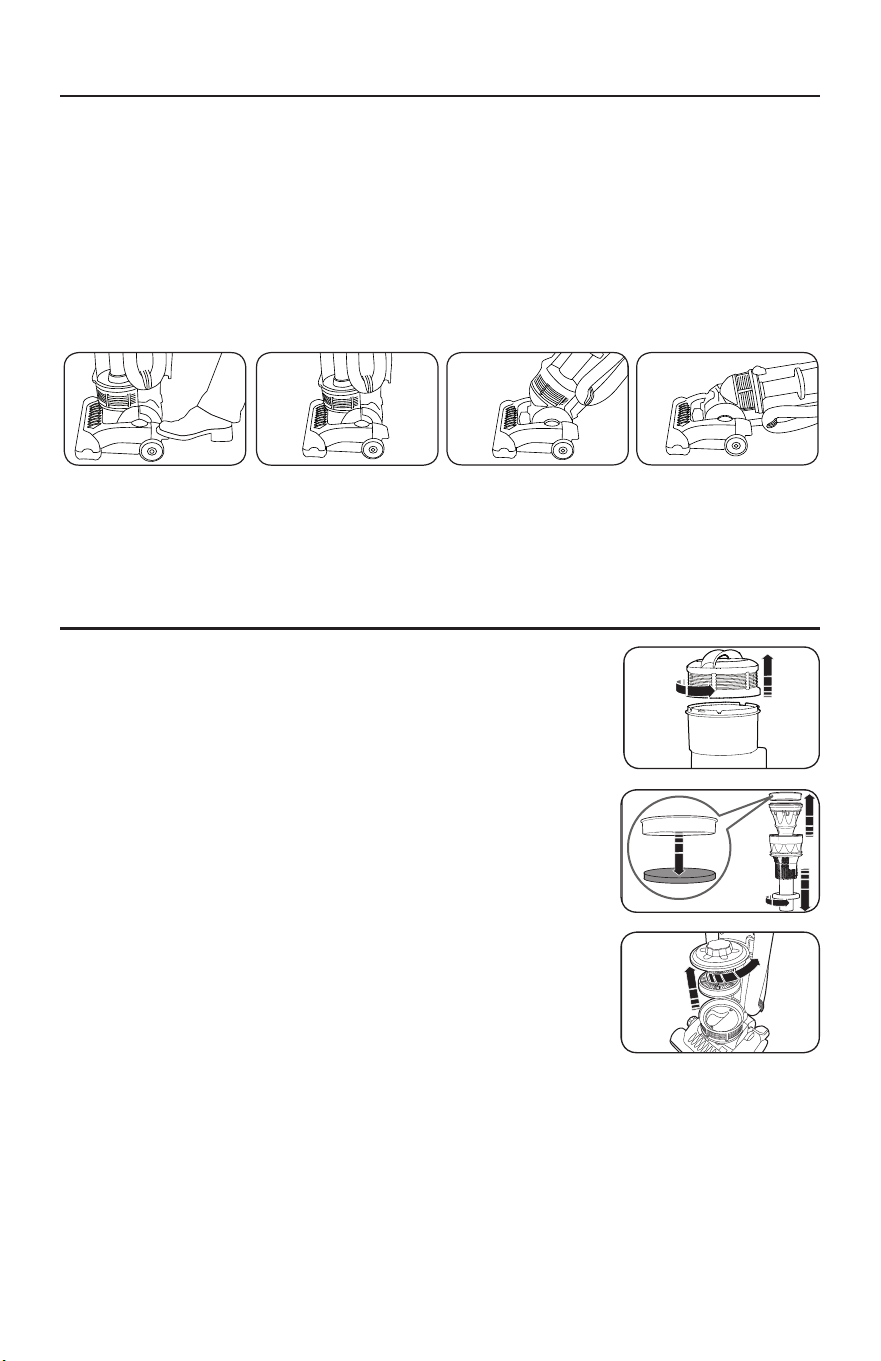
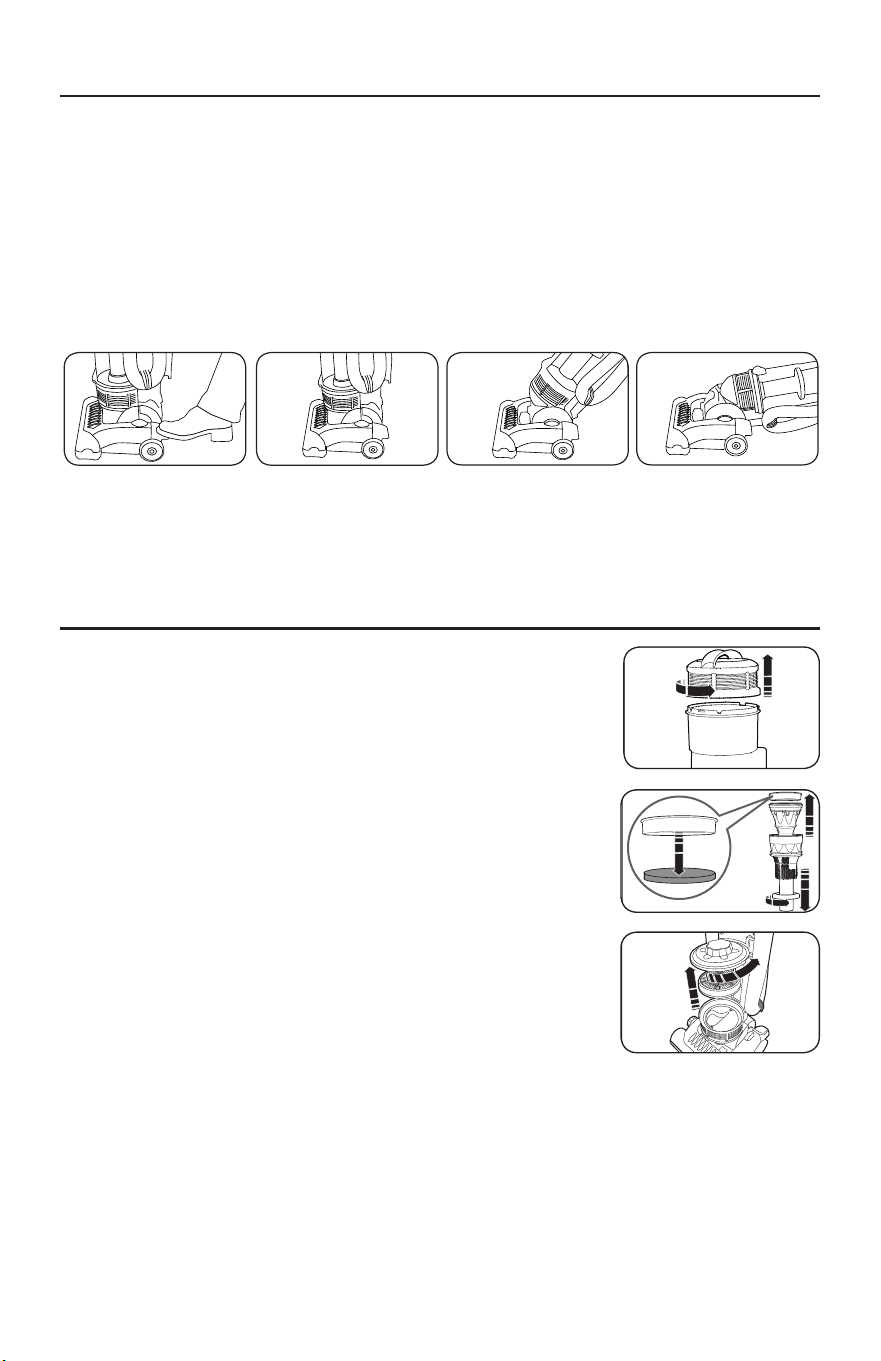
The handle can be set to one of three positions – upright, middle or low.
1. To release the handle, step on the handle release pedal on the left side of the
vacuum nozzle and pull back the handle (Fig. 1).
2. Upright position – for storage or when cleaning tools are used (Fig. 2). The handle
locks in this position.
3. Middle position – for normal cleaning (Fig. 3).
4. Low position – for cleaning under furniture (Fig. 4).
This vacuum is equipped with two filters. These filters
capture fine dust particles and protect the motor from dirt.
Accumulated dirt will be collected on the filters and may
restrict motor performance. It is important to replace the
filters regularly.
How to Clean the Dust Container Filter
1. To access the filter, remove the filter assembly by
removing the dust container lid. Turn the lid counter-
clockwise until it clicks (Fig. 5).
2. Lift out the filter assembly and disassemble (Fig. 6).
3. Wash the dust container filter in cold water and thoroughly
air dry before replacing.
4. Replace the filter and replace the dust container into
the vacuum.
How to Replace the Exhaust Filter
The exhaust filter is located underneath the dust container.
1. Remove the dust container.
2. Remove the exhaust filter cover by turning the lid counterclockwise until it clicks (Fig. 7).
3. Remove the exhaust filter and replace with a new filter (Fig. 7).
4. Replace the filter cover and the dust container into the vacuum.
Note: The exhaust filter cannot be washed or re-used.
6
The hand-held turbo nozzle (13) and crevice tool
with dust brush attachment (21) may be stored in
the designated spaces (14 & 25 respectively) on
the sides of the vacuum cleaner.
When finished cleaning, switch off the appliance
and remove the plug from the mains supply and
wind the cord around the cord storage cleats
(20/22).
If the cleaner overheats, a motor protection
thermostat will automatically switch the motor
off. If this happens, switch the cleaner off,
unplug from the power supply and leave the
cleaner to cool for at least 60 minutes. Check
the airways for blockages, empty the dust
canister and clean the filters before restarting.
The guarantee may be invalidated if the motor is
damaged due to: using the appliance without
the filters installed; not cleaning the filters; or
not replacing damaged filters.
Cleaning the dust canister filter (7)
To maintain suction, the dust canister filter must
be cleaned each time the dust canister (8) is
emptied.
1. To access the filter, remove the filter assembly by
removing the dust canister lid (6). Turn the lid
anti-clockwise until it clicks.
2. Lift out the filter assembly and disassemble.
3. Wash the dust canister filter in cold water and
thoroughly air dry before re-fitting.
IMPORTANT: Do not wash filter with hot water
or detergents.
IMPORTANT: Do not use heated appliances to
dry filter.
4. Replace the dust canister filter and re-assemble
the dust canister.
Cleaning the exhaust filter (9)
The exhaust filter (9) must be cleaned at least
every three months.
The exhaust filter is located underneath the dust
canister (8).
1. Remove the dust canister.
2. Remove the exhaust filter cover (27) by turning
the lid anti-clockwise until it clicks.
3. Lift out the exhaust filter (9).
4. Wash in cold water and thoroughly air dry before
re-fitting.
IMPORTANT: Do not wash filter with hot water
or detergents.
IMPORTANT: Do not use heated appliances to
dry filter.
5. Replace the exhaust filter, the exhaust filter cover
and the dust canister.
Storage
Tool storage
Maintenance - Filters
Safety cut-out
VC73420MUK Rev1_Instruction Book 30/04/2012 12:17 Page 6
6
The hand-held turbo nozzle (13) and crevice tool
with dust brush attachment (21) may be stored in
the designated spaces (14 & 25 respectively) on
the sides of the vacuum cleaner.
When finished cleaning, switch off the appliance
and remove the plug from the mains supply and
wind the cord around the cord storage cleats
(20/22).
If the cleaner overheats, a motor protection
thermostat will automatically switch the motor
off. If this happens, switch the cleaner off,
unplug from the power supply and leave the
cleaner to cool for at least 60 minutes. Check
the airways for blockages, empty the dust
canister and clean the filters before restarting.
The guarantee may be invalidated if the motor is
damaged due to: using the appliance without
the filters installed; not cleaning the filters; or
not replacing damaged filters.
Cleaning the dust canister filter (7)
To maintain suction, the dust canister filter must
be cleaned each time the dust canister (8) is
emptied.
1. To access the filter, remove the filter assembly by
removing the dust canister lid (6). Turn the lid
anti-clockwise until it clicks.
2. Lift out the filter assembly and disassemble.
3. Wash the dust canister filter in cold water and
thoroughly air dry before re-fitting.
IMPORTANT: Do not wash filter with hot water
or detergents.
IMPORTANT: Do not use heated appliances to
dry filter.
4. Replace the dust canister filter and re-assemble
the dust canister.
Cleaning the exhaust filter (9)
The exhaust filter (9) must be cleaned at least
every three months.
The exhaust filter is located underneath the dust
canister (8).
1. Remove the dust canister.
2. Remove the exhaust filter cover (27) by turning
the lid anti-clockwise until it clicks.
3. Lift out the exhaust filter (9).
4. Wash in cold water and thoroughly air dry before
re-fitting.
IMPORTANT: Do not wash filter with hot water
or detergents.
IMPORTANT: Do not use heated appliances to
dry filter.
5. Replace the exhaust filter, the exhaust filter cover
and the dust canister.
Storage
Tool storage
Maintenance - Filters
Safety cut-out
VC73420MUK Rev1_Instruction Book 30/04/2012 12:17 Page 6
6
The hand-held turbo nozzle (13) and crevice tool
with dust brush attachment (21) may be stored in
the designated spaces (14 & 25 respectively) on
the sides of the vacuum cleaner.
When finished cleaning, switch off the appliance
and remove the plug from the mains supply and
wind the cord around the cord storage cleats
(20/22).
If the cleaner overheats, a motor protection
thermostat will automatically switch the motor
off. If this happens, switch the cleaner off,
unplug from the power supply and leave the
cleaner to cool for at least 60 minutes. Check
the airways for blockages, empty the dust
canister and clean the filters before restarting.
The guarantee may be invalidated if the motor is
damaged due to: using the appliance without
the filters installed; not cleaning the filters; or
not replacing damaged filters.
Cleaning the dust canister filter (7)
To maintain suction, the dust canister filter must
be cleaned each time the dust canister (8) is
emptied.
1. To access the filter, remove the filter assembly by
removing the dust canister lid (6). Turn the lid
anti-clockwise until it clicks.
2. Lift out the filter assembly and disassemble.
3. Wash the dust canister filter in cold water and
thoroughly air dry before re-fitting.
IMPORTANT: Do not wash filter with hot water
or detergents.
IMPORTANT: Do not use heated appliances to
dry filter.
4. Replace the dust canister filter and re-assemble
the dust canister.
Cleaning the exhaust filter (9)
The exhaust filter (9) must be cleaned at least
every three months.
The exhaust filter is located underneath the dust
canister (8).
1. Remove the dust canister.
2. Remove the exhaust filter cover (27) by turning
the lid anti-clockwise until it clicks.
3. Lift out the exhaust filter (9).
4. Wash in cold water and thoroughly air dry before
re-fitting.
IMPORTANT: Do not wash filter with hot water
or detergents.
IMPORTANT: Do not use heated appliances to
dry filter.
5. Replace the exhaust filter, the exhaust filter cover
and the dust canister.
Storage
Tool storage
Maintenance - Filters
Safety cut-out
VC73420MUK Rev1_Instruction Book 30/04/2012 12:17 Page 6
Fig. 1
Fig. 5
Fig. 6
Fig. 7
Fig. 3 Fig. 4Fig. 2
Note: To prevent damage to carpets, never leave the vacuum turned on in one place
for an extended period.
HOW TO ADJUST THE HANDLE
HOW TO CLEAN OR REPLACE THE FILTERS
7
ON-BOARD TOOL CLEANING
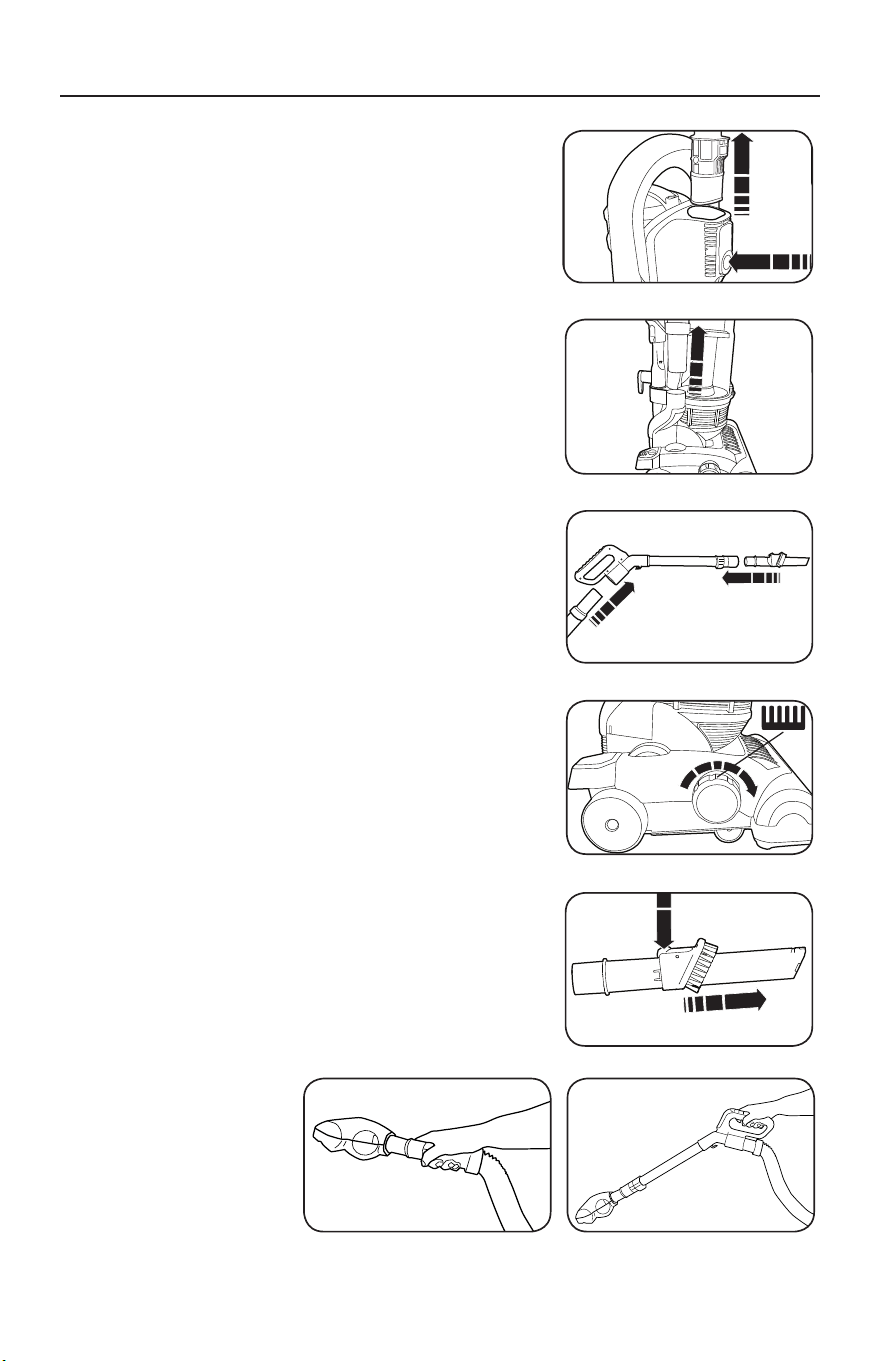
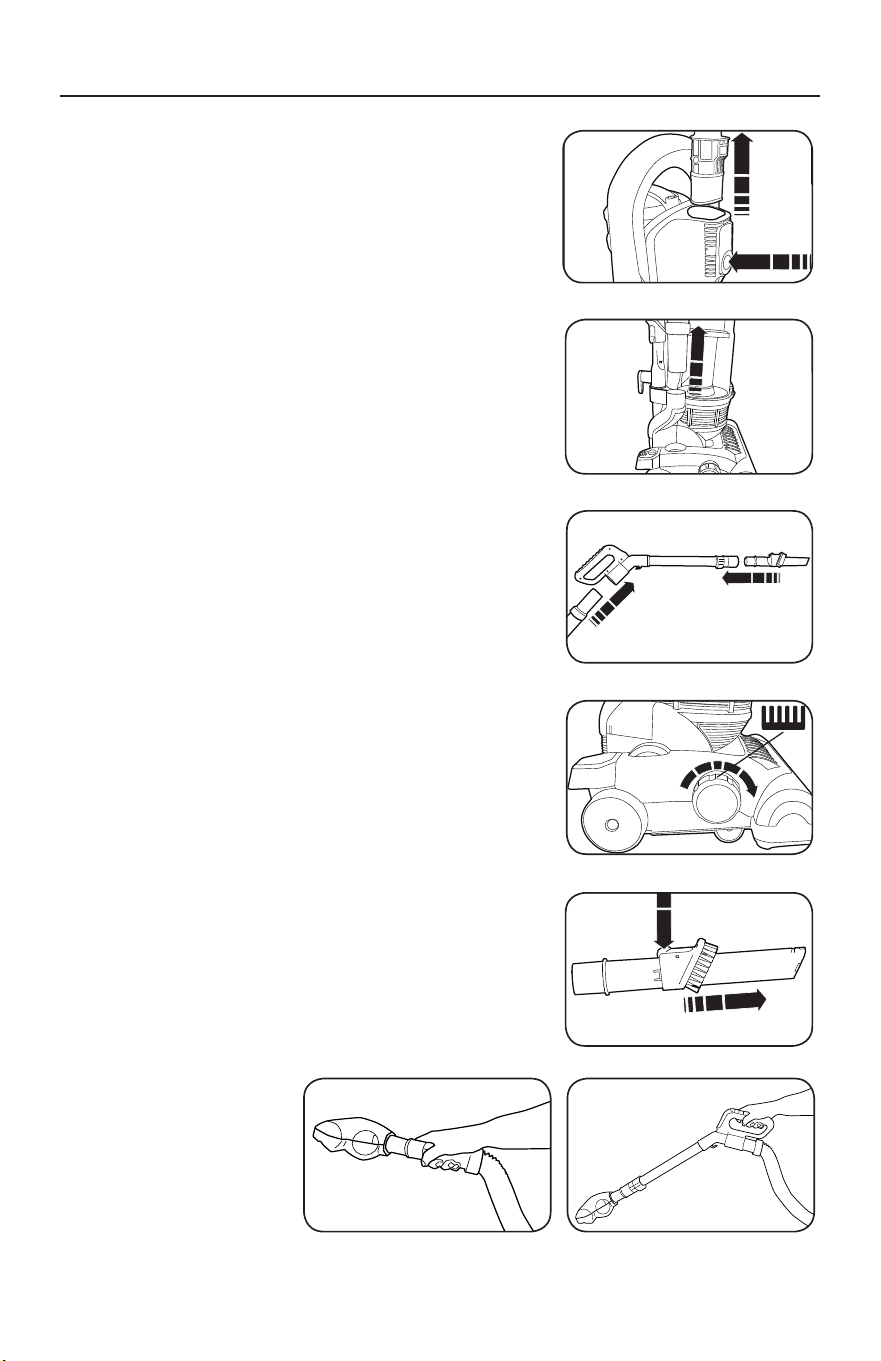
This vacuum is equipped with on-board cleaning tools
including a metal wand (handle tube), stretch hose and
crevice with dusting brush combination tool.
1. Remove the handle by pressing the tube release
button and pulling the handle upwards (Fig. 1).
2. Remove the hose suction end from the side hose
outlet (Fig. 2).
3. Attach the hose suction end to the handle hose
inlet and the desired tool to the end of the handle
tube (Fig. 3).
4. Rotate the height adjustment dial in a clockwise
direction to the tools setting (Fig. 4).
Crevice Tool
The crevice tool is ideal for hard to reach places and
along baseboards (Fig. 5).
Dusting Brush
The dusting brush is ideal for vacuuming delicate
objects and surfaces. The dusting brush is attached
to the crevice tool and may be accessed by pressing
the release button on the side and pulling the dusting
brush to the end of the crevice tool (Fig. 5).
Hand Held Turbo Brush
The turbo brush is ideal for whisking away pet hair
from upholstery and carpeted stairs.
1. Remove the hose suction end from the side
hose outlet.
2. Attach the turbo brush to the end of the hose
(Fig. 6) or to the end of the handle tube (Fig. 7).
• Never over extend the hose such that the cleaner
is pulled over.
IMPORTANT: Only use the tools when the
product is in the parked position. Also, turning
the cleaner sideways helps prevent the
cleaner being pulled along by the stretch hose.
Hand-held turbo nozzle (13)
(certain models only)
The hand-held turbo nozzle is ideal for picking up
hair and fibres from stairs and upholstery.
The hand-held turbo nozzle will not rotate until it
makes contact with the surface being cleaned.
Cleaning the Hand-held turbo nozzle (13)
(certain models only)
The Turbo Nozzle should be regularly cleaned and
any hairs or fibres wrapped around the brush bar
removed to maintain optimum performance.
Crevice tool (21)
The crevice tool is ideal for awkward places,
corners, and behind radiators etc.
Dusting brush (21)
The dusting brush is ideal for vacuuming pelmets
and delicate objects and surfaces.
The dusting brush is attached to the crevice tool
and may be accessed by pressing the release
button on the side and pulling the dusting brush
to the end of the crevice tool.
Tools and accessories
5
Using tools and accessories
1
Remove the tube/handle (1) by pressing the tube
release button (19) and pulling the handle upwards.
2
Remove the hose suction end (23) from the side
hose outlet (24) on the side of the vacuum cleaner.
3
Attach the hose suction end (23) to the handle
hose inlet (2) and the desired tool to the tube end
of the handle (1).
4
Rotate the floor brush height adustment dial (10)
fully in a clockwise direction to the tools setting
(see table on point 3, page 4).
Release the power cord (17) and plug in to the mains outlet as in step 2 of ‘Using in upright mode /
Assembly’.
VC73420MUK Rev1_Instruction Book 30/04/2012 12:17 Page 5
Fig. 1
• Never over extend the hose such that the cleaner
is pulled over.
IMPORTANT: Only use the tools when the
product is in the parked position. Also, turning
the cleaner sideways helps prevent the
cleaner being pulled along by the stretch hose.
Hand-held turbo nozzle (13)
(certain models only)
The hand-held turbo nozzle is ideal for picking up
hair and fibres from stairs and upholstery.
The hand-held turbo nozzle will not rotate until it
makes contact with the surface being cleaned.
Cleaning the Hand-held turbo nozzle (13)
(certain models only)
The Turbo Nozzle should be regularly cleaned and
any hairs or fibres wrapped around the brush bar
removed to maintain optimum performance.
Crevice tool (21)
The crevice tool is ideal for awkward places,
corners, and behind radiators etc.
Dusting brush (21)
The dusting brush is ideal for vacuuming pelmets
and delicate objects and surfaces.
The dusting brush is attached to the crevice tool
and may be accessed by pressing the release
button on the side and pulling the dusting brush
to the end of the crevice tool.
Tools and accessories
5
Using tools and accessories
1
Remove the tube/handle (1) by pressing the tube
release button (19) and pulling the handle upwards.
2
Remove the hose suction end (23) from the side
hose outlet (24) on the side of the vacuum cleaner.
3
Attach the hose suction end (23) to the handle
hose inlet (2) and the desired tool to the tube end
of the handle (1).
4
Rotate the floor brush height adustment dial (10)
fully in a clockwise direction to the tools setting
(see table on point 3, page 4).
Release the power cord (17) and plug in to the mains outlet as in step 2 of ‘Using in upright mode /
Assembly’.
VC73420MUK Rev1_Instruction Book 30/04/2012 12:17 Page 5
Fig. 2
• Never over extend the hose such that the cleaner
is pulled over.
IMPORTANT: Only use the tools when the
product is in the parked position. Also, turning
the cleaner sideways helps prevent the
cleaner being pulled along by the stretch hose.
Hand-held turbo nozzle (13)
(certain models only)
The hand-held turbo nozzle is ideal for picking up
hair and fibres from stairs and upholstery.
The hand-held turbo nozzle will not rotate until it
makes contact with the surface being cleaned.
Cleaning the Hand-held turbo nozzle (13)
(certain models only)
The Turbo Nozzle should be regularly cleaned and
any hairs or fibres wrapped around the brush bar
removed to maintain optimum performance.
Crevice tool (21)
The crevice tool is ideal for awkward places,
corners, and behind radiators etc.
Dusting brush (21)
The dusting brush is ideal for vacuuming pelmets
and delicate objects and surfaces.
The dusting brush is attached to the crevice tool
and may be accessed by pressing the release
button on the side and pulling the dusting brush
to the end of the crevice tool.
Tools and accessories
5
Using tools and accessories
1
Remove the tube/handle (1) by pressing the tube
release button (19) and pulling the handle upwards.
2
Remove the hose suction end (23) from the side
hose outlet (24) on the side of the vacuum cleaner.
3
Attach the hose suction end (23) to the handle
hose inlet (2) and the desired tool to the tube end
of the handle (1).
4
Rotate the floor brush height adustment dial (10)
fully in a clockwise direction to the tools setting
(see table on point 3, page 4).
Release the power cord (17) and plug in to the mains outlet as in step 2 of ‘Using in upright mode /
Assembly’.
VC73420MUK Rev1_Instruction Book 30/04/2012 12:17 Page 5
Fig. 3
• Never over extend the hose such that the cleaner
is pulled over.
IMPORTANT: Only use the tools when the
product is in the parked position. Also, turning
the cleaner sideways helps prevent the
cleaner being pulled along by the stretch hose.
Hand-held turbo nozzle (13)
(certain models only)
The hand-held turbo nozzle is ideal for picking up
hair and fibres from stairs and upholstery.
The hand-held turbo nozzle will not rotate until it
makes contact with the surface being cleaned.
Cleaning the Hand-held turbo nozzle (13)
(certain models only)
The Turbo Nozzle should be regularly cleaned and
any hairs or fibres wrapped around the brush bar
removed to maintain optimum performance.
Crevice tool (21)
The crevice tool is ideal for awkward places,
corners, and behind radiators etc.
Dusting brush (21)
The dusting brush is ideal for vacuuming pelmets
and delicate objects and surfaces.
The dusting brush is attached to the crevice tool
and may be accessed by pressing the release
button on the side and pulling the dusting brush
to the end of the crevice tool.
Tools and accessories
5
Using tools and accessories
1
Remove the tube/handle (1) by pressing the tube
release button (19) and pulling the handle upwards.
2
Remove the hose suction end (23) from the side
hose outlet (24) on the side of the vacuum cleaner.
3
Attach the hose suction end (23) to the handle
hose inlet (2) and the desired tool to the tube end
of the handle (1).
4
Rotate the floor brush height adustment dial (10)
fully in a clockwise direction to the tools setting
(see table on point 3, page 4).
Release the power cord (17) and plug in to the mains outlet as in step 2 of ‘Using in upright mode /
Assembly’.
VC73420MUK Rev1_Instruction Book 30/04/2012 12:17 Page 5
Fig. 4
• Never over extend the hose such that the cleaner
is pulled over.
IMPORTANT: Only use the tools when the
product is in the parked position. Also, turning
the cleaner sideways helps prevent the
cleaner being pulled along by the stretch hose.
Hand-held turbo nozzle (13)
(certain models only)
The hand-held turbo nozzle is ideal for picking up
hair and fibres from stairs and upholstery.
The hand-held turbo nozzle will not rotate until it
makes contact with the surface being cleaned.
Cleaning the Hand-held turbo nozzle (13)
(certain models only)
The Turbo Nozzle should be regularly cleaned and
any hairs or fibres wrapped around the brush bar
removed to maintain optimum performance.
Crevice tool (21)
The crevice tool is ideal for awkward places,
corners, and behind radiators etc.
Dusting brush (21)
The dusting brush is ideal for vacuuming pelmets
and delicate objects and surfaces.
The dusting brush is attached to the crevice tool
and may be accessed by pressing the release
button on the side and pulling the dusting brush
to the end of the crevice tool.
Tools and accessories
5
Using tools and accessories
1
Remove the tube/handle (1) by pressing the tube
release button (19) and pulling the handle upwards.
2
Remove the hose suction end (23) from the side
hose outlet (24) on the side of the vacuum cleaner.
3
Attach the hose suction end (23) to the handle
hose inlet (2) and the desired tool to the tube end
of the handle (1).
4
Rotate the floor brush height adustment dial (10)
fully in a clockwise direction to the tools setting
(see table on point 3, page 4).
Release the power cord (17) and plug in to the mains outlet as in step 2 of ‘Using in upright mode /
Assembly’.
VC73420MUK Rev1_Instruction Book 30/04/2012 12:17 Page 5
Fig. 5
Fig. 7Fig. 6
8
HOW TO REPLACE THE VACUUM BELT AND
HEADLIGHT BULB
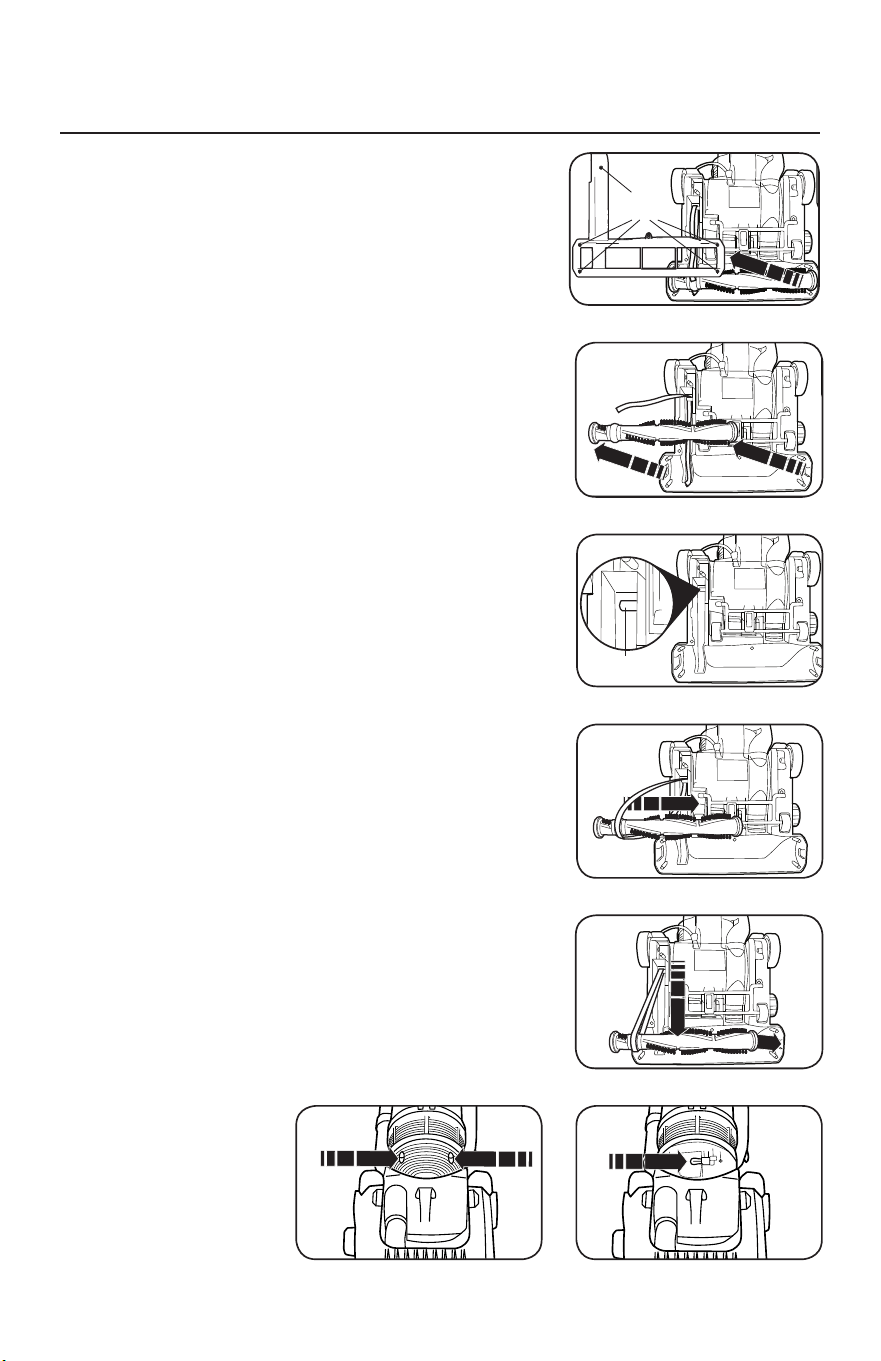
CAUTION: Unplug the vacuum from the electrical outlet.
How to Remove the Bottom Plate
1. Place the vacuum in the lowest position by stepping
on the handle release pedal (see “How to Adjust the
Handle” on page 6). Turn the vacuum over on a flat
surface exposing the bottom plate.
2. Remove the five screws holding the bottom plate in
place (Fig. 1).
3. Remove the bottom plate.
How to Replace the Belt
1. Turn the vacuum over and remove the bottom plate as
described above.
2. Lift out the brushroll and remove the belt (Fig. 2).
3. Loop a new belt around the drive shaft (Fig. 3) and
the raised ring between the bristles on the brushroll
(Fig. 4).
4. Pull the brushroll forward (against the pull of the belt)
and reinsert the ends back into the nozzle (Fig. 5)
making sure to line up the end opposite the belt so
the flat edges slide down properly.
5. Turn the brushroll by hand, making sure the belt is not
twisted and all rotating parts move smoothly.
6. Replace the bottom plate and the five screws.
How to Replace the Bulb
1. Place the vacuum in the lowest position by stepping
on the handle release pedal.
2. Remove the two screws from the headlight
lens (Fig. 6).
3. Remove the lens and replace the bulb (Fig. 7).
4. Replace the headlight lens and the two screws.
7
If the brush bar stops rotating, it is likely that the
drive belt has snapped (usually because the
brush has been stalled). Replacement belts can
be obtained from Morphy Richards by calling the
spare parts helpline number: 0844 873 0726.
Accessing the floor nozzle
1. Press the power pedal (26) to turn the cleaner off.
2. Disconnect the cleaner from the mains supply.
3. Press the upright release pedal (18) and place the
cleaner face down, in a flat position on a soft
surface (eg. carpet).
Removing brush bar and belt
4. Using a cross-headed screwdriver, unscrew the 5
screws on the base of the cleaner to release the
L-shaped plate from over the rotary brush bar.
5. Remove the broken belt and lift out the rotary
brush bar.
Refitting brush bar and belt
6. Hook the belt over the drive shaft (the belt must
be slid sideways past the end of the drive shaft).
7. Pass the rotary brush bar through the belt,
ensuring the correct end is located against the
belt.
8. Pull the rotary brush bar forward (against the pull
of the belt) and locate the square ends of the
brush bar into location slots in the floor nozzle.
9. Rotate the brush bar by hand to ensure the belt is
running in the centre of its location on the brush.
Refitting the floor nozzle base cover
10.
Refit the L-shaped plate over the rotary brush bar,
and screw the 5 screws back into the base of the
cleaner, using a cross-headed screwdriver, do not
overtighten the screws.
11.
Return the cleaner to the upright position.
Connect to the mains supply. Switch on to test.
Maintenance -
Changing the Belt
Screw
points
Drive
shaft
7
VC73420MUK Rev1_Instruction Book 30/04/2012 12:17 Page 7
7
If the brush bar stops rotating, it is likely that the
drive belt has snapped (usually because the
brush has been stalled). Replacement belts can
be obtained from Morphy Richards by calling the
spare parts helpline number: 0844 873 0726.
Accessing the floor nozzle
1. Press the power pedal (26) to turn the cleaner off.
2. Disconnect the cleaner from the mains supply.
3. Press the upright release pedal (18) and place the
cleaner face down, in a flat position on a soft
surface (eg. carpet).
Removing brush bar and belt
4. Using a cross-headed screwdriver, unscrew the 5
screws on the base of the cleaner to release the
L-shaped plate from over the rotary brush bar.
5. Remove the broken belt and lift out the rotary
brush bar.
Refitting brush bar and belt
6. Hook the belt over the drive shaft (the belt must
be slid sideways past the end of the drive shaft).
7. Pass the rotary brush bar through the belt,
ensuring the correct end is located against the
belt.
8. Pull the rotary brush bar forward (against the pull
of the belt) and locate the square ends of the
brush bar into location slots in the floor nozzle.
9. Rotate the brush bar by hand to ensure the belt is
running in the centre of its location on the brush.
Refitting the floor nozzle base cover
10.
Refit the L-shaped plate over the rotary brush bar,
and screw the 5 screws back into the base of the
cleaner, using a cross-headed screwdriver, do not
overtighten the screws.
11.
Return the cleaner to the upright position.
Connect to the mains supply. Switch on to test.
Maintenance -
Changing the Belt
Screw
points
Drive
shaft
7
VC73420MUK Rev1_Instruction Book 30/04/2012 12:17 Page 7
7
If the brush bar stops rotating, it is likely that the
drive belt has snapped (usually because the
brush has been stalled). Replacement belts can
be obtained from Morphy Richards by calling the
spare parts helpline number: 0844 873 0726.
Accessing the floor nozzle
1. Press the power pedal (26) to turn the cleaner off.
2. Disconnect the cleaner from the mains supply.
3. Press the upright release pedal (18) and place the
cleaner face down, in a flat position on a soft
surface (eg. carpet).
Removing brush bar and belt
4. Using a cross-headed screwdriver, unscrew the 5
screws on the base of the cleaner to release the
L-shaped plate from over the rotary brush bar.
5. Remove the broken belt and lift out the rotary
brush bar.
Refitting brush bar and belt
6. Hook the belt over the drive shaft (the belt must
be slid sideways past the end of the drive shaft).
7. Pass the rotary brush bar through the belt,
ensuring the correct end is located against the
belt.
8. Pull the rotary brush bar forward (against the pull
of the belt) and locate the square ends of the
brush bar into location slots in the floor nozzle.
9. Rotate the brush bar by hand to ensure the belt is
running in the centre of its location on the brush.
Refitting the floor nozzle base cover
10.
Refit the L-shaped plate over the rotary brush bar,
and screw the 5 screws back into the base of the
cleaner, using a cross-headed screwdriver, do not
overtighten the screws.
11.
Return the cleaner to the upright position.
Connect to the mains supply. Switch on to test.
Maintenance -
Changing the Belt
Screw
points
Drive
shaft
7
VC73420MUK Rev1_Instruction Book 30/04/2012 12:17 Page 7
7
If the brush bar stops rotating, it is likely that the
drive belt has snapped (usually because the
brush has been stalled). Replacement belts can
be obtained from Morphy Richards by calling the
spare parts helpline number: 0844 873 0726.
Accessing the floor nozzle
1. Press the power pedal (26) to turn the cleaner off.
2. Disconnect the cleaner from the mains supply.
3. Press the upright release pedal (18) and place the
cleaner face down, in a flat position on a soft
surface (eg. carpet).
Removing brush bar and belt
4. Using a cross-headed screwdriver, unscrew the 5
screws on the base of the cleaner to release the
L-shaped plate from over the rotary brush bar.
5. Remove the broken belt and lift out the rotary
brush bar.
Refitting brush bar and belt
6. Hook the belt over the drive shaft (the belt must
be slid sideways past the end of the drive shaft).
7. Pass the rotary brush bar through the belt,
ensuring the correct end is located against the
belt.
8. Pull the rotary brush bar forward (against the pull
of the belt) and locate the square ends of the
brush bar into location slots in the floor nozzle.
9. Rotate the brush bar by hand to ensure the belt is
running in the centre of its location on the brush.
Refitting the floor nozzle base cover
10.
Refit the L-shaped plate over the rotary brush bar,
and screw the 5 screws back into the base of the
cleaner, using a cross-headed screwdriver, do not
overtighten the screws.
11.
Return the cleaner to the upright position.
Connect to the mains supply. Switch on to test.
Maintenance -
Changing the Belt
Screw
points
Drive
shaft
7
VC73420MUK Rev1_Instruction Book 30/04/2012 12:17 Page 7
7
If the brush bar stops rotating, it is likely that the
drive belt has snapped (usually because the
brush has been stalled). Replacement belts can
be obtained from Morphy Richards by calling the
spare parts helpline number: 0844 873 0726.
Accessing the floor nozzle
1. Press the power pedal (26) to turn the cleaner off.
2. Disconnect the cleaner from the mains supply.
3. Press the upright release pedal (18) and place the
cleaner face down, in a flat position on a soft
surface (eg. carpet).
Removing brush bar and belt
4. Using a cross-headed screwdriver, unscrew the 5
screws on the base of the cleaner to release the
L-shaped plate from over the rotary brush bar.
5. Remove the broken belt and lift out the rotary
brush bar.
Refitting brush bar and belt
6. Hook the belt over the drive shaft (the belt must
be slid sideways past the end of the drive shaft).
7. Pass the rotary brush bar through the belt,
ensuring the correct end is located against the
belt.
8. Pull the rotary brush bar forward (against the pull
of the belt) and locate the square ends of the
brush bar into location slots in the floor nozzle.
9. Rotate the brush bar by hand to ensure the belt is
running in the centre of its location on the brush.
Refitting the floor nozzle base cover
10.
Refit the L-shaped plate over the rotary brush bar,
and screw the 5 screws back into the base of the
cleaner, using a cross-headed screwdriver, do not
overtighten the screws.
11.
Return the cleaner to the upright position.
Connect to the mains supply. Switch on to test.
Maintenance -
Changing the Belt
Screw
points
Drive
shaft
7
VC73420MUK Rev1_Instruction Book 30/04/2012 12:17 Page 7
Fig. 1
Fig. 2
Fig. 3
Fig. 4
Fig. 5
Fig. 7Fig. 6

9
THERMAL MOTOR PROTECTION
This vacuum is equipped with a thermal protector designed to protect it from
overheating due to restricted airflow (i.e. clogged hose). Should this situation
occur, the thermal protector will automatically shut the motor off to avoid any
potential damage.
NOTE: To determine if the thermal protector turned off the vacuum, check the headlight.
If the headlight is on and the motor is off, the thermal protector safety shut off the
motor. If both the headlight and motor are off, there is another reason (i.e. unplugged)
the vacuum shut off.
How to Reset the Thermal Protector
1. Unplug the vacuum.
2. Allow the vacuum to cool at least 30 minutes.
3. Check for blockages, empty the dust container and clean the filters.
4. Plug the vacuum in and begin using.
If the vacuum fails to turn on, return it to an Authorized Simplicity Retailer
forservice.

10
• Keep machine and all accessories clean and in good operating condition.
• Empty dust container as needed or when it fills to the MAX line.
• Clean filters every month or more frequently if vacuuming fine powders such as
flour or drywall dust.
• Always use genuine filters and parts, as use of other products may result in poor
cleaning or filtration performance. Simplicity filtration products are designed for
maximum performance.
• Store machine carefully in a dry area.
• For optimum cleaning performance and safety, follow your owner’s manual.
PROBLEM CHECK POINT POSSIBLE SOLUTION
Suction power is
weak.
• Dust container
• Floor nozzle
• Filters
• If the dust container is full, empty it.
• If clogged, remove the object.
• Replace filters.
The vacuum does
not work.
• Power cord Insert the power plug firmly into an
electrical outlet.
Sudden loss of
power.
• Thermal reset Turn off vacuum and unplug from
electrical outlet. Let vacuum cool down
for 60 minutes before turning back on.
Check for clogs. Empty dust container.
Dirt and debris are
blowing through
exhaust vent.
• Filters Make sure filters are clean, dry and
installed correctly.
Any other service should be performed by an AuthorizedSimplicity Vacuum
Retailer. To locate your nearest Authorized Retailer, visit our website at
www.SimplicityVac.com or call 888-974-6759.
TROUBLESHOOTING
FOR BEST PERFORMANCE

11
Owner’s Warranty Information (keep this for your records…)
Store name
Store Address City State Zip
Telephone Date of purchase
Serial number Model number
What is Covered:
This warranty covers any defects in material and workmanship in your new
Simplicity vacuum.
How Long Coverage Lasts:
Warranty coverage for the Simplicity vacuum lasts one year. Household models used
commercially are only warranted for 90 days.
What is Not Covered:
• Damage to the vacuum which occurs from neglect, abuse, alterations, accident,
misuse or improper maintenance.
• Normal replacement items: belts and disposable filters.
What Simplicity Will Do:
This warranty provides, at no cost to you, all labor and parts to keep this vacuum in
correct operating condition during the warranted period.
How to Get Service:
Warranty service can only be obtained by presenting the vacuum to an Authorized
Simplicity Retailer. A proof-of-purchase and product serial number will be
required before service is rendered. To locate your nearest service center, please
call 888-974-6759 or visit www.SimplicityVac.com.
THIS WARRANTY IS EXCLUSIVE AND IN LIEU OF ANY AND ALL OTHER
WARRANTIES WHETHER WRITTEN, ORAL, EXPRESSED OR IMPLIED, (INCLUDING
ANY WARRANTY OF MERCHANTABILITY OR FITNESS FOR A PARTICULAR
PURPOSE). THIS WARRANTY DISCLAIMS LIABILITY FOR INCIDENTAL OR
CONSEQUENTIAL DAMAGES.
How State Law Applies:
This warranty gives you specific legal rights, and you may also have other rights
which vary from state to state.
Register your warranty online at SimplicityVac.com
OWNER’S WARRANTY INFORMATION

Manual del Usuario
S20PET


1
Instrucciones de Seguridad Importantes
2
Cable Polarizado de Dos Patas
3
Identificación de Piezas
4
Cintas y Filtros de Repuesto
4
Cómo Armar y Utilizar la Aspiradora
5
Cómo Vaciar el Contenedor de Polvo
5
Cómo Ajustar la Altura
5
Cómo Ajustar el Mango
6
Cómo Limpiar los Filtros
6
Herramientas de Limpieza Integradas
7
Cómo Reemplazar la Cinta y la Bombilla de la Luz Delantera
8
Protección Térmica del Motor
9
Resolución de Problemas
10
Para un Mejor Funcionamiento
10
Garantía
11
ÍNDICE

2
INSTRUCCIONES IMPORTANTES DE
SEGURIDAD
Al utilizar un electrodoméstico, siempre deben tomarse
las precauciones básicas, incluidas las siguientes:
LEA TODAS LAS INSTRUCCIONES ANTES
DE UTILIZAR ESTE ELECTRODOMÉSTICO.
SOLOPARAUSO EN EL HOGAR.
IMPORTANTE: El fabricante no puede aceptar la responsabilidad por los daños
causados cuando el electrodoméstico no se utiliza de acuerdo con las instrucciones o
cuando se utiliza para otros usos que no son aquellos para los que fue fabricado.
ADVERTENCIA. Para reducir el riesgo de incendio, descarga eléctrica, daño o
lesión:
• No se aleje del aparato cuando este
esté enchufado. Desenchúfelo del
tomacorriente cuando no esté en uso y
antes de realizar tareas de mantenimiento.
• ADVERTENCIA: PODRÍA PRODUCIRSE
UNA DESCARGA ELÉCTRICA SI
SE UTILIZA AL AIRE LIBRE O EN
SUPERFICIES MOJADAS.
• No permita que se utilice como un
juguete. Preste especial atención cuando
sea utilizado por niños o cerca de ellos.
• Utilícelo solamente de acuerdo con lo
descrito en este manual. Utilice solamente
los accesorios recomendados por el
fabricante.
• No utilice la unidad si el cable o el enchufe
están dañados. Si la unidad no funciona
como debería, se cayó, está dañada, la
dejaron a la intemperie o cayó al agua,
llévela a un centro de mantenimiento.
• No jale ni desplace la unidad tirando del
cable, no utilice el cable como manija,
no permita que se cierre ninguna puerta
sobre el cable, ni jale el cable alrededor
de bordes o esquinas pronunciadas.
No pase el electrodoméstico encima
del cable. Mantenga el cable alejado de
superficies calientes.
• No jale del cable para desenchufar el
electrodoméstico. Para desconectarlo,
tome el enchufe, no el cable.
• No manipule el enchufe ni el
electrodoméstico con las manos mojadas.
• Apague todos los controles antes de
desconectar la unidad.
• No coloque ningún objeto en las
aberturas. No lo utilice si alguna abertura
está obstruida; manténgalo sin polvo,
pelusa, cabello y cualquier otra cosa que
pueda reducir el flujode aire.
• Mantenga el cabello, la ropa suelta, los
dedos y todas las partes del cuerpo
alejados de las aberturas y componentes
móviles.
• No aspire nada que esté encendido o
emita humo, como cigarrillos, fósforos o
cenizas calientes.
• No lo use sin haber colocado los filtros
de la aspiradora.
• Tenga especial cuidado al limpiar
escaleras.
• No lo utilice para recoger líquidos
combustibles o inflamables como gasolina,
ni lo utilice en áreas donde estoslíquidos
puedan estar presentes.
• No intente realizar el mantenimiento
o la limpieza de la unidad cuando el
electrodoméstico esté enchufado.
CONSERVE ESTAS INSTRUCCIONES
3
Cable de alimentación de 2 polos
Para reducir el riesgo de una descarga eléctrica, el cargador cuenta con un enchufe
polarizado para corriente alterna (el enchufe tiene una pata más ancha que la otra).
Esta enchufe entra solo de una forma en el tomacorriente. Esta es una función de
seguridad. Si no puede introducir el enchufe en el tomacorriente, intente invirtiendo
la posición del mismo. Si no consigue que el enchufe encaje, contacte a un electricista
calificado para que reemplace el tomacorriente obsoleto. No anule el propósito de
seguridad de la clavija polarizada.
INSTRUCCIONES DE POLARIZACIÓN
4
IDENTIFICACIÓN DE PIEZAS
CINTAS Y FILTROS DE REPUESTO
container filter
25
(1)
H andle Grip
(2)
Handle Hose Inlet
(3)
Cord Clip
(4)
Dust Container Release
Button
(5)
Dust Container Handle
(6)
Dust Container Lid
(7)
Dust Container Filter
(8)
Dust Container
(9)
Exhaust Filter
(10)
HeightAdjustment Dial
(11)
Nozzle
(12)
Hose Storage and
Carrying Handle
(13)
(14)
(15)
Hose
(16)
Hose Storage Hook
(17)
Power Cord
(18)
Handle Release Pedal
Handle Tube Release Button
Rotating Cord Storage Hook
(19)
(20)
(21)
Crevice with Dusting
Brush Combination Tool
(22)
Cord Storage Hook
(23)
Hose Suction End
(24)
Side Hose Outlet
Crevice Tool Storage
Power Pedal
Handheld Trubo Brush
H andle Tube
(25)
(26)
• Cinta Original de Simplicity • Conjunto de Filtros Simplicity
Originales # SF20PET
5
CÓMO ARMAR Y UTILIZAR LA ASPIRADORA
CÓMO VACIAR EL CONTENEDOR DE POLVO
CÓMO AJUSTAR LA ALTURA
Cómo Colocar el Mango de la Aspiradora
La aspiradora y el mango están empacados por separado.
1. Deslice el mango en las ranuras en la parte superior de la
aspiradora hasta que encaje en su lugar (Fig. 1).
2. Gire el gancho superior de almacenamiento del cable a la
posición vertical y enrolle el cable de alimentación alrededor
de los ganchos de almacenamiento del cable cuando guarde
la aspiradora.
Cómo Liberar el Cable de Alimentación
1. El gancho superior del cable cuenta con liberación rápida.
Para liberar el cable, gire el gancho hacia abajo (Fig. 2).
2. Regrese el gancho del cable a su posición hacia arriba antes
de rebobinar el cable.
Interruptor de Encendido/Apagado (On/Off)
1. Para encender la aspiradora, presione el pedal de encendido
en el lado de la boquilla de la aspiradora (Fig. 3).
2. Para apagar la aspiradora, vuelva a presionar el pedal.
Cepillo Turbo Manual
Una el cepillo al soporte de almacenamiento en la
aspiradora (Fig. 4).
Siempre utilice la aspiradora con un contenedor de polvo instalado.
Vacíe el contenedor de polvo cuando sea necesario o cuando alcance
la línea de MAX.
Cómo Vaciar el Contenedor de Polvo
1. Desenchufe la aspiradora. Presione el botón de liberación del
contenedor de polvo para retirar el mismo de la aspiradora (Fig. 5).
2. Presione el botón de vaciado del contenedor de polvo para abrir
la tapa del mismo, y vacíe el contenido en un cesto de basura
(Fig.6).
3. Cierre la tapa del contenedor de polvo hasta que encaje y vuelva a
colocar el contenedor en la aspiradora.
Cómo Ajustar la Altura
de la Boquilla
Rote el dial de ajuste de altura
al tipo de piso a aspirar (Fig. 7).
4
Using in upright mode / Assembly
1
Attach the tube/handle (1) to the main body of
the cleaner.
2
Tu r n the rotatable cord storage cleat (20) to
release the power cord (17). Plug in to the mains
outlet. To keep the cord away from the floor
brush, locate in the cord hook (3).
3
Settings for the
floor brush height adjustment dial (10)
Tools Deep
pile
carpet
Deep to
medium
pile
carpet
Medium
pile
carpet
Smooth
carpet
and
hard
floors
Rotate the floor brush height adustment dial (10) to suit the floor being vacuumed (refer to table above).
4
Switch on the vacuum cleaner by pressing the
power pedal (26).
5
Release from the upright position by pressing the
upright release pedal (18) with your foot.
IMPORTANT: To prevent damage to carpets,
never leave the cleaner switched on in one
place for an extended period.
6
When full, or after use, empty the dust canister (8).
Press the dust canister release button (4) to remove
the dust canister from the vacuum cleaner.
Press the dust canister empty button (27) to open
the base of the dust canister, releasing the contents
into a bin or a bag. Allergy sufferers may wish to
seal the bag around the dust canister before
emptying to p revent dust escaping.
VC73420MUK Rev1_Instruction Book 30/04/2012 12:17 Page 4
4
Using in upright mode / Assembly
1
Attach the tube/handle (1) to the main body of
the cleaner.
2
Tu r n the rotatable cord storage cleat (20) to
release the power cord (17). Plug in to the mains
outlet. To keep the cord away from the floor
brush, locate in the cord hook (3).
3
Settings for the
floor brush height adjustment dial (10)
Tools Deep
pile
carpet
Deep to
medium
pile
carpet
Medium
pile
carpet
Smooth
carpet
and
hard
floors
Rotate the floor brush height adustment dial (10) to suit the floor being vacuumed (refer to table above).
4
Switch on the vacuum cleaner by pressing the
power pedal (26).
5
Release from the upright position by pressing the
upright release pedal (18) with your foot.
IMPORTANT: To prevent damage to carpets,
never leave the cleaner switched on in one
place for an extended period.
6
When full, or after use, empty the dust canister (8).
Press the dust canister release button (4) to remove
the dust canister from the vacuum cleaner.
Press the dust canister empty button (27) to open
the base of the dust canister, releasing the contents
into a bin or a bag. Allergy sufferers may wish to
seal the bag around the dust canister before
emptying to p revent dust escaping.
VC73420MUK Rev1_Instruction Book 30/04/2012 12:17 Page 4
4
Using in upright mode / Assembly
1
Attach the tube/handle (1) to the main body of
the cleaner.
2
Tu r n the rotatable cord storage cleat (20) to
release the power cord (17). Plug in to the mains
outlet. To keep the cord away from the floor
brush, locate in the cord hook (3).
3
Settings for the
floor brush height adjustment dial (10)
Tools Deep
pile
carpet
Deep to
medium
pile
carpet
Medium
pile
carpet
Smooth
carpet
and
hard
floors
Rotate the floor brush height adustment dial (10) to suit the floor being vacuumed (refer to table above).
4
Switch on the vacuum cleaner by pressing the
power pedal (26).
5
Release from the upright position by pressing the
upright release pedal (18) with your foot.
IMPORTANT: To prevent damage to carpets,
never leave the cleaner switched on in one
place for an extended period.
6
When full, or after use, empty the dust canister (8).
Press the dust canister release button (4) to remove
the dust canister from the vacuum cleaner.
Press the dust canister empty button (27) to open
the base of the dust canister, releasing the contents
into a bin or a bag. Allergy sufferers may wish to
seal the bag around the dust canister before
emptying to p revent dust escaping.
VC73420MUK Rev1_Instruction Book 30/04/2012 12:17 Page 4
4
Using in upright mode / Assembly
1
Attach the tube/handle (1) to the main body of
the cleaner.
2
Tu r n the rotatable cord storage cleat (20) to
release the power cord (17). Plug in to the mains
outlet. To keep the cord away from the floor
brush, locate in the cord hook (3).
3
Settings for the
floor brush height adjustment dial (10)
Tools Deep
pile
carpet
Deep to
medium
pile
carpet
Medium
pile
carpet
Smooth
carpet
and
hard
floors
Rotate the floor brush height adustment dial (10) to suit the floor being vacuumed (refer to table above).
4
Switch on the vacuum cleaner by pressing the
power pedal (26).
5
Release from the upright position by pressing the
upright release pedal (18) with your foot.
IMPORTANT: To prevent damage to carpets,
never leave the cleaner switched on in one
place for an extended period.
6
When full, or after use, empty the dust canister (8).
Press the dust canister release button (4) to remove
the dust canister from the vacuum cleaner.
Press the dust canister empty button (27) to open
the base of the dust canister, releasing the contents
into a bin or a bag. Allergy sufferers may wish to
seal the bag around the dust canister before
emptying to p revent dust escaping.
VC73420MUK Rev1_Instruction Book 30/04/2012 12:17 Page 4
4
Using in upright mode / Assembly
1
Attach the tube/handle (1) to the main body of
the cleaner.
2
Tu r n the rotatable cord storage cleat (20) to
release the power cord (17). Plug in to the mains
outlet. To keep the cord away from the floor
brush, locate in the cord hook (3).
3
Settings for the
floor brush height adjustment dial (10)
Tools Deep
pile
carpet
Deep to
medium
pile
carpet
Medium
pile
carpet
Smooth
carpet
and
hard
floors
Rotate the floor brush height adustment dial (10) to suit the floor being vacuumed (refer to table above).
4
Switch on the vacuum cleaner by pressing the
power pedal (26).
5
Release from the upright position by pressing the
upright release pedal (18) with your foot.
IMPORTANT: To prevent damage to carpets,
never leave the cleaner switched on in one
place for an extended period.
6
When full, or after use, empty the dust canister (8).
Press the dust canister release button (4) to remove
the dust canister from the vacuum cleaner.
Press the dust canister empty button (27) to open
the base of the dust canister, releasing the contents
into a bin or a bag. Allergy sufferers may wish to
seal the bag around the dust canister before
emptying to p revent dust escaping.
VC73420MUK Rev1_Instruction Book 30/04/2012 12:17 Page 4
Fig. 1
Fig. 2
Fig. 3
Fig. 5
Fig. 6
Fig. 7
4
Using in upright mode / Assembly
1
Attach the tube/handle (1) to the main body of
the cleaner.
2
Tu r n the rotatable cord storage cleat (20) to
release the power cord (17). Plug in to the mains
outlet. To keep the cord away from the floor
brush, locate in the cord hook (3).
3
Settings for the
floor brush height adjustment dial (10)
Tools Deep
pile
carpet
Deep to
medium
pile
carpet
Medium
pile
carpet
Smooth
carpet
and
hard
floors
Rotate the floor brush height adustment dial (10) to suit the floor being vacuumed (refer to table above).
4
Switch on the vacuum cleaner by pressing the
power pedal (26).
5
Release from the upright position by pressing the
upright release pedal (18) with your foot.
IMPORTANT: To prevent damage to carpets,
never leave the cleaner switched on in one
place for an extended period.
6
When full, or after use, empty the dust canister (8).
Press the dust canister release button (4) to remove
the dust canister from the vacuum cleaner.
Press the dust canister empty button (27) to open
the base of the dust canister, releasing the contents
into a bin or a bag. Allergy sufferers may wish to
seal the bag around the dust canister before
emptying to p revent dust escaping.
VC73420MUK Rev1_Instruction Book 30/04/2012 12:17 Page 4
Fig. 4
6
El mango puede ajustarse en una de tres opciones: vertical, media o baja.
1. Para liberar el mango, presione el pedal de liberación del mango en el lado
izquierdo de la boquilla de la aspiradora y tire el mango hacia atrás (Fig. 1).
2. Posición vertical: para el almacenamiento o al utilizar las herramientas de limpieza
(Fig. 2). En esta posición, el mango queda bloqueado.
3. Posición media: para limpieza normal (Fig. 3).
4. Posición baja: para limpiar bajo muebles* (Fig. 4).
Esta aspiradora está equipada con dos filtros. Estos filtros
capturan las partículas finas de polvo y protegen al motor
de la suciedad. El polvo acumulado será recolectado en
los filtros y podría restringir el rendimiento del motor. Es
importante reemplazar los filtros con regularidad.
Cómo Limpiar el Filtro del Contenedor de Polvo
1. Para acceder al filtro, retire el conjunto del filtro quitando
la tapa del contenedor de polvo. Gire la tapa en sentido
contrario a las agujas del reloj hasta que encaje (Fig. 5).
2. Retire el conjunto del filtro y desármelo (Fig. 6).
3. Limpie el filtro del contenedor de polvo con agua fría y
séquelo totalmente al aire antes de volver a colocarlo.
4. Reemplace el filtro y reemplace el contenedor de polvo en
la aspiradora.
Cómo Reemplazar el Filtro de Escape
El filtro de escape está ubicado debajo del contenedor de polvo.
1. Retire el contenedor de polvo.
2. Retire la tapa del filtro de escape girándola en el sentido contrario a las agujas del reloj
hasta que haga clic (Fig. 7).
3. Retire el filtro de escape y reemplácelo con uno nuevo (Fig. 7).
4. Reemplace la tapa del filtro y el contenedor de polvo en la aspiradora.
Nota: Los filtros de escape no pueden lavarse ni reutilizarse.
6
The hand-held turbo nozzle (13) and crevice tool
with dust brush attachment (21) may be stored in
the designated spaces (14 & 25 respectively) on
the sides of the vacuum cleaner.
When finished cleaning, switch off the appliance
and remove the plug from the mains supply and
wind the cord around the cord storage cleats
(20/22).
If the cleaner overheats, a motor protection
thermostat will automatically switch the motor
off. If this happens, switch the cleaner off,
unplug from the power supply and leave the
cleaner to cool for at least 60 minutes. Check
the airways for blockages, empty the dust
canister and clean the filters before restarting.
The guarantee may be invalidated if the motor is
damaged due to: using the appliance without
the filters installed; not cleaning the filters; or
not replacing damaged filters.
Cleaning the dust canister filter (7)
To maintain suction, the dust canister filter must
be cleaned each time the dust canister (8) is
emptied.
1. To access the filter, remove the filter assembly by
removing the dust canister lid (6). Turn the lid
anti-clockwise until it clicks.
2. Lift out the filter assembly and disassemble.
3. Wash the dust canister filter in cold water and
thoroughly air dry before re-fitting.
IMPORTANT: Do not wash filter with hot water
or detergents.
IMPORTANT: Do not use heated appliances to
dry filter.
4. Replace the dust canister filter and re-assemble
the dust canister.
Cleaning the exhaust filter (9)
The exhaust filter (9) must be cleaned at least
every three months.
The exhaust filter is located underneath the dust
canister (8).
1. Remove the dust canister.
2. Remove the exhaust filter cover (27) by turning
the lid anti-clockwise until it clicks.
3. Lift out the exhaust filter (9).
4. Wash in cold water and thoroughly air dry before
re-fitting.
IMPORTANT: Do not wash filter with hot water
or detergents.
IMPORTANT: Do not use heated appliances to
dry filter.
5. Replace the exhaust filter, the exhaust filter cover
and the dust canister.
Storage
Tool storage
Maintenance - Filters
Safety cut-out
VC73420MUK Rev1_Instruction Book 30/04/2012 12:17 Page 6
6
The hand-held turbo nozzle (13) and crevice tool
with dust brush attachment (21) may be stored in
the designated spaces (14 & 25 respectively) on
the sides of the vacuum cleaner.
When finished cleaning, switch off the appliance
and remove the plug from the mains supply and
wind the cord around the cord storage cleats
(20/22).
If the cleaner overheats, a motor protection
thermostat will automatically switch the motor
off. If this happens, switch the cleaner off,
unplug from the power supply and leave the
cleaner to cool for at least 60 minutes. Check
the airways for blockages, empty the dust
canister and clean the filters before restarting.
The guarantee may be invalidated if the motor is
damaged due to: using the appliance without
the filters installed; not cleaning the filters; or
not replacing damaged filters.
Cleaning the dust canister filter (7)
To maintain suction, the dust canister filter must
be cleaned each time the dust canister (8) is
emptied.
1. To access the filter, remove the filter assembly by
removing the dust canister lid (6). Turn the lid
anti-clockwise until it clicks.
2. Lift out the filter assembly and disassemble.
3. Wash the dust canister filter in cold water and
thoroughly air dry before re-fitting.
IMPORTANT: Do not wash filter with hot water
or detergents.
IMPORTANT: Do not use heated appliances to
dry filter.
4. Replace the dust canister filter and re-assemble
the dust canister.
Cleaning the exhaust filter (9)
The exhaust filter (9) must be cleaned at least
every three months.
The exhaust filter is located underneath the dust
canister (8).
1. Remove the dust canister.
2. Remove the exhaust filter cover (27) by turning
the lid anti-clockwise until it clicks.
3. Lift out the exhaust filter (9).
4. Wash in cold water and thoroughly air dry before
re-fitting.
IMPORTANT: Do not wash filter with hot water
or detergents.
IMPORTANT: Do not use heated appliances to
dry filter.
5. Replace the exhaust filter, the exhaust filter cover
and the dust canister.
Storage
Tool storage
Maintenance - Filters
Safety cut-out
VC73420MUK Rev1_Instruction Book 30/04/2012 12:17 Page 6
6
The hand-held turbo nozzle (13) and crevice tool
with dust brush attachment (21) may be stored in
the designated spaces (14 & 25 respectively) on
the sides of the vacuum cleaner.
When finished cleaning, switch off the appliance
and remove the plug from the mains supply and
wind the cord around the cord storage cleats
(20/22).
If the cleaner overheats, a motor protection
thermostat will automatically switch the motor
off. If this happens, switch the cleaner off,
unplug from the power supply and leave the
cleaner to cool for at least 60 minutes. Check
the airways for blockages, empty the dust
canister and clean the filters before restarting.
The guarantee may be invalidated if the motor is
damaged due to: using the appliance without
the filters installed; not cleaning the filters; or
not replacing damaged filters.
Cleaning the dust canister filter (7)
To maintain suction, the dust canister filter must
be cleaned each time the dust canister (8) is
emptied.
1. To access the filter, remove the filter assembly by
removing the dust canister lid (6). Turn the lid
anti-clockwise until it clicks.
2. Lift out the filter assembly and disassemble.
3. Wash the dust canister filter in cold water and
thoroughly air dry before re-fitting.
IMPORTANT: Do not wash filter with hot water
or detergents.
IMPORTANT: Do not use heated appliances to
dry filter.
4. Replace the dust canister filter and re-assemble
the dust canister.
Cleaning the exhaust filter (9)
The exhaust filter (9) must be cleaned at least
every three months.
The exhaust filter is located underneath the dust
canister (8).
1. Remove the dust canister.
2. Remove the exhaust filter cover (27) by turning
the lid anti-clockwise until it clicks.
3. Lift out the exhaust filter (9).
4. Wash in cold water and thoroughly air dry before
re-fitting.
IMPORTANT: Do not wash filter with hot water
or detergents.
IMPORTANT: Do not use heated appliances to
dry filter.
5. Replace the exhaust filter, the exhaust filter cover
and the dust canister.
Storage
Tool storage
Maintenance - Filters
Safety cut-out
VC73420MUK Rev1_Instruction Book 30/04/2012 12:17 Page 6
Fig. 1
Fig. 5
Fig. 6
Fig. 7
Fig. 3 Fig. 4Fig. 2
Nota: Para evitar daños a las alfombras, nunca deje la aspiradora encendida sobre una
superficie durante un periodo extendido de tiempo.
CÓMO AJUSTAR EL MANGO
CÓMO LIMPIAR O REEMPLAZAR LOS FILTROS
7
HERRAMIENTAS DE LIMPIEZA INTEGRADAS
Esta aspiradora está equipada con herramientas de
limpieza integradas, que incluyen un tubo metálico
(tubo del mango), una manguera extensible yuna
boquilla para rincones con cepillo para polvo
combinado.
1. Retire el mango presionando el botón de liberación
del tubo y tirando del mango hacia arriba (Fig. 1).
2. Retire el extremo de succión de la manguera de la
salida lateral de la manguera (Fig. 2).
3. Conecte el extremo de succión de la manguera a la
entrada de la manguera del mango y la herramienta
deseada al extremo del tubo del mango (Fig. 3).
4. Gire el dial de ajuste de altura en el sentido de
las agujas del reloj hacia la configuración de
herramientas (Fig. 4).
Boquilla para Rincones
La boquilla para rincones es ideal para limpiar aquellos
lugares difíciles de alcanzar y a lo largo de los zócalos
(Fig. 5).
Cepillo para el polvo
El cepillo para polvo es ideal para aspirar objetos y
superficies delicados. El cepillo para polvo se une a la
boquilla para rincones y puede accederse presionando
el botón de liberación lateral y tirando del cepillo para
polvo hasta su posición en el extremo de la boquilla
para rincones (Fig. 5).
Cepillo Turbo Manual
El cepillo turbo es ideal para eliminar pelos de
mascotas de tapizados y escaleras alfombradas.
1. Retire el extremo de succión de la manguera de la
salida lateral de la manguera.
2. Coloque el cepillo turbo en el extremo de la manguera
(Fig. 6) o en el extremo del tubo del mango (Fig. 7).
• Never over extend the hose such that the cleaner
is pulled over.
IMPORTANT: Only use the tools when the
product is in the parked position. Also, turning
the cleaner sideways helps prevent the
cleaner being pulled along by the stretch hose.
Hand-held turbo nozzle (13)
(certain models only)
The hand-held turbo nozzle is ideal for picking up
hair and fibres from stairs and upholstery.
The hand-held turbo nozzle will not rotate until it
makes contact with the surface being cleaned.
Cleaning the Hand-held turbo nozzle (13)
(certain models only)
The Turbo Nozzle should be regularly cleaned and
any hairs or fibres wrapped around the brush bar
removed to maintain optimum performance.
Crevice tool (21)
The crevice tool is ideal for awkward places,
corners, and behind radiators etc.
Dusting brush (21)
The dusting brush is ideal for vacuuming pelmets
and delicate objects and surfaces.
The dusting brush is attached to the crevice tool
and may be accessed by pressing the release
button on the side and pulling the dusting brush
to the end of the crevice tool.
Tools and accessories
5
Using tools and accessories
1
Remove the tube/handle (1) by pressing the tube
release button (19) and pulling the handle upwards.
2
Remove the hose suction end (23) from the side
hose outlet (24) on the side of the vacuum cleaner.
3
Attach the hose suction end (23) to the handle
hose inlet (2) and the desired tool to the tube end
of the handle (1).
4
Rotate the floor brush height adustment dial (10)
fully in a clockwise direction to the tools setting
(see table on point 3, page 4).
Release the power cord (17) and plug in to the mains outlet as in step 2 of ‘Using in upright mode /
Assembly’.
VC73420MUK Rev1_Instruction Book 30/04/2012 12:17 Page 5
Fig. 1
• Never over extend the hose such that the cleaner
is pulled over.
IMPORTANT: Only use the tools when the
product is in the parked position. Also, turning
the cleaner sideways helps prevent the
cleaner being pulled along by the stretch hose.
Hand-held turbo nozzle (13)
(certain models only)
The hand-held turbo nozzle is ideal for picking up
hair and fibres from stairs and upholstery.
The hand-held turbo nozzle will not rotate until it
makes contact with the surface being cleaned.
Cleaning the Hand-held turbo nozzle (13)
(certain models only)
The Turbo Nozzle should be regularly cleaned and
any hairs or fibres wrapped around the brush bar
removed to maintain optimum performance.
Crevice tool (21)
The crevice tool is ideal for awkward places,
corners, and behind radiators etc.
Dusting brush (21)
The dusting brush is ideal for vacuuming pelmets
and delicate objects and surfaces.
The dusting brush is attached to the crevice tool
and may be accessed by pressing the release
button on the side and pulling the dusting brush
to the end of the crevice tool.
Tools and accessories
5
Using tools and accessories
1
Remove the tube/handle (1) by pressing the tube
release button (19) and pulling the handle upwards.
2
Remove the hose suction end (23) from the side
hose outlet (24) on the side of the vacuum cleaner.
3
Attach the hose suction end (23) to the handle
hose inlet (2) and the desired tool to the tube end
of the handle (1).
4
Rotate the floor brush height adustment dial (10)
fully in a clockwise direction to the tools setting
(see table on point 3, page 4).
Release the power cord (17) and plug in to the mains outlet as in step 2 of ‘Using in upright mode /
Assembly’.
VC73420MUK Rev1_Instruction Book 30/04/2012 12:17 Page 5
Fig. 2
• Never over extend the hose such that the cleaner
is pulled over.
IMPORTANT: Only use the tools when the
product is in the parked position. Also, turning
the cleaner sideways helps prevent the
cleaner being pulled along by the stretch hose.
Hand-held turbo nozzle (13)
(certain models only)
The hand-held turbo nozzle is ideal for picking up
hair and fibres from stairs and upholstery.
The hand-held turbo nozzle will not rotate until it
makes contact with the surface being cleaned.
Cleaning the Hand-held turbo nozzle (13)
(certain models only)
The Turbo Nozzle should be regularly cleaned and
any hairs or fibres wrapped around the brush bar
removed to maintain optimum performance.
Crevice tool (21)
The crevice tool is ideal for awkward places,
corners, and behind radiators etc.
Dusting brush (21)
The dusting brush is ideal for vacuuming pelmets
and delicate objects and surfaces.
The dusting brush is attached to the crevice tool
and may be accessed by pressing the release
button on the side and pulling the dusting brush
to the end of the crevice tool.
Tools and accessories
5
Using tools and accessories
1
Remove the tube/handle (1) by pressing the tube
release button (19) and pulling the handle upwards.
2
Remove the hose suction end (23) from the side
hose outlet (24) on the side of the vacuum cleaner.
3
Attach the hose suction end (23) to the handle
hose inlet (2) and the desired tool to the tube end
of the handle (1).
4
Rotate the floor brush height adustment dial (10)
fully in a clockwise direction to the tools setting
(see table on point 3, page 4).
Release the power cord (17) and plug in to the mains outlet as in step 2 of ‘Using in upright mode /
Assembly’.
VC73420MUK Rev1_Instruction Book 30/04/2012 12:17 Page 5
Fig. 3
• Never over extend the hose such that the cleaner
is pulled over.
IMPORTANT: Only use the tools when the
product is in the parked position. Also, turning
the cleaner sideways helps prevent the
cleaner being pulled along by the stretch hose.
Hand-held turbo nozzle (13)
(certain models only)
The hand-held turbo nozzle is ideal for picking up
hair and fibres from stairs and upholstery.
The hand-held turbo nozzle will not rotate until it
makes contact with the surface being cleaned.
Cleaning the Hand-held turbo nozzle (13)
(certain models only)
The Turbo Nozzle should be regularly cleaned and
any hairs or fibres wrapped around the brush bar
removed to maintain optimum performance.
Crevice tool (21)
The crevice tool is ideal for awkward places,
corners, and behind radiators etc.
Dusting brush (21)
The dusting brush is ideal for vacuuming pelmets
and delicate objects and surfaces.
The dusting brush is attached to the crevice tool
and may be accessed by pressing the release
button on the side and pulling the dusting brush
to the end of the crevice tool.
Tools and accessories
5
Using tools and accessories
1
Remove the tube/handle (1) by pressing the tube
release button (19) and pulling the handle upwards.
2
Remove the hose suction end (23) from the side
hose outlet (24) on the side of the vacuum cleaner.
3
Attach the hose suction end (23) to the handle
hose inlet (2) and the desired tool to the tube end
of the handle (1).
4
Rotate the floor brush height adustment dial (10)
fully in a clockwise direction to the tools setting
(see table on point 3, page 4).
Release the power cord (17) and plug in to the mains outlet as in step 2 of ‘Using in upright mode /
Assembly’.
VC73420MUK Rev1_Instruction Book 30/04/2012 12:17 Page 5
Fig. 4
• Never over extend the hose such that the cleaner
is pulled over.
IMPORTANT: Only use the tools when the
product is in the parked position. Also, turning
the cleaner sideways helps prevent the
cleaner being pulled along by the stretch hose.
Hand-held turbo nozzle (13)
(certain models only)
The hand-held turbo nozzle is ideal for picking up
hair and fibres from stairs and upholstery.
The hand-held turbo nozzle will not rotate until it
makes contact with the surface being cleaned.
Cleaning the Hand-held turbo nozzle (13)
(certain models only)
The Turbo Nozzle should be regularly cleaned and
any hairs or fibres wrapped around the brush bar
removed to maintain optimum performance.
Crevice tool (21)
The crevice tool is ideal for awkward places,
corners, and behind radiators etc.
Dusting brush (21)
The dusting brush is ideal for vacuuming pelmets
and delicate objects and surfaces.
The dusting brush is attached to the crevice tool
and may be accessed by pressing the release
button on the side and pulling the dusting brush
to the end of the crevice tool.
Tools and accessories
5
Using tools and accessories
1
Remove the tube/handle (1) by pressing the tube
release button (19) and pulling the handle upwards.
2
Remove the hose suction end (23) from the side
hose outlet (24) on the side of the vacuum cleaner.
3
Attach the hose suction end (23) to the handle
hose inlet (2) and the desired tool to the tube end
of the handle (1).
4
Rotate the floor brush height adustment dial (10)
fully in a clockwise direction to the tools setting
(see table on point 3, page 4).
Release the power cord (17) and plug in to the mains outlet as in step 2 of ‘Using in upright mode /
Assembly’.
VC73420MUK Rev1_Instruction Book 30/04/2012 12:17 Page 5
Fig. 5
Fig. 7Fig. 6
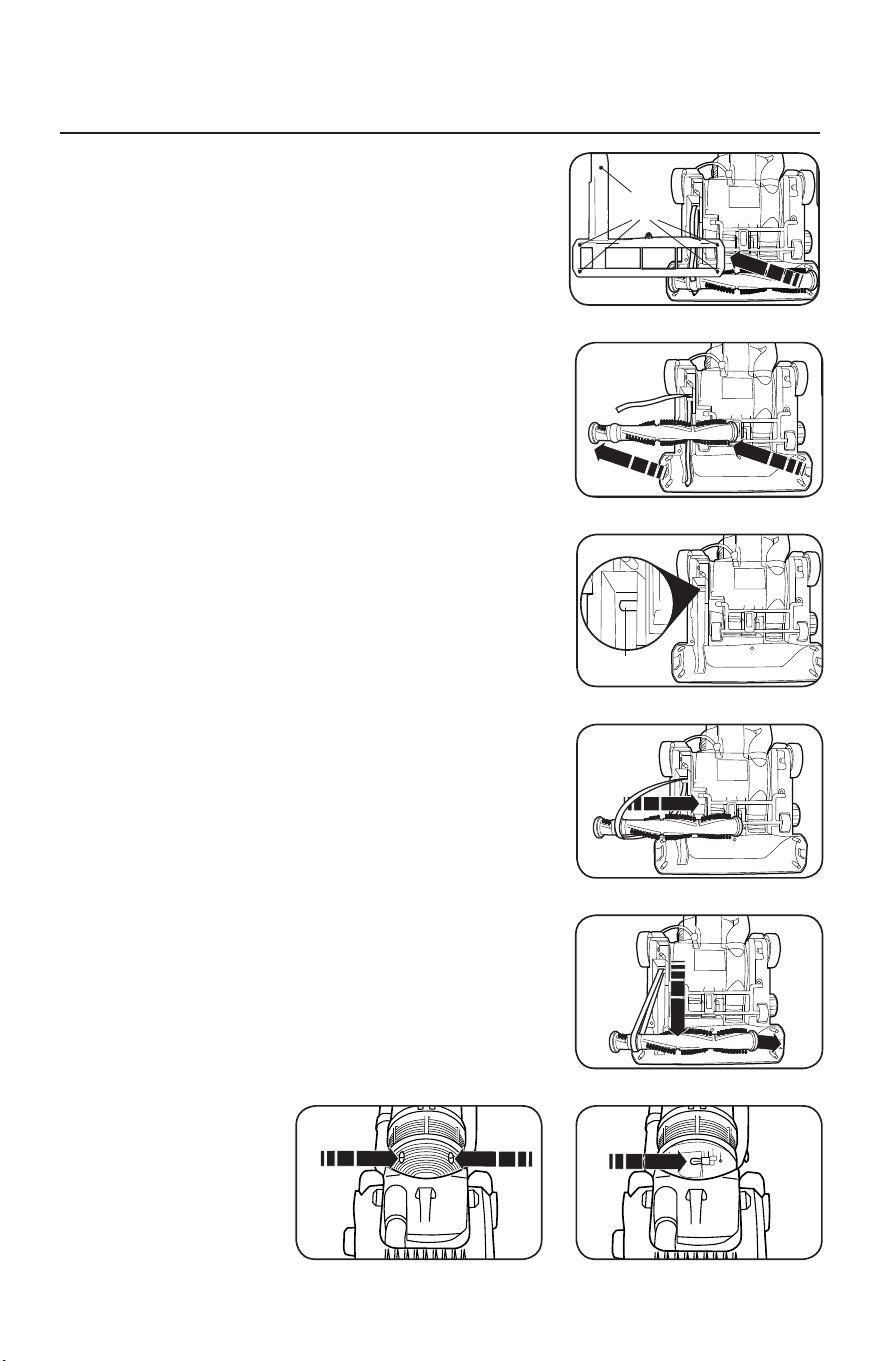
8
CÓMO REEMPLAZAR LA CINTA DE LA ASPIRADORA
Y LA BOMBILLA DE LA LUZ DELANTERA
PRECAUCIÓN: Desconecte la aspiradora de la corriente
eléctrica.
Cómo Extraer la Placa Inferior
1. Coloque la aspiradora en la posición más baja
presionando el pedal de liberación del mango
(consulte “Cómo Ajustar el Mango” en la página 6).
Coloque la aspiradora sobre una superficie plana
exponiendo la placa inferior.
2. Retire los cinco tornillos que sostienen la placa (Fig. 1).
3. Quite la placa inferior.
Cómo Reemplazar la Cinta
1. Dé vuelta la aspiradora y retire la placa inferior según
se describe anteriormente.
2. Levante el rodillo y retire la cinta (Fig. 2).
3. Coloque una nueva cinta alrededor del eje de
transmisión (Fig. 3) y la junta elevada entre las
cerdasen el rodillo (Fig. 4).
4. Tire del rodillo hacia adelante (en sentido contrario
a la tracción de la correa) y vuelva a insertar los
extremos en la boquilla (Fig. 5) asegurándose de
alinear el extremo opuesto a la cinta para que los
bordes planos se inserten de manera adecuada.
5. Gire el rodillo con la mano para asegurarse de que
la correa no esté enrollada y que todas las piezas
giratorias se muevan sin problema.
6. Reemplace la placa inferior y los cinco tornillos.
Cómo Reemplazar la Bombilla
1. Coloque la aspiradora en la posición más baja
presionando el pedal de liberación del mango.
2. Retire los dos tornillos de la lente de la luz
delantera (Fig. 6).
3. Retire la lente y reemplace la bombilla (Fig. 7).
4. Reemplace la lente de la luz y los dos tornillos.
7
If the brush bar stops rotating, it is likely that the
drive belt has snapped (usually because the
brush has been stalled). Replacement belts can
be obtained from Morphy Richards by calling the
spare parts helpline number: 0844 873 0726.
Accessing the floor nozzle
1. Press the power pedal (26) to turn the cleaner off.
2. Disconnect the cleaner from the mains supply.
3. Press the upright release pedal (18) and place the
cleaner face down, in a flat position on a soft
surface (eg. carpet).
Removing brush bar and belt
4. Using a cross-headed screwdriver, unscrew the 5
screws on the base of the cleaner to release the
L-shaped plate from over the rotary brush bar.
5. Remove the broken belt and lift out the rotary
brush bar.
Refitting brush bar and belt
6. Hook the belt over the drive shaft (the belt must
be slid sideways past the end of the drive shaft).
7. Pass the rotary brush bar through the belt,
ensuring the correct end is located against the
belt.
8. Pull the rotary brush bar forward (against the pull
of the belt) and locate the square ends of the
brush bar into location slots in the floor nozzle.
9. Rotate the brush bar by hand to ensure the belt is
running in the centre of its location on the brush.
Refitting the floor nozzle base cover
10.
Refit the L-shaped plate over the rotary brush bar,
and screw the 5 screws back into the base of the
cleaner, using a cross-headed screwdriver, do not
overtighten the screws.
11.
Return the cleaner to the upright position.
Connect to the mains supply. Switch on to test.
Maintenance -
Changing the Belt
Screw
points
Drive
shaft
7
VC73420MUK Rev1_Instruction Book 30/04/2012 12:17 Page 7
7
If the brush bar stops rotating, it is likely that the
drive belt has snapped (usually because the
brush has been stalled). Replacement belts can
be obtained from Morphy Richards by calling the
spare parts helpline number: 0844 873 0726.
Accessing the floor nozzle
1. Press the power pedal (26) to turn the cleaner off.
2. Disconnect the cleaner from the mains supply.
3. Press the upright release pedal (18) and place the
cleaner face down, in a flat position on a soft
surface (eg. carpet).
Removing brush bar and belt
4. Using a cross-headed screwdriver, unscrew the 5
screws on the base of the cleaner to release the
L-shaped plate from over the rotary brush bar.
5. Remove the broken belt and lift out the rotary
brush bar.
Refitting brush bar and belt
6. Hook the belt over the drive shaft (the belt must
be slid sideways past the end of the drive shaft).
7. Pass the rotary brush bar through the belt,
ensuring the correct end is located against the
belt.
8. Pull the rotary brush bar forward (against the pull
of the belt) and locate the square ends of the
brush bar into location slots in the floor nozzle.
9. Rotate the brush bar by hand to ensure the belt is
running in the centre of its location on the brush.
Refitting the floor nozzle base cover
10.
Refit the L-shaped plate over the rotary brush bar,
and screw the 5 screws back into the base of the
cleaner, using a cross-headed screwdriver, do not
overtighten the screws.
11.
Return the cleaner to the upright position.
Connect to the mains supply. Switch on to test.
Maintenance -
Changing the Belt
Screw
points
Drive
shaft
7
VC73420MUK Rev1_Instruction Book 30/04/2012 12:17 Page 7
7
If the brush bar stops rotating, it is likely that the
drive belt has snapped (usually because the
brush has been stalled). Replacement belts can
be obtained from Morphy Richards by calling the
spare parts helpline number: 0844 873 0726.
Accessing the floor nozzle
1. Press the power pedal (26) to turn the cleaner off.
2. Disconnect the cleaner from the mains supply.
3. Press the upright release pedal (18) and place the
cleaner face down, in a flat position on a soft
surface (eg. carpet).
Removing brush bar and belt
4. Using a cross-headed screwdriver, unscrew the 5
screws on the base of the cleaner to release the
L-shaped plate from over the rotary brush bar.
5. Remove the broken belt and lift out the rotary
brush bar.
Refitting brush bar and belt
6. Hook the belt over the drive shaft (the belt must
be slid sideways past the end of the drive shaft).
7. Pass the rotary brush bar through the belt,
ensuring the correct end is located against the
belt.
8. Pull the rotary brush bar forward (against the pull
of the belt) and locate the square ends of the
brush bar into location slots in the floor nozzle.
9. Rotate the brush bar by hand to ensure the belt is
running in the centre of its location on the brush.
Refitting the floor nozzle base cover
10.
Refit the L-shaped plate over the rotary brush bar,
and screw the 5 screws back into the base of the
cleaner, using a cross-headed screwdriver, do not
overtighten the screws.
11.
Return the cleaner to the upright position.
Connect to the mains supply. Switch on to test.
Maintenance -
Changing the Belt
Screw
points
Drive
shaft
7
VC73420MUK Rev1_Instruction Book 30/04/2012 12:17 Page 7
7
If the brush bar stops rotating, it is likely that the
drive belt has snapped (usually because the
brush has been stalled). Replacement belts can
be obtained from Morphy Richards by calling the
spare parts helpline number: 0844 873 0726.
Accessing the floor nozzle
1. Press the power pedal (26) to turn the cleaner off.
2. Disconnect the cleaner from the mains supply.
3. Press the upright release pedal (18) and place the
cleaner face down, in a flat position on a soft
surface (eg. carpet).
Removing brush bar and belt
4. Using a cross-headed screwdriver, unscrew the 5
screws on the base of the cleaner to release the
L-shaped plate from over the rotary brush bar.
5. Remove the broken belt and lift out the rotary
brush bar.
Refitting brush bar and belt
6. Hook the belt over the drive shaft (the belt must
be slid sideways past the end of the drive shaft).
7. Pass the rotary brush bar through the belt,
ensuring the correct end is located against the
belt.
8. Pull the rotary brush bar forward (against the pull
of the belt) and locate the square ends of the
brush bar into location slots in the floor nozzle.
9. Rotate the brush bar by hand to ensure the belt is
running in the centre of its location on the brush.
Refitting the floor nozzle base cover
10.
Refit the L-shaped plate over the rotary brush bar,
and screw the 5 screws back into the base of the
cleaner, using a cross-headed screwdriver, do not
overtighten the screws.
11.
Return the cleaner to the upright position.
Connect to the mains supply. Switch on to test.
Maintenance -
Changing the Belt
Screw
points
Drive
shaft
7
VC73420MUK Rev1_Instruction Book 30/04/2012 12:17 Page 7
7
If the brush bar stops rotating, it is likely that the
drive belt has snapped (usually because the
brush has been stalled). Replacement belts can
be obtained from Morphy Richards by calling the
spare parts helpline number: 0844 873 0726.
Accessing the floor nozzle
1. Press the power pedal (26) to turn the cleaner off.
2. Disconnect the cleaner from the mains supply.
3. Press the upright release pedal (18) and place the
cleaner face down, in a flat position on a soft
surface (eg. carpet).
Removing brush bar and belt
4. Using a cross-headed screwdriver, unscrew the 5
screws on the base of the cleaner to release the
L-shaped plate from over the rotary brush bar.
5. Remove the broken belt and lift out the rotary
brush bar.
Refitting brush bar and belt
6. Hook the belt over the drive shaft (the belt must
be slid sideways past the end of the drive shaft).
7. Pass the rotary brush bar through the belt,
ensuring the correct end is located against the
belt.
8. Pull the rotary brush bar forward (against the pull
of the belt) and locate the square ends of the
brush bar into location slots in the floor nozzle.
9. Rotate the brush bar by hand to ensure the belt is
running in the centre of its location on the brush.
Refitting the floor nozzle base cover
10.
Refit the L-shaped plate over the rotary brush bar,
and screw the 5 screws back into the base of the
cleaner, using a cross-headed screwdriver, do not
overtighten the screws.
11.
Return the cleaner to the upright position.
Connect to the mains supply. Switch on to test.
Maintenance -
Changing the Belt
Screw
points
Drive
shaft
7
VC73420MUK Rev1_Instruction Book 30/04/2012 12:17 Page 7
Fig. 1
Fig. 2
Fig. 3
Fig. 4
Fig. 5
Fig. 7Fig. 6

9
PROTECCIÓN TÉRMICA DEL MOTOR
Esta aspiradora está equipada con un protector térmico diseñado para proteger
la misma del sobrecalentamiento debido a la restricción del flujo de aire (es decir,
una obstrucción en la manguera). En caso de que ocurra esto, el protector térmico
apagará el motor de manera automática para evitar cualquier daño potencial.
NOTA: Para determinar si el protector térmico apagó la aspiradora, verifique la luz
delantera. Si la luz delantera está encendida y el motor está apagado, el protector
térmico apagó el motor de manera segura. Si tanto la luz delantera como el motor
están apagados, existe otro motivo (es decir, una desconexión) por el cual se apagó
laaspiradora.
Cómo Restablecer el Protector Térmico
1. Desenchufe la aspiradora.
2. Permita que la aspiradora se enfríe durante al menos 30 minutos.
3. Verifique que no haya obstrucciones, vacíe el contenedor de polvo y limpie
losfiltros.
4. Conecte la aspiradora a la corriente y comience a usarla.
Si la aspiradora no enciende, envíela a un distribuidor Simplicity autorizado para
recibir mantenimiento.

10
• Mantenga la máquina y todos los accesorios limpios y en buenas condiciones de
funcionamiento.
• Vacíe el contenedor de polvo cuando sea necesario o cuando alcance la línea de
MAX.
• Limpie los filtros todos los meses o con más frecuencia si aspira polvos finos como
harina o polvo de yeso.
• Siempre use filtros y piezas genuinos, ya que el uso de otros productos puede
resultar en un rendimiento deficiente de la limpieza o el filtrado. Los productos
defiltrado Simplicity están diseñados para brindar el mejor funcionamiento.
• Guarde la máquina con cuidado en un lugar seco.
• Para lograr un desempeño óptimo de limpieza y seguridad, siga las instrucciones
del manual del usuario.
PROBLEMA PUNTO DE
REVISIÓN
POSIBLE SOLUCIÓN
Hay poca potencia
de succión.
• Contenedor de
polvo
• Boquilla de suelo
• Filtros
• Si el contenedor de polvo está lleno,
vacíelo.
• Si existe una obstrucción, elimínela.
• Cambie los filtros.
La aspiradora no
funciona.
• Cable de
alimentación
Inserte el enchufe firmemente en un
tomacorriente.
Pérdida repentina
de alimentación.
• Conmutador
térmico
Apague la aspiradora y desconéctela del
tomacorriente. Espere 60 minutos a que
la aspiradora se enfríe antes de volver a
encenderla. Revise si hay obstrucciones.
Vacíe el depósito de polvo.
Polvo y suciedad
salen por el orificio
de ventilación.
• Filtros Asegúrese de que los filtros estén
limpios, secos y bien instalados.
Cualquier otro tipo de mantenimiento deberá ser realizado por un distribuidor
autorizado de aspiradoras Simplicity. Para localizar el distribuidor autorizado más
cercano, visite nuestro sitio web, www.SimplicityVac.com, o llame al 888-974-6759.
RESOLUCIÓN DE PROBLEMAS
PARA UN MEJOR FUNCIONAMIENTO

11
Información de la Garantía del Propietario (conserve esto para su registro)
Nombre de la tienda
Domicilio de la tienda Ciudad Estado Código postal
Teléfono Fecha de compra
Número de serie Número de modelo
Qué cubre:
Esta garantía cubre cualquier defecto en los materiales y la fabricación de su nueva
aspiradora Simplicity.
Cuánto dura la cobertura:
La cobertura de la garantía de la aspiradora Simplicity dura un año. Los modelos para
el hogar que se utilizan a nivel comercial solo cuentan con la garantía por 90 días.
Qué no cubre:
• Daños a la aspiradora que puedan ocurrir por negligencia, maltrato, alteraciones,
accidentes, mal uso o mantenimiento inadecuado.
• Artículos de reemplazo normales: cintas y filtros desechables.
Qué hará Simplicity:
Esta garantía proporciona, durante su vigencia y sin costo alguno, toda la mano de
obra y piezas para mantener esta aspiradora en condiciones adecuadas de operación.
Cómo obtener servicio técnico:
El servicio de la garantía solo puede obtenerse llevando la aspiradora a un
distribuidor autorizado de Simplicity. Para que se preste el servicio, deberá presentar
el comprobante de compra y el número de serie del producto. Para ubicar su centro
de servicio más cercano, llame al 888-974-6759 o visite www.SimplicityVac.com.
ESTA GARANTÍA ES EXCLUSIVA Y REEMPLAZA A CUALQUIER OTRA, YA SEA
ESCRITA, ORAL, EXPRESA O IMPLÍCITA (INCLUIDA CUALQUIER GARANTÍA DE
COMERCIABILIDAD O ADECUACIÓN PARA UN PROPÓSITO PARTICULAR). ESTA
GARANTÍA IMPLICA QUE SE RENUNCIA A CUALQUIER RESPONSABILIDAD POR
DAÑOS INCIDENTALES O EMERGENTES.
Cómo se Aplica la Ley Estatal:
Esta garantía le otorga a usted derechos legales específicos. Además, usted también
podría tener otros derechos que varían de un estado a otro.
Registre su garantía en línea en SimplicityVac.com
INFORMACIÓN DE LA GARANTÍA
PARAELPROPIETARIO

Manuel de l’utilisateur
S20PET


1
Instructions de sécurité importantes
2
Câble à deux conducteurs détrompés
3
Identification des pièces
4
Remplacement des courroies et des filtres
4
Comment assembler et faire fonctionner l’aspirateur
5
Comment vider le réservoir de poussière
5
Comment ajuster la hauteur
5
Comment ajuster la poignée
6
Comment nettoyer les filtres
6
Outils de nettoyage intégrés
7
Comment remplacer l’ampoule du témoin lumineux et la courroie de l’aspirateur
8
Protection thermique du moteur
9
Dépannage
10
Pour une meilleure performance
10
Garantie
11
INDEX

2
CONSIGNES DE SÉCURITÉ IMPORTANTES
Lors de l’utilisation d’un appareil électrique, il est important de prendre
des mesures de précaution de base, notamment les suivantes:
LISEZ TOUTES LES INSTRUCTIONS AVANT
DE COMMENCER À UTILISER CET APPAREIL.
USAGEDOMESTIQUE SEULEMENT.
IMPORTANT: Le fabricant ne pourra être tenu responsable en cas de
dommage causé par une utilisation de cet appareil non conforme aux instructions, ou
en cas de dommage dû à une utilisation autre que celle pour laquelle il a été conçu.
AVERTISSEMENT: Afin de réduire le risque d’incendie, de décharge
électrique, de dégât ou de blessure:
• Ne laissez pas l’appareil branché sans
surveillance. Débranchez-le lorsque vous
ne l´utilisez pas et avant de procéder à
son entretien.
• AVERTISSEMENT: IL EXISTE UN RISQUE
D’ÉLECTROCUTION EN CAS D’UTILISATION
EN EXTÉRIEUR OU SUR DES SURFACES
HUMIDES.
• Ne laissez pas vos enfants jouer avec
l’appareil. Restez vigilant lors de son
utilisation par ou à proximité des enfants.
• Utilisez cet appareil uniquement
selon les instructions décrites dans ce
manuel. Utilisez uniquement les pièces
recommandées par le fabricant.
• N’utilisez pas cet appareil si le cordon ou
la fiche est endommagé(e). Si cet appareil
ne fonctionne pas comme prévu, s’il a subi
une chute, a été endommagé, exposé à
une intempérie, ou s’il est tombé à l’eau,
renvoyez-le à votre service après vente.
• Ne tirez pas et ne soulevez pas l’appareil par
le cordon, n’utilisez pas le cordon comme
poignée, ne fermez pas une porte sur le
cordon et ne tirez pas le cordon contre des
bords tranchants ou des coins. Ne faites pas
rouler l’appareil sur le cordon. Maintenez le
cordon à distance des surfaces chaudes.
• Ne débranchez pas l’appareil en tirant sur
le cordon. Pour le débrancher, tirez sur la
fiche, pas sur le cordon.
• Ne pas manipuler la fiche ou l’appareil
avec les mains mouillées.
• Éteignez toutes les commandes avant de
débrancher.
• N’insérez pas d’objets dans les ouvertures.
N’utilisez pas l’appareil si une ouverture
est obstruée; évitez l’accumulation de
poussières, de peluches, de cheveux ou
de tout autre élément pouvant réduire le
flux d’air.
• Tenez les cheveux, les habits amples, les
doigts et toute autre partie du corps à
distance des ouvertures et des pièces
mobiles.
• N’aspirez pas d’éléments incandescents
ou émettant de la fumée, tel que des
cigarettes, des allumettes ou des cendres
chaudes.
• N’utilisez pas l’appareil sans filtre.
• Prenez des précautions supplémentaires
au moment de nettoyer sur des escaliers.
• N’utilisez pas l’appareil ni pour aspirer des
liquides inflammables ou combustibles
tels que de l’essence, ni dans des endroits
pouvant en contenir.
• N’essayez pas de nettoyer ou de réparer
l’unité lorsque celle-ci est branchée.
CONSERVEZ CES INSTRUCTIONS
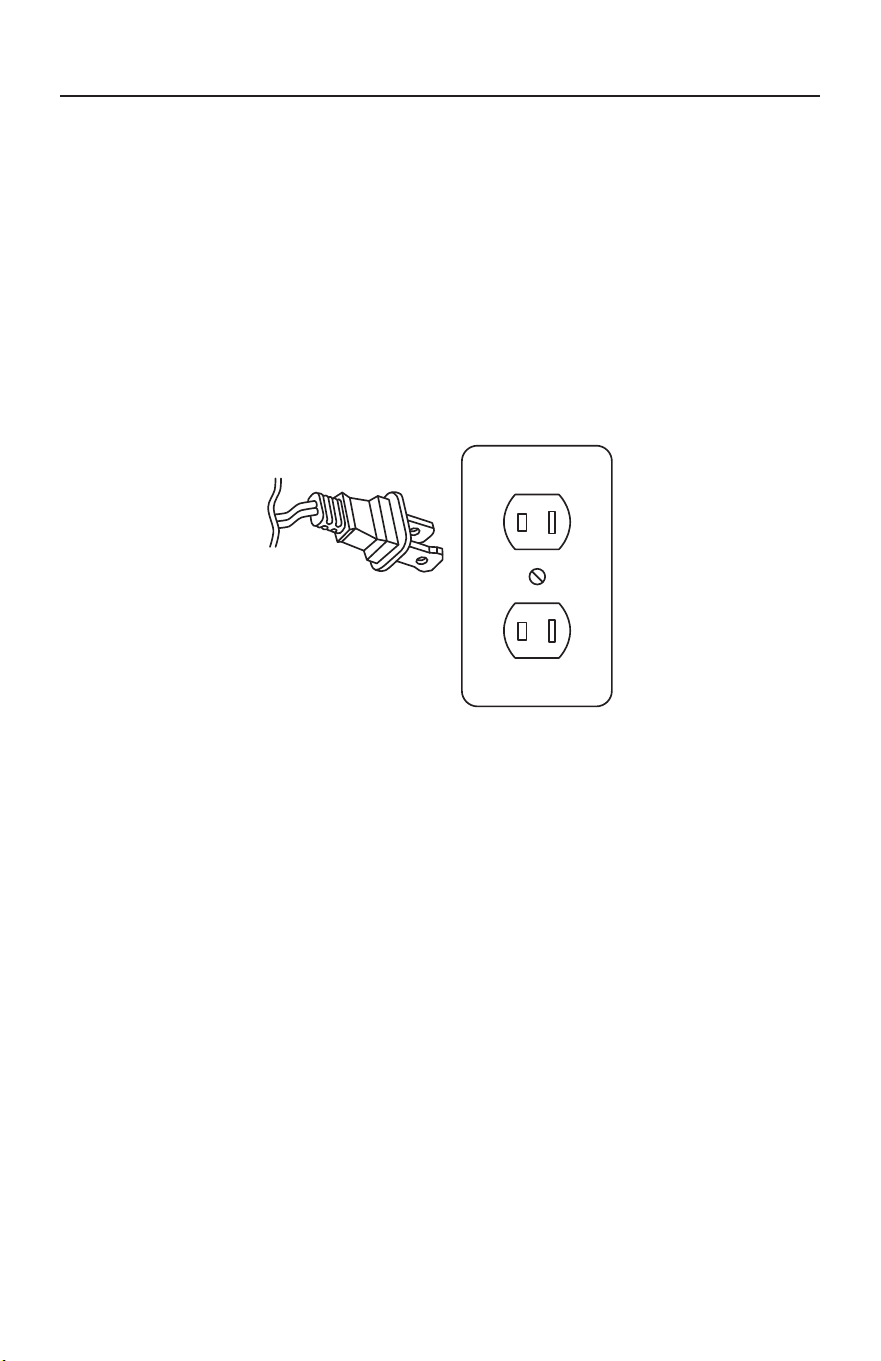
3
Cordon d’alimentation, cordon polarisé à 2 fils
Afin de réduire le risque de décharge électrique, ce chargeur est équipé d’une fiche à
courant alternatif polarisé (une fiche ayant une broche plus large que l’autre). Cette
fiche entre dans la prise uniquement dans un sens. Il s’agit d’un dispositif de sécurité.
Si vous ne parvenez pas à brancher totalement la fiche dans la prise, essayez en
inversant le sens de la fiche. Si vous ne parvenez toujours pas à brancher correctement
la fiche, contactez un électricien qualifié afin de remplacer la prise obsolète. Ne tentez
pas de neutraliser le dispositif de sécurité de la fiche polarisée.
INSTRUCTIONS DE POLARISATION
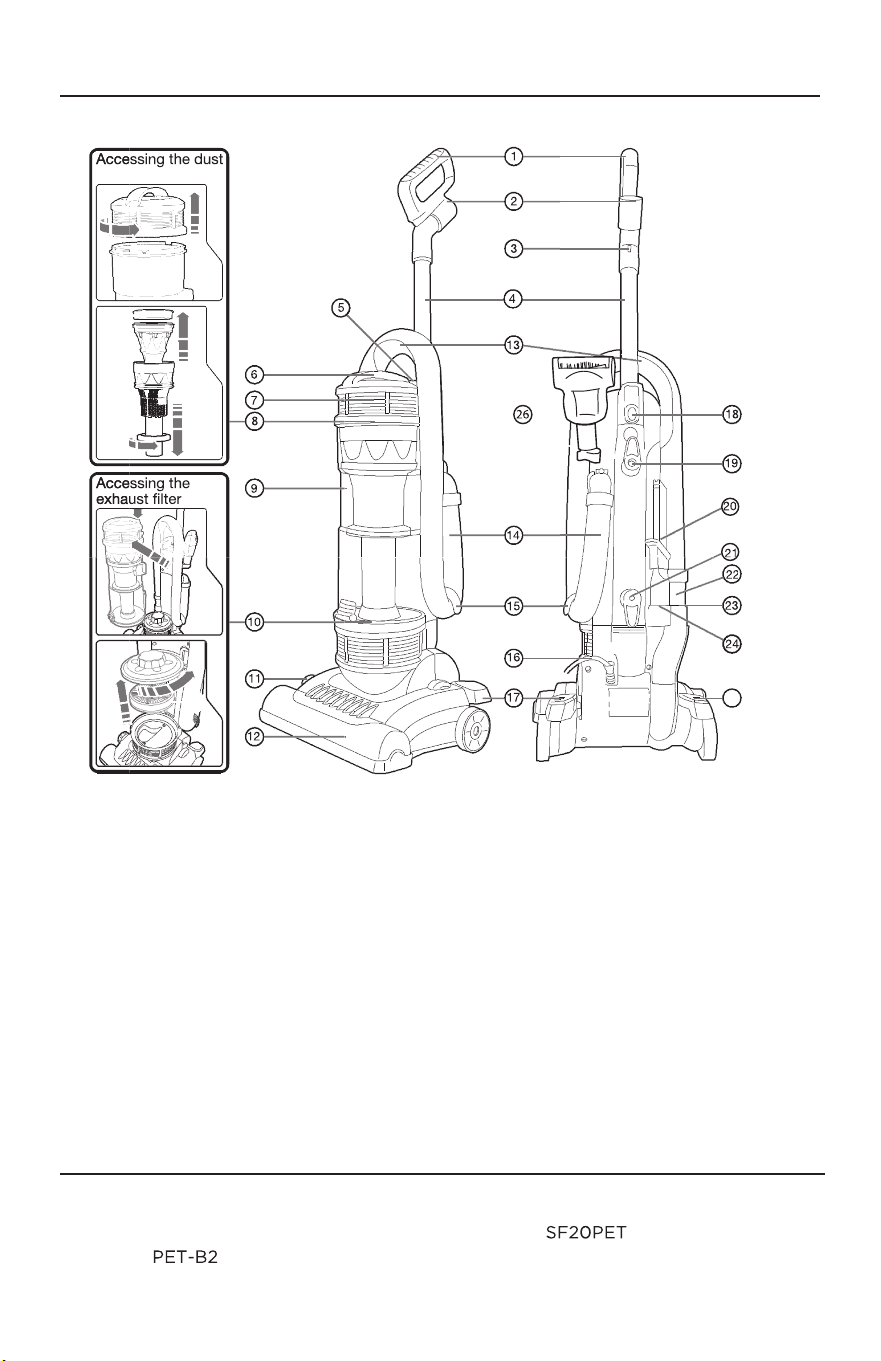
4
IDENTIFICATION DES PIÈCES
REMPLACEMENT DE LA COURROIE ET DU FILTRE
• Courroie d’aspiration Simplicity
authentique
Pièce n
o
• Jeu de filtres authentique Simplicity
Pièce n
o
container filter
25
(1)
H andle Grip
(2)
Handle Hose Inlet
(3)
Cord Clip
(4)
Dust Container Release
Button
(5)
Dust Container Handle
(6)
Dust Container Lid
(7)
Dust Container Filter
(8)
Dust Container
(9)
Exhaust Filter
(10)
HeightAdjustment Dial
(11)
Nozzle
(12)
Hose Storage and
Carrying Handle
(13)
(14)
(15)
Hose
(16)
Hose Storage Hook
(17)
Power Cord
(18)
Handle Release Pedal
Handle Tube Release Button
Rotating Cord Storage Hook
(19)
(20)
(21)
Crevice with Dusting
Brush Combination Tool
(22)
Cord Storage Hook
(23)
Hose Suction End
(24)
Side Hose Outlet
Crevice Tool Storage
Power Pedal
Handheld Trubo Brush
H andle Tube
(25)
(26)
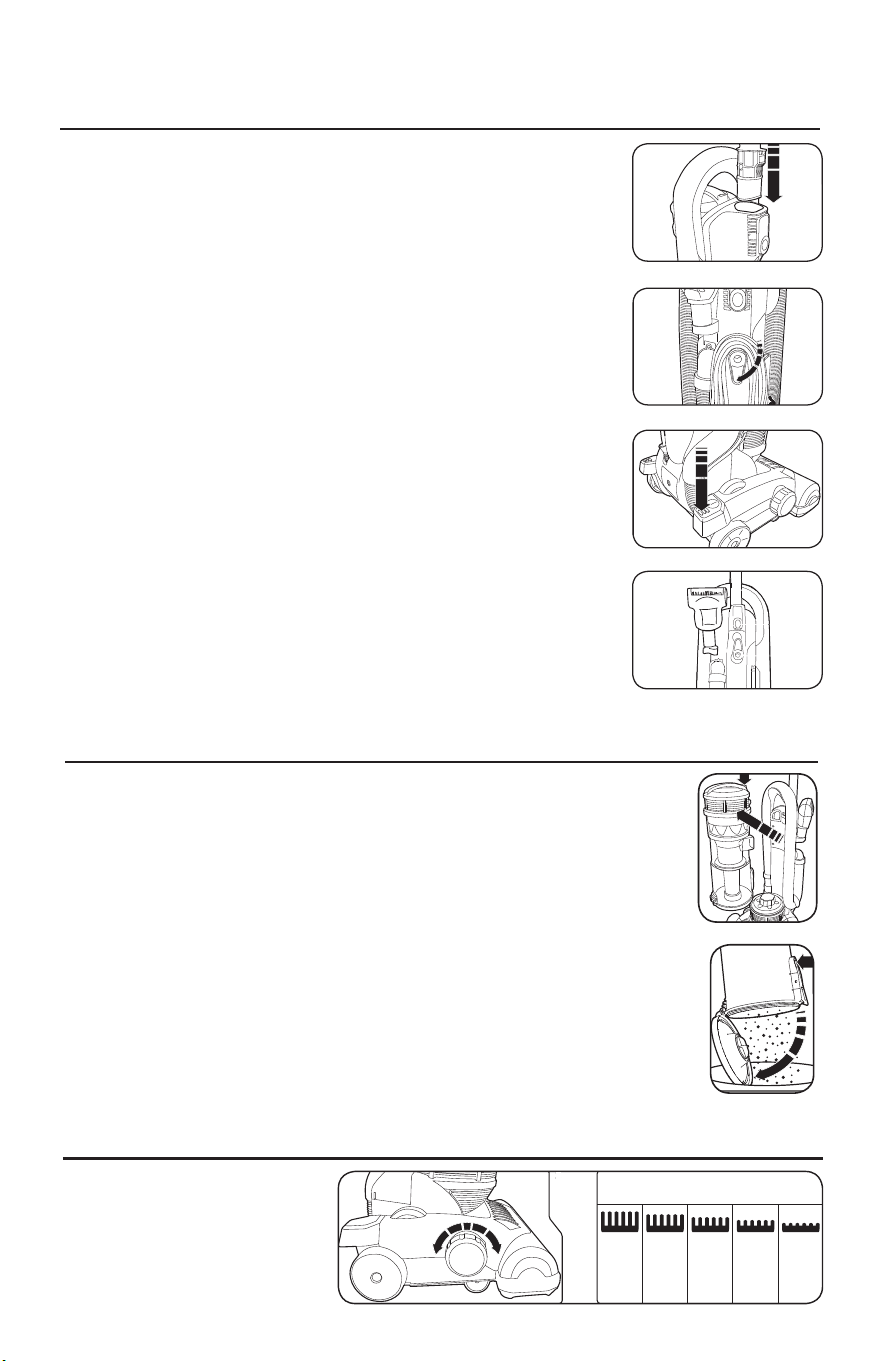
5
COMMENT ASSEMBLER ET FAIRE
FONCTIONNERL’ASPIRATEUR
COMMENT VIDER LE RÉSERVOIR À POUSSIÈRES
COMMENT AJUSTER LA HAUTEUR
Comment fixer la poignée à l’aspirateur
L’aspirateur et la poignée sont emballés séparément.
1. Faites glisser la poignée dans les fentes situées sur le
dessus de l’aspirateur jusqu'à ce que vous entendiez un
clicd'enclenchement (Fig.1).
2. Tournez le crochet de rangement du câble supérieur en
position verticale et enroulez le câble d’alimentation autour
des crochets de rangement lorsque vous rangez l’aspirateur.
Comment relâcher le câble d’alimentation
1. Le crochet de rangement du câble supérieur comprend
unefonction de relâchement rapide. Pour libérer le cordon,
faites pivoter le crochet vers le bas (Fig.2).
2. Replacez le crochet en position verticale avant de réenrouler
le câble.
Interrupteur marche/arrêt
1. Pour activer l’aspirateur, appuyez sur la pédale de mise en
marche située sur le suceur de l’aspirateur (Fig.3).
2. Pour éteindre l’aspirateur, appuyez de nouveau sur la pédale.
Brosse turbo manuelle
Fixez la brosse dans le compartiment de rangement de
l’aspirateur (Fig.4).
Faites toujours fonctionner l’aspirateur avec le réservoir à poussières
installé. Videz le réservoir à poussières lorsque cela est nécessaire ou
quand il atteint la ligne MAX.
Comment vider le réservoir à poussières
1. Débranchez l’aspirateur. Appuyez sur le bouton de relâchement du
réservoir à poussières pour l’extraire de l’aspirateur (Fig.5).
2. Appuyez sur le bouton «vider» du réservoir à poussières pour
ouvrir la base du boîtier et videz le contenu dans un conteneur ou
un sac à ordures (Fig.6).
3. Fermez le couvercle du réservoir à poussières jusqu'à ce que vous
entendiez un clic d'enclenchement et replacez le réservoir dans
l’aspirateur.
Comment ajuster la
hauteur du suceur
Faites pivoter la molette
d’ajustement de la hauteur
enfonction du type de sol sur
lequel l’aspirateur est utilisé (Fig.7).
4
Using in upright mode / Assembly
1
Attach the tube/handle (1) to the main body of
the cleaner.
2
Tu r n the rotatable cord storage cleat (20) to
release the power cord (17). Plug in to the mains
outlet. To keep the cord away from the floor
brush, locate in the cord hook (3).
3
Settings for the
floor brush height adjustment dial (10)
Tools Deep
pile
carpet
Deep to
medium
pile
carpet
Medium
pile
carpet
Smooth
carpet
and
hard
floors
Rotate the floor brush height adustment dial (10) to suit the floor being vacuumed (refer to table above).
4
Switch on the vacuum cleaner by pressing the
power pedal (26).
5
Release from the upright position by pressing the
upright release pedal (18) with your foot.
IMPORTANT: To prevent damage to carpets,
never leave the cleaner switched on in one
place for an extended period.
6
When full, or after use, empty the dust canister (8).
Press the dust canister release button (4) to remove
the dust canister from the vacuum cleaner.
Press the dust canister empty button (27) to open
the base of the dust canister, releasing the contents
into a bin or a bag. Allergy sufferers may wish to
seal the bag around the dust canister before
emptying to p revent dust escaping.
VC73420MUK Rev1_Instruction Book 30/04/2012 12:17 Page 4
4
Using in upright mode / Assembly
1
Attach the tube/handle (1) to the main body of
the cleaner.
2
Tu r n the rotatable cord storage cleat (20) to
release the power cord (17). Plug in to the mains
outlet. To keep the cord away from the floor
brush, locate in the cord hook (3).
3
Settings for the
floor brush height adjustment dial (10)
Tools Deep
pile
carpet
Deep to
medium
pile
carpet
Medium
pile
carpet
Smooth
carpet
and
hard
floors
Rotate the floor brush height adustment dial (10) to suit the floor being vacuumed (refer to table above).
4
Switch on the vacuum cleaner by pressing the
power pedal (26).
5
Release from the upright position by pressing the
upright release pedal (18) with your foot.
IMPORTANT: To prevent damage to carpets,
never leave the cleaner switched on in one
place for an extended period.
6
When full, or after use, empty the dust canister (8).
Press the dust canister release button (4) to remove
the dust canister from the vacuum cleaner.
Press the dust canister empty button (27) to open
the base of the dust canister, releasing the contents
into a bin or a bag. Allergy sufferers may wish to
seal the bag around the dust canister before
emptying to p revent dust escaping.
VC73420MUK Rev1_Instruction Book 30/04/2012 12:17 Page 4
4
Using in upright mode / Assembly
1
Attach the tube/handle (1) to the main body of
the cleaner.
2
Tu r n the rotatable cord storage cleat (20) to
release the power cord (17). Plug in to the mains
outlet. To keep the cord away from the floor
brush, locate in the cord hook (3).
3
Settings for the
floor brush height adjustment dial (10)
Tools Deep
pile
carpet
Deep to
medium
pile
carpet
Medium
pile
carpet
Smooth
carpet
and
hard
floors
Rotate the floor brush height adustment dial (10) to suit the floor being vacuumed (refer to table above).
4
Switch on the vacuum cleaner by pressing the
power pedal (26).
5
Release from the upright position by pressing the
upright release pedal (18) with your foot.
IMPORTANT: To prevent damage to carpets,
never leave the cleaner switched on in one
place for an extended period.
6
When full, or after use, empty the dust canister (8).
Press the dust canister release button (4) to remove
the dust canister from the vacuum cleaner.
Press the dust canister empty button (27) to open
the base of the dust canister, releasing the contents
into a bin or a bag. Allergy sufferers may wish to
seal the bag around the dust canister before
emptying to p revent dust escaping.
VC73420MUK Rev1_Instruction Book 30/04/2012 12:17 Page 4
4
Using in upright mode / Assembly
1
Attach the tube/handle (1) to the main body of
the cleaner.
2
Tu r n the rotatable cord storage cleat (20) to
release the power cord (17). Plug in to the mains
outlet. To keep the cord away from the floor
brush, locate in the cord hook (3).
3
Settings for the
floor brush height adjustment dial (10)
Tools Deep
pile
carpet
Deep to
medium
pile
carpet
Medium
pile
carpet
Smooth
carpet
and
hard
floors
Rotate the floor brush height adustment dial (10) to suit the floor being vacuumed (refer to table above).
4
Switch on the vacuum cleaner by pressing the
power pedal (26).
5
Release from the upright position by pressing the
upright release pedal (18) with your foot.
IMPORTANT: To prevent damage to carpets,
never leave the cleaner switched on in one
place for an extended period.
6
When full, or after use, empty the dust canister (8).
Press the dust canister release button (4) to remove
the dust canister from the vacuum cleaner.
Press the dust canister empty button (27) to open
the base of the dust canister, releasing the contents
into a bin or a bag. Allergy sufferers may wish to
seal the bag around the dust canister before
emptying to p revent dust escaping.
VC73420MUK Rev1_Instruction Book 30/04/2012 12:17 Page 4
4
Using in upright mode / Assembly
1
Attach the tube/handle (1) to the main body of
the cleaner.
2
Tu r n the rotatable cord storage cleat (20) to
release the power cord (17). Plug in to the mains
outlet. To keep the cord away from the floor
brush, locate in the cord hook (3).
3
Settings for the
floor brush height adjustment dial (10)
Tools Deep
pile
carpet
Deep to
medium
pile
carpet
Medium
pile
carpet
Smooth
carpet
and
hard
floors
Rotate the floor brush height adustment dial (10) to suit the floor being vacuumed (refer to table above).
4
Switch on the vacuum cleaner by pressing the
power pedal (26).
5
Release from the upright position by pressing the
upright release pedal (18) with your foot.
IMPORTANT: To prevent damage to carpets,
never leave the cleaner switched on in one
place for an extended period.
6
When full, or after use, empty the dust canister (8).
Press the dust canister release button (4) to remove
the dust canister from the vacuum cleaner.
Press the dust canister empty button (27) to open
the base of the dust canister, releasing the contents
into a bin or a bag. Allergy sufferers may wish to
seal the bag around the dust canister before
emptying to p revent dust escaping.
VC73420MUK Rev1_Instruction Book 30/04/2012 12:17 Page 4
Fig.1
Fig.2
Fig.3
Fig.5
Fig.6
Fig.7
4
Using in upright mode / Assembly
1
Attach the tube/handle (1) to the main body of
the cleaner.
2
Tu r n the rotatable cord storage cleat (20) to
release the power cord (17). Plug in to the mains
outlet. To keep the cord away from the floor
brush, locate in the cord hook (3).
3
Settings for the
floor brush height adjustment dial (10)
Tools Deep
pile
carpet
Deep to
medium
pile
carpet
Medium
pile
carpet
Smooth
carpet
and
hard
floors
Rotate the floor brush height adustment dial (10) to suit the floor being vacuumed (refer to table above).
4
Switch on the vacuum cleaner by pressing the
power pedal (26).
5
Release from the upright position by pressing the
upright release pedal (18) with your foot.
IMPORTANT: To prevent damage to carpets,
never leave the cleaner switched on in one
place for an extended period.
6
When full, or after use, empty the dust canister (8).
Press the dust canister release button (4) to remove
the dust canister from the vacuum cleaner.
Press the dust canister empty button (27) to open
the base of the dust canister, releasing the contents
into a bin or a bag. Allergy sufferers may wish to
seal the bag around the dust canister before
emptying to p revent dust escaping.
VC73420MUK Rev1_Instruction Book 30/04/2012 12:17 Page 4
Fig.4
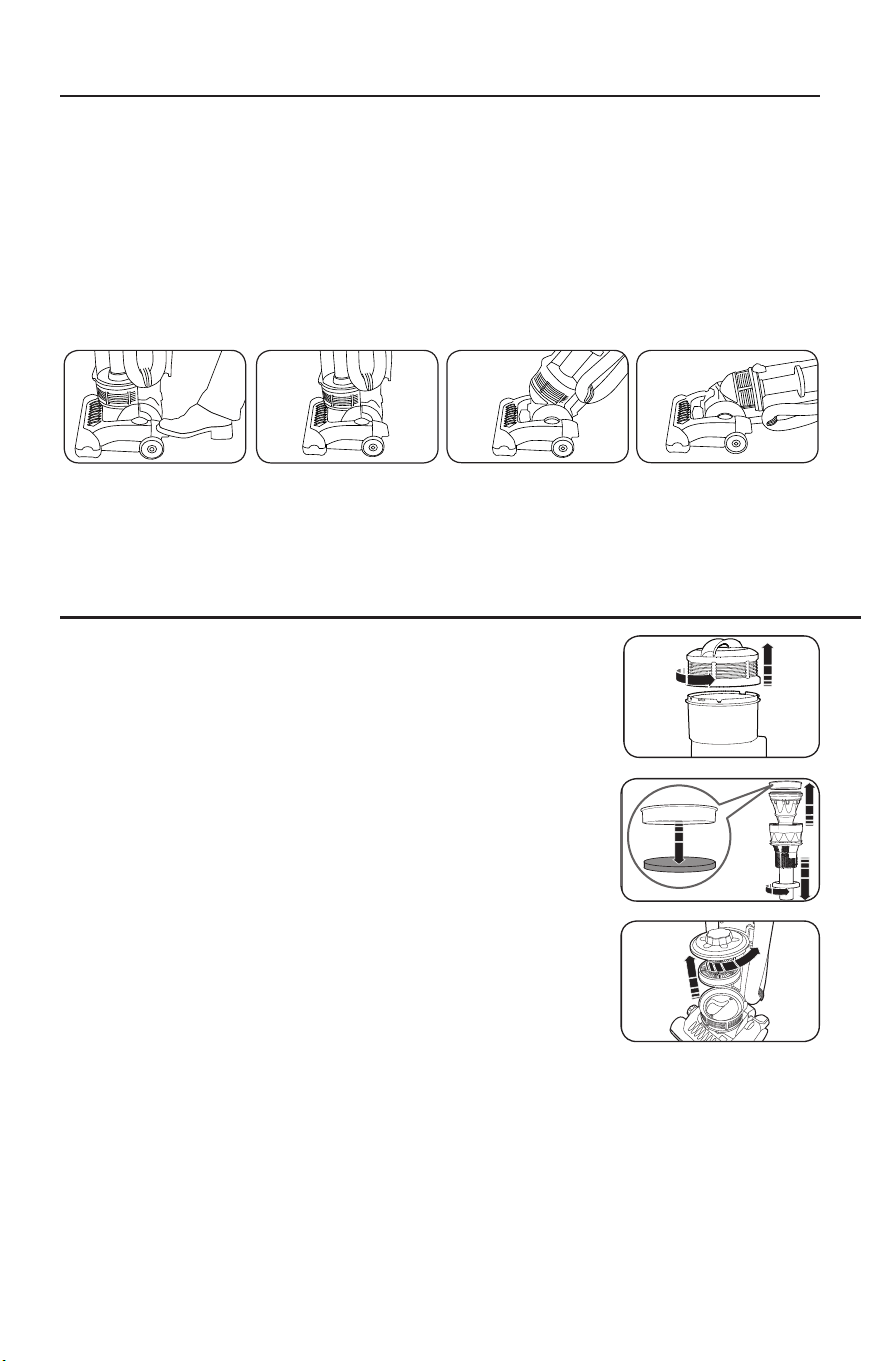
6
La poignée peut être réglée sur l’une des trois positions – verticale, intermédiaire ou basse.
1. Pour débloquer la poignée, appuyez sur la pédale de libération de la poignée sur le
côté gauche du suceur de l’aspirateur et tirez la poignée vers l’arrière (Fig.1).
2. Position verticale – pour le rangement ou lorsque des outils de nettoyage sont
utilisés (Fig.2). La poignée se verrouille dans cette position.
3. Position intermédiaire – pour un nettoyage normal (Fig.3).
4. Position basse – pour le nettoyage du dessous des meubles (Fig.4).
Cet aspirateur est équipé de deux filtres. Ces filtres capturent
les fines particules de poussières et protègent le moteur de
la saleté. La saleté accumulée est recueillie par ces filtres et
peut limiter la performance du moteur. Il est important de
remplacer les filtres régulièrement.
Comment nettoyer le filtre du réservoir à poussières
1. Pour accéder au filtre, retirez l’assemblage du filtre en enlevant
le couvercle protecteur du réservoir à poussières. Tournez
le couvercle dans le sens opposé des aiguilles d’une montre
jusqu'à ce que vous entendiez un clic d'enclenchement (Fig.5).
2. Soulevez l’ensemble du filtre et démontez-le (Fig.6).
3. Nettoyez le filtre du réservoir à poussières à l’eau froide et
laissez-le sécher complètement à l’air avant de le remettre
en place.
4. Replacez le filtre et le réservoir à poussières dans
l’aspirateur.
Comment remplacer le filtre d’évacuation
Le filtre d’évacuation est situé en dessous du réservoir à poussières.
1. Retirez le réservoir à poussières.
2. Enlevez la protection du filtre d’évacuation en tournant le couvercle dans le sens inverse
des aiguilles d’une montre jusqu’à ce vous entendiez un clic d'enclenchement (Fig.7).
3. Enlevez le filtre secondaire usagé et remplacez-le par un filtre neuf (Fig.7).
4. Replacez le filtre et le réservoir à poussières dans l’aspirateur.
Remarque: Les filtres d’évacuation ne peuvent pas être lavés ou réutilisés.
6
The hand-held turbo nozzle (13) and crevice tool
with dust brush attachment (21) may be stored in
the designated spaces (14 & 25 respectively) on
the sides of the vacuum cleaner.
When finished cleaning, switch off the appliance
and remove the plug from the mains supply and
wind the cord around the cord storage cleats
(20/22).
If the cleaner overheats, a motor protection
thermostat will automatically switch the motor
off. If this happens, switch the cleaner off,
unplug from the power supply and leave the
cleaner to cool for at least 60 minutes. Check
the airways for blockages, empty the dust
canister and clean the filters before restarting.
The guarantee may be invalidated if the motor is
damaged due to: using the appliance without
the filters installed; not cleaning the filters; or
not replacing damaged filters.
Cleaning the dust canister filter (7)
To maintain suction, the dust canister filter must
be cleaned each time the dust canister (8) is
emptied.
1. To access the filter, remove the filter assembly by
removing the dust canister lid (6). Turn the lid
anti-clockwise until it clicks.
2. Lift out the filter assembly and disassemble.
3. Wash the dust canister filter in cold water and
thoroughly air dry before re-fitting.
IMPORTANT: Do not wash filter with hot water
or detergents.
IMPORTANT: Do not use heated appliances to
dry filter.
4. Replace the dust canister filter and re-assemble
the dust canister.
Cleaning the exhaust filter (9)
The exhaust filter (9) must be cleaned at least
every three months.
The exhaust filter is located underneath the dust
canister (8).
1. Remove the dust canister.
2. Remove the exhaust filter cover (27) by turning
the lid anti-clockwise until it clicks.
3. Lift out the exhaust filter (9).
4. Wash in cold water and thoroughly air dry before
re-fitting.
IMPORTANT: Do not wash filter with hot water
or detergents.
IMPORTANT: Do not use heated appliances to
dry filter.
5. Replace the exhaust filter, the exhaust filter cover
and the dust canister.
Storage
Tool storage
Maintenance - Filters
Safety cut-out
VC73420MUK Rev1_Instruction Book 30/04/2012 12:17 Page 6
6
The hand-held turbo nozzle (13) and crevice tool
with dust brush attachment (21) may be stored in
the designated spaces (14 & 25 respectively) on
the sides of the vacuum cleaner.
When finished cleaning, switch off the appliance
and remove the plug from the mains supply and
wind the cord around the cord storage cleats
(20/22).
If the cleaner overheats, a motor protection
thermostat will automatically switch the motor
off. If this happens, switch the cleaner off,
unplug from the power supply and leave the
cleaner to cool for at least 60 minutes. Check
the airways for blockages, empty the dust
canister and clean the filters before restarting.
The guarantee may be invalidated if the motor is
damaged due to: using the appliance without
the filters installed; not cleaning the filters; or
not replacing damaged filters.
Cleaning the dust canister filter (7)
To maintain suction, the dust canister filter must
be cleaned each time the dust canister (8) is
emptied.
1. To access the filter, remove the filter assembly by
removing the dust canister lid (6). Turn the lid
anti-clockwise until it clicks.
2. Lift out the filter assembly and disassemble.
3. Wash the dust canister filter in cold water and
thoroughly air dry before re-fitting.
IMPORTANT: Do not wash filter with hot water
or detergents.
IMPORTANT: Do not use heated appliances to
dry filter.
4. Replace the dust canister filter and re-assemble
the dust canister.
Cleaning the exhaust filter (9)
The exhaust filter (9) must be cleaned at least
every three months.
The exhaust filter is located underneath the dust
canister (8).
1. Remove the dust canister.
2. Remove the exhaust filter cover (27) by turning
the lid anti-clockwise until it clicks.
3. Lift out the exhaust filter (9).
4. Wash in cold water and thoroughly air dry before
re-fitting.
IMPORTANT: Do not wash filter with hot water
or detergents.
IMPORTANT: Do not use heated appliances to
dry filter.
5. Replace the exhaust filter, the exhaust filter cover
and the dust canister.
Storage
Tool storage
Maintenance - Filters
Safety cut-out
VC73420MUK Rev1_Instruction Book 30/04/2012 12:17 Page 6
6
The hand-held turbo nozzle (13) and crevice tool
with dust brush attachment (21) may be stored in
the designated spaces (14 & 25 respectively) on
the sides of the vacuum cleaner.
When finished cleaning, switch off the appliance
and remove the plug from the mains supply and
wind the cord around the cord storage cleats
(20/22).
If the cleaner overheats, a motor protection
thermostat will automatically switch the motor
off. If this happens, switch the cleaner off,
unplug from the power supply and leave the
cleaner to cool for at least 60 minutes. Check
the airways for blockages, empty the dust
canister and clean the filters before restarting.
The guarantee may be invalidated if the motor is
damaged due to: using the appliance without
the filters installed; not cleaning the filters; or
not replacing damaged filters.
Cleaning the dust canister filter (7)
To maintain suction, the dust canister filter must
be cleaned each time the dust canister (8) is
emptied.
1. To access the filter, remove the filter assembly by
removing the dust canister lid (6). Turn the lid
anti-clockwise until it clicks.
2. Lift out the filter assembly and disassemble.
3. Wash the dust canister filter in cold water and
thoroughly air dry before re-fitting.
IMPORTANT: Do not wash filter with hot water
or detergents.
IMPORTANT: Do not use heated appliances to
dry filter.
4. Replace the dust canister filter and re-assemble
the dust canister.
Cleaning the exhaust filter (9)
The exhaust filter (9) must be cleaned at least
every three months.
The exhaust filter is located underneath the dust
canister (8).
1. Remove the dust canister.
2. Remove the exhaust filter cover (27) by turning
the lid anti-clockwise until it clicks.
3. Lift out the exhaust filter (9).
4. Wash in cold water and thoroughly air dry before
re-fitting.
IMPORTANT: Do not wash filter with hot water
or detergents.
IMPORTANT: Do not use heated appliances to
dry filter.
5. Replace the exhaust filter, the exhaust filter cover
and the dust canister.
Storage
Tool storage
Maintenance - Filters
Safety cut-out
VC73420MUK Rev1_Instruction Book 30/04/2012 12:17 Page 6
Fig.1
Fig.5
Fig.6
Fig.7
Fig.3 Fig.4Fig.2
Remarque: Afin d’éviter les dommages causés aux tapis, ne laissez jamais l’aspirateur
activé au même endroit pendant trop longtemps.
COMMENT AJUSTER LA POIGNÉE
COMMENT NETTOYER OU REMPLACER LES FILTRES
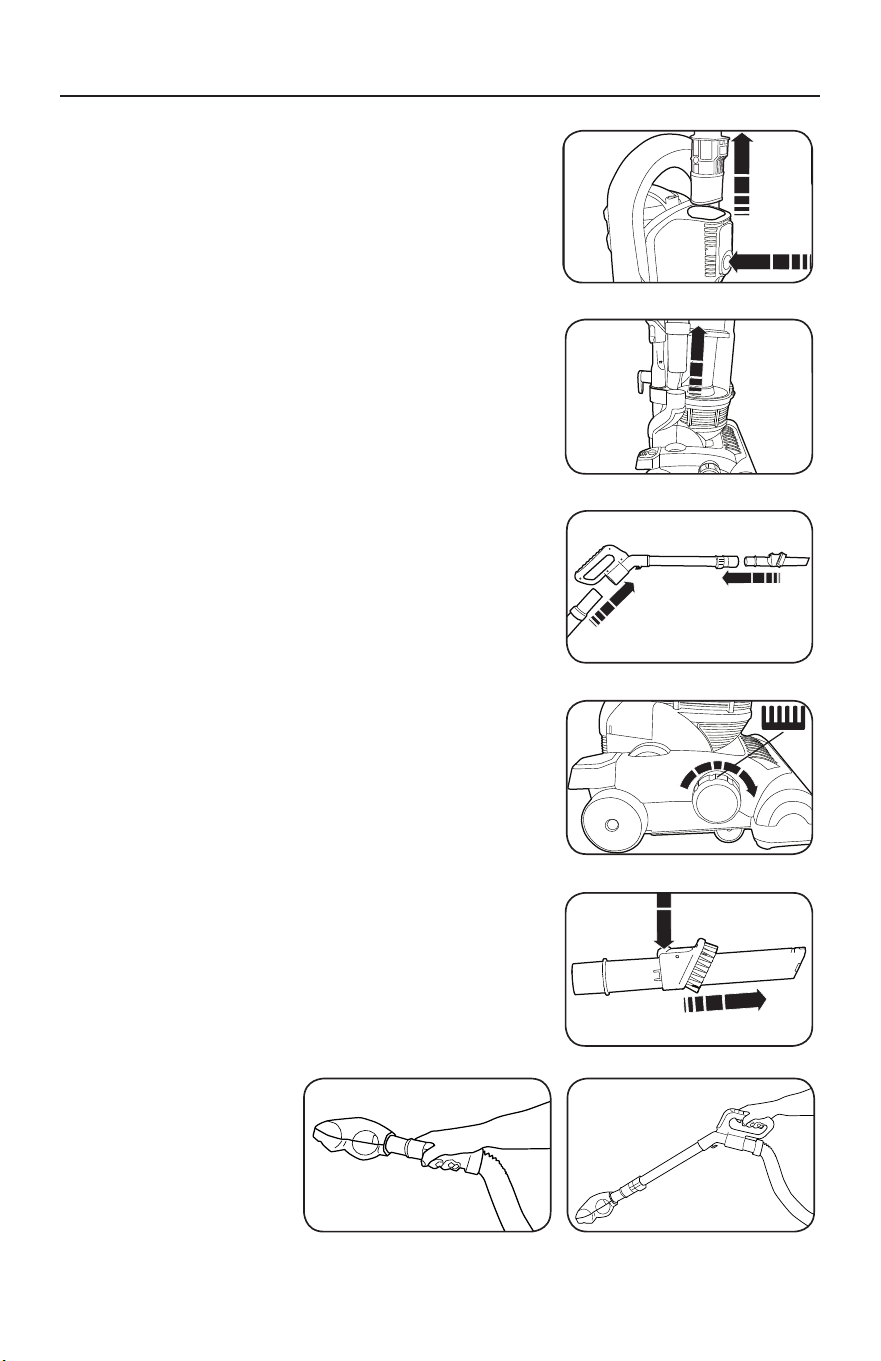
7
NETTOYAGE AVEC OUTILS INTÉGRÉS
Cet aspirateur est équipé d’outils de nettoyage
intégrés, y compris un tube-rallonge en métal (tuyau
de poignée), un tuyau extensible et un suceur avec
brosse à poussière.
1. Retirez la poignée en appuyant sur le bouton de
relâchement du tube et en tirant la poignée vers le
haut (Fig.1).
2. Retirez la sortie du tuyau d’aspiration de la sortie du
tuyau latéral (Fig.2).
3. Raccordez la sortie du tuyau d’aspiration à l’avant du
tuyau de la poignée et l’outil souhaité à l’extrémité
du tube de la poignée (Fig.3).
4. Faites pivoter la molette d’ajustement de la hauteur
dans le sens des aiguilles d’une montre par rapport
au réglage des outils (Fig.4).
Suceur plat
Le suceur plat est idéal pour les endroits difficiles à
atteindre et le long des plinthes (Fig.5).
Brosse dépoussiérante
La brosse dépoussiérante est idéale pour passer
l’aspirateur sur des surfaces et des objets délicats.
La brosse dépoussiérante est raccordée au suceur
plat et peut être accessible en appuyant sur le
bouton de relâchement latéral et en tirant la brosse
dépoussiérante vers l’extrémité du suceur plat (Fig.5).
Brosse turbo manuelle
La brosse turbo est idéale pour enlever les poils des
animaux de compagnie des tissus d’ameublement et
des escaliers recouverts de moquette.
1. Retirez le tuyau d’aspiration de la sortie du
tuyau latéral.
2. Raccordez la brosse turbo à l’extrémité du tuyau
(Fig.6) ou à l’extrémité du tube de la poignée
(Fig.7).
• Never over extend the hose such that the cleaner
is pulled over.
IMPORTANT: Only use the tools when the
product is in the parked position. Also, turning
the cleaner sideways helps prevent the
cleaner being pulled along by the stretch hose.
Hand-held turbo nozzle (13)
(certain models only)
The hand-held turbo nozzle is ideal for picking up
hair and fibres from stairs and upholstery.
The hand-held turbo nozzle will not rotate until it
makes contact with the surface being cleaned.
Cleaning the Hand-held turbo nozzle (13)
(certain models only)
The Turbo Nozzle should be regularly cleaned and
any hairs or fibres wrapped around the brush bar
removed to maintain optimum performance.
Crevice tool (21)
The crevice tool is ideal for awkward places,
corners, and behind radiators etc.
Dusting brush (21)
The dusting brush is ideal for vacuuming pelmets
and delicate objects and surfaces.
The dusting brush is attached to the crevice tool
and may be accessed by pressing the release
button on the side and pulling the dusting brush
to the end of the crevice tool.
Tools and accessories
5
Using tools and accessories
1
Remove the tube/handle (1) by pressing the tube
release button (19) and pulling the handle upwards.
2
Remove the hose suction end (23) from the side
hose outlet (24) on the side of the vacuum cleaner.
3
Attach the hose suction end (23) to the handle
hose inlet (2) and the desired tool to the tube end
of the handle (1).
4
Rotate the floor brush height adustment dial (10)
fully in a clockwise direction to the tools setting
(see table on point 3, page 4).
Release the power cord (17) and plug in to the mains outlet as in step 2 of ‘Using in upright mode /
Assembly’.
VC73420MUK Rev1_Instruction Book 30/04/2012 12:17 Page 5
Fig.1
• Never over extend the hose such that the cleaner
is pulled over.
IMPORTANT: Only use the tools when the
product is in the parked position. Also, turning
the cleaner sideways helps prevent the
cleaner being pulled along by the stretch hose.
Hand-held turbo nozzle (13)
(certain models only)
The hand-held turbo nozzle is ideal for picking up
hair and fibres from stairs and upholstery.
The hand-held turbo nozzle will not rotate until it
makes contact with the surface being cleaned.
Cleaning the Hand-held turbo nozzle (13)
(certain models only)
The Turbo Nozzle should be regularly cleaned and
any hairs or fibres wrapped around the brush bar
removed to maintain optimum performance.
Crevice tool (21)
The crevice tool is ideal for awkward places,
corners, and behind radiators etc.
Dusting brush (21)
The dusting brush is ideal for vacuuming pelmets
and delicate objects and surfaces.
The dusting brush is attached to the crevice tool
and may be accessed by pressing the release
button on the side and pulling the dusting brush
to the end of the crevice tool.
Tools and accessories
5
Using tools and accessories
1
Remove the tube/handle (1) by pressing the tube
release button (19) and pulling the handle upwards.
2
Remove the hose suction end (23) from the side
hose outlet (24) on the side of the vacuum cleaner.
3
Attach the hose suction end (23) to the handle
hose inlet (2) and the desired tool to the tube end
of the handle (1).
4
Rotate the floor brush height adustment dial (10)
fully in a clockwise direction to the tools setting
(see table on point 3, page 4).
Release the power cord (17) and plug in to the mains outlet as in step 2 of ‘Using in upright mode /
Assembly’.
VC73420MUK Rev1_Instruction Book 30/04/2012 12:17 Page 5
Fig.2
• Never over extend the hose such that the cleaner
is pulled over.
IMPORTANT: Only use the tools when the
product is in the parked position. Also, turning
the cleaner sideways helps prevent the
cleaner being pulled along by the stretch hose.
Hand-held turbo nozzle (13)
(certain models only)
The hand-held turbo nozzle is ideal for picking up
hair and fibres from stairs and upholstery.
The hand-held turbo nozzle will not rotate until it
makes contact with the surface being cleaned.
Cleaning the Hand-held turbo nozzle (13)
(certain models only)
The Turbo Nozzle should be regularly cleaned and
any hairs or fibres wrapped around the brush bar
removed to maintain optimum performance.
Crevice tool (21)
The crevice tool is ideal for awkward places,
corners, and behind radiators etc.
Dusting brush (21)
The dusting brush is ideal for vacuuming pelmets
and delicate objects and surfaces.
The dusting brush is attached to the crevice tool
and may be accessed by pressing the release
button on the side and pulling the dusting brush
to the end of the crevice tool.
Tools and accessories
5
Using tools and accessories
1
Remove the tube/handle (1) by pressing the tube
release button (19) and pulling the handle upwards.
2
Remove the hose suction end (23) from the side
hose outlet (24) on the side of the vacuum cleaner.
3
Attach the hose suction end (23) to the handle
hose inlet (2) and the desired tool to the tube end
of the handle (1).
4
Rotate the floor brush height adustment dial (10)
fully in a clockwise direction to the tools setting
(see table on point 3, page 4).
Release the power cord (17) and plug in to the mains outlet as in step 2 of ‘Using in upright mode /
Assembly’.
VC73420MUK Rev1_Instruction Book 30/04/2012 12:17 Page 5
Fig.3
• Never over extend the hose such that the cleaner
is pulled over.
IMPORTANT: Only use the tools when the
product is in the parked position. Also, turning
the cleaner sideways helps prevent the
cleaner being pulled along by the stretch hose.
Hand-held turbo nozzle (13)
(certain models only)
The hand-held turbo nozzle is ideal for picking up
hair and fibres from stairs and upholstery.
The hand-held turbo nozzle will not rotate until it
makes contact with the surface being cleaned.
Cleaning the Hand-held turbo nozzle (13)
(certain models only)
The Turbo Nozzle should be regularly cleaned and
any hairs or fibres wrapped around the brush bar
removed to maintain optimum performance.
Crevice tool (21)
The crevice tool is ideal for awkward places,
corners, and behind radiators etc.
Dusting brush (21)
The dusting brush is ideal for vacuuming pelmets
and delicate objects and surfaces.
The dusting brush is attached to the crevice tool
and may be accessed by pressing the release
button on the side and pulling the dusting brush
to the end of the crevice tool.
Tools and accessories
5
Using tools and accessories
1
Remove the tube/handle (1) by pressing the tube
release button (19) and pulling the handle upwards.
2
Remove the hose suction end (23) from the side
hose outlet (24) on the side of the vacuum cleaner.
3
Attach the hose suction end (23) to the handle
hose inlet (2) and the desired tool to the tube end
of the handle (1).
4
Rotate the floor brush height adustment dial (10)
fully in a clockwise direction to the tools setting
(see table on point 3, page 4).
Release the power cord (17) and plug in to the mains outlet as in step 2 of ‘Using in upright mode /
Assembly’.
VC73420MUK Rev1_Instruction Book 30/04/2012 12:17 Page 5
Fig.4
• Never over extend the hose such that the cleaner
is pulled over.
IMPORTANT: Only use the tools when the
product is in the parked position. Also, turning
the cleaner sideways helps prevent the
cleaner being pulled along by the stretch hose.
Hand-held turbo nozzle (13)
(certain models only)
The hand-held turbo nozzle is ideal for picking up
hair and fibres from stairs and upholstery.
The hand-held turbo nozzle will not rotate until it
makes contact with the surface being cleaned.
Cleaning the Hand-held turbo nozzle (13)
(certain models only)
The Turbo Nozzle should be regularly cleaned and
any hairs or fibres wrapped around the brush bar
removed to maintain optimum performance.
Crevice tool (21)
The crevice tool is ideal for awkward places,
corners, and behind radiators etc.
Dusting brush (21)
The dusting brush is ideal for vacuuming pelmets
and delicate objects and surfaces.
The dusting brush is attached to the crevice tool
and may be accessed by pressing the release
button on the side and pulling the dusting brush
to the end of the crevice tool.
Tools and accessories
5
Using tools and accessories
1
Remove the tube/handle (1) by pressing the tube
release button (19) and pulling the handle upwards.
2
Remove the hose suction end (23) from the side
hose outlet (24) on the side of the vacuum cleaner.
3
Attach the hose suction end (23) to the handle
hose inlet (2) and the desired tool to the tube end
of the handle (1).
4
Rotate the floor brush height adustment dial (10)
fully in a clockwise direction to the tools setting
(see table on point 3, page 4).
Release the power cord (17) and plug in to the mains outlet as in step 2 of ‘Using in upright mode /
Assembly’.
VC73420MUK Rev1_Instruction Book 30/04/2012 12:17 Page 5
Fig.5
Fig.7Fig.6
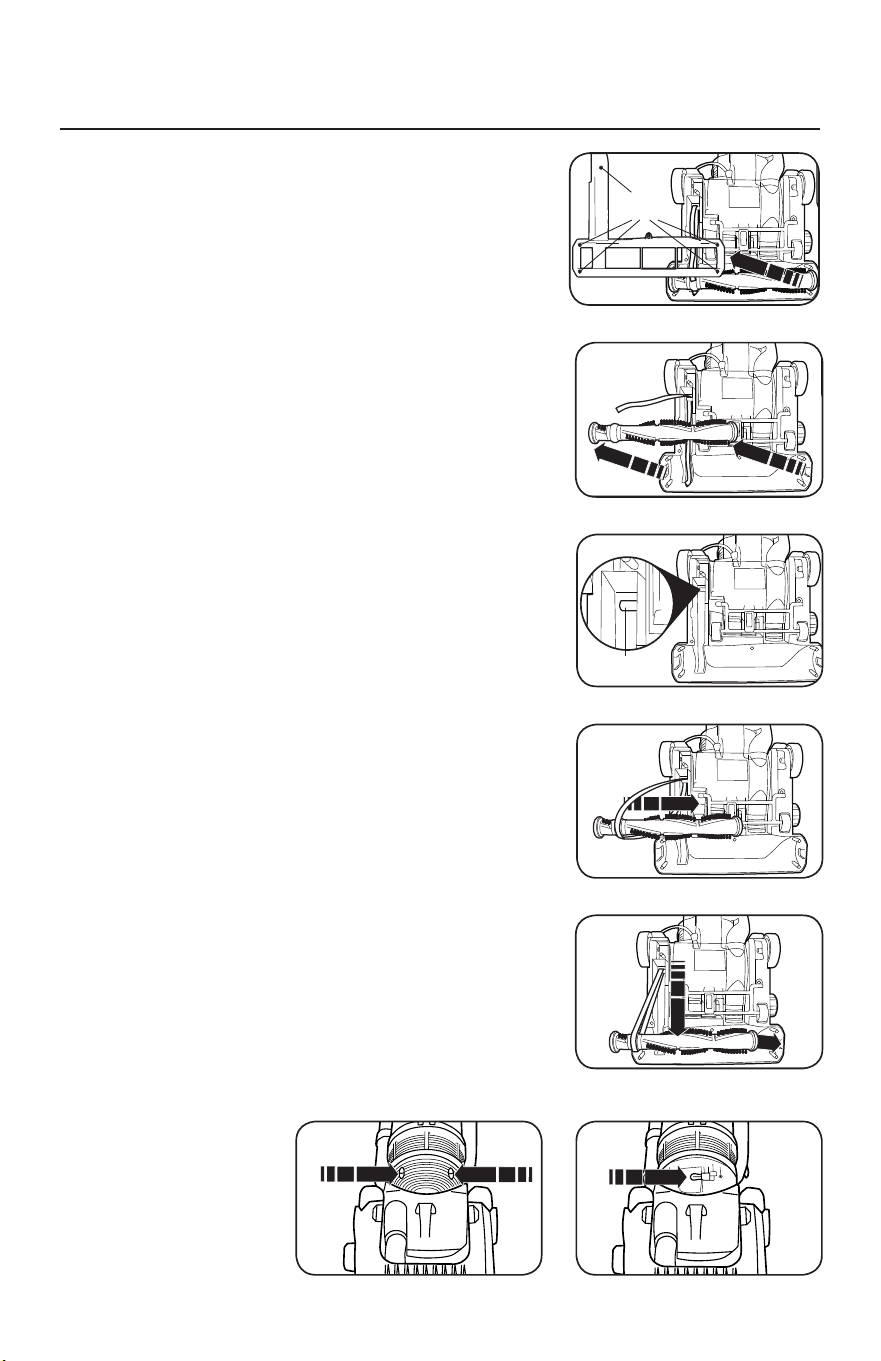
8
COMMENT REMPLACER L’AMPOULE DU TÉMOIN
LUMINEUX ET LA COURROIE DE L’ASPIRATEUR
ATTENTION: Débranchez l’aspirateur de la prise
électrique.
Comment retirer le plateau inférieur
1. Placez l’aspirateur dans sa position la plus basse en
appuyant sur la pédale de libération de la poignée
(voir «Comment ajuster la poignée» à la page6).
Retournez l’aspirateur sur une surface plane en
exposant le plateau inférieur.
2. Enlevez les cinq vis en maintenant le plateau inférieur
en place (Fig.1).
3. Retirez le plateau inférieur.
Comment remplacer la courroie
1. Retournez l’aspirateur et retirez le plateau inférieur
telque décrit ci-dessus.
2. Soulevez la brosse et retirez la courroie (Fig.2).
3. Bouclez la nouvelle courroie autour de l’arbre de
transmission (Fig.3) et de l’anneau en relief situé
entre les poils de la brosse (Fig.4).
4. Tirez la brosse vers l’avant (contre la traction de la
courroie) et réinsérez les extrémités dans le suceur
(Fig.5) en vous assurant d’aligner l’extrémité en
face de la courroie afin que les bords plats glissent
correctement.
5. Faites tourner la brosse manuellement afin de vous
assurer que la courroie n’est pas enroulée sur elle-
même et que toutes les pièces pivotantes tournent
correctement.
6. Replacez le plateau inférieur à l’aide des cinq vis.
Comment remplacer l’ampoule
1. Placez l’aspirateur dans sa position la plus basse en
appuyant sur la pédale de libération de la poignée.
2. Retirez les deux vis de la lentille du témoin
lumineux (Fig.6).
3. Enlevez la lentille et remplacez l’ampoule (Fig.7).
4. Replacez la lentille du témoin lumineux et les deux vis.
7
If the brush bar stops rotating, it is likely that the
drive belt has snapped (usually because the
brush has been stalled). Replacement belts can
be obtained from Morphy Richards by calling the
spare parts helpline number: 0844 873 0726.
Accessing the floor nozzle
1. Press the power pedal (26) to turn the cleaner off.
2. Disconnect the cleaner from the mains supply.
3. Press the upright release pedal (18) and place the
cleaner face down, in a flat position on a soft
surface (eg. carpet).
Removing brush bar and belt
4. Using a cross-headed screwdriver, unscrew the 5
screws on the base of the cleaner to release the
L-shaped plate from over the rotary brush bar.
5. Remove the broken belt and lift out the rotary
brush bar.
Refitting brush bar and belt
6. Hook the belt over the drive shaft (the belt must
be slid sideways past the end of the drive shaft).
7. Pass the rotary brush bar through the belt,
ensuring the correct end is located against the
belt.
8. Pull the rotary brush bar forward (against the pull
of the belt) and locate the square ends of the
brush bar into location slots in the floor nozzle.
9. Rotate the brush bar by hand to ensure the belt is
running in the centre of its location on the brush.
Refitting the floor nozzle base cover
10.
Refit the L-shaped plate over the rotary brush bar,
and screw the 5 screws back into the base of the
cleaner, using a cross-headed screwdriver, do not
overtighten the screws.
11.
Return the cleaner to the upright position.
Connect to the mains supply. Switch on to test.
Maintenance -
Changing the Belt
Screw
points
Drive
shaft
7
VC73420MUK Rev1_Instruction Book 30/04/2012 12:17 Page 7
7
If the brush bar stops rotating, it is likely that the
drive belt has snapped (usually because the
brush has been stalled). Replacement belts can
be obtained from Morphy Richards by calling the
spare parts helpline number: 0844 873 0726.
Accessing the floor nozzle
1. Press the power pedal (26) to turn the cleaner off.
2. Disconnect the cleaner from the mains supply.
3. Press the upright release pedal (18) and place the
cleaner face down, in a flat position on a soft
surface (eg. carpet).
Removing brush bar and belt
4. Using a cross-headed screwdriver, unscrew the 5
screws on the base of the cleaner to release the
L-shaped plate from over the rotary brush bar.
5. Remove the broken belt and lift out the rotary
brush bar.
Refitting brush bar and belt
6. Hook the belt over the drive shaft (the belt must
be slid sideways past the end of the drive shaft).
7. Pass the rotary brush bar through the belt,
ensuring the correct end is located against the
belt.
8. Pull the rotary brush bar forward (against the pull
of the belt) and locate the square ends of the
brush bar into location slots in the floor nozzle.
9. Rotate the brush bar by hand to ensure the belt is
running in the centre of its location on the brush.
Refitting the floor nozzle base cover
10.
Refit the L-shaped plate over the rotary brush bar,
and screw the 5 screws back into the base of the
cleaner, using a cross-headed screwdriver, do not
overtighten the screws.
11.
Return the cleaner to the upright position.
Connect to the mains supply. Switch on to test.
Maintenance -
Changing the Belt
Screw
points
Drive
shaft
7
VC73420MUK Rev1_Instruction Book 30/04/2012 12:17 Page 7
7
If the brush bar stops rotating, it is likely that the
drive belt has snapped (usually because the
brush has been stalled). Replacement belts can
be obtained from Morphy Richards by calling the
spare parts helpline number: 0844 873 0726.
Accessing the floor nozzle
1. Press the power pedal (26) to turn the cleaner off.
2. Disconnect the cleaner from the mains supply.
3. Press the upright release pedal (18) and place the
cleaner face down, in a flat position on a soft
surface (eg. carpet).
Removing brush bar and belt
4. Using a cross-headed screwdriver, unscrew the 5
screws on the base of the cleaner to release the
L-shaped plate from over the rotary brush bar.
5. Remove the broken belt and lift out the rotary
brush bar.
Refitting brush bar and belt
6. Hook the belt over the drive shaft (the belt must
be slid sideways past the end of the drive shaft).
7. Pass the rotary brush bar through the belt,
ensuring the correct end is located against the
belt.
8. Pull the rotary brush bar forward (against the pull
of the belt) and locate the square ends of the
brush bar into location slots in the floor nozzle.
9. Rotate the brush bar by hand to ensure the belt is
running in the centre of its location on the brush.
Refitting the floor nozzle base cover
10.
Refit the L-shaped plate over the rotary brush bar,
and screw the 5 screws back into the base of the
cleaner, using a cross-headed screwdriver, do not
overtighten the screws.
11.
Return the cleaner to the upright position.
Connect to the mains supply. Switch on to test.
Maintenance -
Changing the Belt
Screw
points
Drive
shaft
7
VC73420MUK Rev1_Instruction Book 30/04/2012 12:17 Page 7
7
If the brush bar stops rotating, it is likely that the
drive belt has snapped (usually because the
brush has been stalled). Replacement belts can
be obtained from Morphy Richards by calling the
spare parts helpline number: 0844 873 0726.
Accessing the floor nozzle
1. Press the power pedal (26) to turn the cleaner off.
2. Disconnect the cleaner from the mains supply.
3. Press the upright release pedal (18) and place the
cleaner face down, in a flat position on a soft
surface (eg. carpet).
Removing brush bar and belt
4. Using a cross-headed screwdriver, unscrew the 5
screws on the base of the cleaner to release the
L-shaped plate from over the rotary brush bar.
5. Remove the broken belt and lift out the rotary
brush bar.
Refitting brush bar and belt
6. Hook the belt over the drive shaft (the belt must
be slid sideways past the end of the drive shaft).
7. Pass the rotary brush bar through the belt,
ensuring the correct end is located against the
belt.
8. Pull the rotary brush bar forward (against the pull
of the belt) and locate the square ends of the
brush bar into location slots in the floor nozzle.
9. Rotate the brush bar by hand to ensure the belt is
running in the centre of its location on the brush.
Refitting the floor nozzle base cover
10.
Refit the L-shaped plate over the rotary brush bar,
and screw the 5 screws back into the base of the
cleaner, using a cross-headed screwdriver, do not
overtighten the screws.
11.
Return the cleaner to the upright position.
Connect to the mains supply. Switch on to test.
Maintenance -
Changing the Belt
Screw
points
Drive
shaft
7
VC73420MUK Rev1_Instruction Book 30/04/2012 12:17 Page 7
7
If the brush bar stops rotating, it is likely that the
drive belt has snapped (usually because the
brush has been stalled). Replacement belts can
be obtained from Morphy Richards by calling the
spare parts helpline number: 0844 873 0726.
Accessing the floor nozzle
1. Press the power pedal (26) to turn the cleaner off.
2. Disconnect the cleaner from the mains supply.
3. Press the upright release pedal (18) and place the
cleaner face down, in a flat position on a soft
surface (eg. carpet).
Removing brush bar and belt
4. Using a cross-headed screwdriver, unscrew the 5
screws on the base of the cleaner to release the
L-shaped plate from over the rotary brush bar.
5. Remove the broken belt and lift out the rotary
brush bar.
Refitting brush bar and belt
6. Hook the belt over the drive shaft (the belt must
be slid sideways past the end of the drive shaft).
7. Pass the rotary brush bar through the belt,
ensuring the correct end is located against the
belt.
8. Pull the rotary brush bar forward (against the pull
of the belt) and locate the square ends of the
brush bar into location slots in the floor nozzle.
9. Rotate the brush bar by hand to ensure the belt is
running in the centre of its location on the brush.
Refitting the floor nozzle base cover
10.
Refit the L-shaped plate over the rotary brush bar,
and screw the 5 screws back into the base of the
cleaner, using a cross-headed screwdriver, do not
overtighten the screws.
11.
Return the cleaner to the upright position.
Connect to the mains supply. Switch on to test.
Maintenance -
Changing the Belt
Screw
points
Drive
shaft
7
VC73420MUK Rev1_Instruction Book 30/04/2012 12:17 Page 7
Fig.1
Fig.2
Fig.3
Fig.4
Fig.5
Fig.7Fig.6

9
PROTECTION THERMIQUE DU MOTEUR
Cet aspirateur est équipé d’un protecteur thermique conçu pour protéger l’aspirateur
contre la surchauffe due à un débit d’air restreint (en cas d’obstruction du tuyau). Si
cette situation se produit, le protecteur thermique éteint automatiquement le moteur
afin d’éviter tout dommage potentiel.
REMARQUE: Pour déterminer si le protecteur thermique a éteint l’aspirateur, vérifiez le
témoin lumineux. Si le témoin lumineux est allumé et que le moteur est éteint, alors le
protecteur thermique a éteint le moteur. Si le témoin lumineux et le moteur sont éteints,
l’aspirateur s’est arrêté pour une autre raison (p.ex.: câble débranché).
Comment redémarrer le protecteur thermique
1. Débranchez l’aspirateur.
2. Laissez l’aspirateur refroidir pendant au moins 30minutes.
3. Vérifiez qu’il n’y a pas d’obstruction, videz le réservoir à poussières et nettoyez les
filtres.
4. Branchez l’aspirateur et démarrez l’utilisation.
Si l’aspirateur ne s’allume pas, renvoyez-le à un revendeur Simplicity agréé pour le
soumettre à un entretien.

10
• Gardez la machine et tous les accessoires propres et en bon état de
fonctionnement.
• Videz le réservoir à poussière lorsque cela est nécessaire ou quand il atteint la ligne
MAX.
• Nettoyez les filtres chaque mois ou plus souvent si vous aspirez des poudres fines
telles que de la farine ou de la poussière murale sèche.
• Utilisez toujours des filtres et pièces certifiés, car l’utilisation d’autres produits peut
entraîner un mauvais nettoyage ou une mauvaise qualité de filtration. Les produits
de filtration certifiés sont conçus pour une performance maximale.
• Rangez soigneusement votre appareil dans un endroit sec.
• Pour une meilleure performance de nettoyage et plus de sécurité, suivez les
instructions de votre manuel.
PROBLÈME POINT DE
VÉRIFICATION
SOLUTION POSSIBLE
La puissance
d’aspiration est
faible.
• Réservoir à
poussières
• Suceur pour sol
• Filtres
• Si le réservoir à poussière est plein,
videz-le.
• En cas d’obstruction, enlevez l’objet
qui en est la cause.
• Remplacez les filtres.
L’aspirateur ne
fonctionne pas.
• Câble
d’alimentation
Insérez la fiche d’alimentation
fermement dans une prise électrique.
Perte de puissance
soudaine.
• Réinitialisation
thermique
Éteignez l’aspirateur et débranchez-le
de la prise électrique. Laissez l’aspirateur
refroidir pendant 60minutes avant de
le rallumer. Assurez-vous qu’il n’y a
pas d’obstruction. Videz le réservoir à
poussières.
La poussière et les
débris sont aspirés
par le conduit
d’évacuation.
• Filtres Assurez-vous que les filtres sont
propres, secs et installés correctement.
Tout autre service doit être effectué par un revendeur autorisé de Simplicity
Vacuum. Pour trouver le revendeur agréé le plus proche, visitez notre site Web
www.SimplicityVac.com ou appelez le 888-974-6759.
DÉPANNAGE
POUR UNE MEILLEURE PERFORMANCE

11
Informations de garantie du propriétaire (à garder dans vos archives)
Nom du magasin
Adresse du magasin Ville État Code postal
Téléphone Date d’achat
Numéro de série Numéro de modèle
Ce que couvre cette garantie:
La présente garantie couvre tous défauts de matériau et de fabrication de votre nouvel
aspirateur Simplicity.
Durée de la garantie:
La couverture de la garantie pour l'aspirateur Simplicity dure une année. Les modèles
domestiques utilisés commercialement sont uniquement garantis pendant 90jours.
Ce que cette garantie ne couvre pas:
• Les dommages causés à l’aspirateur en raison d’une négligence, d’abus,
d’altérations, d’accidents, d’utilisations non conformes ou d’un entretien inadapté.
• Articles de remplacement courants: courroies et filtres jetables.
Ce que Simplicity fera:
Cette garantie fournit, sans que vous ayez à encourir de frais, toute la main-d’œuvre
et toutes les pièces nécessaires pour conserver cet aspirateur en bon état de
fonctionnement pendant la période de garantie.
Comment obtenir un service d’entretien et réparation:
Les services de garantie peuvent uniquement être obtenus en présentant l’aspirateur
auprès d’un Revendeur agréé Simplicity. Avant tout service, vous devrez présenter
une preuve d’achat et le numéro de série du produit en question. Afin de localiser votre
centre de service le plus proche, veuillez appeler le 888-974-6759 ou rendez-vous sur
www.SimplicityVac.com.
LA PRÉSENTE GARANTIE EST EXCLUSIVE ET REMPLACE TOUTE AUTRE GARANTIE
ÉCRITE, ORALE, EXPLICITE OU IMPLICITE (NOTAMMENT TOUTE GARANTIE DE
QUALITÉ MARCHANDE OU DE CONFORMITÉ À UN USAGE PARTICULIER). LA
PRÉSENTE GARANTIE EXCLUT TOUTE RESPONSABILITÉ POUR DOMMAGES
INDIRECTS OU CONSÉCUTIFS.
Comment s’appliquent les lois des États:
La présente garantie vous donne des droits particuliers, et il est possible que vous
jouissiez aussi d’autres droits variables d’un État à l’autre.
Enregistrez votre garantie en ligne sur www.SimplicityVac.com
COORDONNÉES DU TITULAIRE DE LA GARANTIE



©2018 Tacony Corporation
888-974-6759
1760 Gilsinn Lane
Fenton, MO 63026