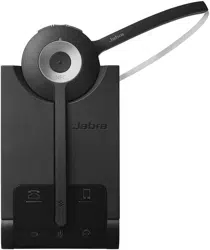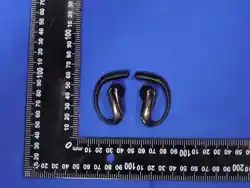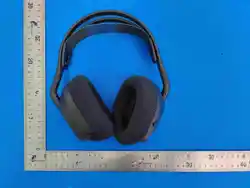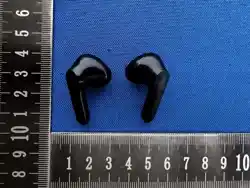

FCC Warning
This device complies with Part 15 of the FCC Rules. Operation is subject to the following two
conditions:
(1) This device may not cause harmful interference, and (2) this device must accept any
interference received, including interference that may cause undesired operation.
NOTE 1: This equipment has been tested and found to comply with the limits for a Class B digital
device, pursuant to part 15 of the FCC Rules. These limits are designed to provide reasonable
protection against harmful interference in a residential installation. This equipment generates,
uses and can radiate radio frequency energy and, if not installed and used in accordance with the
instructions, may cause harmful interference to radio communications. However, there is no
guarantee that interference will not occur in a particular installation. If this equipment does
cause harmful interference to radio or television reception, which can be determined by turning
the equipment off and on, the user is encouraged to try to correct the interference by one or
more of the following measures:
- Reorient or relocate the receiving antenna.
- Increase the separation between the equipment and receiver.
-Connect the equipment into an outlet on a circuit different from that to which the receiver is
connected.
-Consult the dealer or an experienced radio/TV technician for help.
NOTE 2: Any changes or modifications to this unit not expressly approved by the party
responsible for compliance could void the user's authority to operate the equipment.
The device has been evaluated to meet general RF exposure requirement. The device can be
used in portable exposure condition without restriction.
Operating Frequency
Band:2402-2480MHz
Maximum
Radio-Frequency
Power:≤10dBM I.Button
Functions
1.Power On:Remove the earbuds from the charging case,and they will utomatically power on and
pair.Alternatively,long-press the touch button for 3-5 seconds to turn on.2.Power Off:Place the earbuds back
in the charging case to turn them off automatically,orl ong-press the touch button for3-5 seconds to turn off.
3.Play/Pause:While playing,tap one of the earbuds'touch buttons to pause playback.In pause mode,tap again
to resume playback.4.Answer/End Cal:When there is an incoming call,tap one of the earbuds'to uch buttons to
answer.During the call,tap the same touch button to end the call.5.Reject Call:When there is an incoming
call,long- press the touch button for2-3 seconds to reject the call.
II.How to Power On and Pair the Earbuds
1.Remove both earbuds from the charging case simultaneously(Note:both must be taken out at the same
time).The earbuds will automatically power on and begin pairing.Wait for 5to 30 seconds.When one earbud
keeps flashing and the other goes off,it
indicates successful pairing.Then,turn on your phone's wireless,search for the corresponding earbud device
name,and connect.

2.If one earbud is not producing sound(mono mode),place both earbuds back in the charging case.Wait a few
seconds,then take them out again.Wait for 5 to 30 seconds.Turn on the wireless on your phone,find the
paired device,unpair it,and then turn
off and on the wireless to reconnect.3.Ifyour phone cannot find the earbuds,place both earbuds back in the
charging case,wait a few seconds,take them out again,and wait for 5to 30 seconds.Turn onwirelesson your
phone,search for the earbuds,and connect.
lI Usage Notes
1.Do not treat the product with force or crush it with heavyobjects.Keep it away from
high-temperature,high-humidityenvironments.2.Keep the product away from Wi-Firoutersand other
high-frequency transmitting devices,as this mayaffect signal reception,leading to sound lag or disconnection.
3.Use the product within an effective range(10-15meters).Ensure there are no physical obstructions(such
aswalls)between the wireless device and the earbuds.4.Thisproduct does not support USB PD fast charging.
The chargermust provide power within the range of1watt to 5 watts toensure maximum charging speed