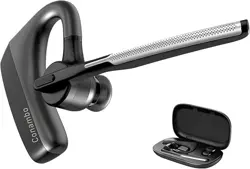
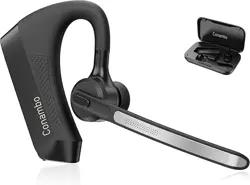
Model: CNB100 (DE-JBT100)
Overview

The Conambo JBT100 is a wireless, single-ear Bluetooth headset designed for hands-free communication. It features noise cancellation technology, a long-lasting battery, and is intended for use with cell phones, computers, and other Bluetooth-enabled devices in environments such as offices, homes, and vehicles.
Key identifiers for your headset include the model number CNB100 or DE-JBT100.
Features & Specifications
Technical Specifications
- Bluetooth Version: 5.1
- Wireless Range: Up to 39 feet (12 meters)
- Noise Reduction: CVC 8.0 & ENC Dual-microphone Noise Cancelling
- Battery Capacity: 400mAh Lithium Polymer
- Talk Time: Up to 35 hours
- Standby Time: Up to 500 hours
- Charging Time: Approximately 3.5 hours
- Charging Port: USB Type-C
- Compatibility: iOS, Android, and other Bluetooth-enabled devices (cell phones, tablets, laptops, smart speakers).
- Weight: 6 ounces (170 grams)
Physical Features
The headset includes the following components:
- Adjustable Headband: Fits various head sizes.
- Rotating Microphone Boom: Can be positioned close to the mouth.
- Padded Ear Cushion: Made from soft protein leather for comfort.
- Control Buttons: Located on the rear of the earpiece.
- Blue Multifunction Button
- Volume Up (+) Button
- Volume Down (-) Button
- Mute Button
- USB Type-C Charging Port: Located on the bottom edge of the earpiece.
- Status LED Indicator: Shows pairing and battery status.
Use Guide
Charging the Headset
- Connect the provided USB Type-C cable to the charging port on the headset.
- Connect the other end of the cable to a USB power adapter or computer port.
- The LED indicator will light up during charging. A full charge takes approximately 3.5 hours.
Powering On/Off
- To Power On: Press and hold the Multifunction button for 2-3 seconds. You will hear a power-on tone and the LED will flash.
- To Power Off: Press and hold the Multifunction button for 4-5 seconds. You will hear a power-off tone.
Pairing with a Device (Initial Connection)
- Power on the headset. The LED will flash red and blue, indicating it is in pairing mode.
- On your smartphone, tablet, or computer, enable Bluetooth in the device settings.
- Search for available Bluetooth devices. Select "JBT100" from the list.
- If prompted for a PIN, enter 0000 (four zeros).
- Once connected, you will hear a confirmation tone and the LED will flash blue slowly.
Connecting to a Previously Paired Device
Once paired, the headset will typically reconnect automatically when both devices have Bluetooth enabled and are within range. If it does not, power on the headset and ensure Bluetooth is enabled on your device.
Answering and Ending Calls
- Answer a Call: Press the Multifunction button once.
- End/Reject a Call: Press the Multifunction button once.
- Ignore a Call: Press and hold the Multifunction button for 2 seconds.
Volume Control
- Increase Volume: Press the Volume Up (+) button.
- Decrease Volume: Press the Volume Down (-) button.
Using the Mute Function
During an active call, press the dedicated Mute button to silence your microphone. Press it again to unmute.
Pairing with a Second Phone (Multipoint)
The headset can be connected to two phones simultaneously.
- Ensure the headset is powered off.
- Press and hold the Multifunction button for 6-7 seconds until you hear "Pairing" and the LED flashes red and blue rapidly.
- Pair with the first phone as described in the "Initial Connection" steps.
- Power off the headset again.
- Repeat steps 2 and 3 to pair with the second phone.
- When both phones are paired, the headset will connect to the last used device. Incoming calls from either phone can be answered.
LED Indicator Guide
| LED State | Meaning |
|---|---|
| Flashing Red & Blue | Pairing mode active. |
| Slow Flashing Blue | Connected to a device. |
| Solid Red | Charging in progress. |
| Solid Green | Fully charged. |
| Flashing Red | Battery is low. Please charge. |
Care & Maintenance
- Clean the ear cushion and headband with a soft, dry cloth. Do not use harsh chemicals.
- Store the headset in a cool, dry place when not in use.
- Avoid exposing the headset to extreme temperatures, moisture, or direct sunlight for prolonged periods.
- The product is not water-resistant. Keep it away from liquids.
- To maintain the battery, it is recommended to charge the headset before it is completely depleted.
Troubleshooting
| Problem | Possible Solution |
|---|---|
| Headset won't power on. | Charge the headset for at least 30 minutes. Ensure the charging cable is properly connected. |
| Cannot pair with device. | 1. Ensure the headset is in pairing mode (LED flashing red/blue). 2. Ensure Bluetooth is enabled on your device. 3. Move the headset and device closer together. 4. Restart both the headset and your device. |
| Poor audio quality or echo. | 1. Ensure the microphone boom is positioned close to your mouth. 2. Move away from potential sources of wireless interference (other Bluetooth devices, Wi-Fi routers). 3. Ensure the headset is fully charged. |
| Headset disconnects frequently. | 1. Check the battery level. 2. Ensure you are within the 39-foot wireless range without major obstructions. 3. Disconnect other nearby Bluetooth devices that may cause interference. |
| Cannot connect to a PC. | PC Bluetooth implementations vary. Try the pairing process multiple times. If issues persist, consult your PC's documentation for Bluetooth compatibility. |
| Mute button not working. | The mute function is primarily designed for mobile phones. It may not be supported by all computer software or applications. |
Compliance & Safety
- This device complies with Part 15 of the FCC Rules. Operation is subject to interference that may cause undesired operation.
- Do not use the headset while driving if it distracts you from safe vehicle operation. Obey all local laws regarding hands-free devices.
- Contains a lithium polymer battery. Do not disassemble, crush, puncture, or expose to fire.
Warranty and Support
For warranty information about this product, please click here.
For technical support or product inquiries, contact the seller through your Amazon order details or visit the manufacturer's store page.