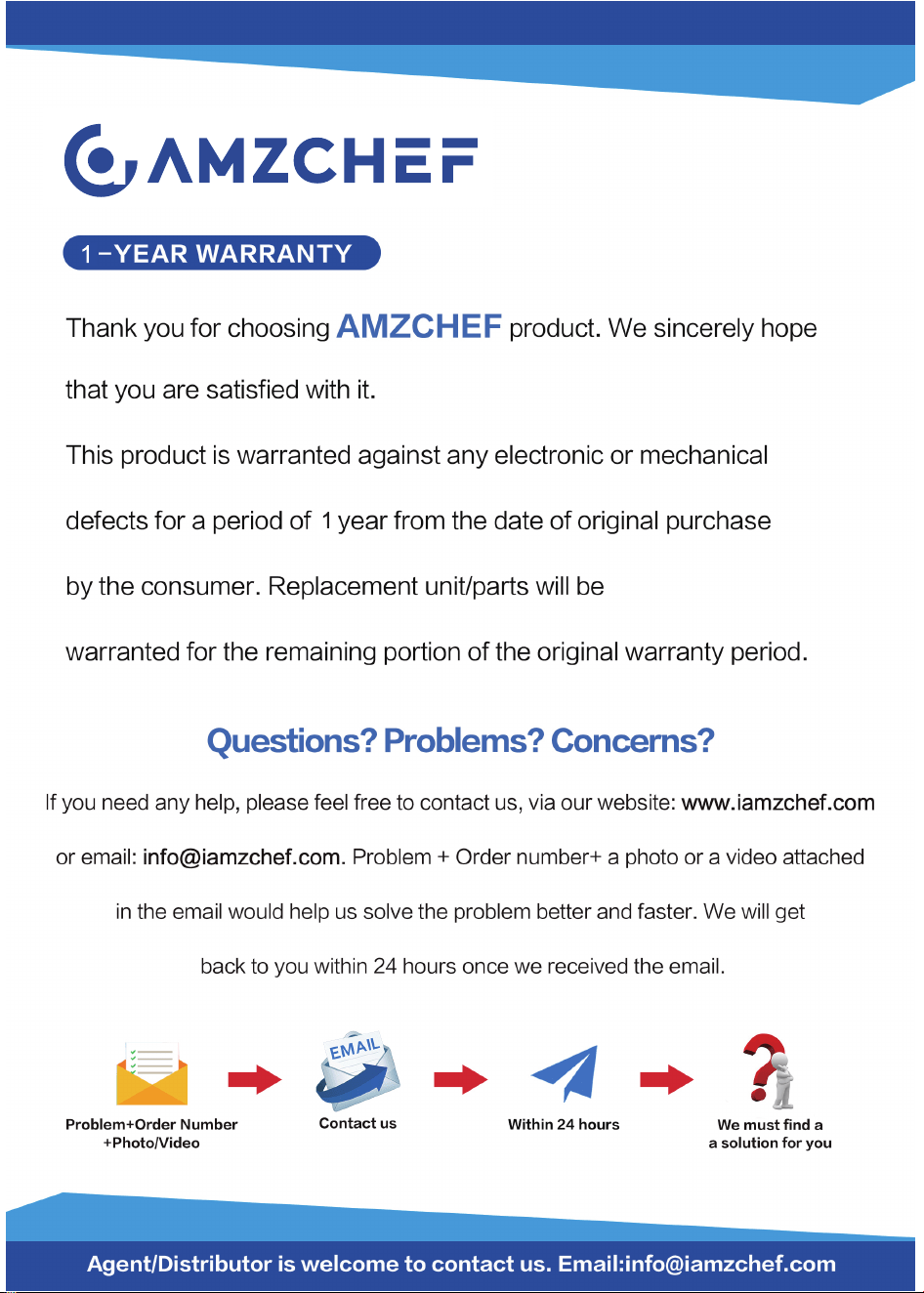
Brand: amzchef
Model: DT02
120V~ 60Hz 500W
USER
MANUAL
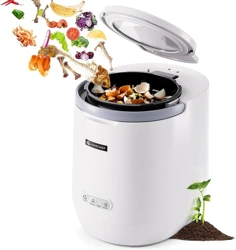
Food Waste Composter

Welcome to the Amzchef Family!
Cheers to you for owning a new Amzchef product!
We are devoted to making high-quality kitchen, home, and personal
care products for all our customers. As a respected manufacturer, all our
products adhere to rigorous standard, safety, and functionality.
We are dedicated to offering exceptional customer service, which is why
we provide a 1-year warranty on this product to guarantee your
satisfaction for years to come.
If you have questions or need assistance, please get in touch with us
via our website: www.iamzchef.com, or email: [email protected].
Problem + order number + a photo or a video attached in the email
would help us solve the problem better and faster.
Your thoughts and suggestions matter to us, so please don't hesitate to
email them at [email protected].
The Amzchef Team
PLEASE READ INSTRUCTIONS CAREFULLY BEFORE USE
RETAIN THIS MANUAL FOR FUTURE REFERENCE
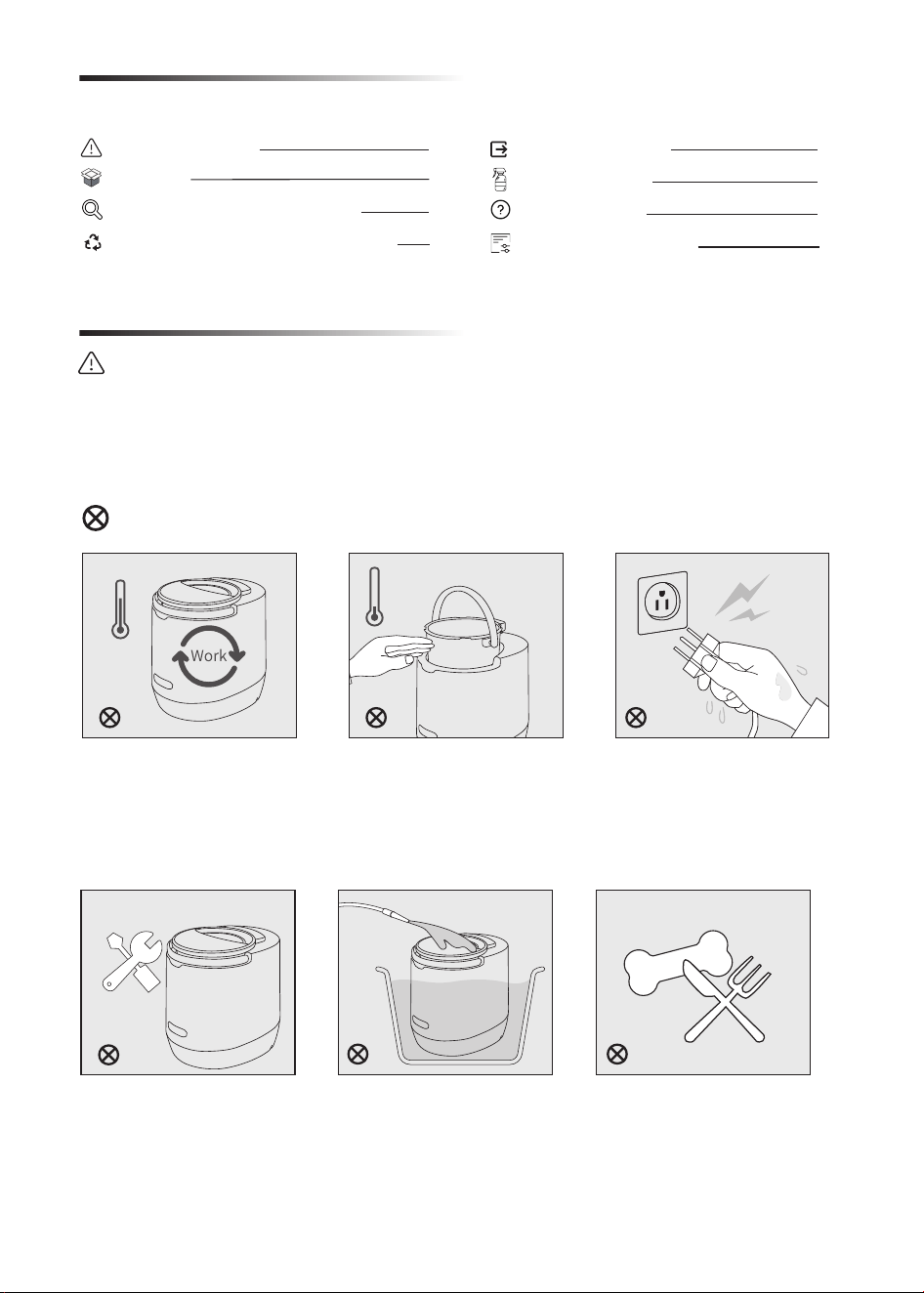
Table of contents
1
3
5
7
9
11
12
Safety Precautions
Prohibited categories
8
Acceptable & Prohibited Food Waste
Safety Precautions
WARNING:
Your safety is important to us. In order to reduce the risk of fire or electrical shocks when using this
product, please read all accompanying instruction material carefully before use. For your safety and
that of others, please strictly abide by the instructions.
Getting to Know Your Appliance
Cleaning & Care
Output Mangement
Troubleshooting
Technical Specification
Do not open the lid or
remove the bucket while it
is running. Always turn off
or unplug the unit before
opening.
Except for the official or
authorized technicians, do
not disassemble, repair or
change the unit to avoid
the risk of injury, fire or
electrical shocks.
Do not flush or submerge
the unit under water, do not
place the unit in areas
where water may leak to
protect against malfunctions
or electrical shocks.
Do not put in hard waste or
kitchenware (such as pork bone,
shell, dishes, forks or spoons etc.),
which could lead to product
malfunction. Refer to the Manual
Instruction for what can and can’t be
put in the unit.
Do not touch any hot
surfaces, always remove
the bucket with handles
after a cycle is completed
and cooled.
Do not touch or operate the
cord, plug or socket with
wet hand to protect against
electrical shocks.
Initial Use
1
Prohibited categories
Attention categories
WARNING:
• It is not recommended for the people with reduced physical or sensory capabilities, mental
abilities, or common sense, including children to use this device, unless they are able to use under
the supervision of an adult who understands the product and takes responsibility for their safety.
• Children should be supervised to ensure they don’t play with the product.
• In case of any damage to the power supply cord, which should be replaced by the manufacturer,
its service agent or a similarly qualified person approved in order to avoid any hazard.
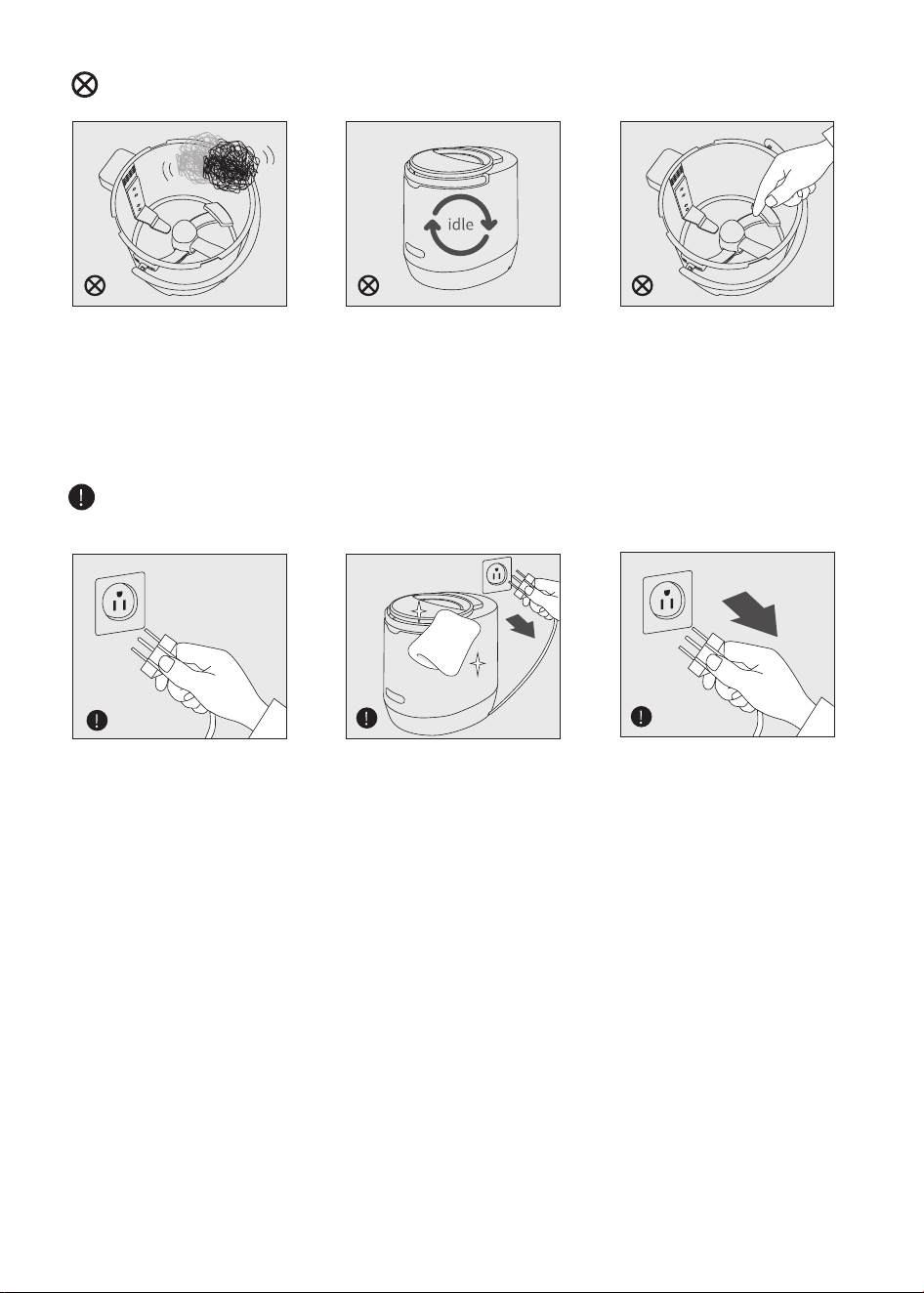
Do not use steel balls or
hard objects to scrub the
inner liner (may cause
scratches to the non-stick
coating).
Do not touch or clean the
blade with your hand to
prevent being cut or
scratched.
Make sure to use the plug
correctly, when unplugged
the power plug, be sure to
hold the plug, don’t pull the
cord.
Unplug the unit from the
socket when not in use,
and keep the unit properly.
Unplug the unit before
cleaning or replacing parts.
Do not idle the unit to avoid
product malfunctions or
burns out.
2
Please avoid letting the elderly, the infirm and children unpack or install the
product.
1. INSTALLATION
2. PREPARATION FOR USE
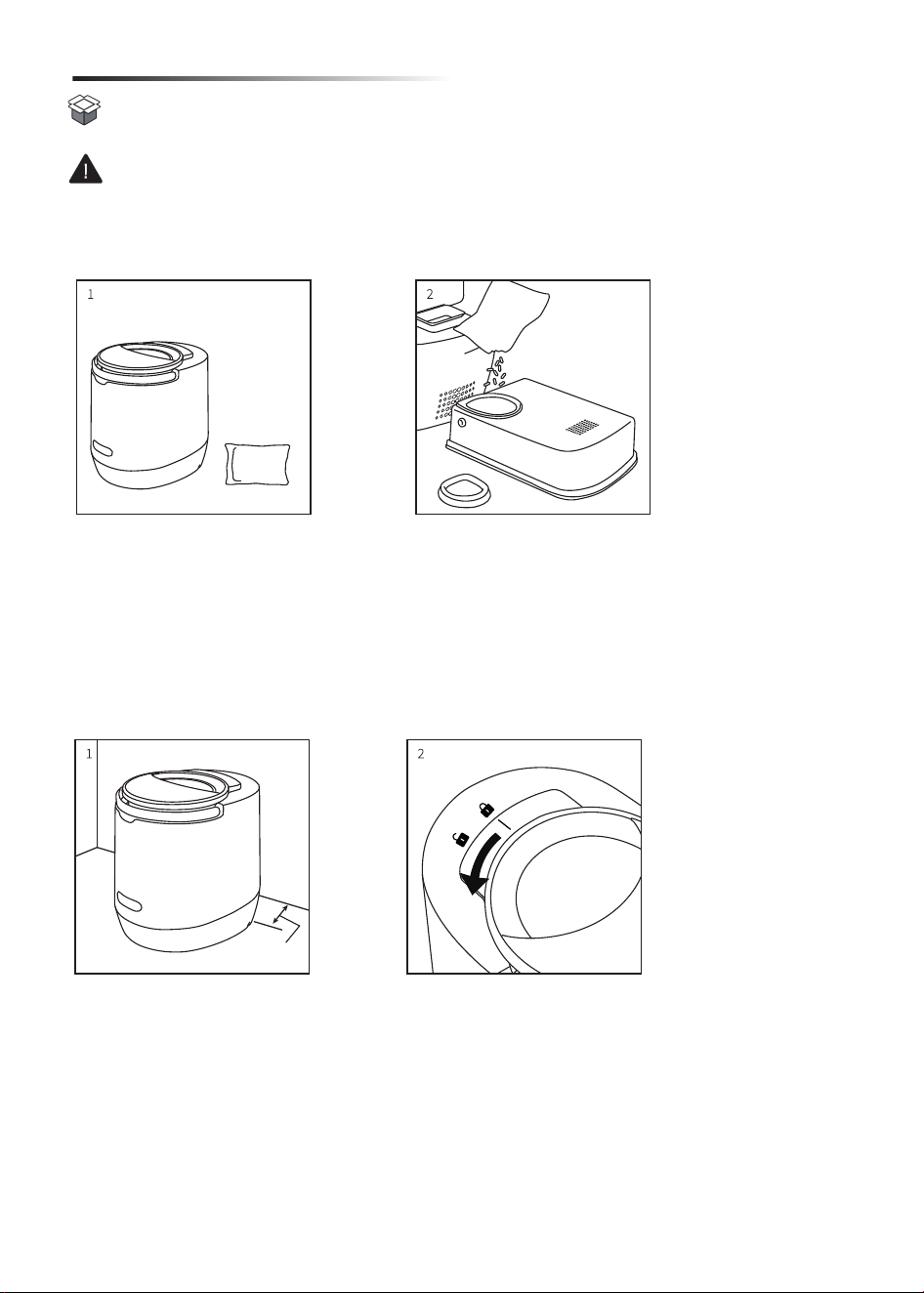
1. Before use, place the unit on a flat, dry and stable surface near the power supply, and
make sure to place it at least 4” (10 cm) away from the wall.
2. Rotate the lid to the position of the Unlock symbol, put in the food waste (and
microorganism if necessary), close the lid and rotate the lid to the position of Lock symbol
and make sure it is locked down.
1. Unpack the unit and take out the machine, activated carbon pack and other accessories.
2. Take the back filter box off the machine, open the silicon cover and fill in the activated
carbon, then close the cover and place the filter box back to the machine.
Initial Use
4”
10cm
3
2. PREPARATION FOR USE
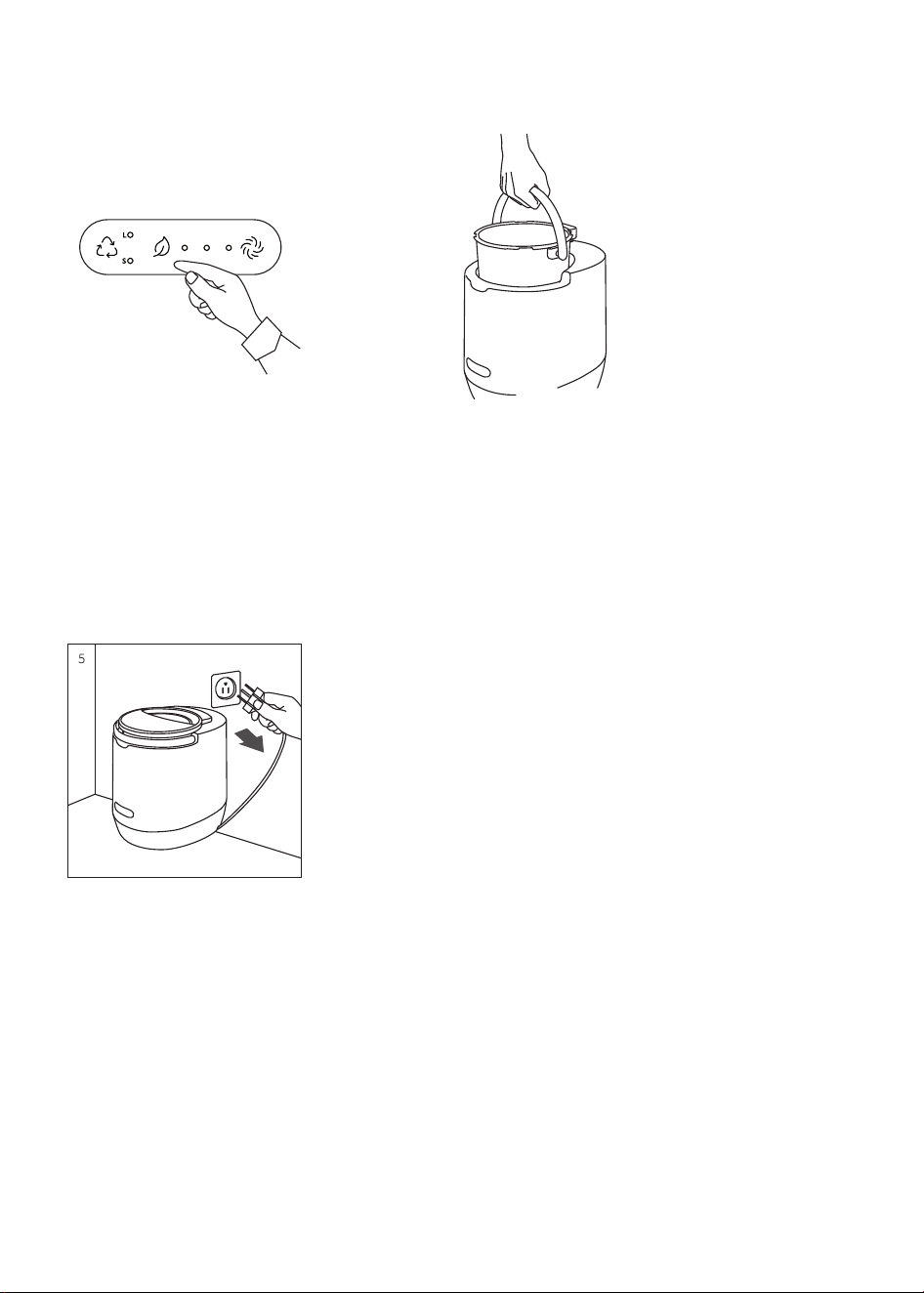
3. Plug the unit in, then press the mode button to select a function, after which the machine
will start operating. (If you notice a beeping noise and a red LED blinking, it could mean the
lid is not secured or the bucket is not properly positioned.)
4. Once the cycle is complete, the machine will beep once. Always grasp the handle when
lifting the bucket. To avoid scalding, do not directly touch the side and bottom; instead, use a
thick cloth to protect your hands or allow the bucket to cool before emptying or pouring its
contents.
5. After use, cut off the power supply, tuck the unit into any corner of your kitchen.
4
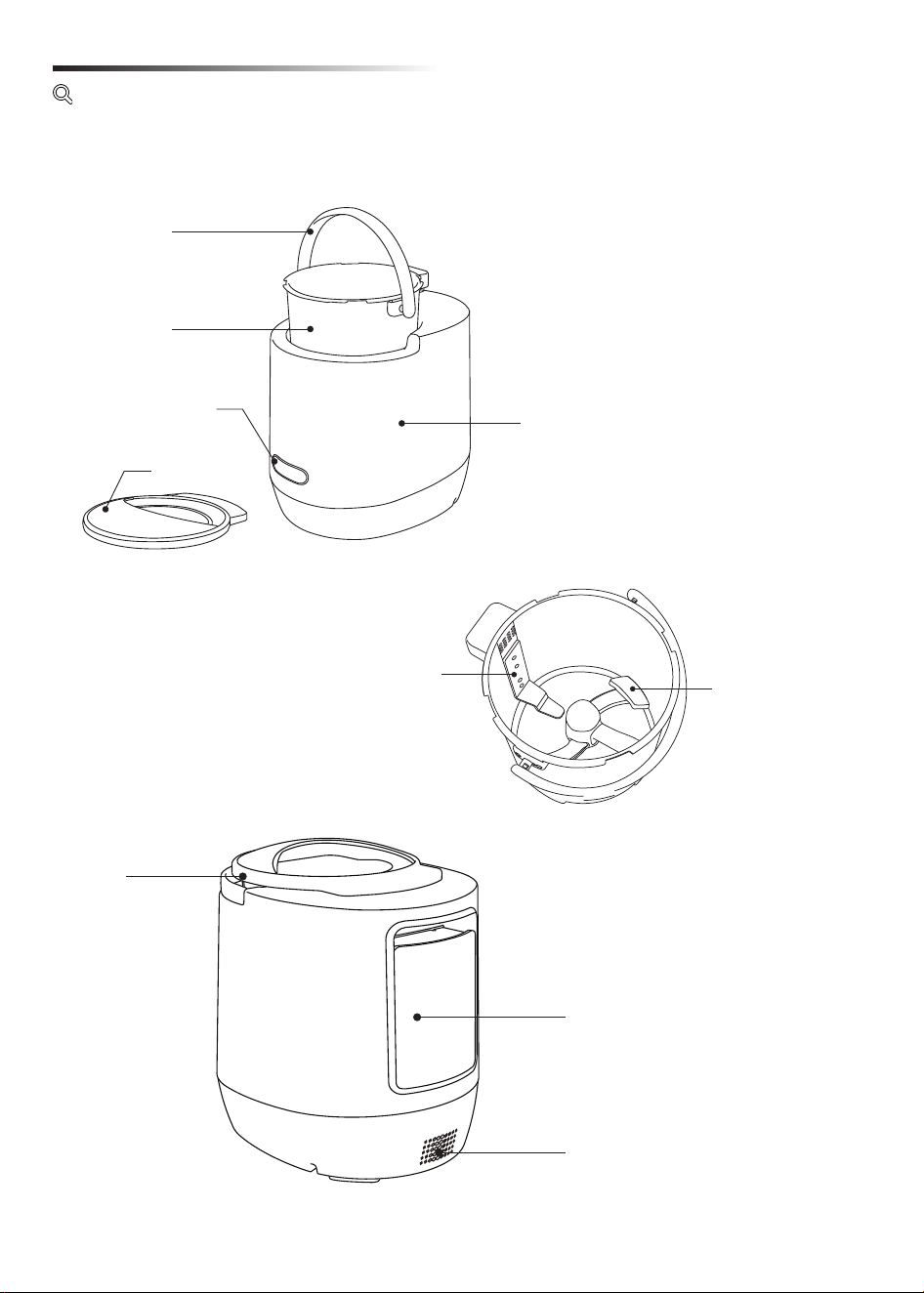
Overview
Getting to Know Your Appliance
Handle
Bucket
Control Panel
Lid
Lid
Housing
Filter Box
Rotating Shaft
Fixed Blade
Air outlet
5
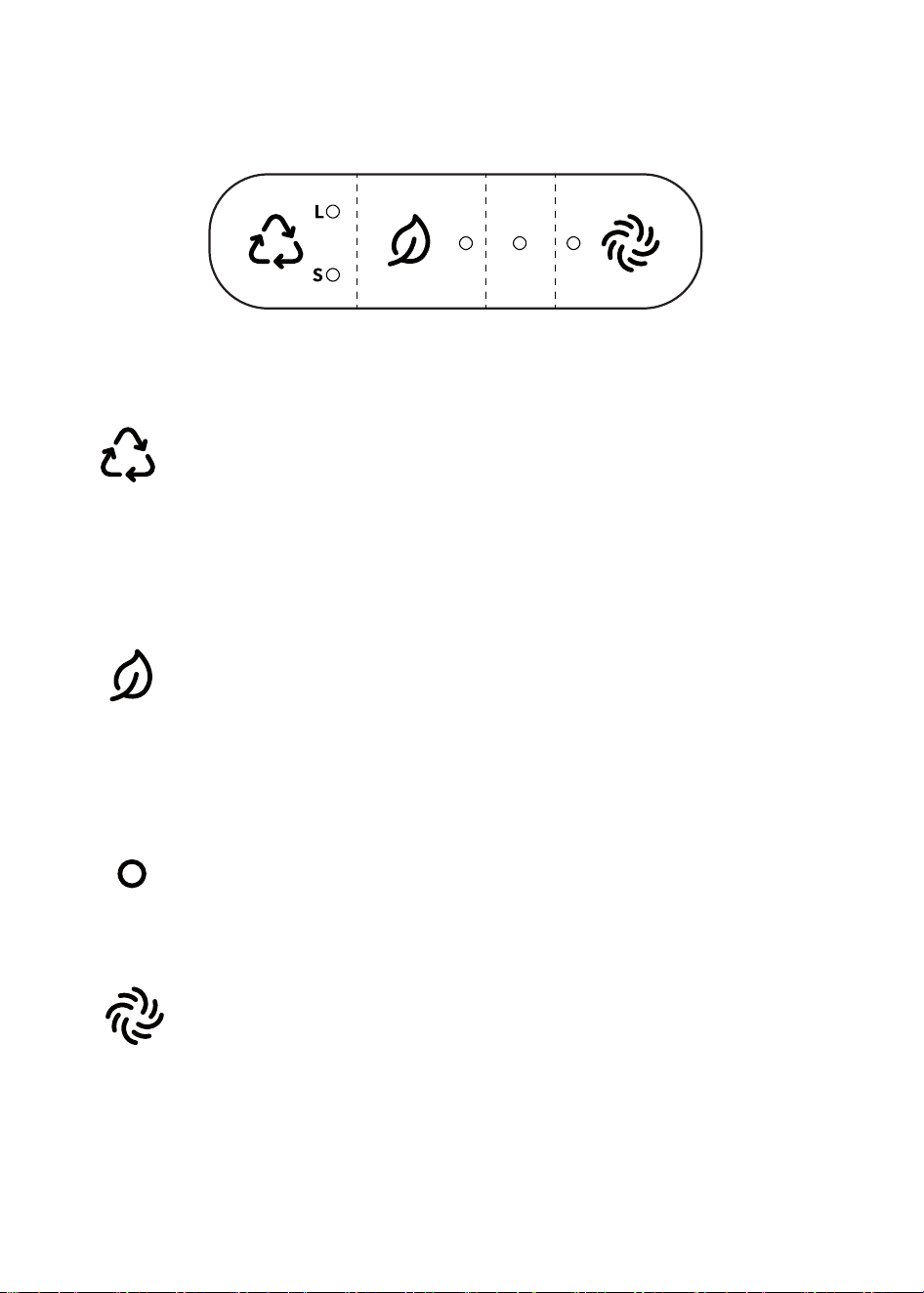
Control Panel
Disposing Composting Abnormal
Alarm
Self-cleaning
Disposing:
Composting:
1. Press button, and the machine will start operating in 3 seconds.
2. During the cycle, hold down button for 3 seconds to cancel it.
* We suggest adding a maximum of 800g of food waste for each composting
cycle, and then add 30g (≈3 scoops) FPS to the food waste. This mode can
produce high quality compost after 24 hours.
Abnormal Alarm:
If the LED light blinks red, it might suggest that the lid is not properly locked,
the bucket is out of place, or food waste has become stuck.
Self-Cleaning:
1. Press button, and the machine will start self-cleaning in 3 seconds.
2. During the cycle, hold down button for 3 seconds to cancel it.
* Fill clean water up to the water line beforehand, and do not run it when it
is empty.
1. Press button to choose mode S or mode L. Press button again to switch
another mode.
Mode S: less than 500g, takes 4 hours
Mode L: 500g~1.5kg, takes 7 hours
2. After selecting, the unit will start operating in 3 seconds.
3. During the cycle, hold down button for 3 seconds to cancel it.
6
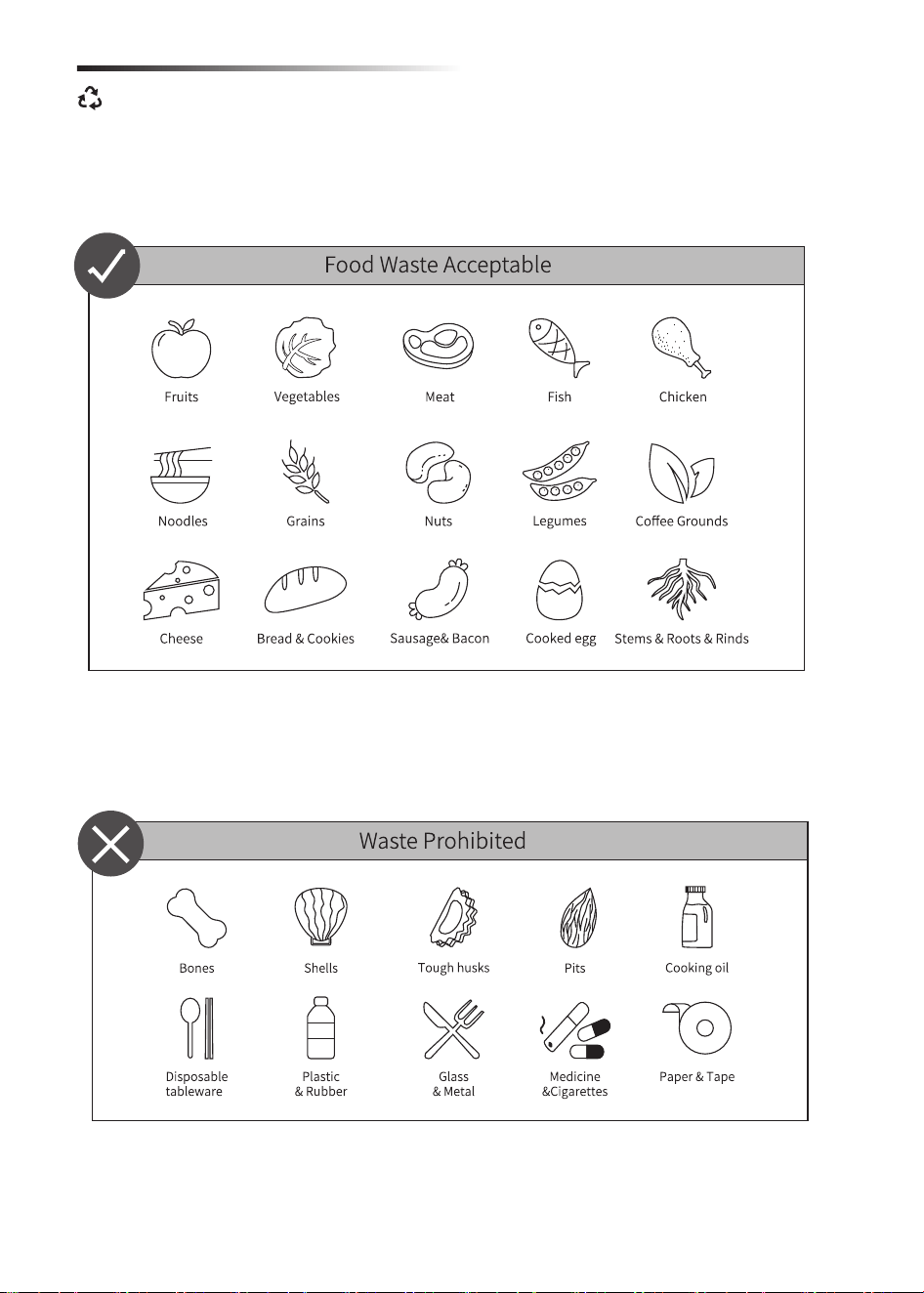
• You will achieve ideal cycle results if your cycle contains a variety of food wastes.
• Moisture-rich foods may result in moist by-product. If this is the case, we
recommend running another cycle.
• Large items such as corn husks and melons should be cut up into pieces no
larger than the length of your thumb.
• Make sure to cut up rigid stems/fibrous vegetables (e.g. flower stems, broccoli
stems, kale stems etc.) so that they don’t get stuck during grinding.
• It would cause the machine malfunction if put in the prohibited waste as listed
above.
Acceptable & Prohibited Food Waste
7
1. OUTPUT AFTER DISPOSING
Why do white molds appear inside the output sometimes after planting?
2. OUTPUT AFTER COMPOSTING
After disposal, the end product is a dry form of organic matter that is unlikely to develop mold,
emit any smells, or draw in flies and pests. The dry output can be stored in the organics pick
up bin (better no more than 6 months). When the bin reaches capacity, dispose of it with
regular trash. The output can also be used in the composting process.
The filamentous white molds are called white actinomycetes. They can decompose lignin and
cellulose that are not easy to be decomposed. It tends to occur when the humidity is too high.
This also often happens during natural composting, which is a normal phenomenon if without
obvious odor. This can be improved by stirring the white molds to mix with soil and reducing
the frequency of watering.
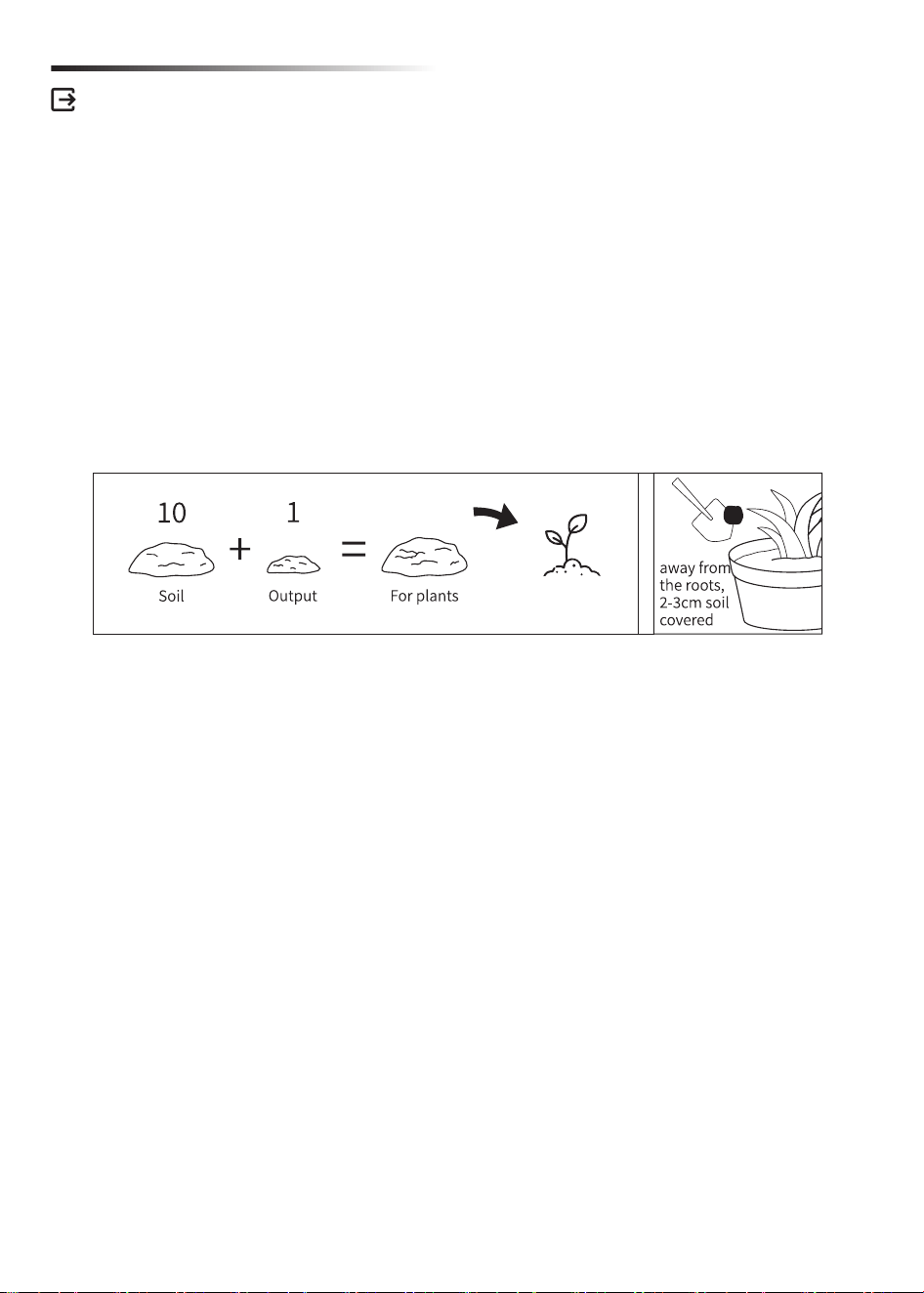
The compost comes out of the unit is nutrient-rich and can be used to feed your garden and
lawn in a ratio of 1 part compost to 10 parts soil. Do not directly feed with the compost only.
Output Management
8
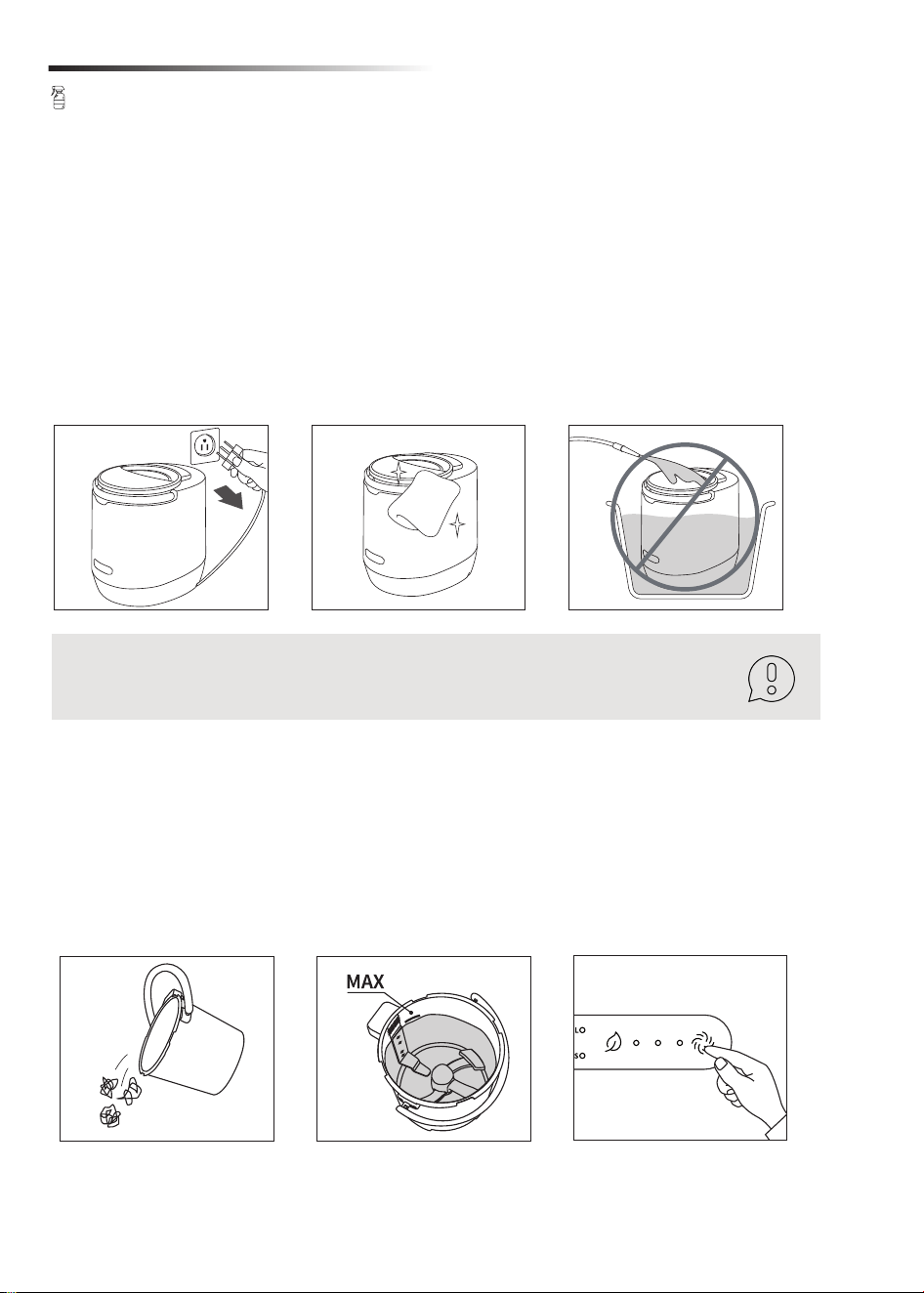
1. HOW TO CLEAN THE HOUSING
2. HOW TO CLEAN THE BUCKET
It is important to know how to clean the unit so that it stays looking great and also continues
to perform as its best.
We recommend cleaning the housing once a month or as frequently as you would clean any
other kitchen appliance. Simply wipe with a damp dish cloth, then use a dry cloth to remove
excess moisture.
If the unit is particularly dirty, add a small amount of dish soap to you cleaning process, finally
use a dry cloth to remove excess moisture.
The unit provides a Self-Cleaning function. Add clean water to the water line inside the
bucket, press Self-Cleaning button, and the unit will start the Self-Cleaning process.
After the process completed, dispose of the dirty water. The bucket can be conveniently
taken out and cleaned manually or put in the dishwasher for a more comprehensive wash.
Ensure the bucket is free from any excess dirt/particles before using Self-Cleaning function
or placing in the dishwasher.
NEVER flush or submerge your unit under water. There are electrical components and any
excess water would cause significant damage and could cause electric shock.
For your safety, before cleaning or replacing components, make sure the
unit is unplugged-in.
Cleaning & Care
9
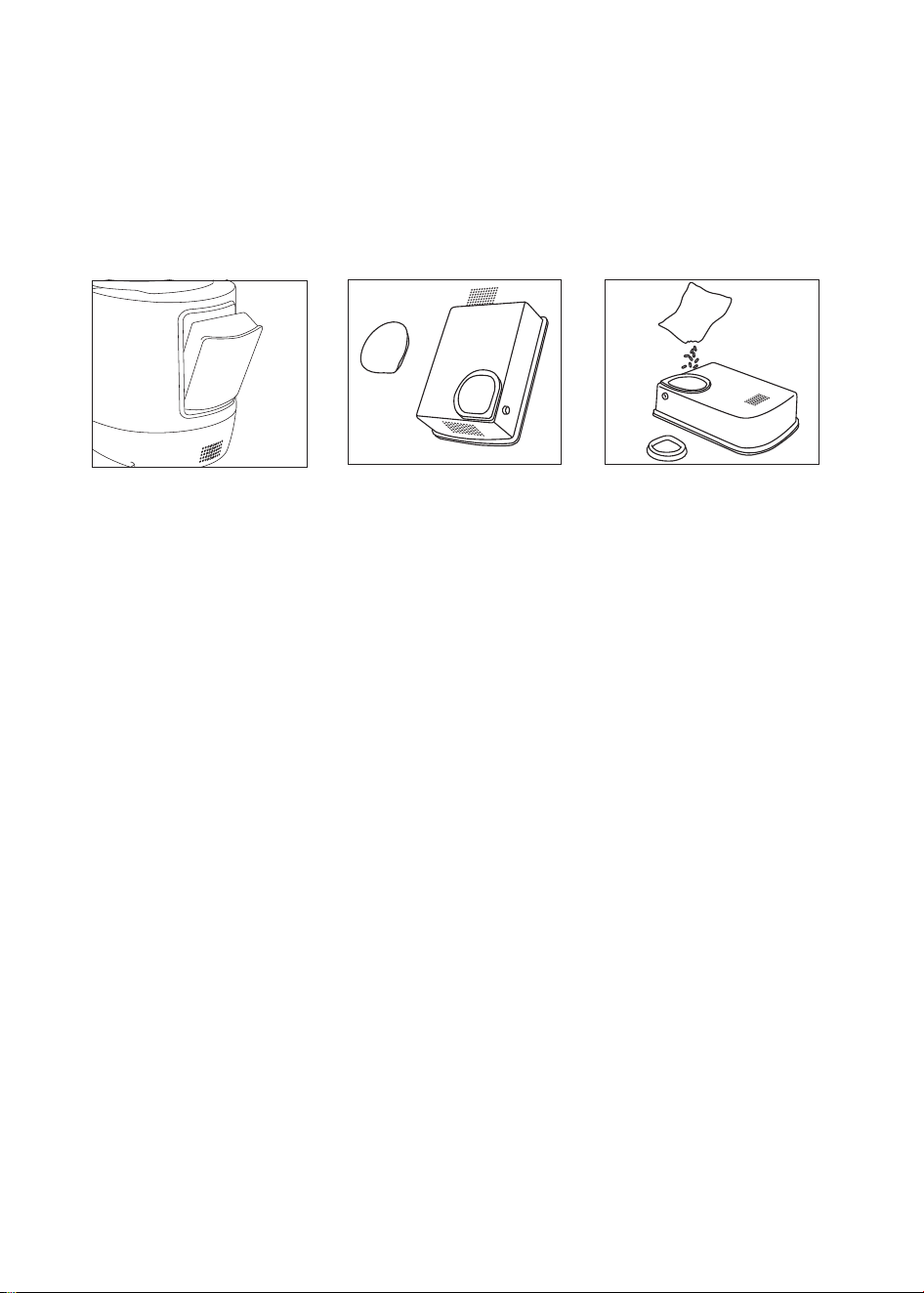
3. HOW TO CHANGE ACTIVATED CARBON REFILLS
We recommend to change activated carbon refills every 3 months depending upon your
usage.
Remove the back filter box, open the silicone cover, clear out the used activated carbon, put
in new refills, close the cover, then close the cover and reattach the filter box.
Please contact the official website or other authorized channels to purchase the activated
carbon pack.
10

Noises during the cycle are normal. While the majority of cycles are quiet, particularly the
dense, fibrous or moisture-rich food waste in a cycle can cause the bucket to make
sounds as it processes food waste.
Do not leave any foreign object, such as spoons, forks and knives in the bucket as this
will damage the blades and other components when starting the unit and may cause
injury.
5. I'm hearing clunking/squeaking sounds during the cycle, is it normal?
Ensure to select the right mode (S or L) depending on the volume/weight of food waste
(details refer to the User Manual). If the food waste (such as cucumbers, watermelon,
celeries etc.) contains too much moisture, it is recommended to start a new cycle.
6. Why does the output still feel wet after a cycle completed?
It is normal to have residue in the base and sides of the bucket after some cycles. Simply
empty the contents of the finished cycle or use the Self-Cleaning function to clean the
bucket. If adding food waste with too much starch content (such as potatoes, corns, rice,
oats etc.) resulted in sticky substances at the bottom or the sides of the bucket, it is
recommended to wash the bucket by hand with mild soap.
7. When do I need to clean the bucket?
The unit can be used in any indoor areas with a power outlet and sufficient space (such as
kitchen, laundry, basement, etc.). Ensure the unit is place on a flat and dry surface. Do not
place the unit on or near any hot gas or electric burners, in an oven, next to heaters, or
where it could touch any other source of heat.
It is not recommended to leave unprocessed food waste in the unit for long periods of
time. The carbon filters odor control is not active while the unit is not processing. Leaving
unprocessed food waste in the unit for too long time will generate odors, methane gas,
and may attract fruit flies and/or other pests.
It is not recommended to put in frozen food in the unit as it’s too hard, and may cause
blocking. Also, during composting process, too low temperature caused by the frozen
food may lead the microbial bacterial to enter a dormant state.
The unit is designed to have this setting for safety purpose. The unit will only be working
when the lid is closed well and bucket is placed properly.
Troubleshooting
1. Where should I store the unit?
2. Can I store unprocessed food waste in the unit?
3. Can I put frozen food in the unit?
4. Why does the unit stop working once I open the lid or remove the bucket?
11
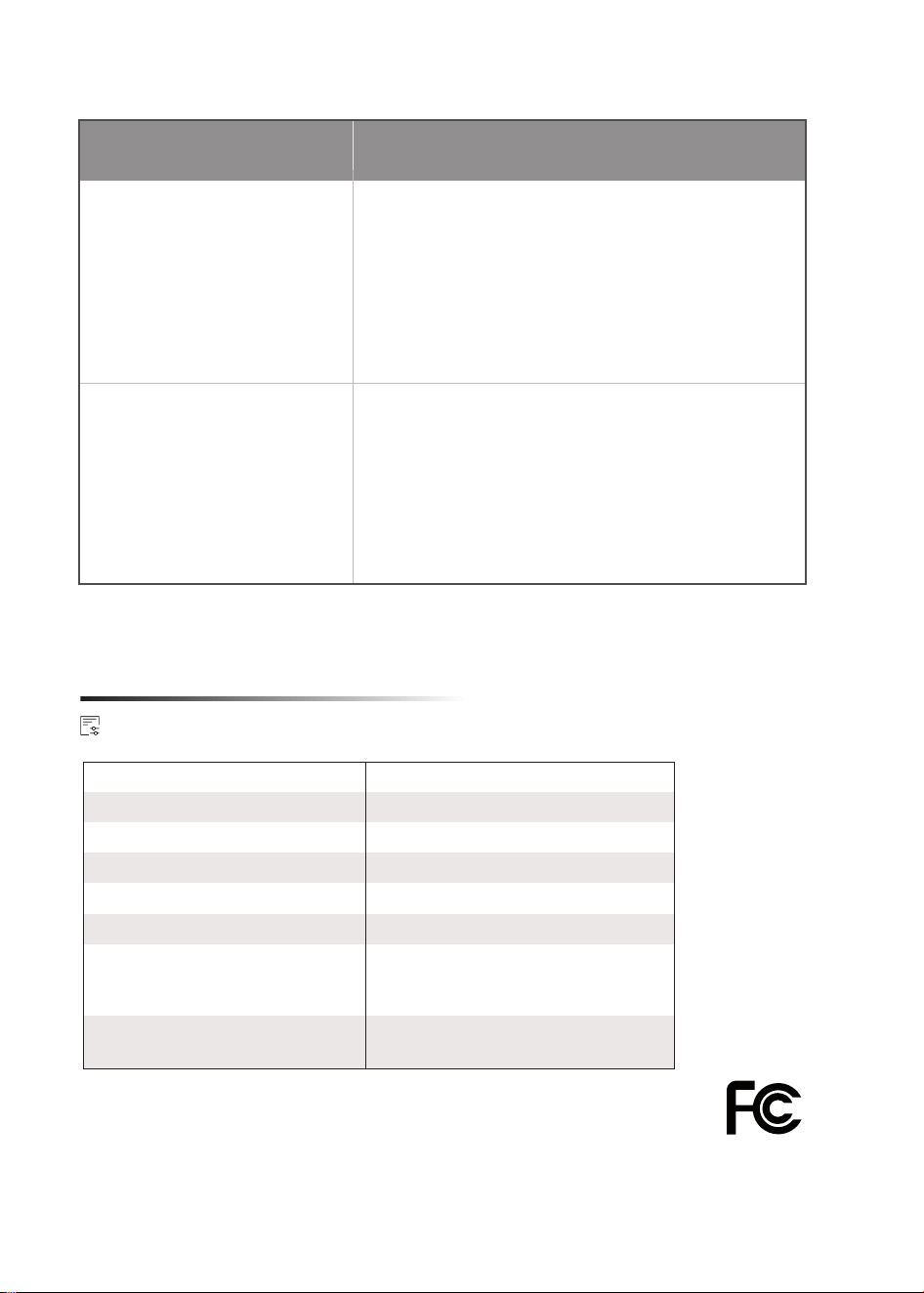
When the LED light flashes red while you hear beeping sound, it might be due to lid
not being locked or the bucket not being placed back in place.
Reason Solution
Mixing shaft is
blocked.
Cut off the power first.
Open the lid and check if the mixing shaft
gets stuck with something hard (e.g. hard
bones, pits, shells, etc.). If it does, clean
them up.
Then re-connect the power supply, press
function button to re-start the process.
The lid is not being locked
or the bucket is not being
placed back in place.
Rotate the lid to the position of Locked
symbol and ensure it is locked down.
Then check if the handle is placed well
or any gap left between the bucket and
the machine body, be sure the bucket is
placed in position.
If still not resolved, restart the machine.
If after reviewing the Troubleshooting section, the problem is not resolved, do not
attempt to repair or disassemble the unit yourself.
Please contact the after-sales service for assistance.
Manufacturer: Hangzhou Yongyao Technology Co., Ltd.
Add: No.10, Xinghu Road, Huanghu Town, Yuhang District, Hangzhou City, Zhejiang, China
Tel: +1 (838) 910 8317 E-Mail: [email protected]
Technical Specification
Rated Power
Model
Rated Frequency
Voltage
Product Capacity
Max Processing Capacity
Working Time
Product Dimension
500W
DT02
120V~
60Hz
4L
1.5KG
315mm×240mm×335mm
12.4”x9.5”x13.2”
Disposing (4-7 hours)
Composting (24 hours)
Self-Cleaning (20 minutes)
12