ST5 Temperature Sensors Kit
H5Lite-ST5D
Introduction
2
.............................................................................................................................
What’s in the Box
3
.................................................................................................................
Product Parameter
4
...............................................................................................................
Setup
10
...........................................................................................................................................
Mounting
5
..................................................................................................................................
12
......................................................................................................
How the System Works
......................................................................................................
Troubleshooting 16
....................................................................................................................
Customer Service 17
..................................................................................................................
Precautions and Disclaimer 18
.............................................................................................
FCC Statement 20
........................................................................................................................
Warranty 23
....................................................................................................................................
Content
Introduction What's in the Box Product Parameter
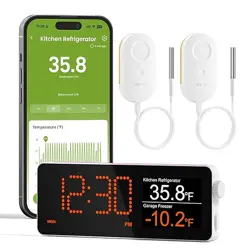
• H5Lite: The H5Lite is a device that helps manage MOCREO
sensors and connects to the Internet through Wi-Fi (2.4GHz). It
has a screen where you can see sensor data, history charts, and
other information in real-time.
• ST5: The ST5 is a wireless temperature sensor with an external
probe, used to measure the ambient temperature, in spaces like
refrigerators and freezers.
The ST5 Temperature Sensor will measure the ambient tempera-
ture through the external probe and send the data to the
H5Lite Hub wirelessly.
The H5Lite connects to the Internet through Wi-Fi (2.4 GHz)
and updates the data to the MOCREO Cloud. Users can access
the sensor's data through MOCREO Smart App no matter where
they are.
Device Body
Specifications
Model
Wireless Connection
Communication Range
Dimensions
Weight (Including Probe)
Battery (Rechargeable)
Size of Stainless Steel Shell
Cable Length
Cable Cross Section
Probe Measuring Rage
Temperature Accuracy
ST5
Bluetooth
131 ft (40 m) (Open space, no obstructions)
2.4 x 2.4 x 0.7 in
2.93 oz
3.7V 1800mAh Lithium Battery
0.24 in (6 mm) diameter
4.9 ft (1.5 m)
0.16 × 0.05 in
-40° - 221°F(-40° - 105°C)
±0.9°F (14° - 185°F)
Specifications
Specifications
Rotary Encoder × 1, Side Button × 1
2-inch, 320 × 240 IPS display, non touch
7-segment 4-digit clock display
2.4GHz(not support 5GHz Wi-Fi)
BLE 5.0
5.01 × 0.54 × 1.80 in
1.93 oz
DC 5V/1A
Temperature Probe (Optional)
Ports
Physical Button × 2
LCD Display (W × H)
LED Dot Matrix
Wi-Fi
Bluetooth
Overall Dimensions
Weight
Type-C × 1
Type-C × 1
Function
Button
Display
Network
Dimensions
Weight
Power
External Probe lntertace
(1) Add H5Lite
(2) Add ST5 Sensor
USB Type-C Power Port
External Probe
lntertace
LED Dot Matrix
LCD Screen
Rotary Encoder: The rotary button allows moving the selec-
tion box up and down the screen, and pressing the button
confirms the selection.
Side Button: Return to the previous interface.
Button Functionality
Side Button
Rotary Encoder
1
8
9
2
Mounting Setup
10 11 12 13 14 15
3 4 5 6 7
1. H5Lite
2.ST5 Sensor
❶Download MOCREO Smart App
Open the MOCREO Smart App, follow the instructions
provided by the app, and complete the H5Lite addition
process.
❷Add Device
We offer two mounting methods:
Desktop Stand
Adhesive Mounting
1. Pass the power cord through the hole of
the desktop stand.
2. Insert into the POWER port.
3. Mount the H5Lite to the desktop stand.
1. Insert the power core into the POWER port.
2. Stick the adhesive strips to the two bumps
on the back of the H5Lite.
3. Attach H5Lite to the wall.
16 17 18 19 20 21 22 23
(v1.3)
Troubleshooting Customer Service Precautions and Disclaimer
1. H5Lite is offline
(1) Verify the power supply.
(2) Check the network status.
Within the H5Lite LCD Display, troubleshoot according to the
following path:
Settings >>> Network& Internet >>> Network Diagnostics
2. Sensor is offline
Navigate to the H5Lite LCD screen, scroll the "
Rotary Encoder
"
to the offline sensor’s card, and enter the sensor troubleshoot-
ing page.
Search for "MOCREO Smart" on Google Play/ App Store or
scan the QR code below to download the MOCREO Smart
App and register your MOCREO account on the app.
Google Play MOCREO Smart AppApp Store
Welcome to MOCREO smart
No device found.Click the top right corner to add.
My Home > My Home >
All
Add Devices
Hub
All
Wi-Fi Hub
Wi-Fi Hub
H5LITE
F
F
Open the MOCREO Smart App, follow the instructions
provided by the app, and complete the ST5 Sensor addition
process.
Add Devices
Hub
Sensor
Wi-Fi Hub
Temperature
Sensor
ST5
H5LITE
My Home >
All
All
Wi-Fi Hub ST5 Sensor
My Home >
All
Wi-Fi Hub
F
F F
How the System Works
Search [ MOCREO ] on YouTube to watch the setup video tutorials.
User Guide Manual
+1 (530) 988-8608
https://doc.mocreo.com/
MOCREO Sensor
Precautions for Use
To ensure the normal use of the product, please pay attention
to the following situations:
• lt is recommended to install the H5Lite in a high place.
• Do not expose the Device to high temperatures, humidity, or
dusty environments.
• Do not place the Device near flammable materials.
• Do not put heavy objects on the Device or use it as a support.
• Children should not use the Device without adult supervision.
FCC Statement
FCC ID (Sensor): 2A36D-ST4
FCC ID (H5Lite): 2BFZL-H5LT
This device complies with part 15 of the FCC Rules. Operation
is subject to the following two conditions:
• This device may not cause harmful interference.
• This device must accept any interference received, including
interference that may cause undesired operation.
Warning: Changes or modifications not expressly approved by
the party responsible for compliance could void the user's
authority to operate the equipment.
Note: This equipment has been tested and found to comply
with the limits for a Class B digital device, according to part 15
of the FCC Rules.
These limits are designed to provide reasonable protection
against harmful interference in a residential installation. This
equipment generates uses and can radiate radio frequency
energy and, if not installed and used in accordance with the
instructions, may cause harmful interference to radio communi-
cations.
However, there is no guarantee that interference will not occur
in a particular installation. lf this equipment does cause harmful
interference to radio or television reception, which can be
determined by turning the equipment off and on, the user is
encouraged to try to correct the interference by one or more of
the following measures:
• Increase the separation between the equipment and the
receiver.
• Connect the equipment to an outlet on a circuit different from
that to which the receiver is connected.
• Consult the dealer or an experienced radio/TV technician for
help.
Warranty
MOCREO products enjoy a 12-month limited warranty (starting
from the date when the customer receives the product), which
applies only to hardware components of the device that are not
subject to accident, misuse, neglect, fire, or other external
causes, alterations, or repair.
Disclaimer
The contents about how to use the product and the App
guidance are only for reference; please refer to the actual
situation for specific applications. If there is something different
from the instructions during using the product, please contact
MOCREO Support for updates.
This product is for detecting and monitoring only. MOCREO is
not responsible for any property damage or other consequenc-
es of the use of this product.
Provide power to your H5Lite.
Make sure Bluetooth is ON so you
can add the device to the app.
1. ST5 Temperature Sensor
F
50.8
50.8
5V 1A
Charging
Port
Setup
Pinhole
3.5mm
Probe
Port
Indicator
Light
(Built in)
N/A
Inductive
Probe
3.5mm
Male Plug
Sensor Probe
4.9ft Probe
Cable x2
Velcro
x2
Pin Clip
x1
Probe/Cable
Clip x4
Double Sided
Tape x4
Power
Adapter x1
Micro USB
Cable x1
USB Type A
-Type C x1
Desktop
Stand x1
H5Lite x1
User Manual x1
ST5 Sensor x2
ST5 Temperature Sensors Kit
H5Lite-ST5D