USER MANUAL
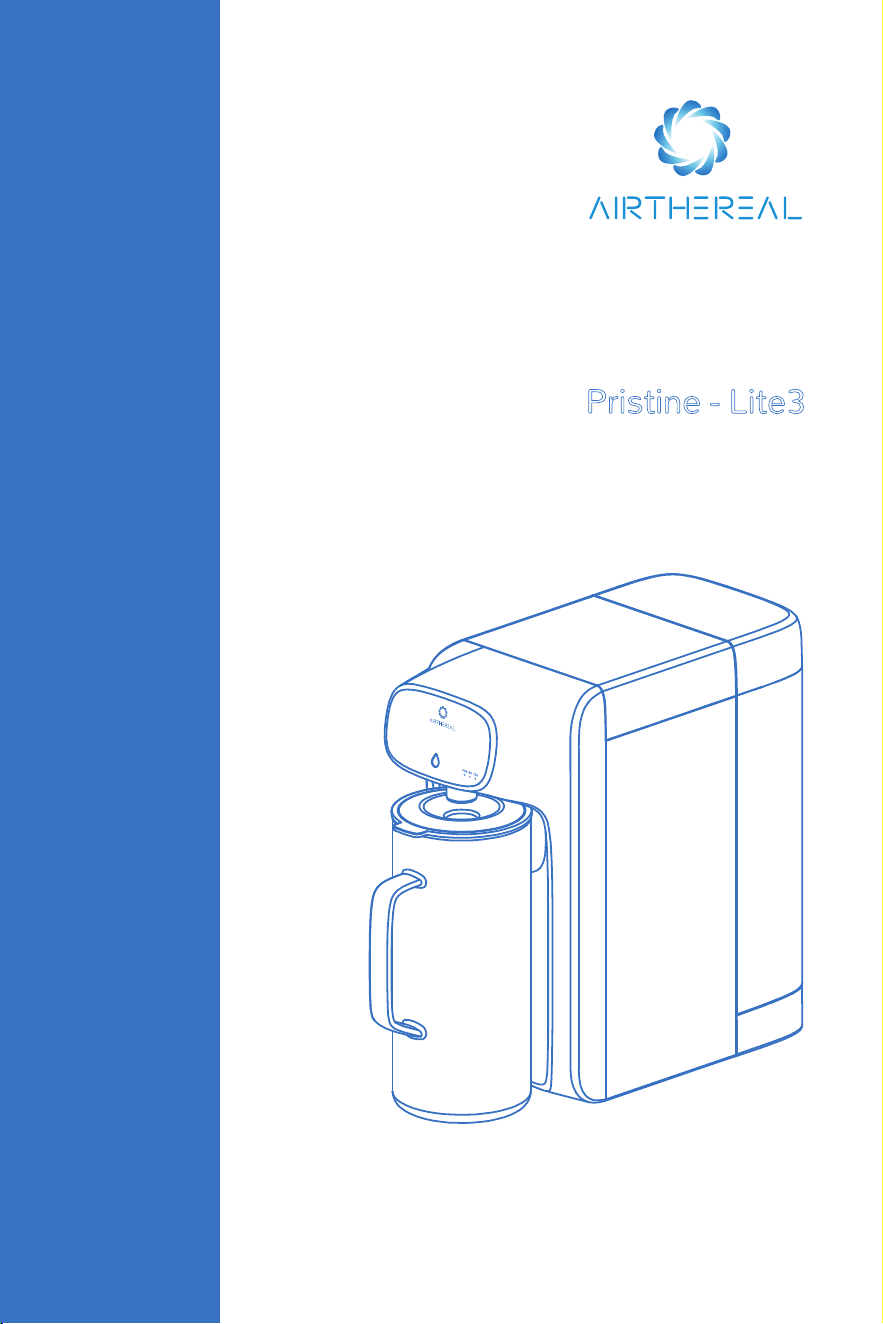
REVERSE OSMOSIS
WATER PURIFIER
Pristine - Lite3
Please read this user manual in its entirety
before use and keep it for future reference.

CONTENTS
SAFETY INSTRUCTIONS
SPECIFICATIONS
COMPONENTS
GETTING STARTED
MAINTENANCE
TROUBLESHOOTING
LIMITED WARRANTY
······································································ 02
·················································································· 03
······················································································ 03
·············································································· 04
····················································································· 05
··········································································· 06
············································································ 08
1

2
SAFETY INSTRUCTIONS
IMPORTANT SAFE GUARDS: To avoid the risk of serious injury when using your
Reverse Osmosis Water Purifier, basic safety precautions must be followed, including
but not limited to the following.
All contents in this chapter are related to safety, users must comply with it.
To protect against electric shock, do not place the power adapter, cord, base unit, or
electronic module in water or other liquids.
Keep out of reach of children. Do not let children operate the machine.
Do not operate any appliance with a damaged electrical cord or plug or after the
appliance malfunctions or has been dropped or damaged in any manner. If the power
adapter cord is damaged, it must be replaced.
Do not try to repair the machine yourself. If you have any problems, please contact
Airthereal customer service for help.
Use only factory-authorized replacement parts. The use of unauthorized replacement
parts may degrade both the safety and the performance of this product and will void
the limited warranty.
The appliance must be dry before connecting to electrical power and be dry and free
of leaks during operation.
Avoid installing under direct sunlight and outdoor places.
Do not expose this appliance to an environment below 32°F.
Please make sure the temperature of the water source is 41-100°F.
Do not store flammable items near the machine.
When the machine will be inactive for more than 7 days, please empty the water tank
and unplug the power supply.
Regularly inspect product for water leaks as water leaks can cause property damage.
Please only use accessories and filter cartridges from AIRTHEREAL.
Unplug from the electrical outlet before cleaning or performing routine maintenance
(i.e.replacing the filter cartridge).
3
SPECIFICATIONS
Product Name
Model
Rated voltage
Rated Power
Inlet Water Temperature
Working Pressure
Pure Water Rate
Ambient Humidity
Ambient Temp
Reverse Osmosis Water Purifier
Lite3
DC 24V
43W
41-100°F
0.4Mpa-0.8Mpa
7 fl oz/min
≤90%
39-104°F
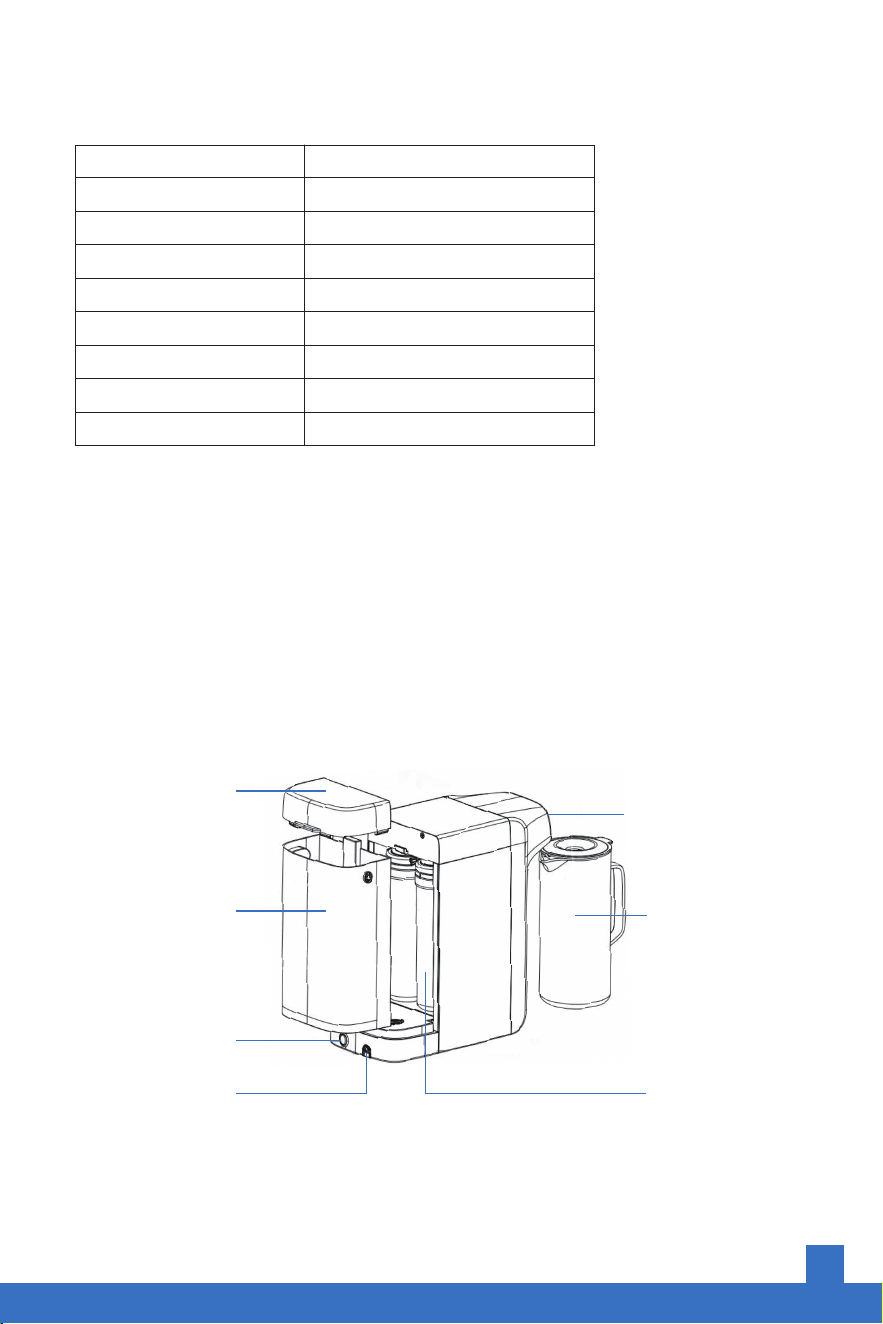
COMPONENTS
Water Tank Lid
Raw Water Tank
On/Off Switch
Adapter Connect
Indicator and Water
Outlet Button
Glass Pitcher
Filter
4
GETTING STARTED
Before First Use
1. Please wash the water tank and glass pitcher before first use.
2. Fill the water to the MAX volume line on the water tank.
3. Place the machine on a flat and stable surface that is within reach of a power outlet.
4. Ensure the filter is installed securely in its designated spot. (The filter is preinstalled
before delivery)
5. Plug into a power outlet and turn on the switch behind the machine. The display will
illuminate.
6. Press the water button until the light turns red and starts blinking. Empty the glass
pitcher and the water tank. This concludes one cycle of cleaning.
7. Repeat steps 2-6 in their entirety three times before using or drinking any water.
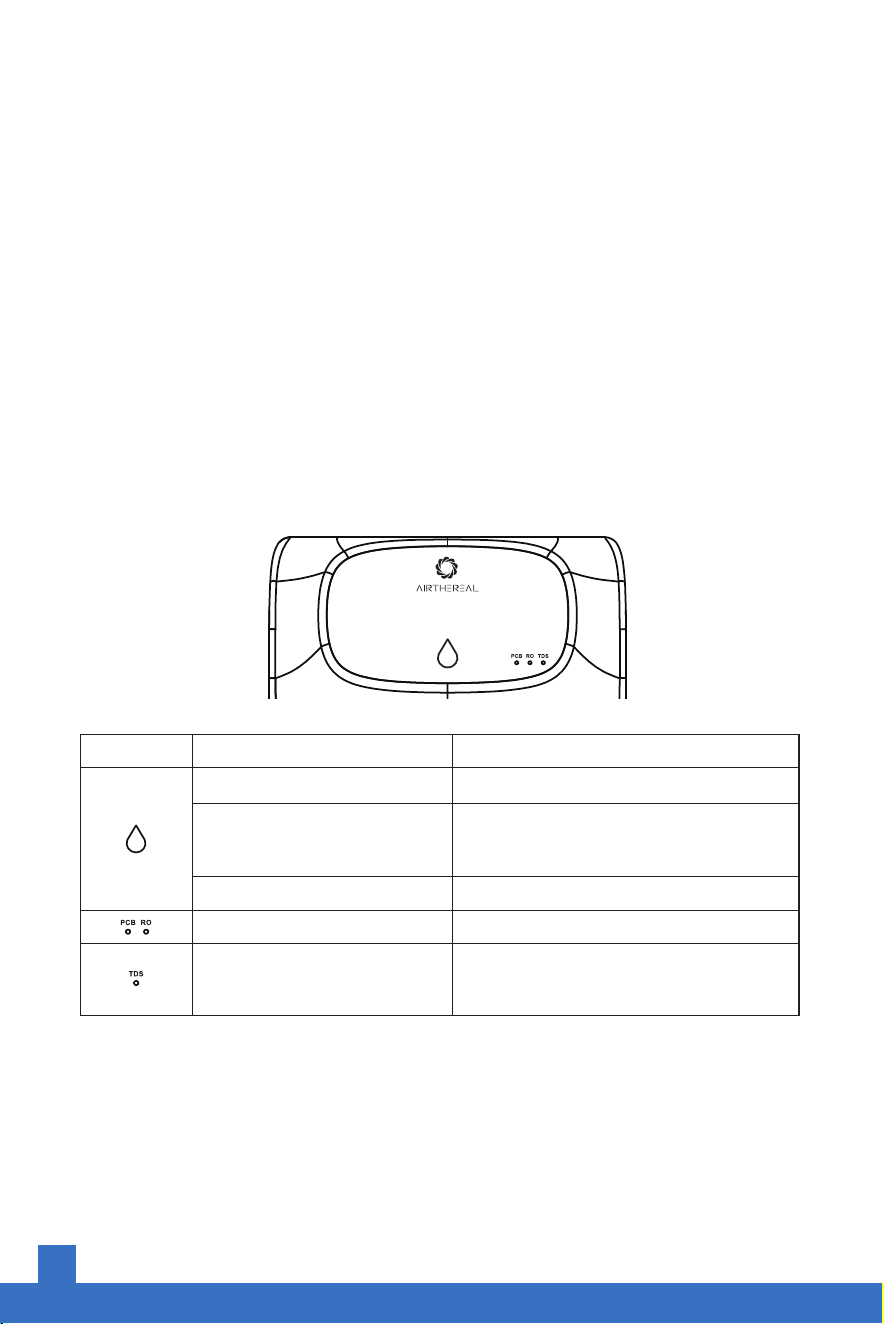
Function
Operating Status
Short press to dispense water
The water tank is not installed
correctly or water needs to be
added to the tank
Long press 3s to reset the filter
Need to replace the filter
The real-time water quality
indicator based on TDS (total
disolved solids)
Display
White light blinking
Red light blinking
A 1-second beep will confirm the filter reset
Red light
Blue / Yellow / Red = Good / Fair / Poor
Indicator
5
MAINTENANCE
Filter Lifespans
Filter Replacement
Note:
1. Filter lifespan is based on the power-on time of the whole machine or the time the
machine is actively purifying water. Whichever time threshold is reached first will
cause the filter reset indicator to illuminate.
2. The actual lifetime of the filters may differ depending on the input water quality,
season, and how long the machine is powered on. The figures above are just an
estimate. Your results may vary.
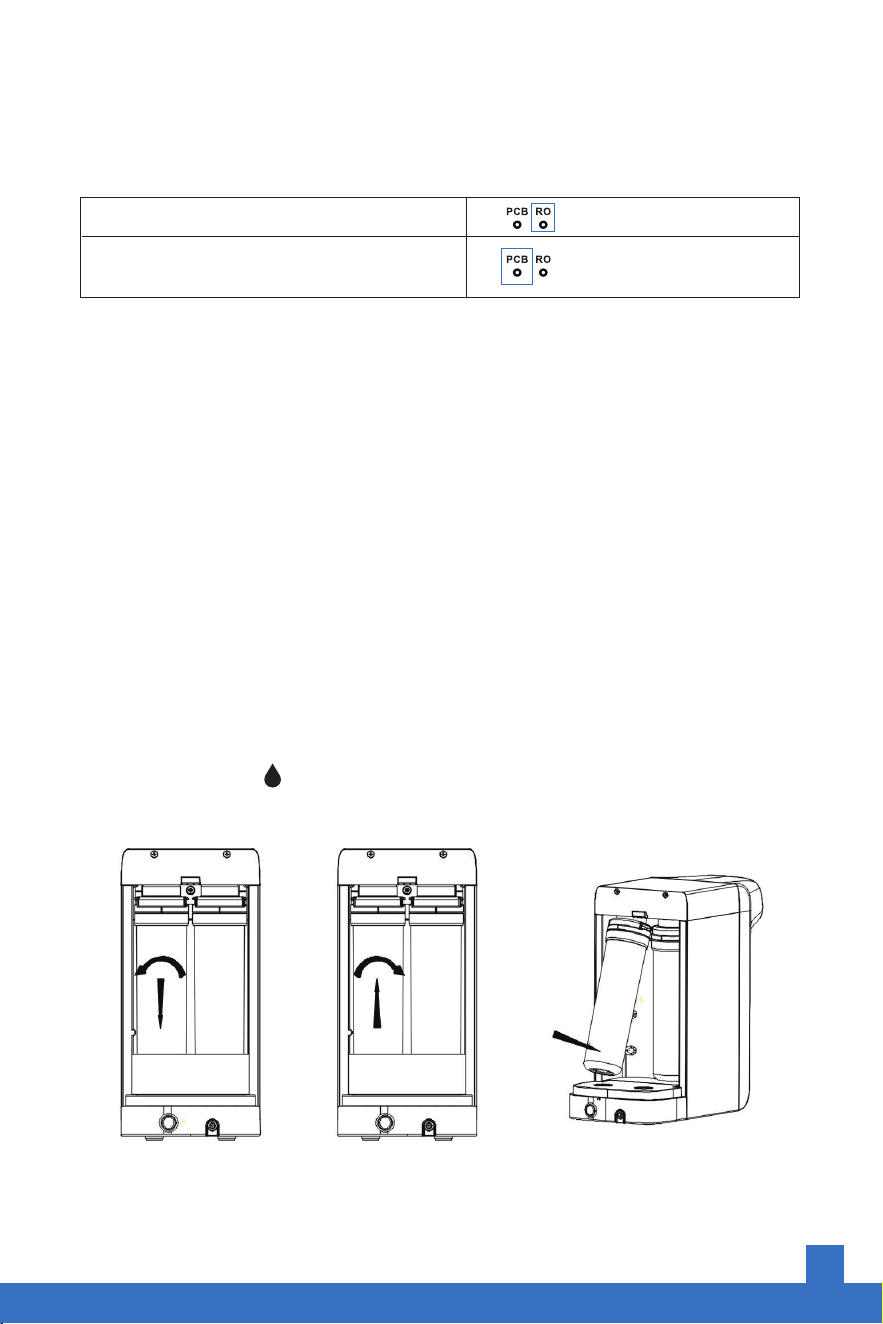
1. Turn off the power and remove the raw water tank.
2. Twist off the original filter in a counter-clockwise direction.
3. Insert the new filter and twist clockwise until tightened.
4. Press and hold the icon for 3 seconds The buzzer will beep for 1 second to alert
that the filter has been reset successfully.
need to replace the filter
need to replace the filter
RO (Reverse Osmosis) Membrane Filter
PCB (Pleated PP Membrane & Activated
Carbon Block) Filter

6
TROUBLESHOOTING
How to clean your water purifier
1. Please regularly wipe the exteriorwith a soft towel . Do not wipe the surface with
chemical cleaners as not to damage the surface.
2. Do not rinse the product with water as it may cause water accumulation that is prone
to bacteria and odors
3. Please clean the water tank regularly to keep the tank clean and hygienic. Dirty water
in the tank tank may cause damage to seals and other components.
4. If you need to stop using this machine for a long time (more than 7 days), please
drain thewater tank and unplug from the power supply. When using the water purifier
again, you must clean the unit according to the "Product Instructions" above before
drinking.
Solution
Check if the adapter power plug
is loose
Turn on the power switch on the
rear of the machine
Check and install the raw water
tank correctly
Ensure the power cord is
plugged in correctly
Add water above the minimum
water level line
Wash the raw water tank
regularly (recommended
at least once a week)
Drain out the water and rinse
thoroughly according to the
cleaning instructions
Please purchase a new filter
element and replace future
filters when you see the change
filter indicator illuminate
Possible Causes
Not plugged in to power
The machine power switch
is not on
The original water tank is
not installed in place
The power supply is not
plugged in
The water level in the tank
is below the minimum water
level line
The raw water tank needs
to be cleaned
Water that has not been
used for a long time or
that has been stored in
the internal tank for too
long can have odors
The filter needs to be
replaced
Problem
The machine
does not work
The machine
does not make
water
The water tanks
smells weird

7
Solution
Check and reinstall the water
tank to ensure it iis secure
Press the tank valve at the
bottom with yourr finger
Check that each filter is properly
installed
Remove from power and contact
Airthereal for help
Replace the PCB filter
Replace the RO filter
Replace the dirty filter
Replace the clogged filter
Remove from power and call
Airthereal for help
Turn off the power and call
Airthereal for help
It is normal and may occur
during water dispensing
Possible Causes
The raw water tank is not
installed in place
The raw tank valve is stuck
The filter element is not
installed in place
Other internal component
failures
The PCB filter is blocked
The RO filter has exceeded
it’s lifespan
The filter has expired
Poor water quality leads to
filter clogs
Other causes
Damaged water seal or
internal component failure
Air bubbles discharged
by the reverse osmosis
membrane
Problem
The raw tank
is leaking
Water leakage
Water making
becomes slow
Abnormal sounds
when dispensing
water
There is dripping
water on the tap
There is a misty
white foam in the
raw water tank

8
LIMITED WARRANTY
We provide a 1-year warranty.For more information please visit:
www.airthereal.com/warranty
• What’s covered?
Defects due to faulty materials and/or workmanship of the product.
• What’s not covered?
1.Damage caused by the owner when attempting to fix or alter the product by himself
or herself.
2.Damage caused by misuse, abuse, neglect, alterations, or unauthorized repair.
3.Natural depreciation.
• Warranty Period
Warranty becomes effective from the date of original purchase and will last for 1 year.
• Who's covered?
This limited warranty is only effective for the original purchaser. It is non-transferable.
• How to request warranty services?
To obtain the benefit of this warranty, please email [email protected].
Our customer service team will address your issue as soon as possible!

FOR THE AIR WE CARE
www.airthereal.com
Always here to help you
V 202312
Produced for: West Ryder Technology LLC
2330 Paseo Del Prado STE C304
Las Vegas, NV 89102
WARNING Cancer and Reproductive Harm
www.p65warnings.ca.gov