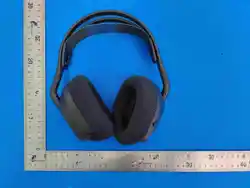
WIRELESS HEADSET
USER MANUAL
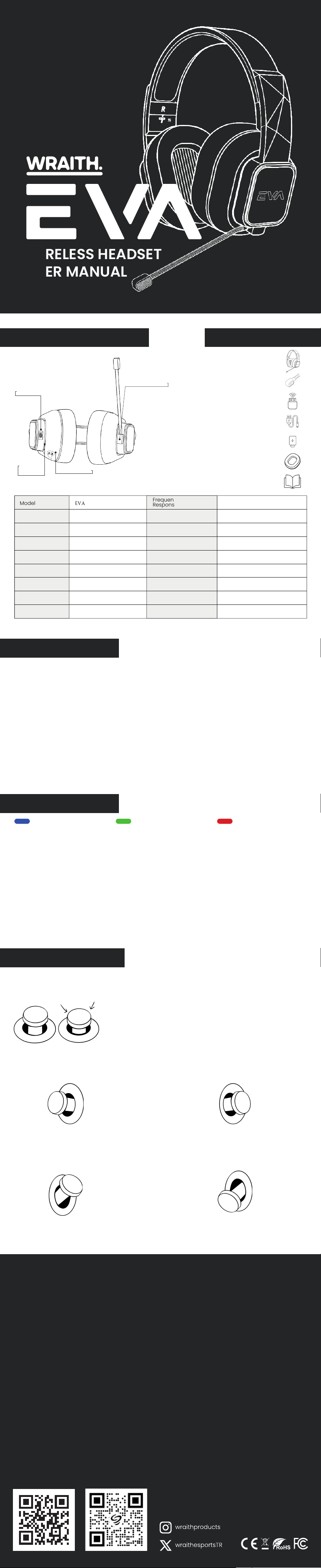
PRODUCT OVERVIEW BOX CONTENTS
CE Declaration of Conformity
This headphone complies with the essential requirements and other relevant provisions of the applicable EU directives.
The Declaration of Conformity can be requested via the manufacturer.
FCC Declaration of Conformity
This headphone complies with part 15 of the FCC Rules. Operation is subject to the following two conditions: (1) This device
may not cause harmful interference, and (2) this device must accept any interference received, including interference
that may cause undesired operation.
ROHS Declaration of Conformity
This headphone complies with the requirements of the RoHS Directive (2011/65/EU) on the restriction of hazardous
substances in electrical and electronic equipment.
WEEE Disposal Information
This symbol on the product or its packaging indicates that this product must not be disposed of with household waste.
Instead, it is your responsibility to dispose of it at an appropriate collection point for recycling of electrical and electronic
equipment.
Battery Safety Warning
1.This product contains a built-in lithium battery. Do not attempt to remove, replace, or open the battery.
2.Do not expose the product to fire or excessive heat.
3.Use only the supplied charger or certified charging equipment.
4.If the battery swells or leaks, stop using immediately and contact support.
5.Dispose of the product according to local regulations for lithium battery disposal.
Hearing Safety
To prevent possible hearing damage, do not listen at high volume levels for long periods. Keep the volume at a moderate
level.
General Safety Instructions
1. Keep the device away from water and moisture.
2. Do not use the device while driving or in situations where hearing impairment may pose a danger.
3. Keep out of reach of children under 3 years due to small parts.
4. Do not disassemble or modify the product.
ACTION BUTTON
Model
MIC Sensitivity
SPK Sensitivity
Battery Capacity
Audio System
Connectivity
Product Weight
Bluetooth Version
EVA
–34db
107DB+3
1000MAH NTC
Around 10m
Stereo
2.4G / Bluetooth / Wired
298 ± 5
v5.3
Connection
Distance
Speaker
Speaker Impedance
Standby Time
Charging Time
Rated Power
Maximum Power
Output Charge Markup
Audio delay
20–20KHZ
40mm
32 Ω
Connection standby >200H
3–4H
10MW
20MW
USB Type-C
Frequency
Response Range
~ 40ms bluetooth
~ 15ms 2.4g 0 ms wired
CONNECTIVITY
LED INDICATOR
• 2.4G Connection Method
Use the action button to switch to 2.4G mode. Plug the wireless USB adapter into any functional USB
port on your device. The Eva headset will automatically pair when powered on.
Once connection is established, the side LEDs will light up green continuously. If the connection is lost
or the headset is in pairing mode, green lights will flash slowly.
• Bluetooth Connection Method
Use the action button to switch to bluetooth mode. On the device you wish to pair, your headset with
appear as “Eva Headset” in the list of available bluetooth devices. Click to connect.
When connection is established, the side LEDs will light up blue continuously. If the connection is lost
or the headset is in pairing mode, blue lights will flash slowly.
In order to sewer the connection from the headset, simply press the action button 5 times.
• Wired connection mode
Simply connect your headset to your computer with the included USB cable. The headset will switch
to wired mode as soon as it detects the connection. The headset can be used while charging.
Blue Light
Bluetooth mode: Flash blue light
Bluetooth mode connected: Blue
light stays solid
Bluetooth mic on/off: Mic off flash
red, mic on → flash green
Bluetooth search / reconnect:
Blue light flashes once every 5
seconds
Red Light
Sleep mode: Red light flashes for 3
seconds before turning off
Power off: Red light flashes for 3
seconds before turning off
Mic off: Flash red 3 times
Low battery: Red light flashes
once every 3 seconds
Game mode: Flash red light 3
times
Green Light
2.4G mode: Flash green light
Music mode: Flash green light 3
times
Mic on: Flash green 3 times
Power on (2.4G mode): Green
light flashes
Connection indicator: Green light
solid
Disconnect (2.4G mode): Flash
green light
wraithesports.com
For Other Languages
Action Button
LED
Indicator
Type-C / Charging Port
Microphone Port
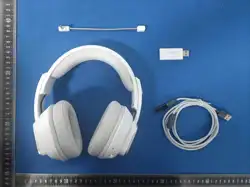
EVA Wireless Headset
USB Wireless Dongle
Detachable Microphone
2.0 m USB-C to USB-C Braided Cable
USB-C Adapter
1 Pair of Replacement Earpads
User Manual
Press once – music pause/play
Press once – Answer call/Hang up call
Press 2 times – Disable/Enable microphone
Press 3 times – start voice assistant
Press 5 times – Disconnect active bluetooth connection
Press for 2 seconds – language switch EN/TR (Must be done with
no established connection)
Press for 2 seconds – Reject incoming call
Press for 5 seconds – power on and off
Left:
Press once Previous track
Press for 2 seconds Switch between
gaming mode and music mode
Up
Press once – volume increase one increment
Press and hold – continuous volume increase
Right:
Press once - Next track
Press for 2 seconds - Switch between wireless
and bluetooth mode
Down
Press once – volume decrease one increment
Press and hold – continuous volume decrease

FCC Warning
This device complies with Part 15 of the FCC Rules. Operation is subject to the following two conditions:
(1) This device may not cause harmful interference, and (2) this device must accept any interference received, including
interference that may cause undesired operation.
NOTE 1: This equipment has been tested and found to comply with the limits for a Class B digital device, pursuant to part 15 of
the FCC Rules. These limits are designed to provide reasonable protection against harmful interference in a residential
installation. This equipment generates, uses and can radiate radio frequency energy and, if not installed and used in accordance
with the instructions, may cause harmful interference to radio communications. However, there is no guarantee that
interference will not occur in a particular installation. If this equipment does cause harmful interference to radio or television
reception, which can be determined by turning the equipment off and on, the user is encouraged to try to correct the
interference by one or more of the following measures:
- Reorient or relocate the receiving antenna.
- Increase the separation between the equipment and receiver.
-Connect the equipment into an outlet on a circuit different from that to which the receiver is connected.
-Consult the dealer or an experienced radio/TV technician for help.
NOTE 2: Any changes or modifications to this unit not expressly approved by the party responsible for compliance could void the
user's authority to operate the equipment.
The device has been evaluated to meet general RF exposure requirement. The device can be used in portable exposure
condition without restriction.