To ensure that you use this product correctly,
please read this manual carefully before use.
JF-B-31-1
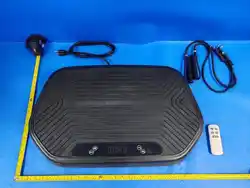
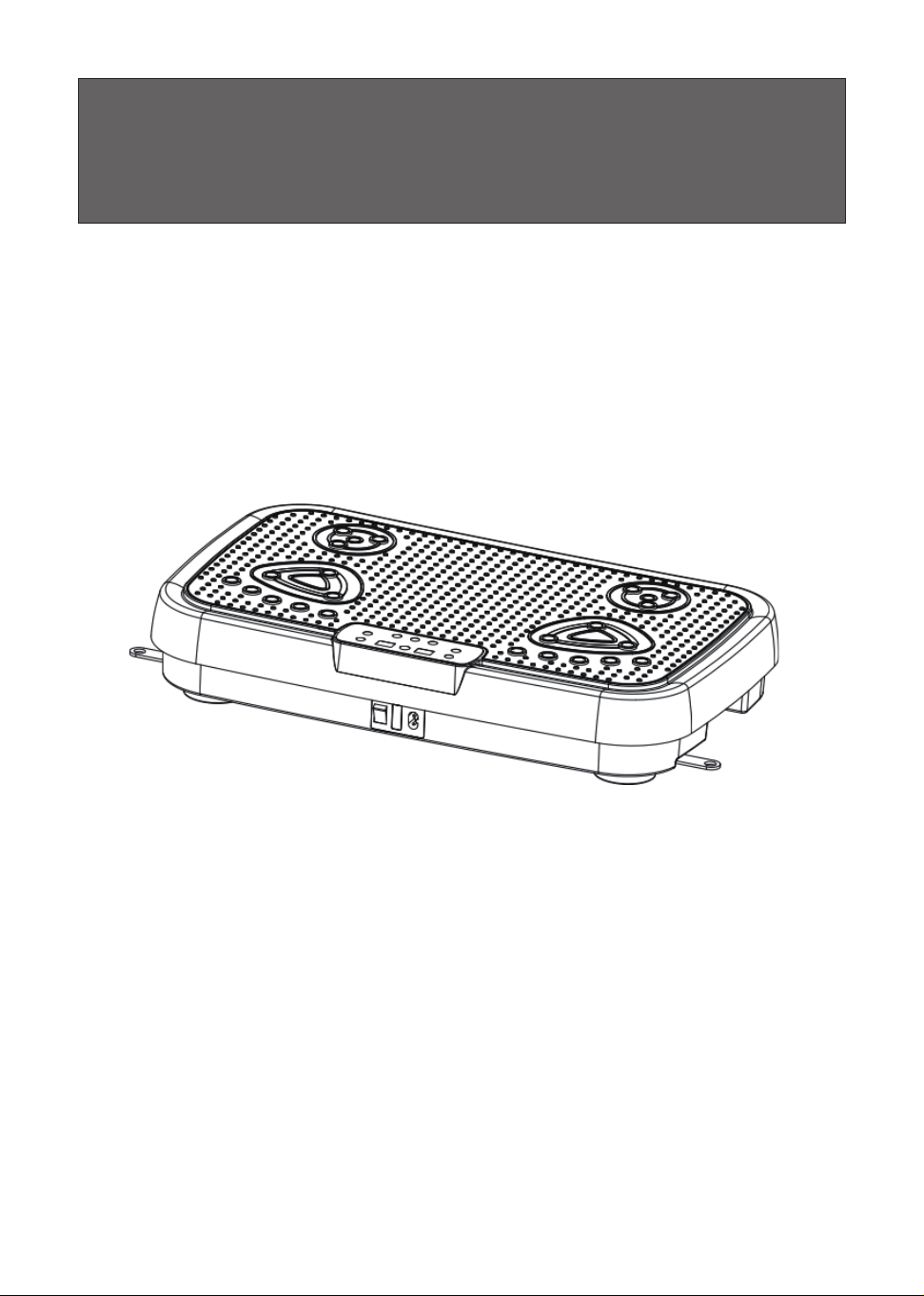
Vibration Plate Machine
with Bluetooth
Vibration Plate Machine User Manual

Content
IMPORTANT SAFETY INSTRUCTIONS ............................................
1
Product Safety Instructions.................................................................
2
Warning ..............................................................................................
3
SERVICING OF DOUBLE-INSULATED PRODUCTS ........................
4
Warning ..............................................................................................
4
Product Description ............................................................................
6
Accessories List..................................................................................
7
Control Panel Instruction ....................................................................
8
Remote Control Functions ..................................................................
9
Product Specication ........................................................................
10
Exercise Guide & Demonstrations....................................................
11
Care & Maintenance .........................................................................
13
Troubleshooting ................................................................................
14
WARRANTY INFORMATION ...........................................................
15

IMPORTANT SAFETY INSTRUCTIONS
1
When using an electrical appliance, basic precautions should always be followed,
including the following:
Read all instructions before using this appliance.
DANGER-To reduce the risk of electric shock:
1) Always unplug this appliance from the electrical outlet immediately after using and
before cleaning.
WARNING- To reduce the risk of burns, re, electric shock, or injury to persons:
1) An appliance should never be left unattended when plugged in. Unplug from outlet
when not in use, and before putting on or taking o parts.
2) Do not operate under blanket or pillow. Excessive heating can occur and cause re
electric shock, or injury to persons.
3) This appliance is not intended for use by persons with reduced physical, sensory or
mental capabilities, or lack of experience and knowledge, unless they have been given
supervision or instruction concerning use of the appliance by a person responsible for their
safety. Keep children under the age of 14 away from this machine.
4) Use this appliance only for its intended use as described in this manual. Do not use
attachments not recommended by the manufacturer.
5) Never operate this appliance if it has a damaged cord or plug, if it is not working
properly, if it has been dropped or damaged, or dropped into water. Connect to customer
service for help.
6) Do not carry this appliance by supply cord or use cord as a handle.
7) Keep the cord away from heated surfaces.
8) Never operate the appliance with the air openings blocked. Keep the air openings free
of lint, hair, and the like.
9) Never drop or insert any object into any opening.
10) Do not use outdoors.
11) Do not operate where aerosol (spray) products are being used or where oxygen is
being administered.
12) To disconnect, turn all controls to the o position, then remove plug from outlet.
13) To reduce the risk of injury, place the appliance on a at, horizontal, and stable
surface. Do not place or use the appliance on a slippery surface.
14) To reduce the risk of injury, do not use the appliance with wet shoes, wet feet.
15) To reduce the risk of injury, do not use the appliance if the surface is wet. lf the
appliance surface becomes wet, dry the surface before using.
SAVE THESE INSTRUCTIONS

Product Safety Instructions
Important! Please read all details before use, and keep this user
manual for future reference.
Operating Environment: Do not use this product in damp, humid, or dusty
environments to avoid device malfunction.
Indoor Use Only: Please use this product indoors at standard room
temperature.
Storage & Child Safety: Do not store this product outdoors. Store it safely
indoors and keep it out of reach of children to prevent unsupervised operation
or accidents.
Surface Placement: Always place the product on a at, stable surface when
in use.
Medical Contraindications: Do not use this product on infants, pregnant
women, or individuals with pacemakers, metal implants, internal medical
devices, fractures, severe osteoporosis, or those using other vibration
equipment.
Health Restrictions: Individuals diagnosed with cancer or other serious
medical conditions should not use this product.
Liquid Warning: Do not immerse the product in water or any other liquids.
Usage Limits: After using the product for 10 minutes, allow it to rest for 10 to
20 minutes before using it again.
Discontinue Use: If you feel unwell, dizzy, or experience discomfort during
use, please stop using the product immediately.
Timing of Use: Do not use this product immediately after meals or after
consuming alcohol to prevent physical discomfort or injury during intense
movement.
Menstrual Cycle Notice: Women should avoid using this product during
menstruation.
Post-Use Safety: After use, turn o the device, unplug the power cord, and
store it safely out of reach of children to prevent unsupervised use.
2

Warning
3
The appliance is intended for household/domestic use only.
1. Do not immerse the product in water or any other liquids.
2. Keep fingers away from the gap between the upper and lower housing to
prevent pinching or injury.
3. Do not attempt to disassemble, repair, or modify the product on your own.
4. Do not carry pocket knives, keys, or other sharp or hard objects while using
the product to prevent unintended injury.
5. This product is designed for single-person use only. Do not allow two or more
people to use it at the same time to avoid accidents.
6. Do not overload or exceed the rated capacity of the product during operation.
7. Stop exercising immediately if you feel dizzy, faint, nauseous, short of breath,
or experience chest tightness.
8. Always unplug the power cord before moving, repositioning, or storing the
product.
9. Keep the product away from heat sources, open ames, or direct radiators.
10. Do not use the product if either the main unit or the remote control is
malfunctioning or damaged.
11. Maintain a clear space of at least 6 feet (2 meters) around the product during
operation to prevent collisions or hazardous situations.
12. Use only the original power cord provided with the device. Do not use power
cords from other products to avoid re hazards or damage.
13. Never plug in or use a damaged power cord. Replace it immediately with an
authorized cord of the same model to prevent re or electrical hazards.
14.To reduce the risk of personal injury, read and understand all the instructions
before using this product.

Warning
SERVICING OF DOUBLE-INSULATED PRODUCTS
4
1. Do not attempt to disassemble, repair, or modify the product without
authorization, as this may cause electric shock, injury, or other hazards.
2. Do not use the product if the power cord is damaged or if the wall outlet is
loose, to avoid electric shock, power leakage, short circuits, or re.
3. Do not damage, forcibly bend, twist, pull, or place heavy objects on the power
cord, and avoid pinching the wire, to prevent power leakage, electric shock, or
re.
4. Keep batteries out of reach of children. If swallowed, batteries can cause
severe chemical burns or other life-threatening hazards.
In a double-insulated product, two systems of insulation are provided instead
of grounding. No grounding means is provided on a double-insulated product,
nor should a means for grounding be added to the product. Servicing a double-
insulated product requires extreme care and knowledge of the system, and
should be done only by qualied service personnel.
Replacement parts for a double-insulated product must be identical to the parts
they replace. A double-insulated product is marked with the words "DOUBLE
NSULATION" or "DOUBLE INSULATED." The symbol (square within a square)

5
FCC ID: 2A48I-JF-B-31-1
This device complies with part 15 of the FCC Rules. Operation is subject to the
following two conditions:
(1)This device may not cause harmful interference, and
(2)this device must accept any interference received, including interference that
may cause undesired operation.
NOTE: This equipment has been tested and found to comply with the limits for
a Class B digital device, pursuant to part 15 of the FCC Rules. These limits are
designed to provide reasonable protection against harmful interference in a
residential installation. This equipment generates, uses and can radiate radio
frequency energy and, if not installed and used in accordance with the instructions,
may cause harmful interference to radio communications. However, there is
no guarantee that interference will not occur in a particular installation. If this
equipment does cause harmful interference to radio or television reception, which
can be determined by turning the equipment o and on, the user is encouraged to
try to correct the interference by one or more of the following measures:
— Reorient or relocate the receiving antenna.
— Increase the separation between the equipment and receiver.
— Connect the equipment into an outlet on a circuit dierent from that to which
the receiver is connected.
— Consult the dealer or an experienced radio/TV technician for help.
Important:
Changes
or
modifications
not
expressly
approved
by
the
party
responsible
for
compliance
could
void
the
user‘s
authority
to
operate
the
equipment.
This equipment complies with FCC radiation exposure limits set forth for an
uncontrolled environment. This equipment should be installed and operated with
minimum distance 0cm between the radiator and your body.
Product Description
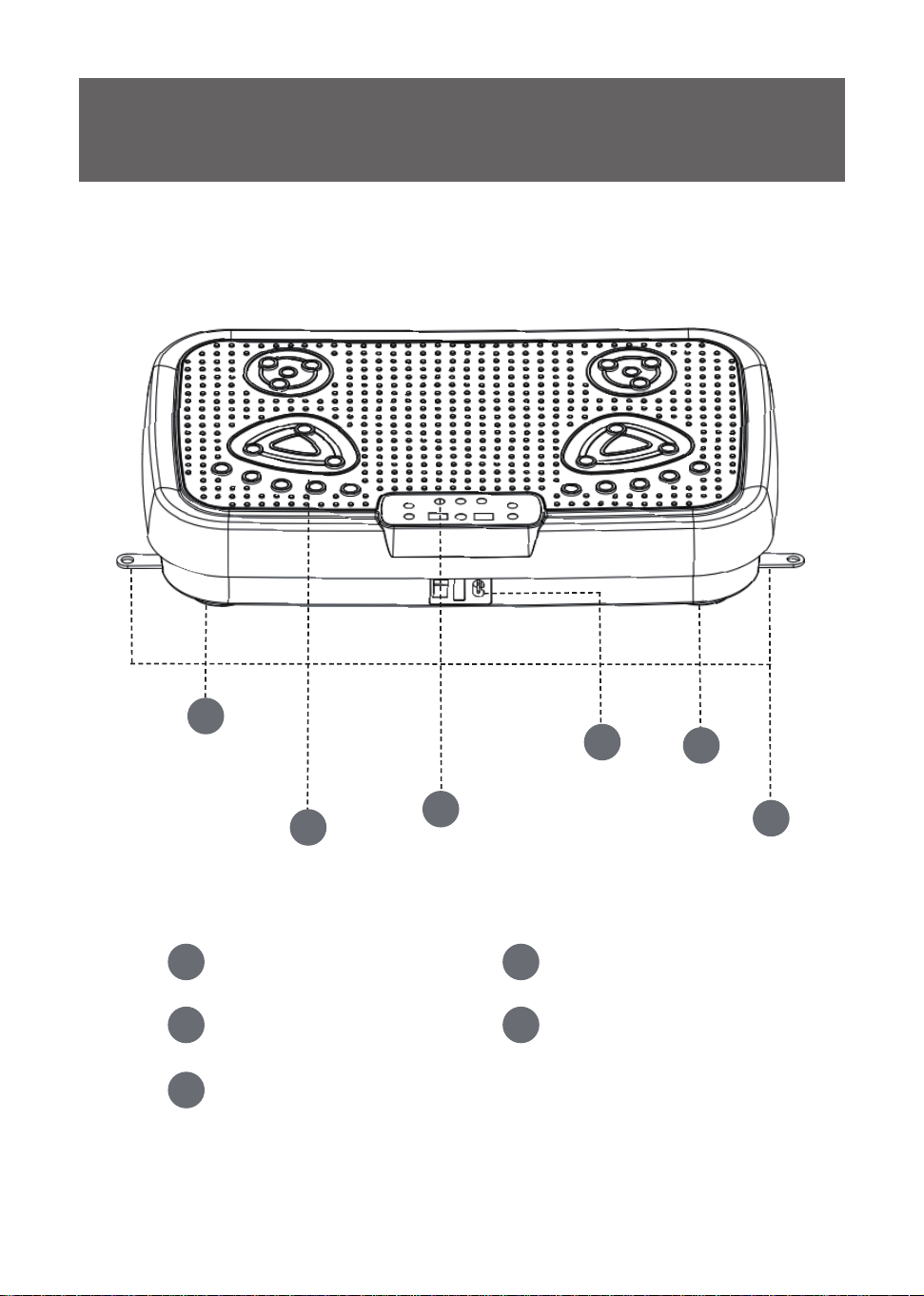
Foot Pad
Workout area
Control Panel
Power cord & switch
Clip for Pull-string
1
2
3
4
1
5
1
2
3
4
5
6
Accessories List
Product
Manual
7
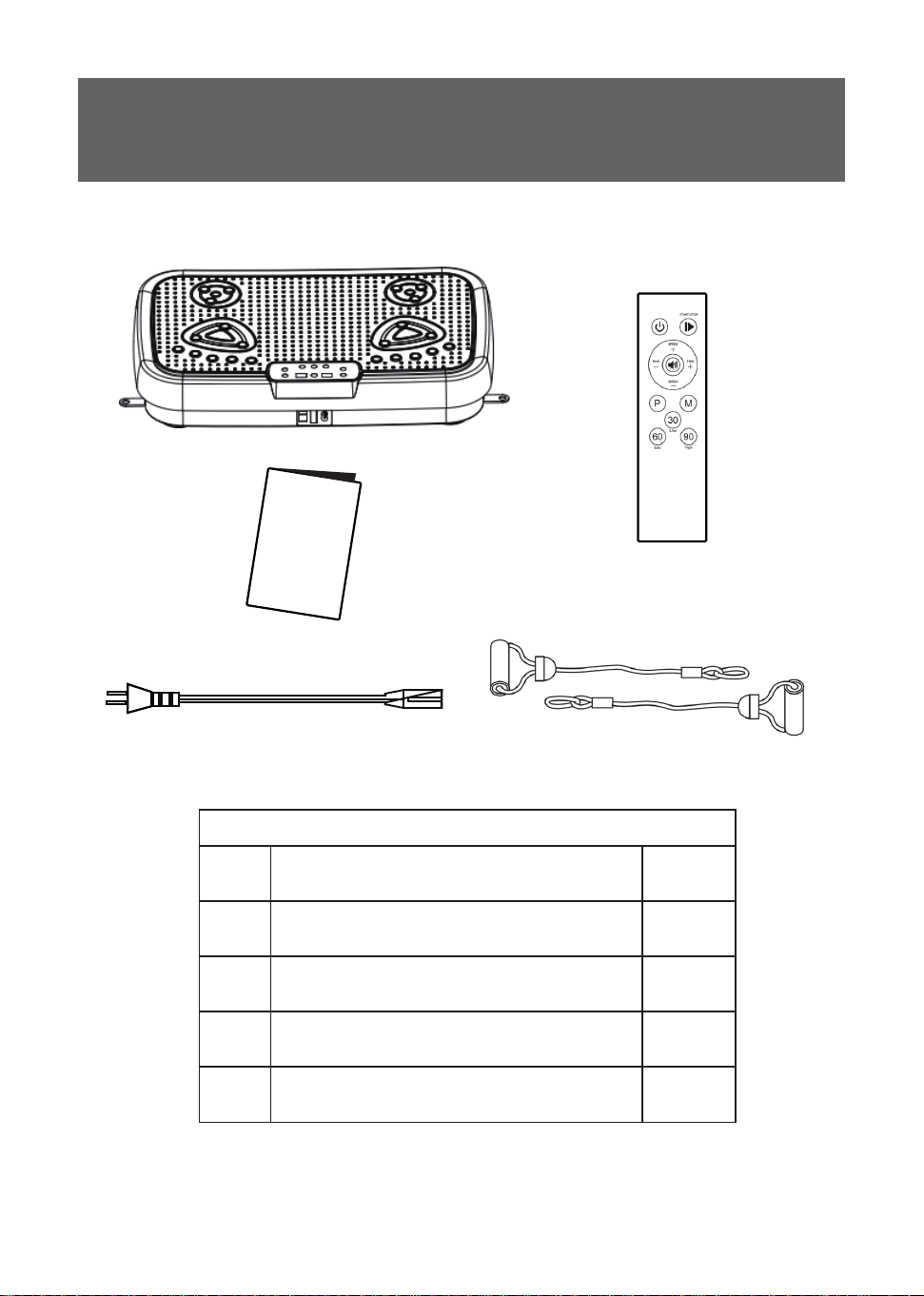
Package List
1 Vibration Plate Machine *1
2 Remote *1
3 Power cord *1
4 Manuel *1
5 Pull-string *2
Control Panel Instruction
8
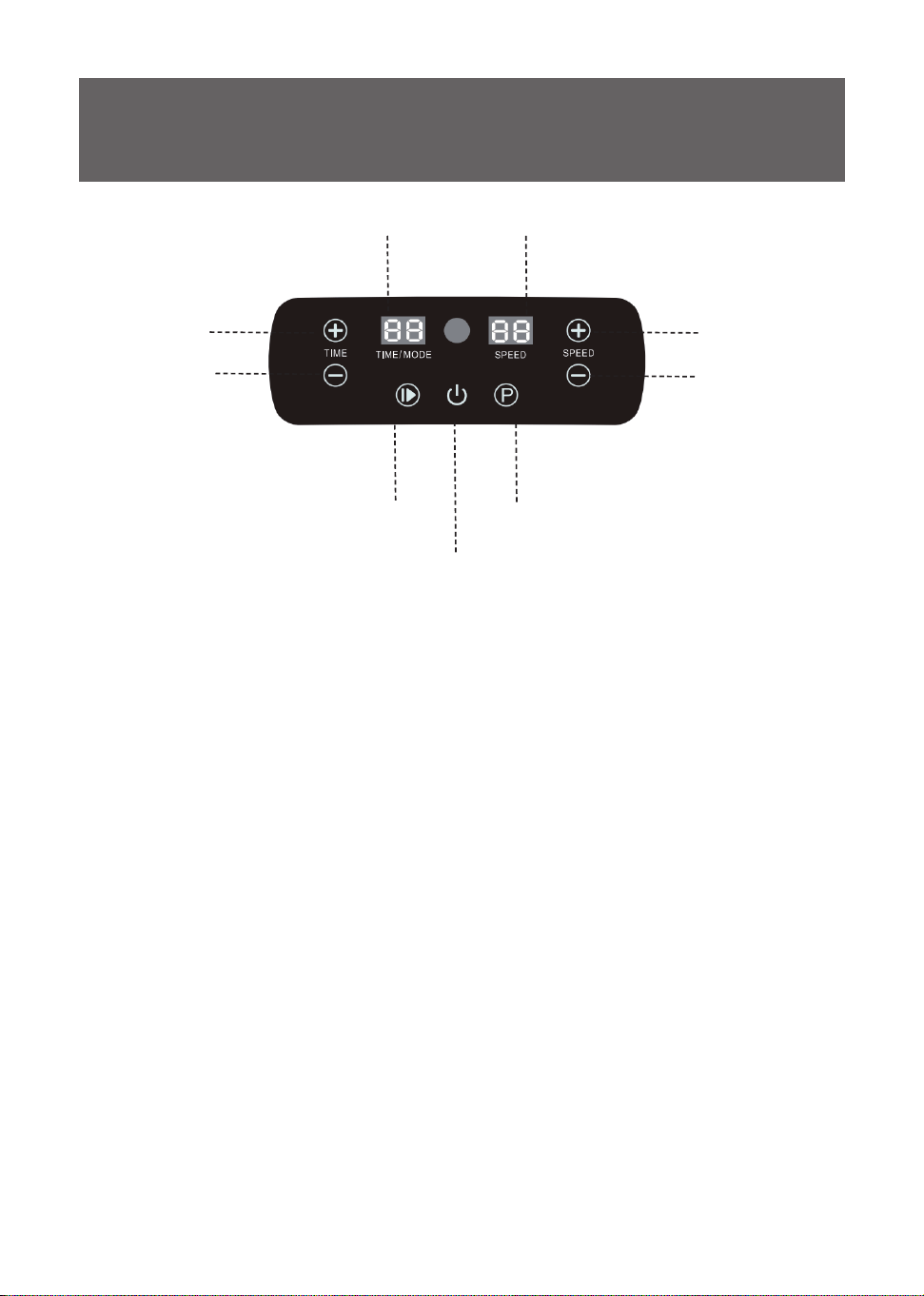
TIME/MODE Display SPEED Display
Time Up
Time Down
Speed Up
Speed Down
Power On
/
O
Program Select (P)
Start/Stop
Control Panel Functions & Display Denitions
1. TIME / MODE Display: Manual mode "HA" with a standard 10-minute session
upon power-on. The display toggles between Mode and Remaining Time every
5 seconds.
2. SPEED Display: Displays the current operating speed level.
3. Time Up&Down: In manual mode, press before starting to increase&decrease
the workout time(From 10-20mins). Press and hold or fast adjustment.
4. Speed Up&Down: Press during operation to increase&decrease the speed (up
to level 99). Press and hold for fast adjustment.
5. Start / Stop Button: Press once to start or stop.
6. Power On / O Button: Press to wake&turn o the screen.
7. Program Select (P): Press to cycle through preset programs. Programs must
be selected before starting the device. Speed for preset programs are pre-
programmed.
8. Bluetooth Speaker Function: Turn on Bluetooth on your mobile device, and
select the device name "VPM-0506" to connect.
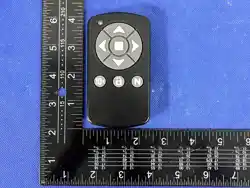
Remote Control Functions
Battery Instruction:
1. Only use the battery type specied: 2 × AA Batteries (not included)
2. Ensure batteries are inserted with the correct polarity (+ and -).
3. Do not recharge non-rechargeable batteries.
4. Rechargeable batteries must be removed from the appliance before charging.
5. Do not mix dierent types of batteries (e.g., alkaline and carbon-zinc), or new and used
batteries.
6. Remove exhausted batteries promptly and dispose of them safely.
7. Remove the batteries if the appliance is to be stored unused for a long period.
8. Do not short-circuit the supply terminals.
9
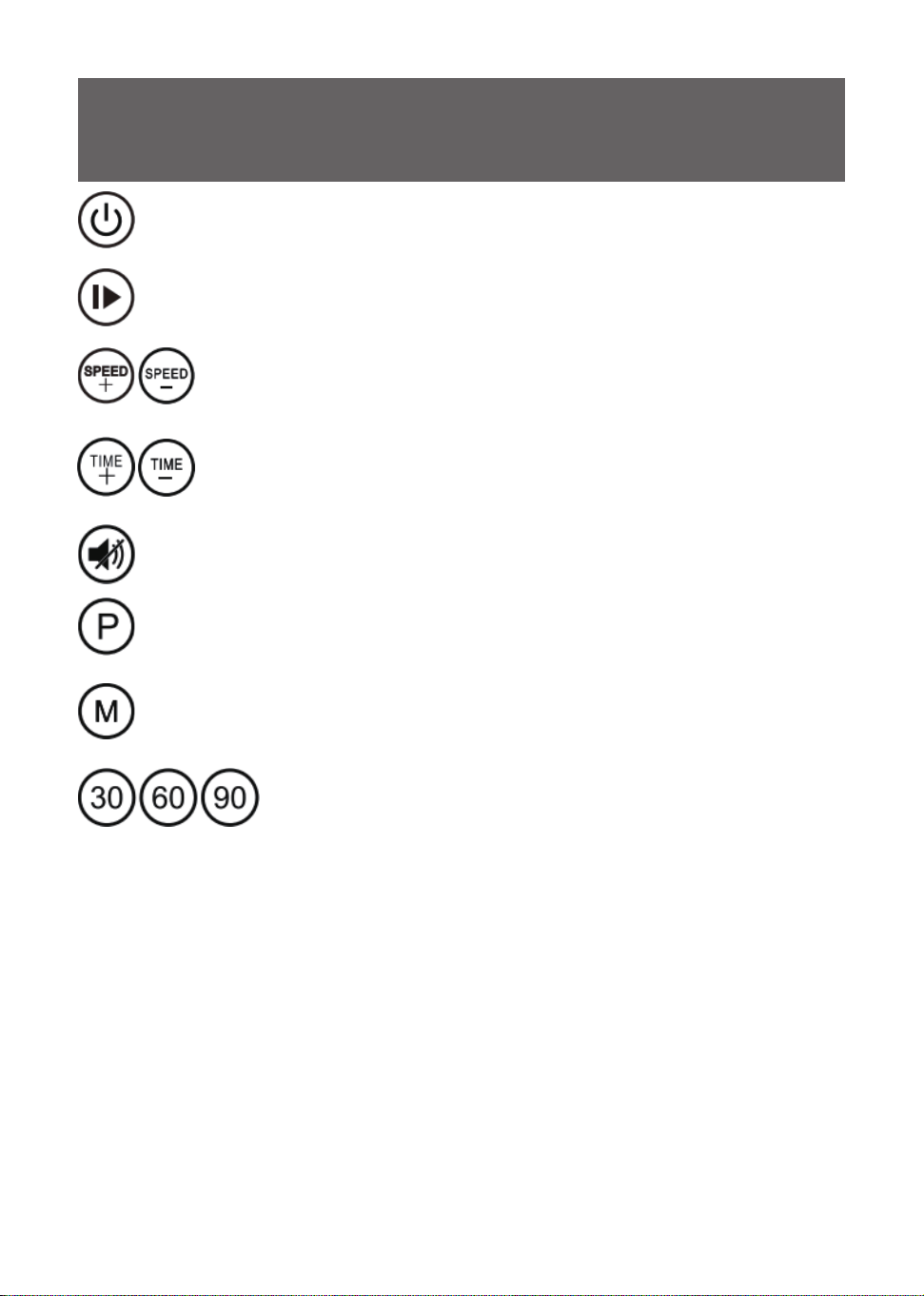
Power / Standby Button: Press during operation to stop the machine and turn
o the display to enter standby mode. Press again to turn on the display and
return to mode selection status.
Start / Stop Button: After powering on, press once to start operating in the
current mode. Press again to stop operation.
Speed Up&Down Button: In manual mode, press after starting to
increase&decrease speed (range: 99 to 1). Press and hold for rapid
continuously adjustment.
Time Up&Down Button: In manual mode, press before starting to
increase&decrease workout time (range: 1-20mins). Press and hold for
rapid continuously adjustment.
Mode Button: Press to switch to manual mode (HA).
Program Button: Press to cycle through automatic preset modes (P1 → P2 →
P3 → P4 → P5).
Mute Button: Press to toggle the button/beeper sound on or o.
Speed Shortcut Buttons: In manual mode, press after starting to
quickly set the speed directly to level 30 (Low), 60 (Mid), or 90
(High).
Product Specication
10
Product Name Vibration Plate Machine
Product Model JF-B-31-1
Operating Voltage AC 110V-240V 50/60Hz
Rated Power 130W
Speed Gear 1-99
Net Weight of Product 6kg
Gross Weight of Product 7.2kg
Product Dimensions 520*315*100 mm
Packaging Dimensions 604*353*116 mm
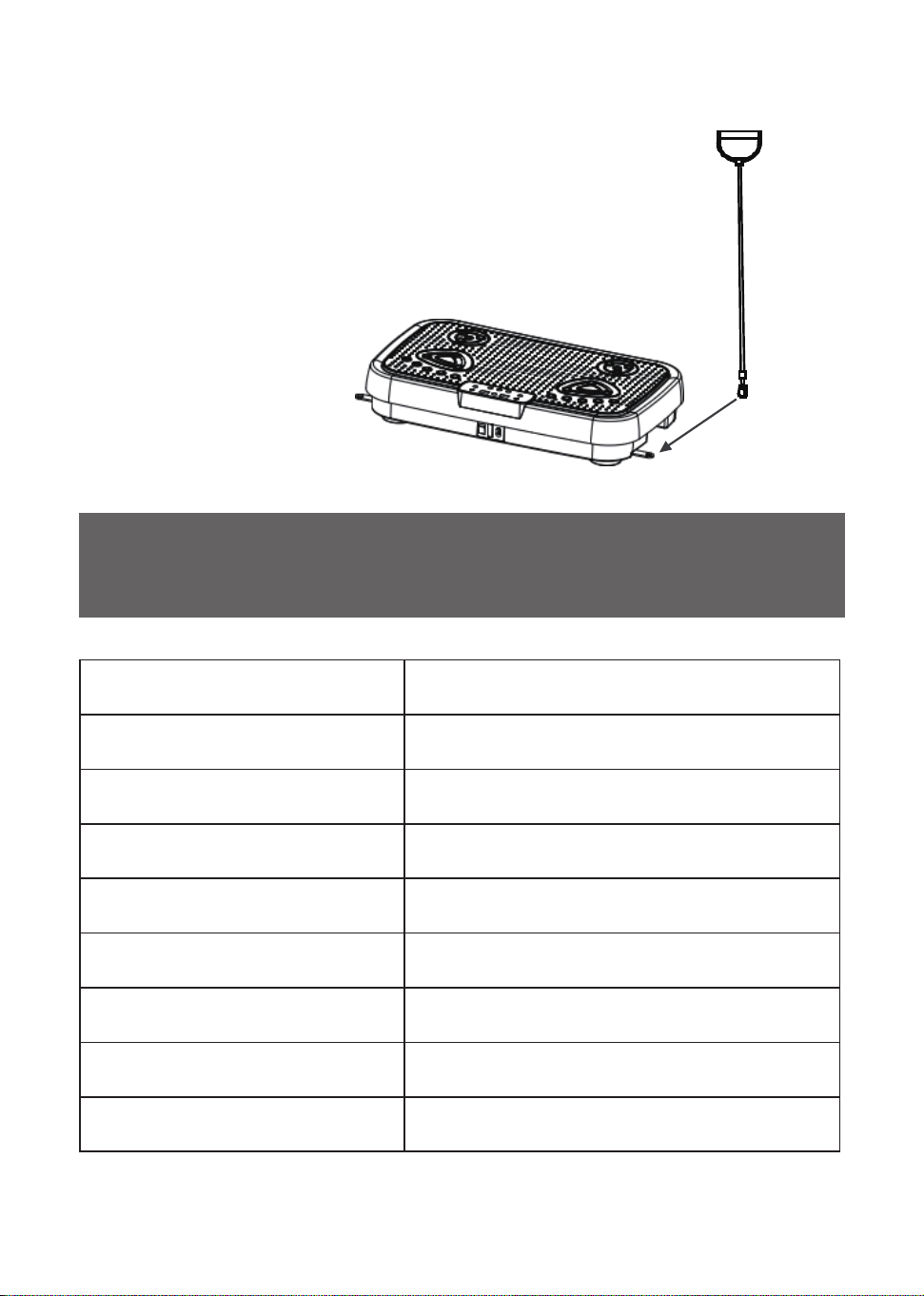
The resistance band anchor clips located under the
machine are retracted. Pull the clips outward, then
attach the resistance bands to the clips to begin
your workout.
How to Attach the Resistance Bands
Exercise Guide & Demonstrations
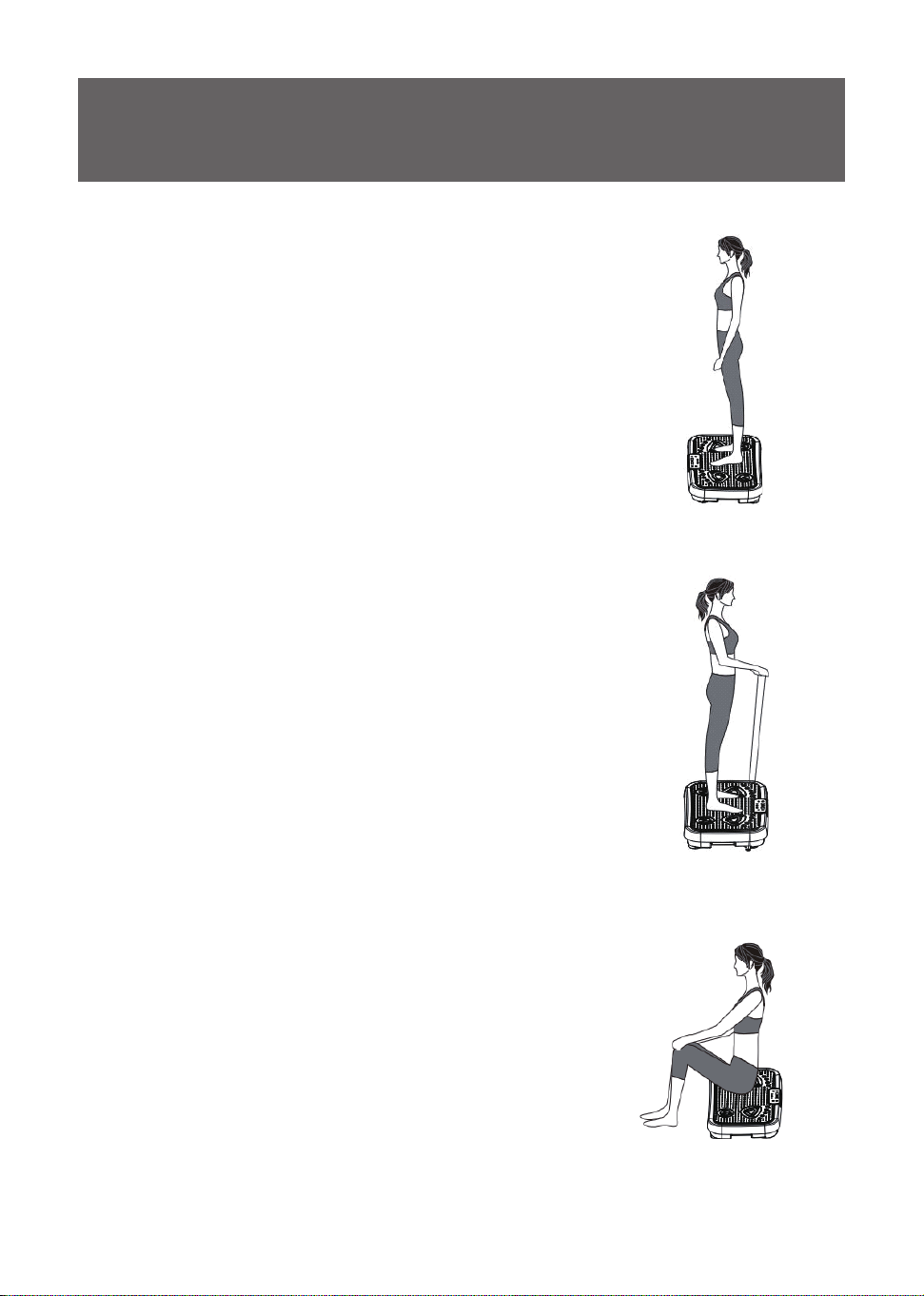
Standing Posture
Carefully step onto the platform. Stand upright with feet
shoulder-width apart and engage your core. Maintain
a stable posture and keep your back straight without
slouching or swaying from side to side. This position
activates your core, glutes, and lower body muscles,
boosting metabolism and toning your body through
vibration.
Resistance Band Standing Workout
Carefully step onto the platform and hold the resistance
bands with both hands. Keep your shoulders stable
and pull the bands upward using arm strength. Keep
your back straight and avoid leaning forward. This
position relaxes the body while eectively targeting and
strengthening your arm muscles.
Seated Exercise
Sit directly on the platform with your back straight. Keep
your head up and avoid slouching. Relax your hands on
your knees. This pose eectively relieves tension in your
hips and lower back.
11
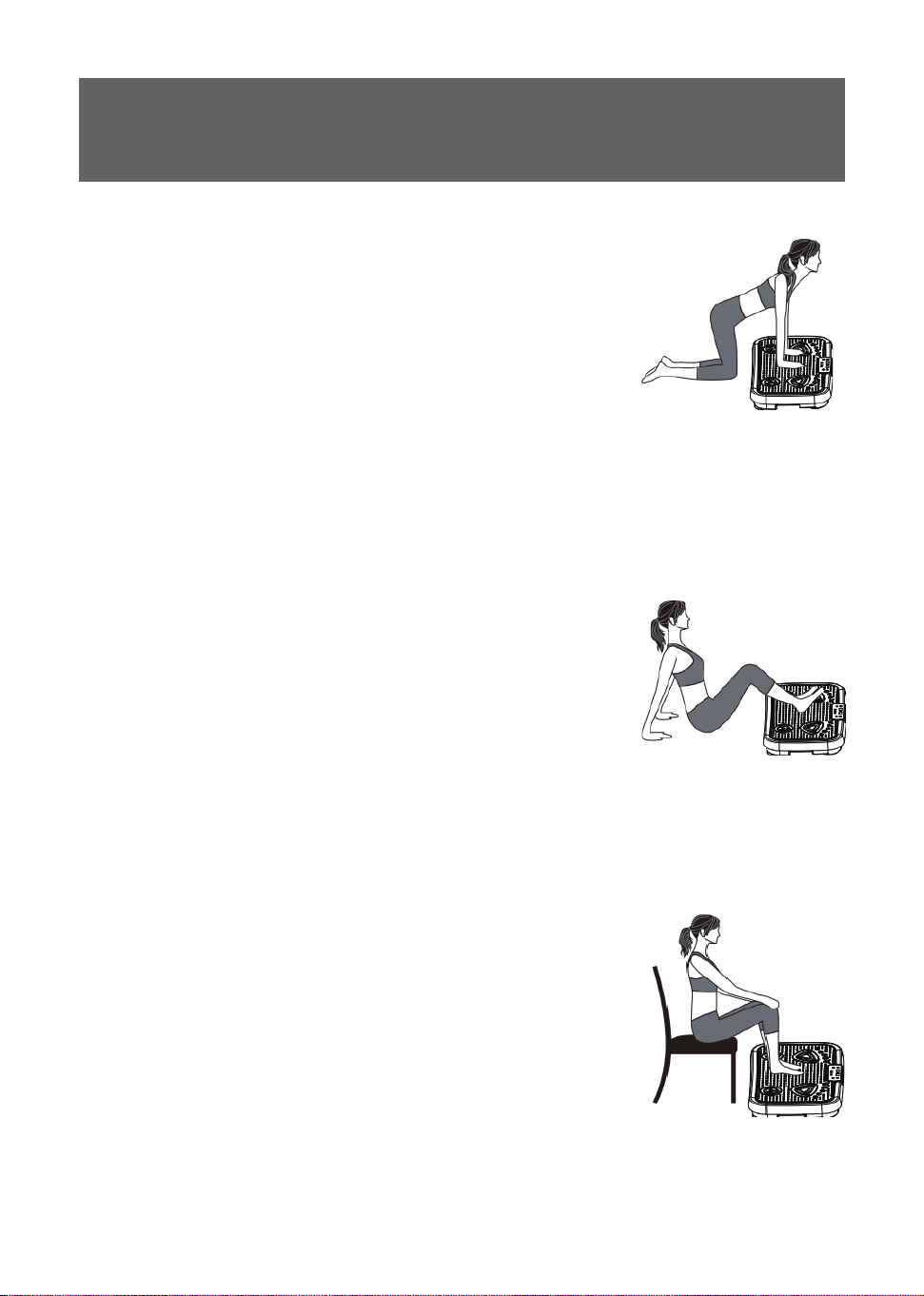
Leg & Calves Stretch
Place both feet flat on the platform and support your
upper body with your hands behind you. Keep your back
straight and avoid slouching. This pose helps relax and
stretch your calf and thigh muscles.
Upper Body Shoulder Stretch
Place your hands flat on the platform with arms
supporting your upper body, knees resting on a mat.
Keep your body in a straight line from back to hips,
engage your core, and avoid sagging your lower back.
This position targets and relieves shoulder tightness.
Chair-Seated Calves Relaxation
Sit comfortably in a chair with your back straight. Place
your feet flat on the vibration platform and relax your
hands on your knees. This pose provides a soothing
massage for your calves.
12

Care & Maintenance
WARNING!
Please always disconnect the power cord before cleaning.
Prevent cleaning liquids or moisture from entering the device,
as this may cause short circuits, electric shock, re, or other
hazards.
1. Cleaning: Always unplug the power cord first. Wipe the outer housing and
non-slip foot pad using a slightly damp cloth with a mild, neutral detergent.
2. Storage: If the product will not be used for an extended period, turn o the
power and store it in a cool, dry place. This helps prevent accidental surface
scratches and slows down the aging of the plastic housing.
3. Chemical Warning: Do not use acidic or alkaline cleaners, alcohol, or harsh
chemicals, as they may corrode the plastic surface
Product care
Remote Control Care
1. Cleaning: Remove the batteries before cleaning. Wipe o dirt using a slightly
damp cloth or paper towel. Allow the remote control to air-dry completely in a
well-ventilated area before reuse (avoid direct sunlight).
2. Chemical Warning: Do not use acidic or alkaline cleaners to wipe the remote
control, as they may cause corrosion.
13
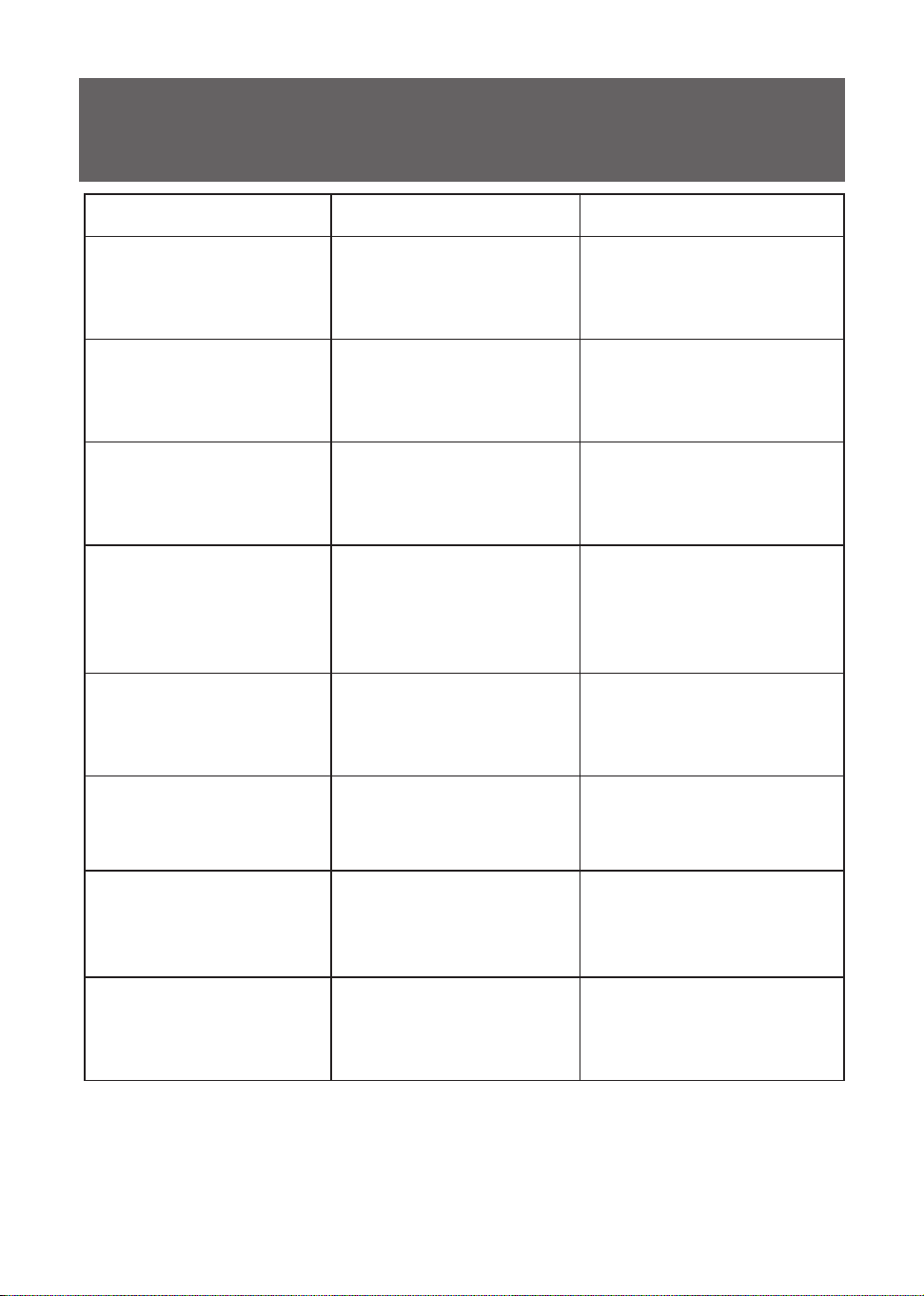
Troubleshooting
Problem Possible Cause Solution
1.
Device does not turn on
1.1
The power cord is not
fully plugged in.
1.1.1
Re-plug and secure the
power cord.
1.2
The main power switch
is o.
1.2.1
Press the power switch
from "0" to "I"
1.3
A power surge caused
the fuse to blow.
1.3.1
Please Contact customer
service
2.
Clicking noises during
operation
2.1
Normal sound
when it works, not a
malfunction.
2.1.1
No action required.
3.
Remote control is
unresponsive
3.1
The batteries are
depleted.
3.1.1
Replace with new
batteries.
3.2
Operating distance is
too far.
3.2.1
Move closer to the device
and try again.
4.
Device stops when
using
4.1
Preset workout timer
ended (10 minutes).
4.1.1
Restart the program if
desired.
4.2 Motor overheat or
overload protection
was triggered.
4.2.1
Turn o the device, allow
it to cool down completely,
and restart.
14

WARRANTY INFORMATION
Defective Products & Returns
This product comes with a 1-year full warranty from the date of purchase. Do
NoT dispose of your product before contacting us.
Should your product prove defective, please contact the Customer Support via
zhongfutaitrading[email protected] with your invoice and order number.
Customer Support
Your satisfaction is our goal! Should you encounter any issues or have
anyquestions about your new product, feel free to contact our CustomerSupport
Team via
zhongfutaitrading[email protected]
15
Company: Ningbo Jiufeng Electrical Appliance CO., LTD
Address: No.268, Binhai Road, Binhai New Zone, Economic Development
Zone,Fenghua District, Ningbo City, Zhejiang Province, China
E-mail: [email protected]
MADE IN
CHINA
This product complies with relevant European directives
Dispose of electrical devices in an environmentally responsible manner!
Do not dispose of electrical devices with household rubbish
Please contact your local authorities for available disposal options for your worn-out device.
In accordance with European Directive regarding electrical and electronic devices must be collected
separately and sent in for recycling.