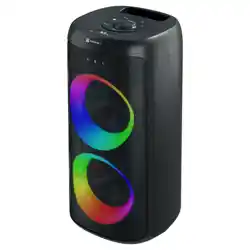

User Manual
Power Switch
Press the Power Button to ON /OFF
1. INPUT Button
Short Press: Switch between BT / USB / FM /
AUX modes.
When powered on, the speaker starts in
Bluetooth (BT) mode.
2. PLAY Button
Short Press: Play / Pause music.
Long Press (FM Mode): Auto-scan and save
all FM stations.
Long Press (BT Mode): Clear Bluetooth
pairing. Long press again to reconnect.
3. PREV Button
Short Press: Go to the previous track or FM
station.
(Not functional in AUX mode.)
4. NEXT Button
Short Press: Go to the next track or FM
station.
(Not functional in AUX mode.)
5. RGB Lighting Button
Short Press: Cycle through LED effects (LED1
--> LED5 --> OFF).
6. TWS Button
Short Press (BT Mode): Pair with another
Dash 14 speaker.
7. BASS Button
Press Once: Enable Bass Boost (BASS).
Press Again: Turn Bass Boost OFF.
8. Volume Encoder
Rotate to adjust volume (0–30).
Default volume is 20.
Button FunctionsProduct Specifications
Bluetooth Version : 5.3
Bluetooth Working Range : Less than 10m
Speaker Power : 120W
Signal to Noise Ratio : 75
Frequency Response : 40Hz-20kHz
Charging Voltage : 5V/3A
Charging Port : Type-C
Built-in : 7.4V/4000mAh
Lithium Battery
Rear Panel
1) Insert a USB flash drive to
play files. Supports MP3, WAV,
WMA, and Fat36 formats, with
a maximum capacity of 32GB.
2) GT volume adjustment
knob, with volume levels
from 0 to 30.
3) MIC volume adjustment
knob, with volume levels
from 0 to 30.
4) Reverb adjustment knob,
reverb level from 0 to 16 .
5) External audio input,
supports 3.5mm stereo
audio input.
6) GT input jack,
no reverb.
7) MIC input jack
with reverb.
8) Power switch, ON turns
on the speaker, OFF turns
off speaker
9) Battery charging input,
rated voltage 5V/3A .
DC 5V
2
4
3
6
5
7
1
- +
8