AUTO
SPEED
AUTO
MODE
Thank you for purchasing this Window Air Conditioner. Before operating this unit,
please read these instructions completely and keep the manual ready for further reference.
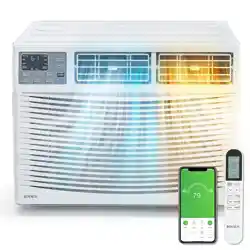
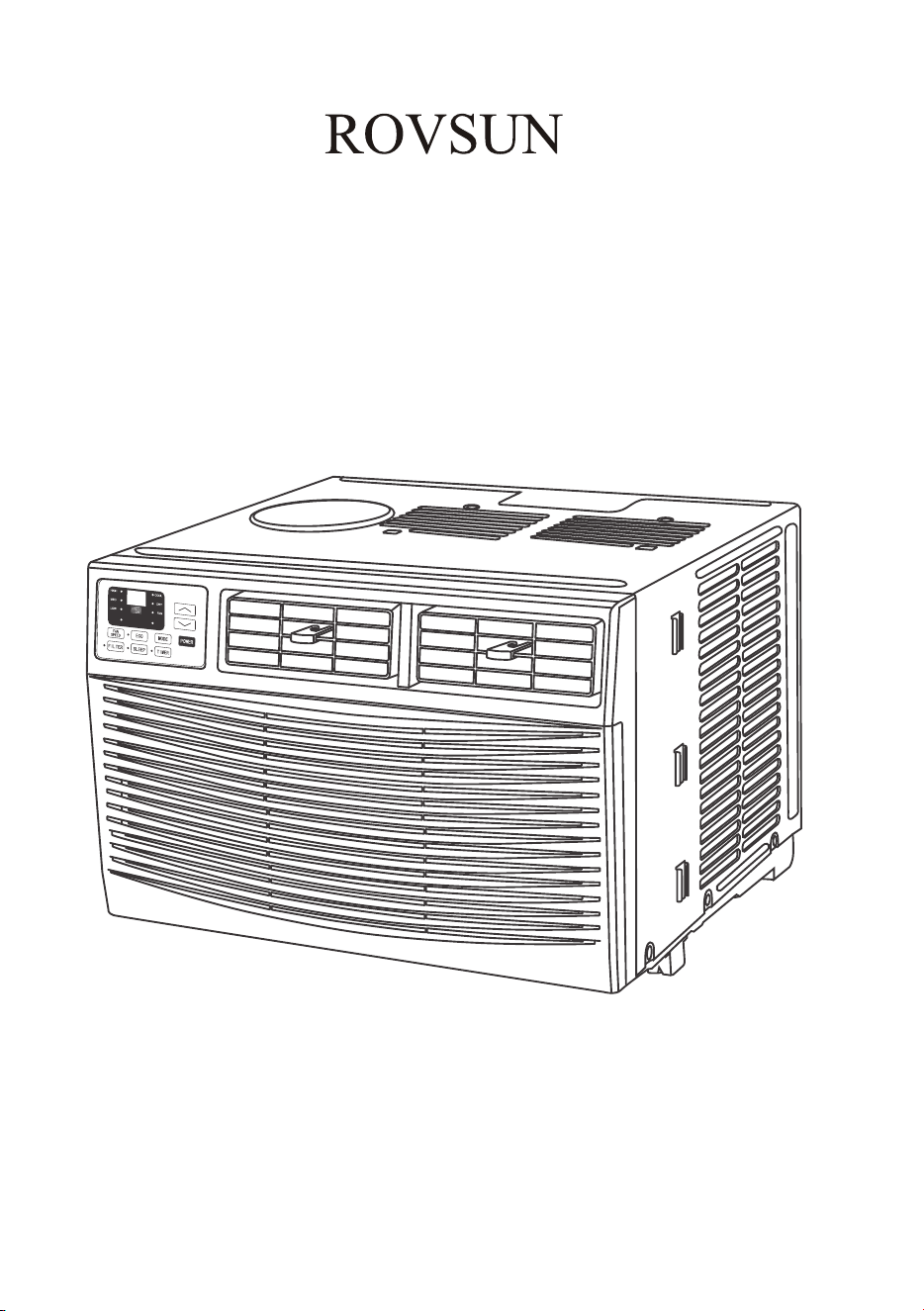
Window Air Conditioner
USER MANUAL
8000Btu, 10000Btu, 12000Btu
Made in China


IMPORTANT SAFETY INSTRUCTION ...........................................................................
...................................................................................
PACKING LIST ............................................................................................................
INSTALLATION&ASSEMBLY INSTRUCTIONS ..............................................................
USING YOUR AIR CONDITIONER ................................................................................
........................................................................
CARE AND CLEANING ................................................................................................
TROUBLESHOOTING .................................................................................................
INTRODUCTION TO REFRIGERANTS R32(Only for R32 Model).....................................
THROUGH-THE-WALL INSTALLATION INSTRUCTIONS................................................
INSTALLATION & ASSEMBLY INSTRUCTIONS..............................................................
ELECTRICAL REQUIREMENTS
OPERATING YOUR AIR CONDITIONER
1
2
3
4
6
11
12
13
15
16
17
INTRODUCTION
1
9K
12K
18K
24K
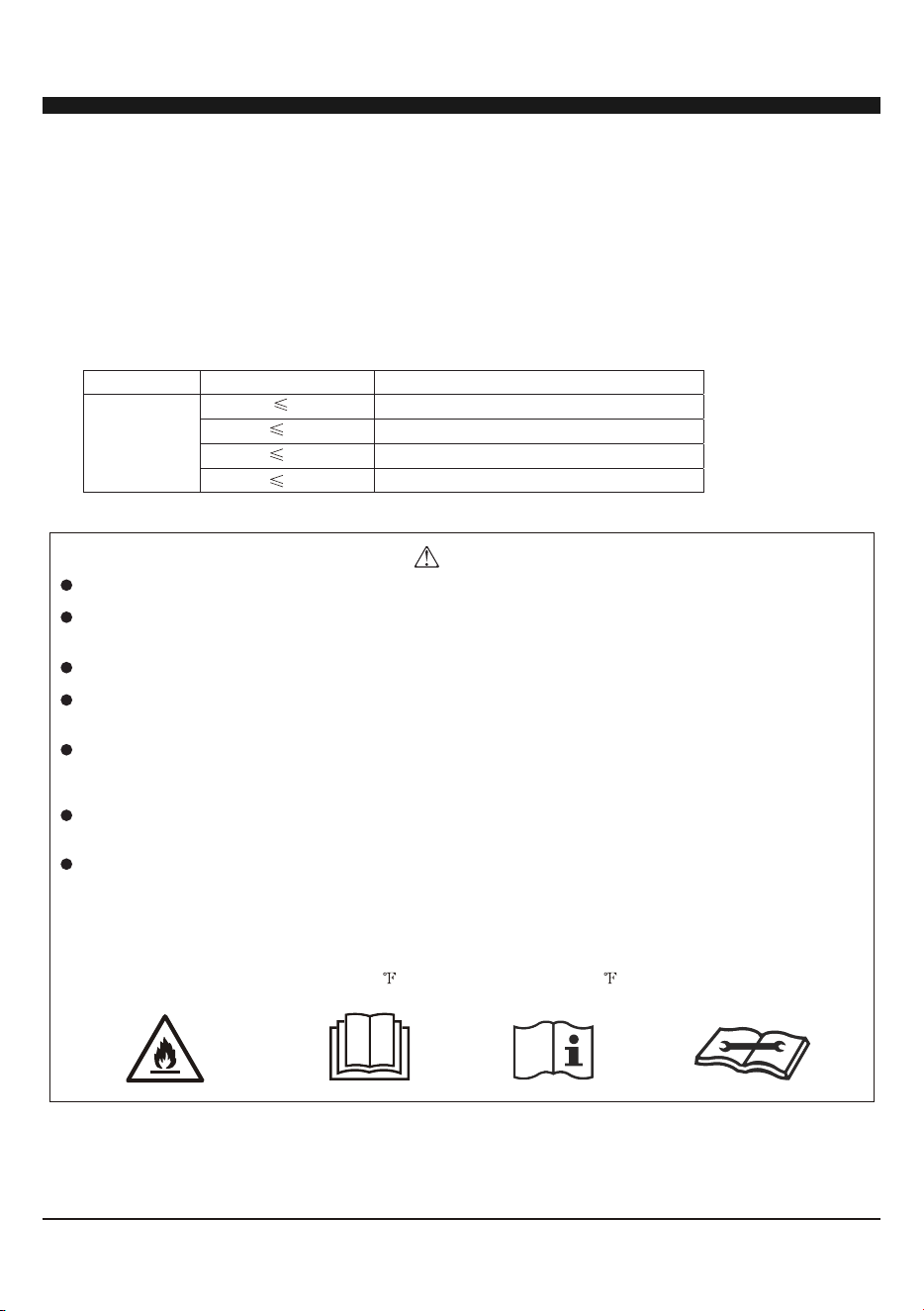
The refrigerants used for air conditioners are environmentally friendly hydrocarbons R32. This kind of erant is
combustible and odorless. Moreover, it can burn and explode under certain condition. However, there will be no
risk of burning and explosion if you comply with the following table to install your air conditioner in a room with
an appropriate area and use it correctly.
Compared with ordinary refrigerants, Refrigerant R32 is environmentally friendly and do not destroy the ozone
sphere and that its value of greenhouse effect is also very low.
Room area requests for air conditioner with Refrigerant R32
Warnings
Please read the manual before installation, using, maintenance.
Do not use means to accelerate the defrosting process or to clean, other than those recommended by the
manufacturer.
Do not pierce or burn the appliance.
The appliance shall be stored in a room without continuously operating sources (for example: open flames,
an operating ignition gas appliance or an operating electric heater.)
Please contact the nearest after-sale service center when maintenance is necessary. At the time of
maintenance, the maintenance personnel must strictly comply with the Operation Manual provided by the
corresponding manufacturer and any non-professional is prohibited to maintain the air conditioner.
The handling, installation, storage, servicing and disposal must comply with the provisions of gas-related
national laws and regulations, and also national wiring regulation.
It is necessary to clear away the refrigerant in the system when maintaining or scrapping an air conditioner.
Be aware that refrigerants may not contain an odour.
This appliance is not intended for use by persons (including children) with reduced physical, sensory or
mental capabilities, or supervision or instruction concerning use of the appliance by a person responsible for
their safety.
Children should be supervised to ensure that they do not play with the appliance.
Unit operation limits: Outdoor side 61~110 , 80%RH; indoor side 61~90 , 80%RH.
R32
Refrigerant
Capacity(Btu)
Room Area
2
Above 4m
2
Above 4m
2
Above 15m
2
Above 25m
INTRODUCTION TO REFRIGERANTS R32(Only for R32 Model)
2
A2L
3
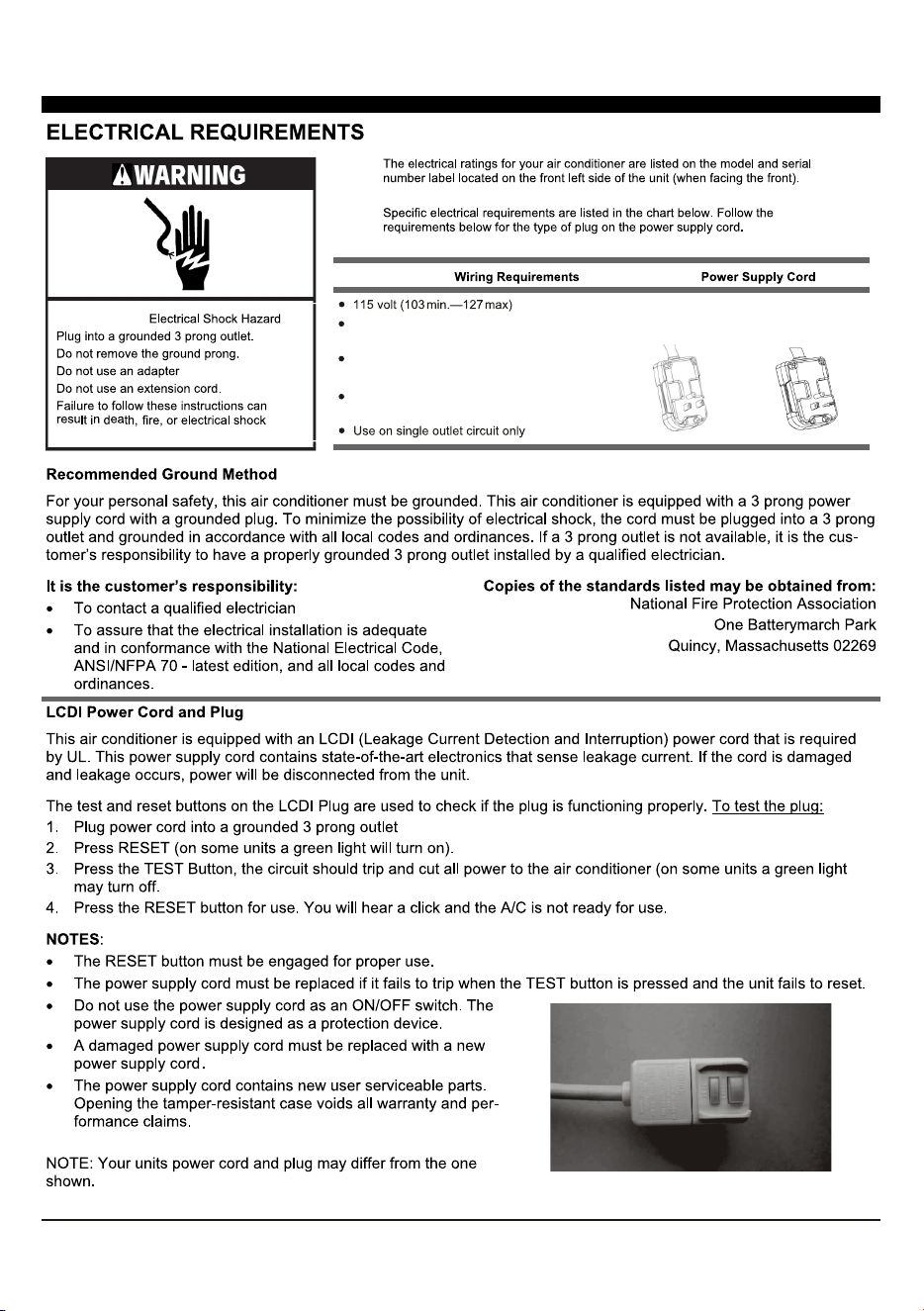
(6K cooling) 10A time-delay fuse or
circuit breaker
(12K heating) 20A time-delay fuse or
circuit breaker
6K/8K/10K/12K Cooling
8K Heating
12K Heating
(8K-12K cooling & 8K heating) 15A
time-delay fuse or circuit breaker
4
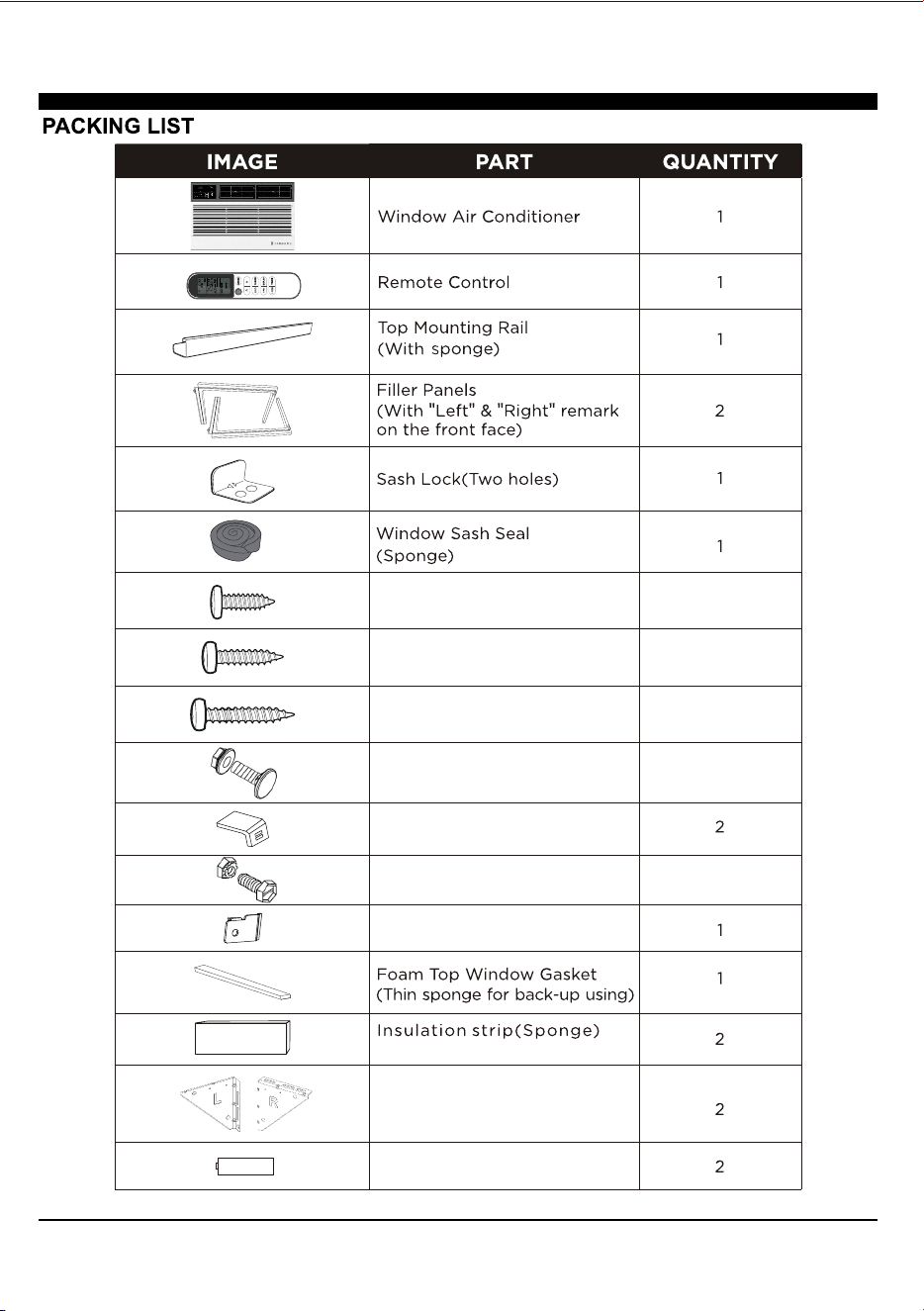
1/2" Length Screws
3/4" Long Screws
5/8" Big Flat Head Bolt and
Locknut
3/8" Short Screws
Sill Angel Bracket
1/2" Small Flat Head Bolt and
Locknut
Support Bracket(with R and L
remark)
Chassis Lock
5
4
3
2
4
Battery
(Only for E-star model)
5
OFFSET
STOOL
SILL
INTERIOR
WALL
EXTERIOR
WALL
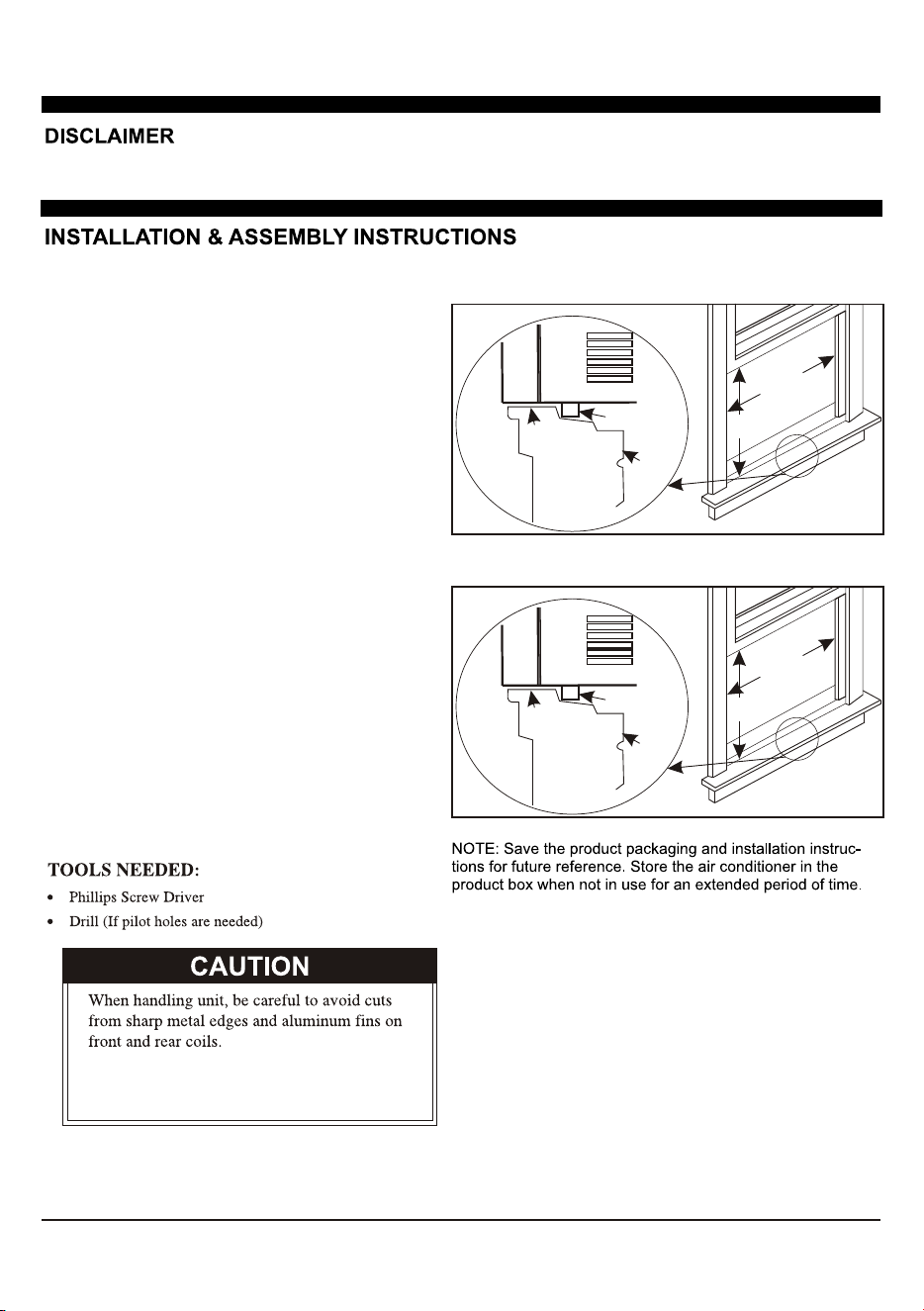
Air conditioner
Bottom channel
26” to 36”
660mm to 914mm
16”
406mm
1. This air conditioner is designed to be installed
In a standard double-hung window with a window
width.
2. The air conditioner can be installed without the
accordion panels fit in a narrow window opening.
3. The lower sash ( the lower part of the window that
moves up and down) must allow for vertical
clearance when open.
4. All supporting parts must be secured to firm wood,
masonry, or metal.
5. The electrical outlet must be within reach of the
power cord.
Window preparation
ALL INFORMATION AND THE TECHNICAL SPECIFICATIONS PRESENTED IN THIS USER’ S MANUAL ARE THE PRESENTATION
OF THE MANUFACTURE. PLEASE READ AND FOLLOW THESE INSTRUCTIONS CAREFULLY.
How to Install
NOTE:This is necessary for proper condensed water
utilization and drainage. If you are not using the Side
Panels for any reason, this pitch to the rear muse be
maintained!
Remove the air conditioner from the box and place on a
hard flat surface, as floor, a bench or a table. There is a
Left and Right Window Filler Panel - be sure to use the
proper panel for each side. When installed the flange for
securing the panel in place to the window sill will be facing
into the room.
OFFSET
STOOL
SILL
INTERIOR
WALL
EXTERIOR
WALL
Air conditioner
Bottom channel
23” to 36”
584mm to 914mm
14-1/2”
368mm
For 6K/8K-Cooling
For 10K/12K-Cooling, 8K/12K-Heating
Besure that, there will be a 3 tilt angle
downward to the unit back side, after
finish the unit installation.
6
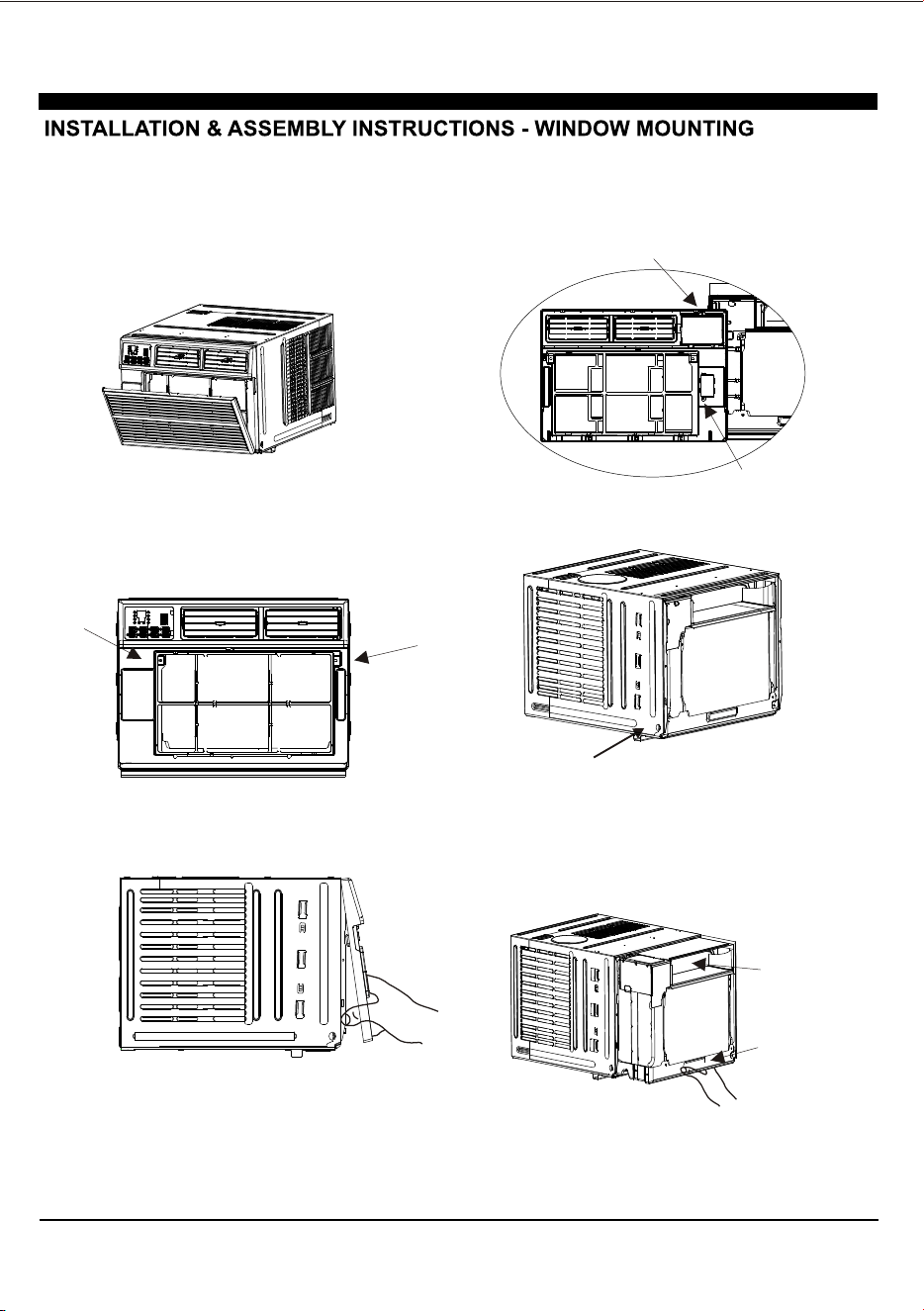
5. Remove the control panel screw and WI-FI module
screw (if available) from the front panel.
1. Pull down the front panel and remove the filter.
2. Lift the front panel upwards to remove and place
to the side.
3. Locate the two faceplate screws and remove.
These screws will need to be re-installed prior
to mounting the air conditioner.
4. After removing the screws, gently pull away the
faceplate from the air conditioner cabinet.
REMOVE FRONT PANEL AND CHASSIS
6.Remove the screws from the cabinet.
7. Hold the cabinet while pulling on the base
handle to carefully remove the unit. Do not pull
or lift near the top of the unit.
Do not pull or lift
this area. It may
cause damage.
Pull the base handle.
7
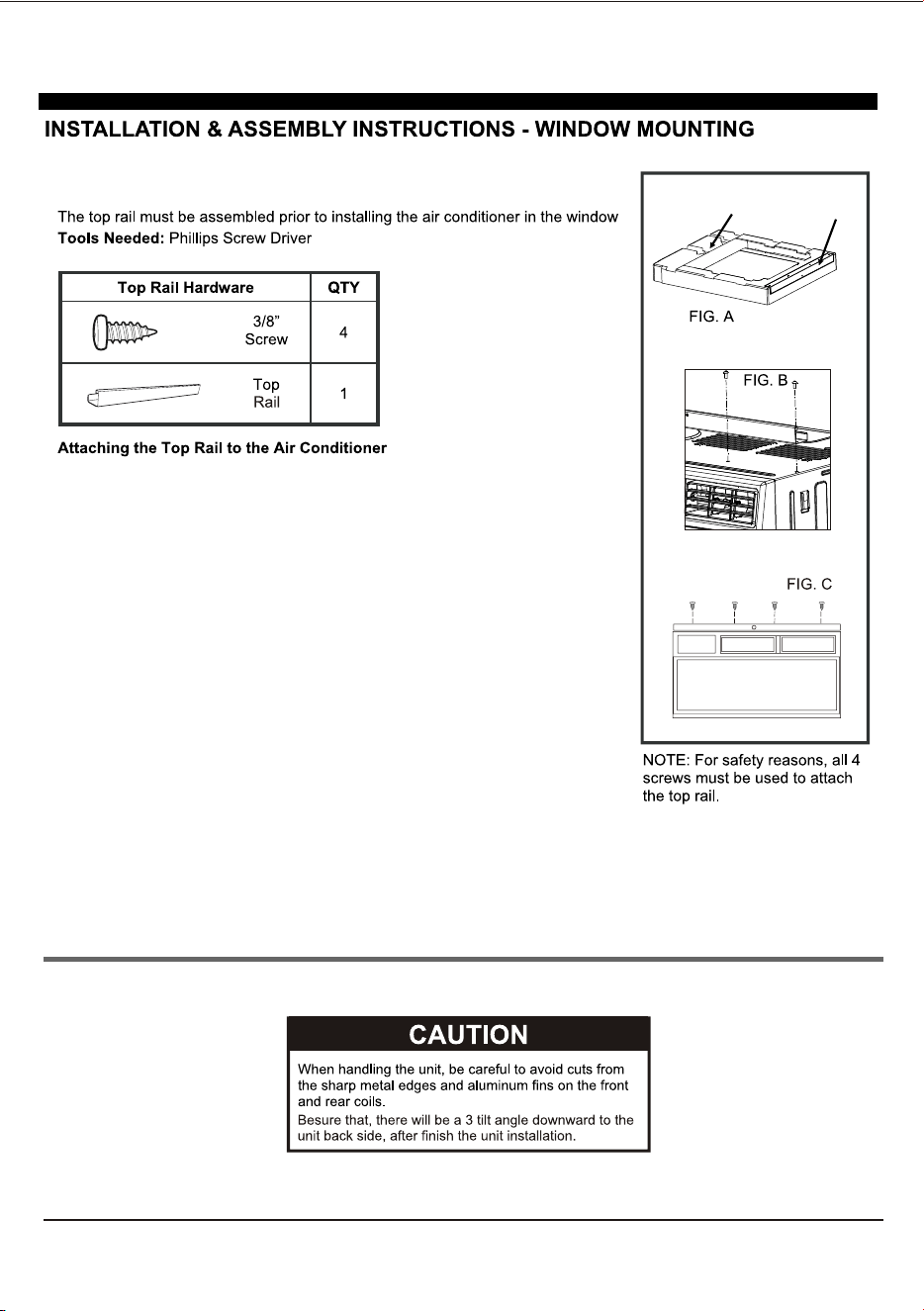
1. Place the cabinet on a hard flat surface.
2. Remove top rail from the top form of the packaging
material as shown in FIG. A.
3. Align the hole in the top rail with those on the top of
the unit as shown in FIG. B.
4. Secure the top rail to the unit with the 3/8” screws
as shown in FIG. C.
Top RailTop Foam
Top Rail Assembly
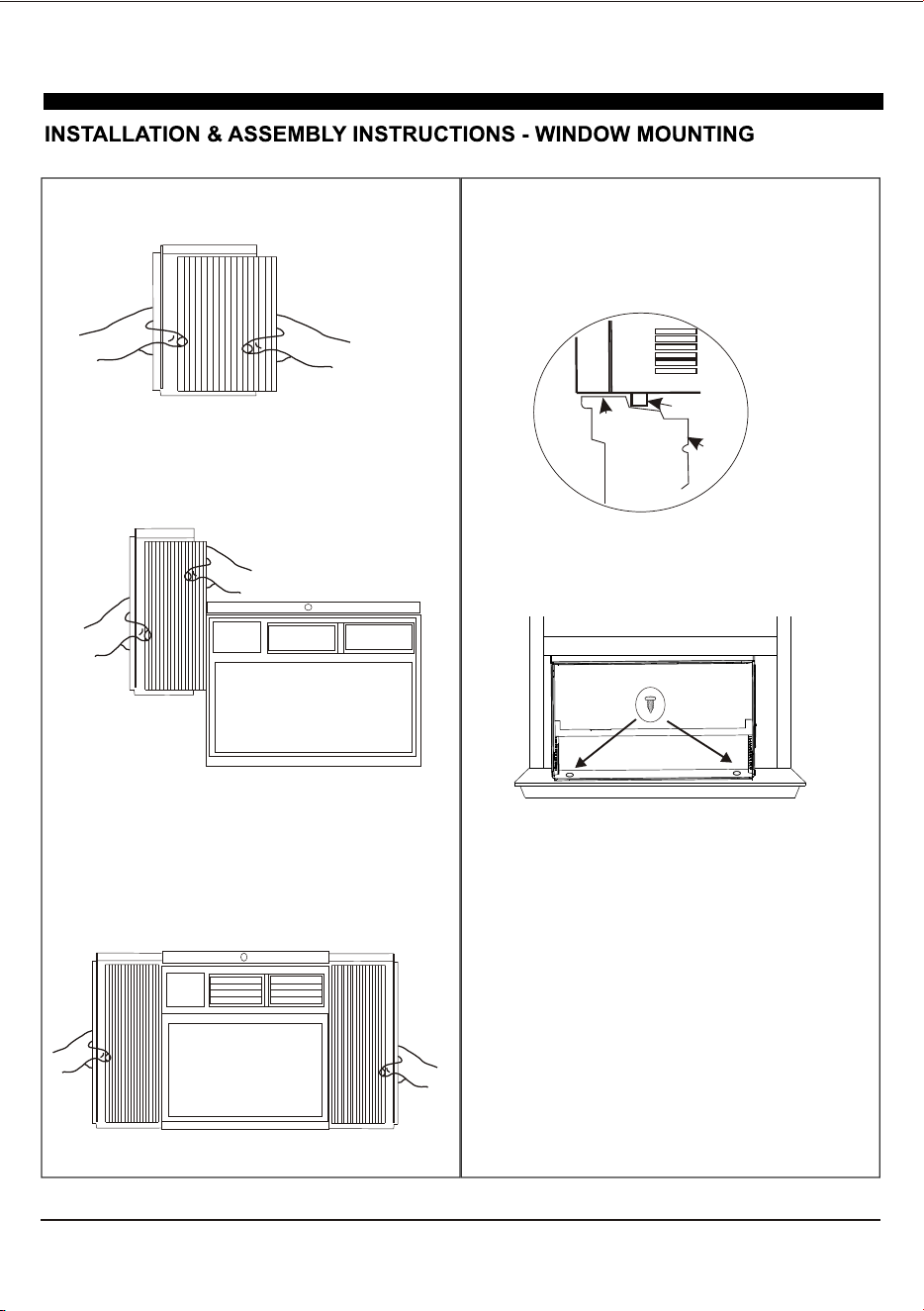
Accordion Panel and cabinet Assembly
1.Hold the Accordion Panel in one hand and gently
pull the center to free the open end.
2.Slide the free end of the panel into the cabinet as
shown. Be sure to leave enough space to slip the
top and bottom of the frame into the rails on the
cabinet.
3.Once the panel has been installed on the side of
the cabinet, make sure it sits securely inside the
frame channel by making slight adjustments. Slide
the top and bottom ends of the frame into the top
and bottom rails of the cabinet. Slide the panel all
the way for both sides.
OFFSET
STOOL
SILL
INTERIOR
WALL
EXTERIOR
WALL
Air conditioner
Bottom channel
4.Use two or more people, place the air conditioner
into the window opening so the bottom of the air
conditioner frame is against the window sill.
Tilt the back of the unit slightly download to allow
accumulated rain water to drain out.
5.Fasten cabinet bottom to window sill using two
1/2” screws. Pre-drill holes if needed.
8
9
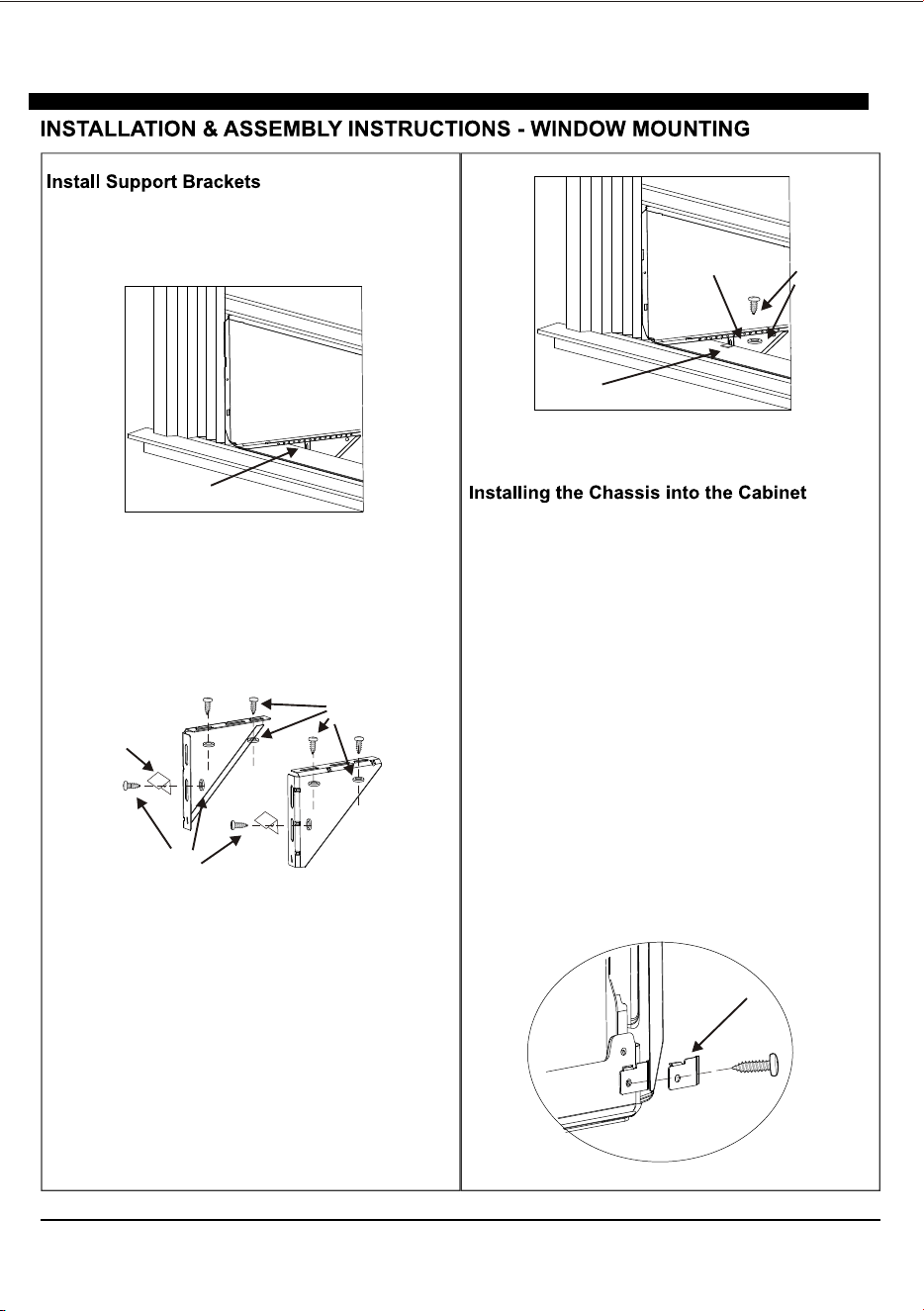
1.Hold each support bracket flush against the outside of
the window sill. Tighten each bracket to the bottom of the
cabinet as shown. Mark the brackets at top lever of the
window sill and then remove.
Sign marking
1/2” long bolt
and locknut
Sill angle
bracket
5/8” long bolt
and locknut
4. Tighten all the bolts with locknuts securely.
1.Team lift (two people or more) the air conditioner
chassis and carefully slide it into the cabinet. Let
the front of the air conditioner hang out
approximately 6”.
2.CAUTION: DO NOT PUSH ON THE CONTROLS
OR FINNED COILS.
3.Be sure the chassis is firmly seated in the back of
the cabinet.
4.Insert all screws removed during window install-
ation and fasten, then reattach the front face plate,
front panel, and the air filter.
5. If the wall is too near to effect driving the cabinet
screw back, you can assemble the chassis lock at
the right bottom corner of chassis with 3/8” screw
as shown, before assemble the front panel.
2.Assemble the sill angle brackets to the support
brackets at the marked position with long bolt and
locknut as shown. Hand tighten, but not all the way
for any changes that may need to be made later
during installation.
3.Install the support brackets (with sill angle bra-
ckets) to the bottom of the cabinet as shown.
Sill angle bracket
Support bracket
Bolt and
Locknut
Chassis Lock
10
Window seal
sponge
Sash lock
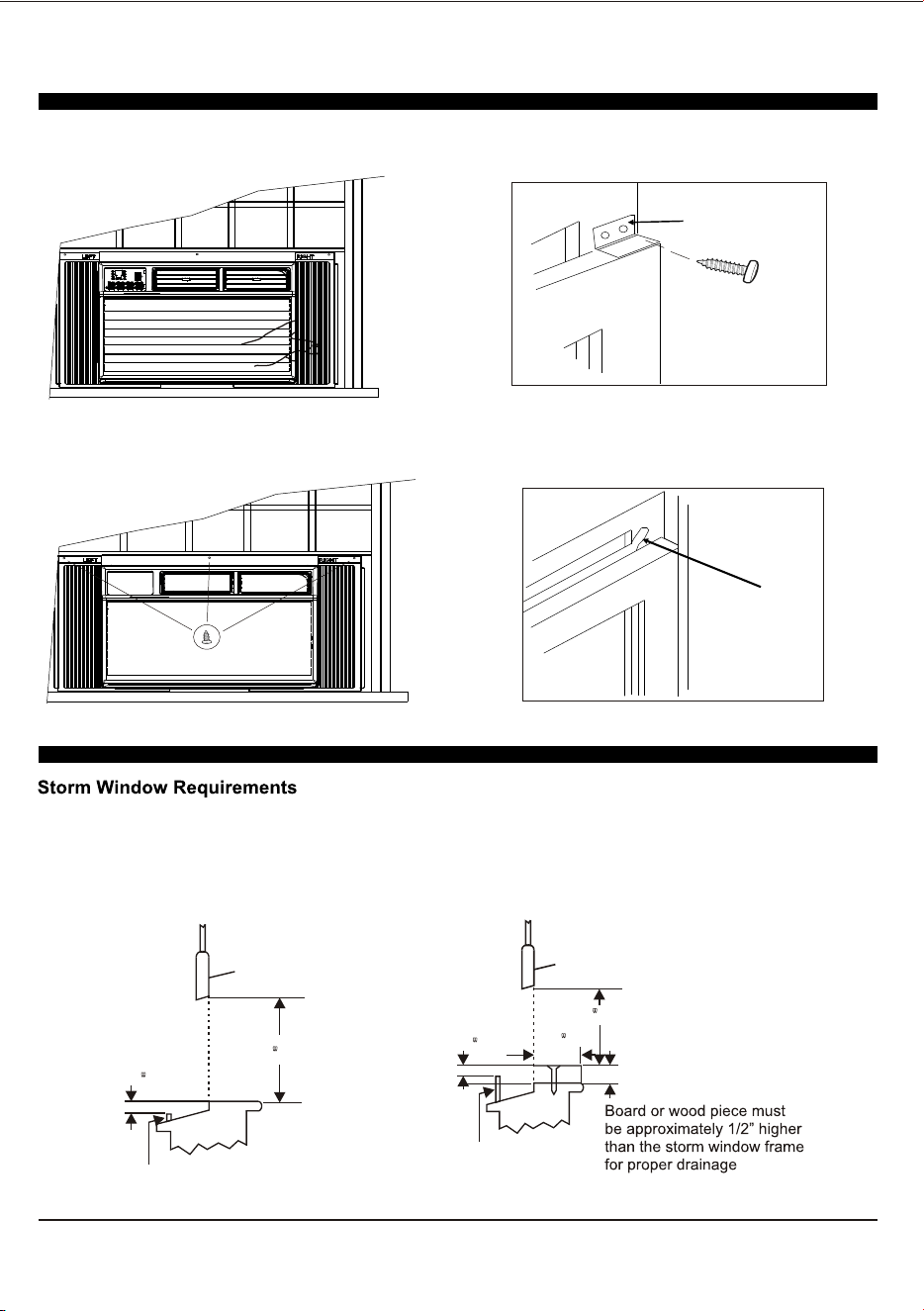
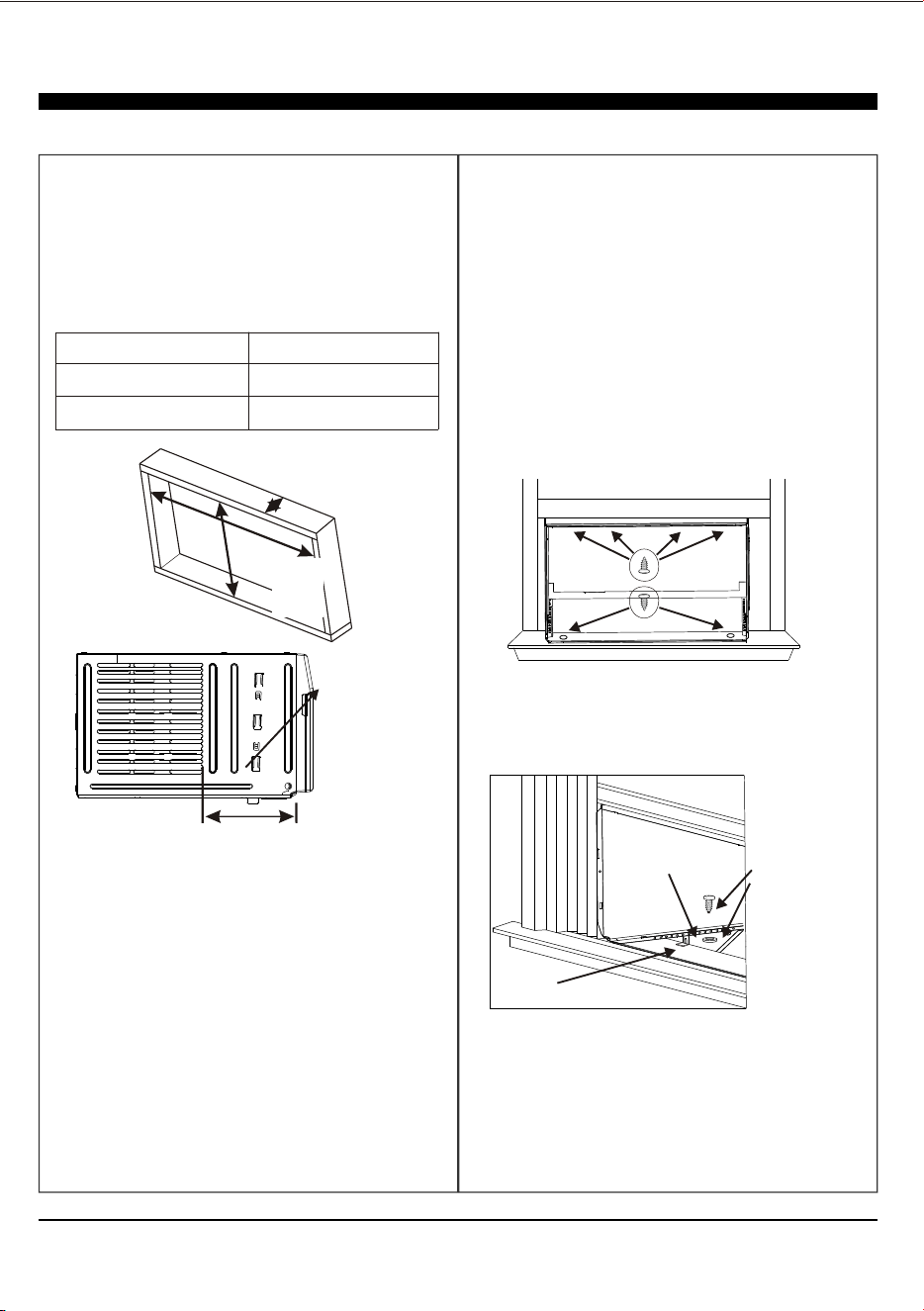
5.Extend the side accordion panels out against
the window frame as shown.
6.Drive 1/2” locking screws through frame holes,
and drive one 3/4” screw through top rail into
window sash as shown.
7.To secure lower sash in place, attach right angle
sash lock with 3/4” screws as shown.
8.Cut foam seal and insert in the space between
the upper and lower sashes as shown.
A storm window frame will not allow the air conditioner to tilt properly which in turn will keep it from draining
properly. To adjust for this, attach a board or piece of wood to the sill. The board or wood piece should have
a depth of at least 1/2”. Make sure the board or piece of wood is approximately 1/2” higher than the storm
window frame. This will allow the air conditioner to tilt enough for proper drainage.
16 MIN
SASH
1/2 MIN
Storm Window Frame
or Obstruction
1/2 MIN
Storm Window Frame or Obstruction
16 MIN
SASH
1/2 MIN
11
THROUGH-THE-WALL INSTALLATION INSTRUCTIONS - OPTIONAL
The case may be installed through-the-walll as optional.
Read completely, then follow step-by-step.
NOTE: Obtain all materials locally for mounting the air
conditioner through-the-wall.
Through-the-wall installation is not appropriate, if any of
the side or top louvers of case is obstructed by the wall.
All side and top louvers in the case must project on the
outdoor side of the wall.
The room side of the case must project into the room far
enough to maximize the balance of the unit.
The case must be installed level from side to side and
with a slight tilt from front to rear. Use a level, no more
than a 1/2 bubble will be correct slant to the outside.
Lintel angle is required to support bricks or blocks
above opening.
Flashing is required and should extend the length of the
opening to ensure no inside cavity leakage occurs.
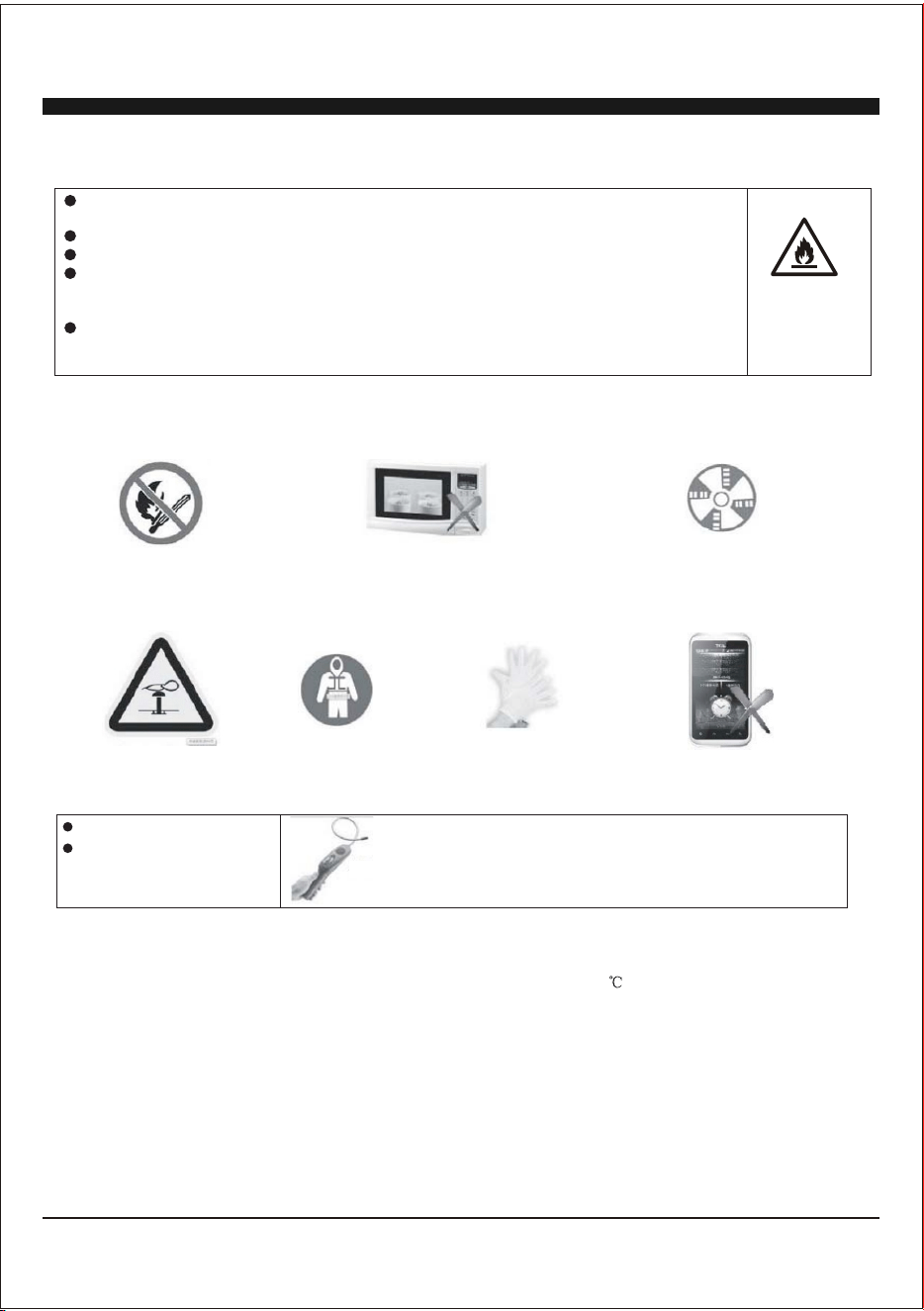
Building a wooden frame is required when install the case
through-the-wall. The opening and dimension of wooden
frame is required as below.
IMPORTANT
Frame Max. Thickness
Inside Frame Width
Inside Frame Height
The Maximum
Wall thickness
8 9/10”(225mm)
Inside
Frame
Height
Frame
Thickness
8 9/10”( 225 mm)
1.Build a wooden frame into the wall opening and make
sure fasten securely, which is suitable to the WALL
OPENING REQUIREMENT.
2.Remove the air conditioner from the carton box and
take off the chassis as window mounting installation.
3.Place the cabinet into the wooden frame, and lock the
cabinet by the top rail hole and bottom chassis hole with
1” long wood screws as shown, from inside to outside.
4. Assemble the two Support Bracket with Sill Angle
Bracket to the cabinet against to the wooden frame as
window mounting installation instructions.
5. Assemble the chassis into the cabinet and fasten or
lock it, as window mounting installation instructions.
Sill angle bracket
Support bracket
Bolt and
Locknut
NOTE: The allowed maximum wall thickness is less than
8 9/10”. Otherwise, the wall will block the air inlet of
outdoor side, it will effect the normally operation of unit.
20”( 508 mm)
15-1/5”(385 mm)
Inside
Frame
Width
INSTALLATION & ASSEMBLY INSTRUCTIONS
Important Considerations
12
Before installing the appliance, you must read the manual carefully to get the safety
information and notes.
A leak test must be done after the installation is completed.
It is a must to do the safety inspection before maintaining or repairing an air
conditioner using combustible refrigerant in order to ensure that the fire risk is
reduced to minimum.
It is necessary to operate the machine under a controlled procedure in order to
ensure that any risk arising from the combustible gas or vapor during the operation
is reduced to minimum.
Unit refrigerant charge amount: refer to unit name plate marking.
Introduction to Refrigerants R32(Only for R32 Model)
1. Site Safety
2. Operation Safety
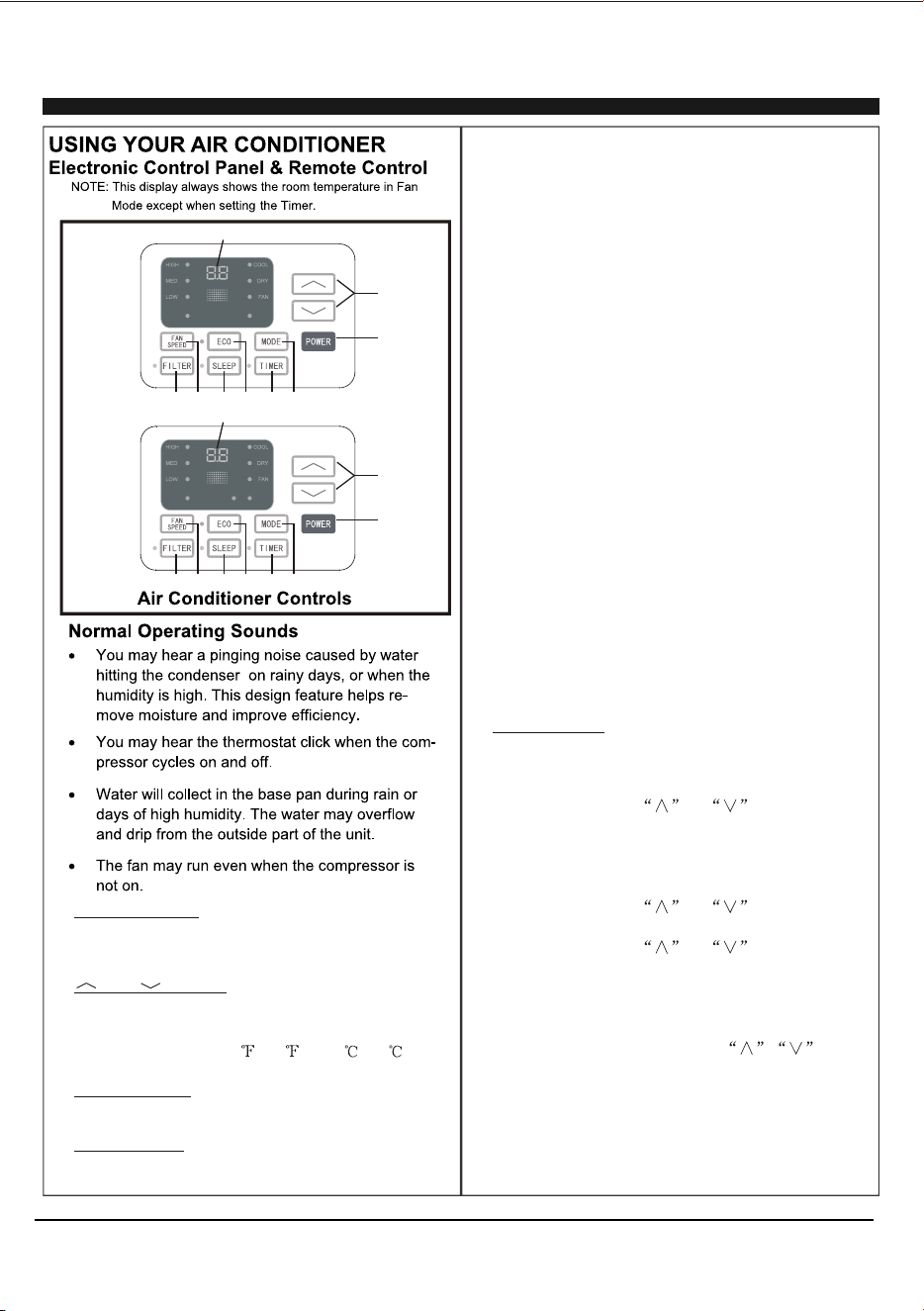
Open Flames Prohibited Ventilation Necessary
Open Flames Prohibited
Mind Static Electricity
Must Wear Protective Clothing and anti-static gloves
Don't use mobile phone
3. Installation Safety
Refrigerant Leak Detector
Appropriate Installation Location
The left picture is the schematic diagram of a refrigerant leak detector.
Please note that:
1. The installation site should be in a well-ventilated condition.
2. The sites for installing and maintaining an air conditioner using Refrigerant R32 should be free from open fire
or welding, smoking, drying oven or any other heat source higher than 548 which easily produces open fire.
3. When installing an air conditioner, it is necessary to take appropriate anti-static measures such as wear
anti-static clothing and/or gloves.
4. It is necessary to choose the site convenient for installation or maintenance wherein the air inlets and outlets of
the indoor and outdoor units should be not surrounded by obstacles or close to any heat source or combustible
and/or explosive environment.
5. If the indoor unit suffers refrigerant leak during the installation, all the personnel should go out till the refrigerant
leaks completely for 15 minutes. If the product is damaged, it is a must to carry such damaged product back to
the maintenance station and it is prohibited to weld the refrigerant pipe or conduct other operations on the user's
site.
6. It is necessary to choose the place where the inlet and outlet air of the indoor unit is even.
7. It is necessary to avoid the places where there are other electrical products, power switch plugs and sockets,
kitchen cabinet, bed, sofa and other valuables right under the lines on two sides of the indoor unit, and also
prevent mechanical damage from occurring.
A2L
13
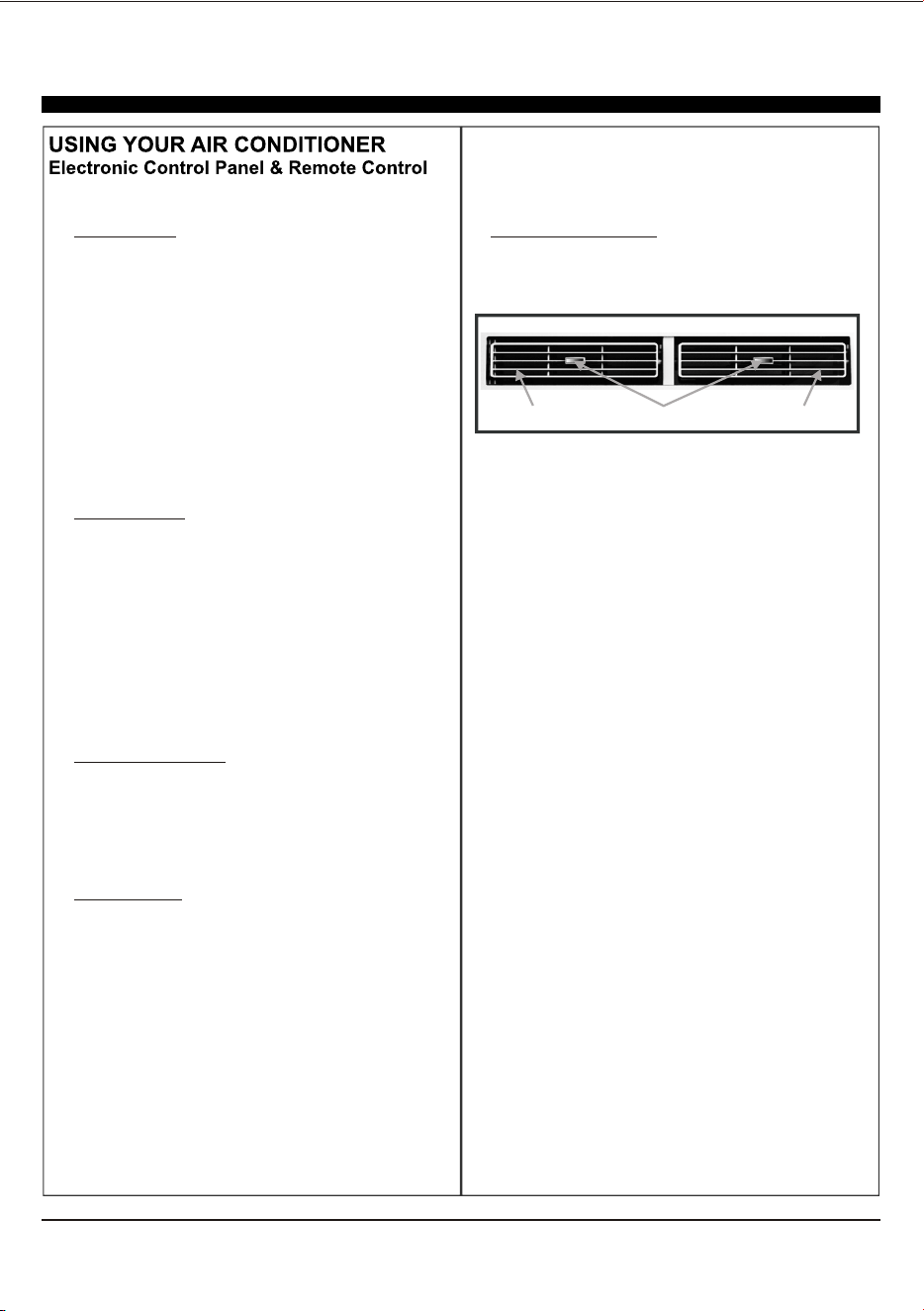
1. Without timer setting, the set
temperature will be displayed.
Time will be displayed under timer setting. the
Digital Display:
And Button:2. Use these buttons on the
control panel and remote to increase or decrease
the Set Temperature or Timer.
Temperature range: 61 ~88 or 16 ~31 .
3. Turn the air conditioner on and off.Power Button:
Press the mode button to cycle
through the various modes: Cool, Dry, Fan and
Auto, or Heat.
4. Mode Button:
Use these buttons on the control
panel and remote to set the Timer.
Timer Off: The timed stop is programmed by
pressing TIMER button. Set the rest time by
pressing the button or until the rest
time displayed is to your then press
TIMER button again.
Timer On: When the unit is off, press TIMER
button at the first time, set the temperature with
pressing the button or . Press TIMER
button at the second time, set the rest time with
pressing the button or . Press TIMER
button at the third time, confirm the setting, then
the rest time to next automatical switching-on
could be read on the display of the machine.
Note: It can be set to automatically turn off or on in
0.5-24 hours. Each press of the
buttons will increase or decrease the timer. The
Timer can be set in 0.5 hours increment below 10
hours and 1 hour increment for 10 hours or above.
The SET light will turn on while setting.
To cancel the set function, press the TIMER
button again.
liking
the
5. Timer Button:
Cool Mode: The cooling function allows the air
conditioner to cool the room and at the same time
reduces . Press the MODE button to
activate the cooling function. To optimize the
function of the air conditioner, adjust the
temperature and the speed by pressing the button
indicated.
Dry Mode: This function reduces the humidity of
the air to make the room more comfortable. Press
MODE button to set the DRY mode. An automatic
function of alternating cooling cycles and air fan
is activated.
Fan Mode: The conditioner works in only
ventilation. Press MODE button to set the FAN
mode. With pressing FAN SPEED button the
speed changes in the following sequence: Hi, Med
and Lo in FAN mode.
air humidity
the
Auto Mode: In AUTO mode the unit automatically
chooses the fan speed and the mode of operation
(COOL,HEAT,DRY or FAN). In this mode the
temperature are set automatically according to
the room temperature (tested by the temperature
sensor which is incorporated in the indoor unit.).
Heat Mode: The heating function allows the air
conditioner to heat the room. Press the MODE
button to activate the heating function. To optimize
the function of the air conditioner, adjust the
temperature and the speed by pressing the button
indicated.
1
2
3
4
5
6
7
8
9
AUTO
SPEED
AUTO
MODE
1
2
3
4
5
6
7
8
9
HEAT
AUTO
SPEED
AUTO
MODE
For Cooling model
For Heating model
14
When the unit is in ECO mode, the
light will turn on. In ECO mode, the unit will turn-off
once the room is cooled to the user set temperature.
The unit will turn back on when the room temperat-
ure rises above the user set temperature.
Before the compressor starts, the fan motor will run
for a while, then it will stop for awhile, It will repeat
to provide a much more comfortable feeling and
save energy.
6. ECO Button:
Press the SLEEP button, all of the
display lights will turn off after a while, but the Sleep
light is always on. In SLEEP mode, the air
conditioner will automatically adjust the temperature
and fan speed to make the room more comfortable
during the night. The set temperature will
automatically raise or decrease based on the room
temperature and the duration of sleep.
7. Sleep Button:
Press the FAN SPEED button
to choose the fan speed options. You can choose
Hi, Med, Lo or auto speed in COOL mode and
choose Hi, Med, Lo in FAN mode.
8. Fan Speed Button:
9.
When the Filter Check light is off,
When the Filter Check light is on,
the light by pressing the Filter Check button. After
the fan motor works for 500 total hours, the Filter
Check light will turn on to remind the user to clean
the filter.
it isn't necessary to press the Filter Check button.
you can turn off
Filter Button:
10.
To direct the airflow, use the
horizontal wheel to control the horizontal direction
and the air deflector to control the vertical
direction.
Directional Louvers:
horizontal wheelair deflector air deflector
15
DISPLAY:
POWER:
4
MODE:
" " and " ":
.
4.
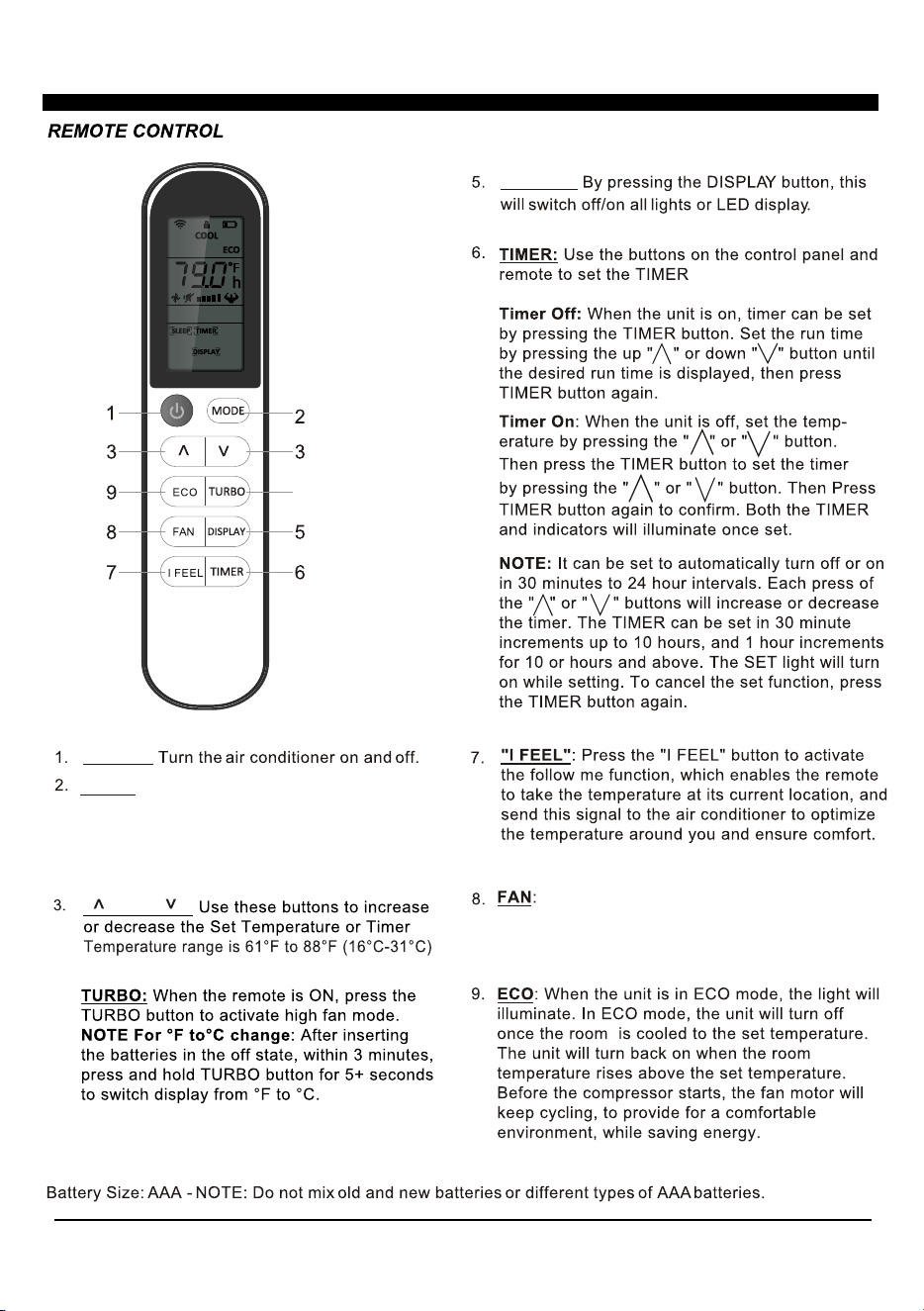
USING YOUR REMOTE CONTROL
Press the button to select the mode of
operation, AUTO, COOL, DRY, FAN and HEAT
Note: The HEAT mode is inactive for COOL ONLY
models. Press and hold the MODE button for more
than 5 seconds to delete or add the HEAT mode on
remote.
Press the "FAN" speed button to select the fan
options. You can choose HI, MED, LO or AUTO in COOL
MODE or HEAT MODE, and HI, MED, LO in FAN MODE.
4
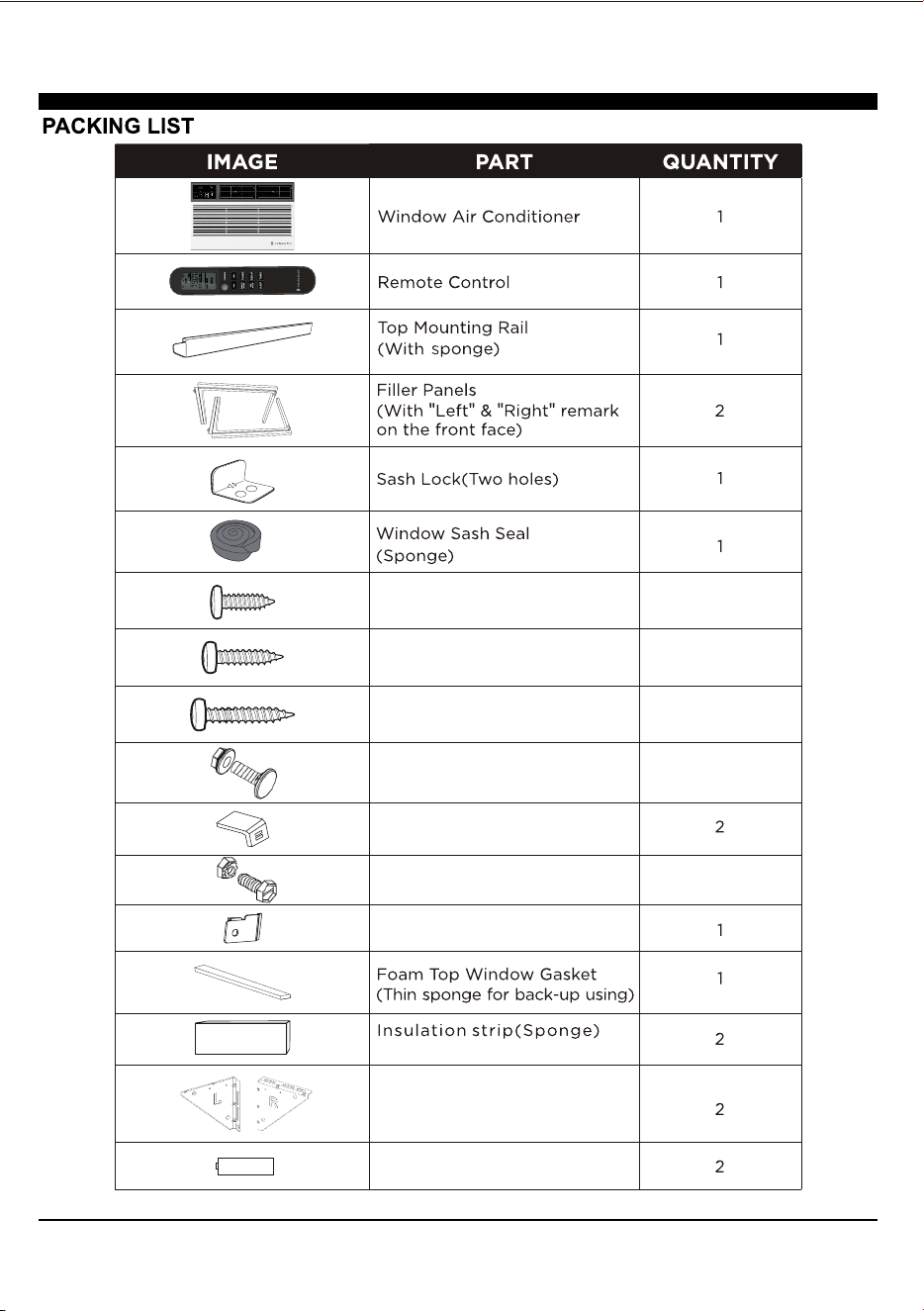
1/2" Length Screws
3/4" Long Screws
5/8" Big Flat Head Bolt and
Locknut
3/8" Short Screws
Sill Angel Bracket
1/2" Small Flat Head Bolt and
Locknut
Support Bracket(with R and L
remark)
Chassis Lock
5
4
3
2
4
Battery
(Only for E-star model)
17
18