Play/Pause/Switch Music
Ear Monitor/Reverb Volume
Adjustment Switch
Wake Up Voice Assistant
Answer/Hang Up/Reject Call
Short press: Pause/play music
Answer/hang up calls
Long press for 1.5 seconds: Wake
up phone voice assistant
Long press for 1 second: Reject
incoming calls
Short press: Adjust music volume
Long press for 1 second: Quickly adjust
music volume
(Combination key) Long press "+ key" and
"- key" simultaneously for 2 seconds: Clear
Bluetooth pairing records
Short press: Switch between live
streaming and karaoke modes
Short press: Switch between live
streaming and karaoke modes
Short press: Switch between ear
monitor volume adjustment and
reverb volume adjustment
Ear monitor volume adjustment (down): Control
ear monitor volume level
Reverb volume adjustment (down): Control
reverb volume level
(Combination key) Long press "+ key" and "- key"
simultaneously for 2 seconds: Clear Bluetooth
pairing records
Note: Due to system compatibility issues, the wire-controlled button adjustment functions may
vary on some playback devices. Adjustments can be made via the playback device settings.
Note: Due to system compatibility issues, the wire-controlled button adjustment functions may
vary on some playback devices. Adjustments can be made via the playback device settings.
Note: Our company continuously strives to improve product quality and performance. Technical
specifications and design are subject to change without prior notice. We reserve the right to
improve the product, and the actual product shall prevail for its functions!
Short press: Switch listening modes
(HD music/dynamic bass)
Long press for 1 second: Record wet
audio/record dry audio
Short press: Switch listening modes
(HD music/dynamic bass)
1. Hang the microphone on the collar and adjust its position to a range where it can
pick up sound normally without being held. Then you can select songs and sing;
2. For handheld use: First adjust the microphone to a suitable distance, then select
songs and sing.
Long press for 1 second: Record wet
audio/record dry audio
Long press: Microphone mute
/microphone mute off
Long press: Microphone mute
/microphone mute off
Live Streaming/
Karaoke Mode Switch
Microphone On/Off
HD Music/Dynamic Bass Switch
Record Wet Audio/Record Dry Audio
Note: The pictures in this user guide are all schematic diagrams, which may differ from
the actual product. Please refer to the actual product for details.
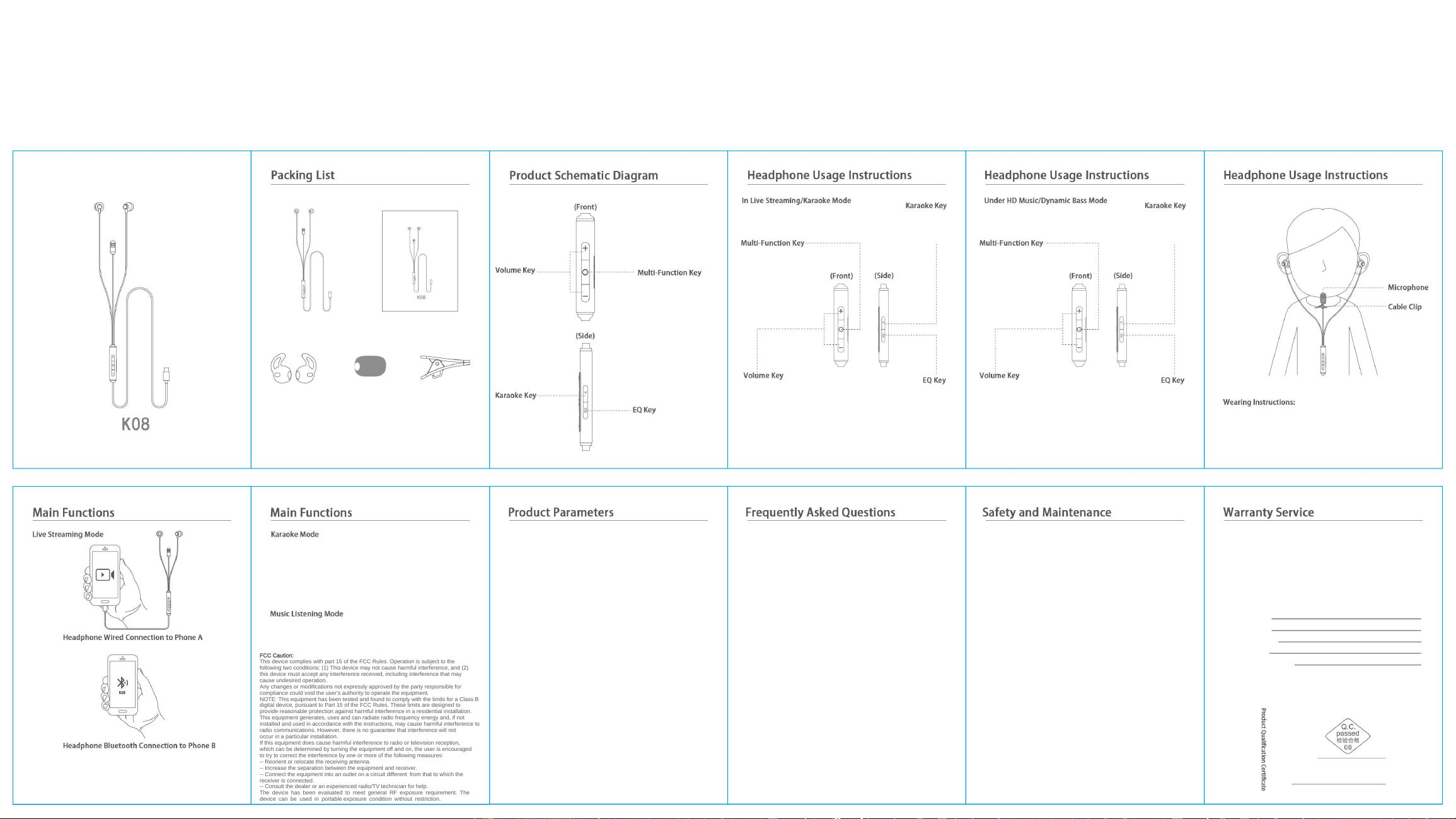
·Connect the headphone to Phone A via cable; the Bluetooth function will turn on
automatically after connection. Then use Phone B to pair with the headphone’s
Bluetooth ("K08"). After setup, you can start live streaming on Phone A, and use
Phone B to play music as background audio.
·After short-pressing the "Karaoke Key" to switch to "Karaoke Mode", you can
short-press the "Multi-Function Key" to toggle between ear monitor/reverb volume
adjustment, then use the "Volume Key" to adjust the ear monitor/reverb. Once the
reverb volume and ear monitor volume are set appropriately, start karaoke;
·Long-press the "EQ Key" for 1 second to switch between dry audio recording/wet
audio recording. Dry audio recording captures sound without effects; wet audio
recording captures sound with reverb effects.
1. On some phones, sound still plays through the phone after plugging in the
headphone.
· Please enable the OTG function in your phone settings;
· Fully close the music playback app, reinsert the headphone, then reopen the
music app.
2. On some phones, sound still plays through the phone (not the headphone)
during calls.
· Due to the system characteristics of some phones, you need to pick up the
· Due to the system characteristics of some phones, you need to pick up the
phone to answer calls.
3. The headphone cannot answer calls or wake up the voice assistant?
· The headphone may be in Live Streaming/Karaoke Mode. Switch to HD
Music/Dynamic Bass Mode to use call control and wake up the voice assistant
normally.
4. No sound from the headphone/microphone after successful connection.
· Ensure the headphone is properly plugged into the device;
· Ensure the headphone is properly plugged into the device;
· Check that the volume of the device and headphone is not muted;
· Phone cases or other objects may prevent the headphone plug from being
fully inserted.
5. Abnormal ear monitor sound (double sound heard).
· Disable the built-in ear monitor effect of some apps to avoid overlapping
interference with the headphone’s ear monitor.
6. Why does the headphone’s wire control get slightly hot?
6. Why does the headphone’s wire control get slightly hot?
· The sound card chip generates normal heat during operation. No need to
worry—you can use it normally.
7. Why does the headphone suddenly stutter or disconnect?
· Due to the nature of Bluetooth headphones, electromagnetic interference in
the area may cause stuttering or disconnection. Try changing the usage location.
8. How to reset the headphone to factory settings?
· Long-press the "Karaoke Key" and "EQ Key" simultaneously for 10 seconds to
· Long-press the "Karaoke Key" and "EQ Key" simultaneously for 10 seconds to
reset the headphone to factory settings.
1. Use the product in accordance with the user guide. Do not attempt to
disassemble it, as this may render it unrepairable.
2. Children under 14 years old must use this product under adult supervision.
3. To ensure product safety, do not plug the product into high-power or
high-voltage devices.
4. This product contains magnetic materials, which may cause:
· Potential interference with implantable medical devices and air transport.
· Potential interference with implantable medical devices and air transport.
Consult a doctor or relevant staff;
· Damage to magnetic stripe cards (e.g., bank cards, phone cards). Do not keep it
in prolonged contact with such cards;
· Attachment of metal objects, which may cause injury.
5. If you experience skin discomfort while wearing the product (due to individual
differences), stop using it and consult a doctor.
6. Use an appropriate volume to avoid hearing damage.
6. Use an appropriate volume to avoid hearing damage.
7. Do not use the product while driving, cycling, operating machinery, or in
situations requiring awareness of ambient sounds, to prevent safety accidents.
8. To reduce fire and electric shock risks, do not use the device during
thunderstorms.
9. It is recommended to use the product within a temperature range of 0-35°C.
9. It is recommended to use the product within a temperature range of 0-35°C.
Do not use it near heat sources (e.g., radiators, heaters, stoves, or other
heat-emitting devices), and avoid prolonged direct sunlight exposure.
10. Avoid dropping, impacting, strong vibration, or contact with sharp objects to
prevent product damage.
11. Use and store the product in a dry, clean environment. Avoid humid
conditions, and do not contact corrosive chemical solvents.
1. Any quality issues caused by the product itself are covered by the warranty
service (the validity period shall comply with the "Three Guarantees" service
stipulated by relevant national laws and regulations).
2. The warranty does not cover damage caused by human factors, cosmetic
defects (e.g., scratches, breakage) due to human handling, or cases where valid
purchase proof cannot be provided.
3. The company shall bear the repair costs incurred during the warranty period,
3. The company shall bear the repair costs incurred during the warranty period,
but transportation costs are not covered.
4. Please keep this document properly for warranty service.
Customer Name:
Contact Phone:
Customer Address:
Purchase Date:
Repair Submission Date:
Inspector:
Product Specifications, Production & Inspection Date:
See product seal or identification code
Model: K08
Speaker Impedance: 32Ω
Interface Type: Type-C
Speaker Size: 14.2mm
Microphone Signal-to-Noise Ratio: 70dB
Microphone Sensitivity: -40dB
Frequency Range: 20Hz-20KHz
Frequency Range: 20Hz-20KHz
Microphone Polar Pattern: Omnidirectional Microphone
*The above data are obtained from laboratory environment tests
and may vary slightly depending on the actual usage environment.
·HD Music: Natural and realistic, balanced and transparent across three
frequencies, with clear and bright vocals;
·Dynamic Bass: Powerful bass, surging and strong rhythm, and a stunning
listening experience.
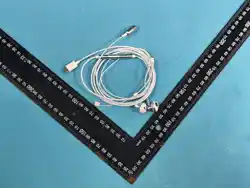
Earphone *1
Silicone Ear
Support *1 pair
Sponge Mic Cover *1
Packing List: Earphone *1, User Manual *1, Silicone Ear Support *1 pair,
Sponge Mic Cover *1, Cable Clip *1
Cable Clip *1
User Manual *1
Model: K08
Size: 60x80mm
Printing Material & Requirements: 80g book paper, black-and-white double-sided printing, 6-fold leaflet
Document Completion Date: 2025/ /
Die-cut lines are not to be printed
FCC Caution:
This device complies with part 15 of the FCC Rules. Operation is subject to the
following two conditions: (1) This device may not cause harmful interference, and (2)
this device must accept any interference received, including interference that may
cause undesired operation.
Any changes or modifications not expressly approved by the party responsible for
compliance could void the user's authority to operate the equipment.
NOTE: This equipment has been tested and found to comply with the limits for a Class B
digital device, pursuant to Part 15 of the FCC Rules. These limits are designed to
provide reasonable protection against harmful interference in a residential installation.
This equipment generates, uses and can radiate radio frequency energy and, if not
installed and used in accordance with the instructions, may cause harmful interference to
radio communications. However, there is no guarantee that interference will not
occur in a particular installation.
If this equipment does cause harmful interference to radio or television reception,
which can be determined by turning the equipment off and on, the user is encouraged
to try to correct the interference by one or more of the following measures:
-- Reorient or relocate the receiving antenna.
-- Increase the separation between the equipment and receiver.
-- Connect the equipment into an outlet on a circuit different from that to which the
receiver is connected.
-- Consult the dealer or an experienced radio/TV technician for help.
The device has been evaluated to meet general RF exposure requirement. The
device can be used in portable exposure condition without restriction.

