Introduction to the functions of the watch
Charging and activation of the watch
"(Please use 5V 1A and below charger to charge the
device)"
Operating instructions for the watch
Why the watch can't receive push notifications?
Before first use, the watch needs to be charged and activated; Use the
equipped magnetic charger to attach to the metal contacts on the
back of the watch, and the other end of the charger can be plugged
into a USB charging head or computer USB port.
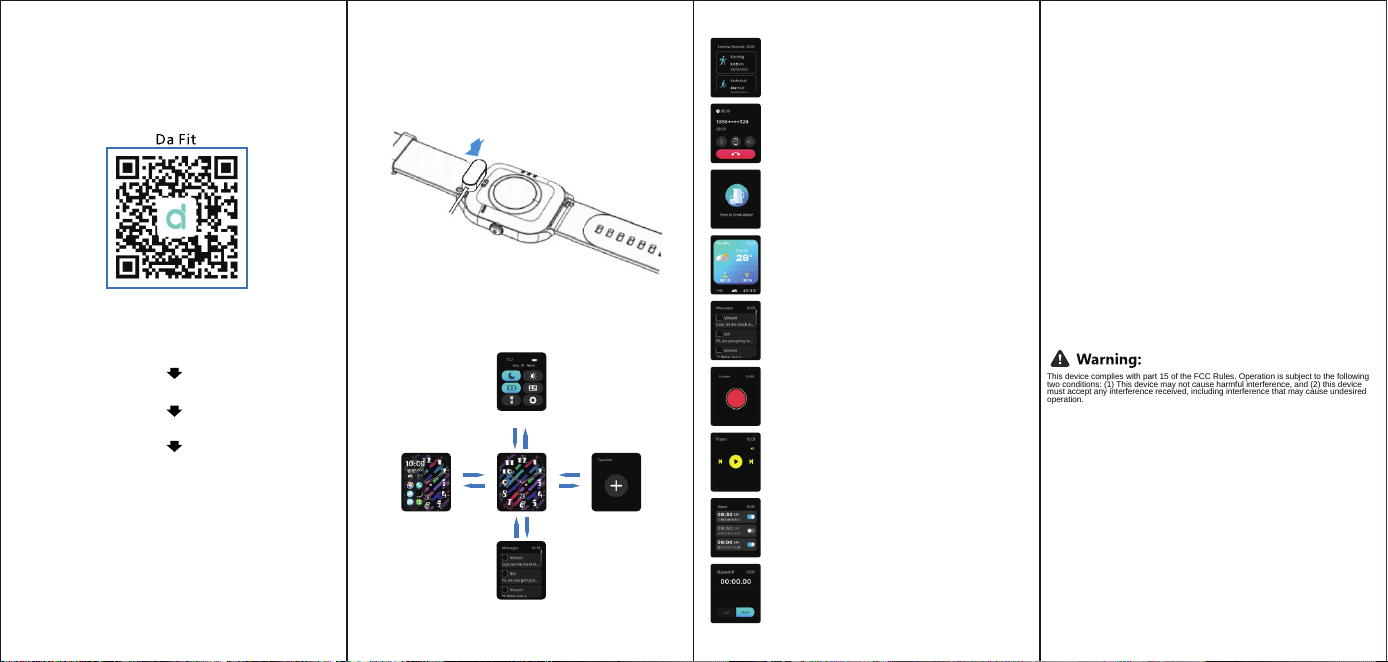
Download and install the APP
Control center
Swipe Down Swipe Up
Swipe Left
Swipe Right
Swipe DownSwipe Up
Function list
Swipe Left
Swipe Right
DIY Card
Messages
1. Vergewissern Sie sich, dass die Wireless-Funktion Ihres Handys eingeschaltet ist.
2. Zeigen Sie die "MAC"-Adresse Ihrer Uhr in "Einstellungen" - "Über" an.
3. Wenn die Uhr zum ersten Mal mit der APP verbunden wird, warten Sie auf eine
Pop-up-Meldung, um der Uhr die Verwendung von Wireless zu erlauben
(wenn Sie versehentlich die Werkseinstellungen der Uhr wiederhergestellt haben
Wenn Sie versehentlich die Werkseinstellungen der Uhr wiederhergestellt haben,
wieder holen Sie bitte den obigen Vorgang, um die Uhr zu verbinden).
4. Wenn die Uhr länger als 120 Sekunden eingeschaltet ist, ohne dass eine
Verbindung mit der APP hergestellt wurde, schaltet die Uhr automatisch die
drahtPhonee Verbindung aus. Wenn Sie die APP zu diesem Zeitpunkt verbinden
möchten, müssen Sie die drahtPhonee Verbindung in den
„Einstellungen“_„Uhr“ der Uhr ein- und ausschalten und dann den oben
beschriebenen Vorgang ausführen.
Phone settings.
1.Make sure the message push on/off is turned on in your mobile Phone.
2. Make sure the message can be displayed in the notification bar of your
Phone. The device information depends on whether the information can
be read in the notification bar of the Phone. If there are no notifications
on the Phone, the device will not be able to receive push messages. (You
need to find the notification settings in your Phone to turn on/off the
multimedia message alerts)
3.Turn on the accessibility settings of your device. (You will need to find
the accessibility settings in your Phone settings and turn on the
accessibility settings for your device)
Phone Settings
1. Make sure the message push on/off is turned on for your Phone.
2.Make sure the message can be displayed in the notification bar of your
Phone,(You need to find the notification setting in your Phone and turn
on/off the multimedia message alert)
Smart
V-A
W
atch
Downloading the APP
Scan the following QR code, download and install the APP.
Open the APP and set up your profile
Go to the "Device", Click "Add Device"
Click on your device in the scanned devices list
Binding completed
Connecting the watch
Quick Guide To Use
1. Make sure the Wireless of your cell Phone is turned on
2. Show the "MAC" address of your watch in "Settings" - "About".
3. When the watch is linked to the APP for the first time, wait for a
pop-up message to allow the watch to use Wireless permission (if
you have accidentally restored the factory settings of the watch,
please repeat the above operation to connect the watch).
4. lf the watch is turned on for more than 120 seconds without
connecting to the APP, the watch will automatically turn off the
Wireless. lf you want to connect the APP at this time, you need to
turn on the Wireless ON/OFF in the "Settings"_"Watch" of the watch,
and then do the above operation.
EN/英文
Why can't wear a watch in a hot bath?
The temperature of the bath water is relatively high, and a lot of water
vapor will be generated, and the water vapor is in the gas phase, and
its molecular radius is small.It's easy to penetrate through the gap of
the device case.When the tempera ture dropsit will condense into
liquid water droplets again, which will easily cause a short circuit
internal and damage the circuit board, and then damage the whole
device.
Sports
Smart watch automatically tracks steps and calorie taken
on the screen.
NOTE: Your movement stats reset to zero at midnight.
Drinking Water Reminder
The smart watch will remind you "Time to Drink Some
Water"
at the planned drinking time.
Note: You can set the feature in the APP
Weather
Alarm
Stop Watch
Wireless Call
After connecting the device, you can remote contral the
music player on your phone.
Remote Shutter
Music Players
After connecting to your phone, the watch can remotely
control your phone's camera to take photos.After opening
the camera on your phone, tap on the watch camera control
page to trigger the camera shutter to take a picture.
Message Reminder
The watch can receive push notifications from the display
phone, and you can set the push APP ON/OFF in DAFIT.
The watch page stores the last 8 messages.
(You can view messages, but the watch cannot edit or
reply to them).
It could show the weather info of current and tomorrow on
the
weather page. Weather info is synced after con-necting with
the APP it will not beupdated after a long disconneted.
Tap the start button on stopwatch page to start
timing, and tap the stop button to stop timing
Alarms can be set in the APP or the watch, up to 8 alarms
can be set. The watch will display an alarm icon and
vibrate at the set time
Open the APP to link the Wireless of the watch, and
after synchronizing the phone, you can make,
answer or reject calls on the watch.
The device has been evaluated to meet general RF exposure requirement. The
This device complies with part 15 of the FCC Rules. Operation is subject to the following
two conditions: (1) This device may not cause harmful interference, and (2) this device
must accept any interference received, including interference that may cause undesired
operation.
Note: This equipment has been tested and found to comply with the limits for a
Class B digital device, pursuant to part 15 of the FCC Rules. These limits are
designed to provide reasonable protection against harmful interference in a
residential installation. This equipment generates, uses and can radiate radio
frequency energy and, if not installed and used in accordance with the
instructions, may cause harmful interference to radio communications.
However, there is no guarantee that interference will not occur in a particular
installation. If this equipment does cause harmful interference to radio or
television reception, which can be determined by turning the equipment off and
on, the user is encouraged to try to correct the interference by one or more of the
following measures:
—Reorient or relocate the receiving antenna.
—Increase the separation between the equipment and receiver.
—Connect the equipment into an outlet on a circuit different from that to which
the receiver is connected.
—Consult the dealer or an experienced radio/TV technician for help.
Important: Any change or modifications not expressly approved by the manufact
urer responsible for compliance could void the user's authority to operate the
equipment.
device can be used in portable exposure condition without restriction.
If your watch has LED light, please double click the on button, you can
turn on the flashlight