User Manual

FCC Statement
This device complies with part 15 of the FCC rules. Operation is subject to the
following two conditions: (1) this device may not cause harmful interference,
and (2) this device must accept any interference received, including
interference that may cause undesired operation.
Changes or modifications not expressly approved by the party responsible for
compliance could void the user's authority to operate the equipment.
NOTE: This equipment has been tested and found to comply with the limits for
a Class B digital device, pursuant to part 15 of the FCC Rules. These limits are
designed to provide reasonable protection against harmful interference in a
residential installation. This equipment generates uses and can radiate radio
frequency energy and, if not installed and used in accordance with the
instructions, may cause harmful interference to radio communications.
However, there is no guarantee that interference will not occur in a particular
installation. If this equipment does cause harmful interference to radio or
television reception, which can be determined by turning the equipment off
and on, the user is encouraged to try to correct the interference by one or
more of the following measures:
• Reorient or relocate the receiving antenna.
• Increase the separation between the equipment and receiver.
• Connect the equipment into an outlet on a circuit different from that to
which the receiver is connected.
• Consult the dealer or an experienced radio/TV technician for help. The device
has been evaluated to meet general RF exposure requirement.
The device can be used in portable exposure condition without restricti

3
Charging and Activation
a.Connect the watch charging cable to a 5V-1Aadapter and plug it
in.Ensure proper alignmentofthe cable with the metal contact pins
on theback cover of the watch.The built-in magnetswill
automatically attach to the correct poles forcharging.
b.lfthe watch is newly received or has not beenused for a long
time, the battery may be in a 0voltage protection state. Charge the
watch for atleast 15 minutes to accumulate enough power
toactivate it.The built-in magnets will automaticallyattach to the
correct poles for charging.
c.lt is recommended to charge the device once amonth.Keep the
device fully charged and powe!itoffwhen not in use to ensure
longevity andoptimal performance.
4
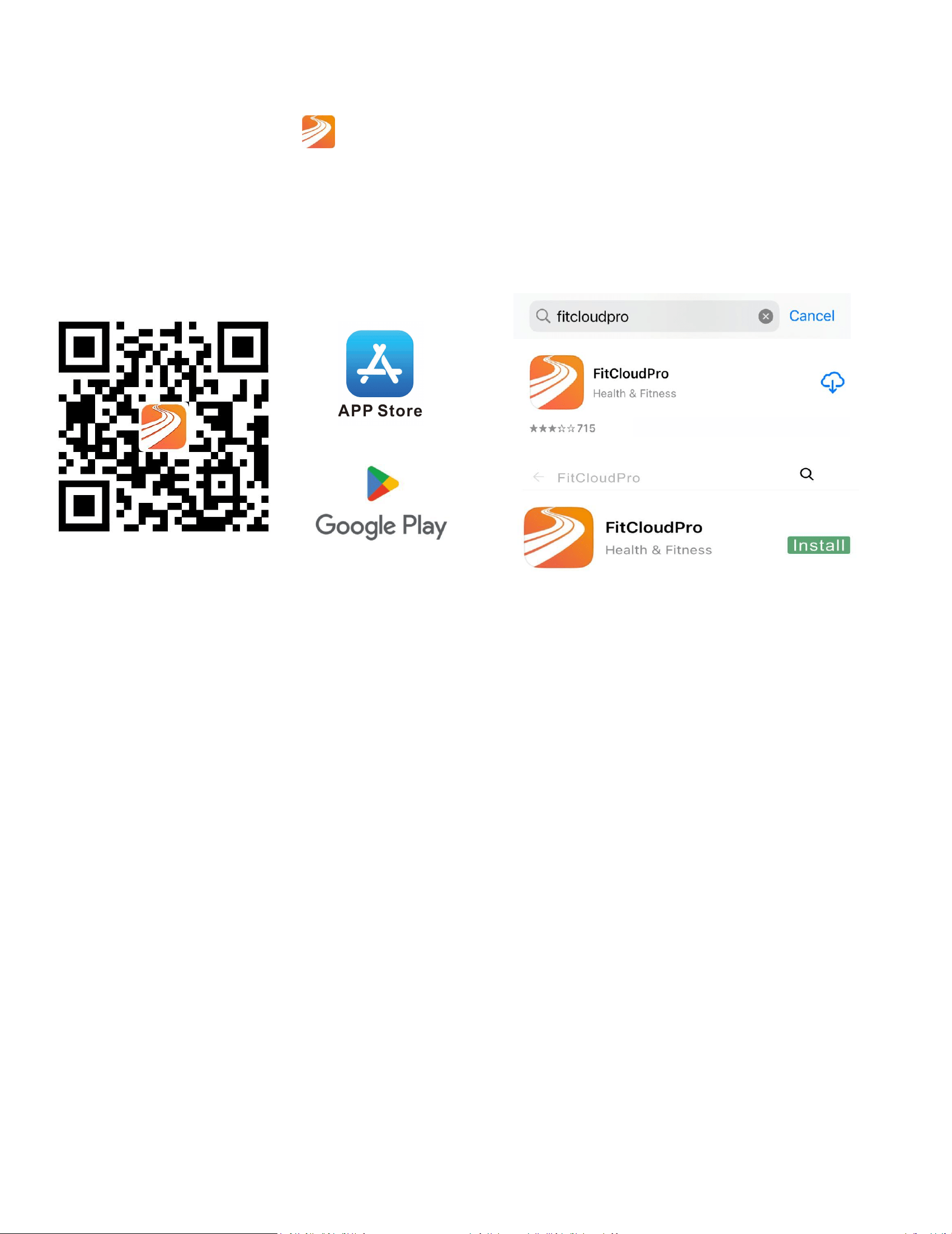
App Download
①Download the"
FitCloudPro" appfromthe App Store or
Google Play.
②Scan QR code to download.
Pair as Follows-l0S
a.Upon first use ofthe FitCloudPro app, enableit to access
Bluetooth, wireless data, andnotifications on your compatible
smartphone bygranting all necessary permissions throughyour
phone's settings.

5
b.Use the app with "VisitAs Guest" or"Sign ln"
6
Connecting Bluetooth-l0S
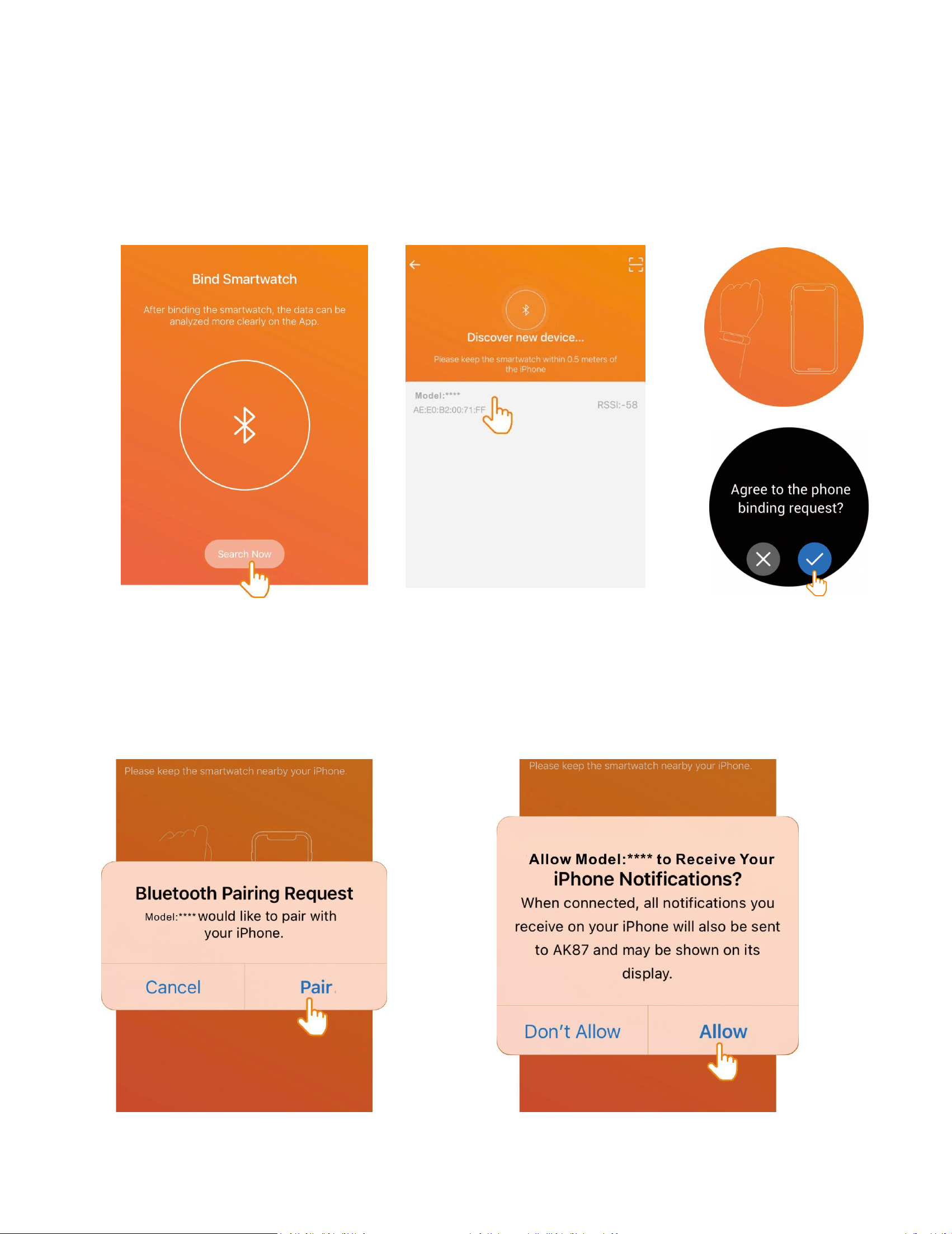
a.Select'Search Now' to discover andconnect to the watch
Bluetooth device. and tarthe watch to 'agree' grant access and
completthe pairing process.
b."Allow Bluetooth Pairing" and "Allow Notifications”
7
Setting Up FitCloudPro App on
Android: Permissions and Agreement
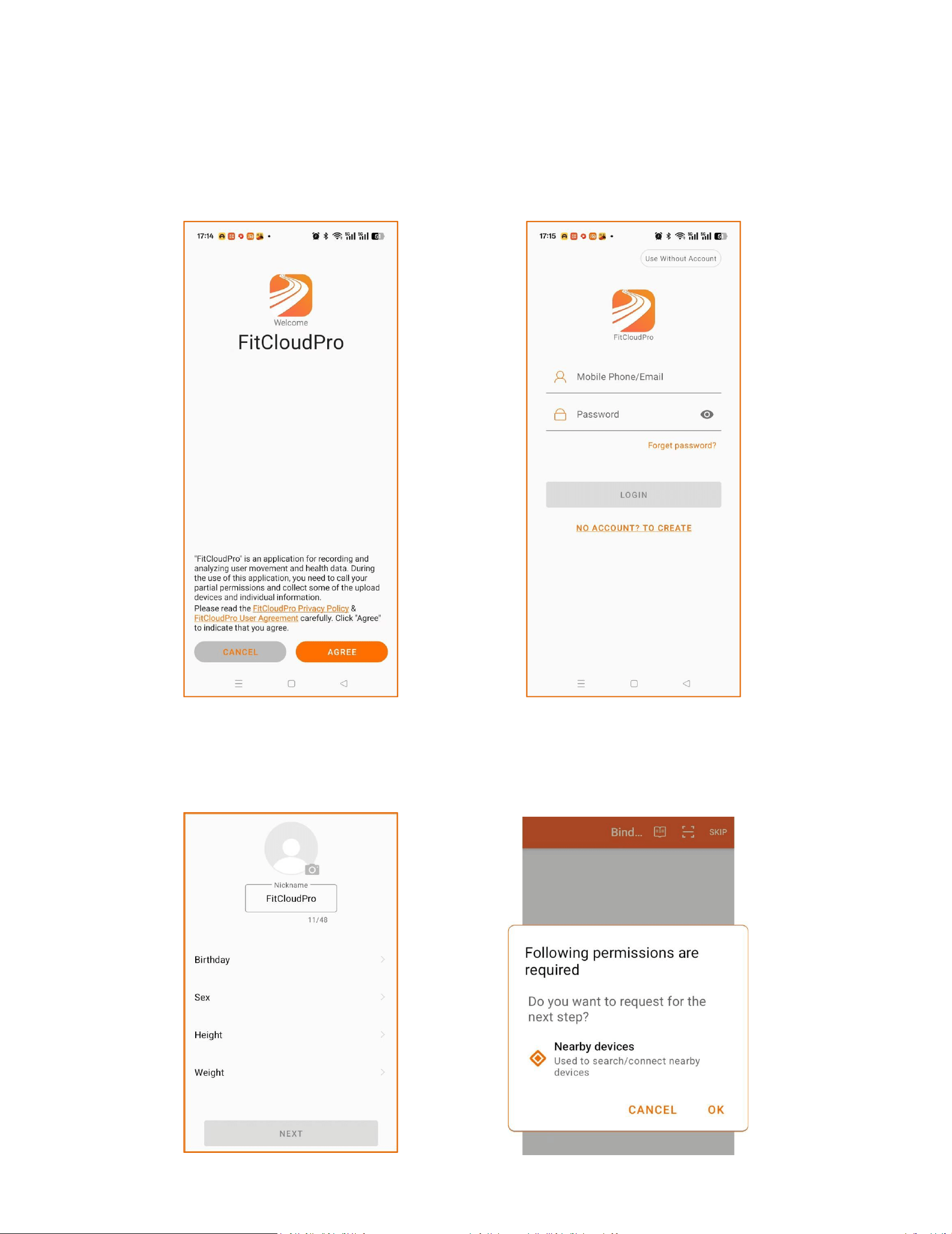
a."Agree"FitCloudPro Privacy Policy & UserAareement ,Login or
Use WithoutAccount:
b.Fill in your personal information and Search/connect nearby
permissions Bluetooth request
8
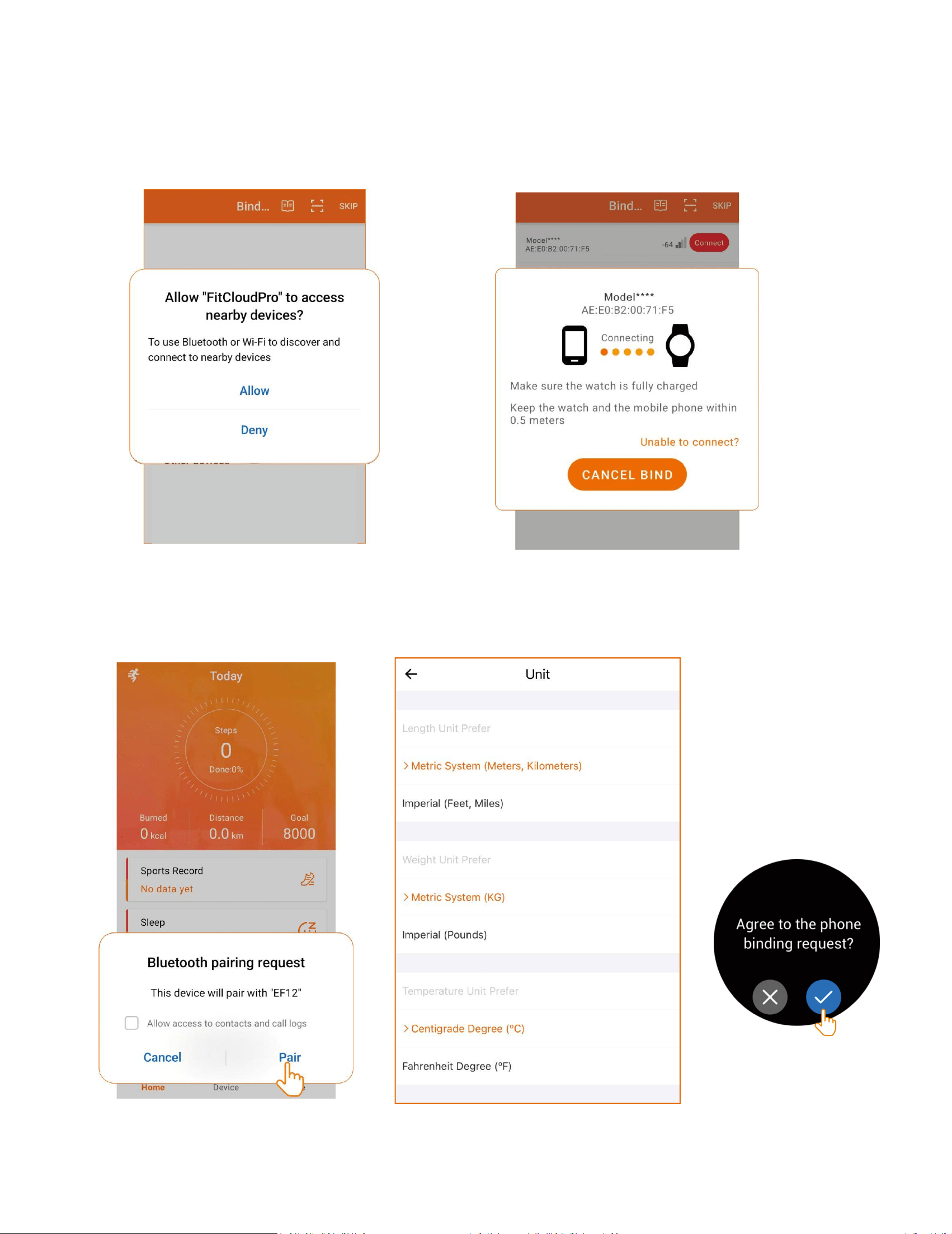
C.Allow FitCloudPro to discover and connecttathe watch
devices.Tap the watch and selectagree to grant access and
complete thepairing process.
d.Allow Bluetooth pairing requests and Accessto Contacts:
9
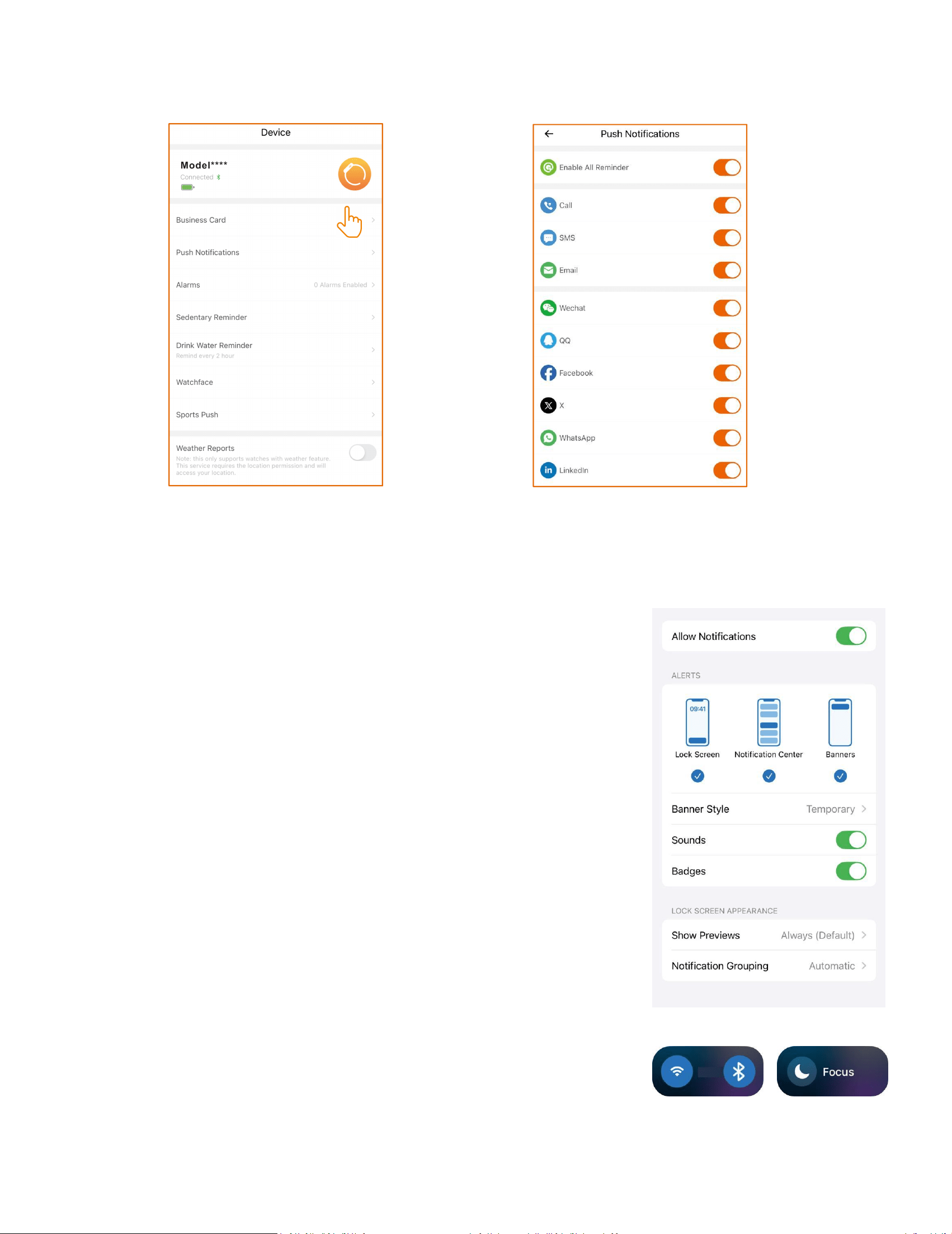
Turning on Push Notifications
a.Note that the watch cannot receivenotifications when the phone
is in Do Not Disturbmode.
b.Ensure the mobile phone's Bluetooth is
active, the FitCloudPro app is running,and the
watch is connected tothe phone's Bluetooth.
c.Make sure that notificationsare visible on
the notificationbar of your phone,
10
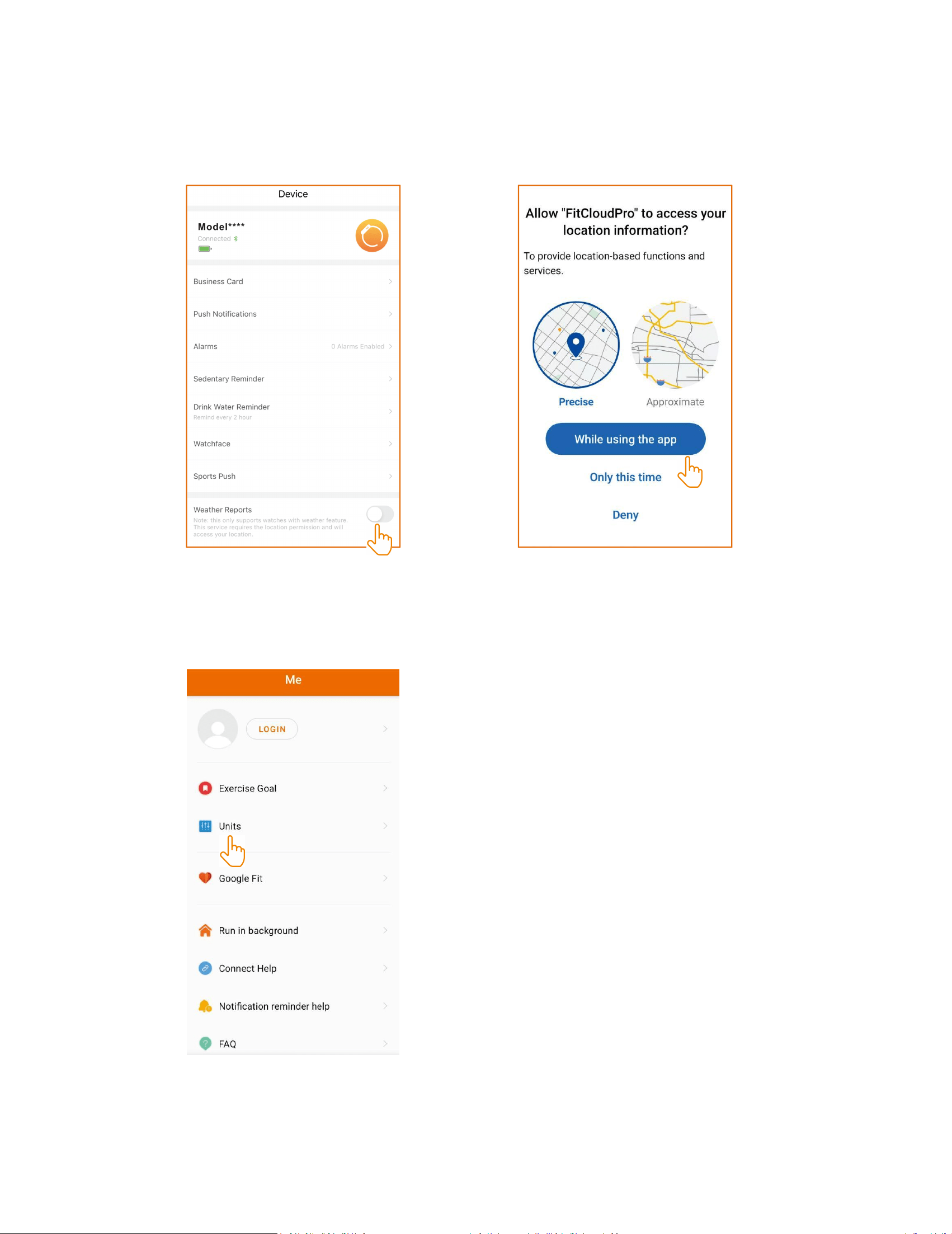
Turning on weather locator
Turn on the weather reports feature in theFitCloudPro app to get weather
forecasts.
Setting the Display Unit of the Watch
11
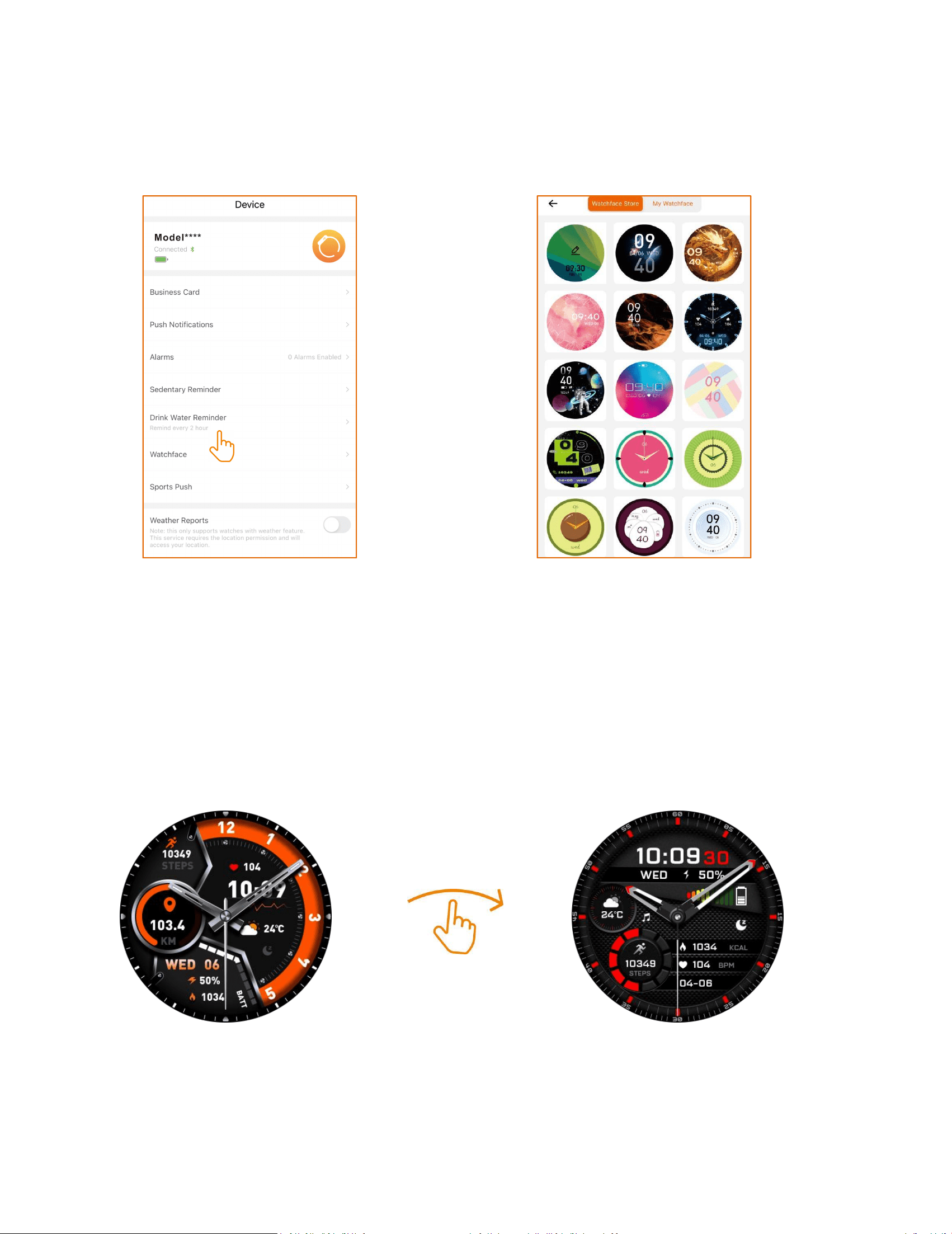
Setting/Download Watch Faces
a.Press and hold the watch face for 2 secondsthen quickly swipe to
switch between watchfaces
b.Download watch faces through FitCloudPro's watch face Ul
market. Note that onlyone watch face Ul can be saved at a
timeAnew download will replace the previouslysaved watch face
Ul.
12
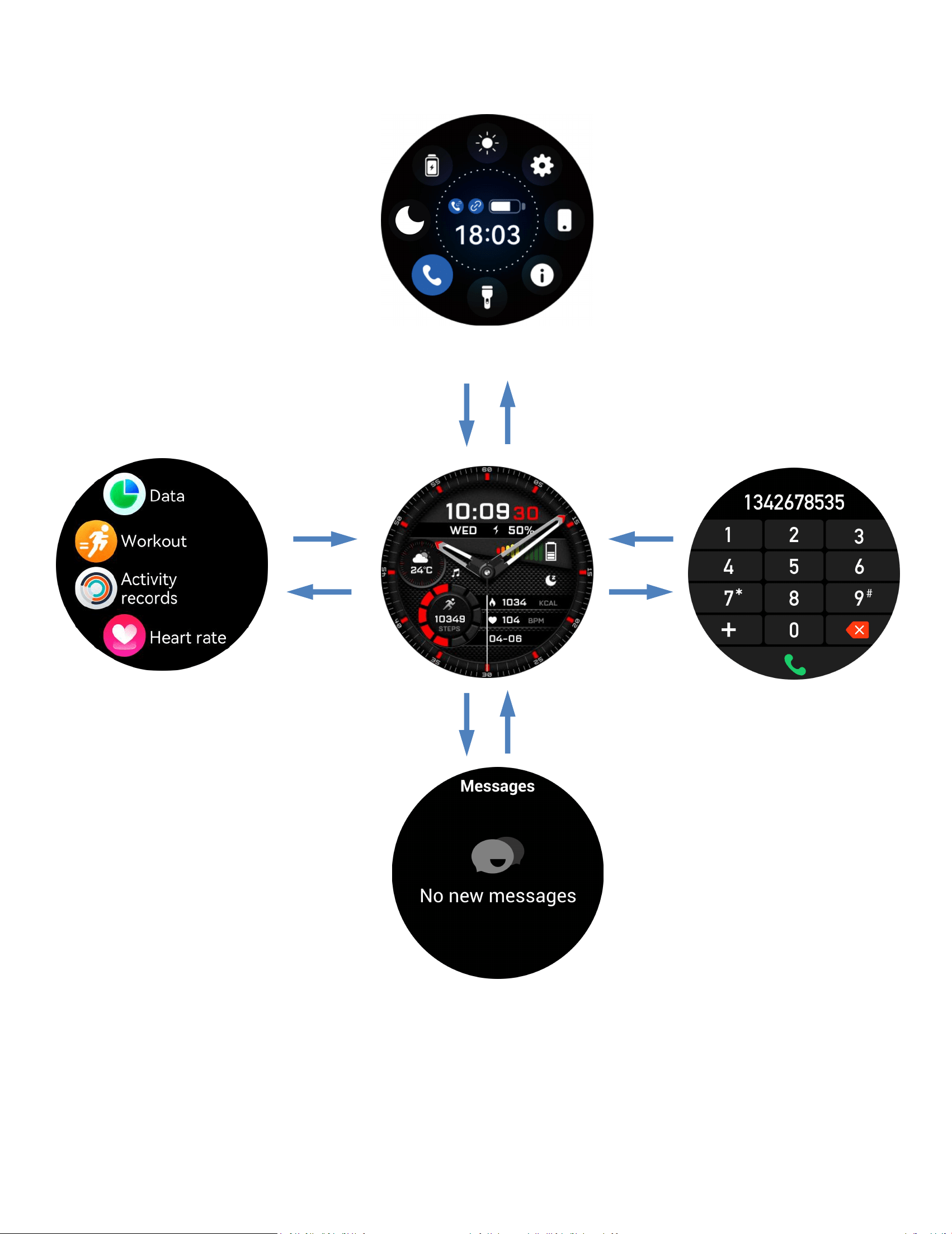
c.Displaying touchscreen functionality
Messages
Dial
Menu
Control Center
13
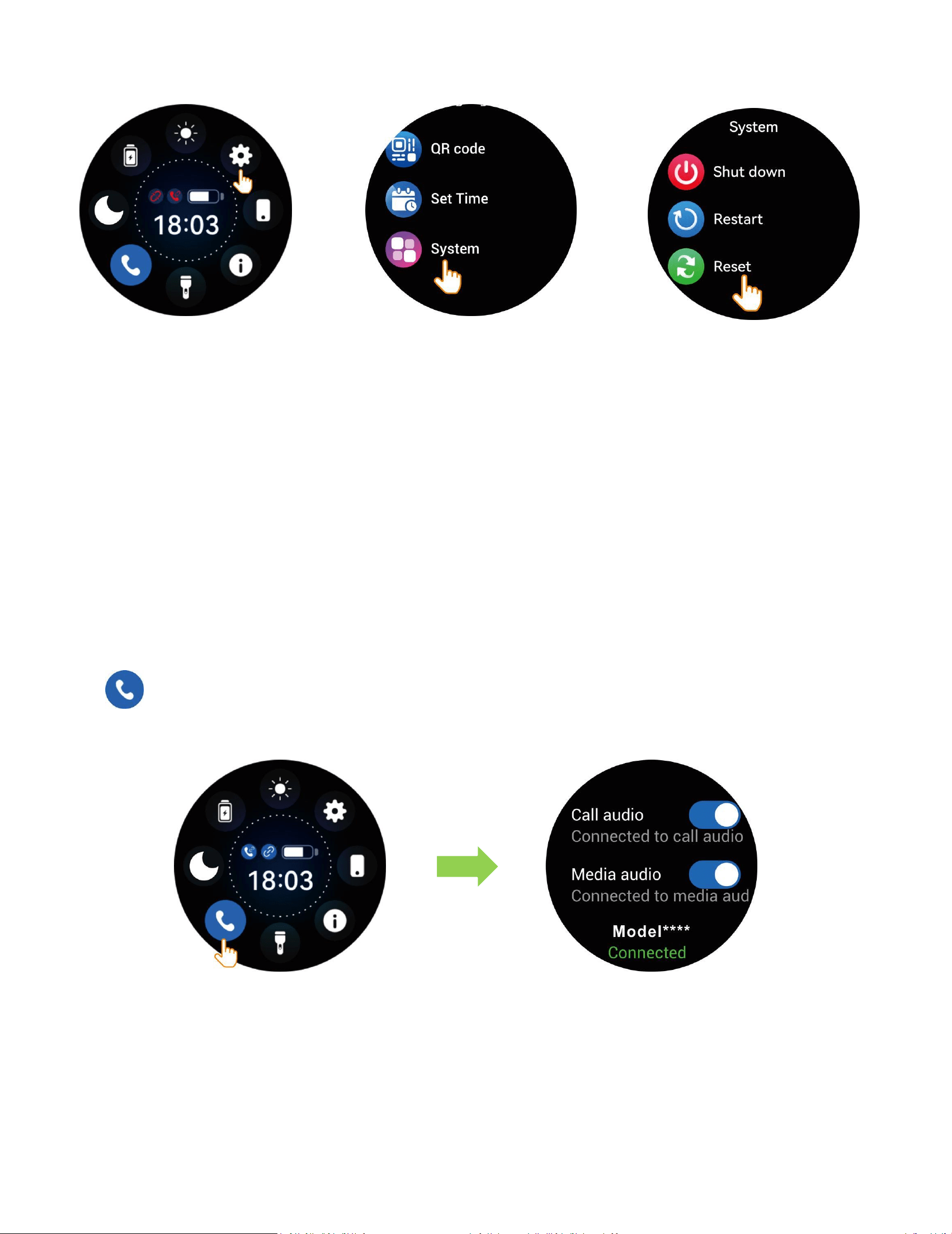
Resetting the Watch
fthe exercise,sleep, and heart rate data areinaccurate,orifthe Bluetooth
connection orcall functionality fails, try resetting the watch asshown below and
rebind.Alternatively, you canreset or update the firmware through the app!
Turning on/off Call Audio and
Media Audio
a.Tap
to enable or disable BluetoothCalling.
Settings
System
Reset
14
b. To prevent the watch from playing media sounds or
making/answering calls, simply turnoff the media audio and call
audio settings.
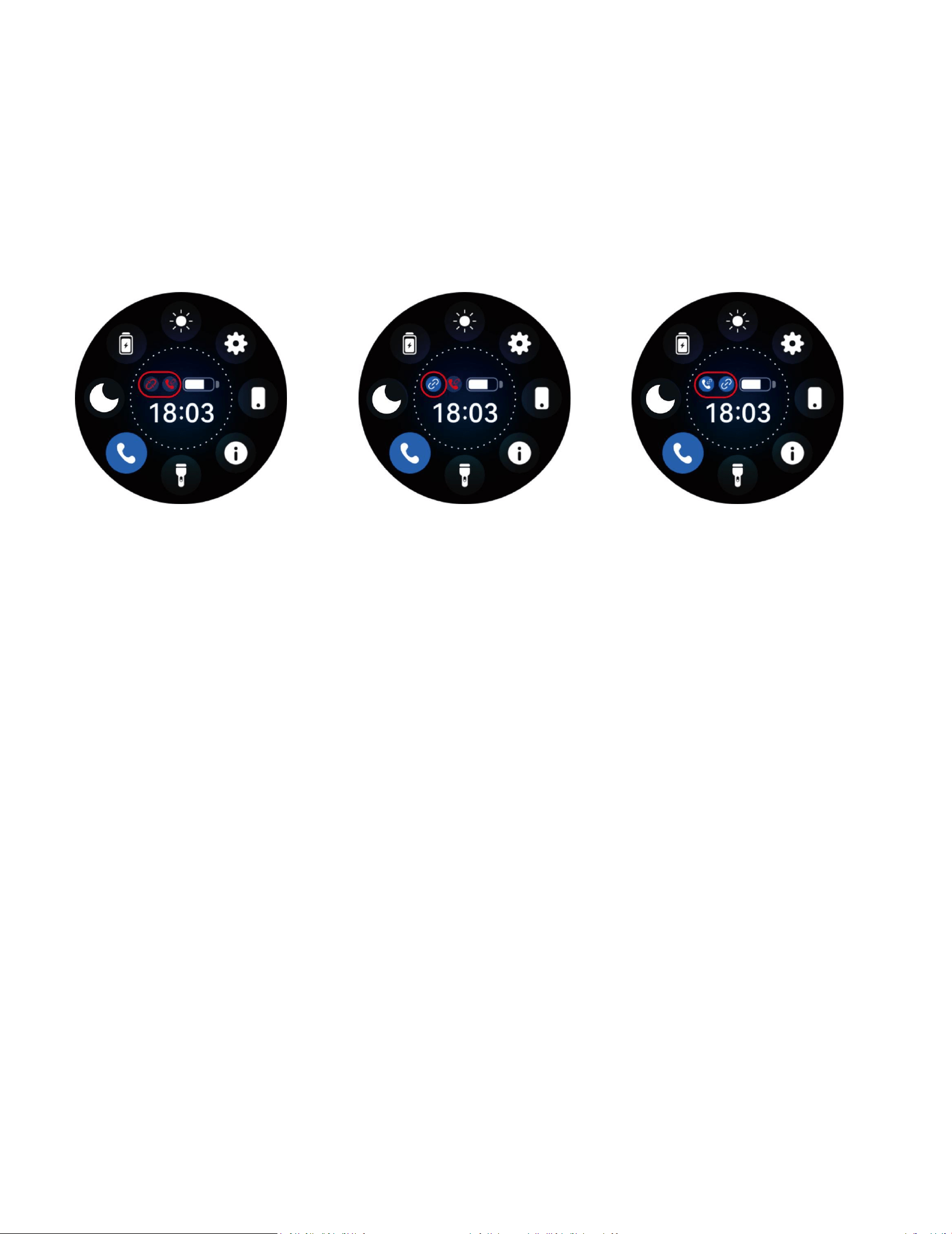
Watch Connection Status
Note:The watch is paired with the iOS systemapp,allowing
message reminders even if theappis closed.However, forAndroid
phonesthe app must be open to receive messagereminders.
BT Call and APP
Disconnected
APP Connected
BT Call Connected
APP Connected
BTCall Disconnected
15
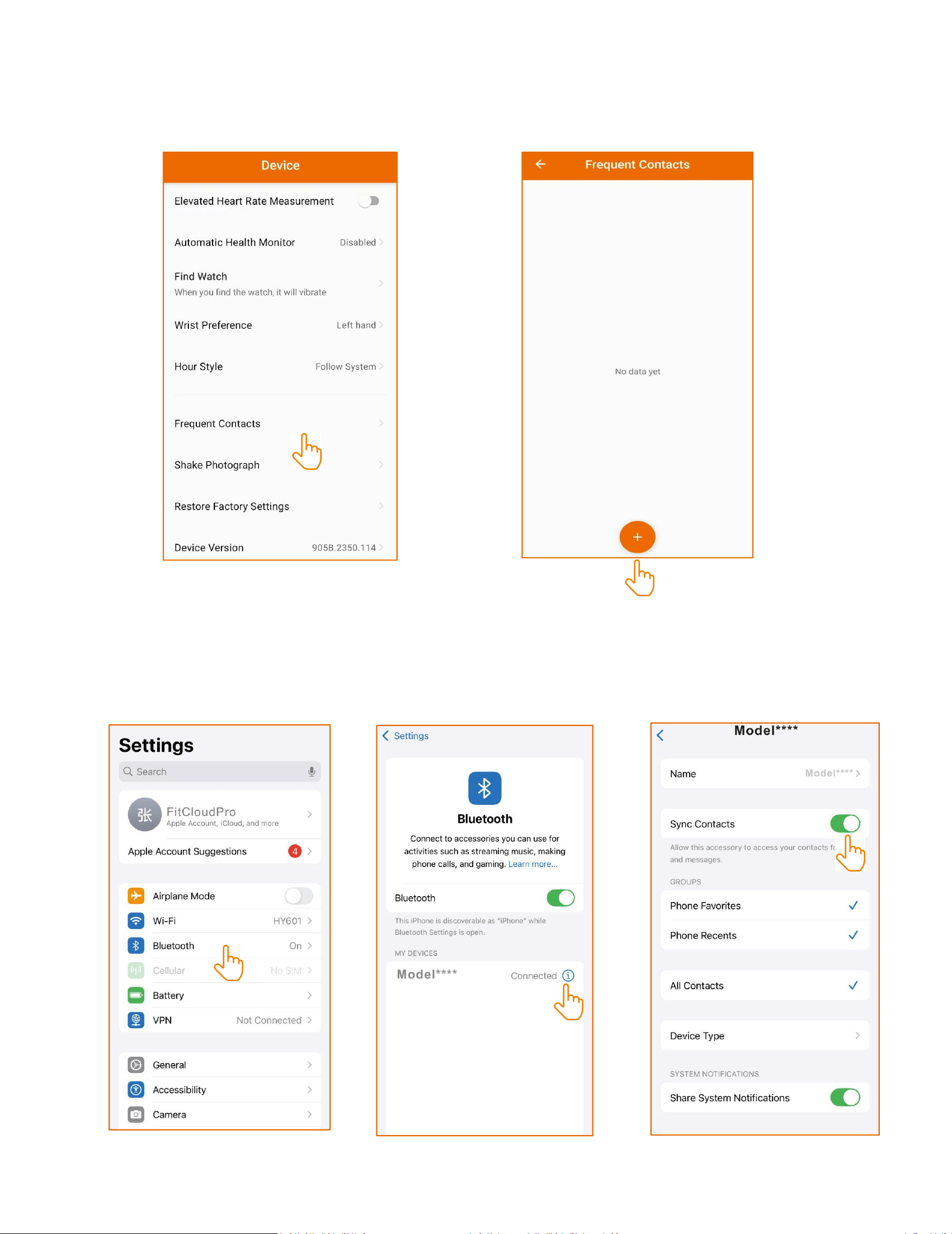
Adding and Syncing Favotite Contacts
a.Add contacts to the watch via FitCloudPro
b.Note some phones require manual activationof Bluetooth
contact syncing due to privacyconsiderations

16
Key Safety Tips
a.Do not expose the watch to extremelyhigh-temperature
environments ike scorchingsun rays or around high-temperature
deviceslike heaters,ovens,microwave ovens,
orwaterheaters.High-temperatureenvironments may cause battery
explosionsor other safety accidents.
b.The productincludes an irremovable purecobalt
battery.Non-profes-sionals are notallowed to disassemble it in case
of a safetyaccident.
c.This product has passed multiplewaterprooftests before
launch.Consideringdifferent using habits,its internal parts
mayexperience wear and tear, which affects itssealing
performance.Therefore please wearand use the smartwatch
carefullyduringswimming and diving, but avoid wearing it in
asauna room or for a hot shower.
d.Our products do not belong to medicalapparatus.The heart rate,
blood oxygen,sleep, calories, and steps.and other healthdata
collected by it are only for referenceratherthan clinical basis.