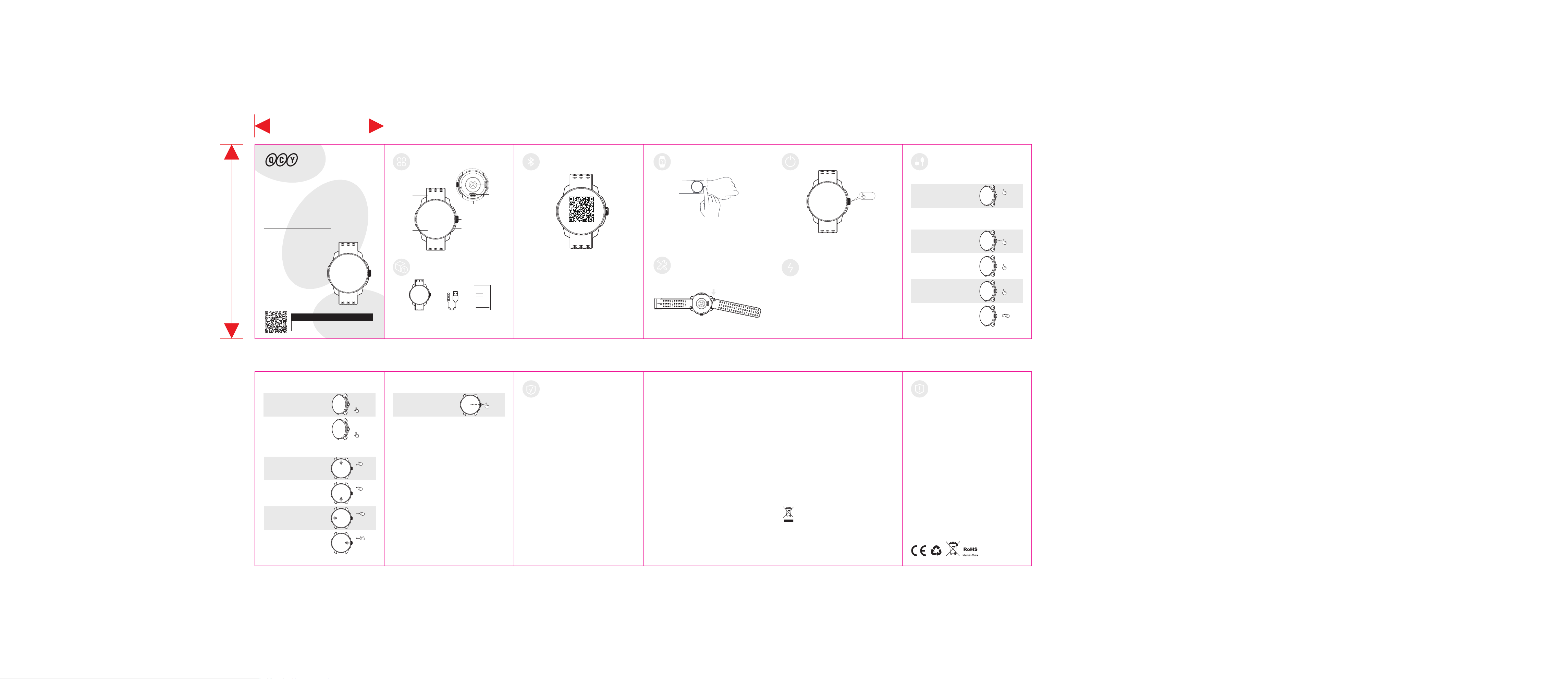
(On the main interface)
Swipe right
from the edge
Quick glance page
(On the main interface)
Swipe left
from the edge
Function card
x1
Click once
SAFETY INSTRUCTIONS
FCC STATEMENT
IC STATEMENT
WARRANTY INFORMATION
Warranty Period
QCY products come with a 12-month warranty period from the date of
delivery.
How to Solve My Problem
Online purchase: When applying for after-sales service, please give
priority to contacting the customer service of the purchase
channel/platform. The service support of QCY will provide technical
support services and solutions to process your after-sales questions.
Oine purchase: Please contact the store/distributor or agent directly to
assist with your after-sale question.
Valid proof of purchase to claim warranty
Products purchased from online: Please provide with order number or
information that clearly show the sales channel, product details, price,
sales date.
Products purchased from non-ocial channels: Please provide with
sales store information, order number, or product information evidence
confirmed by QCY service team.
Not Covered under Warranty
The manufacturer's warranty is avoid under the following circumstances
but not limited to:
• Lost, stolen, or free products.
• Items that have expired their warranty period.
• Products without sucient proof of purchase.
• Improper or inadequate maintenance or modification.
• Accident, misuse, abuse, contamination, or other external causes.
• The use of unspecified adapter and accessories.
• Malfunctions or damages resulting from natural disasters, earthquakes,
lightning, abnormal voltage, or environmental factors.
• Damages that occur as a result of one's failure to follow the
instructions.
Contact Details
For FAQS and more information
Please email to [email protected] or visit https://www.qcy.com
This equipment has been tested and found to comply with the limits for a
Class B digital device, pursuant to Part 15 of the FCC Rules. These limits
are designed to provide reasonable protection against harmful
interference in a residential installation.
This equipment generates uses and can radiate radio frequency energy
and, if not installed and used in accordance with the instructions, may
cause harmful interference to radio communications. However, there is
no guarantee that interference will not occur in a particular installation. If
this equipment does cause harmful interference to radio or television
reception, which can be determined by turning the equipment o and on,
the user is encouraged to try to correct the interference by one or more
of the following measures:
--Reorient or relocate the receiving antenna.
--Increase the separation between the equipment and receiver.
--Connect the equipment into an outlet on a circuit dierent from that to
which the receiver is connected.
--Consult the dealer or an experienced radio/TV technician for help.
This device complies with part 15 of the FCC Rules. Operation is subject
to the following two conditions:
(1)This device may not cause harmful interference, and (2) this device
must accept any interference received, including interference that may
cause undesired operation.
Changes or modifications not expressly approved by the party
responsible for compliance could void the user's authority to operate the
equipment.
This device contains licence-exempt transmitter(s)/receiver(s) that
comply with Innovation, Science and Economic Development
Canada’s licence-exempt RSS(s). Operation is subject to the
following two conditions:
(1) This device may not cause interference.
(2) This device must accept any interference, including interference
that may cause undesired operation of the device
Cet appareil contient des émetteurs / récepteurs exemptés de
licence conformes aux RSS (RSS)d'Innovation, Sciences et
Développement économique Canada. Le fonctionnement est soumis
aux deux conditions suivantes :
(1) Cet appareil ne doit pas causer d'interférences.
(2) Cet appareil doit accepter toutes les interférences, y compris
celles susceptibles de provoquer un fonctionnement indésirable de
l'appareil.
ANATEL STATEMENT
Este equipamento não tem direito à proteção contra interferência
prejudicial e
não pode causar interferência em sistemas devidamente autorizados.
1.Please carefully read and retain this user manual before using the
product.
2.If the product is not used for an extended period (more than 2 weeks),
please recharge it.
3.You must choose a charger produced by a legitimate manufacturer and
certified by the national safety authority.
4. If your phone cannot detect the product, either re-enter pairing mode
or perform a factory reset on the product. If there is a phone program
error, close and reopen Bluetooth on the phone or restart the phone.
5. Do not disassemble or modify the battery, insert foreign objects,
expose it to high temperatures, or immerse it in water or other liquids to
prevent battery leakage, overheating, ignition, or explosion. Battery
replacement should only be done by the manufacture.
6. Do not drop, crush, or puncture the battery. Prevent external pressure
that may lead to internal short circuits and overheating.
7. Do not dismantle or modify the product for any reason, as it may result
in fire, electronic breakdown, or permanent damage to the product.
8. Do not expose the product to extremely low or high temperatures
(below 0°C or above 45°).
9. Do not the product indicator light near the eyes of children or animals.
10. Do not use the product during thunderstorms, as it may cause
abnormal operation and increase the risk of electric shock.
11. Do not use oil or other volatile liquids to clean the product.
This marking indicates that this product should not be disposed with other
household wastes throughout the EU. To prevent possible harm to the
environment or human health from uncontrolled waste disposal, recycle it
responsibly to promote the sustainable reuse of material resources. To
return your used device, please use the return and collection systems or
contact the retailer where the product was purchased. They can take this
product for environmental safe recycling.
Notice:
Manufacturer: Dongguan Hele Electronics Co., Ltd
Address: Room 101, Block 1, No.38, Daojiao Daohou Road, Daojiao
Town, Dongguan City, Guangdong Province, China
E-mail: [email protected]
Website: www.qcy.com
BACK BUTTON
Return to previous menu
x2
Click twice
SOS Emergency call
For more operations, please visit
https://instruction.watch.qcy.com/watchHelp/DAF1/
watch_help.html
(On the main interface)
Swipe down
from the edge
TOUCHSCREEN
Quick settings
(On the main interface)
Swipe up
from the edge
Message list
(On the main interface)
Note: the watch face can also be installed and updated through the App.
WATCH FACE SWITCHING
Replace watch face style
3s
Long press
USER
MANUAL
Triathlon Watch
QCY Action
PRODUCT DIAGRAM PAIRING
WHAT’S IN THE BOX
Power On: Press and hold the function button for 3 seconds, and the
watch will turn on automatically.
Power O: While the watch is on, press and hold the function button for 3
seconds. Then, select Power O on the screen and tap to power it o.
1. Place the watch on the charger, ensuring the charging contacts on the
back of the watch align and make full contact with the metal pins on the
charger.
2. Please use a charger from a qualified manufacturer with national
certification. The recommended output voltage is 5V and the current is
within 2A.
3. If the watch cannot be powered on after being left for a long time, it
needs to be pre-charged for about 1 minute before the charging icon will
be displayed when used again.
4. Please wipe the charging contacts of the charging cable clean to avoid
any sweat or moisture residue.
POWER ON/OFF
CHARGING INSTRUCTIONS
CONTROLS
x1
QUICK FUNCTION BUTTON
Quick enter function interface
Click once
Touchscreen
Strap
Quick Function Button
Heart Rate
Sensor
Charging
Port
Function Button
Back Button
Watch Charging Cable User Manual
The images in this manual are for reference only and may dier from
the actual product.
First Time Connection:
1. Power on
Long press the function button to power on the smartwatch.
2. Download and install the App
Method 1: Use your phone to directly scan the QR code on the watch’s
screen or the QR code in the user manual to download.
Method 2: Search for the "QCY GO" App in your phone's App Store to
download.
3. Open the App and follow the prompts to pair your watch
Method 1: To add via QR code scanning — enter the scanning interface
on the App's device page, scan the QR code displayed on the watch's
screen, and follow the prompts to bind and connect.
Method 2: To add by searching for nearby devices — tap "+" on the
App's device page, and the App will automatically search for discoverable
nearby devices; then tap your watch from the list and follow the prompts to
bind and connect.
HOW TO WEAR
Installing/Removing the Strap
(Scan to download
the APP)
1. For everyday wear, position the watch about one finger-width above
your wrist bone and adjust the strap to a comfortable fit.
2. It is recommended to tighten the strap during exercise and loosen it
slightly afterward.
Note: Wearing the watch too loosely may aect the heart rate sensor’s
data collection.
Refer to the illustrations for installing or removing the strap.
Note: After installation, please gently pull on the strap to ensure it is
securely attached.
3s
x1
FUNCTION BUTTON
Menu list
Click once
2s
Long press
Unlock the screen
(Below the lock screen interface)
(Default sports function)
Scroll
Swipe the page
(Not the lock screen interface)
Power o interface
3s
Long press
60 mm
正面
反面
S13英文说明书
成型尺寸:90×60mm
材质:80g哑粉纸
工艺:过哑油 正反印刷,折页
90 mm
FCC ID:
RDR-WA25S13A