User Manual
WARNING NOTICE:
Before using this product, please read this manual carefully and keep
it for future reference. For additional support, please call
customer service at 1-866-646-4332.
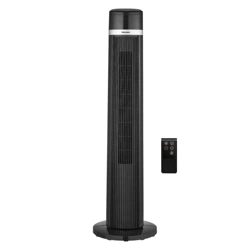
Tower Fan
MODEL: PSFZ40DR6RWV SKU# 6211681

Thanks for Choosing
PELONIS!
Your support means the world to us.
We hope you enjoy our product as
much as we did creating it.

Contents
Important Safeguards
Product Overview
Installation
Operating Instructions
Troubleshooting
Cleaning and Maintenance
Specifications
Service and Support
Warranty
01
04
05
07
1 0
1 1
1 4
15
16

01
1.
2.
3.
4.
5.
6.
7.
8.
Important Safeguards
READ AND SAVE
THESE INSTRUCTIONS
CAUTION
Read the instructions and rules for safe operation carefully.
This appliance is not intended for use by persons (including children) with
reduced physical, sensory or mental capabilities, or lack of experience and
knowledge, unless they have been given supervision or instruction
concerning use of the appliance by a person responsible for their safety.
Children should be supervised to ensure that they do not play with the appliance.
Never insert fingers, pencils, or any other object through the grille when the fan
is running.
Disconnect the fan when moving from one location to another.
Make sure that the fan is on a stable surface when operating to prevent it from
falling over.
Keep electrical appliances out of reach from children or infirm persons. Do not
let them use the appliances without supervision.
This fan is meant for household use only.

1.
2.
3.
4.
5.
6.
7.
8.
9.
10.
11.
WARNING
If the power cord is damaged, it must be replaced by the manufacturer, its service
agent or a similarly qualified person in order to avoid a hazard.
To protect against the risk of electrical shock, do not immerse the unit, cord, or
plug in water or other liquid.
Unplug the appliance from the outlet before cleaning or when the appliance is not
in use.
Do not take the rotor blade guard off after the fan is assembled.
The appliance is only to be used with the power cord provided with the appliance.
This appliance has a polarized plug (one blade is wider than the other). To reduce
the risk of electric shock, this plug is intended to fit in a polarized outlet only one
way. If the plug does not fit fully in the outlet, reverse the plug and try again.
If it still does not fit, contact a qualified electrician. Do not attempt to defeat this
safety feature.
WARNING—To reduce the risk of fire or electric shock, do not use this fan with any
solid-state speed control device.
This product employs overload protection (fuse).
A blown fuse indicates an overload or short-circuit situation. If the fuse blows,
unplug the product from the outlet. Replace the fuse as per the fuse replacement
instructions (see the product specifications for the proper fuse rating) and check
the product. If the replacement fuse blows, a short-circuit may be present and the
product should be discarded or returned to an authorized service facility for
examination and/or repair.
a) Do not operate any fan with a damaged cord or plug. Discard fan or return
to an authorized service facility for examination and/or repair.
b) Do not run cord under carpeting. Do not cover cord with throw rugs,
runners, or similar coverings. Do not route cord under furniture or appliances.
Arrange cord away from trac area and where it will not be tripped over.
Do not leave the fan running unattended.
To reduce the risk of fire, electric shock, or injury, do not use replacement parts
that have not been recommended by the manufacturer (e.g., parts made at home
using a 3D printer).
The fan shall not be modified by the user. such as by adding supplemental filters to
fans not intended to be used for air cleaning purposes.
02

12.
This device complies with Part 15 of the FCC Rules. Operation is subject to the
following two conditions: 2.1 This device may not cause harmful interference,
and 2.2 This device must accept any interference received, including interference
that may cause undesired operation. 3 Caution: The user is cautioned that
changes or modifications not expressly approved by the party responsible for
compliance could void the user's authority to operate the equipment.
Note: This equipment has been tested and found to comply with the limits for a
Class B digital device, pursuant to part 15 of the FCC Rules. These limits are
designed to provide reasonable protection against harmful interference in a
residential installation. This equipment generates uses and can radiate radio
frequency energy and, if not installed and used in accordance with the instruc-
tions, may cause harmful interference to radio communications. However, there
is no guarantee that interference will not occur in a particular installation. If this
equipment does cause harmful interference to radio or television reception,
which can be determined by turning the equipment off and on, the user is
encouraged to try to correct the interference by one or more of the following
measures:
—Reorient or relocate the receiving antenna.
—Increase the separation between the equipment and receiver.
—Connect the equipment into an outlet on a circuit different from that to which
the receiver is connected.
—Consult the dealer or an experienced radio/TV technician for help.
03
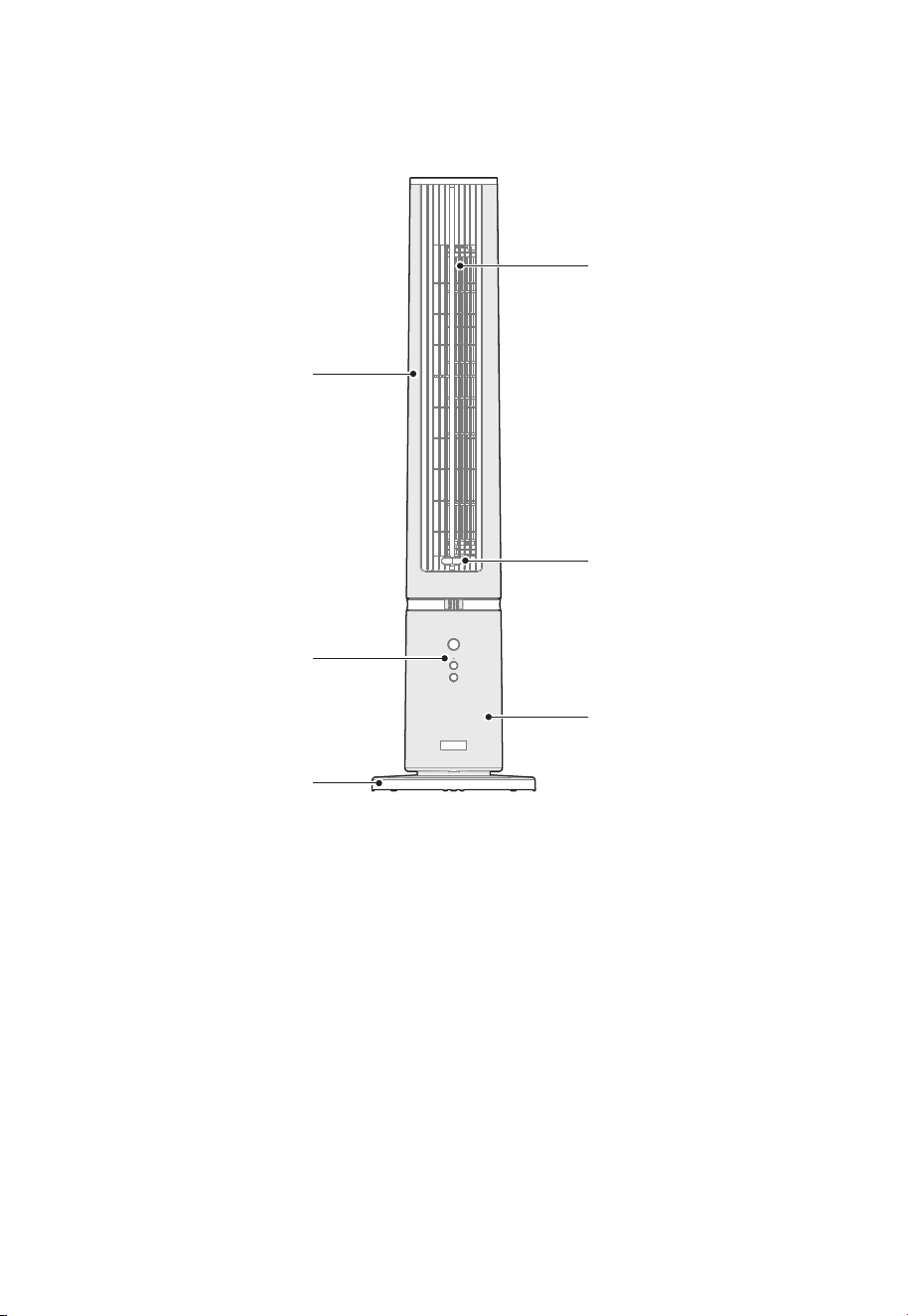
Air Outlet
Upper Body
Aroma Compartment
Lower Body
Control Panel
Base
Product Overview
All the pictures in this manual are for explanation purpose only. Any discrepancy between the real
object and the illustration in the drawing shall be subject to the real object.
[Note]
04
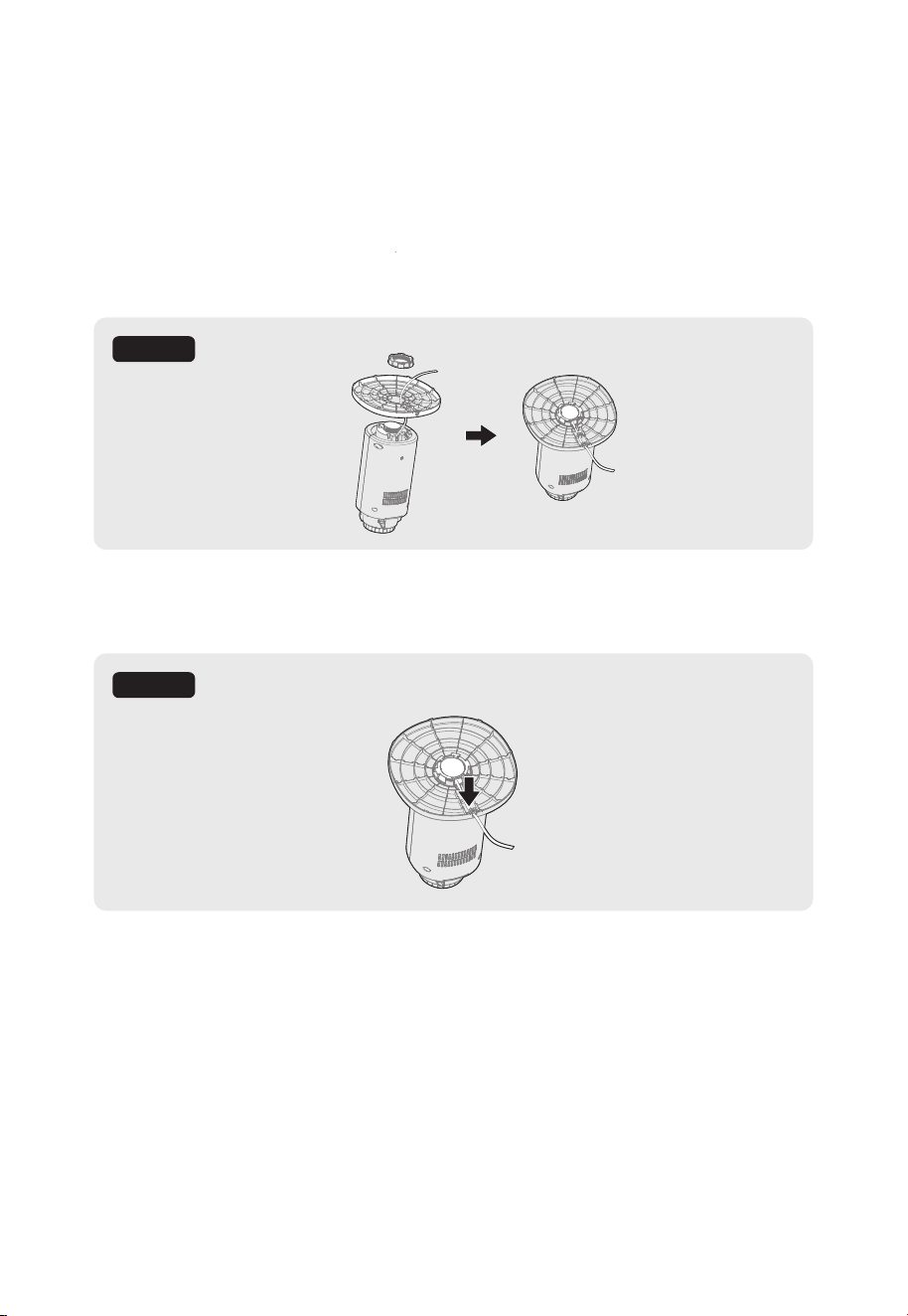
Installing the Base
Open the box and take out the base and lower body. Turn the base and lower body
upside down, then find the power cord on the lower body. Pass the power cord
through the round hole in the center of the base, then fix the base and lower body
together with a lock nut. If the base and lower body do not fit together properly, make
sure the power cord sits in the wire groove of the base.
1.
2.
Installation
Figure 1
Figure 2
Press the power cord firmly down along the wire groove on the base. Secure the power
cord in the slots at both ends of the wire groove.
05
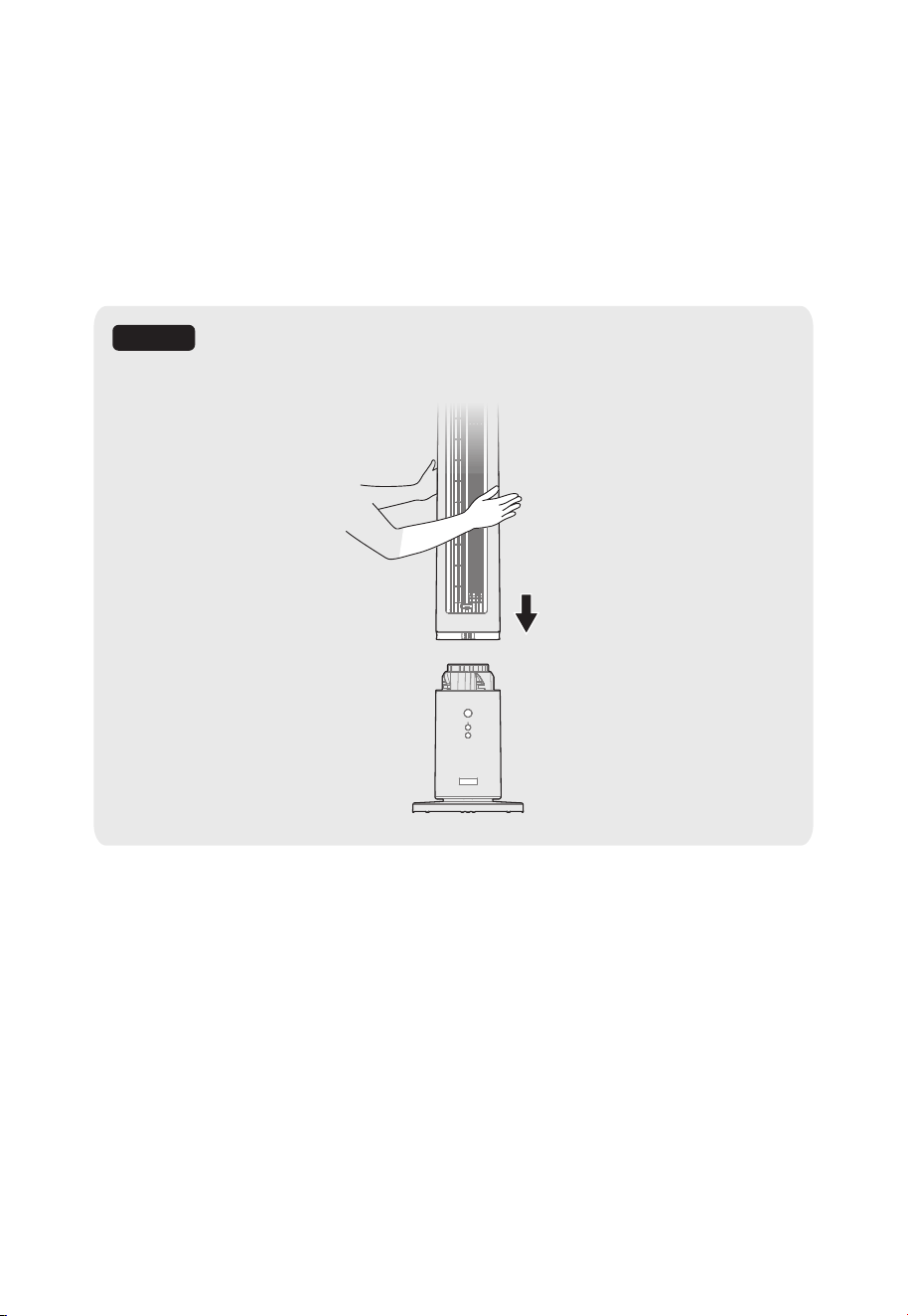
Installing the Body
Place the lower body and base on a stable, level surface. Carefully pick up the upper
body and align the air outlet on the upper body with the control panel of the lower
body. Gently lower the upper body onto the lower body until it is securely connected.
3.
Figure 3
06
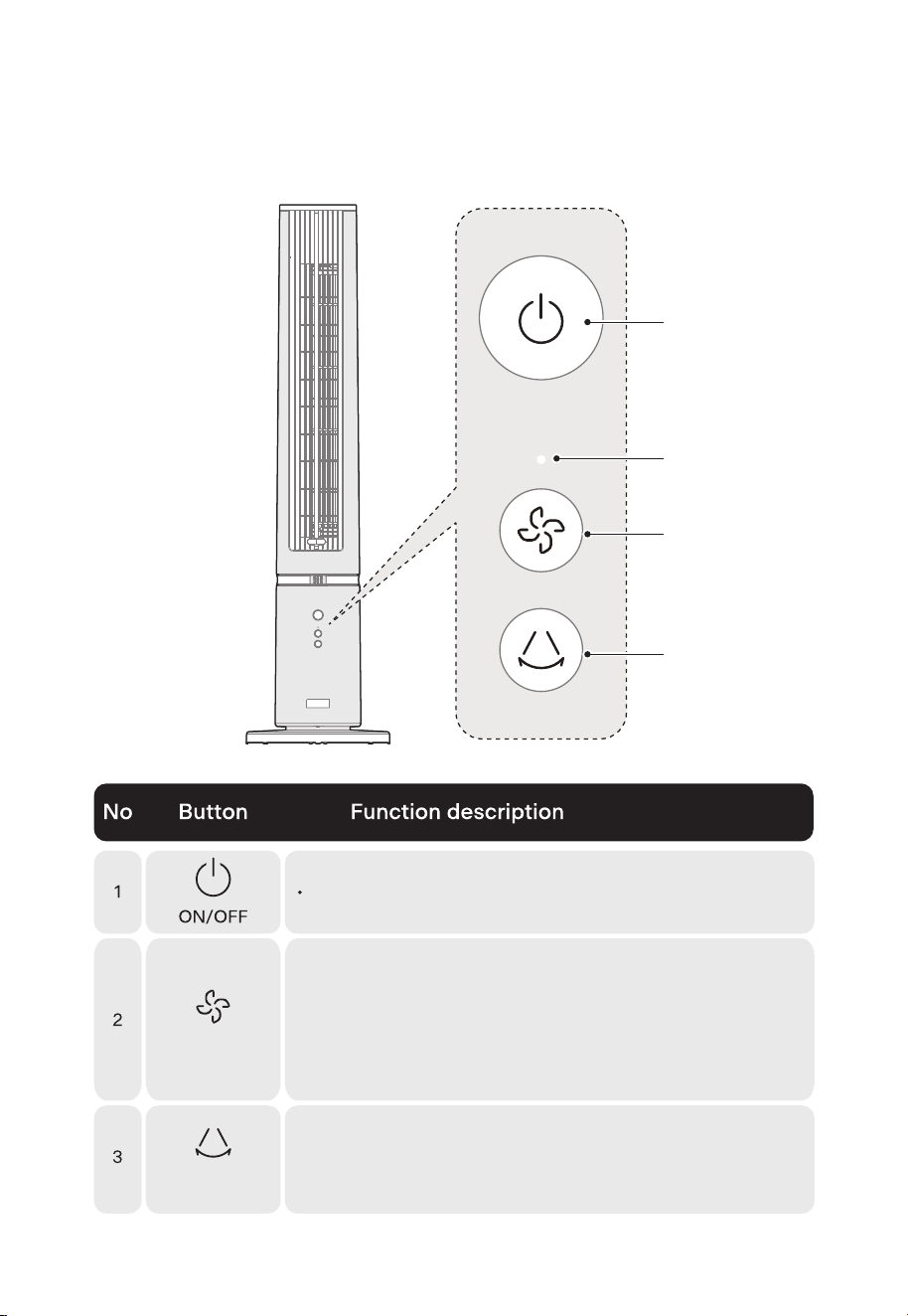
Operating Instructions
1
2
Indicator Light
3
07
Click to turn the power on or off.
Wind Speed
• Click to cycle through the available wind speeds: 1-2-3-4
• When using the wind speed adjustment button on the fan
body to adjust the wind speed, the indicator light will flash
according to the wind speed level. For example, if the fan
speed is set to level 1, the indicator light will flash once; if
the fan speed is set to level 2, the indicator light will flash
twice, and so on.
Oscillation
• Click to turn the oscillation function on or off.
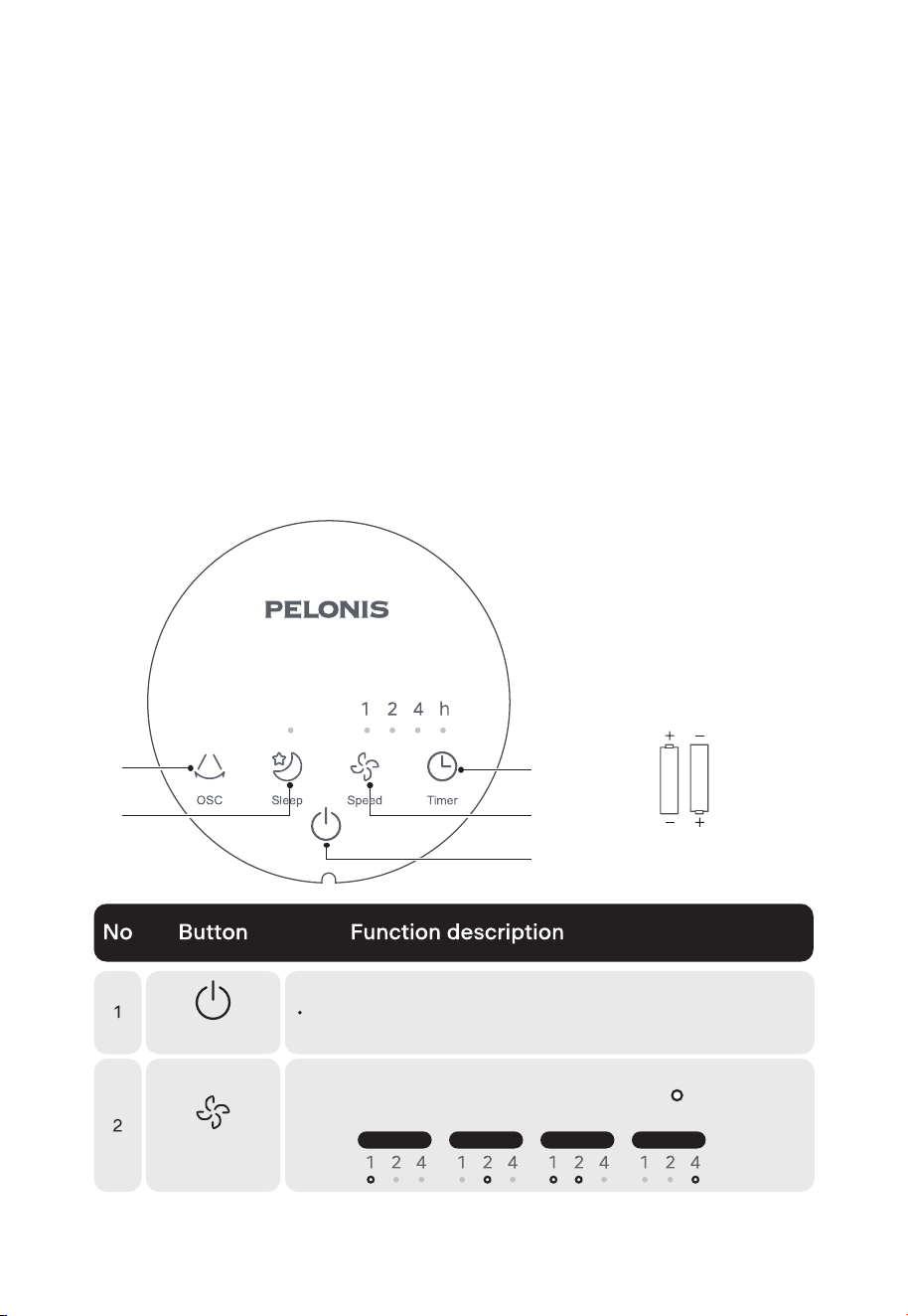
1
3
2
4
5
• Plug in the product.
• Remove the battery cavity cover. Insert two AAA batteries into the remote control. The
remote control will automatically activate. Slide the battery cover back onto the remote
control.
• If activation fails, please disconnect the product's power supply and remove the remote
control battery for at least one minute. Repeat the above steps to activate the remote
control.
About the Remote Control
• The remote controller should be used within 16 ft of the front of the product.
• The battery contains many heavy metals, acids and bases, etc., which may threaten
human health. Used batteries should be recycled separately or disposed of according
to local e-waste regulations.
Activate the Remote Control
08
Click to turn the power on or off.
Wind Speed
On/Standby
Speed 1
Speed 2 Speed 3 Speed 4
• Click to cycle through the wind speeds: 1-2-3-4.
• The wind speed indicator lights will display, to correspond
with the set wind speed:
(battery not included in
the packaging)
AAA Battery, 1.5V
Battery
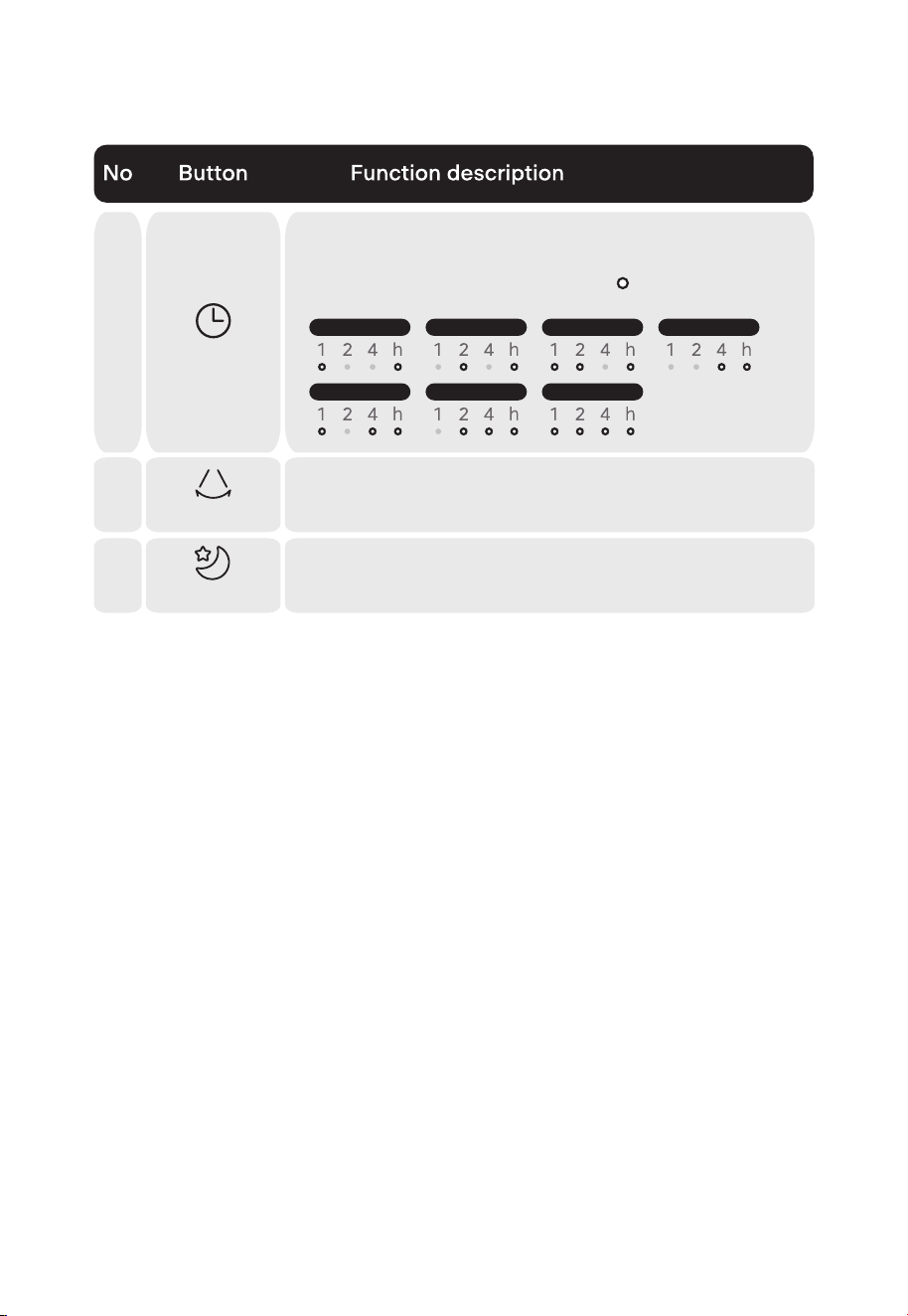
3
1h 2h 3h
5h 6h 7h
4h
• Click to set the timer within the range of 1-7 hours. The fan
will stop operating and return to standby after the set time
passes.
• The timer indicator lights will display, to correspond with
the set time:
Timer
4
Oscillation
• Click to turn the oscillation function on or off.
5 • Click to the Sleep function on or off. The Sleep function is a
preset fan pattern designed for comfortable sleep.
Sleep
09
[Note]
• Please use a AAA manganese or alkaline battery. Do not use a non-recyclable battery.
• Do not mix new batteries with old.
• Do not mix alkaline, standard (carbon-zinc), or rechargeable (ni-cad, ni-mh, etc.) batteries.

Operating your appliance can lead to errors and malfunctions. This section contains
possible causes and notes for resolving an error message or malfunction. To save your
time and money, read this section carefully before calling the service center.
Troubleshooting
Problem
The machine
does not work
properly after
installed
Make sure the plug is properly
inserted into the socket.
The power cable is not
plugged in or has poor
contact.
The remote
control does not
work.
Remove the remote control battery
and disconnect the fan's power
supply. Wait for one minute, then
install the battery and plug in the
fan again.
The remote control did not
connect to the fan.
Press the power button to turn the
fan on.
The fan is not powered on.
Cause Solution
10
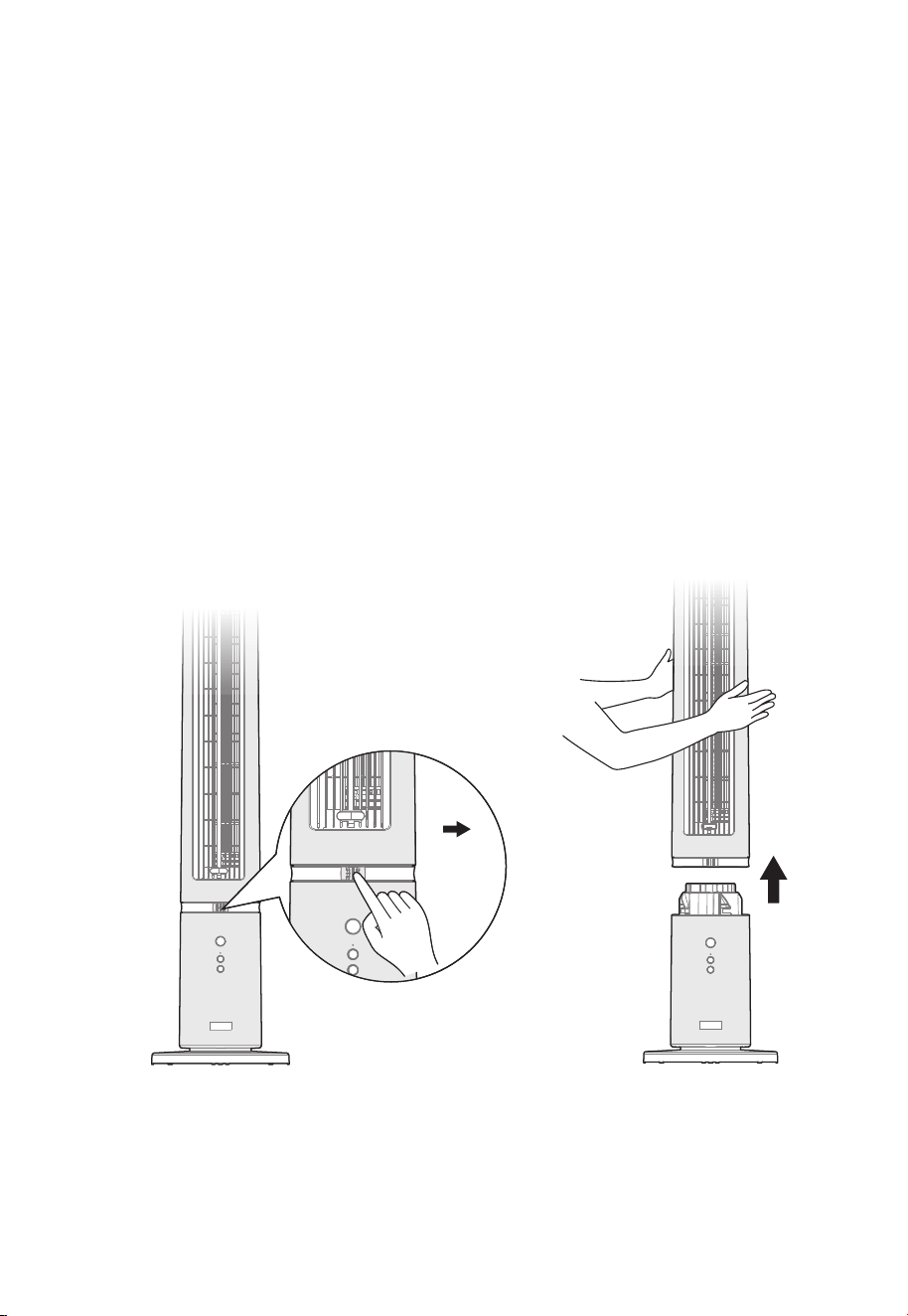
Disassembly and Cleaning Method
Separate the Upper and Lower Body
Before disassembling the body and the base, please turn off the power and unplug the
fan. Next, unlock the upper body by pushing the lock on the front of the body to the
right. Holding the handle hole at the back of the upper body, pull the upper body
upwards to separate it from the lower body.
Slide
the lock
to the
right
Cleaning and Maintenance
• Before cleaning this product, be sure to turn off the power and unplug it.
• After cleaning and maintenance, be sure to wait until your fan fully dry before using or
storing it.
• Do not rinse the base directly with water. Gently wipe the surface with a soft cloth
containing a little neutral detergent and then wipe it dry. Do not use solvents such as
gasoline.
• Do not disassemble the product for modification. It is recommended to check and clean
this product regularly to extend its service life.
11
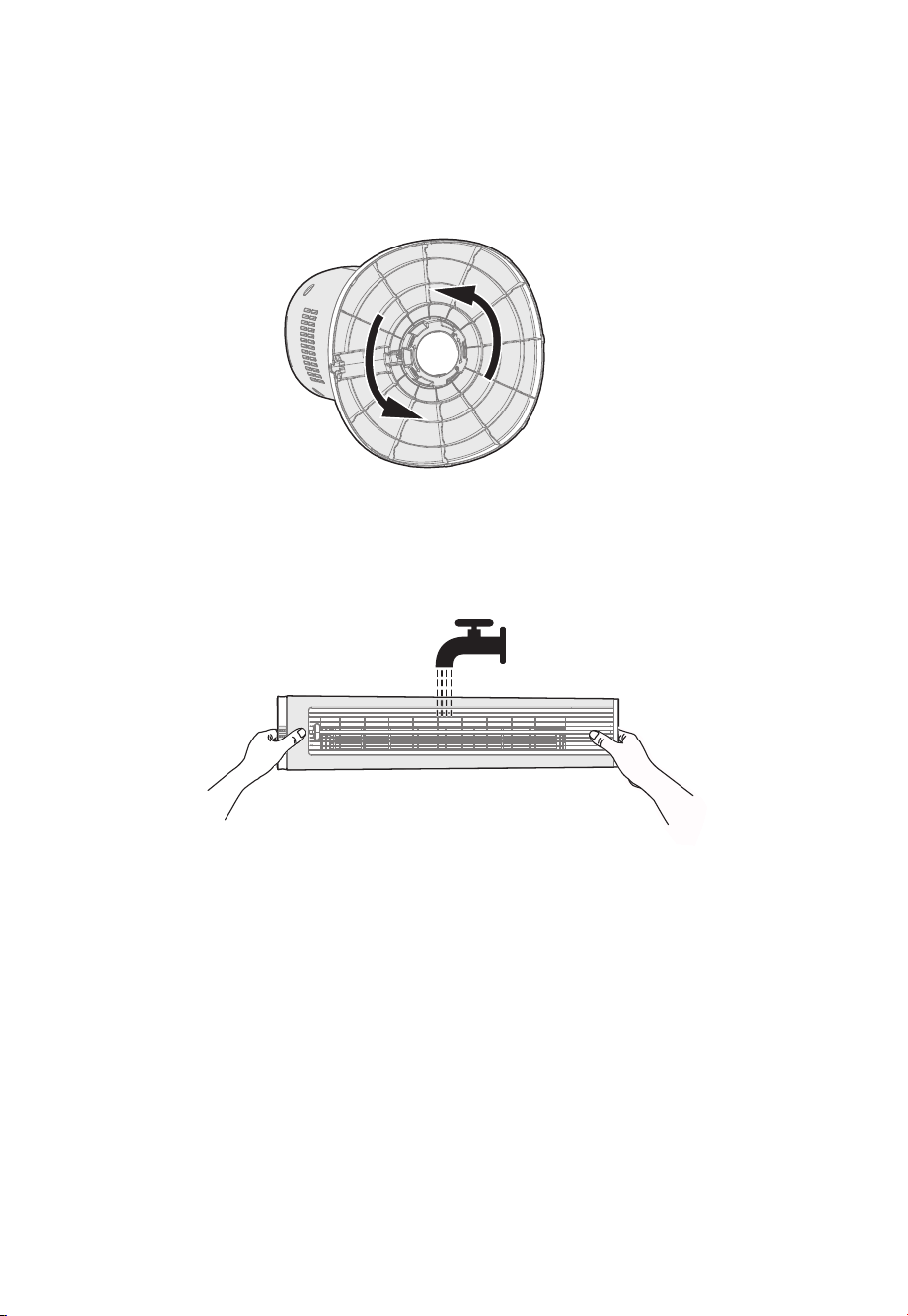
Remove the Lower Body From the Base
Turn the base upside down, as shown in the figure below. Rotate the lock nut counterclockwise
to remove the base.
Cleaning method
Lay the upper body flat horizontally. Rinse it in every direction (up and down; front and back)
under running water. After rinsing, gently shake the water out of the body or let it stand until
the water is drained. Make sure the upper body is dry before reinstalling it and powering your
fan on.
[Note]
When cleaning the body, make sure it is separated from the base.
12
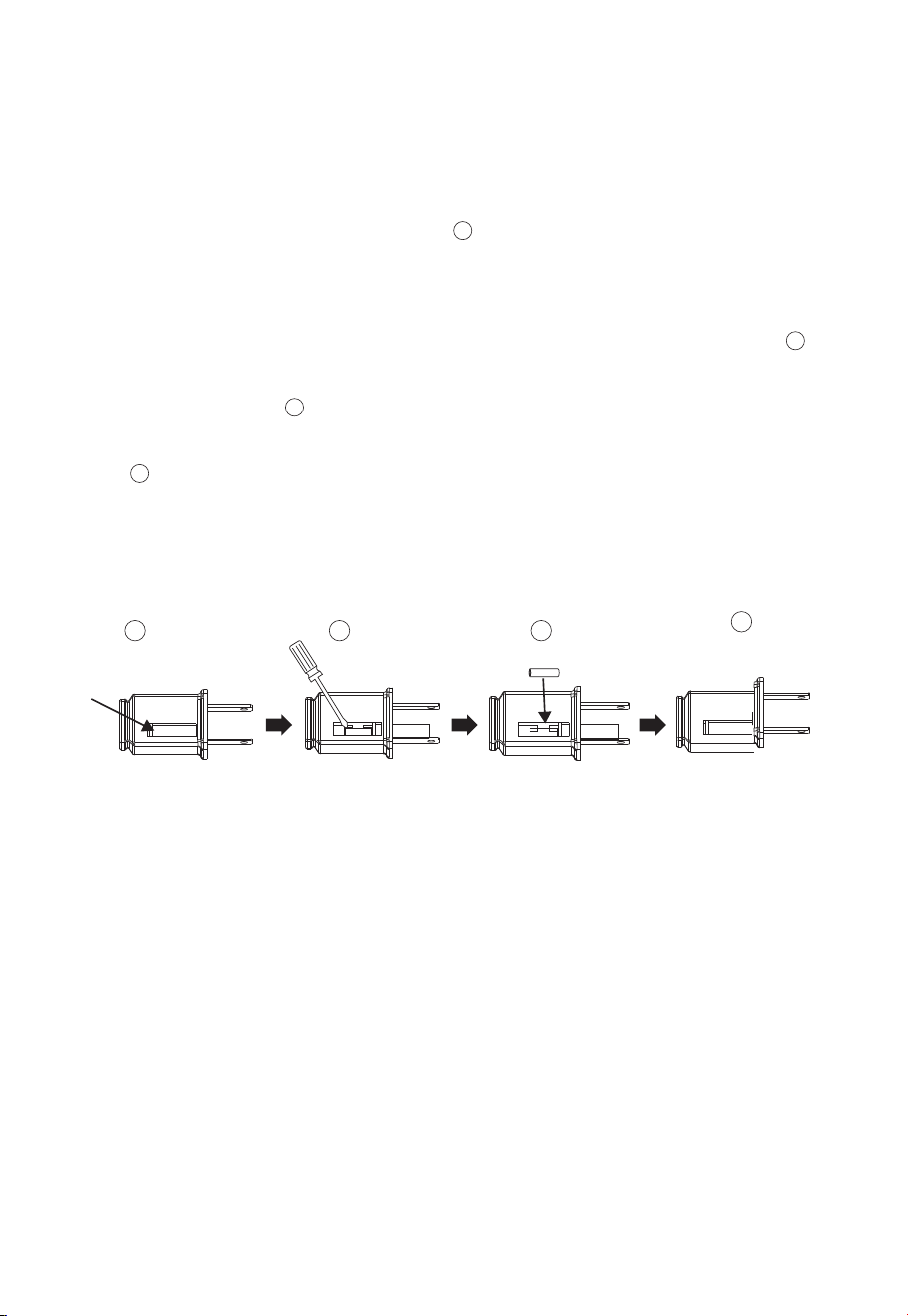
Replacing the Fuse
a) Grasp the plug to remove it from the power outlet. Do not unplug the fan by pulling on
the cord.
b) Open the fuse cover. Find the fuse cover on top of the plug, then slide it towards the
prongs to open it and access the fuse. (Fig. )
c) Carefully remove the fuse. Insert the tip of your tool into fuse slot (next to the terminal),
then pry the fuse gradually and slowly. Do not use too much force. If you feel
resistance, remove your tool and try again. Pry the fuse out little by little. When one
side of the fuse has been released, it should be easy to remove the entire fuse. (Fig. )
d) WARNING — risk of fire. Replace the fuse with a 2.5 Amp, 125 Volt fuse. Do not use any
other kind of fuse. (Fig. )
e) Close the fuse cover. Place the fuse cover back onto the plug and slide it closed.
(Fig. )
f) WARNING — risk of fire. Do not replace the plug. The plug contains a safety device
(fuse) that should not be removed. Discard the product if the plug is damaged.
g) If your fan suddenly stops working, please check to see if there is a problem with the
fuse.
2
3
4
1
1
2
3
4
[Note]
• Do not push suddenly or with too much force when replacing the fuse, as forceful movements
could damage the product or cause an accident.
• If you feel like the process is dicult, please double-check the instructions to make sure you're
performing each step correctly.
13

Model
PSFZ40DR6RWV
Power Supply
120V~, 60Hz
Rated Power
45W
Specifications
14

300 Kimball Drive,
.
Parsippany NJ 07054
15

16
• Please read all instructions before attempting to use this product.
• Misuse, negligence, physical damage or accidents.
• Lack of maintenance (see instructions for proper maintenance).
• Repair by any unauthorized party during the warranty period.
• Damage caused by connection to an improper input voltage (see specification label
on your product).
One (1) Year Limited Warranty
Midea America Corp. warrants as limited herein to the original purchaser of retail that
each new product, shall be free of defects in material and workmanship for a period of
one (1) year from the date of delivery. This one (1) year warranty is limited to the Motor
and Electric Element. The date of delivery establishes the warranty period, should service
be required.
In the event of malfunctions or failure of your product , simply deliver or send the product,
postage prepaid along with PROOF OF PURCHASE,within the warranty period of one (1)
year, to Midea America Corp.. Midea America Corp. reserves the right to inspect the
claimed defective part or parts to determine if the defect or malfunction complaint is
covered by this warranty. Midea America Corp. shall,within sixty(60)days after receipt of
the product,at its option,repair and/or replace the defective part or parts free of charge.
This warranty shall only cover defect arising from normal usage. Midea America Corp.
assumes no responsibility whatsoever if the product should fail during the warranty
period by reason of:
Midea America Corp. makes no further warranties or representations, express or implied
except those contained herein. No representative or dealer is authorized to assume any
other liability regarding the product. The duration
of the implied warranty granted under
State law, including warranties of merchantability and fitness for particular purpose are
limited in duration should the duration of the express warranty grant it hereunder. Midea
America Corp. shall in no event be liable for direct, indirect, special or consequential
damages.
Some states do not allow limitations on how long an implied warranty lasts, and/or the
above limitations or exclusion may not apply to you. This warranty gives you specific
legal rights and you may have other rights which vary from state to state.