Bluetooth Remote control
ATB110X
Unilumin Group Co., Ltd
Address: 1-3rd Floor, Building B, 18 Haoye Rd.,Fuhai Subdistrict, Bao'an District,
Shenzhen China
Phone: 0755-29918999
Website: http://www.unilumin.cn

catalogue
I. Product Overview
II. Product Features
III. Description of Button Functions
IV. Bluetooth Pairing Guide
V. Detailed Functional Description
VI. Technical Specifications and Parameters

I. Product Overview
The ATB110X Bluetooth remote control is a wireless control device specifically
designed by Shenzhen Zhoming Technology Co., Ltd. for smart display terminals,
integrating communication and control functions. In addition to supporting conventional
button operations, it offers various bidirectional interactive capabilities, enabling
convenient wireless control of all-in-one devices, LED displays, and other equipment.
This remote control employs the Bluetooth 5.0 low-power protocol, featuring stable
connectivity, low power consumption, strong interference resistance, and extended
operating range, making it widely suitable for various smart display devices.
II. Product Features
● Supports one-touch sleep/wake functionality for all-in-one devices (controls
screen power)
● Supports switching between dark and light screens
● Supports switching between HDMI 1 and HDMI 2 signal sources
● Supports screen brightness adjustment
● Supports switching between multiple display modes (Standard/Video/HDR)
● Supports color temperature adjustment
● Supports operating systems starting from Android 4.3
III. Description of Button Functions
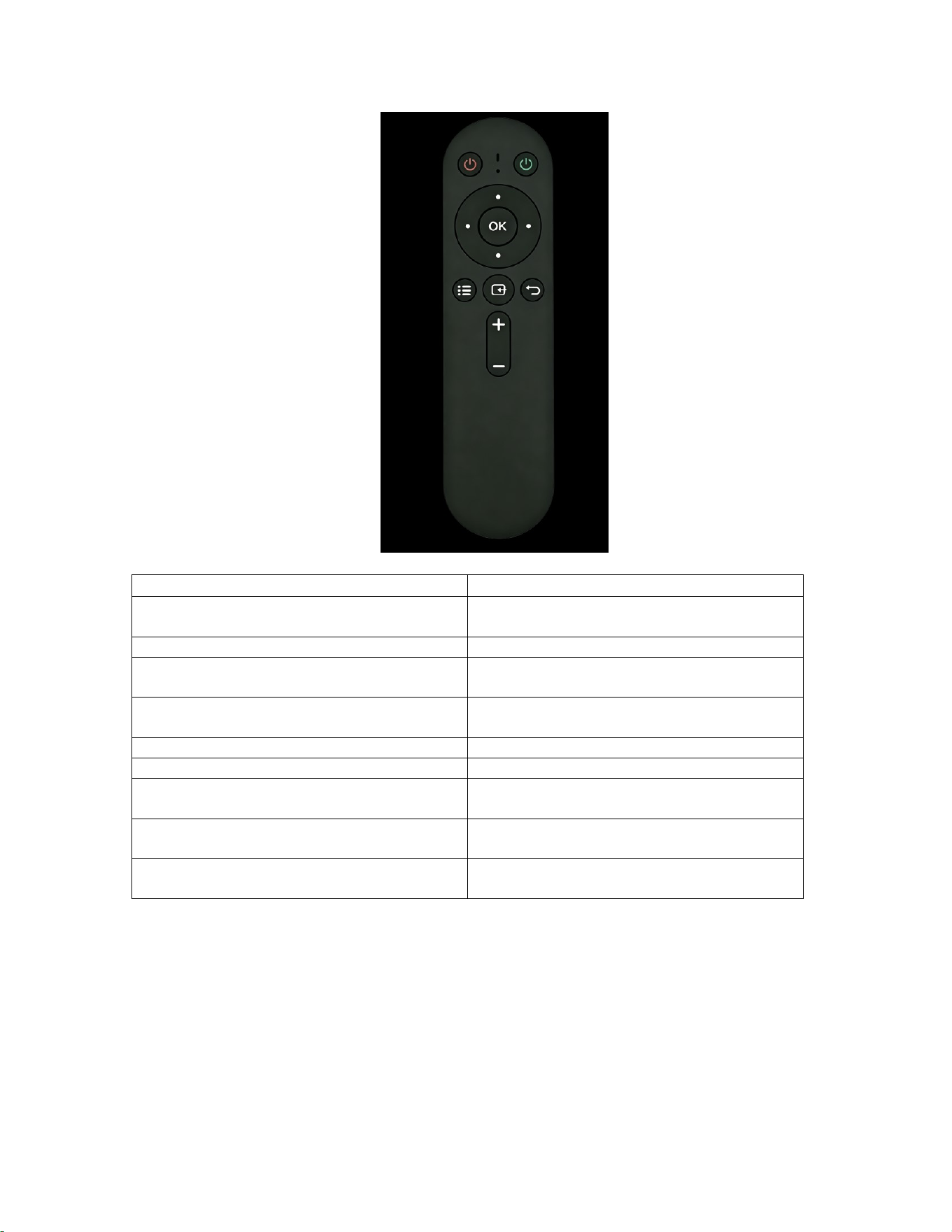
This remote control has the following function buttons:
Button Name
functional description
Power Key (Red)
Control the all-in-one device's sleep/wake
cycle and screen power-off
Power Key (Green)
Control screen blackening/brightening
OK/Confirm Key
Confirm selection and confirm menu
operation
Direction Keys (Up/Down/Left/Right)
Menu Navigation, Parameter Adjustment
Selection
menu key
Open/Close Display Settings Menu
Signal Source Key
Switch HDMI 1/HDMI 2 signal source
return key
Return to the parent menu and exit the current
operation
Volume Up Key
Increase volume and adjust brightness
parameters
Volume Key
Reduce volume and adjust
brightness/parameters
IV. Bluetooth Pairing Guide
4.1 Initial Pairing

1. Press and hold the combination key "Display Mode Menu Key + Exit Menu Key"
for 3 seconds; the indicator light will remain lit, and the remote control will enter
Bluetooth pairing mode.
2. After releasing the button, the indicator light continues to flash; at this point, the
device can detect Bluetooth devices.
3. The Bluetooth device name is: BLE_YT_RMC;
4. The indicator light automatically turns off after successful pairing; pairing is
complete.
4.2 Secondary Pairing/Auto-Reconnection
After the initial successful pairing, for subsequent use:
1. After powering off the Bluetooth module, power it on again and press and hold
the combination key "Display Mode Menu Key + Exit Menu Key" to pair it.
2. You can also press any button directly; the remote control will automatically
connect to the paired device.
3. The pairing timeout is 30 seconds; pairing must be restarted after this period.
4.3 Cancel Pairing
1. Power off the entire device (including the Bluetooth module);
2. Press and hold the combination key "Display Mode Menu Key + Exit Menu Key"
for 3 seconds; the indicator light will remain lit.
3. After releasing the button, the indicator light flashes for 30 seconds, then pairing
is successfully canceled.
4.4 Pairing Instructions
● A Bluetooth module can only pair with one remote control at a time.
● After successful pairing, press any key to activate the remote control and establish
a connection quickly.

● Supports adaptive frequency hopping during use, automatically avoiding
interference bands such as WiFi.
V. Detailed Functional Description
5.1 Low Battery Alert Function
When the remote control battery voltage drops below 2.0 V ± 0.2 V, each button
indicator will flash for 3 seconds, indicating low battery level; replace the battery
promptly.
5.2 Sleep and Wakefulness
● When paired: does not enter deep sleep mode and maintains fast connection
capability;
● Unpaired state: Release the button to enter deep sleep mode; press any key to
wake it up.
● Disconnected state (no pairing information): enters deep sleep after 30 seconds;
● Upon waking, it automatically uses the BLE low-power protocol to quickly
connect with paired devices and send key values.
5.3 Anti-interference Frequency Hopping
Compliant with the Bluetooth BLE protocol specifications, it utilizes 3 dedicated
pairing channels and 37 data channels. During communication, it automatically selects
frequency bands with strong anti-interference capabilities; when encountering wireless
interference such as WiFi signals nearby, it switches frequencies to avoid affected
channels, ensuring stable connectivity.
5.4 Key Communication Protocol

It employs the Bluetooth 5.0 standard's low-power HID protocol: pressing a button
sends a key value every 100 ms, while releasing the button triggers a release command,
ensuring rapid and accurate response.
VI. Technical Specifications and Parameters
Parameter Category
Specification Parameters
working voltage
2.2V ~ 3.6V
rated operational voltage
DC 3.0 V
Dormant current
≤ 12.0 μA
Bluetooth Operating Current
≤ 7.0 mA
transport protocol
Bluetooth 5.0 BLE
Working Frequency Range
2.400GHz ~ 2.4835GHz
Frequency Deviation
±20 kHz ( 25°C)
Maximum Transmission Rate
1Mbps
Transmission Power
Max:-1.616dBm
receiving sensitivity
Max:-93 dB
Effective Control Distance
>5.0 m
operating temperature range
-10℃ ~ +70℃
Working Humidity
20% ~ 90%
Storage Temperature
-25℃ ~ +85℃
atmospheric pressure
86KPa ~ 106KPa
Antenna Type
Built-in PCB omnidirectional antenna
pilot lamp
1 red LED indicator light
product size
154.0 mm (length) × 39.0 mm (width) × 13.6
mm (thickness)
FCC ID
2AWQ8-ATB110X

FCC Statement
NOTE: This equipment has been tested and found to comply with the limits for a
Class B digital device, pursuant to part 15 of the FCC Rules. These limits are
designed to provide reasonable protection against harmful interference in a
residential installation. This equipment generates, uses and can radiate radio
frequency energy and, if not installed and used in accordance with the
instructions, may cause harmful interference to radio communications. However,
there is no guarantee that interference will not occur in a particular installation. If
this equipment does cause harmful interference to radio or television reception,
which can be determined by turning the equipment off and on, the user is
encouraged to try to correct the interference by one or more of the following
measures:
- Reorient or relocate the receiving antenna.
- Increase the separation between the equipment and receiver.
- Connect the equipment into an outlet on a circuit different from that to which the
receiver is connected.
- Consult the dealer or an experienced radio/TV technician for help
Changes or modifications not expressly approved by the party responsible for
compliance could void the user's authority to operate the equipment.
This device complies with Part 15 of the FCC Rules. Operation is subject to the
following two conditions:
(1) this device may not cause harmful interference, and (2) this device must
accept any interference received, including interference that may cause
undesired operation.
FCC RF Exposure Statement:
This equipment complies with FCC radiation exposure limits set forth for an
uncontrolled environment. This equipment can be used in portable exposure
conditions.